Bluehost and Hostinger are both running their Black Friday sales right now, and on paper they look almost the same: cheap multi-year plans, a free domain for the first year, and a big “up to” discount badge. So which one actually gives you better value for your money?
That is exactly what this comparison answers. I’m Karan Rajput, and across 7+ years of blogging and client WordPress work I’ve hosted sites on both Bluehost and Hostinger, so I’ll mix the sale data with what I’ve actually felt as a user, not just what the pricing page says.
You’ll find the live deal details, step-by-step claim instructions, a plan-by-plan comparison, the renewal catch most deal pages skip, and a clear pick based on your use case. Whether you’re starting a first blog, running several niche sites, or setting up a WooCommerce store, there is a recommendation for you.
One thing to know early: the two sales are not shown on the same billing term, so comparing the monthly numbers side by side can mislead you. Bluehost’s page is set to a 36-month term, while Hostinger’s is set to 48 months. I’ll show you how to read both fairly, and if you’re still hunting for other WordPress deals, the live Black Friday roundup keeps them in one place.
Hostinger vs Bluehost Black Friday Deal Snapshot: Both Sales at a Glance
Bluehost [STATUS: LIVE NOW]
Starts on: Already live | Ends on: November 30, 2026

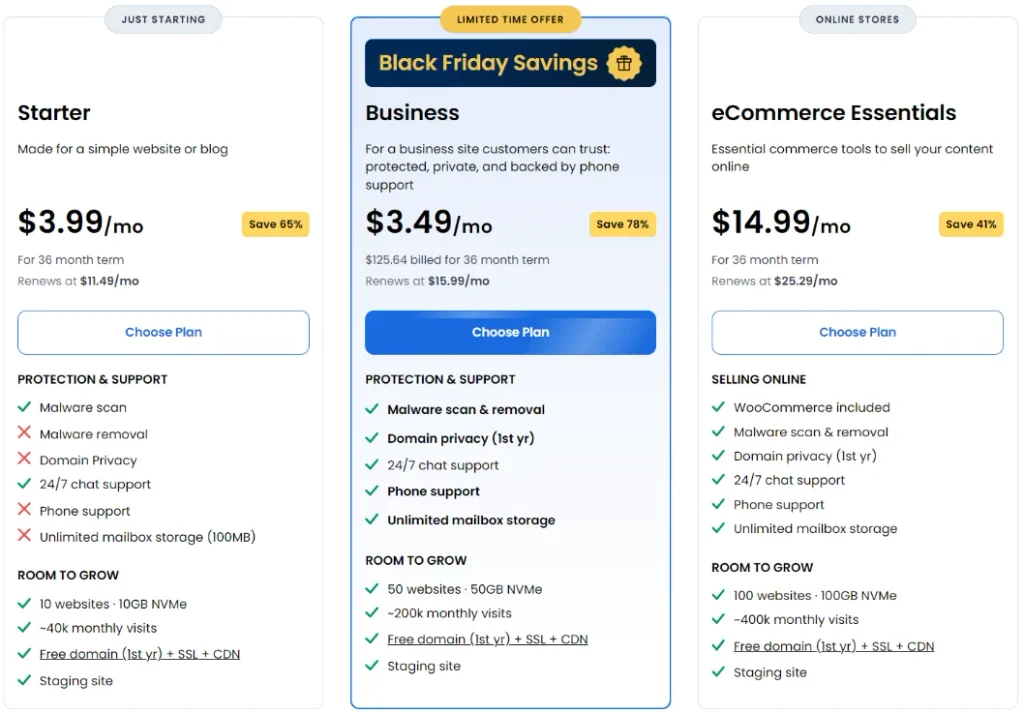
- Page badge: up to 89% off with stackable offers. Plan cards show Starter 65% off, Business 78% off, eCommerce Essentials 41% off
- 36-month term: Starter $3.99/mo, Business $3.49/mo ($125.64 billed for 36 months), eCommerce Essentials $14.99/mo
- Renews at: Starter $11.49/mo, Business $15.99/mo, eCommerce Essentials $25.29/mo
- Coupon: auto-applied, no code needed
- Free domain (1st year), SSL and CDN included
Hostinger [STATUS: LIVE NOW]
Starts on: Live now | Ends on: Not announced yet

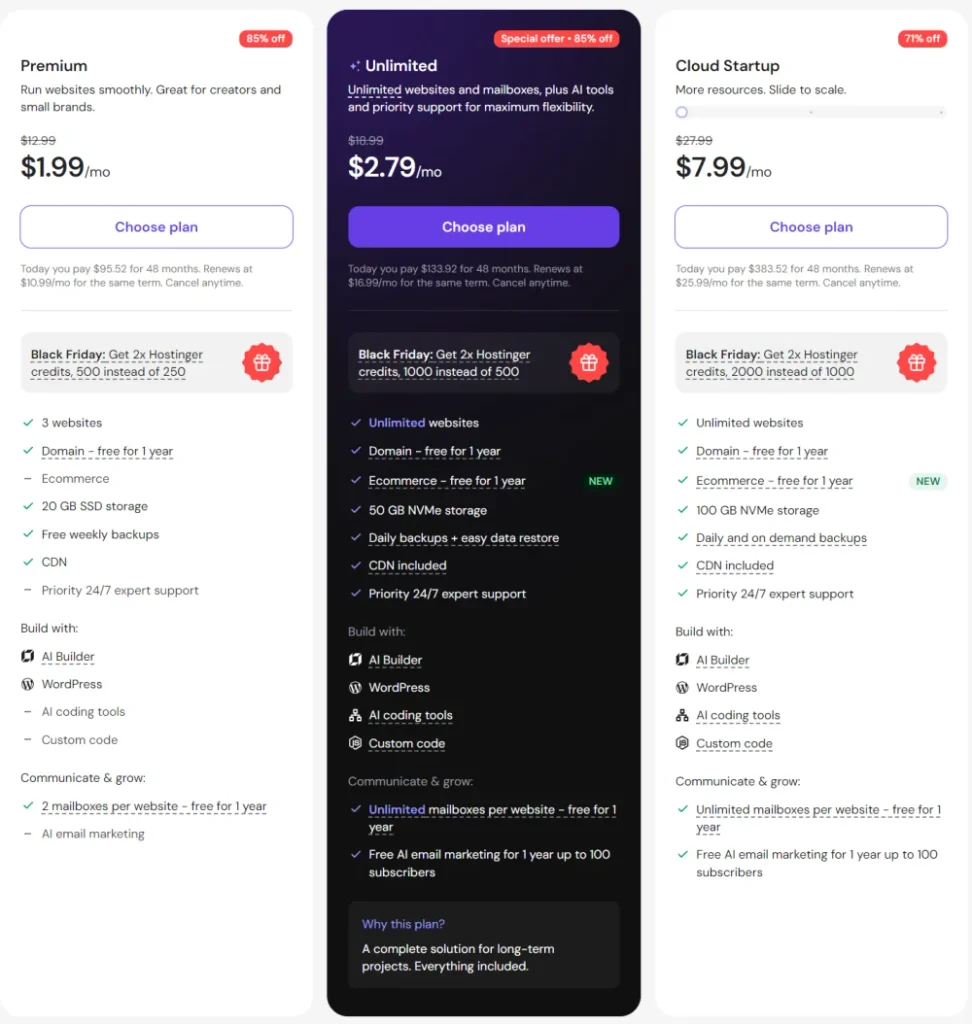
- Premium 85% off: $1.99/mo (regular $12.99), $95.52 for 48 months, renews at $10.99/mo
- Unlimited 85% off (special offer): $2.79/mo (regular $18.99), $133.92 for 48 months, renews at $16.99/mo
- Cloud Startup 71% off: $7.99/mo (regular $27.99), $383.52 for 48 months, renews at $25.99/mo
- Coupon code: BLACKFRIDAY
- Black Friday bonus: 2x Hostinger credits (500 instead of 250 on Premium, 1000 instead of 500 on Unlimited, 2000 instead of 1000 on Cloud Startup)
- Domain free for 1 year, 30-day money-back guarantee
This post contains affiliate links, and I earn a commission from them at no extra cost to you. Thank you for your support!The Bottom Line
For most bloggers running several WordPress sites, Hostinger Unlimited gives better value after you factor in the 85% sale, daily backups, and unlimited websites. Bluehost Business wins if you want phone support, a staging site, and a 36-month term instead of 48. Check renewal rates before buying either.
How to Claim Each Deal
Bluehost (coupon auto-applies):
- Open the Bluehost Black Friday offer through the link.
- On the plans page, switch the toggle to 36 Months. The sale prices I used are from that term (a 12-month option exists, but check its price separately).
- Pick your plan. For most people, that means Business at $3.49/mo, billed $125.64 for 36 months.
- Add your free domain (1st year) and check at checkout that the discount shows in your order summary.
Hostinger (code BLACKFRIDAY):
- Open the Hostinger Black Friday offer through the link.
- Set the plan period to 48 months, as shown on the pricing page.
- Choose Unlimited at $2.79/mo ($133.92 upfront) or the plan you need.
- At checkout, check whether the sale price is already reflected. If there is a coupon box, use BLACKFRIDAY there.
Hostinger has no end date announced yet, which sounds relaxing, but I wouldn’t wait. Bluehost’s date is fixed.
Why Monthly Prices Aren’t a Fair Fight
Here’s the catch most deal pages skip. Bluehost’s sale is on a 36-month term. Hostinger’s is on 48 months, and Hostinger says all plans are paid upfront, with the monthly rate being the total divided by the months.
So Hostinger’s lower monthly number partly comes from spreading the cost over a longer commitment. That’s not a trick, but you should know it.
The bigger issue is renewal. Both companies renew at several times the intro rate, and the entry-level plans jump the most. Hostinger Premium and Unlimited are the sharpest examples, and Bluehost Business also climbs steeply (see the Snapshot for exact renewal rates).
My advice: treat the sale as a way to lock in 3 to 4 years cheaply, then decide at renewal whether to stay or migrate. Both offer free migration, so switching isn’t painful.
Bluehost Black Friday: What You Actually Get
The Bluehost badge says up to 89% off with stackable offers, but none of the three plan cards shows 89%. They show 65%, 78% and 41%. I couldn’t see which combination reaches the headline number, so for planning purposes I’d treat 78% on Business as the realistic figure unless your checkout shows more.
Here’s an odd and useful detail: right now the Business plan costs less per month than Starter, because Business carries the “Black Friday Savings” badge. So unless you truly need the cheapest-looking card, Starter makes little sense.
- Starter: 10 websites, 10GB NVMe, about 40k monthly visits. No domain privacy, no phone support, and mailbox storage capped at 100MB.
- Business: 50 websites, 50GB NVMe, about 200k monthly visits. Adds malware removal, domain privacy (1st year), phone support, and unlimited mailbox storage.
- eCommerce Essentials: WooCommerce included, 100 websites, 100GB NVMe, about 400k monthly visits, phone support.
All three include a staging site, free SSL, CDN, and free WordPress migration. Backups are weekly, which is on the lighter side.
From a performance standpoint, NVMe on every tier is a good sign for server response time, and the CDN helps static assets. But Bluehost doesn’t publish PHP workers, RAM, or CPU on this page, so I can’t compare raw resources honestly. You’re buying on a “monthly visits” guideline.
If you want to compare this against previous sale structures, my dedicated Bluehost Black Friday breakdown goes deeper.
Hostinger Black Friday: Where the Value Is and Where Limits Hide
Hostinger’s discounts are bigger on paper: 85% on Premium and Unlimited, 71% on Cloud Startup. What makes it easier to judge is that Hostinger actually publishes its resource limits.
| Plan | Websites | Storage | PHP workers | RAM | CPU cores |
|---|---|---|---|---|---|
| Premium | 3 | 20 GB SSD | 40 | 2 GB | 1 |
| Unlimited | Unlimited | 50 GB NVMe | 60 | 3 GB | 2 |
| Cloud Startup | Unlimited | 100 GB NVMe | 100 | 4 GB | 4 |
A few things I’d flag as a developer:
- Premium is on SSD, not NVMe, and it has weekly backups only, no priority support, and a 3-site limit. It’s cheap for a reason.
- “Unlimited” has a Fair Usage Policy. You won’t hit a website count wall, but resources (RAM, CPU, PHP workers) are the real ceiling.
- Inodes matter more than storage. Unlimited allows 600,000 files and directories. On image-heavy WordPress sites with many thumbnail sizes, I’ve seen file counts run out before disk space does. Worth monitoring.
- Cloud Startup adds a dedicated IP, daily and on-demand backups, 4 CPU cores, and 4 GB RAM. It’s the plan for stores and heavier traffic.
The 2x Hostinger credits are mostly for the AI Builder. If you build in WordPress as I do, you may never use them, so don’t let them tilt your decision.
The Hostinger Black Friday page covers the full plan lineup if you want more detail.
What My Own Hosting History Taught Me
I started blogging on 25 April 2018, and my first hosting that same day was Bluehost.com on a US server, mainly because WordPress recommends it. I took a 3-year shared plan and, honestly, the experience was good. Speed was fine even though India was my biggest single audience.
Then I made a mistake. In 2021, because of renewal costs and Indian traffic, I moved all my sites to Bluehost India (bluehost.in). Speed dropped, posts that were sitting in the top 3 slid past page 5, and monthly traffic fell from roughly 1.5 lakh to about 10K. I can’t isolate every SEO variable, but the timing matched the move, and support didn’t help me fix it.
Later I moved to Hostinger Cloud, where my sites run now.
Why mention this? The Bluehost plans in this article are the US store. My complaint is only about Bluehost India, not Bluehost.com. Take it as one blogger’s experience, not a lab test.
Pros and Cons
Hostinger
Pros
- 85% sale on Premium and Unlimited, the biggest discounts in this comparison
- Unlimited gets daily backups and priority 24/7 support
- Resource limits (PHP workers, RAM, CPU) are published, so you can judge capacity
- 30-day money-back guarantee is stated on the page
- Cloud Startup includes a dedicated IP
Cons
- Renewal rates are several times the intro rates, especially on Premium and Unlimited
- Everything is paid upfront for 48 months
- No phone support is listed on the pricing page I used
- “Unlimited” is bound by a Fair Usage Policy, and the sale has no announced end date to plan around
Bluehost
Pros
- Business is currently priced below Starter, so the best plan is also the cheaper-looking one
- Phone and chat support on Business and eCommerce Essentials
- NVMe storage and a staging site on every plan
- WooCommerce is included on eCommerce Essentials
- The coupon applies automatically, so no code hunting
Cons
- Weekly backups only, on all plans
- Starter has no domain privacy and only 100MB mailbox storage
- eCommerce Essentials shows only 41% off, the smallest saving here
- The 89% headline doesn’t appear on any plan card, and no PHP worker, RAM or CPU numbers are published
Head-to-Head: Equivalent Plans
Entry level: Bluehost Starter vs Hostinger Premium
| Feature | Bluehost Starter | Hostinger Premium |
|---|---|---|
| Sale discount shown | 65% | 85% |
| Websites | 10 | 3 |
| Storage | 10GB NVMe | 20 GB SSD |
| Backups | Weekly | Free weekly |
| 100MB mailbox storage | 2 mailboxes per website, free 1 year | |
| Support | 24/7 chat, no phone | No priority support listed |
| Best for | More sites on a tight budget | Smallest bill, one to three simple sites |
Bluehost Starter gives you more sites, faster storage type, and clearer traffic guidance. Hostinger Premium gives you the bigger discount and more disk space, but only on SSD. Neither is my pick for serious blogging.
Mid-tier: Bluehost Business vs Hostinger Unlimited
| Feature | Bluehost Business | Hostinger Unlimited |
|---|---|---|
| Sale discount shown | 78% | 85% |
| Websites | 50 | Unlimited (Fair Usage Policy) |
| Storage | 50GB NVMe | 50 GB NVMe |
| Traffic/resources | About 200k monthly visits | 60 PHP workers, 3 GB RAM, 2 CPU cores |
| Backups | Weekly | Daily plus easy restore |
| Support | 24/7 chat plus phone | Priority 24/7 expert support |
| Staging | Included | Not shown on the page |
| Best for | Phone support and staging | Multi-site bloggers and daily backups |
These two are the real contest. On storage, they’re equal. Hostinger wins on backups, the bigger discount, and published limits. Bluehost wins on phone support and staging. In client work, daily backups have saved me more than once when a plugin update broke a site, which is why I weigh them heavily.
Which One Should You Pick?
- For bloggers running three or more niche sites, Hostinger Unlimited is better because it combines unlimited websites with daily backups and 60 PHP workers.
- If you want a human on the phone or a staging site, Bluehost Business makes more sense, since both are listed on its plan.
- For a growing WooCommerce store, Hostinger Cloud Startup is the stronger value because of 4 CPU cores, 4 GB RAM, a dedicated IP, and 71% off. Bluehost eCommerce Essentials only makes sense if you specifically want WooCommerce pre-included.
- For a first-time blogger with one site, go with Bluehost Business if you want phone help, or Hostinger Unlimited if chat support is enough for you.
Who should skip this: Bluehost Starter and Hostinger Premium for anyone planning more than a couple of sites. Also skip both if you can’t commit to a 3- to 4-year term upfront, or if you’re unwilling to face the renewal jump later.
Overall: Hostinger Unlimited is my pick for value. Its real weakness is no listed phone support and a 48-month upfront payment.
What to Do After Buying
Setup steps:
- Point your domain, then install WordPress (or use the free migration if you’re moving an existing site).
- Install one caching plugin, and turn on the CDN that comes with your plan.
- Confirm SSL is active before you publish anything.
Key settings:
- Set a backup routine you control, because weekly backups on Bluehost leave a gap.
- Add a calendar reminder well before your term ends so renewal doesn’t surprise you.
Mistakes to avoid:
- Buying the cheapest tier and outgrowing it in six months.
- Stuffing the site with plugins, which hurts LCP far more than any hosting difference.
- Forgetting that the free domain is for the first year only.
- Ignoring inode counts on Hostinger if you run image-heavy sites.

Hostinger vs Bluehost Black Friday Deal
Coupon Code:
Bluehost: auto-applied
Hostinger: BLACKFRIDAY
Frequently Asked Questions
Is Hostinger or Bluehost cheaper this Black Friday?
Hostinger shows 85% off on Premium and Unlimited, versus 78% on Bluehost Business and 65% on Starter. But Hostinger’s price is on a 48-month term, and Bluehost’s is on 36, so compare the upfront totals and renewal rates in the Snapshot, not just the monthly numbers.
Do I need a coupon code for either deal?
Bluehost’s coupon applies automatically, so there’s nothing to enter. For Hostinger, the code is BLACKFRIDAY. Check your checkout summary first, and if there’s a coupon field and the sale price isn’t showing, enter the code there.
When do these Black Friday deals end?
Bluehost’s sale ends on November 30, 2026. Hostinger hasn’t announced an end date yet. I’d still not wait, because a sale with no announced end date can change without much notice.
Which is better for a beginner blogger?
If you want phone support and a staging site, Bluehost Business is friendlier. If you’re comfortable with chat support and want daily backups plus unlimited websites for less, Hostinger Unlimited is the better value.
Is there a money-back guarantee?
Hostinger’s page shows a 30-day money-back guarantee. I couldn’t confirm Bluehost’s refund terms from the pricing page I used, so check them at checkout before you pay.
Where can I see other WordPress deals this week?
The WordPress Black Friday deals roundup tracks plugins, themes, and hosting offers in one place, so you can stack savings on the tools you need.
Final Verdict
If I had to put my own money on one deal for a multi-site WordPress setup, it would be Hostinger Unlimited: the bigger discount, daily backups, and published limits give it the edge. Bluehost Business is the better call if phone support and a staging site matter more to you than the extra savings.
Either way, remember the renewal jump is real. Lock in the term, plan your upgrade, and don’t buy more plan than you need. Ready to choose? Grab the Hostinger deal or the Bluehost deal while both are live.
72+ Best WordPress Black Friday/Cyber Monday Deals 2026 [Up to 99% OFF] – Verified Deals Live
Looking for more Black Friday & Cyber Monday software discounts? We have hand-picked and verified 72+ live deals across WordPress hosting, plugins, themes, VPNs, and AI tools—all in one place so you don’t miss out on the biggest savings of the year. Explore the complete WordPress Black Friday Deals 2026 guide.
Quick Deal Snapshot [STATUS: LIVE NOW]
Status: Live now (Ends December 11, 2026)
- Savings: Save up to 99% across 60+ verified WordPress & SaaS brands
- Web Hosting & Domains: Up to 95% OFF + Free Domains & Migrations
- WordPress Plugins & Builders: Up to 90% OFF + Lifetime Deals
- Themes, AI & VPN Tools: Up to 88% OFF + Extra Free Months
- Verified Discounts: Direct promo codes & auto-applied checkout links
- Updated Daily: New live deals added throughout Black Friday week
Coupon: Auto-applied & verified codes inside.

Related Posts