Short answer: It depends entirely on which Bluehost plan you’re running.
On shared hosting, Bluehost will slow down — or go down — the moment traffic spikes. I’ve watched this happen on client sites firsthand. On their Managed VPS plans, though, it’s a completely different story. The hardware is solid, resources are isolated, and it can handle serious traffic without breaking a sweat.
This article breaks down exactly when Bluehost works for high-traffic sites, when it doesn’t, and what your actual options are as your site grows.
Quick Answer
Bluehost shared hosting is not built for high traffic — sustained visitor spikes will slow your site or cause downtime. Their Managed VPS, starting at $49.99/mo with AMD EPYC processors, DDR5 RAM, and NVMe SSD storage, is where Bluehost actually handles serious traffic volumes reliably.
This post contains affiliate links. If you purchase through our links, we may earn a small commission at no extra cost to you. Thank you for your support!Bluehost’s shared plans are fine for new sites and bloggers finding their footing. I’ve recommended them plenty of times for people just starting (more on that in Is Bluehost Good for Beginners?). But shared hosting has a fundamental ceiling — you’re competing for CPU, RAM, and I/O with hundreds of other accounts on the same physical server.
When traffic spikes, three things typically happen in sequence:
- Page load times shoot up — CPU queue gets too long, PHP waits pile up
- PHP workers get exhausted, resulting in 503 errors during peak loads
- Site slows down even with caching — because cache generation itself consumes resources during cold starts
There’s no exact traffic number that triggers this. A WordPress site with 20+ plugins and an active WooCommerce installation can start showing strain at just 10,000–20,000 monthly visits on shared hosting, while a lean static blog might hold up far longer.
Here’s something most Bluehost reviews won’t mention: the version of Bluehost matters significantly. I had a client migrate to Bluehost India, and over the following months, we saw a consistent, noticeable traffic drop that wasn’t there before the move. After switching back to Bluehost’s global (US-based) infrastructure, things stabilized. The India-specific setup just wasn’t performing at the same level. If your audience is global — or even pan-India — stick with global Bluehost.
What “High Traffic” Actually Means in Hosting Terms
People use “high traffic” to mean very different things. Here’s a practical breakdown:
| Traffic Level | Monthly Visitors | What You Need |
|---|---|---|
| Low | Under 20,000 | Shared hosting (fine) |
| Medium | 20,000 – 100,000 | Managed VPS — Standard plan |
| High | 100,000 – 500,000 | Managed VPS — Mid-tier plan |
| Very High | 500,000+ | Managed VPS top-tier or Dedicated |
These are rough benchmarks, not hard rules. A WooCommerce store with 30,000 monthly visitors can put more strain on a server than a content blog at 150,000, because dynamic cart sessions, checkout processing, and real-time inventory queries are CPU-heavy operations. If WooCommerce is your primary concern, the analysis in Is Bluehost Good for WooCommerce? goes deeper on that specifically.
Bluehost Managed VPS: The Actual Answer for High Traffic
If you’re serious about handling real traffic volumes, Bluehost’s Managed VPS is built for it. AMD EPYC processors with DDR5 RAM and NVMe SSD storage are not entry-level server hardware — for a mainstream hosting brand, it’s a legitimately strong infrastructure choice.
Here are the current Managed VPS plans:
Standard NVMe 4 — $49.99/mo
(36-month term — renews at $68.99/mo)
- 2 vCPU cores
- 4 GB DDR5 RAM
- 100 GB NVMe SSD Storage
- cPanel included
- Unmetered bandwidth
- 2 dedicated IPs
- Free site migration tool
- 30-day money-back guarantee
Enhanced NVMe 8 — $68.99/mo
(36-month term — renews at $98.99/mo)
- 4 vCPU cores
- 8 GB DDR5 RAM
- 200 GB NVMe SSD Storage
- cPanel included
- Unmetered bandwidth
- 2 dedicated IPs
- Free site migration tool
- 30-day money-back guarantee
Ultimate NVMe 16 — $97.99/mo
(36-month term — renews at $143.99/mo)
- 8 vCPU cores
- 16 GB DDR5 RAM
- 450 GB NVMe SSD Storage
- cPanel included
- Unmetered bandwidth
- 2 dedicated IPs
- Free site migration tool
- 30-day money-back guarantee
Included across all plans: 24/7 support, SiteLock security, staging environment, SSH and SFTP access, free backups, free SSL certificates, optimized caching, CDN add-on, automated backups, HTTP/2 enabled servers.
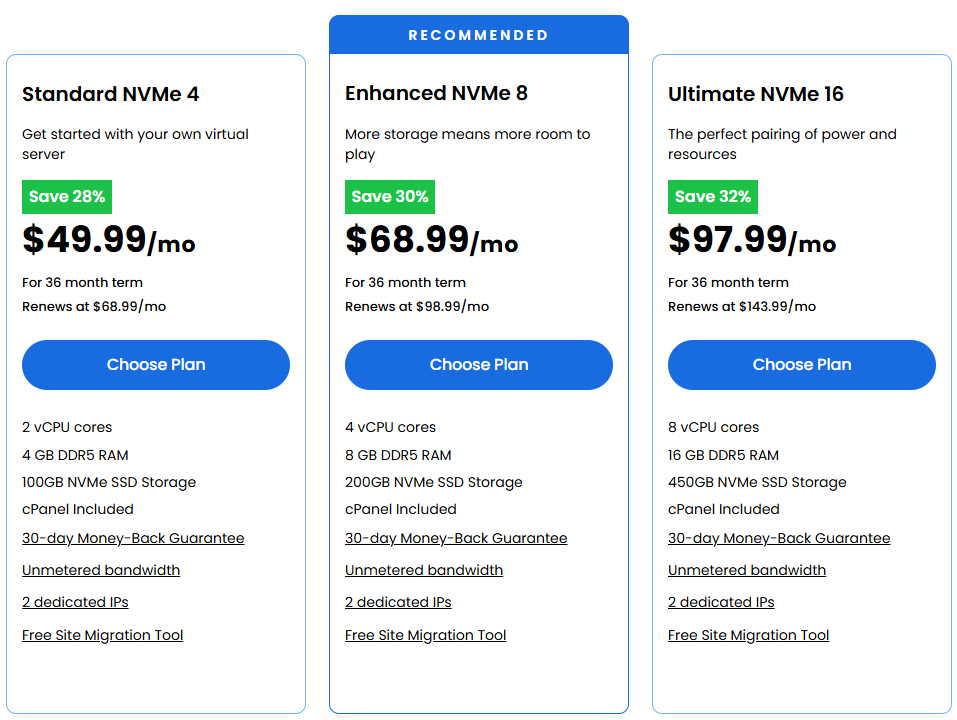
The renewal pricing is worth factoring in from day one. The initial promotional rate is locked for 36 months, but the jump afterward is significant — especially on the Enhanced and Ultimate plans.
Which Plan Matches Your Traffic Level?
For most WordPress sites in the 50,000–150,000 monthly visitor range, Standard NVMe 4 at $49.99/mo is sufficient — with WP Rocket or similar caching and Cloudflare’s free CDN in front. The 2 vCPU and 4 GB DDR5 RAM handle concurrent requests well at that level.
Move to Enhanced NVMe 8 if you’re running WooCommerce with active checkouts, hosting multiple sites on the same VPS, or dealing with media-heavy pages that don’t cache cleanly.
Ultimate NVMe 16 is for sites with genuinely high concurrency — membership platforms, large stores running flash sales, or multi-site networks with shared resources.
What Bluehost VPS Actually Gets Right
The hardware stack is modern. DDR5 RAM and NVMe SSD on AMD EPYC is not what you’d expect from a mainstream shared hosting brand. Most competitors in this price range are still running DDR4 on SATA SSDs.
Fully managed means no server admin work. Bluehost handles setup, configuration, security patches, and performance optimization at the server level. You don’t need to SSH in to configure anything from scratch.
cPanel is included, not optional. Many VPS providers charge $15–$30/mo separately for cPanel licensing. Bluehost bundles it at no extra cost, which is a genuine advantage for WordPress users coming from shared hosting.
Staging environment across all plans. For high-traffic sites, pushing changes directly to production is risky. The built-in staging environment is a feature I look for on any production-grade setup — it’s included here without needing a separate plugin or paid add-on.
Unmetered bandwidth. You’re not watching a traffic meter or worrying about overage charges during a traffic spike. That peace of mind has real value.
Where It Falls Short
Renewal pricing is steep. The Standard plan increases from $49.99 to $68.99/mo after your initial 36-month term. That’s a 38% jump that surprises a lot of users at renewal.
US-only data centers. Bluehost VPS doesn’t let you choose a server location. If your audience is concentrated in India, Southeast Asia, or Europe, you’ll need Cloudflare or another CDN to compensate for the distance-related TTFB impact.
CDN is an add-on, not free. Unlike some competitors, there’s no bundled CDN with VPS plans. Cloudflare’s free tier covers the basics, but it’s an extra setup step that beginners sometimes miss.
36-month commitment for best price. If your traffic is seasonal or you’re testing the platform short-term, the month-to-month pricing won’t look as attractive.
Pros & Cons
Pros
- AMD EPYC + DDR5 RAM + NVMe SSD — genuinely modern server hardware
- Fully managed — Bluehost handles all server-level technical work
- cPanel included in all plans — no extra licensing cost
- Staging environment included — useful for live production sites
- Unmetered bandwidth — no overage surprises during traffic spikes
- 30-day money-back guarantee on all VPS plans
Cons
- Renewal pricing jumps significantly — Standard goes from $49.99/mo to $68.99/mo after 36 months
- US data centers only — no server location selection for global audiences
- CDN not bundled — needs Cloudflare setup or paid add-on separately
- No short-term or flexible billing — best value requires a 36-month lock-in
Bluehost vs Hostinger vs Liquid Web for High-Traffic Sites



| Feature | Bluehost Managed VPS | Hostinger VPS | Liquid Web Self-Managed |
|---|---|---|---|
| Entry price | $49.99/mo | $6.49/mo | $5/mo |
| Entry RAM | 4 GB DDR5 | 4 GB | 1 GB |
| Entry vCPU | 2 vCPU | 1 vCPU | 1 vCPU |
| Entry storage | 100 GB NVMe | 30 GB NVMe | 30 GB SSD |
| Management level | Fully managed | AI-managed | Self-managed |
| Control panel | cPanel (included) | Optional add-on | cPanel/Plesk optional |
| Bandwidth | Unmetered | 4 TB | 1 TB |
| Renewal rate (entry) | $68.99/mo | $11.99/mo | Standard rates |
| Server locations | US only | Worldwide | Multiple |
| Uptime guarantee | Not published | Not published | 99.99% |
| Best for | Managed WordPress, business sites | Budget-conscious devs | Dev teams, custom stacks |
Who each one is actually built for:
Hostinger VPS starts at $6.49/mo and their KVM 2 plan at $8.99/mo gives you 2 vCPU, 8 GB RAM, and 60 GB NVMe — more RAM than Bluehost’s $49.99/mo entry plan at a fraction of the price. The catch is that it’s AI-managed, not fully managed. If you’re comfortable in a Linux terminal or want to run Docker-based deployments, Hostinger makes strong sense on price. If not, the AI management layer can only take you so far. See Hostinger VPS plans →
Liquid Web Self-Managed VPS starts at $5/mo for 1 GB RAM, with the 4 GB plan at $8.50/mo during their current promotion. Liquid Web’s infrastructure is enterprise-grade — 99.99% uptime guarantee, 10 Gbps network, root access, and OS flexibility, including Windows. But “self-managed” means exactly that — you own every configuration decision. This is not a plug-and-play WordPress hosting solution. It’s built for developer teams and agencies that know what they’re doing with server infrastructure. See Liquid Web VPS plans →
Bluehost Managed VPS sits in a clearly defined middle space — not the cheapest, not the most customizable, but the most hands-off managed solution of the three. For a WordPress site owner or small business who wants VPS-level performance without touching a server configuration, $49.99/mo is a reasonable trade. See Bluehost Managed VPS Plan
Who Should (and Shouldn’t) Choose Bluehost for High Traffic
Bluehost Managed VPS works well if:
- Your WordPress site is pulling 50,000–300,000 monthly visitors
- You want managed hosting and don’t want to deal with server administration
- You’re already on Bluehost shared and upgrading makes migration easier
- cPanel familiarity is important — no learning curve on a new control panel
Skip Bluehost VPS if:
- You need server locations outside the US for lower TTFB
- You’re a developer comfortable with unmanaged or self-managed VPS at a lower cost
- Short-term or flexible billing is important (seasonal traffic, testing phase)
- Budget is tight, and you’re willing to manage the server yourself
What I’ve Observed at the VPS Level
Over three years of working with Bluehost global hosting on client projects, the performance has generally been reliable — particularly when WP Rocket is configured properly, and Cloudflare sits in front, handling edge caching. One consistent recommendation I make to every client: avoid Bluehost India. On a project that migrated there from Bluehost’s global infrastructure, traffic dropped noticeably and consistently over several months. After moving back to global hosting, performance returned to normal. That’s a hard lesson that doesn’t show up in most review articles.
On the NVMe storage side specifically, the difference versus standard SSD is observable in practice. On comparable VPS setups, uncached PHP generation time on NVMe consistently comes in lower, and for high-traffic sites where Core Web Vitals directly affect rankings, that margin compounds at scale. Pair it with HTTP/2 (which Bluehost VPS supports out of the box) and proper caching, and you’ve got a solid base.
After You Upgrade: First Things to Configure
Don’t leave the VPS at its default settings after provisioning. Here’s what to set up first:
- Activate Bluehost’s optimized caching — it’s included in the plan, just needs to be turned on inside cPanel
- Set up Cloudflare free tier — handles CDN, basic DDoS mitigation, and edge caching without extra cost
- Configure the staging environment before making any plugin or theme updates
- Verify HTTP/2 is active — supported on all Bluehost VPS plans, improves asset delivery for heavy pages
- Check automated backup schedule in cPanel — it’s included but set to defaults, adjust frequency based on how often content changes
- Install and configure SiteLock — bundled with all plans, worth setting up early
Frequently Asked Questions
Not reliably for sustained high traffic. Shared resources are distributed across hundreds of accounts, so traffic spikes quickly exhaust your allocation. For sites consistently above 50,000 monthly visitors, Bluehost’s Managed VPS is the appropriate starting point.
What’s the cheapest Bluehost plan that actually handles high traffic?
The Standard NVMe 4 at $49.99/mo on a 36-month term. It includes 2 vCPU, 4 GB DDR5 RAM, 100 GB NVMe SSD, and unmetered bandwidth — adequate for most WordPress sites in the 50,000–150,000 monthly visitor range when paired with proper caching.
Does Bluehost VPS include cPanel?
Yes — cPanel is bundled in all three Managed VPS plans at no extra charge. Most standalone VPS providers bill cPanel separately at $15–$30/mo, so this inclusion is a genuine advantage.
Is there a money-back guarantee on Bluehost VPS?
Yes — all Managed VPS plans carry a 30-day money-back guarantee.
Does Bluehost VPS pricing increase at renewal?
Yes, and significantly. The Standard NVMe 4 increases from $49.99/mo to $68.99/mo after the 36-month term. Budget for this from the start — it’s not a hidden charge, but it does catch people off guard.
How does Bluehost VPS compare to Hostinger for high-traffic WordPress sites?
Hostinger VPS is considerably cheaper and offers more RAM per dollar, but requires you to manage the server yourself (or rely on their AI assistant). Bluehost VPS is fully managed with cPanel included — better for non-technical users who want performance without the administration overhead.
Bottom Line
Bluehost shared hosting has a clear ceiling. Once traffic grows consistently, VPS is the only reliable path forward. The Managed VPS plans are modern, fully managed, and include cPanel at no extra cost — making them a solid choice for WordPress site owners who want performance without server administration headaches. Renewal pricing is the one factor worth planning for from day one.
Final Verdict
Bluehost and high traffic can absolutely go together — but only on VPS, not shared hosting. The Managed VPS tier, starting at $49.99/mo, is a legitimate option for growing WordPress sites that need performance without server admin complexity.
The hardware is modern, the management is genuinely hands-off, cPanel is included, and unmetered bandwidth removes one variable from the equation. The main drawbacks are the steep renewal pricing and the absence of global server locations.
For most WordPress site owners scaling past 50,000 monthly visitors, Bluehost Managed VPS hits the right balance of performance and manageability. If budget is the priority and you’re comfortable with server management, Hostinger VPS gives you more resources for less. For developer teams needing enterprise infrastructure with full control, Liquid Web Self-Managed VPS is the right direction.