Bluehost is one of the first names beginners stumble across when searching for WordPress hosting. It has WordPress.org’s official recommendation, a starting price that looks friendly, and millions of hosted websites to its name. But being popular isn’t the same as being the right choice — especially when you’re just starting out.
I’ve set up WordPress sites on Bluehost for client projects and tested them alongside other hosts. Here’s my actual take on whether it works well for beginners, where it earns that reputation, and where it quietly lets you down.
This post contains affiliate links. If you purchase through our links, we may earn a small commission at no extra cost to you. Thank you for your support!What Makes Bluehost “Beginner-Friendly” (And What That Really Means)
When hosting companies say “beginner-friendly,” they usually mean one of two things: easy setup or low price. Bluehost actually delivers on both — but with some important caveats.
The onboarding flow is genuinely smooth. After signing up, you get a guided WordPress installation that takes under five minutes. The dashboard isn’t cPanel-heavy the way older hosts used to be — Bluehost has built a cleaner interface on top that keeps things manageable for someone who’s never logged into a hosting account before.
The AI Website Builder they’ve added recently is another entry point for complete non-techies. You answer a few prompts about your site type and goals, and it scaffolds a basic WordPress site for you. It’s not going to win design awards, but for someone who just needs something live quickly, it removes the initial blank-canvas paralysis.
From a developer standpoint, I did notice the control panel still has some redundancy — you occasionally end up clicking between two different dashboards for different settings. Not a dealbreaker, but worth knowing upfront.
Bluehost Pricing: What You Actually Pay
This is where most reviews bury the real information. Let me be direct about it.
Standard Plans (36-month term):
| Plan | Intro Price | Renews At |
|---|---|---|
| Starter | $3.99/mo | $9.99/mo |
| Business | $6.99/mo | $13.99/mo |
| eCommerce Essentials | $14.99/mo | $21.99/mo |
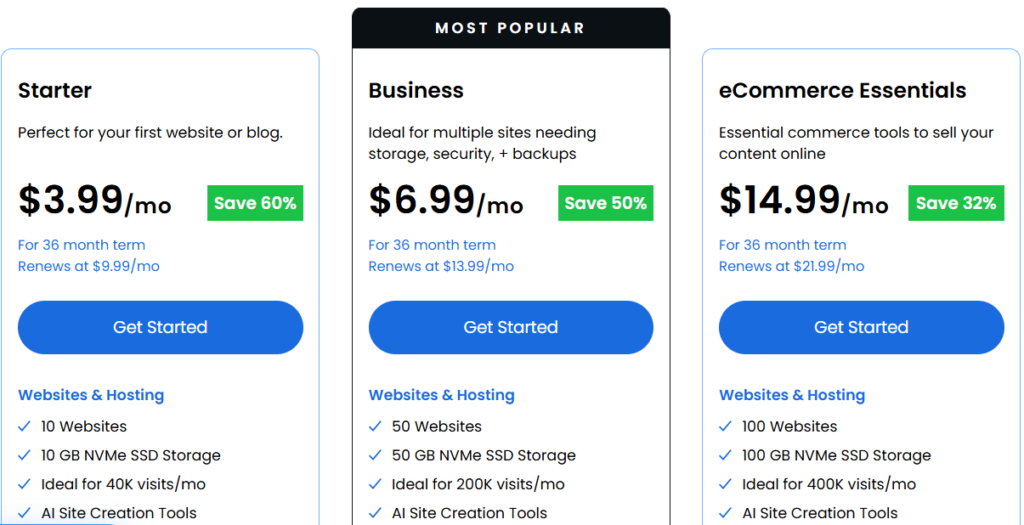
All prices are for a 36-month billing term. Shorter terms cost more upfront. The intro price is only for your first billing cycle — after that, renewals jump significantly.
Starter Plan ($3.99/mo) covers 10 websites, 10 GB NVMe SSD storage, a free domain for 1 year, free SSL, free CDN, AI Site Creation Tools, 99.99% uptime SLA, free site migration, malware scanning, DDoS protection, Yoast SEO (free plugin), and static content caching. Phone support is not included.
Business Plan ($6.99/mo) steps up to 50 websites, 50 GB NVMe SSD storage, AI-powered malware detection and removal, domain privacy free for year 1, Phone support included, and a WordPress staging site. This is marked as the most popular plan.
eCommerce Essentials ($14.99/mo) adds 100 websites, 100 GB NVMe SSD, WooCommerce Auto-Install, secure payment processing, product subscriptions, visitor memberships, offer paid courses, an affiliate program, and custom email templates. Built for online store owners.
Enterprise & Custom plans are available for high-traffic or flash-sale scenarios — you’d need to contact their team for pricing.
The Renewal Price Reality
The jump from $3.99 to $9.99 at renewal is the single biggest complaint from Bluehost users. It’s not a hidden fee — it’s in the fine print — but most beginners don’t notice it until their first renewal bill arrives.
If budget is a long-term concern, plan for the renewal price from day one. Locking in a 36-month term at the intro rate gives you the longest window before that increase hits.
Setting Up WordPress on Bluehost: What Beginners Actually Experience
The WordPress auto-install is one of Bluehost’s strongest points for beginners. Click “Get Started,” pick your domain, and WordPress is installed automatically — no FTP, no manual database setup, nothing technical.
Once inside WordPress, Bluehost pre-installs a few plugins, including Yoast SEO (free version). That’s actually useful context for someone building their first blog. If you’re following a guide like how to start a blog, the setup flow aligns well with the typical beginner path: domain → hosting → WordPress → theme → plugins.
One thing I noticed when setting up a client site on Bluehost: the checkout page has pre-ticked add-ons — SiteLock, CodeGuard, professional email — that inflate the bill if you don’t manually uncheck them. None of these is necessary at the starter stage. Uncheck everything you didn’t specifically research before completing your purchase.
Performance: Does Bluehost Actually Deliver Speed?
Bluehost’s own data (from their website, citing a WFShout November 2025 comparison) shows a US load time of 0.35 seconds — faster than Kinsta (0.43s), WP Engine (0.53s), SiteGround (1.17s), DreamHost (1.32s), and Hostinger (1.82s) in that test.
Take vendor-provided benchmarks with appropriate skepticism, but the direction is consistent with what I’ve seen in practice. Bluehost’s NVMe SSD storage, built-in CDN, and static content caching (included from the Starter plan) do contribute to decent loading speeds for standard WordPress sites.
For Indian visitors specifically, Bluehost has global data centers across North America, South America, Europe, and Asia. Server location selection happens at checkout. If your audience is primarily in India, pick an Asia-region server — it makes a meaningful difference in TTFB.
Their uptime SLA is 99.99%, and the infrastructure supports up to 40K visits/month on the Starter plan and 200K on the Business plan. For a new blog or small business site, those limits are more than enough.
What You Get (That Competitors Don’t Always Mention)
Beyond the standard checklist, a few things stand out:
WordPress.org Official Recommendation — Bluehost has held this since 2006. It’s not a paid placement; it’s a credibility signal that carries weight, especially for WordPress-first beginners.
NVMe SSD on All Plans — Not every host includes NVMe-speed storage at the entry level. It affects file read/write speed, which has a real impact on WordPress admin responsiveness.
Free CDN on All Plans — The included Cloudflare CDN integration means your static assets are served from edge nodes globally, without any manual setup. For a beginner, this is genuinely plug-and-play.
AI Malware Detection — Available from the Business plan upward, this is automated rather than manual scanning. On the Starter plan, you get malware scanning but not the AI-powered removal layer.
Managed WordPress Updates — Bluehost handles core WordPress updates, which matters for beginners who won’t know how to run them manually.
Where Bluehost Falls Short
Let’s be honest about the limitations — because they’re real.
Renewal Pricing is the Biggest Issue. The jump to $9.99/mo at renewal (from $3.99) is steep relative to competitors. If you’re on a tight budget and didn’t plan for it, year 2 becomes uncomfortable.
Storage is Limited on the Starter. 10 GB NVMe SSD sounds fine for a text blog, but if you’re running an image-heavy portfolio or uploading lots of media, you’ll feel that ceiling faster than expected. The Business plan’s 50 GB is more breathing room.
Phone Support Excluded on Starter. 24/7 chat support is included across all plans, but phone support is a Business plan and above feature. For true beginners who’d rather talk to someone, this is a meaningful gap in the entry plan.
No Monthly Billing at Competitive Rates. Bluehost’s pricing structure heavily favors long-term commitments. Month-to-month is available but significantly more expensive. If you’re not ready to commit to 36 months, the math changes.
Upsells at Checkout. Pre-checked add-ons (SiteLock, CodeGuard, Pro Email) are the kind of friction that catches beginners off guard. They’re not mandatory, but you need to know how to uncheck them.
Pros and Cons
Pros
- Clean onboarding — WordPress is live in under 5 minutes
- WordPress.org has been officially recommended since 2006
- NVMe SSD storage on all plans, including Starter
- Free domain, SSL, and CDN included from day one
- AI-powered malware detection on Business plan and above
- Staging environment included (Business plan+)
- Global data center selection at checkout
Cons
- Renewal price nearly triples on Starter plan ($3.99 → $9.99/mo)
- Only 10 GB storage on the entry plan — tight for media-heavy sites
- Phone support is not available on the Starter plan
- Pre-checked paid add-ons at checkout inflate the bill if missed
- Shared hosting limitations kick in for high-traffic or resource-heavy sites
Bluehost vs Hostinger, WordPress.com, and InMotion: Which One Fits Your Needs?
Before jumping to the table, let me share something personal — because it’s relevant to this exact decision.
I started blogging on April 25, 2018. Bluehost was my very first hosting purchase. The reason was simple: WordPress.org officially recommends it, and for a beginner with no reference point, that endorsement carries real weight. The plan started at $1.99/mo back then, and I locked in a 3-year shared hosting plan for around ₹12,000–₹13,000 — my first-ever hosting bill. The server was US-based, and for a site getting decent traffic from the US and other countries, it worked well. Speed was solid, rankings were stable, and I had no major complaints throughout that entire term.
Then I made what I still consider my biggest hosting mistake.
When renewal time came, the cost felt steep. And since most of my traffic was coming from India, I figured — why not move to Bluehost India? Same brand, Indian servers, lower latency for Indian visitors. Seemed logical. I made the switch and migrated all my sites.
It was a disaster. Within a short period of moving to Bluehost India, my website speed dropped noticeably, rankings collapsed — around 80% of my posts that were ranking in the top 3 vanished, and the site eventually fell off page 5 altogether. Monthly traffic went from 1.5-2 lakh to under 10K. I contacted Bluehost support multiple times. Nothing changed. I eventually migrated everything directly to Hostinger Cloud, and things started recovering.
My strong advice: Never use Bluehost India. The global Bluehost (bluehost.com, US servers) is a different experience — and the review above reflects that. But the India variant is a completely different product.
With that context, here’s how the four main options compare for beginners:
| Feature | Bluehost Starter | Hostinger Premium | WordPress.com Personal | InMotion Launch |
|---|---|---|---|---|
| Starting Price | $3.99/mo | $2.99/mo | ₹112/mo | $4.99/mo |
| Billing Term | 36 months | 48 months | 36 months | Annual |
| Renewal Price | $9.99/mo | $10.99/mo | ₹420/mo | $13.99/mo |
| Websites | 10 | 3 | 1 site, unlimited pages | 2 |
| Storage | 10 GB NVMe SSD | 20 GB SSD | 6 GB | 100 GB NVMe SSD |
| Free Domain | Yes (1st year) | Yes (annual plans) | Yes (1st year) | Yes (select terms) |
| Free SSL | Yes | Yes (unlimited) | Yes | Yes |
| Free CDN | Yes | Business plan+ | Yes (global edge) | Yes |
| Daily Backups | No | No (weekly auto) | No (Business plan+) | No |
| Phone Support | No | No | No (Business plan+) | No (chat & ticket only) |
| WordPress Install | 1-click (optimized) | 1-click managed | Built-in (WordPress.com) | 1-click |
| Uptime SLA | 99.99% | 99.9% | High-burst capacity | 99.99% |
| Money-Back Guarantee | 30 days | 30 days | — | 90 days |
| Best For | WordPress-first beginners | Budget-focused value | Hosted, no-server beginners | Storage-heavy or agency use |
Reading the table:
Bluehost remains the strongest pick for WordPress-first beginners who want a guided setup, NVMe storage, and the WordPress.org credibility signal — provided you use bluehost.com (global), never the India variant.
Hostinger Premium at $2.99/mo is the most budget-friendly entry point, but note the storage is 20 GB SSD (not NVMe at this tier), and CDN is only available from the Business plan ($3.99/mo) upward. For pure cost efficiency, especially if you’re running 1–3 sites, it’s hard to argue against it. I’ve covered the Hostinger signup process and WordPress installation on Hostinger if you want to go that route.
WordPress.com Personal (₹112/mo billed every 36 months) is for someone who wants zero server management — it’s a fully hosted platform, not self-hosted WordPress. You get unlimited pages, no ads, and a free domain for year 1, but plugin installation is locked behind the Business plan (₹448/mo). If you need plugins — and for most bloggers, you will — WordPress.com’s entry plans are too restrictive for serious SEO work.
InMotion Hosting Launch ($4.99/mo) is interesting for storage — 100 GB NVMe SSD on the entry plan is significantly more than Bluehost Starter or Hostinger Premium. The 90-day money-back guarantee is the longest in this comparison. The downside: only 2 websites on the Launch plan, phone and chat support only on Power and above, and the renewal rate ($13.99/mo) is the highest in this group. Best suited for someone who needs large storage from day one or is in a market where InMotion’s US-based data centers serve them better.
Who Should Use Bluehost
Go with Bluehost if:
- You’re building your first WordPress blog or small business site
- You want a guided, low-friction WordPress setup experience
- You value the WordPress.org recommendation as a trust signal
- You’re okay with committing to a 36-month term to lock in the intro price
- You don’t need more than 10–50 GB of storage at this stage
Skip Bluehost if:
- Budget is your primary concern, and you’re comparing the year-2 price
- You need more than 10 GB of storage from day one (go Business or Hostinger)
- You’re building a WooCommerce store from the start — the eCommerce plan at $14.99/mo is solid, but Hostinger’s WooCommerce hosting is worth comparing
- You want monthly billing without a significant premium
If you’re still figuring out your niche or domain before committing to hosting, start with how to choose a niche for your blog and how to choose a domain name — getting those two right before picking a host saves a lot of back-and-forth later.
What to Do After Signing Up with Bluehost
Most reviews stop at “here’s how to sign up.” But the first 48 hours after buying hosting are where beginners make the most mistakes.
Step 1: Uncheck unnecessary add-ons at checkout. SiteLock, CodeGuard, and Pro Email are paid services. You don’t need any of them to launch a WordPress site. Bluehost gives you malware scanning and SSL for free — that’s enough to start.
Step 2: Choose your data center location carefully. If your audience is in India or South/Southeast Asia, select an Asia-region server at signup. You can’t easily change this later.
Step 3: Install WordPress via the dashboard. Use the auto-installer, not manual setup. It takes under 5 minutes and pre-configures database settings for you.
Step 4: Install a lightweight theme. Don’t use the default WordPress theme. For a fast, SEO-friendly start, a theme like GeneratePress works well. I’ve covered the GeneratePress Premium installation process if you want a step-by-step.
Step 5: Install only essential plugins. Don’t go plugin-heavy from day one. Stick to an SEO plugin (Yoast is already there), a caching plugin, and a security plugin. More on which plugins to install.
Step 6: Set up your SSL and force HTTPS. Bluehost provides Let’s Encrypt SSL for free. Enable it from the dashboard and force HTTPS redirect — this matters for both security and SEO.
FAQ’s: Bluehost Good for Beginners
Is Bluehost actually good for beginners in 2026?
Yes — for WordPress specifically, it’s one of the easiest hosts to get started with. The guided setup, automatic WordPress installation, and clean dashboard make the first experience far less intimidating than older hosting providers. The main things to be aware of upfront are the renewal price jump and the pre-ticked add-ons at checkout.
What’s the cheapest Bluehost plan right now?
The Starter plan is $3.99/mo on a 36-month term. It includes 10 websites, 10 GB NVMe SSD storage, a free domain for year 1, free SSL, and CDN. It renews at $9.99/mo after the initial term.
Does Bluehost include a free domain?
Yes. All standard plans include a free domain name for the first year. After that, domain renewal is a separate cost — typically around $15–20/year depending on the TLD.
Is Bluehost good for WordPress?
Bluehost has been officially recommended by WordPress.org since 2006 — longer than almost any other host. It offers managed WordPress updates, pre-configured settings, and one-click installation. It’s built with WordPress in mind at the infrastructure level.
Can I upgrade my Bluehost plan later?
Yes. You can upgrade from Starter to Business or eCommerce Essentials from within your dashboard. Bluehost prorates the cost based on your remaining term. Downgrading is less straightforward and typically requires contacting support.
Is Bluehost good for Indian bloggers?
It works well, provided you select an Asia-region data center at signup. For audiences primarily in India, this reduces TTFB meaningfully. Budget-wise, pricing is in USD — so factor in the exchange rate when comparing with INR-priced alternatives.
Note: This applies to Bluehost global (bluehost.com) only. Bluehost India is a separate product — avoid it entirely if your audience is in India.
The Starter plan supports up to 40K visits/month, and Business handles up to 200K. Beyond that, Bluehost offers VPS and dedicated hosting options — or you’d look at managed WordPress hosting providers. For most new blogs, shared hosting handles growth for the first 1–2 years comfortably.
Is Bluehost India the same as Bluehost (global)?
No — and this distinction matters. Bluehost India (bluehost.in) is a separate product operated under a different infrastructure. From personal experience managing multiple sites, the global Bluehost (bluehost.com) with US-based servers delivers significantly better speed and stability, especially for sites with mixed international and Indian traffic. If you’re based in India and your audience is primarily Indian, Hostinger’s global servers with Asia-region nodes tend to outperform Bluehost India by a meaningful margin. Avoid Bluehost India specifically — the review above refers exclusively to Bluehost global.
Final Verdict
Bluehost earns its reputation as a beginner-friendly host — but “good for beginners” comes with conditions. The setup experience is genuinely smooth, WordPress integration is the best in class, and the Starter plan at $3.99/mo gives you everything needed to launch a blog. The Business plan at $6.99/mo is the smarter long-term pick if you want phone support, staging, and proper malware removal without needing to upgrade mid-term.
The renewal price is the one thing you must plan for. Go in with eyes open on that, skip the checkout upsells, pick the right data center, and Bluehost is a solid foundation for your first — or fifth — WordPress site.
Start with Bluehost here and lock in the intro price before it changes.