Event plugins have a habit of looking cheap until you start adding extras. Ticketing, QR check-in, email reminders, recurring dates — it adds up fast, and suddenly the bill looks very different.
Eventin is ThemeWinter’s WordPress event management plugin, and its Black Friday sale is live right now with up to 65% off. It handles event pages, ticketing, registrations, QR check-in, virtual events, and AI-assisted event creation, and every paid plan includes all Pro add-ons.
I’m Karan Rajput, and after 7+ years of blogging and WordPress client work, I’ve learned that the sale price matters less than what the licence actually covers. So this page stays practical: how to claim the deal, which plan fits whom, where Eventin falls short, and a full side-by-side against The Events Calendar, Events Manager and WP Event Manager.
This is mainly for you if you run workshops, conferences, webinars, classes, or ticketed community events on WordPress and you’re tired of stitching together separate plugins. It’s also useful if you build event sites for clients and want one licence that covers multiple domains. And if you only need a simple calendar on a hobby site, I’ll tell you plainly when the free version is enough and Pro isn’t worth it.
Eventin Black Friday Sale Snapshot [🟢STATUS: LIVE NOW]
Starts on: Live now | Ends on: Not confirmed. A countdown timer runs on the official page, but it can change, so check before you buy.
Up to 65% off on annual plans, up to 60% off on lifetime plans, with doubled domain limits shown on the lifetime cards.
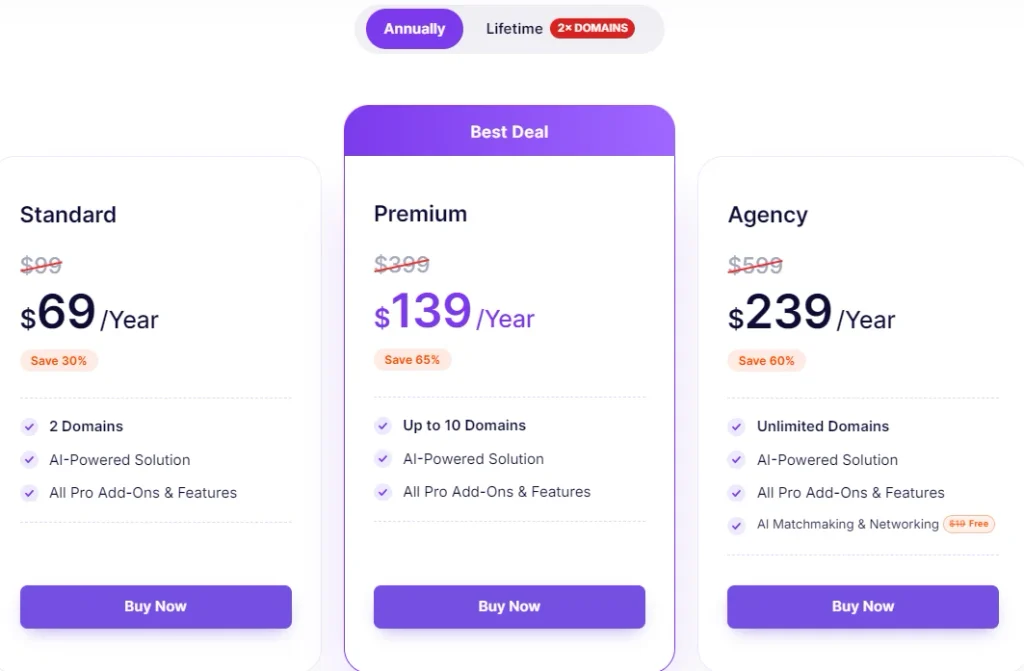
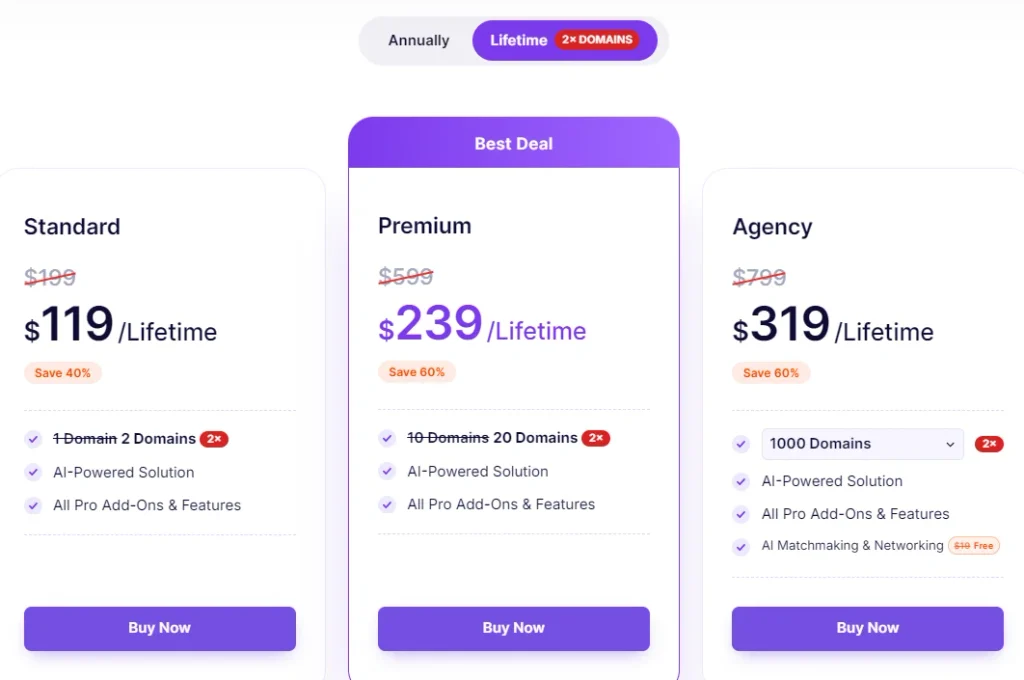
- Annual plans (per year): Standard $69 (was $99, 30% off, 2 domains) | Premium $139 (was $399, 65% off, up to 10 domains) | Agency $239 (was $599, 60% off, unlimited domains)
- Lifetime plans (one-time): Standard $119 (was $199, 40% off, 2 domains) | Premium $239 (was $599, 60% off, 20 domains) | Agency $319 (was $799, 60% off, 1000 domains in the selector)
- Included on every plan: AI-powered solution, all Pro add-ons and features. Agency also adds AI Matchmaking & Networking.
- Safety net: the sale page shows a 15-day money-back guarantee, and its banner advertises savings of up to $540.
Coupon: Not needed. The discount is auto-applied at checkout. 👇

Disclaimer: This post contains affiliate links, and I earn a commission from them at no extra cost to you. Thank you for your support!Quick Answer: Eventin’s Black Friday sale is live with up to 65% off. For freelancers and small agencies, Premium is the sensible pick, since it’s the plan the pricing page itself labels Best Deal. Try the free version first if you’re unsure, and don’t wait too long, because the end date isn’t officially confirmed.
How to Claim the Eventin Black Friday Deal
Takes about two minutes. No coupon hunting.
- Open the official page through this link: Eventin Black Friday deal. You’ll see the sale banner and the pricing cards.
- Pick your billing type. Use the toggle between Annually and Lifetime. The lifetime side carries the “2× Domains” tag.
- Choose your plan. Standard, Premium, or Agency. Premium ($139/year or $239 lifetime) is the one marked Best Deal.
- Click Buy Now and complete checkout.
- Compare the final total at checkout with the price on the card before paying. No code was mentioned for this offer, so you shouldn’t need to hunt for one.
- Keep the refund window in mind. The page shows a 15-day money-back guarantee, so use those days to test properly.
What You Actually Get With Eventin Pro
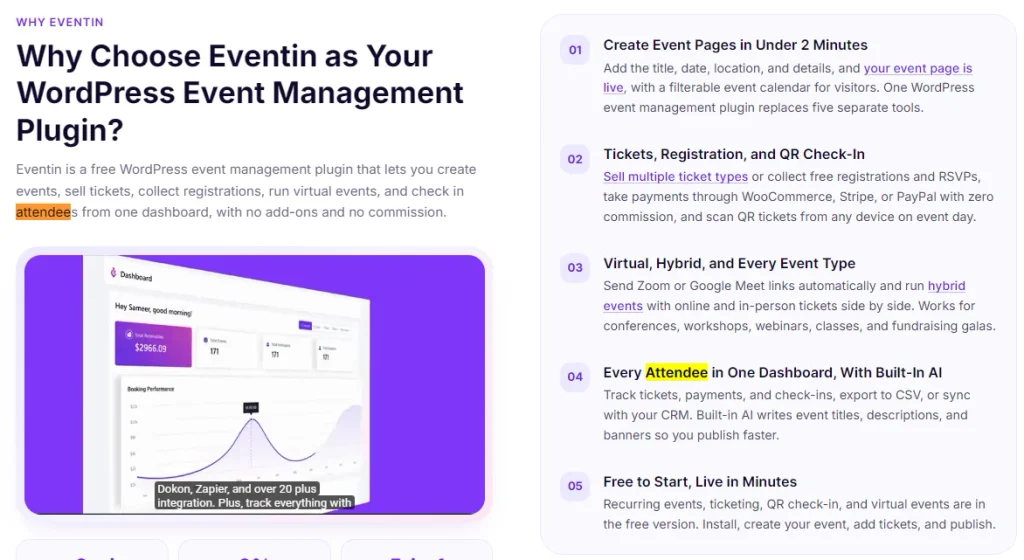
Think of Eventin as five tools squeezed into one plugin: events, calendars, ticketing, attendee management and AI helpers. Here’s what matters in practice.
Events and calendars. You can build in-person, virtual, and hybrid events, one-time, multi-day, or recurring, with schedules, sessions, speakers, organizers, and venue maps. Visitors get month, week, day, and list calendar views with filters. Each event also supports FAQs, social links, and SEO settings, which helps if you want event pages to rank.
Tickets, registrations and payments. Free RSVPs and paid events both work. You get Early Bird, VIP and General tiers, capacity limits, waitlists, custom registration fields, file uploads, visual seat plans and QR code tickets. Payments run through WooCommerce, PayPal, Stripe, or SureCart, and the vendor states 0% commission on tickets. Tax and VAT options are built in.
Design tools. There’s a drag-and-drop event landing page builder, custom ticket templates with QR codes, and certificate templates. It works with Gutenberg, Elementor, Divi, and Bricks. Ready-made themes cover multivendor event marketplaces, education conferences, single instructors, universities, creative conferences, digital marketing and food festivals.
Migration. If you’re on The Events Calendar, Eventbrite, or Facebook events, Eventin has guided import with preview and duplicate detection. That’s the first thing I’d test if you’re moving from another plugin.
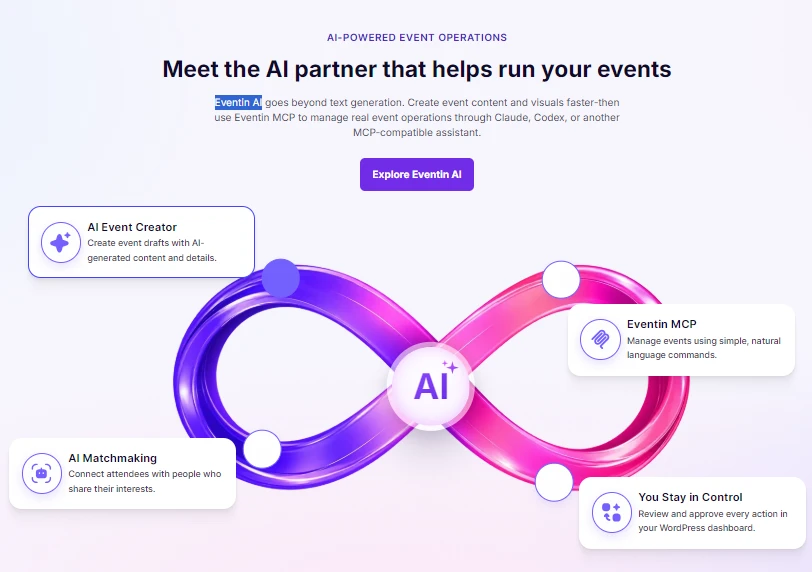
AI layer. The AI Event Creator drafts titles, descriptions, and banners. Eventin MCP lets you manage events through natural-language commands from an MCP-compatible assistant, and you approve actions from the WordPress dashboard. Agency adds AI Matchmaking & Networking, with Connect Cards, two-way matching, match scores, and privacy controls. Great for conferences and communities. Irrelevant for a plain workshop page.
Eventin comes from ThemeWinter, and the team’s other products have their own sales too. See my ThemeWinter Black Friday deal page and the WPCafe Black Friday deal page.
Annual or Lifetime: Which One Is Worth It?
From what I observed going through the plan cards, the plans differ mainly by domain count, not by features. That makes the decision simpler than most plugins.
- Standard: 2 domains on both billing types. Fits one event site plus a staging or second project. Annual shows 30% off, lifetime shows 40%.
- Premium: up to 10 domains on annual, 20 on lifetime. Annual shows the biggest cut on the page at 65%, lifetime shows 60%.
- Agency: unlimited domains on annual, up to 1000 on lifetime, plus AI Matchmaking & Networking shown as a free inclusion. Both show 60% off.
The lifetime view lists lifetime product updates, lifetime email support, and a free guided setup. If you’ll keep running events on the same sites for a couple of years, lifetime usually wins. If it’s a one-off event or you’re still testing the plugin, annual or the free version is the safer start.
Is this the lowest price ever? I can’t verify past sale history, so treat “up to 65%” as the headline saving, not a guaranteed record low. The plan cards do show the original strike-through prices, which is enough to judge the savings today.
Pro tip: the free version already includes recurring events, ticketing, QR check-in, and virtual events. Install it first, build one real event, run a test checkout, then upgrade. The money-back window is your backup.
If you’re picking up other WordPress tools this week, I keep them together in my Best WordPress Black Friday Deals roundup.
A Developer’s Take: Integrations, Compatibility and Page Weight
In client projects, the real cost of an event plugin is rarely the licence. It’s the add-ons and the hours spent making them play nicely together. That’s why Eventin’s integration list caught my eye.
Per the comparison data, it supports Elementor widgets and shortcodes, Gutenberg, Divi, Oxygen and Bricks, plus WooCommerce, Dokan multivendor, FluentCRM, BuddyBoss, Webhooks and Twilio SMS. For automation, it lists Zapier, BitFlows, BitApps, Pabbly, and OttoKit. Schema markup, SEO plugin support, RTL, and translation readiness are also listed.
Webhooks plus CRM sync is the part developers will like. You can push registrations into your own workflow without writing custom glue code.
Core Web Vitals: I haven’t benchmarked Eventin’s front-end weight, so I won’t quote numbers. Event pages with calendars, maps, and sliders are where LCP and CLS usually suffer. Test an event page on staging with your theme and caching before launch, and keep ticket and checkout pages out of page cache.
Where Eventin Falls Short (and Who Should Skip It)
No plugin fits everyone. Here’s where Eventin can disappoint.
- You pay for domains, not features. Since plans differ mainly by domain limits, a single-site owner may pay for a bigger tier than needed.
- It’s a big plugin for a small job. If you only need a basic upcoming-events list, the setup depth is overkill.
- The comparison data is vendor-published. The table below comes from Eventin’s own page, so verify anything critical on each competitor’s official site.
- The AI extras are a convenience, not a reason to buy. MCP and matchmaking help conferences and communities, but they won’t matter for a simple workshop page.
- The sale end date isn’t confirmed. The countdown can change, so decide on your own timeline.
Who should skip it: hobby sites with occasional events, people who only want a plain calendar without ticketing, and anyone not running WordPress. The free version may be all you need.
Best WordPress Event Management Plugin – Eventin vs The Events Calendar vs Events Manager vs WP Event Manager
Here’s the full feature comparison, as listed on Eventin’s own comparison page. Add-on prices are shown where a feature is a paid extra.
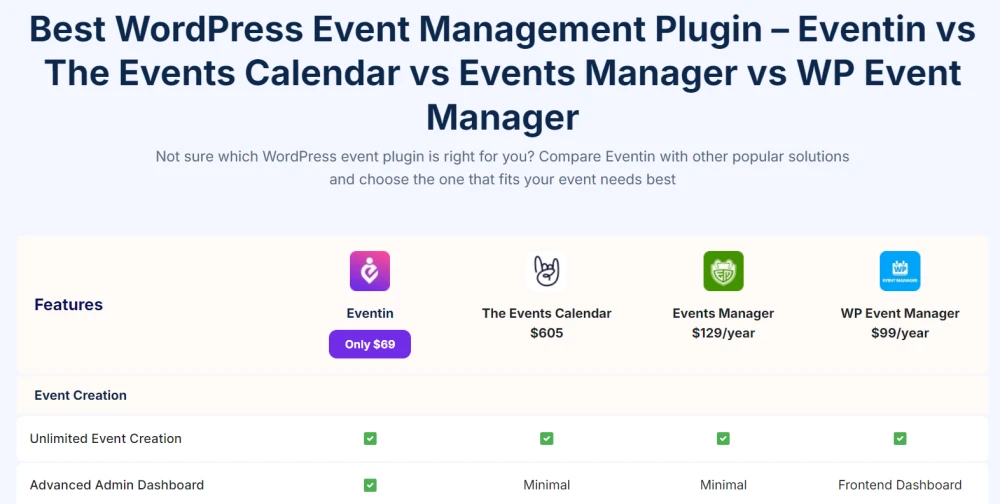
| Feature | Eventin | The Events Calendar | Events Manager | WP Event Manager |
|---|---|---|---|---|
| Listed price | Standard annual plan (see Deal Snapshot) | $605 | $129/year | $99/year |
| EVENT CREATION | ||||
| Unlimited Event Creation | Included | Included | Included | Included |
| Advanced Admin Dashboard | Included | Minimal | Minimal | Frontend Dashboard |
| AI-powered Event Creation | Included | Not available | Not available | Not available |
| Upcoming/Expired Events Tab | Included | Not available | Not available | Included |
| Flexible Event Schedule | Included | Paid add-on – $69 | Not available | Add-on |
| Seamless Calendar Sync | Included | Included | Included | Add-on (iCal) |
| Recurring Events | Included | Paid add-on – $149 | Included | Add-on |
| Advance Event Booking Reporting | Included | Basic | Included | Add-on |
| Physical, Virtual & Hybrid Venues | Included | Included | Included | Included |
| Event Import & Export | Included | Paid add-on – $89 | Included | Add-on |
| Multi-vendor Event Marketplace | Included | Not available | Not available | Add-on |
| TICKETING | ||||
| Multi-tier Tickets (Early Bird, VIP, Group) | Included | Paid add-on – $149 | Included | Add-on |
| Ticket Variations & Pricing Control | Included | Paid add-on – $149 | Included | Add-on |
| Registration Rules & Conditions | Included | Not listed | Included | Add-on |
| Visual Seating by Ticket Type | Included | Paid add-on – $129 | Not available | Add-on |
| WooCommerce-powered Ticket Sales | Included | Not listed | Included | Add-on |
| SPEAKERS | ||||
| Single Speaker Pages | Included | Included | Not available | Add-on |
| Multiple Speaker Layouts | Included | Not available | Not available | Not available |
| Organizer Profiles | Included | Included | Included | Included |
| Speaker & Organizer Listings | Included | Included | Included | Included |
| DESIGN | ||||
| Visual Event Landing Page Builder | Included | Not available | Not available | Not available |
| Event Ticket Builder (Custom Layouts) | Included | Not available | Not available | Add-on |
| Event Certificate Builder | Included | Not available | Not available | Not available |
| Frontend Event Submission | Included | Paid add-on – $129 | Included | Included |
| Page Builder Support (Elementor, Divi, Bricks) | Included | Limited | Limited | Limited |
| ATTENDEES | ||||
| Attendee Tickets | Included | Included | Included | Add-on |
| Multi-Tiered Tickets | Included | Included | Included | Add-on |
| QR Code-based Check-in | Included | Paid add-on – $149 | Included | Add-on |
| Custom Attendee Fields | Included | Included | Included | Add-on |
| Manual Attendee Registration | Included | Included | Included | Not available |
| RSVP Support | Included | Paid add-on – $149 | Included | Add-on |
| Bulk Attendee Registration | Included | Included | Included | Not available |
| Email Automation Builder | Included | Paid add-on – $89 | Included | Add-on |
| Automated Confirmations & Reminders | Included | Paid add-on – $89 | Included | Add-on |
| Post-event Follow-ups & Thank-you Emails | Included | Paid add-on – $89 | Included | Add-on |
| Email Templates | Included | Paid add-on – $89 | Included | Add-on |
| Email Tracking | Included | Paid add-on – $89 | Included | Not available |
| PAYMENTS | ||||
| WooCommerce Integration | Included | Included | Paid add-on – $75 | Included |
| WooCommerce Coupon Support | Included | Paid add-on – $149 | Included | Not available |
| PayPal Payments | Included | Included | Included | Add-on |
| Stripe Payments | Included | Included | Included | Add-on |
| SureCart Integration | Included | Not available | Not available | Not available |
| Manual & Offline Payments | Included | Included | Included | Via WooCommerce |
| Invoice Download & Print | Included | Not available | Included | Not available |
| INTEGRATIONS | ||||
| Divi Builder | Included | Not available | Not available | Add-on (DIVI Elements) |
| Elementor Builder Widgets and Shortcodes | Included | Paid add-on – $149 | Included | Included |
| Oxygen Builder Support | Included | Not available | Not available | Not available |
| Gutenberg Compatibility | Included | Included | Included | Included |
| Google Maps Integration | Included | Included | Included | Add-on |
| Zoom Integration | Included | Paid add-on – $149 | Included | Add-on |
| Google Meet Integration | Included | Paid add-on – $149 | Included | Not available |
| Dokan Multivendor | Included | Not available | Not available | Not available |
| FluentCRM | Included | Included | Not available | Not available |
| BuddyBoss | Included | Included | Not available | BuddyPress only |
| Webhooks Support | Included | Not available | Included | REST API add-on |
| Otter Blocks Integration | Included | Included | Not available | Not available |
| Twilio SMS Integration | Included | Included | Paid add-on – $49 | Add-on (SMS Notifications) |
| BitFlows Integration | Included | Not available | Not available | Not available |
| BitApps Integration | Included | Not available | Not available | Not available |
| Zapier Integration | Included | Not available | Included | Add-on |
| Pabbly Integration | Included | Not available | Not available | Not available |
| iCal/Outlook/Google Cal Integration | Included | Included | Included | Add-on (iCal) |
| MARKETPLACE | ||||
| Multiple Organizers | Included | Not available | Not available | Included |
| Vendor Event Control | Included | Not available | Not available | Organizer Frontend Dashboard |
| Central Marketplace Dashboard | Included | Not available | Not available | Add-on |
| ANALYTICS | ||||
| Sales Insights & Revenue Tracking | Included | Not available | Not available | Add-on |
| Registration Reports | Included | Included | Not available | Add-on |
| Attendance & Check-in Reports | Included | Included | Not available | Add-on (App) |
| OTHERS | ||||
| Add FAQ to Event | Included | Not available | Not available | Not available |
| Advanced Event Search | Included | Included | Included | Included |
| RTL Language Support | Included | Included | Included | Included |
| Translation Ready | Included | Included | Included | Included |
| SEO Plugin Support | Included | Included | Included | Included |
| Schema Mark-up | Included | Not available | Included | Included |
| Lifetime Product Updates | Included | Not available | Included | Yearly license renewal |
| Lifetime Email Support | Included | Not available | Included | Not available |
| Best For | Ticketed events, multi-domain and client work | Basic calendars where add-ons are optional | Booking-focused sites that skip seating and design tools | Simple listings you’ll extend later |
| Winner | Eventin for ticketing-heavy and multi-site setups |
What the table tells you: The Events Calendar lists recurring events, multi-tier tickets, and QR check-in as separate paid add-ons, plus email at its own add-on price, so the real cost climbs once you need them. WP Event Manager is the cheapest on paper, but ticket tiers, QR check-in, recurring events, and Stripe are all add-ons there. Events Manager is the closest rival on included features, though it has no visual seating, certificate builder, landing page builder, or AI creation.
For ticket sellers who want QR check-in, tiered tickets, and email automation without stacking extras, Eventin is the better fit, because those are all listed as included while The Events Calendar charges separate add-on prices for them. If your site already runs Events Manager and you only need bookings, Zoom, Meet, and email, it covers a lot and switching may not be worth the effort. For the lowest entry cost on a basic listing site, WP Event Manager is worth considering, as long as you accept add-ons later.
Eventin’s one weakness here: it’s a much larger feature set than a simple events page needs.
What to Do After Buying Eventin
- Install and activate the licence as shown in your account. Note which domains you use, since each plan has a domain limit.
- Set up payments first. Connect WooCommerce, Stripe, PayPal, or SureCart, then check tax and VAT options.
- Build one test event. Add two ticket tiers, set capacity and waitlist rules, and run a small test checkout.
- Check emails and QR codes. Send yourself a confirmation, then scan the QR ticket from a phone. Use an SMTP plugin so emails don’t land in spam.
- Import old events if you’re migrating, then review the duplicate detection results.
- Fill the SEO settings and event schema fields before publishing.
Mistakes to avoid: using up domain slots carelessly, letting checkout pages get cached, and going live without testing mobile check-in. A ticket launch also creates traffic spikes, so decent hosting matters. My Cloudways and Hostinger deal pages cover options.
Eventin Black Friday Sale
Deal: Up to 65% Off + Lifetime
Coupon Code: Not needed. The discount is auto-applied at checkout.👇
Frequently Asked Questions
Is the Eventin Black Friday sale live, and when does it end?
Yes, the sale is live now. The official page runs a countdown timer, but the end date hasn’t been confirmed, and the timer can change. I’d treat it as a limited-time offer and not wait for the last hour. Check the live page before buying, since prices and limits can change without notice.
Do I need a promo code for the Eventin Black Friday deal?
No code was mentioned with this offer, and the plan cards show the discounted price directly. Follow the steps in the How to Claim section, pick your plan, and compare the checkout total with the card price before paying. If anything looks different at checkout, recheck the official page.
Should I buy the annual or the lifetime plan?
If you’ll keep running events on the same site for a couple of years, lifetime is the better fit, because it includes lifetime product updates, email support, and a free guided setup. Annual makes sense for a one-off event or a trial run. Premium annual carries the biggest percentage cut, so compare both toggles before deciding.
Is there a free version of Eventin?
Yes. The free version includes recurring events, ticketing, QR check-in, and virtual events, so you can build and test a real event before paying. Pro covers all Pro add-ons and features across multiple domains. If your needs are basic, the free plugin may genuinely be enough for you.
Does Eventin work with Elementor, Gutenberg, and WooCommerce?
Per the comparison data, yes: Eventin lists Elementor widgets and shortcodes, Gutenberg compatibility, Divi, Bricks, Oxygen, and WooCommerce integration. If you build with Elementor, my Elementor Black Friday deal page covers its plans. Still, test on a staging copy first, since theme and plugin combinations vary.
Is there a refund if Eventin doesn’t suit me?
The sale page shows a 15-day money-back guarantee. Use that window properly: build a real event, run a test checkout, scan a QR ticket, and check your emails. Refund terms can change, so read the official policy before buying.
Bottom Line
Eventin’s sale is a strong one if you’re selling tickets, running multi-day events, or building event sites for clients, because the licence bundles what other plugins sell as separate add-ons. Premium is the plan I’d look at first. Standard fits a single-site setup, and Agency suits larger client portfolios. If you only need a plain calendar, stay on the free version and skip the upsell.
Check the live prices, since the end date isn’t confirmed. Get Eventin Pro at the current Black Friday price.
Shopping for other tools too? My WordPress Black Friday deals page tracks them in one place.
72+ Best WordPress Black Friday/Cyber Monday Deals 2026 [Up to 99% OFF] – Verified Deals Live
Looking for more Black Friday & Cyber Monday software discounts? We have hand-picked and verified 72+ live deals across WordPress hosting, plugins, themes, VPNs, and AI tools—all in one place so you don’t miss out on the biggest savings of the year. Explore the complete WordPress Black Friday Deals 2026 guide.
Quick Deal Snapshot [STATUS: LIVE NOW]
Status: Live now (Ends December 11, 2026)
- Savings: Save up to 99% across 60+ verified WordPress & SaaS brands
- Web Hosting & Domains: Up to 95% OFF + Free Domains & Migrations
- WordPress Plugins & Builders: Up to 90% OFF + Lifetime Deals
- Themes, AI & VPN Tools: Up to 88% OFF + Extra Free Months
- Verified Discounts: Direct promo codes & auto-applied checkout links
- Updated Daily: New live deals added throughout Black Friday week
Coupon: Auto-applied & verified codes inside.

Related Posts