Optiontics is a WooCommerce product options plugin, and its Black Friday sale is running right now with up to 80% off. That headline number belongs to the annual Agency plan, though. Lifetime plans and bundles have their own discounts, and this article breaks them down so you don’t have to guess.
If you run a store where size and color aren’t enough (engraving text, file uploads, made-to-measure pricing, add-on gift wrap), this plugin is built for exactly that. It also has an AI builder and 40+ ready templates, which is why I looked at it closely.
I’m Karan Rajput, and after 7+ years of blogging and client WordPress work, I’ve seen how fast variation lists get out of hand on WooCommerce stores. This guide covers which plan fits which store, where the lifetime deal makes sense, and where Optiontics falls short.
One thing to know upfront: the sale page shows a live countdown, but the end date isn’t officially confirmed, so it can change. Don’t treat the countdown as a fixed deadline in either direction. Looking at the wider sale season? Our Best WordPress Black Friday Deals 2026 page tracks the other live offers in one place.
Optiontics Black Friday Sale Snapshot [🟢STATUS: LIVE NOW]
Starts on: Already live | Ends on: Not officially confirmed (check the countdown on the sale page)
Deal Active Now
- Discount: Up to 80% off (annual Agency plan). Lifetime plans go up to 65% off.
- Annual plans: Start at $45/year (Standard, 5 sites)
- Lifetime plans: Start at $79 one-time (Standard, up to 10 sites with the 2× sites boost)
- Bundle: Pointics + Optiontics Agency Bundle at $299 one-time, unlimited sites
- Validity note: No promo code was shown on the pricing page I checked. 30-day money-back guarantee applies.
Coupon: Not needed. The discount is auto-applied at checkout. 👇
Disclaimer: This post contains affiliate links, and I earn a commission from them at no extra cost to you. Thank you for your support!Quick Answer: Optiontics’ Black Friday sale gives up to 80% off, with the biggest cut on the annual Agency plan. For most single-store owners, the lifetime Standard or Premium plan is the smarter buy, since it’s a one-time payment with lifetime product updates. Agencies handling client stores should look at the unlimited-site options.
How to Claim the Optiontics Black Friday Deal
It takes about two minutes. No coupon hunting.
- Open the Optiontics sale page through this link.
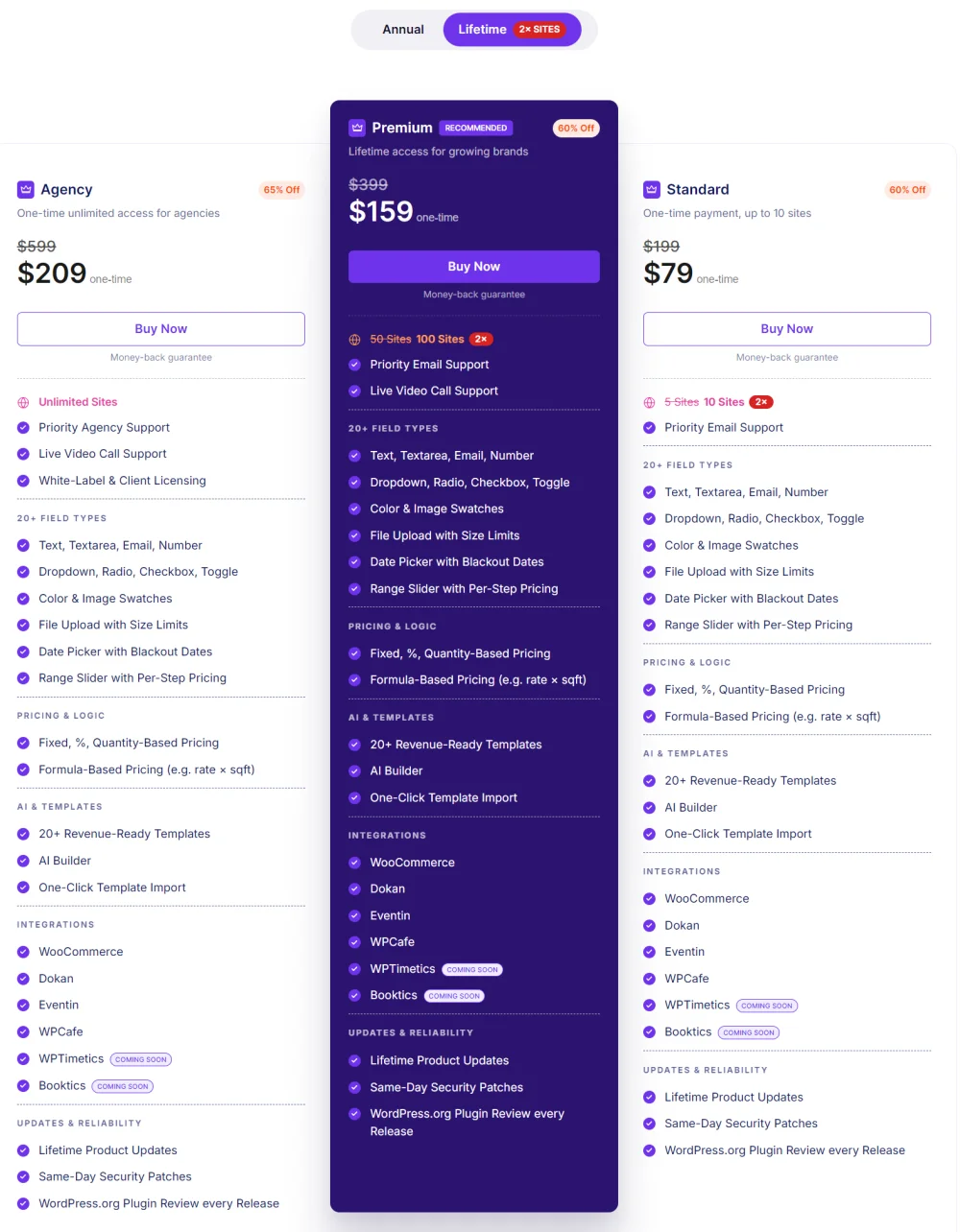
- Use the Annual / Lifetime toggle above the plan cards. The lifetime view carries a “2× Sites” badge.
- Pick your plan from the table below and click Buy Now.
- Checkout is handled by Paddle, and PayPal and cards are shown as payment options.
- Confirm the final amount on the checkout screen before you pay. No promo code was mentioned on the sale page, so there’s nothing to copy.
| Plan | Annual price | Lifetime price | Sites |
|---|---|---|---|
| Standard | $45/year (was $79), 45% off | $79 one-time (was $199), 60% off | 5 annual, 10 lifetime |
| Premium | $75/year (was $219), 65% off | $159 one-time (was $399), 60% off | 50 annual, 100 lifetime |
| Agency | $99/year (was $499), 80% off | $209 one-time (was $599), 65% off | Unlimited |
Bundle options on the same page:
- Pointics + Optiontics Agency Bundle: $299 one-time (was $1,164), unlimited sites, lifetime updates, priority agency support
- Standard Mega Bundle: $299 (was $1,045). Includes Eventin, WP Cafe, Optiontics, Pointics, plus 25 themes on a 5-site license
- Agency Mega Bundle: $599 (was $5,403), 3 monthly installments available. 25 themes on a 10-site license
- Enterprise Mega Bundle: $649 (was $10,493), 3 monthly installments available
Which Plan Fits Which Store?
Here’s the thing most people miss. The pricing page says every plan includes full access to every field type, pricing rule, and AI build, with no hidden add-ons. So you’re not paying more for features. You’re paying for site count and support level.
Standard suits one or two stores. The lifetime version at 60% off is the better value than the annual at 45% off if you’ll still use the plugin a year from now.
Premium adds live video call support and a much higher site limit. Buy it only if you manage a handful of client stores or want the video support. Otherwise it’s overbuying.
Agency is where the 80% annual discount lives. It adds white-label and client licensing, which matters if you hand stores over to clients.
For a single store you’ll run for years, go lifetime Standard. If you build WooCommerce stores for clients, Agency lifetime at 65% off is the cleaner pick over renewing annually.
Beginner-friendly? The AI builder takes a plain-language description (like “a mug with three colors and an engraving add-on”) and drafts the fields, prices, and rules. The page itself says AI drafts are suggestions, so you still review everything before publishing. Good.
What You Actually Get
Optiontics adds a product options layer on top of WooCommerce. You keep your products and add the fields each one needs.
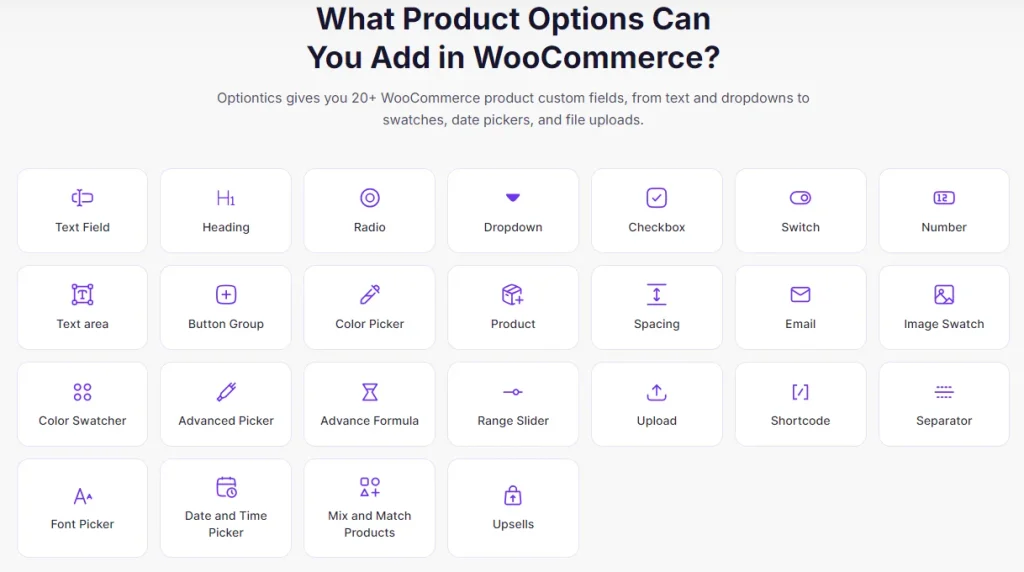
- 20+ field types: text, dropdown, checkbox, date and time picker, range slider, file upload, color and image swatches, formula fields
- Conditional logic: show “engraving text” only when the customer ticks “Add engraving”
- Flexible pricing: fixed, percentage, per character, quantity-based, or formula (width × height × rate for blinds, banners, flooring)
- File uploads: multiple files per order, size limits you control, files stay attached to the WooCommerce order
- Integrations: WooCommerce, Dokan, Eventin and WPCafe. WPTimetics and Booktics are marked “Coming Soon”
The Eventin and WPCafe support is interesting. Event organizers can sell ticket add-ons, and restaurants can show a “Customize” button on dishes. If you use those, check the Eventin Black Friday deal and the WPCafe Black Friday deal too.
The Developer Take: Performance and Compatibility
This is where I look first. Extra product option plugins usually load extra JS and CSS on every product page, and that can hurt LCP and cause layout shift when swatches render late.
Optiontics publishes a comparison claiming an 18ms page-load impact, against 168ms for ThemeHigh and 114ms for Studio Wombat (data dated April 2026). I haven’t benchmarked it myself, so treat that as the vendor’s number. They do say you can reproduce their tests, which is a good sign.
From a performance standpoint, my advice is simple. Install it on staging, open a product with swatches and a file upload field, then run PageSpeed Insights and check CLS before and after. Hosting also matters here. A slow server will hide any plugin’s gains.
It lists compatibility with Astra, Divi, Flatsome, Elementor, and OceanWP. If you’re on Astra, our Astra Theme Black Friday deal pairs well with a WooCommerce setup like this.
Pro observation: Product options are not variations. In client WooCommerce work, the pattern I keep running into is a product with hundreds of variations just to cover size, material, and color. Optiontics solves that by keeping options separate. But if you need separate stock and SKU for every combination, native variations are still the safer route. Confirm this in the demo before buying.
What Works and What Doesn’t
Pros
- Formula pricing handles made-to-measure products without custom code
- AI builder plus one-click template import cuts setup time
- Conditional logic keeps long option forms short on mobile
- Lifetime plans come with a 2× site boost during the sale
- 30-day money-back guarantee through Paddle
Cons
- The page says 40+ pre-built templates in one place, but the plan cards say 20+ Revenue-Ready Templates. Confirm the real number
- The savings calculator lists lifetime Standard as “up to 5 sites”, while the plan card shows 10 with the 2× boost. Check the site limit at checkout
- Annual cards list “Lifetime Product Updates”, which looks copied from the lifetime cards. Ask what happens after year one
- WPTimetics and Booktics integrations are still “Coming Soon”, so they shouldn’t influence today’s purchase
Optiontics vs ThemeHigh vs Studio Wombat
This table uses the vendor’s own comparison (data as of April 2026), so read it with that in mind.
| Feature | Optiontics | ThemeHigh | Studio Wombat |
|---|---|---|---|
| Pre-built templates | 40+ library | None listed | None listed |
| Drag-and-drop builder | Modern builder, live front-end preview | Partial | Not listed |
| AI-assisted setup | AI builder from plain text | Not listed | Not listed |
| Page-load impact (vendor-measured) | 18ms | 168ms | 114ms |
| Formula-based pricing | Full, with rate × sqft formulas | Partial | Listed |
| 5-year cost for 1 site | One-time on lifetime plans | $195 | $195 |
| Best for | Stores wanting templates, AI setup and lifetime pricing | Basic option needs | Formula pricing on a simple setup |
Optiontics leads on setup speed and the one-time payment model. The other two charge $39 per site every year, so costs stack up as you add stores. Where they’re closer is conditional logic and dynamic pricing, which all three list.
Verdict: For agencies or anyone running multiple stores, Optiontics lifetime makes more sense because the cost doesn’t repeat per site. If you only need one or two simple extra fields on a single product, a lighter option may be enough, and Optiontics would be more tool than you need.
Who Should Skip This
Skip Optiontics if your products only need size and color. Native WooCommerce variations handle that fine. Skip it too if you need per-combination stock tracking, or if you were counting on the Booktics or WPTimetics integrations today.
It’s a strong fit for print-on-demand, made-to-measure, personalized gifts, food customization, and ticket add-ons.
What to Do After Buying
- Install and activate the plugin, then start from a template close to your product type instead of a blank form.
- Build one product first. Test it on mobile, since long option forms hurt conversions.
- Check the cart and order screens. Make sure option prices and uploaded files appear on the WooCommerce order.
- Set file size limits on upload fields before going live.
- Review every AI-generated field and price before publishing.
Mistake to avoid: don’t roll it out across all products at once. Roll it out in batches and watch your page speed.
Optiontics Black Friday Deal
Deal: Up to 80% OFF
Coupon Code: Not needed. The discount is auto-applied at checkout.👇
Frequently Asked Questions
Is there an Optiontics Black Friday coupon code?
No promo code was shown on the sale page I checked. The discounted prices appear directly on the plan cards. If checkout asks for a code, use only what the official page provides, and confirm the final amount before paying.
When does the Optiontics Black Friday sale end?
The end date isn’t officially confirmed. The page has a live countdown, but it can change, so don’t rely on it. If you’ve already decided Optiontics fits your store, buying early is the safer move.
Annual or lifetime, which should I choose?
For a store you’ll run for years, lifetime is better value, since annual plans are recurring costs. Annual only makes sense for a short project. The page doesn’t list the annual renewal price, so check it at checkout.
Is there a free version or trial?
The page has a “Try Free” button next to the Pro option. Paid plans also come with a 30-day money-back guarantee, so you can test it on a real store with refund protection.
Does Optiontics work with Elementor and my theme?
It lists support for Astra, Divi, Flatsome, Elementor, and OceanWP, as well as WooCommerce, Dokan, Eventin, and WPCafe. Always test on staging first.
Are there other Black Friday deals from the same team?
Yes. See the ThemeWinter Black Friday deal and the Pointics Black Friday deal for related products.
Final Verdict
Optiontics is worth a serious look if your WooCommerce products need more than size and color. The sale’s real value is in the lifetime plans and bundles, not just the 80% headline, which applies only to annual Agency. For a single store, go lifetime Standard. For client work, go Agency. Verify the site limit and template count at checkout, and check the countdown on the official page.
Ready to compare plans? Check the Optiontics Black Friday sale here.
72+ Best WordPress Black Friday/Cyber Monday Deals 2026 [Up to 99% OFF] – Verified Deals Live
Looking for more Black Friday & Cyber Monday software discounts? We have hand-picked and verified 72+ live deals across WordPress hosting, plugins, themes, VPNs, and AI tools—all in one place so you don’t miss out on the biggest savings of the year. Explore the complete WordPress Black Friday Deals 2026 guide.
Quick Deal Snapshot [STATUS: LIVE NOW]
Status: Live now (Ends December 11, 2026)
- Savings: Save up to 99% across 60+ verified WordPress & SaaS brands
- Web Hosting & Domains: Up to 95% OFF + Free Domains & Migrations
- WordPress Plugins & Builders: Up to 90% OFF + Lifetime Deals
- Themes, AI & VPN Tools: Up to 88% OFF + Extra Free Months
- Verified Discounts: Direct promo codes & auto-applied checkout links
- Updated Daily: New live deals added throughout Black Friday week
Coupon: Auto-applied & verified codes inside.

Related Posts