Running a restaurant website usually means stitching together a menu plugin, a booking tool and some kind of ordering add-on, then hoping they never clash with each other. WPCafe tries to replace that whole pile with one plugin, and it’s on sale right now for Black Friday.
This page covers the live WPCafe Pro offer: up to 65% off, how the plans differ, the free restaurant theme that appeared in my checkout, and which plan suits which buyer. It’s written for café owners, cloud kitchen operators, and freelancers who build restaurant websites for clients.
I’m Karan Rajput, and after 7+ years of blogging, SEO and client WordPress work, I’ve noticed restaurant projects usually go wrong because of plugin sprawl. Every extra plugin adds scripts, settings and update headaches, so one well-built plugin is a real advantage here.
One thing before you scroll: the countdown timer on the page may change, and the sale’s end date isn’t confirmed yet. The prices in this article come straight from WPCafe’s pricing page, but BFCM pages get tweaked often, so glance at the checkout total before you pay. Prices change, but the plan logic below won’t, so you can use this page even after the sale timer resets.
Quick Deal: WPCafe Pro Black Friday Sale Snapshot [🟢STATUS: LIVE NOW]
Starts on: Live now | Ends on: Not confirmed (page countdown is running and may be extended or reset)
WPCafe Pro is discounted across annual and lifetime plans, and the sale price already shows in the cart.
- Discount: Up to 65% off (Premium annual). Premium and Agency lifetime are 60% off, Standard lifetime is 40% off
- Lifetime Premium: $239 one-time (regular $599), with the 2× domain bonus taking it to 20 domains
- Annual Premium: $139/year (regular $399), up to 10 domains
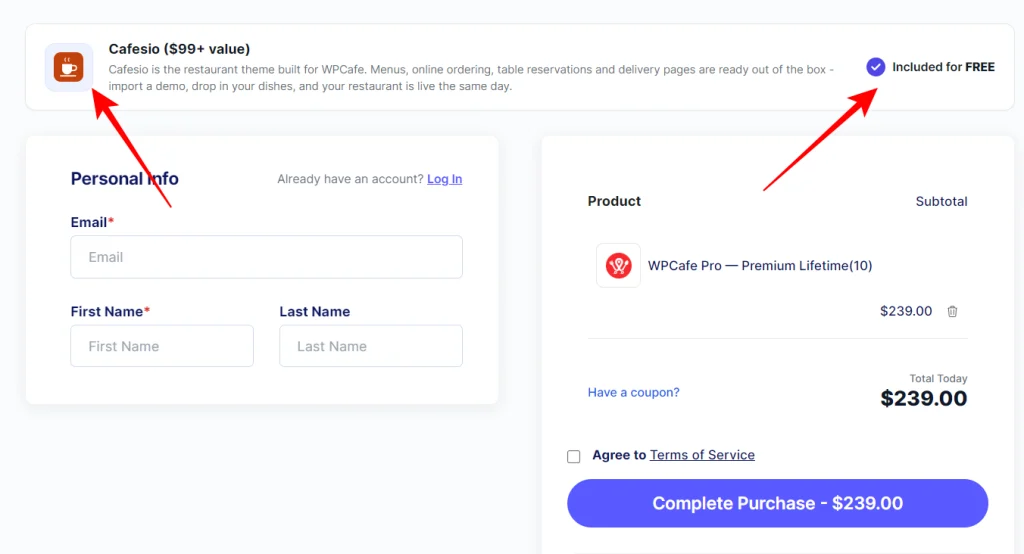
- Free perk: Cafesio restaurant theme ($99+ value) was added free in the Premium Lifetime cart I viewed
- Coupon: No code provided. The sale prices already show on the pricing page and in checkout. Backed by a 15-day money-back guarantee
Coupon: Not needed. The discount is auto-applied at checkout. 👇

Disclaimer: This post contains affiliate links, and I earn a commission from them at no extra cost to you. Thank you for your support!Quick Answer: WPCafe Pro is worth buying on Black Friday if you want menus, online ordering, and table booking inside WordPress without per-order commissions. Premium Lifetime is the sweet spot for most restaurant owners and freelancers, while Standard suits a single-location café. Annual plans make sense only if you prefer a smaller upfront spend.
How to Claim the WPCafe Black Friday Deal
- Open the sale page. Go to the WPCafe Black Friday page. The Black Friday banner and pricing cards load there.
- Pick your billing style. Use the toggle above the cards: Annually or Lifetime. The Lifetime tab carries the 2× Domains badge.
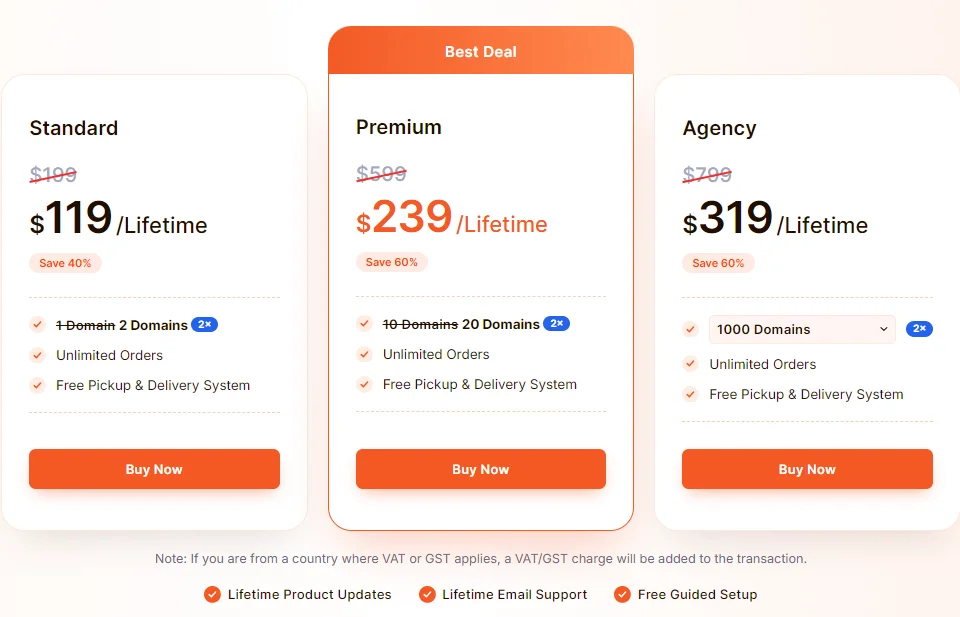
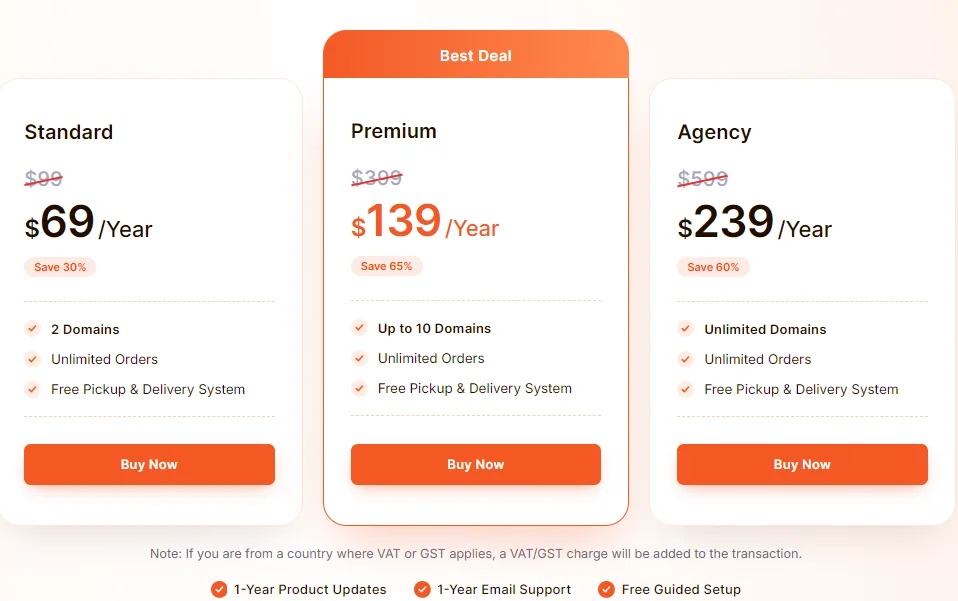
- Choose a plan. Here’s what the cards showed when I checked:
| Plan | Billing | Sale Price | Regular Price | Saving | Domains |
|---|---|---|---|---|---|
| Standard | Annual | $69/Year | $99 | 30% | 2 |
| Premium | Annual | $139/Year | $399 | 65% | Up to 10 |
| Agency | Annual | $239/Year | $599 | 60% | Unlimited |
| Standard | Lifetime | $119/Lifetime | $199 | 40% | 2 (was 1) |
| Premium | Lifetime | $239/Lifetime | $599 | 60% | 20 (was 10) |
| Agency | Lifetime | $319/Lifetime | $799 | 60% | 1000 (selectable) |
Every plan lists Unlimited Orders and the Free Pickup & Delivery System. The lifetime section also lists lifetime product updates, lifetime email support and free guided setup.
- Click Buy Now and fill in checkout. Enter email and name, then check the cart line and total.
- Agree to the terms and complete the purchase. If your country charges VAT or GST, the page says it’s added at checkout. That likely includes India, so the final amount may be higher than the card price.
The checkout does have a “Have a coupon?” link, but since no code was provided, I’d simply go with the sale price you see.
What You Actually Get Inside WPCafe Pro
Think of it as four jobs handled in one place.
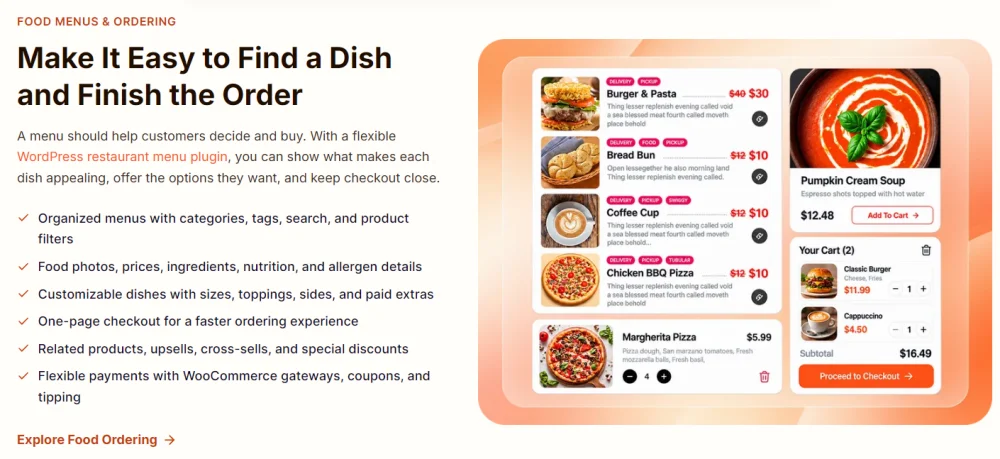
Menus and ordering. You can build menus with categories, tags, search, and filters. Each dish can carry photos, ingredients, nutrition and allergen details, plus sizes, toppings and paid extras. Checkout is one page, with upsells, cross-sells, coupons and tipping, and payments run through WooCommerce gateways.
Pickup, delivery and dine-in. You set service hours, breaks, holidays, minimum spends, and prep times, either globally or per branch. Customers can schedule a slot or order ASAP. You can cap daily orders, show breakfast or lunch menus only at the right hours, and use Google Maps address autocomplete.
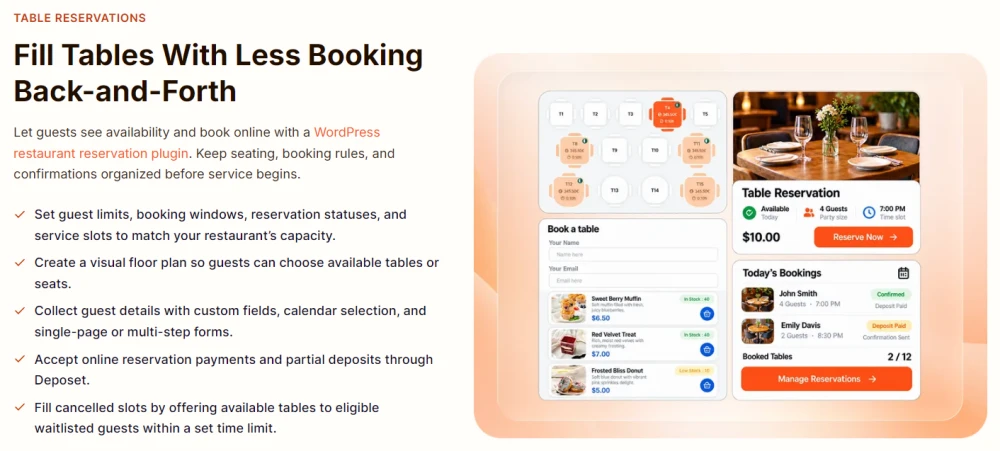
Table reservations. There’s a visual floor plan, custom booking fields, single-page or multi-step forms, and a waitlist that offers cancelled tables to waiting guests within a time limit. Deposits and partial payments run through Deposet.
Design and daily operations. WPCafe lists 34+ ready-made menu layouts, QR-code table ordering, and a receipt layout editor for kitchen tickets. The dashboard shows live order alerts, separate panels for owners, managers, and kitchen staff, and WhatsApp automation. It also lists WPCafe MCP for asking an AI assistant about orders and reservations.
WPCafe comes from ThemeWinter, and you can see its other offers in my ThemeWinter Black Friday deal guide.
Which Plan Should You Pick?
Standard Lifetime (40% off): Right for one café or one restaurant site. It’s the weakest discount of the lifetime set, but a single-location business rarely needs more than 2 domains.
Premium Lifetime (60% off): My pick for most buyers. It suits a restaurant owner with a second site, or a freelancer building a handful of client sites.
Agency Lifetime (60% off): Only for agencies serving many restaurants. The 1000-domain dropdown is overkill for everyone else.
Annual plans: The headline “up to 65%” belongs to Premium Annual, not lifetime. Do the maths first: two years of Premium Annual costs $278, more than the $239 Premium Lifetime. That holds even if renewals stay at the sale price, which the page doesn’t confirm.
Pro Observation: The cart I saw read “WPCafe Pro — Premium Lifetime(10)”, while the pricing card showed 20 domains after the 2× bonus. The label probably reflects the base tier, but after buying, confirm the domain count shown in your account dashboard.
Does It Slow Down Your Site?
I haven’t benchmarked WPCafe with numbers, so treat this as a checklist rather than a verdict.
From a performance standpoint, menu pages are the usual problem. In restaurant projects I’ve worked on, the heaviest pages were menus with dozens of uncompressed food photos, not the plugin itself. With sliders, tabs, and a mini cart, also check three things on your own site:
- LCP: Your top dish image should be compressed and not lazy-loaded above the fold
- CLS: The mini cart and menu filters shouldn’t push content down as they load
- Script bloat: Look in DevTools to see whether plugin scripts load on non-ordering pages too
WPCafe works with WooCommerce for payments. For Elementor or Gutenberg compatibility, I’d test on a staging site before launch.
What Works and What Doesn’t
Pros
- One plugin covers menus, ordering, and table booking, so there are fewer plugins to update
- Ordering runs through WooCommerce gateways, and the page says you keep 100% of every order
- Lifetime plans include updates, email support, and guided setup
- There’s a free version and a 15-day money-back guarantee, so the risk is low
Cons
- The headline 65% applies only to Premium Annual. Lifetime plans top out at 60%
- Reservation deposits depend on Deposit, which is another plugin to keep updated
- Support is listed as email, so don’t expect instant answers mid-service rush
- Annual renewal pricing isn’t shown on the page, and VAT/GST may be added at checkout
WPCafe vs Other Ways to Run Online Ordering
I’m comparing approaches rather than named competitors here, because competitor prices change too often to quote reliably. For a wider look at what’s on sale right now, see my best WordPress Black Friday deals roundup.
| Factor | WPCafe Pro | Hosted ordering platform | WooCommerce + separate booking plugin |
|---|---|---|---|
| Cost model | One-time lifetime or yearly licence | Usually a monthly subscription | Free core, each add-on billed separately |
| Per-order commission | None per the page (100% of orders kept) | Varies by provider | None, but depends on add-ons |
| Table reservations | Built-in with floor plan and waitlist | Often a separate paid module | Needs another plugin |
| Setup effort | One plugin plus WooCommerce for payments | Lowest, vendor-managed | Highest, most plugins to wire up |
| Hosting and updates | Your job | Vendor handles it | Your job |
| Best For | Restaurants already on WordPress | Owners wanting zero maintenance | Developers who like custom builds |
The hosted approach wins on convenience, but you give up control of data and design. The WooCommerce patchwork gives flexibility, but I’ve seen it turn messy once bookings and orders need to talk to each other.
For a restaurant already on WordPress, WPCafe is better because ordering, bookings, and menus sit in one dashboard. If you want someone else to handle uptime and updates, a hosted platform makes more sense. WPCafe’s weakness is simple: hosting, backups, and updates are fully on you.
Who Should Skip This Deal
- Food bloggers who only need a menu page. The free version may be enough.
- Restaurant owners who don’t want to touch WordPress. A hosted platform will cause fewer headaches.
- Anyone buying only because of a countdown. The end date isn’t confirmed, and the refund window exists for a reason.
What to Do After Buying
- Install and activate WPCafe Pro, then ask for the free guided setup that lifetime plans list.
- Set service hours, prep times, and delivery limits before building menu pages.
- Import a Cafesio demo if you got it, then replace the dishes with your own.
- Place a real test order on mobile with your payment gateway.
- Set up reservation emails and confirm your domain count in the account dashboard.
Mistakes to avoid: uploading uncompressed food photos, skipping a staging test, and forgetting tax settings in WooCommerce. If your hosting feels slow under ordering traffic, a managed host like the one in my Cloudways Black Friday deal guide is worth a look.
WPCafe Black Friday Sale
Deal: Up to 65% Off + Free Cafesio Theme
Coupon Code: Not needed. The discount is auto-applied at checkout.👇
Frequently Asked Questions
Is there a WPCafe Black Friday coupon code?
No code was provided with this sale. The discounted prices already show on the pricing page and in the cart. Checkout has a coupon field, but I wouldn’t count on codes stacking. If you’re hunting for more savings across WordPress tools, my WordPress Black Friday deals page lists the live offers.
When does the WPCafe Black Friday sale end?
The end date isn’t confirmed. A countdown timer is running on the page, but sale timers can be extended or reset during BFCM. Check the live timer before you plan around it, and remember the 15-day money-back guarantee if you buy early.
Is the lifetime plan better than annual?
For most buyers, yes. Two years of Premium Annual costs more than Premium Lifetime, and lifetime includes updates, email support, and guided setup. Annual only makes sense if you want a lower upfront cost, and renewal pricing isn’t shown on the page.
Can I try WPCafe before paying?
Yes. There’s a free version you can start with, and the Pro plans carry a 15-day money-back guarantee. Testing the free plugin on a staging site first is the safest way to confirm it fits your theme and workflow.
Is the Cafesio theme free with every plan?
I only saw it in the Premium Lifetime cart, listed as included free with a $99+ value. I can’t confirm it appears for every plan, so check your cart before paying if the theme matters to your decision.
Bottom Line
If your restaurant site runs on WordPress and you’re tired of juggling separate tools, WPCafe Pro at these Black Friday prices is a solid deal. Premium Lifetime gives the best mix of savings and domain flexibility, Standard covers a single café, and annual plans suit tight budgets. Verify the countdown and cart total, test it on staging, and use the refund window if it doesn’t fit. When you’re ready, you can grab the WPCafe Black Friday deal here.
72+ Best WordPress Black Friday/Cyber Monday Deals 2026 [Up to 99% OFF] – Verified Deals Live
Looking for more Black Friday & Cyber Monday software discounts? We have hand-picked and verified 72+ live deals across WordPress hosting, plugins, themes, VPNs, and AI tools—all in one place so you don’t miss out on the biggest savings of the year. Explore the complete WordPress Black Friday Deals 2026 guide.
Quick Deal Snapshot [STATUS: LIVE NOW]
Status: Live now (Ends December 11, 2026)
- Savings: Save up to 99% across 60+ verified WordPress & SaaS brands
- Web Hosting & Domains: Up to 95% OFF + Free Domains & Migrations
- WordPress Plugins & Builders: Up to 90% OFF + Lifetime Deals
- Themes, AI & VPN Tools: Up to 88% OFF + Extra Free Months
- Verified Discounts: Direct promo codes & auto-applied checkout links
- Updated Daily: New live deals added throughout Black Friday week
Coupon: Auto-applied & verified codes inside.

Related Posts