Bluehost Cloud sits in a different league from their shared hosting. It’s fully managed, built on a multi-regional cloud infrastructure, and priced accordingly — starting at $65/mo and going up to $230/mo.
Three plans. Big price gaps. And most guides just list the specs without telling you what actually matters.
This article cuts through that. I’ll break down what each plan gives you, where the real differences lie beyond the numbers, and which plan makes sense for which type of site or business.
This post contains affiliate links. If you purchase through our links, we may earn a small commission at no extra cost to you. Thank you for your support!What Makes Bluehost Cloud Different From Regular Hosting
Before comparing plans, it’s worth understanding what you’re actually paying for — because “cloud hosting” means different things on different platforms.
Bluehost Cloud is a fully managed WordPress platform running on a distributed, multi-region cloud infrastructure. It’s not a VPS with a WordPress installer slapped on top.
Here’s what every plan includes, regardless of tier:
- 100% uptime SLA — with credits if they fail (5% of the monthly fee per 30 minutes of downtime, up to 100%)
- One-Click Staging — push/pull between staging and live without manual file transfers
- Global Edge Caching + CDN — multi-region delivery, not just a bolt-on CDN
- NVMe SSD Storage — significantly faster read/write than standard SSDs
- Automated daily backups (via Jetpack) with restore points
- Managed WordPress — automatic core and plugin updates, platform hardening, DDoS/WAF integrations
- Yoast SEO Premium — included across all three plans
- Unrestricted Bandwidth
- 24/7 Priority Support — direct access to WordPress and cloud platform experts, not frontline triage
The key differentiators between plans are: number of websites, storage, and vCPU threads.
Understanding vCPUs — The Number That Actually Matters Most
Most people skip this and focus on storage. That’s a mistake.
A vCPU (virtual CPU) on Bluehost Cloud maps to a PHP worker — the process that handles each request for dynamic pages. More vCPUs = more simultaneous requests served = faster response under real traffic load.
vCPUs are pooled at the account level. You distribute them across sites as needed. So on Cloud 25 with 75 vCPUs, you might allocate 10–15 to a busy WooCommerce store and spread the remaining 60 across lighter client sites.
Each site can use up to 10 vCPUs at a time.
This is where the plans actually separate themselves:
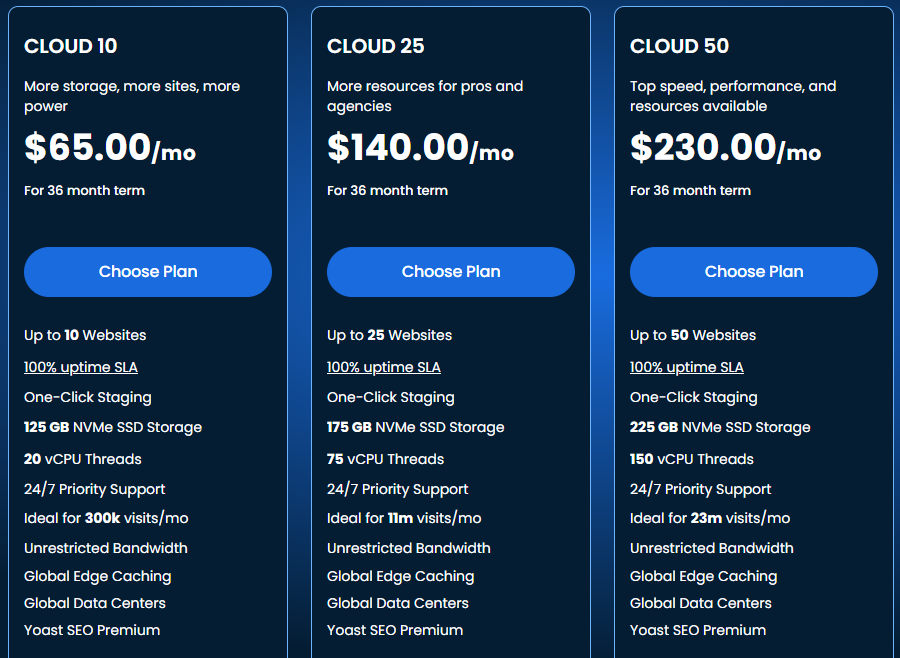
| Feature | Cloud 10 | Cloud 25 | Cloud 50 |
|---|---|---|---|
| Websites | Up to 10 | Up to 25 | Up to 50 |
| NVMe SSD Storage | 125 GB | 175 GB | 225 GB |
| vCPU Threads | 20 vCPUs | 75 vCPUs | 150 vCPUs |
| Ideal Traffic/mo | Up to 300k visits | Up to 1M visits | Up to 23M visits |
| Price (36-month) | $65/mo | $140/mo | $230/mo |
| Uptime SLA | 100% | 100% | 100% |
| Staging | One-Click | One-Click | One-Click |
| Bandwidth | Unrestricted | Unrestricted | Unrestricted |
| Yoast SEO Premium | ✓ Included | ✓ Included | ✓ Included |
| 24/7 Priority Support | ✓ | ✓ | ✓ |
All prices are for a 36-month term. Check the official site for current promotional rates.
The jump from Cloud 10 (20 vCPUs) to Cloud 25 (75 vCPUs) is enormous — nearly 4x the compute. The jump from Cloud 25 to Cloud 50 doubles it again.
Cloud 10 — $65/mo: Who It’s Actually Built For
Cloud 10 is the entry point, but “entry” doesn’t mean weak. At $65/mo on a 36-month term, you’re getting managed cloud infrastructure that would cost significantly more to replicate independently.
What you get:
- Up to 10 websites
- 125 GB NVMe SSD storage
- 20 vCPU threads (pooled across all sites)
- Ideal for up to 300,000 visits/month
Best fit for:
- A content blogger running 3–5 WordPress sites with moderate traffic
- A small business with one main site and a few staging/dev environments
- Someone migrating from shared hosting who wants managed infrastructure without paying for capacity they won’t use
Where it gets tight:
The 20 vCPU pool sounds reasonable until you realise each dynamic WordPress page load can consume a PHP worker momentarily. On a WooCommerce store with checkout pages, cart sessions, and simultaneous users, you’ll feel this constraint faster than you’d expect.
I’ve worked on client sites where a mid-size WooCommerce store started pushing consistent 50k–80k monthly visits with flash sales occasionally spiking to 2–3x that. On 20 vCPUs, those spike moments would create queuing. Not crashes — but noticeable slowdowns during peak load.
Cloud 10 is fine for content-heavy sites. For serious eCommerce, look at Cloud 25.
Cloud 25 — $140/mo: The Most Practical Choice for Agencies
This is the sweet spot plan, and if you’re building or managing sites professionally, it’s where you’ll likely land.
What you get:
- Up to 25 websites
- 175 GB NVMe SSD storage
- 75 vCPU threads
- Ideal for up to 1 million visits/month
The 75 vCPU pool changes things significantly. You can run a WooCommerce flagship site at full allocation (10 vCPUs), keep 3–4 agency client sites at 5–8 vCPUs each, and still have compute headroom for staging and dev environments.
From an agency workflow standpoint, the combination of 25 sites + one-click staging + priority support is genuinely efficient. You’re not patching servers, you’re not managing caching plugins site-by-site, and the automated plugin updates reduce the maintenance overhead that typically burns hours in client work.
Best fit for:
- Freelancers and agencies managing 10–20 client WordPress sites
- Growing eCommerce operations are expecting traffic scaling
- SaaS-adjacent WordPress products (membership sites, LMS platforms) where concurrency matters
One honest note: The jump from $65/mo to $140/mo is steep if you’re currently on 3–5 sites with modest traffic. Don’t buy into Cloud 25 capacity you won’t use within 6–12 months.
Cloud 50 — $230/mo: Enterprise Scale, Not for Everyone
Cloud 50 is built for scale that most individual operators don’t need. 150 vCPUs, 225 GB storage, 50 websites, and traffic headroom up to 23 million visits per month.
What you get:
- Up to 50 websites
- 225 GB NVMe SSD storage
- 150 vCPU threads
- Ideal for up to 23 million visits/month
At this tier, you’re looking at large agencies running dozens of client sites, high-traffic media publishers, or eCommerce businesses running multiple storefronts under one account.
The real value of Cloud 50 isn’t just the raw specs — it’s the resource headroom. At 150 vCPUs, you can afford to over-allocate during campaigns, absorb traffic spikes across multiple sites simultaneously, and never worry about a single high-traffic event choking other sites in your pool.
Best fit for:
- Large digital agencies (20+ active client sites)
- Enterprise WooCommerce or multi-storefront setups
- High-traffic publishers or affiliate networks with consistent 5M+ monthly visits
Who should skip it:
If you can’t clearly identify 15+ active websites today that need this infrastructure, Cloud 50 is overkill. The $90/mo gap between Cloud 25 and Cloud 50 adds up to $1,080/year. That’s real money to spend on compute you’re not using.
Pros and Cons of Bluehost Cloud Hosting
Pros
- 100% uptime SLA is genuinely backed — they credit your account, not just promise it. Real-time site replication across multi-region data centres with automatic failover, even if a full data centre goes offline.
- vCPU pooling gives flexibility — allocating compute per site rather than per plan means you can prioritise resources intelligently instead of paying for per-site fixed allocations.
- Fully managed stack reduces overhead — automated core/plugin updates, DDoS/WAF integrations, and staging baked in. For agencies, this directly reduces maintenance billable hours.
- Yoast SEO Premium on all plans — not a huge dollar value but a useful inclusion for WordPress-heavy workflows.
- Free migration with zero downtime — content, themes, and plugins preserved; includes free domain transfer if needed.
Cons
- Pricing is committed on 36-month terms — the $65/mo, $140/mo, and $230/mo rates are for the longest billing cycle. Month-to-month rates are considerably higher, which matters if you’re testing the platform.
- Cloud 10’s 20 vCPUs gets tight under WooCommerce load — this isn’t a dealbreaker, but it’s a limitation Bluehost’s own marketing glosses over.
- No entry-level pricing for single-site operators — if you run one WordPress site, even Cloud 10 is expensive compared to managed WordPress alternatives. There’s no single-site cloud tier.
- Platform-managed environment limits server-level customisation — if you need custom PHP configurations, specific server modules, or OS-level access, Cloud isn’t the right fit. That’s what VPS/dedicated is for.
Bluehost Cloud vs Alternatives: How It Actually Compares
Bluehost Cloud sits in a specific niche — fully managed, multi-site WordPress cloud with a 100% uptime SLA. To understand if the pricing makes sense, you need to compare it against what else exists at similar or lower price points.
Here’s how it stacks up against Hostinger Cloud and Liquid Web Cloud Dedicated:
| Feature | Bluehost Cloud 10 | Hostinger Cloud Startup | Liquid Web Xeon E-2356G |
|---|---|---|---|
| Price/mo | $65 (36-month) | $7.99 (48-month) | $106.50/mo (promo) |
| Sites | 10 | 100 | Unlimited (InterWorx) |
| CPU | 20 vCPUs (pooled) | 4 CPU cores | 6 cores @ 3.2 GHz (dedicated) |
| RAM | Not specified per plan | 4 GB | 32 GB |
| Storage | 125 GB NVMe | 100 GB NVMe | 2×960 GB SSD RAID 1 |
| PHP Workers | Pooled vCPUs | 100 | Root-level control |
| Managed WordPress | Full | Full | Self + Fully managed option |
| Uptime SLA | 100% (credited) | 99.9% | 100% (guaranteed) |
| Staging | One-click | Not built-in | Via control panel |
| Bandwidth | Unrestricted | Not specified | 10 TB |
| Support | 24/7 Priority | 24/7 Priority | 24/7 Expert (Heroic Support) |
| Best For | Multi-site agencies | Budget multi-site | High-resource single environments |
How to read this:
Hostinger Cloud Startup at $7.99/mo looks dramatically cheaper — and it is, on paper. But the 48-month commitment is required for that rate, and renewal jumps to $25.99/mo. For agencies needing serious compute under WordPress load, 4 CPU cores with 4 GB RAM will feel the pressure faster than Bluehost Cloud 10’s vCPU pool. Where Hostinger genuinely wins: pure site count (100 sites) and entry-level affordability for lighter workloads.
Liquid Web Cloud Dedicated at $106.50/mo is a different product category entirely. You’re getting dedicated hardware — 6 physical cores, 32 GB RAM, RAID storage — not a shared cloud pool. It’s more expensive than Cloud 10, but the raw compute is incomparable. For a single high-stakes WooCommerce store or a resource-intensive application, Liquid Web’s dedicated environment offers headroom that no managed WordPress cloud plan can match at any tier. The trade-off is management overhead — you need to know what you’re doing, or pay for fully managed add-ons.
The honest verdict by use case:
For multi-site WordPress agency work under moderate traffic → Bluehost Cloud 10 or Cloud 25 is the most operationally efficient choice.
For budget-conscious freelancers managing lighter sites at scale → Hostinger Cloud Startup makes financial sense, provided traffic stays manageable.
For a single high-traffic WooCommerce operation or SaaS platform needing maximum dedicated compute → Liquid Web Cloud Dedicated is worth the premium over any shared cloud plan.
Which Plan Should You Actually Choose?
Here’s the honest, use-case-based breakdown:
Choose Cloud 10 ($65/mo) if:
You’re running 5–10 content-heavy WordPress sites (blogs, portfolio sites, informational sites) with combined traffic under 300k visits/month. You want managed infrastructure without agency-level overhead.
Choose Cloud 25 ($140/mo) if:
You’re an agency or freelancer managing 10–25 client sites, running at least one WooCommerce store, or expecting traffic growth to push past 300k monthly visits. The 75 vCPU pool is the real reason to be here.
Choose Cloud 50 ($230/mo) if:
You’re managing 20+ active client sites simultaneously, running high-traffic eCommerce across multiple storefronts, or operating a publishing network with consistent high-volume traffic. Don’t buy it speculatively.
Skip Bluehost Cloud entirely if:
You’re a beginner running one blog. You’re better served by Hostinger or a standard shared plan until your traffic and complexity justify the infrastructure cost.
What to Do After Getting on Bluehost Cloud
Once you’re set up, don’t just import your site and leave. A few things worth doing immediately:
- Set up staging immediately — One-click staging is one of the best features here. Use it before any major plugin updates or theme changes.
- Allocate vCPUs intentionally — Log into your dashboard and assign vCPU threads based on each site’s actual traffic, not evenly across all sites.
- Review the WAF rules — The premium WAF is active by default but worth checking if you run WooCommerce or membership sites where login page traffic is heavy.
- Test your restore points — Bluehost uses Jetpack for automated daily backups. Do a test restore in staging within the first week so you know exactly how the process works before you actually need it.
- Turn on 2FA — Available at account level. With shared access for client sites, this matters.
Frequently Asked Questions
If you’re managing one basic blog, no — shared hosting is more economical. But if you’re running multiple sites where uptime, speed, and managed infrastructure matter (eCommerce, agencies, high-traffic content sites), the gap in performance and reliability justifies the cost difference significantly.
What does the 100% uptime SLA actually mean?
It means Bluehost credits your account 5% of your monthly fee for every 30 minutes of unplanned downtime, and up to 100% of your monthly fee. This excludes scheduled maintenance. Real-time site replication across multi-region data centres and automatic failover back to the SLA — it’s not just a marketing phrase.
Can I upgrade from Cloud 10 to Cloud 25 later?
Yes. Bluehost Cloud allows scaling up, and their support team can help with the transition. You don’t need to rebuild or re-migrate your sites.
What happens if my site gets a sudden traffic spike?
The platform auto-scales using load balancers and multi-region replicas to absorb surges. You can also upgrade to more resources quickly, and the team can assist with caching and performance tuning if needed.
Is Bluehost Cloud good for WooCommerce?
Cloud 25 and Cloud 50 are well-suited for WooCommerce due to their vCPU pools, global CDN, and scalable architecture. Cloud 10 can handle a smaller WooCommerce store, but shops expecting traffic spikes should start at Cloud 25.
Does Bluehost Cloud support agencies managing client sites?
Yes — the platform includes multisite management tools, client handoff workflows, one-click staging, and a dashboard for managing user permissions across sites. Cloud 25 is particularly well-positioned for freelancers and small agencies.
Can I use Bluehost Cloud if I sell online?
Yes. Bluehost Cloud works with WooCommerce. The global CDN, scalable resources, automatic daily backups, and SSL support handle the demands of an eCommerce setup. For larger storefronts, Cloud 25 or Cloud 50 provides the vCPU headroom needed during sales events.
Final Verdict
Bluehost Cloud is a legitimate managed WordPress infrastructure play — not a rebranded shared plan with a premium badge. The 100% uptime SLA, vCPU pooling, one-click staging, and global CDN are real differentiators.
For most users reading this, Cloud 25 at $140/mo is the practical choice — especially if you’re managing client work or running a growing eCommerce operation. Cloud 10 works well for multi-site content operations under moderate traffic. Cloud 50 is for genuinely large-scale setups that can justify the investment.
If you’re ready to move past shared hosting and want infrastructure that handles growth without constant server management, Bluehost Cloud is worth a serious look.