Most people picking a Bluehost plan spend five minutes on the pricing page, grab the cheapest option, and move on. That works — until renewal hits, or they realize their plan can’t handle the traffic they’re getting.
This breakdown skips the fluff. You’ll know exactly what each plan gets you, what it quietly leaves out, and which one matches your actual situation — whether you’re starting a blog, running client sites, or building an online store.
Quick Answer
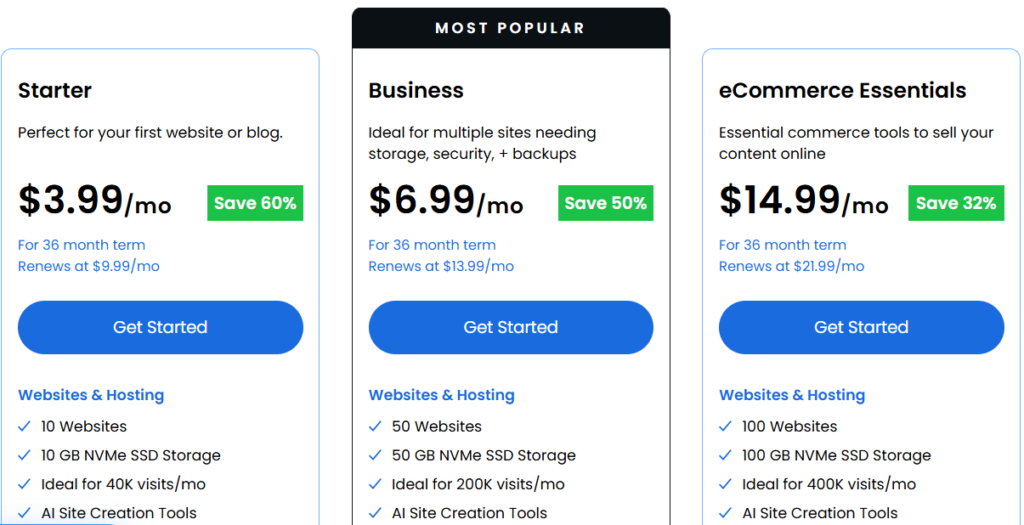
If you’re just starting out with one blog or website, the Starter at $3.99/mo is fine — but watch the renewal price and the 10 GB storage cap. If you’re managing multiple sites or need phone support, Business at $6.99/mo is the real sweet spot. The eCommerce Essentials at $14.99/mo only makes sense if you’re running a WooCommerce store that needs built-in membership, subscription, or affiliate tools.
This post contains affiliate links. If you purchase through our links, we may earn a small commission at no extra cost to you. Thank you for your support!The Renewal Pricing Nobody Talks About
Before comparing features, here’s what matters most — and what most comparison articles bury in a footnote.
| Plan | Promo Price (36-month) | Renewal Price |
|---|---|---|
| Starter | $3.99/mo | $9.99/mo |
| Business | $6.99/mo | $13.99/mo |
| eCommerce Essentials | $14.99/mo | $21.99/mo |
That Starter plan you’re eyeing at $3.99/mo? After 36 months, it becomes $9.99/mo. The Business plan goes from $6.99 to $13.99. These are promotional prices locked in only for the initial term.
This isn’t a hidden fee — Bluehost is transparent about it on the pricing page. But most buyers don’t factor this into their real budget. If you’re planning to stay long-term (which you should be, for SEO stability), the 36-month term gives you the lowest entry price and the most time before renewal kicks in.
What Actually Separates the Three Plans
This is where things get interesting — because the headline differences (storage, websites) don’t tell the full story.
Storage: The 10 GB Trap on Starter
The Starter plan gives you 10 GB NVMe SSD storage across 10 websites. Sounds reasonable until you actually use it.
A typical WordPress install with a theme, 10–15 plugins, and a few hundred posts can consume 2–3 GB easily. Add images, video thumbnails, WooCommerce product photos, or a page builder like Elementor — and 10 GB becomes a ceiling you’ll hit faster than you expect.
Business jumps to 50 GB across 50 sites. eCommerce goes to 100 GB across 100 sites. If you’re managing client websites or plan to grow, Starter’s storage limit is the single biggest reason to skip it.
Traffic Capacity: What “Ideal for X visits/mo” Actually Means
Bluehost is upfront about expected traffic thresholds per plan:
- Starter — Ideal for 40K visits/month
- Business — Ideal for 200K visits/month
- eCommerce Essentials — Ideal for 400K visits/month
These aren’t hard limits — shared hosting doesn’t work that way. But they’re honest benchmarks for how the resource allocation is structured. If your site is getting consistent traffic above these ranges, you’ll likely feel it in response times before Bluehost flags anything.
For a new blog or small business site, 40K/mo is more than enough headroom. For an established affiliate site or multi-client setup, Business gives you room to breathe. For a WooCommerce store with seasonal spikes, the eCommerce plan’s 400K threshold matters.
If you’re curious about how Bluehost holds up under real traffic pressure, I’ve covered that in more detail in my Bluehost is good for high traffic sites breakdown.
Phone Support: Only Available from Business Upward
Starter includes 24/7 chat support. Phone support is not included.
This is a deal-breaker for some users — not because chat is bad, but because when something goes genuinely wrong with a live client site, waiting in a chat queue feels different than being on a call.
Business and eCommerce Essentials both include phone support. If you’re running client projects or an active WooCommerce store, this matters more than any storage number.
AI-Powered Malware Detection: Not on Starter
All plans include free malware scanning. But Business and eCommerce Essentials get AI-Powered Malware Detection & Removal — a more proactive layer that catches threats before they escalate.
Starter gets standard Malware Detection & Removal. For a personal blog, that’s probably fine. For a client site or store handling transactions, the AI-powered version on Business is worth noting.
Domain Privacy: Free on Business, Not Starter
Business and eCommerce include free Domain Privacy for the first year. On Starter, you’d need to add this separately if you want your WHOIS information protected.
Small detail — but it’s a real cost difference if you’re buying multiple domains.
Free CDN: Business and eCommerce Only
A CDN routes your content through servers closer to visitors globally, improving load times for international audiences. Business and eCommerce Essentials include it. Starter does not.
If your audience is primarily local (India, for example), this may not be critical. But for an affiliate site targeting the US or UK, the CDN inclusion on Business is meaningful from a Core Web Vitals standpoint.
The eCommerce Essentials Plan — When It Makes Sense and When It Doesn’t
At $14.99/mo (renewing at $21.99/mo), eCommerce Essentials is roughly 2x the Business plan price. That gap is only justified by one thing: the Commerce Tools bundle.
What you get that Business doesn’t have:
- WooCommerce Auto-Install
- Secure Payment Processing
- Product Subscriptions
- Visitor Memberships
- Offer Paid Courses
- Affiliate Program
- Custom Email Templates
- Easy Social Logins
If your store needs subscriptions, memberships, or a built-in affiliate program, this plan bundles what would otherwise require multiple premium plugins. That’s real value for a digital product store or membership site.
But if you’re just launching a basic WooCommerce store selling physical products? The Business plan + a free WooCommerce plugin covers you. You don’t need eCommerce Essentials for a simple shop.
I’ve gone deeper on this in my Bluehost WooCommerce hosting review if you want the full store-specific picture.
A few things that don’t get enough attention because they’re consistent across all plans:
WordPress Staging Site — Available on Starter, Business, and eCommerce. This is genuinely unusual for entry-level shared hosting. Being able to test theme or plugin updates on a staging environment before pushing live is a workflow feature most beginners don’t know they need — until they break something on a live site.
SSH & WP-CLI — Also on all three plans. For developers or anyone managing WordPress from the command line, having WP-CLI on a $3.99/mo plan is a legitimate value point.
99.99% Uptime SLA — All plans carry the same uptime commitment. According to WPShout’s November 2025 data cited by Bluehost, their US load time came in at 0.35s — faster than Kinsta (0.43s), WP Engine (0.53s), SiteGround (1.17s), and Hostinger (1.92s) in that comparison. That’s solid for shared hosting.
Free Domain for Year 1 — All plans include this. Not a differentiator between plans, but worth factoring into the overall first-year cost.
Pros and Cons
Pros
- Staging site on every plan, including the $3.99 Starter — genuinely useful for safe updates
- SSH & WP-CLI access even at the entry level
- 99.99% uptime SLA with competitive US load times (0.35s per WPShout November 2025 data)
- eCommerce plan bundles membership, subscription, and affiliate tools that would cost significantly more via plugins
- Free domain for year 1 across all plans
Cons
- Starter’s 10 GB storage is tight for anything beyond a single lean blog
- Phone support completely absent on the Starter plan
- Renewal pricing jumps are significant — Starter goes from $3.99 to $9.99/mo, Business from $6.99 to $13.99/mo
- CDN is not included in the Starter, which limits performance for international audiences
- eCommerce Essentials is expensive at renewal ($21.99/mo) if you only use 20% of its commerce features
Bluehost vs Hostinger — A Quick Reality Check
Hostinger is the most common alternative people consider when comparing Bluehost plans. Here’s how the numbers actually stack up.
| Feature | Bluehost Starter | Bluehost Business | Hostinger Premium | Hostinger Business |
|---|---|---|---|---|
| Promo Price | $3.99/mo | $6.99/mo | $2.99/mo | $3.99/mo |
| Renewal Price | $9.99/mo | $13.99/mo | $10.99/mo | $16.99/mo |
| Websites | 10 | 50 | 3 | 50 |
| Storage | 10 GB NVMe | 50 GB NVMe | 20 GB SSD | 50 GB NVMe |
| Free CDN | No | Yes | No | Yes |
| Staging Site | Yes | Yes | No | No |
| Phone Support | No | Yes | No | No |
| Daily Backups | No | No | Weekly only | Yes (daily + on-demand) |
| AI WordPress Tools | No | No | No | Yes (AI Agent — Free) |
| WordPress Multisite | No | No | No | Yes |
| Free Domain (Year 1) | Yes | Yes | Yes | Yes |
| Uptime SLA | 99.99% | 99.99% | 99.9% | 99.9% |
| Official WP Partner | Yes | Yes | No | No |
| Best For | Single blogs | Agencies, freelancers | Budget starters (1–3 sites) | Growing multi-site users |
At face value, Hostinger Business at $3.99/mo looks like it matches Bluehost Business at $6.99/mo — same promo price range, same 50 websites, same 50 GB NVMe. But dig a layer deeper and the differences become clearer.
Bluehost gives you a staging site on every plan, including Starter — something Hostinger doesn’t offer on shared hosting. If you’re building client sites or testing plugin updates before pushing live, that matters. Bluehost also carries an official WordPress.org partnership status, which carries real weight for long-term compatibility and security response.
Hostinger counters with things Bluehost shared plans don’t have at all: an AI Agent for WordPress (free on Business), daily and on-demand backups, WordPress Multisite support, and a dedicated IP address on their Cloud Startup plan ($7.99/mo). If you’re building AI-assisted WordPress sites or managing a growing multi-site network, Hostinger Business is genuinely compelling.
One more thing worth noting — Hostinger’s Premium plan at $2.99/mo only allows 3 websites. Bluehost Starter at $3.99/mo allows 10. If you’re running more than 3 sites and the budget is tight, Bluehost Starter actually gives you more room at a slightly higher price.
Bottom line: For a first blog or personal project, Hostinger Premium ($2.99/mo) is hard to beat on price. For agency work, client projects, or anyone who values phone support and staging, Bluehost Business ($6.99/mo) has the edge. If you want to check out Hostinger directly, Visit the Hostinger official website
I’ve also written a full Hostinger sign-up guide and WordPress installation walkthrough on Hostinger if you want to compare the setup experience side by side.
Which Plan Should You Actually Pick?
Go with Starter ($3.99/mo) if:
You’re building your first blog or personal site, you don’t need phone support, and you’re comfortable staying under 10 GB for a while. It’s a real entry point with staging, and WP-CLI included — just commit to the 36-month term to lock in the price. Good starting point if you’re following a blogging guide and just getting off the ground.
If you’re wondering whether Bluehost is actually a good fit for beginners, I’ve covered that in detail here: Is Bluehost Good for Beginners?
Go with Business ($6.99/mo) if:
You’re managing multiple sites, need phone support, want AI-powered malware detection, or you’re running client projects. The jump from Starter is $3/mo — but the differences in support, storage (50 GB vs 10 GB), CDN, and domain privacy are meaningful. This is the plan I’d recommend to most WordPress freelancers and small agencies without hesitation.
Go with eCommerce Essentials ($14.99/mo) if:
You need WooCommerce with subscriptions, memberships, an affiliate program, or paid courses built in. If you’re building a digital product store or membership community and don’t want to stitch together three separate premium plugins, this plan pays for itself. If you’re just selling physical products, start with Business and add WooCommerce — you’ll save money.
My Real Experience With Bluehost Business (7+ Years Later)
I started my blogging journey on April 25, 2018, and the first hosting plan I bought was Bluehost Business, on a 3-year term with the US server location.
Here’s what that first year actually looked like: nothing. The sites I built took close to 12 months to start showing any meaningful rankings. That’s not a Bluehost problem — that’s just how SEO works. A new domain needs time to build authority, and most beginners underestimate that cycle completely.
The 3-year term gave me breathing room. Year one was the slow build. Years two and three were when traffic actually started coming in — and by the time my plan was approaching renewal, I had 30+ websites hosted on that single Business plan account.
That’s the part most plan comparison articles miss. When you start a blog, you rarely stop at one. You test niches, build new projects, and take on client work. Bluehost Business’s 50-site limit gave me space to grow without hitting a ceiling mid-journey.
When my 3-year term expired, and traffic had genuinely scaled, I moved to Hostinger Cloud — which made sense at that stage. But for where I was starting from in 2018? Bluehost Business was exactly the right call.
This is why I recommend the Business plan for beginners who are serious about blogging, not the Starter. The Starter’s 10-website cap sounds fine on day one. But hosting is a long-term commitment, and upgrading mid-cycle or at renewal always costs more. Locking into Business from the start gives you room to experiment without the pressure to upgrade.
If you’re managing fewer than 10 sites and genuinely won’t scale beyond that, Starter works. But in my experience, most bloggers who stick with it eventually outgrow 10 sites — usually right around the time renewal pricing kicks in.
What to Do After Buying
Once your plan is active:
- Install WordPress — Bluehost’s one-click installer makes this quick. Don’t let the default theme stay active.
- Pick a lightweight theme — GeneratePress or Kadence are my go-to recommendations for performance. Here’s my GeneratePress Premium install guide if you need it.
- Install only the plugins you actually need — Bloated plugin lists hurt Core Web Vitals. Start with the essentials: SEO, caching, and security. My essential plugins guide covers this in detail.
- Enable staging before making major changes — It’s available on every plan. Use it.
- Check your storage usage regularly — especially on Starter. If you’re consistently above 7–8 GB, plan your upgrade before you hit the ceiling under load.
Frequently Asked Questions
Is Bluehost Starter enough for a WordPress blog?
For most new bloggers, yes — with caveats. The 10 GB storage handles a lean WordPress blog comfortably for a year or two. The catch is no phone support and no CDN. If you’re monetizing quickly or expect traffic above 40K/mo, the Business plan is a safer long-term choice.
Can I upgrade my Bluehost plan later?
Yes. Bluehost allows plan upgrades from within the account dashboard. You’ll get prorated credit for the remaining time on your current plan. That said, starting on the right plan avoids the friction of mid-cycle upgrades.
Does the Bluehost Starter plan include a free domain?
Yes — all three plans (Starter, Business, and eCommerce Essentials) include a free domain name for the first year. After that, you’ll pay standard renewal pricing for the domain separately.
Is the eCommerce Essentials plan good for WooCommerce?
It depends on what your store needs. If you’re selling digital products with subscriptions, memberships, or an affiliate program built in, the commerce tools bundle makes this plan worth it. For a basic WooCommerce store, Business + free WooCommerce plugin is more cost-efficient. More details here: Is Bluehost Good for WooCommerce?
What’s the actual renewal price for Bluehost plans?
Starter renews at $9.99/mo, Business at $13.99/mo, and eCommerce Essentials at $21.99/mo — all after the initial 36-month promotional term.
Is there a money-back guarantee?
Yes. All three plans come with a 30-day money-back guarantee. Domain registration fees are typically non-refundable.
Yes — and this is actually rare for shared hosting at this price point. WordPress staging is available on all three plans, including the $3.99/mo Starter.
Final Verdict
The Bluehost Starter plan is a decent entry point — but only if you go in knowing its limits: 10 GB storage, no phone support, no CDN. For most people reading this, Business at $6.99/mo is the smarter buy. The storage jump alone (10 GB → 50 GB) is worth the $3/mo difference, and phone support plus AI-powered malware detection make it a real upgrade for anyone managing sites seriously.
eCommerce Essentials is a strong plan — but only if you’re actually using the commerce-specific tools it bundles. Don’t overpay for features you won’t touch.