Most comparisons of these two tools get it wrong from the first paragraph. They frame it as a head-to-head battle when these are fundamentally different tools built for different jobs.
Semrush is a full-stack SEO platform — keyword research, backlink analysis, rank tracking, site audit, competitor intelligence. Surfer SEO is a content optimization tool that has evolved to include AI visibility tracking. Comparing them directly is a bit like comparing a Swiss Army knife with a scalpel.
That said, you still need to pick one (or figure out if you need both). This breakdown is based on real usage across my own sites and client projects.
The Short Answer
If you need keyword research, backlink data, and site auditing under one roof — Semrush wins. If your primary workflow is writing and optimizing content with real-time NLP scoring, Surfer SEO wins. Many serious SEO teams use both, but if budget forces a choice, your answer depends entirely on where you spend most of your working hours.
This post contains affiliate links. If you purchase through our links, we may earn a small commission at no extra cost to you. Thank you for your support!What Each Tool Actually Does
Before getting into comparisons, it helps to be honest about what each tool was built for.
Semrush started as a keyword and competitor research tool and has grown into one of the most complete SEO suites available. With Semrush, you can research any domain’s organic traffic, find keyword gaps, audit your site for technical issues, track rankings across locations and devices, analyze backlink profiles, run paid ad research, and now — with Semrush One — monitor your brand’s presence in AI search results.
Surfer SEO started as an on-page optimization tool. You paste your target keyword, it pulls the top-ranking pages, analyzes NLP entities and content structure, and gives you a Content Score as you write. Over time, Surfer added AI writing assistance (Surfy), a Topical Map feature, Cannibalization Reports, and AI visibility tracking across ChatGPT, Perplexity, Google AI Mode, and Google AI Overview.
The overlap is smaller than it looks on paper.
Where Surfer SEO Has a Clear Edge
Content Scoring While You Write
This is Surfer’s strongest differentiator. The real-time Content Score system — which evaluates keyword usage, NLP entities, headings, word count, and structure against top-ranking pages — genuinely changes how content gets written.
I’ve used this on client projects where content writers would draft articles in Google Docs with the Surfer extension active. The feedback loop is immediate. You can see which terms are underrepresented, where structural gaps exist, and how the score changes as you edit. Semrush does not have an equivalent feature at this level of granularity.
Surfer’s 1-click Content Optimization (available from the Standard plan at $119/mo monthly or $99/mo billed annually) is also genuinely useful for refreshing existing pages — it pulls in NLP suggestions for pages that have lost rankings.
AI Visibility Tracking
Surfer now tracks how your brand appears across AI platforms — ChatGPT, Perplexity, Google AI Mode, Google AI Overview, and Google Gemini. The Standard plan lets you track 25 AI prompts refreshed weekly. The Pro plan ($219/mo monthly, $182/mo annually) bumps that to 50 prompts with daily refresh.
This is a real gap Surfer is filling before most competitors do it properly. If you’re in a niche where AI overviews are eating your traffic, monitoring which prompts surface your brand (or your competitors) is increasingly valuable.
Content Planning Depth
Surfer’s Topical Map and Cannibalization Report (both available from Pro plan onwards) help content teams plan clusters and identify pages eating each other’s rankings. These aren’t perfect features — the Topical Map can generate suggestions that need editorial filtering — but they’re genuinely useful as a starting point.
Where Semrush Has a Clear Edge
Keyword Research Depth
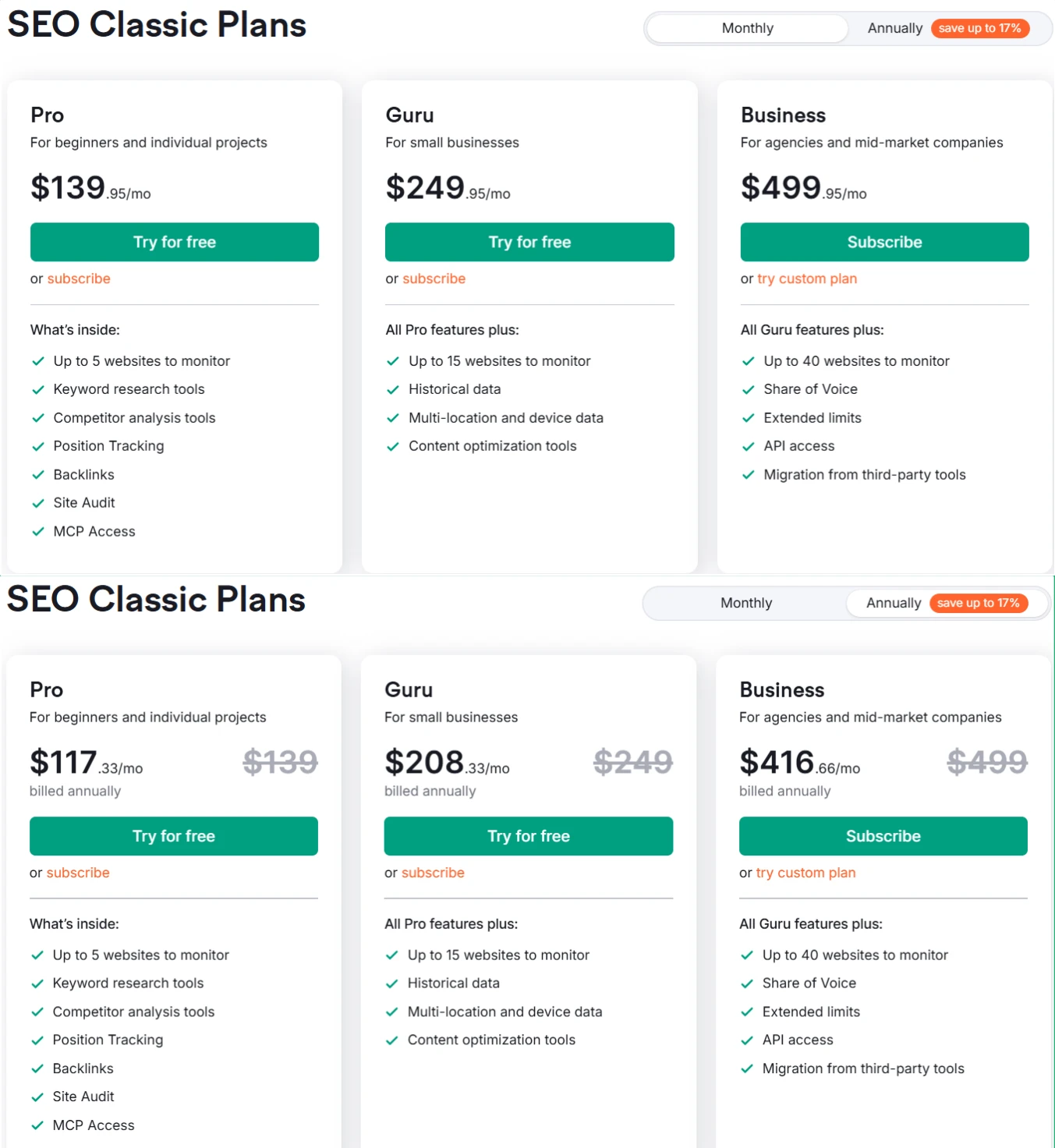
Nothing in Surfer’s stack comes close to Semrush’s keyword research capabilities. The Keyword Magic Tool gives you access to Semrush’s database with filters for intent, difficulty, SERP features, CPC, volume trends, and more. On the Pro plan ($139.95/mo monthly, or $117.33/mo billed annually), you get 10,000 results per report and 3,000 reports per day.
Semrush also shows keyword intent (informational, navigational, transactional, commercial) natively — something I rely on heavily when planning content hierarchies for client sites.
Backlink Intelligence
Surfer has no backlink data. None. If you’re doing link building, competitor backlink analysis, or toxic link auditing, you need Semrush (or Ahrefs). The Backlink Analytics and Backlink Audit tools inside Semrush are genuinely strong, especially for identifying referring domain quality and anchor text distribution.
Technical Site Auditing
Semrush’s Site Audit tool crawls your site and flags technical issues across Core Web Vitals, crawlability, internal linking, duplicate content, HTTPS implementation, and more. The Pro plan allows 100,000 pages crawled per month (20,000 per monitored website). Guru gets 300,000. These are serious numbers.
Surfer has a basic Content Audit and Rank Drop Alerts. Useful, but not in the same league for technical SEO diagnostics.
Competitor Intelligence
This is where Semrush separates itself from almost every tool in the market. You can pull any competitor’s top pages by traffic, their keyword rankings, their best-performing backlinks, their ad copy, and their traffic cost. For a blogger doing competitive research before targeting a new niche, this kind of data is irreplaceable.
Historical data (available from Guru plan at $249.95/mo monthly, or $208.33/mo annually) lets you see how a site’s traffic has changed over time — useful for identifying Google update impacts.
Semrush One: The AI Visibility Addition
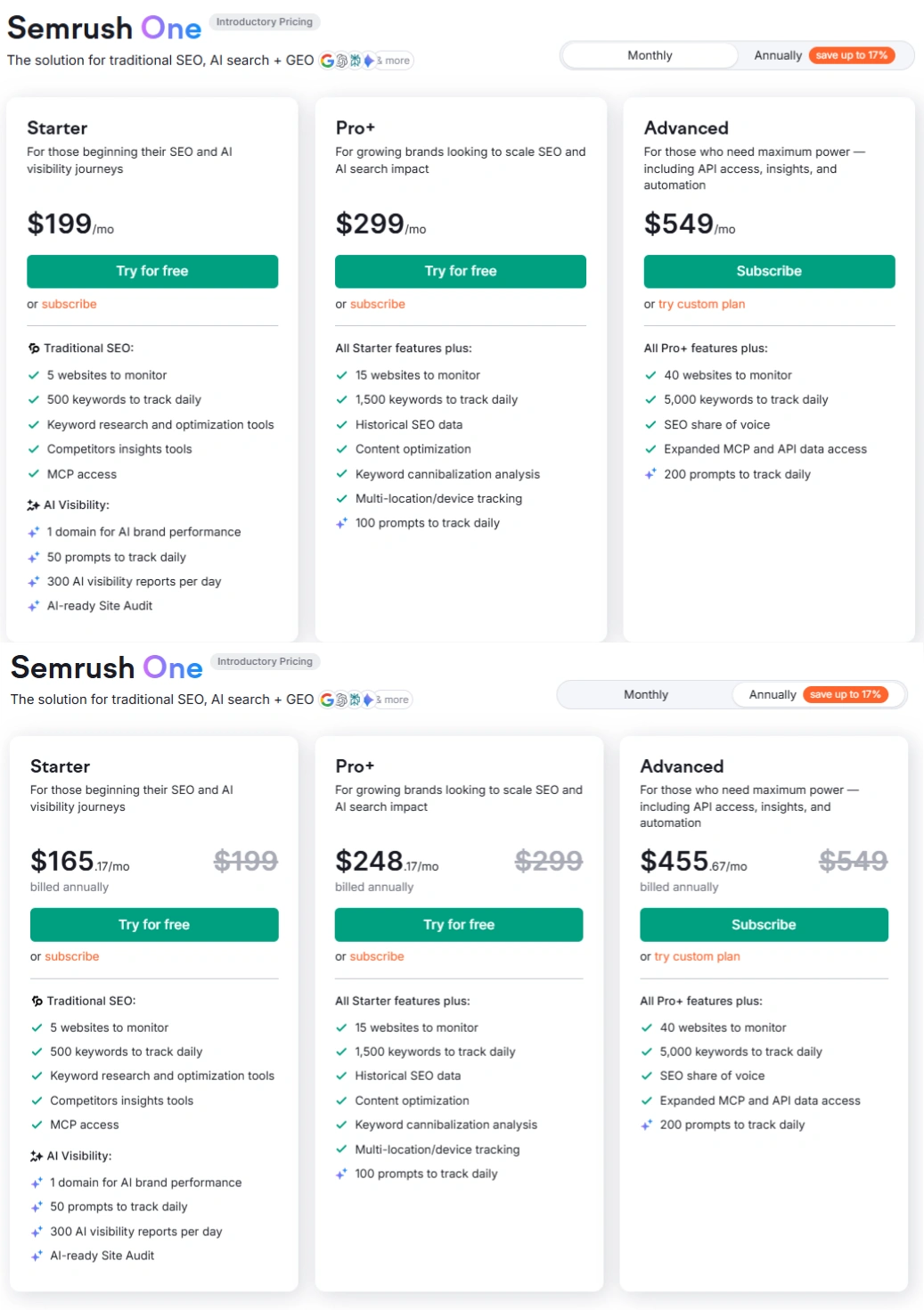
Semrush has now introduced Semrush One, which adds AI search monitoring on top of traditional SEO. The Starter plan at $165.17/mo (billed annually) includes tracking for 1 domain for AI brand performance, 50 AI prompts monitored daily, 300 AI visibility reports per day, and an AI-ready Site Audit.
This directly competes with Surfer’s AI visibility tracking, though the prompt counts and monitoring depth differ across plan tiers.
Pricing: What You’re Actually Paying
Semrush SEO Classic Plans
| Pro | Guru | Business | |
|---|---|---|---|
| Monthly billing | $139.95/mo | $249.95/mo | $499.95/mo |
| Annual billing (per month) | $117.33 | $208.33 | $416.66 |
| Websites to monitor | 5 | 15 | 40 |
| Keywords to track | 500 | 1,500 | 5,000 |
| Pages crawled/month | 100,000 | 300,000 | 1,000,000 |
| Historical data | No | Yes | Yes |
| API access | No | No | Yes |
| JavaScript rendering (audit) | No | Yes | Yes |
Semrush One Plans (Introductory Pricing)
| Starter | Pro+ | Advanced | |
|---|---|---|---|
| Monthly billing | $199/mo | $299/mo | $549/mo |
| Annual billing (per month) | $165.17 | $248.17 | $455.67 |
| Websites to monitor | 5 | 15 | 40 |
| AI prompts tracked/day | 50 | 100 | 200 |
| AI visibility reports/day | 300 | 300 | 300 |
| Keywords tracked daily | 500 | 1,500 | 5,000 |
Surfer SEO Plans
| Discovery | Standard | Pro | Peace of Mind | |
|---|---|---|---|---|
| Monthly billing | $59/mo | $119/mo | $219/mo | $359/mo |
| Annual billing (per month) | $49 | $99 | $182 | $299 |
| Documents (monthly) | 10 (monthly) / 30 (annual) | 30/mo (monthly) / 360/yr (annual) | 30/mo (monthly) / 360/yr (annual) | Unlimited* |
| AI prompts tracked | None | 25 (weekly refresh) | 50 (daily refresh) | 100 (daily refresh) |
| Team seats | 1 | 3 | 5 | 10 |
| Cannibalization Report | No | No | Yes | Yes |
| API Access | No | No | No | Yes |
*Fair usage policy applies to unlimited documents.
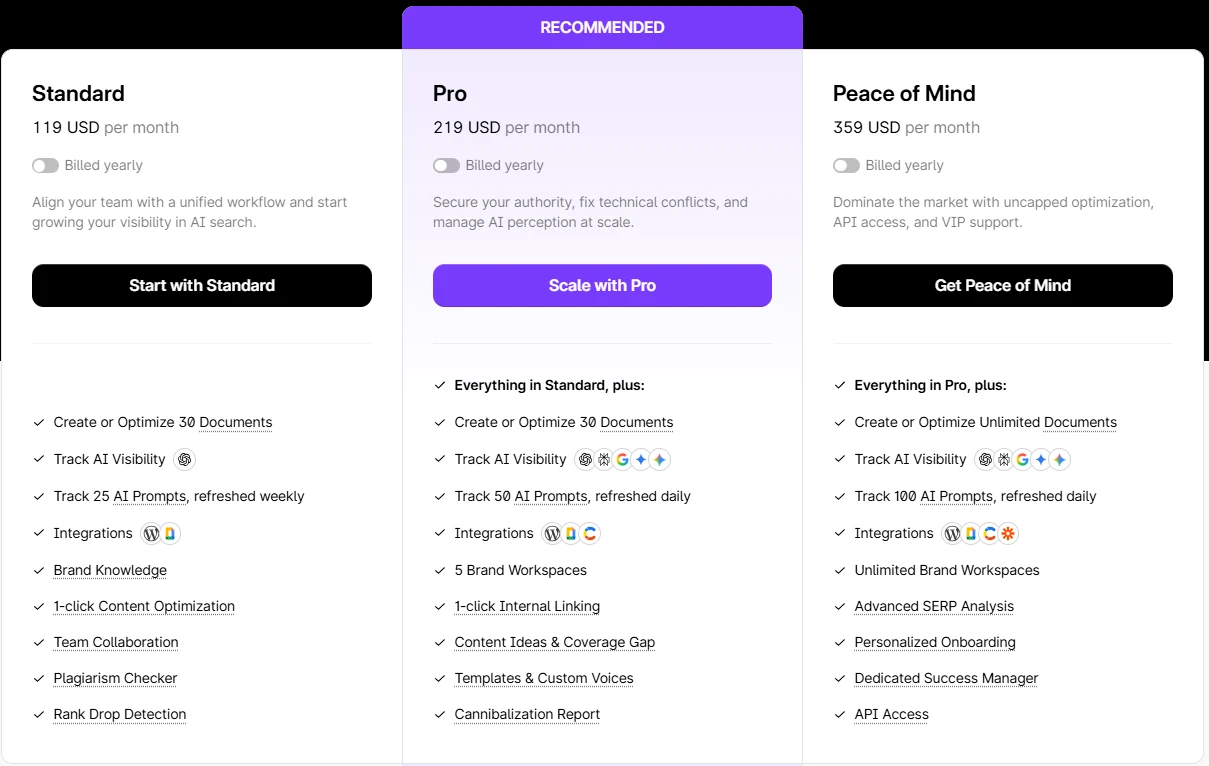
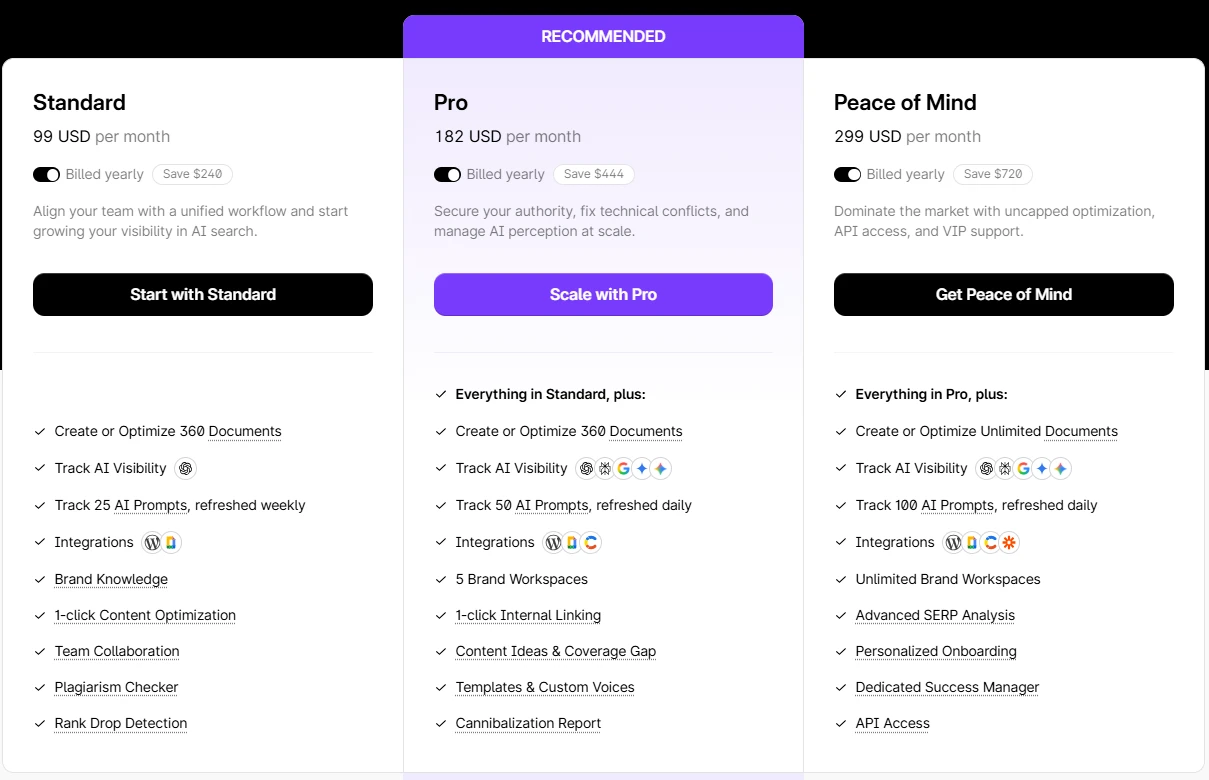
One important note: Surfer’s annual plan gives you a larger document pool (e.g., 360 documents/year on Standard vs. 30/month on monthly billing), which works differently — it’s an annual allocation rather than a monthly reset. Worth understanding before committing.
Head-to-Head Comparison
| Feature | Surfer SEO | Semrush |
|---|---|---|
| Real-time Content Scoring | Yes (core feature) | No |
| Keyword Research | Basic (Topical Map only) | Deep (Keyword Magic Tool) |
| Backlink Analysis | No | Yes (full suite) |
| Site Audit Depth | Basic content audit | Full technical audit |
| AI Visibility Tracking | Yes (ChatGPT, Perplexity, Google) | Yes (Semrush One plans) |
| Competitor Research | Limited | Extensive |
| AI Writing Assistant | Yes (Surfy) | No |
| Cannibalization Detection | Yes (Pro plan+) | Yes (Semrush One Pro+) |
| Entry Price (Annual) | $49/mo (Discovery) | $117.33/mo (Classic Pro) |
| Free Trial | No free trial | Yes (Pro and Guru) |
| Best For | Content writers, bloggers | SEOs, agencies, full-stack teams |
Quick note on free trials: Semrush offers free trials on its Pro and Guru plans. Surfer SEO does not currently offer a free trial on any plan — the Discovery plan at $49/mo (annual) is effectively their entry point.
The entry price gap is significant. Surfer is considerably cheaper at the starting tier, but Semrush delivers a substantially wider toolset even at the Pro level.
Who Should Use Surfer SEO
Surfer makes the most sense if your primary workflow revolves around content creation and optimization. Specifically:
- Bloggers and content marketers who write frequently and want data-backed guidance while drafting
- Content teams needing live collaboration and NLP-guided scoring
- Anyone tracking AI search visibility across ChatGPT, Perplexity, and Google AI overviews specifically
- Users on a tighter budget who don’t need backlink data or deep technical auditing
The Pro plan at $182/mo (billed annually) is the first tier where the tool becomes genuinely complete — you get cannibalization reports, topical maps, 5 brand workspaces, 1-click internal linking, and daily AI prompt refresh.
Who Should Use Semrush
Semrush is the right choice when you need the full picture — not just content, but research, technical audits, competitor intelligence, and link analysis together.
- SEO professionals managing multiple client sites
- In-house SEO teams that need rank tracking across locations and devices
- Anyone doing active link building who needs backlink data
- Agencies needing Share of Voice data and white-label reporting (Business plan and above)
- Anyone who wants a free trial before committing
The Guru plan at $208.33/mo (billed annually) is where Semrush becomes meaningfully more useful — historical data, JavaScript rendering in Site Audit, multi-location tracking, and content optimization tools all unlock here.
Pros and Cons
Surfer SEO
Pros
- Real-time Content Score is genuinely useful during the writing process, not just after
- AI visibility tracking across multiple platforms is ahead of where most tools are
- More affordable entry point — Discovery at $49/mo annually is accessible
- Clean interface, low learning curve for content-focused users
- Surfy AI writing assistant is included across all paid plans
Cons
- Zero backlink data — you’ll need a separate tool for any link analysis
- Document limits on lower plans are genuinely restrictive (10 docs/month on monthly Discovery)
- No free trial — you commit before you test
- Topical Map suggestions need editorial judgment; they can generate irrelevant clusters
- Pro plan ($182/mo annually) is where it becomes complete — Standard has gaps
Semrush
Pros
- Unmatched keyword research depth — Keyword Magic Tool alone justifies the subscription for many users
- Full technical site audit with JavaScript rendering (Guru+)
- Backlink data, toxic link auditing, and competitor link intelligence built in
- Free trial available on Pro and Guru plans
- Semrush One adds AI visibility tracking for brands that need both traditional and AI search monitoring
Cons
- No real-time content scoring while writing — the content optimization tools are post-draft suggestions
- Pro plan ($117.33/mo annually) lacks historical data and JavaScript rendering — you hit real limitations quickly
- Business plan ($416.66/mo annually) is required for Share of Voice and API access — jumps significantly in cost
- Interface can feel dense for users who only need content tools
- Semrush One plans are labeled “introductory pricing” — these rates may change
Do You Need Both?
Honestly, many professional SEO teams do run both. The workflow makes sense: Semrush for research, competitor analysis, and rank tracking; Surfer for content drafting and optimization.
The combined cost at entry level (Surfer Standard at $99/mo + Semrush Pro at $117.33/mo, both billed annually) comes to roughly $216/mo. That’s not unreasonable for a full-time blogger or a small agency. But it’s also not cheap.
If budget forces a single choice, the question is simple: Do you spend more time on research or writing? Research → Semrush. Writing → Surfer. Both equally → Semrush, because it covers more ground overall.
My Experience Using Both Tools
I’ve been using Semrush for over five years now — across my own affiliate sites, and client projects both. And the one thing that never gets old is the Keyword Magic Tool.
When I first started, I was doing keyword research the slow way — manually checking search volumes, guessing at competition levels, and often targeting keywords that looked good on paper but were nearly impossible to rank for. Semrush changed that workflow completely.
The Keyword Magic Tool is genuinely one of those features where you realize how much time you were wasting before. Type in a broad seed keyword, and you get thousands of variations — but the real power kicks in when you start layering filters. I usually filter by KD (Keyword Difficulty) below 30, set a minimum search volume threshold, and sometimes add an intent filter to isolate informational queries. What comes out the other side is a shortlist of keywords where ranking is actually achievable — not just theoretically possible.
On one client project — a WordPress niche site in a fairly competitive space — this exact filtering approach helped me identify a cluster of low-KD, decent-volume keywords that the client had completely overlooked. Within four months of publishing content around those terms, three of the pages were ranking in the top 5. That’s not magic — that’s just having the right data upfront.
For Surfer SEO, I used it more recently on a client’s content refresh project. The site had several pages that were sitting on page two — ranking but not converting traffic. I ran those URLs through Surfer’s Content Editor, and what stood out immediately was the NLP entity gap. The pages were missing several semantically relevant terms that top-ranking competitors consistently covered. After updating the content based on Surfer’s recommendations and improving the Content Score from the 40s into the mid-70s, two of those pages moved up noticeably within six weeks. Nothing dramatic — but meaningful movement on pages that had been stagnant for months.
The honest difference between the two, from actual use: Semrush tells you where to focus your SEO effort. Surfer tells you how to fix the content once you’re there. They solve different problems — and that’s exactly why many teams end up using both.
Frequently Asked Questions
Is Surfer SEO better than Semrush for content writing?
For the actual writing and optimization process, yes — Surfer’s real-time Content Score and NLP entity tracking is built specifically for that workflow. Semrush’s content tools are useful, but are not designed to guide you as you write. If content production is your primary activity, Surfer fits that workflow better.
Does Semrush have content optimization like Surfer SEO?
Semrush has SEO Writing Assistant and content optimization features, particularly in Guru and Business plans. However, these are not equivalent to Surfer’s Content Score system. Semrush’s content tools work more as a checklist after writing rather than a live scoring system while you draft.
Which tool is cheaper — Surfer SEO or Semrush?
Surfer starts lower. Discovery is $49/mo billed annually, Standard is $99/mo. Semrush Classic Pro starts at $117.33/mo billed annually. However, what you get per dollar differs substantially — Semrush’s Pro plan covers keyword research, backlinks, rank tracking, and site auditing that Surfer simply doesn’t include.
Does Surfer SEO have a free trial?
No. Surfer SEO does not offer a free trial on any plan. Semrush offers free trials on its Pro and Guru plans, which makes it easier to evaluate before committing.
Can Semrush replace Surfer SEO completely?
For most bloggers and content marketers, Semrush does not replace the content scoring experience that Surfer provides. It handles keyword research and technical SEO better than Surfer, but does not offer real-time NLP scoring during content creation. For pure SEO research and auditing work, Semrush covers far more ground.
Which is better for tracking AI search visibility?
Both now offer AI visibility tracking. Surfer tracks prompts across ChatGPT, Perplexity, Google AI Mode, Google AI Overview, and Google Gemini. Semrush One offers similar functionality with its AI search monitoring. Surfer’s entry point for this feature (Standard plan) is cheaper than Semrush One’s Starter plan, though the monitoring depth and daily prompt volumes differ by tier.
Bottom Line
Surfer SEO and Semrush aren’t really competing for the same user — they’re built around different workflows. That’s the honest take after using both across my own sites and client projects.
For content-focused bloggers and writers: Surfer SEO at the Pro plan ($182/mo annually) gives you everything you need to write, optimize, and track AI visibility without overpaying for features you won’t use.
For SEO professionals, agencies, and anyone doing keyword research, backlink analysis, or technical auditing: Semrush is the clear choice. Start with a free trial on the Semrush Guru plan to experience the full depth before committing.
If you can only pick one and you’re unsure, go with Semrush. It covers more ground, has a free trial, and scales better as your SEO needs grow beyond content alone.