LatePoint’s Black Friday sale is live, with a lifetime option sitting next to the usual annual plans. This page covers the discount on each plan, how it applies at checkout, and which tier makes sense for your number of sites.
I’m Karan Rajput, and I’ve spent 7+ years working with WordPress and SEO, including client sites that needed booking forms for salons, tutors and consultants. Booking plugins are where I most often see the cheap-plan trap: the entry tier looks affordable, then recurring appointments, calendar sync or extra payment gateways turn out to sit behind a higher tier.
LatePoint works differently. Every feature is available on every plan, and the price only goes up when you need more sites. That makes this sale much easier to judge, because you are really choosing between one site, up to five sites, or up to 100.
Scale and Agency buyers also get a free SureContact email marketing plan, which adds real value if you plan to follow up with customers by email. I will also point out the limits of this offer, who should skip it, and what to set up in the first week after buying, so you can decide with the full picture rather than just the headline percentage.
LatePoint Black Friday Sale Snapshot [🟢STATUS: LIVE NOW]
Starts on: Live now | Ends on: 6 Dec 2026 (per LatePoint’s countdown; check the live timer)
Up to 58% off LatePoint’s WordPress booking plugin, applied automatically at checkout. Scale and Agency also include free SureContact email marketing.
- Lifetime: Starter $179 (regular $249) | Scale $369 (regular $599) | Agency $549 (regular $1299)
- Annual: Starter $69 (regular $99) | Scale $129 (regular $249) | Agency $269 (regular $499)
- Free gift: SureContact with 2,500 contacts (one-time), listed by LatePoint as a $149 value, on Scale and Agency only
- Coupon: Auto-applied, nothing to type
- Coverage: 1 site / up to 5 sites / up to 100 sites, every feature on every plan, 14-day money-back guarantee
Coupon: Not needed. The discount is auto-applied at checkout. 👇

Note: LatePoint’s page labels the Agency price “per year” even under the Lifetime toggle, while Starter and Scale say “one-time.” Confirm the Agency billing term on the checkout screen. Annual prices are introductory and renew at the full price shown at checkout.
Disclaimer: This post contains affiliate links, and I earn a commission from them at no extra cost to you. Thank you for your support!Quick Answer: LatePoint’s sale gives up to 58% off, and the biggest cut lands on the Agency lifetime tier. The discount applies automatically at checkout. Pick Starter for one site, Scale for up to five sites plus the free SureContact gift, and Agency only if you build booking sites for clients.
How to Claim the LatePoint Black Friday Discount
- Open the sale page. Use this LatePoint link
- Choose your billing. The pricing toggle offers Annual and Lifetime, and Lifetime carries a “Limited Offer” tag.
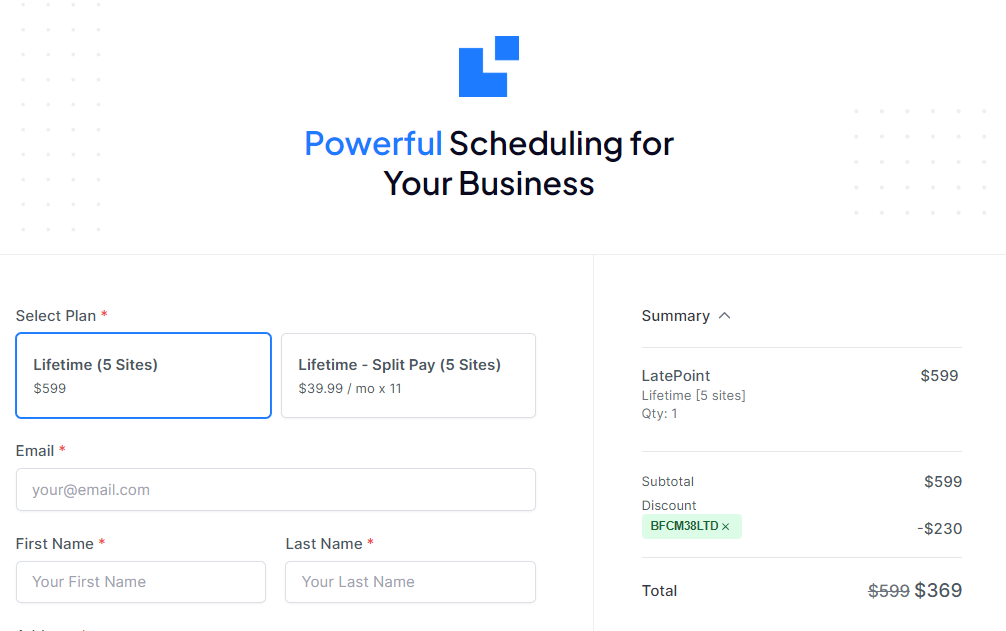
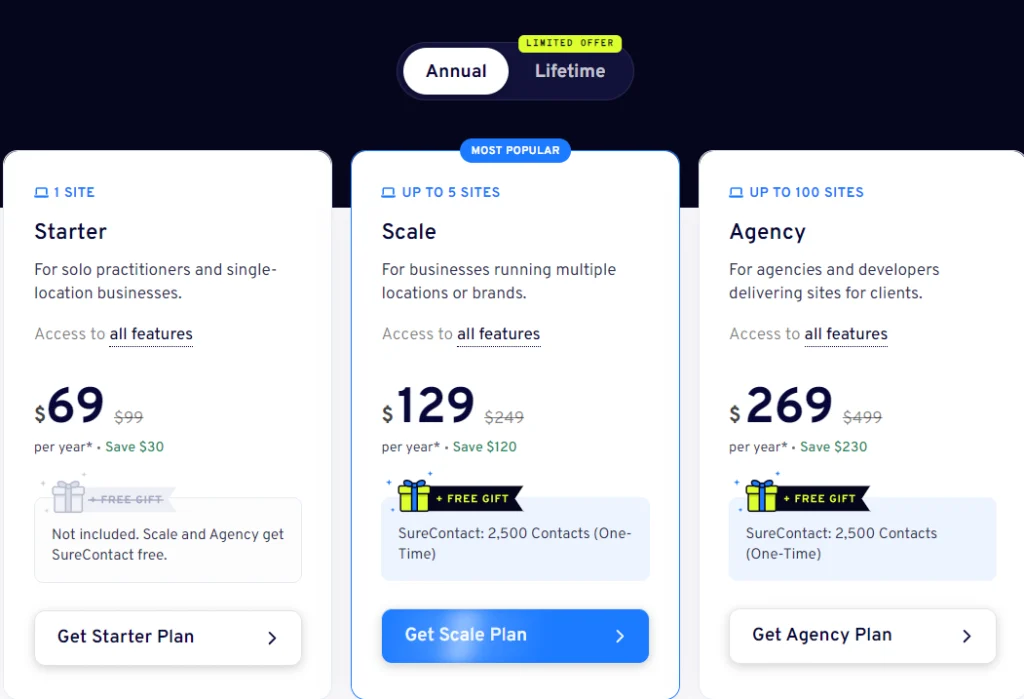
- Pick a plan by site count. Starter covers 1 site, Scale up to 5, Agency up to 100. At sale prices, Scale is $369 one-time on lifetime or $129 per year on annual.
- Decide how to pay. Lifetime Scale can be split into 11 payments of $39.99/mo, and Agency into 11 payments of $59.99/mo. Do the maths first: 11 × $39.99 is about $440, against $369 paid once. For Agency, 11 × $59.99 is about $660 against $549. Split pay is a cash-flow option, not a saving.
- Check the order summary. On the Scale Lifetime checkout I looked at, the regular $599 dropped to $369 with a code already applied (BFCM38LTD). Other plans may show a different code. If the discount line is missing, go back and reopen the sale page before paying.
- Pay and start the refund clock. PayPal, Stripe, and Visa are listed, and the 14-day money-back guarantee starts from here.
Your bank may convert USD to INR at its own rate, so the final card charge can differ slightly.
Where the 58% Actually Lands
The headline number is the ceiling, not what everyone gets. Working from the regular prices LatePoint lists, lifetime Starter saves about 28%, lifetime Scale about 38%, and lifetime Agency about 58%. On annual billing, Starter is about 30% off, Scale about 48%, and Agency about 46%.
So if you only run one site, expect a smaller cut than the banner suggests. And annual savings are first-year savings, because renewals return to the full price.
Pro observation: Scale is the tier where the maths and the bonus line up for freelancers. Starter looks cheaper but gets no SureContact gift and covers one site. If you plan to add a second site within a year, Scale is usually the more sensible entry point.
What You Get on Every Plan, and What I’d Check First
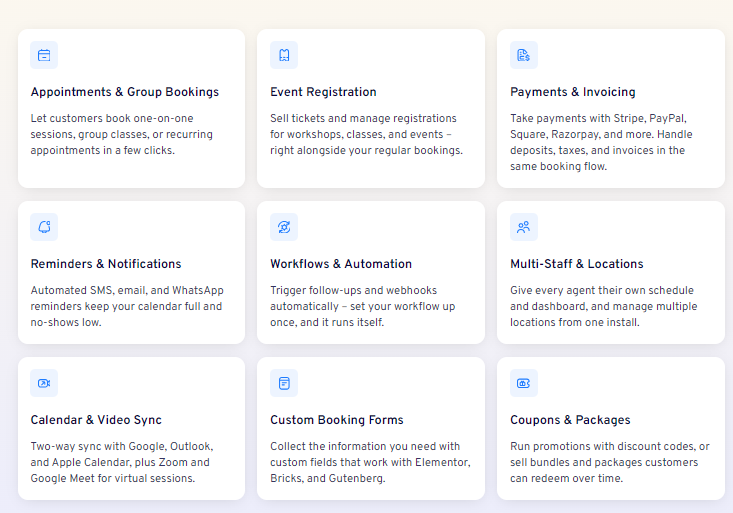
LatePoint’s pricing page says there are no feature gates and no paid add-ons. Every plan includes:
● One-on-one, group, and recurring appointments, plus event registration
● Payments and invoicing through Stripe, PayPal, Square, Razorpay and more, with deposits and taxes
● SMS, email and WhatsApp reminders
● Workflows and webhooks
● Multi-staff schedules and multiple locations
● Two-way Google, Outlook and Apple Calendar sync, plus Zoom and Google Meet
● Custom booking forms that work with Elementor, Bricks and Gutenberg
● Coupons and packages
Razorpay support matters if you sell to Indian customers. If you build with Elementor, you may also want to check the current Elementor Black Friday deal before the weekend ends.
From a performance standpoint, any booking plugin that renders a calendar adds JavaScript and CSS. On client booking projects, the first thing I check is whether those assets load on every page or only where the form sits, because sitewide loading can hurt LCP on pages that never needed a calendar. Plugin weight and hosting speed together decide how fast a booking page feels. The pricing page can’t tell you either, so test on staging with the browser’s Network tab. It also doesn’t mention WooCommerce, so confirm that with LatePoint if you plan to sell products alongside bookings.
Practical trick: check how a staging site counts against your site limit before you activate the licence there.
Is the Free SureContact Gift Actually Useful?
On Scale and Agency, LatePoint adds SureContact, the email marketing tool from Brainstorm Force. The pricing page calls it a one-time plan with 2,500 contacts, usable until all contacts are consumed. That is a fixed pool, not a monthly allowance.
For a salon, tutor, or consultant emailing past clients, that’s a useful starting list. A fast-growing list will outgrow it, and SureContact’s own Black Friday deal is worth a look if you reach that point.
LatePoint’s page doesn’t explain how the gift is activated, so check your account and email after purchase.
What’s Good and What’s Not
Pros
● Every feature on every plan, so recurring bookings and calendar sync never sit behind an upgrade
● Lifetime pricing on Starter and Scale, which removes yearly renewal worry
● 10+ payment gateways, including Razorpay, which helps Indian sellers
● 14-day money-back guarantee, enough time to test on a real setup
● Free SureContact on Scale and Agency
Cons
● Starter covers one site and skips the SureContact gift, so the cheapest tier is also the least rewarded
● Annual sale prices are introductory, and renewals go back to the full displayed price
● The SureContact bonus is a one-time pool, not a monthly quota that refreshes
● The pricing page is vague on lifetime terms, with no clear statement of what lifetime covers for updates and support, and the “per year” label on the Agency card adds confusion
How Does LatePoint Compare With Amelia and SimplyBook.me?
This table uses the comparison LatePoint publishes on its own pricing page, so treat it as the vendor’s view and verify competitor tiers on their sites.
| What you compare | LatePoint | Amelia | SimplyBook.me |
|---|---|---|---|
| Feature access | Every feature on every plan | Gated by tier | Gated by a custom-feature limit |
| Recurring appointments | Built into every plan | Needs the Standard tier | Included |
| Calendar sync (Google/Outlook/Zoom) | Built into every plan | Needs the Standard tier | Uses 1 of 3 custom-feature slots |
| Payment gateways | 10+ gateways | Square only on the entry tier | Included |
| Multi-location management | Built into every plan | Needs the Standard tier | Enterprise tier only |
| Lifetime option | Available | Available | Not offered |
| Best for / winner | Sites needing everything from day one | Basic booking with Square on one domain | Monthly billing with only a few extras |
The real difference is how each one charges for growth. With Amelia, you climb tiers to unlock features, and with SimplyBook.me you spend limited custom-feature slots. With LatePoint, you only pay for more sites.
For a WordPress site that needs recurring bookings, calendar sync, and several gateways from day one, LatePoint is the better pick because all three come on every plan. If you only need basic booking with Square on a single domain, Amelia’s entry tier may be enough. If you prefer monthly billing and need just a few extras, SimplyBook.me makes more sense. LatePoint’s one real weakness here is that the licence is tied to site count.
Who Should Skip This Deal
● Non-WordPress users. LatePoint is built around WordPress, so look elsewhere if your site isn’t on it.
● Anyone who only needs a basic form. LatePoint’s site offers a Try for Free option and a Free vs Pro comparison, so test the free version before paying.
● Starter buyers who want email marketing. The SureContact gift isn’t included there.
If price is your worry, there are no paid add-ons to budget for. If setup is your worry, the 14-day refund window lets you test properly.
What to Do After Buying
- Log in to My Account on LatePoint’s site for your licence details.
- Set up services, staff and locations first, and style the forms later.
- Connect a payment gateway in test mode and run one full test booking.
- Link your calendar and Zoom or Google Meet, then set email reminders. SMS and WhatsApp reminders may involve provider costs the pricing page doesn’t mention, so check before relying on them.
- Check the booking page speed in PageSpeed Insights, watching LCP and CLS.
Because LatePoint supports webhooks, OttoKit’s Black Friday deal is a natural fit for sending bookings into other apps. For contact or enquiry forms outside the booking flow, SureForms is worth a look.
Mistakes to avoid: buying Starter and needing a second site later, skipping test mode, forgetting to activate the SureContact gift, and letting the 14-day window pass without testing.

Discount– Limited Time Offer!
Deal: Up to 58% Off + Free SureContact
Coupon Code: Not needed. The discount is auto-applied at checkout.👇
Frequently Asked Questions
Is the LatePoint Black Friday discount applied automatically?
Yes. On the Scale lifetime checkout I looked at, the discount already appeared as a line in the order summary, so there was nothing to type in. Check that line before paying. If it’s missing, reopen the sale page through the link above and start again.
Which LatePoint plan is best for beginners?
Starter suits a beginner running one website. Choose Scale if you manage more than one brand or location, or want the free SureContact gift. Features are the same on every plan, so choosing smaller doesn’t cost you anything except site count. LatePoint’s FAQ also covers upgrades, so check there.
Is there a free version or refund option?
LatePoint’s site shows a Try for Free button and a Free vs Pro comparison, so you can start with the free version. Paid plans also come with a 14-day money-back guarantee. I’d use that window to test on staging with a real payment gateway.
The pricing page says there is no feature gating and no paid add-ons. The things to watch are annual renewals at full price, split pay costing more in total than paying once, and any SMS or WhatsApp provider costs. Prices are in USD, so your bank may add conversion charges.
When does the sale end, and are there other deals?
The sale ends on 6 Dec 2026, going by LatePoint’s own countdown, which showed about 7 days left on 28 Nov. Sale timings can change, so check the live timer before you buy. For hosting, themes and other plugins, see my list of Best WordPress Black Friday Deals 2026.
Final Verdict
If you run one or more WordPress booking sites, this sale is worth a serious look because every feature comes on every plan and you only pay for site count. Scale is the sweet spot for most freelancers and small businesses, with up to five sites and SureContact included. Starter fits a single site, and Agency fits client work. Use the 14-day window to test properly, then keep it or claim the refund. When you’re ready, grab the LatePoint Black Friday deal here before the timer runs out.
77+ Best WordPress Black Friday/Cyber Monday Deals 2026 [Up to 99% OFF] – Verified Deals Live
Looking for more Black Friday & Cyber Monday software discounts? We have hand-picked and verified 77+ live deals across WordPress hosting, plugins, themes, VPNs, and AI tools—all in one place so you don’t miss out on the biggest savings of the year. Explore the complete WordPress Black Friday Deals 2026 guide.
Quick Deal Snapshot [STATUS: LIVE NOW]
Status: Live now (Ends December 11, 2026)
- Savings: Save up to 99% across 60+ verified WordPress & SaaS brands
- Web Hosting & Domains: Up to 95% OFF + Free Domains & Migrations
- WordPress Plugins & Builders: Up to 90% OFF + Lifetime Deals
- Themes, AI & VPN Tools: Up to 88% OFF + Extra Free Months
- Verified Discounts: Direct promo codes & auto-applied checkout links
- Updated Daily: New live deals added throughout Black Friday week
Coupon: Auto-applied & verified codes inside.

Related Posts