Cookie banners are one of those jobs everyone ignores until a client asks, “Is this site actually GDPR-safe?” That’s usually when a proper consent tool suddenly feels worth paying for, and when most people learn that a banner alone doesn’t stop trackers from firing.
SureCookie is running its Black Friday sale right now, with up to 34% off across its plans, lifetime options included. The discount is auto-applied, so there’s no coupon to hunt for. Below you’ll find the live prices, the claim steps, what each plan includes, and who should skip it.
I’m Karan Rajput, and after 7+ years of blogging and working on client WordPress sites, I judge cookie tools from two angles: does it really block scripts before consent, and does it stay light on the front end? SureCookie’s sale page leads with script blocking, so that’s where I started looking.
Whether you run one blog, a handful of niche sites, or client work across many domains, this should help you pick between Business and Pro, annual and lifetime, without guessing. The sale timer is short, so check the snapshot below first. I’ve also flagged the real limits, including features the page still lists as coming soon, so nothing surprises you after checkout.
SureCookie Black Friday Sale Snapshot [🟢STATUS: LIVE NOW]
Starts on: Already live | Ends on: The sale timer showed about 2 days 1 hour left when I checked on 28 November 2026. The timer can change, so trust the one on the sale page.
SureCookie’s sale gives up to 34% off, applied automatically. Prices below are in USD, as listed on the sale page.
- Discount: Up to 34% off, auto-applied. No promo code needed.
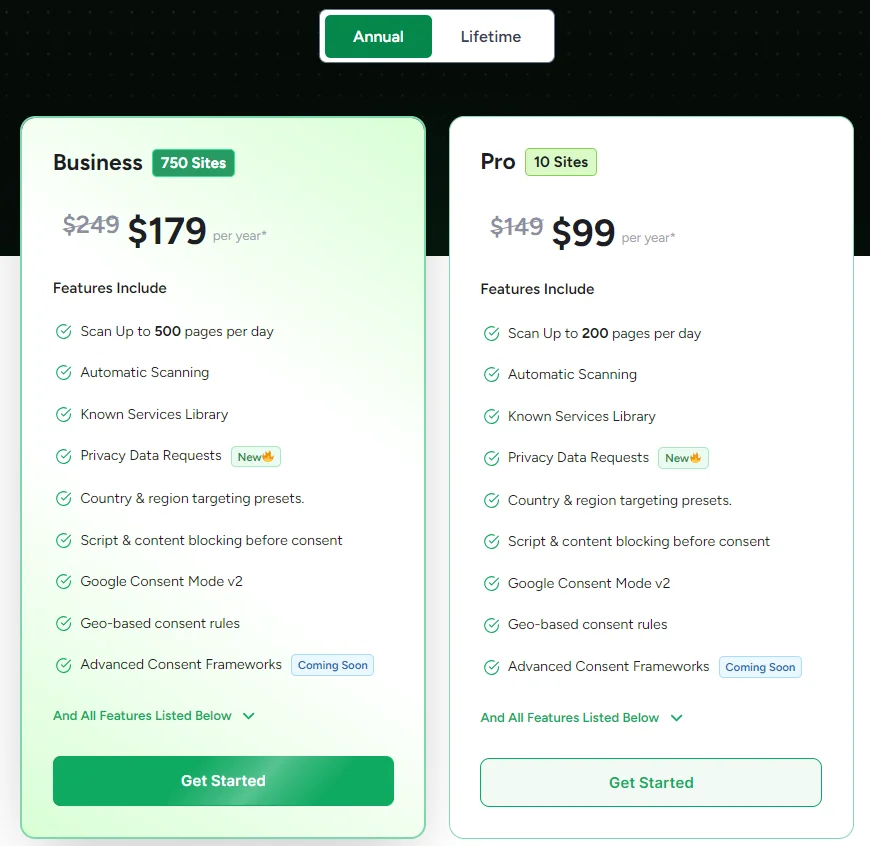
- Annual: Pro (10 sites) at $99 per year, regular $149. Business (750 sites) at $179 per year, regular $249.
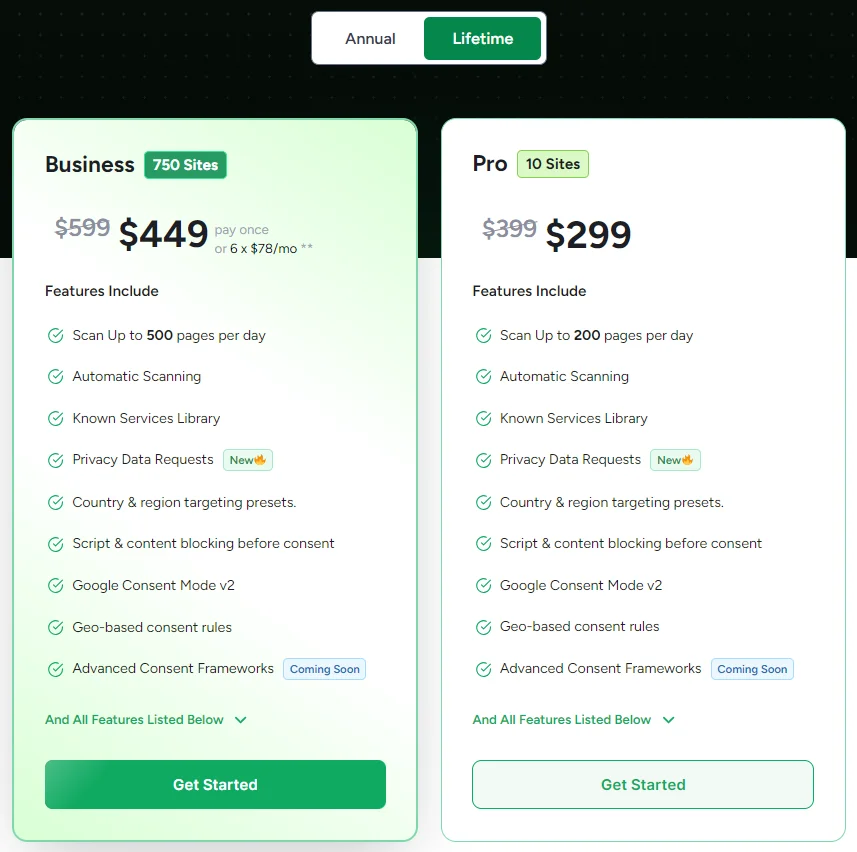
- Lifetime: Pro (10 sites) at $299, regular $399. Business (750 sites) at $449, regular $599.
- Split pay: Available on the checkout page.
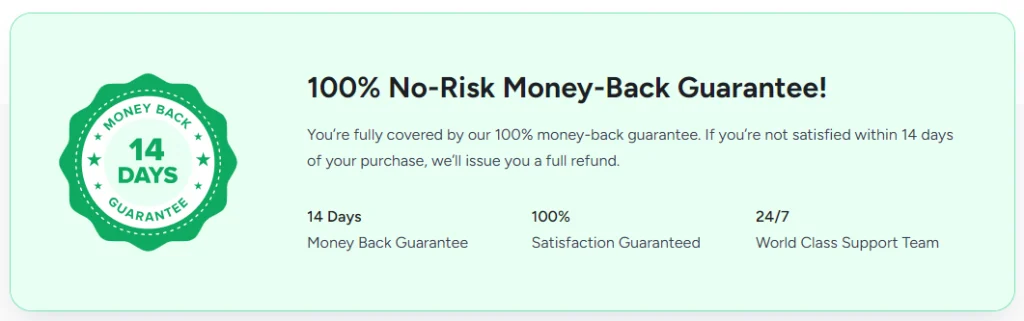
- Safety net: 14-day money-back guarantee.
- Fine print: Annual prices are introductory. Renewals are at full price.
Coupon: Not needed. The discount is auto-applied at checkout. 👇

Disclaimer: This post contains affiliate links, and I earn a commission from them at no extra cost to you. Thank you for your support!Quick Answer: If you need cookie consent with script blocking before consent and don’t want pageview-based pricing, SureCookie’s Black Friday sale is worth a look. The Pro plan covers 10 sites, Business covers 750, and the discount applies automatically. The annual price is introductory, so renewals cost more.
How to Claim the SureCookie Black Friday Discount
It takes about two minutes. Here’s the flow I followed on the sale page and checkout:
- Open the SureCookie sale page through this link.
- Pick Annual or Lifetime using the toggle above the plan cards.
- Click Get Started under Pro (10 sites) or Business (750 sites).
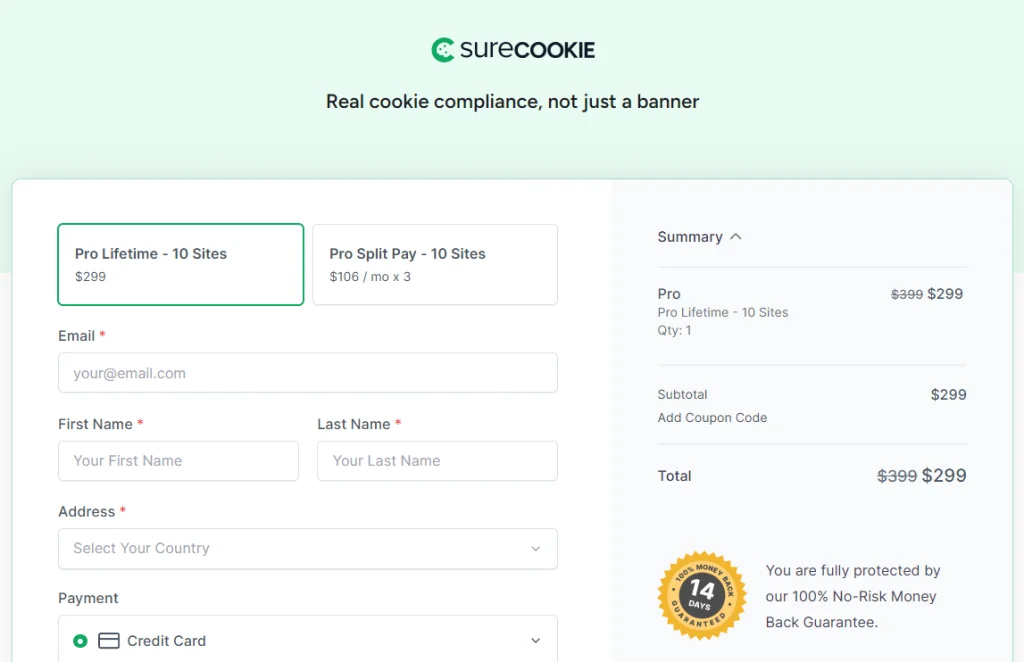
- On the checkout page, check the summary. The discounted price is already applied. For example, Pro Lifetime showed $299 with $399 struck through. There’s an “Add Coupon Code” field, but you don’t need it because the discount is auto-applied.
- Choose how to pay. Pro Lifetime offers a Pro Split Pay option of $106 per month for 3 months. Business Lifetime shows 6 payments of $78 per month on the pricing card.
- Finish payment. If you’re not happy within 14 days, the page promises a full refund.
One practical observation: split pay isn’t free money. Three payments of $106 come to $318, against $299 paid once. Six payments of $78 come to $468, against $449. If cash flow isn’t a problem, pay once.
What You Actually Get With SureCookie
The sale page groups features well, so here’s the useful version.
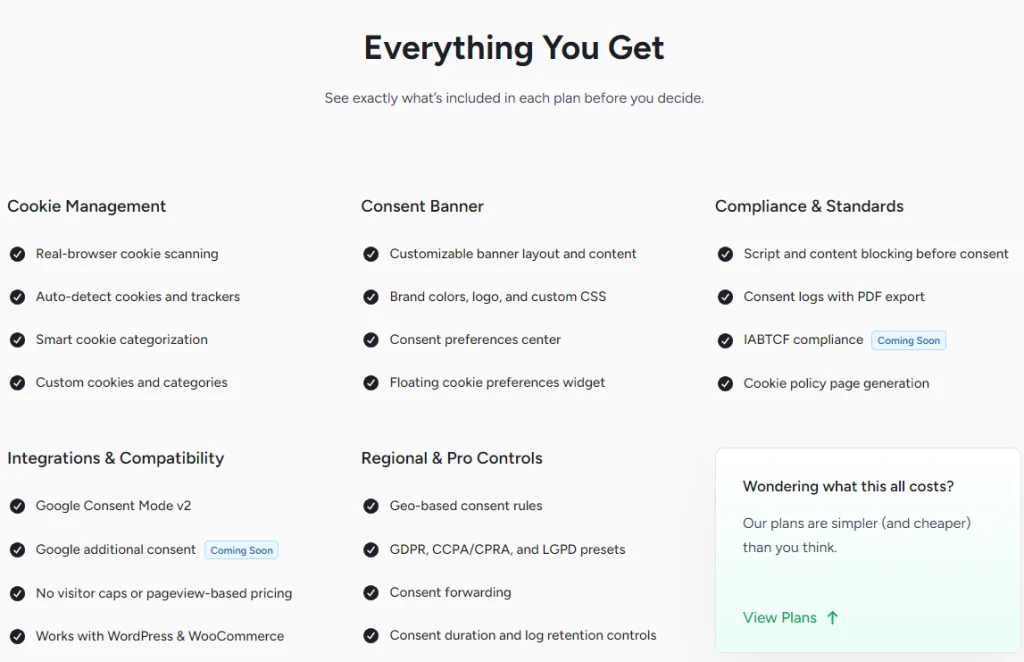
Scanning and cookie control. SureCookie uses real-browser cookie scanning and auto-detects cookies and trackers. It sorts them into categories, and you can add custom cookies and categories. Both plans include automatic scanning and a Known Services Library.
The consent banner. You can change the layout and content, add brand colors, a logo, and custom CSS, and show a consent preferences center plus a floating cookie preferences widget.
Compliance side. This is the part I care about most:
- Script and content blocking before consent
- Consent logs with PDF export
- Cookie policy page generation
- Google Consent Mode v2
- GDPR, CCPA/CPRA and LGPD presets
- Geo-based consent rules, country and region targeting presets, and consent forwarding
- Controls for consent duration and log retention
- Privacy Data Requests, which the page marks as New
It works with WordPress and WooCommerce, and there are no visitor caps or pageview-based pricing. That last point matters if your traffic is unpredictable, because some consent tools get expensive as a site grows.
Business vs Pro: Which Plan Fits You?
Both plans list the same core feature set on the sales page. The real differences are the site limit and the daily scan limit.
| Detail | Business | Pro |
|---|---|---|
| Site limit | 750 sites | 10 sites |
| Daily scan limit | Up to 500 pages per day | Up to 200 pages per day |
| Billing options | Annual or Lifetime, with split pay | Annual or Lifetime, with split pay |
| Core consent features | Script blocking, Consent Mode v2, geo-based rules, privacy data requests | Same list |
| Scanning tools | Automatic scanning, Known Services Library | Same |
| Best for | Agencies and freelancers managing many client domains | Bloggers and small owners with a few sites |
Where each one wins: Pro is the sensible pick for one blog or a few niche sites. If you manage client work across dozens of domains, Business is the only one that makes sense, and the 500-page daily scan limit gives larger sites more room. Don’t buy Business “just in case” if you only run a few sites, because you’d be paying for a site limit you’ll never touch.
For someone running a handful of micro-niche sites like I do, Pro’s 10-site limit is enough. The scan limit is the thing to check if one of your sites has thousands of pages.
A Developer’s Take on Performance and Compatibility
Cookie tools sit on every page, so they can affect speed. A few things I’d check before trusting any of them:
- Does the banner load late? A banner that pops in after render can cause layout shift (CLS). Test it on mobile.
- What happens to third-party scripts? Blocking analytics and ad scripts until consent can actually reduce early page weight. The usual problem I see on client WordPress projects is a banner that looks fine while Analytics or ad scripts still fire before anyone clicks Accept. Always verify this in your browser’s network tab, in a private window.
- Builder compatibility. The sale page names WordPress and WooCommerce. It doesn’t mention Elementor or Gutenberg, so test the banner and preferences widget on your own builder and theme before rolling it out everywhere.
Pro observation: the pricing is tied to sites and scan limits, not visitors. For anyone who has been burned by pageview-based plans after a traffic spike, that’s a quiet but real advantage.
Pros and Cons
Pros
- Script and content blocking before consent is listed in both plans, which is the feature that matters most for real compliance.
- No visitor caps or pageview-based pricing, so a traffic spike won’t raise your bill.
- GDPR, CCPA/CPRA, and LGPD presets plus geo-based rules help when your audience is spread across regions.
- A 14-day money-back guarantee and split pay options lower the risk of trying it.
- Consent logs export to PDF, which is handy if a client asks for proof.
Cons
- Advanced Consent Frameworks, IABTCF compliance, and Google additional consent are all marked “Coming Soon”. Don’t buy for features that aren’t live yet.
- Annual prices are introductory and renewals are at full price, so year two costs more than year one.
- Pro scans up to 200 pages per day, which may be tight for a very large content site.
- Split pay adds up to more than paying once.
Who Should Skip This Deal
- Publishers who need IABTCF right now. The page lists it as Coming Soon, so wait until it’s live.
- Anyone expecting a legal guarantee. No cookie tool can promise you’re compliant. It’s a tool, not legal advice. Keep your policies and legal checks in place.
- Single-site hobby bloggers who aren’t sure. The sale page offers a free SureCookie download for people who can’t decide. Try that first.
Why the Timing Matters
The sale timer is short, with roughly two days left when I checked. I can’t tell you this is the lowest price SureCookie will ever have, because I only have this year’s sale data. What I can say is that the discount applies automatically while the sale runs, and prices may change after it ends, so check the official page.
If you’re also hunting for other tools this season, my WordPress Black Friday deals roundup is updated with what’s live. SureCookie also sits alongside other Brainstorm Force offers, such as the SureCart deal and the Schema Pro deal, if you’re building out a WordPress stack.
What to Do After Buying
- Run the first scan. Let SureCookie detect cookies and trackers, then check that they landed in the right categories.
- Match the banner to your brand. Set colors, logo, and text, and keep the wording short.
- Set geo-based rules. Choose the right preset (GDPR, CCPA/CPRA or LGPD) for your audience.
- Test blocking in a private window. Open your browser’s network tab and confirm trackers don’t fire before you accept.
- Check the preferences widget on mobile. Make sure it doesn’t cover buttons or forms.
- Generate the cookie policy page and review the consent logs.
Mistakes to avoid:
- Hard-coding Analytics or tag scripts outside the tool, which leaves them unblocked.
- Forgetting to clear your cache after changing banner settings.
- Assuming one scan is final. Rescan after adding new plugins or tracking scripts.

SureCookie Black Friday Deal
Deal: Up to 34% Off + Lifetime
Coupon Code: Not needed. The discount is auto-applied at checkout.👇
Frequently Asked Questions
Is the SureCookie Black Friday discount automatic?
Yes. The sale price is applied automatically, and the checkout summary already shows the reduced total. There’s a coupon field, but you don’t need a code. The sale runs on a timer, so the discount can disappear once it ends.
Which plan is best for beginners?
Pro is the simpler choice. It covers 10 sites and includes the same listed core features as Business, including script blocking before consent and Google Consent Mode v2. Go with Business only if you manage many client sites.
Is there a lifetime plan?
Yes, both Pro and Business have a lifetime option on the sale page, paid once, with split pay at checkout. Check the official site for the exact lifetime terms before you buy.
Do annual plans renew at the sale price?
No. The page says annual pricing is introductory and renewals are at full price. You can cancel renewal at any time, and access stays active until your term ends.
Does SureCookie work with WooCommerce and Google Consent Mode?
The sales page lists WordPress and WooCommerce support and Google Consent Mode v2. Google additional consent is marked as Coming Soon.
What if I don’t like it?
There’s a 14-day money-back guarantee. If you’re not satisfied within 14 days of purchase, the page says you’ll get a full refund.
Are there other Black Friday deals live?
Yes. I keep my WordPress Black Friday deals page updated with the latest live offers.
Final Verdict
SureCookie’s sale is a solid pick if you want script blocking before consent without pageview-based pricing. Pro suits most bloggers and small site owners, and Business is for agencies managing many domains. Just remember the “Coming Soon” features aren’t live yet, and annual renewals are at full price.
If it fits your setup, grab the SureCookie Black Friday deal here before the timer runs out.
77+ Best WordPress Black Friday/Cyber Monday Deals 2026 [Up to 99% OFF] – Verified Deals Live
Looking for more Black Friday & Cyber Monday software discounts? We have hand-picked and verified 77+ live deals across WordPress hosting, plugins, themes, VPNs, and AI tools—all in one place so you don’t miss out on the biggest savings of the year. Explore the complete WordPress Black Friday Deals 2026 guide.
Quick Deal Snapshot [STATUS: LIVE NOW]
Status: Live now (Ends December 11, 2026)
- Savings: Save up to 99% across 60+ verified WordPress & SaaS brands
- Web Hosting & Domains: Up to 95% OFF + Free Domains & Migrations
- WordPress Plugins & Builders: Up to 90% OFF + Lifetime Deals
- Themes, AI & VPN Tools: Up to 88% OFF + Extra Free Months
- Verified Discounts: Direct promo codes & auto-applied checkout links
- Updated Daily: New live deals added throughout Black Friday week
Coupon: Auto-applied & verified codes inside.

Related Posts