Video is often the heaviest thing on a WordPress page. A plain YouTube embed pulls in third-party scripts, shows suggested videos you don’t control, and tells you very little about who actually watched. Presto Player fixes most of that with a branded, ad-free player, Bunny.net streaming, chapters, email capture, and built-in analytics.
Its Black Friday sale runs from 16 November to 06 December 2026 with up to 63% off, and the discount applies automatically, so there’s no code to hunt for. It suits course creators, marketers, podcasters, and anyone running a membership or client site where video has a job to do. If you only drop a clip on one blog post a month, you may not need it at all, and I’ll say so plainly.
I’m Karan Rajput, and after 7+ years of blogging, client WordPress work, and SEO, I’ve seen video hurt page speed far more often than it helps conversions. Here you’ll see how to claim the sale, which plan fits which kind of site, where Presto Player falls short, and when the free version is enough.
Building a bigger stack this season? My Best WordPress Black Friday Deals 2026 roundup tracks the other offers that are live right now.
Presto Player Black Friday Sale Snapshot [🟢STATUS: LIVE NOW]
Starts on: 16 Nov 2026 | Ends on: 06 Dec 2026
Presto Player’s Black Friday Super Sale covers yearly plans, lifetime plans, and a Player + Capture bundle. The discount applies automatically at checkout.
- Discount: up to 63% off (the headline figure on the official sale page)
- Yearly entry price: Presto Player Starter at $69 for the first year (1 site)
- Lifetime entry price: Presto Player Pro at $299 one-time (up to 10 sites)
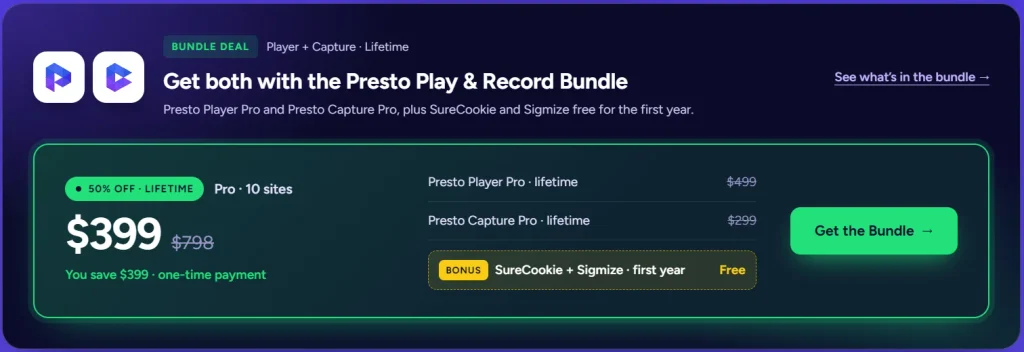
- Bundle: Presto Play & Record Bundle at $399 lifetime, with SureCookie and Sigmize free for the first year
- Bonus: SureContact (2,500 contacts) free with the Agency Suite
- Validity: 14-day money-back guarantee. Renewals are at full price.
Coupon: Not needed. The discount is auto-applied at checkout. 👇

Disclaimer: This post contains affiliate links, and I earn a commission from them at no extra cost to you. Thank you for your support!Quick Answer: Presto Player is a smart Black Friday buy if video does real work on your site, such as courses, lead capture, or client projects. For most solo bloggers, the lifetime Pro plan gives the best long-term value, while agencies should look at Creator’s Suite or Agency Suite. If you only embed occasional YouTube clips, skip it.
How to Claim the Presto Player Black Friday Deal
It takes about two minutes, and you don’t need to enter a code.
- Open the official Presto Player Black Friday page through my link.
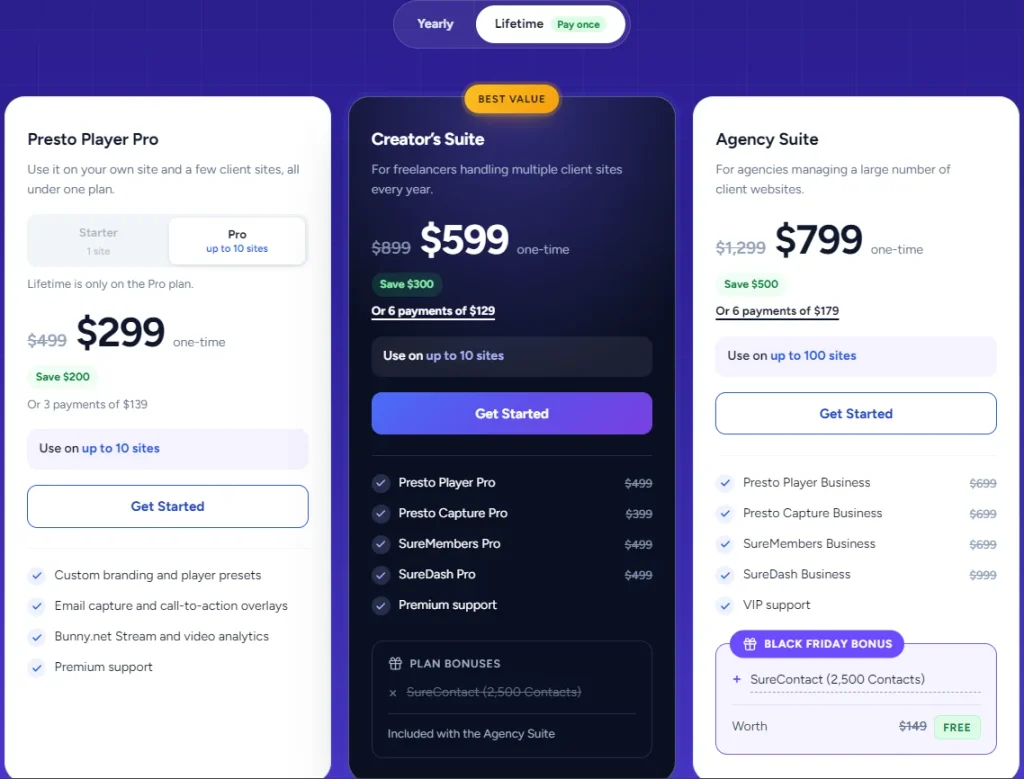
- Pick Yearly or Lifetime using the toggle at the top of the pricing cards.
- Choose your plan and click Get Started.
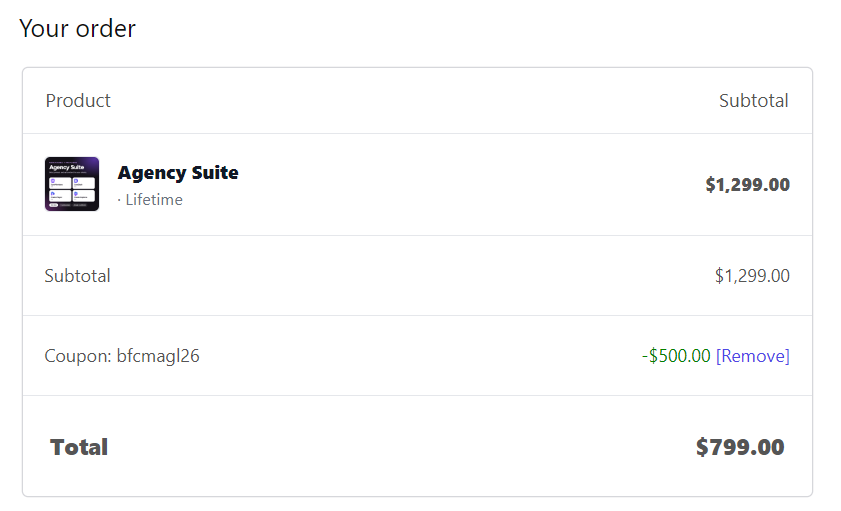
- Check the order summary before paying. In the Agency Suite lifetime checkout I captured, the reduction showed up on its own, taking the $1,299 subtotal down to $799.
- Pick your payment option. Split pay is available on the checkout page.
- Keep your receipt. The 14-day money-back window starts from purchase.
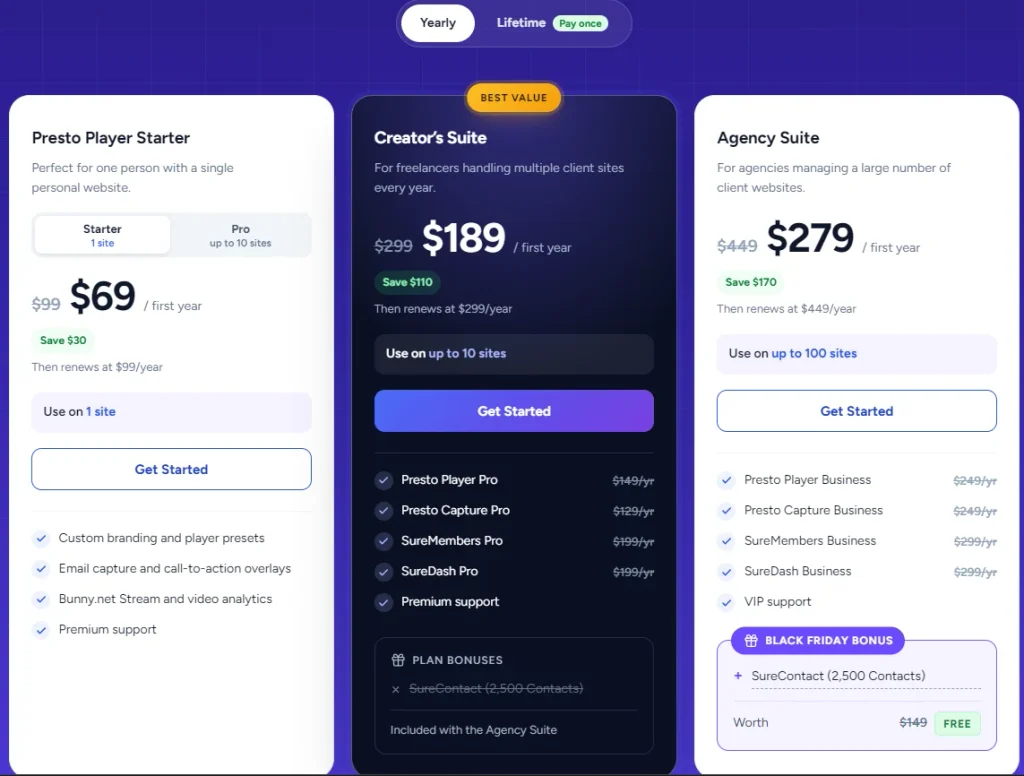
| Plan | Billing | Sale Price | Regular Price | Sites | Notes |
|---|---|---|---|---|---|
| Presto Player Starter | Yearly | $69 first year | $99 | 1 site | Renews at $99/year |
| Creator’s Suite | Yearly | $189 first year | $299 | Up to 10 sites | Renews at $299/year |
| Agency Suite | Yearly | $279 first year | $449 | Up to 100 sites | Renews at $449/year |
| Presto Player Pro | Lifetime | $299 one-time | $499 | Up to 10 sites | Or 3 payments of $139 |
| Creator’s Suite | Lifetime | $599 one-time | $899 | Up to 10 sites | Or 6 payments of $129 |
| Agency Suite | Lifetime | $799 one-time | $1,299 | Up to 100 sites | Or 6 payments of $179 |
| Presto Play & Record Bundle | Lifetime | $399 one-time | $798 | Pro, 10 sites | Player Pro + Capture Pro, SureCookie and Sigmize free first year |
All prices are in USD, and they are introductory, with renewals at full price. The Starter/Pro toggle on the yearly card switches between 1 site and up to 10 sites, and the Pro price appears when you flip it on the page. Pricing may change, so check the official site before paying.
What Each Plan Actually Gives You
There are a lot of tiers, but really three kinds of buyers.
- Presto Player Starter (yearly): for one personal site. You get custom branding and player presets, email capture and call-to-action overlays, Bunny.net Stream with video analytics, and premium support.
- Presto Player Pro (lifetime): the same Pro feature set on up to 10 sites with a one-time payment. For the standalone player, this is the only lifetime route.
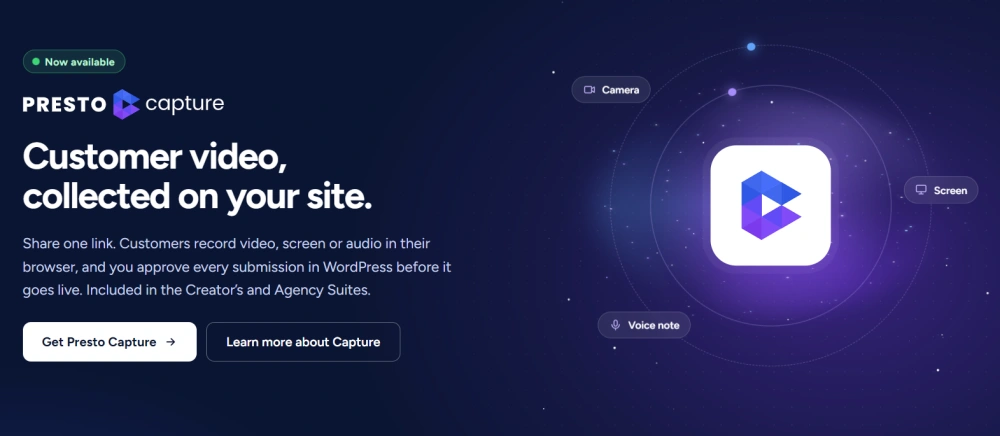
- Creator’s Suite: Presto Player Pro, Presto Capture Pro, SureMembers Pro, SureDash Pro, and premium support. Capture lets customers record video, screen, or audio in their browser, and you approve each submission in WordPress before it goes live. It works with SureCart and WooCommerce for buyer testimonials and product reviews.
- Agency Suite: Business versions of all four products, VIP support, up to 100 sites, and SureContact (2,500 contacts) free as the Black Friday bonus.
- Presto Play & Record Bundle: lifetime Player Pro and Capture Pro, plus SureCookie and Sigmize free for the first year.
On client sites, the headache is rarely the first video. It’s the twentieth, when every player looks slightly different. Presets fix that: update one, and every video assigned to it follows.
Where Presto Player Beats a Plain Embed
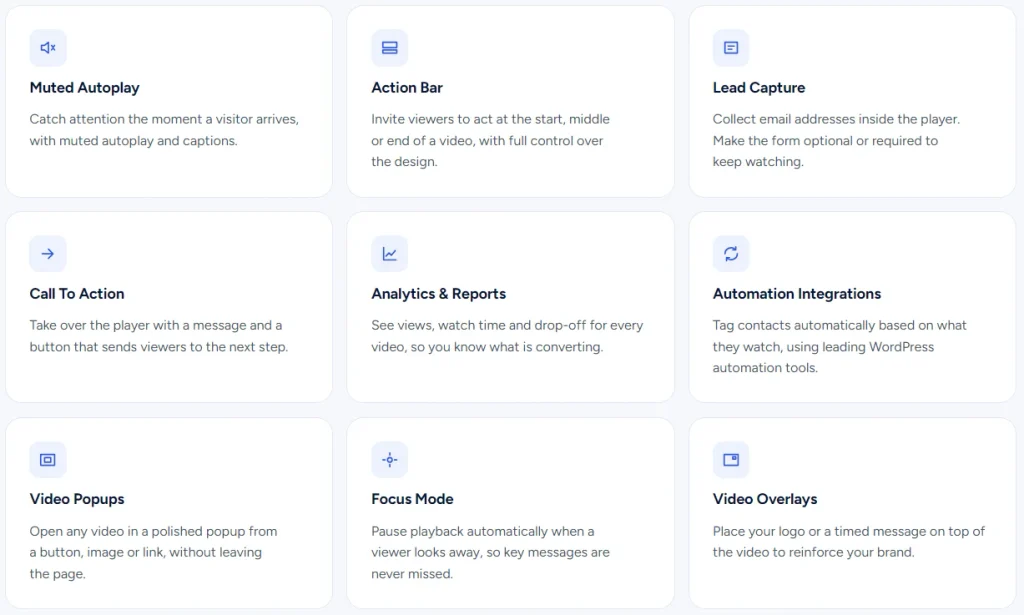
- Analytics: views, watch time, and drop-off per video, plus Google Analytics integration.
- Lead capture: an email form inside the player, optional or required to keep watching, with Mailchimp, MailerLite, FluentCRM, and ActiveCampaign support.
- Action bar and overlays: calls to action at the start, middle, or end, plus logo and timed message overlays.
- Course tools: unlimited chapters, playlists with progress tracking, and members-only video.
- Private videos: protected content with expiring links.
- Presto Player Abilities: on WordPress 6.9+ with the MCP Adapter, AI assistants like Claude, ChatGPT, or Cursor can manage your video library under your existing permissions. I’d treat this as a bonus, not a reason to buy.
The Developer Take: Speed, Bunny.net and Page Builders
From a performance standpoint, the player is only half the story. The video source decides most of your speed. If you keep YouTube as the source, you still load YouTube’s resources. The real gain comes from streaming through Bunny.net or self-hosting, which Presto positions as no ads, no third-party branding, and pay-as-you-go bandwidth.
In client projects I’ve worked on, an above-the-fold video is the usual LCP problem. Whatever player you choose, test it on staging with PageSpeed Insights, give it a fixed aspect ratio to avoid CLS, and keep it below the first screen where the design allows.
On compatibility, the sales page lists Elementor, Beaver Builder, LearnDash, and WooCommerce, and shortcodes cover everything else. I’d still check block editor behavior on your own staging site first. If you build with Elementor, my Elementor Black Friday deal page has the current plans.
Pro observation: Bunny.net bandwidth is billed by Bunny, separately from your Presto plan, and it scales with how much your viewers watch. Budget for it if you’re moving a big course library.
What I Like and Where It Falls Short
Pros
- Ad-free, unbranded playback when streaming through Bunny.net.
- Per-video analytics inside WordPress, including drop-off points.
- Email capture, CTAs, and overlays live inside the player, not in a separate plugin.
- Presets keep branding consistent across every video.
- A lifetime route exists, plus a bundle if you also want Capture.
Cons
- Bunny.net streaming is billed on usage, so your real cost is the plan plus bandwidth.
- Yearly plans renew at full price, noticeably higher than the first-year sale price.
- Lifetime isn’t available on Starter, so the 1-site plan stays a yearly commitment.
- The 63% headline is the ceiling. The discount on any single plan card is smaller, so judge each plan by its own crossed-out price.
- Creator’s Suite includes SureMembers Pro and SureDash Pro, which are wasted spend if you only want the video tools.
Who should skip: anyone embedding a few YouTube videos with no need for analytics, email capture, or private content. The free plugin already covers that. Also skip it if you want fully managed video hosting inside one flat plan.
Presto Player Pro vs Free Plugin vs a Plain Embed
| Factor | Presto Player Pro | Free Presto Player | Plain YouTube/Vimeo Embed |
|---|---|---|---|
| Video sources | YouTube, Vimeo, self-hosted, Bunny.net Stream | Multiple sources incl. YouTube, no Bunny.net | One platform per embed |
| Player branding | Custom logo, branding colour, custom CSS, overlays | Branding colour, default presets | Platform’s own player |
| Analytics | Dashboard with views, watch time, drop-off, Google Analytics | None built in | Stats live on the platform |
| Lead capture | In-player email form with 4 named email integrations | Not included | Not included |
| Private videos | Secure private videos | Not included | Visibility set on the platform |
| Cost model | One-time or yearly plan, plus Bunny usage if used | Free | Free to embed |
| Best for | Courses, marketers, client sites | Occasional embeds | Casual blog videos |
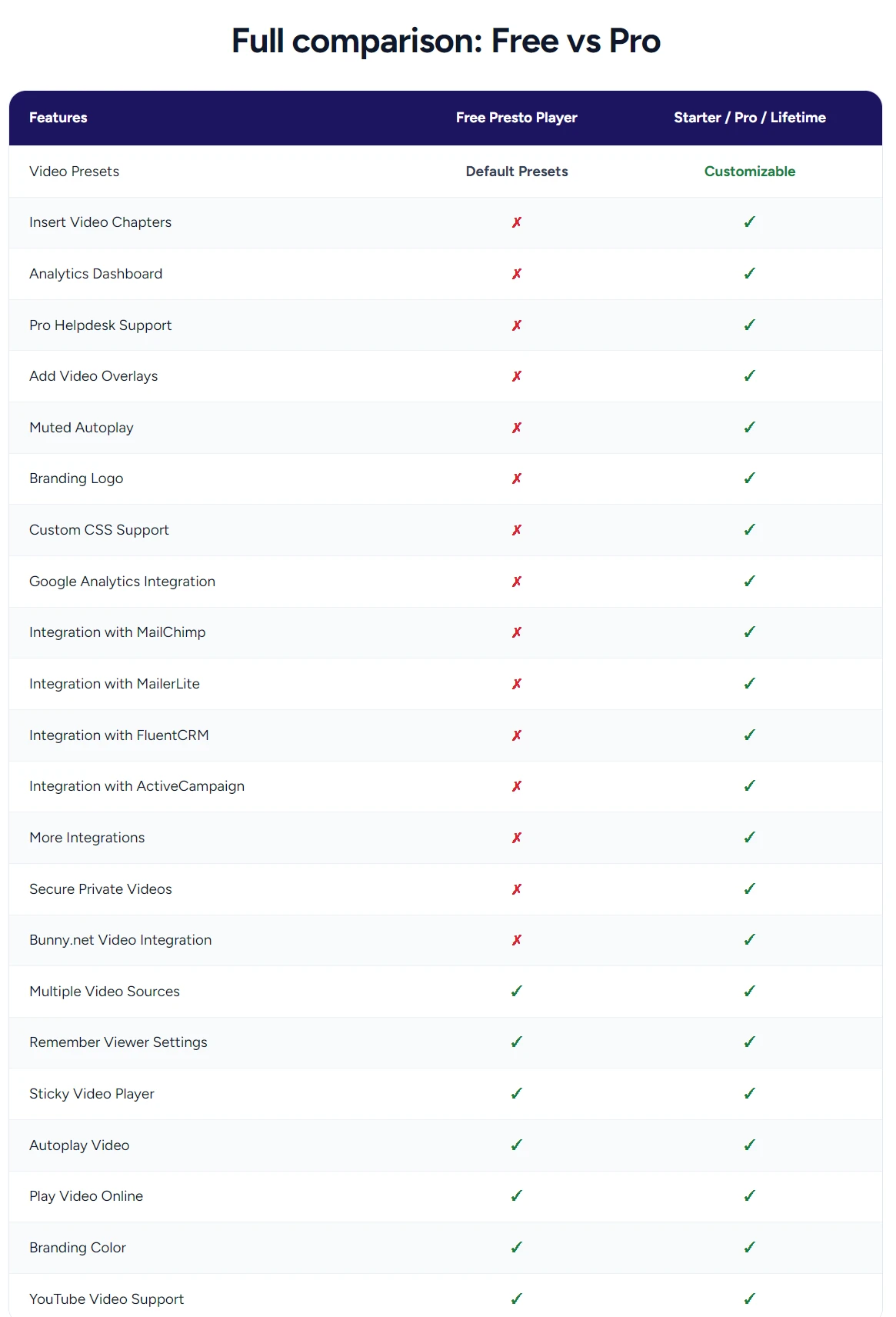
The free plugin is a decent upgrade over a raw embed, but it stops at presentation. Pro is where you get data and conversion tools, and the plain embed is fine when video is decoration.
- For course creators and lead-gen sites, Presto Player Pro is better because watch-time and drop-off data sit inside your own WordPress dashboard.
- If you embed a handful of videos and need no analytics or email capture, the free plugin makes more sense.
- For freelancers, go with Creator’s Suite. For larger client rosters, Agency Suite is worth considering.
What to Do After Buying
- Download the Pro plugin from your account, install it, and activate your license.
- Build one default preset first: brand colour, logo, and controls.
- Connect Bunny.net Stream if you want ad-free delivery, and start with one test video.
- Connect your email tool and Google Analytics.
- Run PageSpeed Insights on staging before you roll it out.
Mistakes to avoid:
- Autoplaying with sound. Use muted autoplay instead.
- Migrating a whole library before checking Bunny usage.
- Buying Creator’s Suite just for Capture when the bundle covers Player and Capture.
- Forgetting that yearly plans renew at full price.
Is It Worth Buying Before 06 December?
The sale page runs a countdown to 06 December 2026, so plan around that date, but don’t rush a plan you haven’t matched to your sites. Presto calls this its biggest Black Friday deal of 2026. I haven’t compared it with earlier years, so treat that as their wording. The prices on the official page are the lowest I can see right now, and the 14-day money-back guarantee keeps the risk low.
Discount– Limited Time Offer!
Deal: Up to 63% Off + Lifetime Bundle
Coupon Code: Not needed. The discount is auto-applied at checkout.👇
Frequently Asked Questions
Is the Presto Player Black Friday discount applied automatically?
Yes. The sale runs from 16 November to 06 December 2026, and the discount applies automatically, so there’s no coupon to type. In the checkout screenshot I captured, the reduction appeared in the order summary on its own. Check the total before you pay, and use the official site if anything looks off.
Is Presto Player lifetime available on every plan?
Not for the standalone player. The sale page says lifetime is only on the Pro plan, so Starter stays yearly. Creator’s Suite and Agency Suite also have lifetime options, and the Presto Play & Record Bundle is a lifetime offer for Player Pro and Capture Pro on up to 10 sites.
Do I need Bunny.net to use Presto Player Pro?
No. Presto Player works with self-hosted files, YouTube, Vimeo, and Bunny.net Stream. Bunny.net is the route to ad-free, unbranded streaming, and it’s billed by usage, separate from your Presto plan. If you only embed YouTube videos, you can skip it, but you’ll miss the main speed and branding upside.
Is there a free version of Presto Player?
Yes, it’s on WordPress.org. It covers multiple video sources, YouTube support, sticky player, autoplay, and branding colour. Pro adds chapters, analytics, overlays, muted autoplay, custom CSS, email integrations, private videos, and Bunny.net. If you’re unsure, try the free plugin first, then upgrade during a sale like this one.
Will it work with my page builder or LearnDash?
The sales page lists Elementor, Beaver Builder, LearnDash, and WooCommerce among its integrations, and shortcodes work elsewhere. For LearnDash video progression specifically, check Presto’s documentation first, since I haven’t confirmed how it behaves in your setup.
What other WordPress deals are live right now?
If you’re setting up a new site or refreshing a client’s stack, hosting, themes, SEO plugins, and page builders all have Black Friday pricing. I keep the live ones in my Best WordPress Black Friday Deals 2026 roundup, which is easier than checking each brand separately.
Final Verdict
Presto Player is worth buying this week if video does real work on your site: course lessons, lead capture, or client projects where branding has to stay consistent. For most solo site owners, the lifetime Pro plan is the cleanest long-term pick, and the Play & Record Bundle makes sense if you also want Capture. Skip it if YouTube embeds are all you need. With a 14-day money-back guarantee and the sale ending 06 December 2026, you can grab the Presto Player Black Friday deal here and test it on staging first.
77+ Best WordPress Black Friday/Cyber Monday Deals 2026 [Up to 99% OFF] – Verified Deals Live
Looking for more Black Friday & Cyber Monday software discounts? We have hand-picked and verified 77+ live deals across WordPress hosting, plugins, themes, VPNs, and AI tools—all in one place so you don’t miss out on the biggest savings of the year. Explore the complete WordPress Black Friday Deals 2026 guide.
Quick Deal Snapshot [STATUS: LIVE NOW]
Status: Live now (Ends December 11, 2026)
- Savings: Save up to 99% across 60+ verified WordPress & SaaS brands
- Web Hosting & Domains: Up to 95% OFF + Free Domains & Migrations
- WordPress Plugins & Builders: Up to 90% OFF + Lifetime Deals
- Themes, AI & VPN Tools: Up to 88% OFF + Extra Free Months
- Verified Discounts: Direct promo codes & auto-applied checkout links
- Updated Daily: New live deals added throughout Black Friday week
Coupon: Auto-applied & verified codes inside.

Related Posts