Open your own store, add a product, and see what happens. On a default WooCommerce setup, the cart lives on a separate page, so shoppers leave what they were browsing just to review their order. That extra step can be a quiet leak. Modern Cart from CartFlows replaces it with a slide-in or popup cart that keeps shoppers on the page they were already viewing.
Its Black Friday sale is live now, and this is a plugin where the 56% headline is genuinely reachable, on the Pro lifetime plan. This page covers the deal, what the cart actually does, what the Starter version leaves out, and who can skip the upgrade.
I’m Karan Rajput, and after 7+ years of WordPress and client WooCommerce work, I treat any plugin that loads on every page with suspicion. A cart drawer touches speed, layout shift and mobile usability all at once, so I’ll cover those too, not just the features.
The discount applies automatically at checkout, so there’s no code to enter, and the sale runs until 6 December 2026 going by the site’s countdown. I’d still check the timer before paying, since sale timers can change without notice. If you’re unsure, the Starter version is there to test first.
Modern Cart Black Friday Deal Snapshot [🟢STATUS: LIVE NOW]
Starts on: Live now | Ends on: 6 December 2026 (follows the site countdown)
Modern Cart Pro is part of the CartFlows Black Friday and Cyber Monday sale, with annual and lifetime options and a larger Suite bundle.
- Discount: Up to 56% off, applied automatically at checkout, no coupon code needed. On this plugin’s cards the saving is about 54% (annual) and 56% (lifetime).
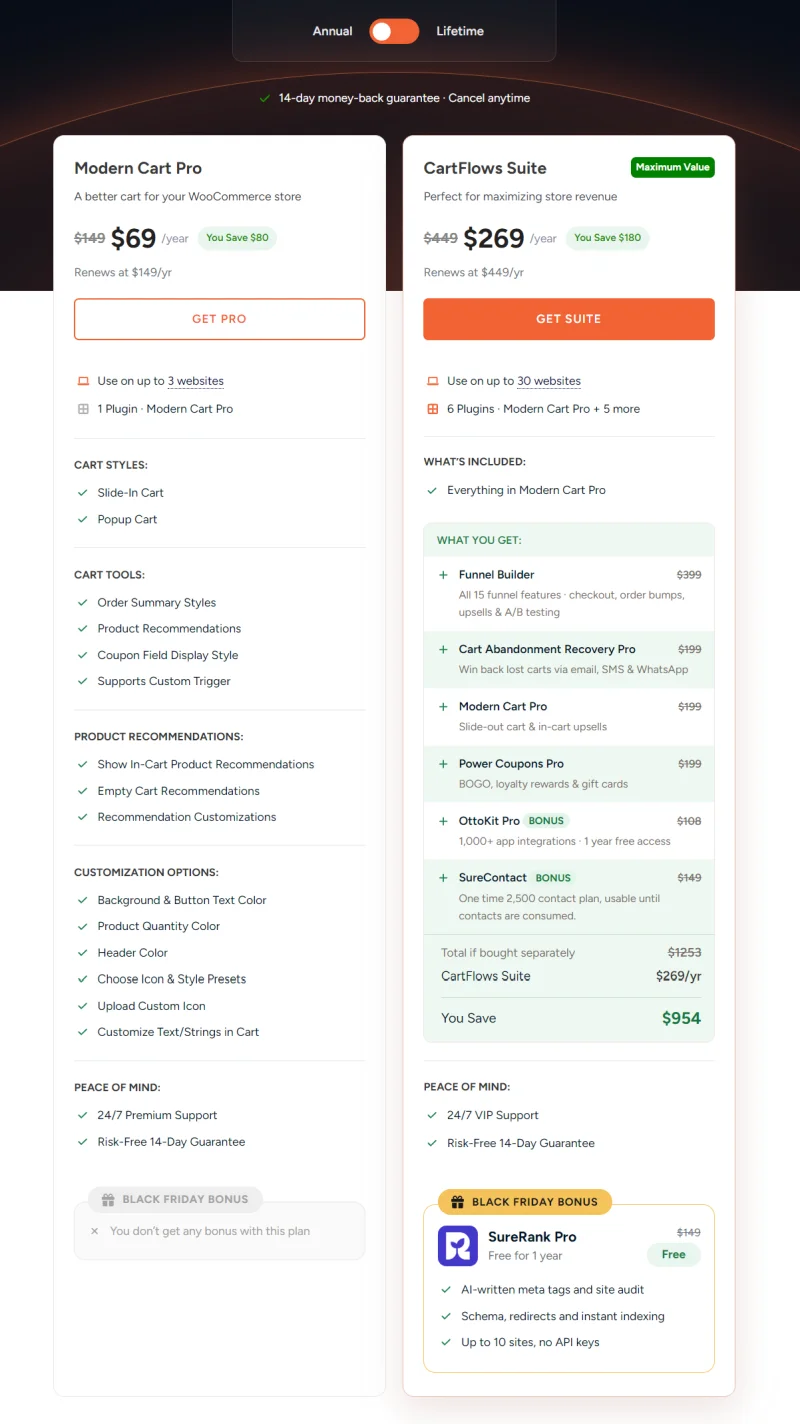
- Modern Cart Pro, annual (USD, first year): $69/yr (list $149, renews at $149/yr, up to 3 websites)
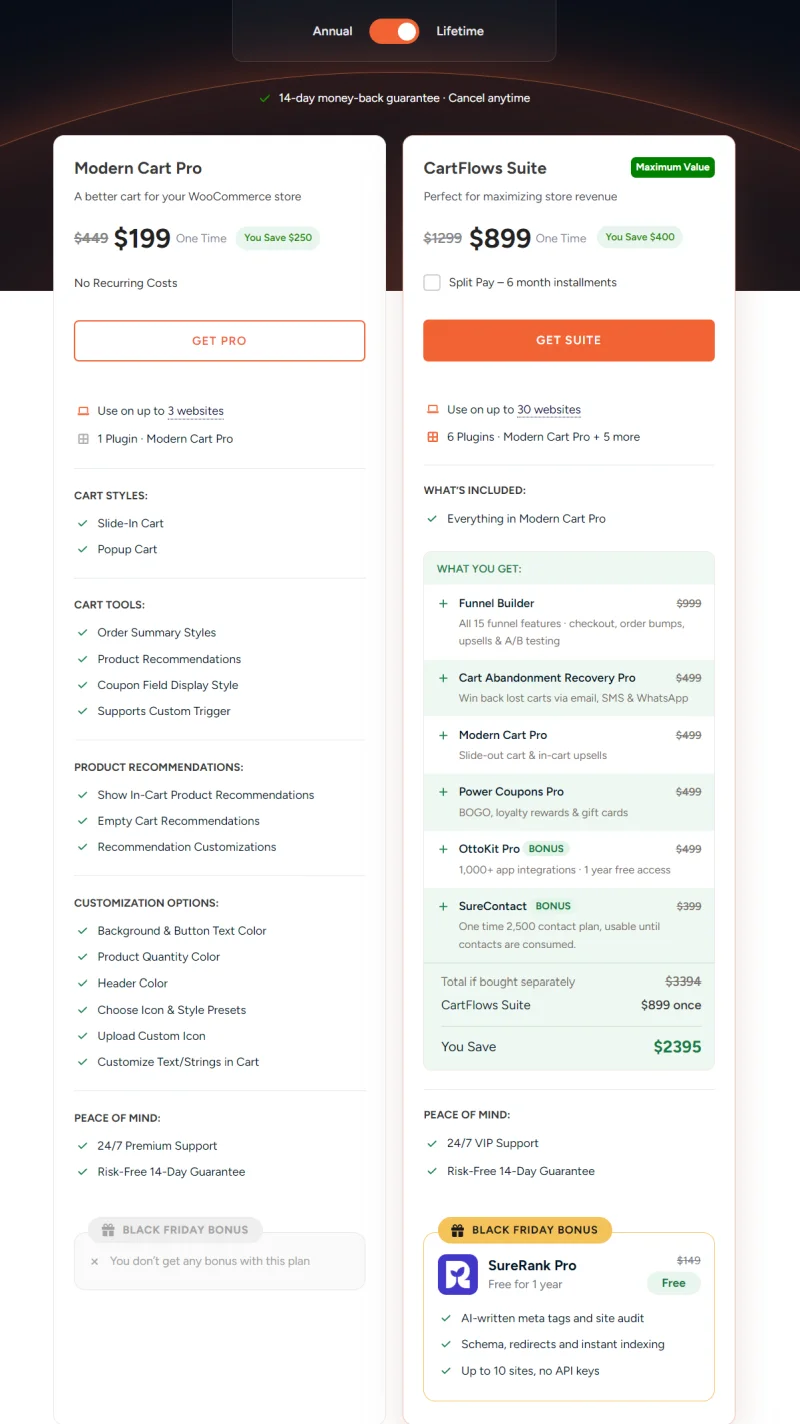
- Modern Cart Pro, lifetime (USD, one-time): $199 (list $449, up to 3 websites), no recurring costs
- CartFlows Suite (Modern Cart Pro + 5 more plugins, up to 30 websites): $269/yr (list $449, renews at $449/yr) or $899 lifetime (list $1,299, Split Pay over 6 months available)
- Bonus: None on Modern Cart Pro. The Suite adds OttoKit Pro and SureRank Pro free for 1 year, plus a one-time 2,500-contact SureContact plan.
Coupon: Not needed. The discount is auto-applied at checkout. 👇

14-day money-back guarantee, no questions asked. Pricing may change, so confirm on the official pricing page before you pay.
Disclaimer: This post contains affiliate links, and I earn a commission from them at no extra cost to you. Thank you for your support!Quick Answer: Modern Cart Pro is worth it if you want product recommendations and a popup option inside the cart, and the lifetime plan is where the 56% headline applies. If you only need a clean slide-in cart with a free shipping bar, the Starter version already covers that, so start there.
How to Claim the Modern Cart Black Friday Deal
- Open the Modern Cart pricing page and check that the sale banner and countdown are showing.
- Use the Annual / Lifetime toggle to pick your term. You’ll see two cards: Modern Cart Pro and the CartFlows Suite.
- Click Get Pro for the cart plugin alone, or Get Suite for the bundle.
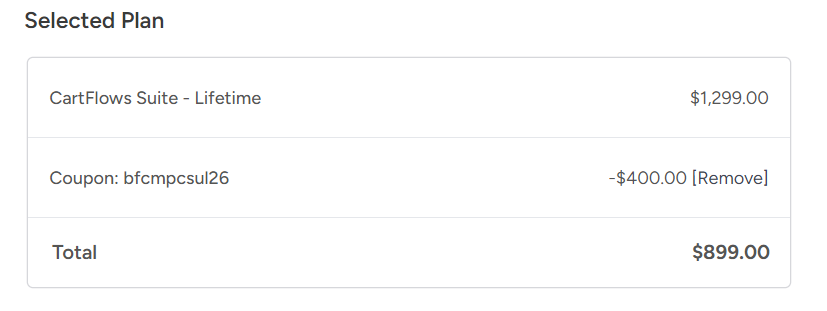
- At checkout, look at the Selected Plan box. On the Suite Lifetime checkout I looked at, the regular $1,299.00 dropped by $400.00 through a coupon that applied on its own (it appeared as bfcmpcsul26), leaving a total of $899.00. For Modern Cart Pro alone, compare the total with the card: $69 for annual, or a one-time $199 for lifetime.
- Pay with PayPal, Stripe or VISA. The Suite lifetime card also offers a Split Pay option over six monthly instalments.
- Keep your receipt. You have 14 days to ask for a refund.
What a Slide Cart Changes for Shoppers
The cart opens over the page instead of replacing it. Slide-in is available on both tiers, while the popup style is Pro only. A floating cart icon, with position and “hide if cart empty” settings, comes with both.
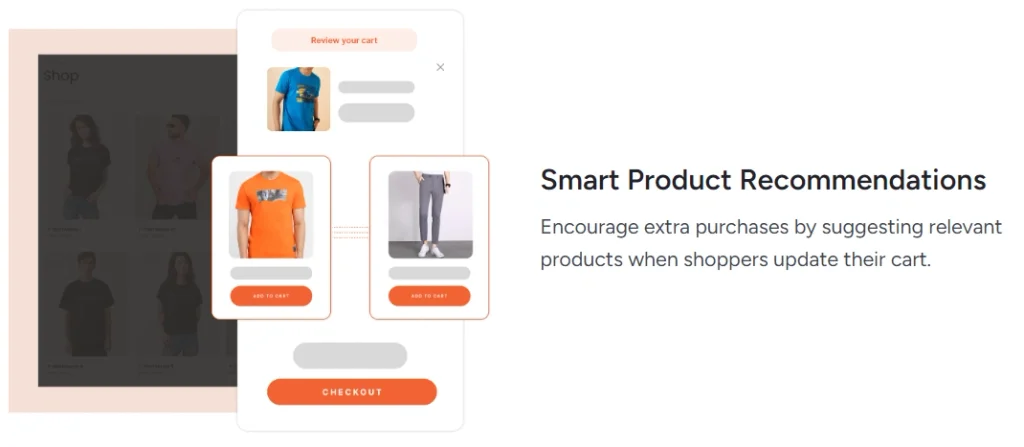
Product recommendations. This is the feature that can lift order value. Related products appear in the cart as shoppers update it, and Pro adds recommendations for an empty cart, extra styles and a custom heading. CartFlows credits the Modern Cart step with a +12% average order value in its own Suite figures. That’s a company claim, not my result, so treat it as best-case.
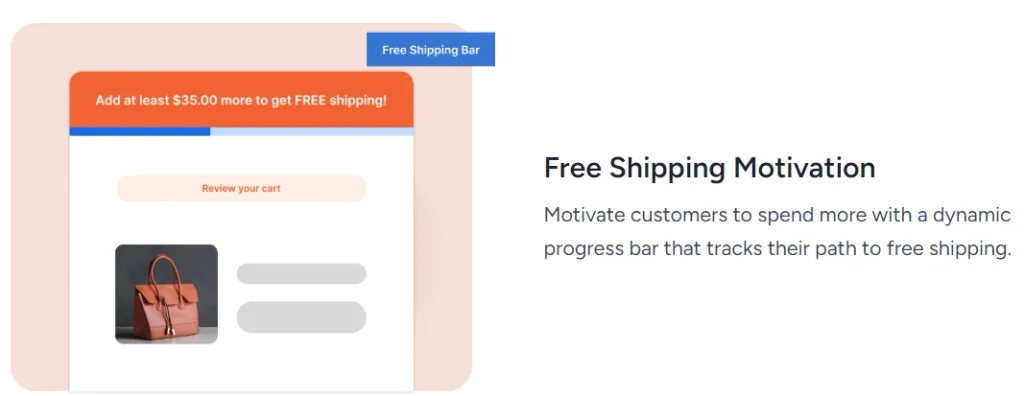
Free shipping bar. A progress bar shows how far the shopper is from free shipping. It’s included on Starter too, and it’s the cheapest upsell tool on the list. Make sure your free shipping rule in WooCommerce is set up first, since the bar tracks the path to it.
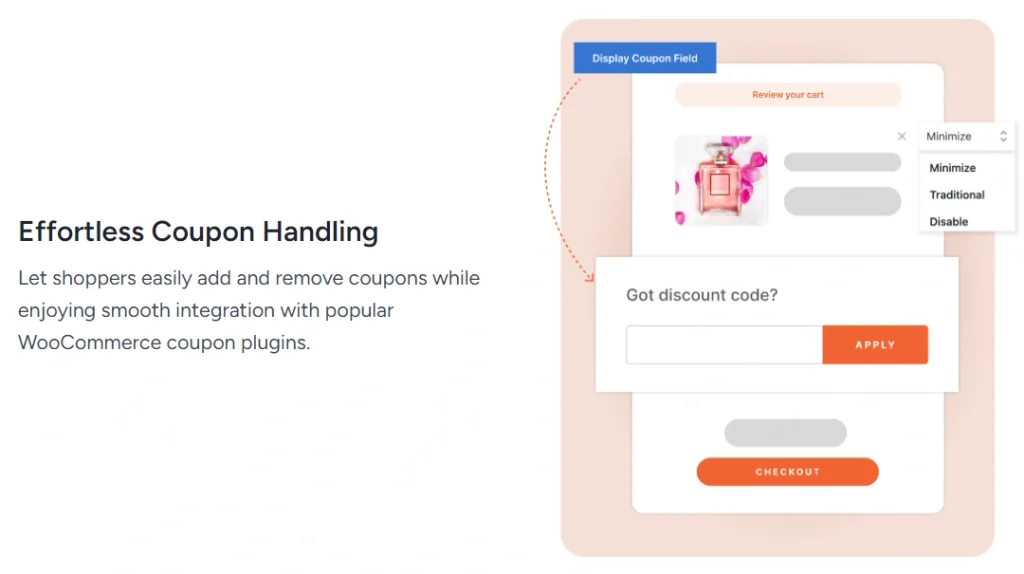
Coupon field. The product page shows three display choices: minimize, traditional or disable. In my view, if your store applies discounts automatically, an empty code box is just an invitation to go searching. That’s the case for rule-based discounts like the Power Coupons deal, where you can hide the field entirely.
Labels and styling. Both tiers let you edit the heading, coupon text, checkout button text and shipping bar text. Pro adds six more colour controls (background, button text, quantity and header colours) and an icon picker with presets and a custom upload.
Which Plan Gets the 56%?
I worked out the saving on each card from its crossed-out list price. These are my own rounded calculations:
- Modern Cart Pro (annual): about 54% off list
- Modern Cart Pro (lifetime): about 56% off list
- CartFlows Suite (annual): about 40% off list
- CartFlows Suite (lifetime): about 31% off list
So here the banner figure holds up, on the Pro lifetime plan. Annual has a catch: the sale price is a first-year price, and renewals return to the regular list price. Using the renewal price on the card, Modern Cart Pro on annual has already cost more than lifetime by the second year. The Suite takes until the third year. Also, Modern Cart Pro carries no Black Friday bonus. The free plugins go to Suite buyers only.
What I’d Test Before Leaving It On
A cart drawer is front-end code, so I’d check it like any other plugin that runs on every page.
- Scripts and requests. Open DevTools’ Network tab on a cached page and look for extra scripts, or AJAX calls that refresh the cart. Side carts commonly rely on them, and I couldn’t confirm how this one works.
- Layout shift. The floating icon and the drawer shouldn’t move content while loading. Check CLS on mobile, and use the “hide if cart empty” setting to keep the icon quiet.
- Theme overlap. If your theme already has its own mini cart or off-canvas cart, turn one off. CartFlows comes from the team behind Astra, so if you run the Astra Theme, test the two together.
- Compatibility. The product page says it works with popular themes and plugins. It doesn’t spell out page builders or the WooCommerce block checkout, so confirm those on a staging site.
The site also lists a question about speed and one about mobile, but I couldn’t see the answers. Cart width has separate desktop and mobile settings on both tiers, so you can tune it, but test on a real phone.
Pro tip: Pro lists “supports custom trigger”. I read that as opening the cart from your own button or menu item, but check the documentation for the exact setup.
Where It Falls Short and Who Should Skip It
Real drawbacks:
- The money features are Pro only. In-cart recommendations, the popup cart and most colour controls are missing from Starter.
- No bonus on Pro. The free plugins go to Suite buyers.
- Annual renewals return to list price.
- Pro covers 3 websites. Agencies will outgrow it quickly.
- It only handles the cart. It does nothing for shoppers who still leave, which is the job of a recovery tool like the cart recovery deal.
Who should skip it: stores not on WooCommerce, single-product shops that send buyers straight to checkout, and stores with heavy cart logic where a full cart page may still be clearer. If your theme’s mini cart already does the job, you may not need a plugin at all.
Starter vs Pro: What the Upgrade Adds
| Modern Cart Starter | Modern Cart Pro | |
|---|---|---|
| Cart styles | Slide-in cart | Slide-in and popup cart |
| Recommendations | Not in Starter | In-cart and empty-cart recommendations, extra styles, custom heading |
| Totals display | One toggle | Separate controls for total, subtotal, tax, discount and shipping, plus order summary styles |
| Coupon field | Show or hide | Adds a display style option |
| Colours | Primary, heading and body | Adds six more: background, button text, quantity text and background, header text and background |
| Icons | Colour, background and size | Adds icon picker, style presets and custom upload |
| Same in both | Free shipping bar, floating icon, text labels, desktop and mobile width, animation speed, express checkout | Same set |
| Best for | A branded slide cart with a shipping bar | Stores that want upsells in the cart and full styling |
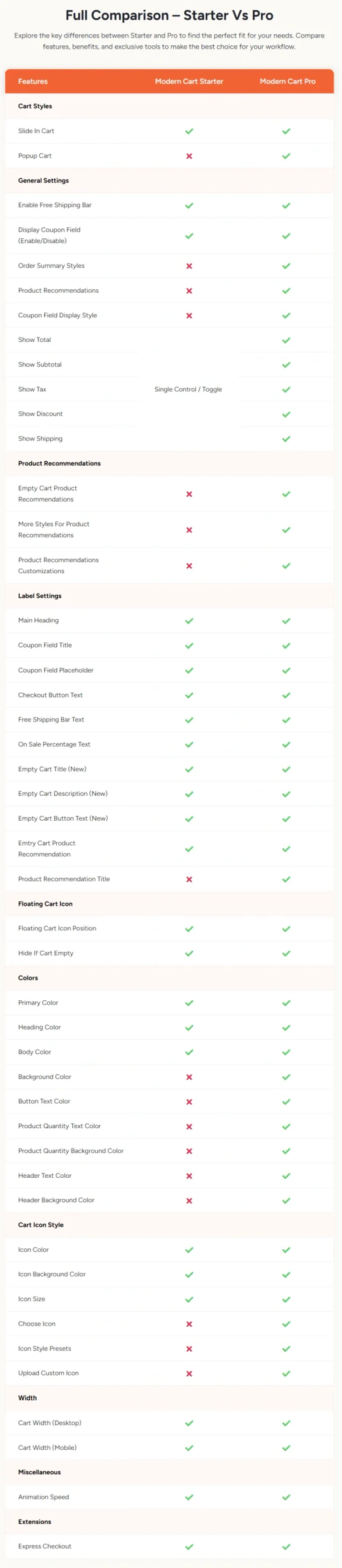
Starter is a solid base. It replaces the cart page and keeps the shipping bar. Pro is where the revenue features sit, mainly the recommendations and popup style.
For a store that just wants a cleaner cart, Starter is enough. If you want upsells inside the cart, buy Pro, since recommendations are Pro only, and take lifetime if you’ll keep it beyond the first year.
Does the Suite Make Sense for a Cart Plugin?
Only if the cart isn’t your only gap. The Suite brings in a funnel builder, cart recovery and a coupon tool, covers 30 websites instead of 3, and adds the free-for-a-year bonuses. My CartFlows Black Friday guide covers the whole bundle.
One or two stores that only need a better cart should stay with Pro. For client work across many stores, or a store that will also use the funnel builder, the Suite is the cheaper route than adding plugins one at a time.
What to Do After Buying
- Install the plugin and activate your licence.
- Pick slide-in or popup, then set your cart width for desktop and mobile.
- Turn on the free shipping bar and add product recommendations.
- Test as a logged-out visitor on a real phone, with caching on.
- Check LCP and CLS on a product page before and after.
Mistakes to avoid: showing too many recommendations, hiding the coupon field while you still rely on manual codes, and leaving your theme’s own mini cart active next to Modern Cart.
Discount– Limited Time Offer!
Deal: Up to 56% OFF
Coupon Code: Not needed. The discount is auto-applied at checkout.👇
Frequently Asked Questions
Is the Modern Cart Black Friday discount automatic?
Yes. The discount applies automatically at checkout, so you don’t need a code. Start from the pricing page, pick Annual or Lifetime, and compare the checkout total with the plan card. If the sale price is missing, go back through my link and choose the plan again before you pay.
Is there a free version of Modern Cart?
The pricing page invites you to try the free version, and its comparison table lists a Starter tier. Starter has the slide-in cart, free shipping bar, floating icon and text labels. Recommendations and the popup cart need Pro. Check the exact limits on the site before you rely on it.
Should I buy Modern Cart Pro annual or lifetime?
Lifetime, if you’ll use it past the first year. Annual renews at the regular list price, so by the second year it has already cost more than lifetime. Annual only suits a short test or a store you may close. Read the licence terms for what lifetime covers.
Will Modern Cart work with my theme and other plugins?
The product page says it’s designed to work with popular WordPress themes and plugins. It doesn’t list page builders or the block checkout, so I’d test those on a staging site. If your theme already has its own mini cart, turn that off to avoid two carts.
Can I use Modern Cart on client websites?
The site lists this as a common question, but I couldn’t see the answer. Pro covers up to 3 websites, and the Suite covers up to 30. If you do client work, ask support about the licence terms before buying, and use the 14-day refund window to test.
Are there other WordPress deals worth checking this week?
Yes. Hosting, themes and plugins are all discounted right now, and I keep a running list in my WordPress Black Friday deals roundup. If you’re building the store itself, a fast host helps a cart drawer feel instant.
Final Verdict
Modern Cart Pro is a good buy this week if you want upsells inside the cart and a cleaner flow than the default page. The lifetime plan carries the best discount and avoids renewals. If a slide-in cart with a shipping bar is enough, the Starter version already covers that, and it costs nothing to test first.
The discount applies by itself, the refund window is 14 days, and the countdown is your only deadline. You can get the Modern Cart Black Friday deal here before the timer ends.
77+ Best WordPress Black Friday/Cyber Monday Deals 2026 [Up to 99% OFF] – Verified Deals Live
Looking for more Black Friday & Cyber Monday software discounts? We have hand-picked and verified 77+ live deals across WordPress hosting, plugins, themes, VPNs, and AI tools—all in one place so you don’t miss out on the biggest savings of the year. Explore the complete WordPress Black Friday Deals 2026 guide.
Quick Deal Snapshot [STATUS: LIVE NOW]
Status: Live now (Ends December 11, 2026)
- Savings: Save up to 99% across 60+ verified WordPress & SaaS brands
- Web Hosting & Domains: Up to 95% OFF + Free Domains & Migrations
- WordPress Plugins & Builders: Up to 90% OFF + Lifetime Deals
- Themes, AI & VPN Tools: Up to 88% OFF + Extra Free Months
- Verified Discounts: Direct promo codes & auto-applied checkout links
- Updated Daily: New live deals added throughout Black Friday week
Coupon: Auto-applied & verified codes inside.

Related Posts