CartFlows is running its Black Friday and Cyber Monday sale right now, and the banner on the site says up to 56% off. This page walks through what that actually means: which plans are discounted, how the lifetime option works, and which bonus plugins come free with the Pro and Suite plans.
If you run a WooCommerce store, CartFlows is the plugin family that replaces the default checkout with a proper sales funnel. One Suite licence gets you the funnel builder, a slide-out cart, cart recovery emails and a rule-based coupon tool, all built by Brainstorm Force, the team behind Astra.
I’m Karan Rajput, and I’ve spent over 7 years working on WordPress, SEO and client WooCommerce projects. Cart and checkout plugins are where I’m most careful, because a heavy one can hurt both speed and conversions at the same time, so I read the fine print first.
Below you’ll find the claim steps, the differences between plans, the bonus plugins, and the limits nobody mentions on a sales page. The discount is applied automatically at checkout, so there’s no code to hunt for. According to the site’s countdown, the sale ends on 6 December 2026, but I’d check the timer before you buy because it can change.
CartFlows Black Friday Sale Snapshot [🟢STATUS: LIVE NOW]
Starts on: Live now | Ends on: 6 December 2026 (follows the site countdown)
CartFlows Black Friday and Cyber Monday sale on the funnel builder and the full Suite, with free bonus plugins on Pro and Suite.
- Discount: Up to 56% off, applied automatically at checkout. No coupon code to enter.
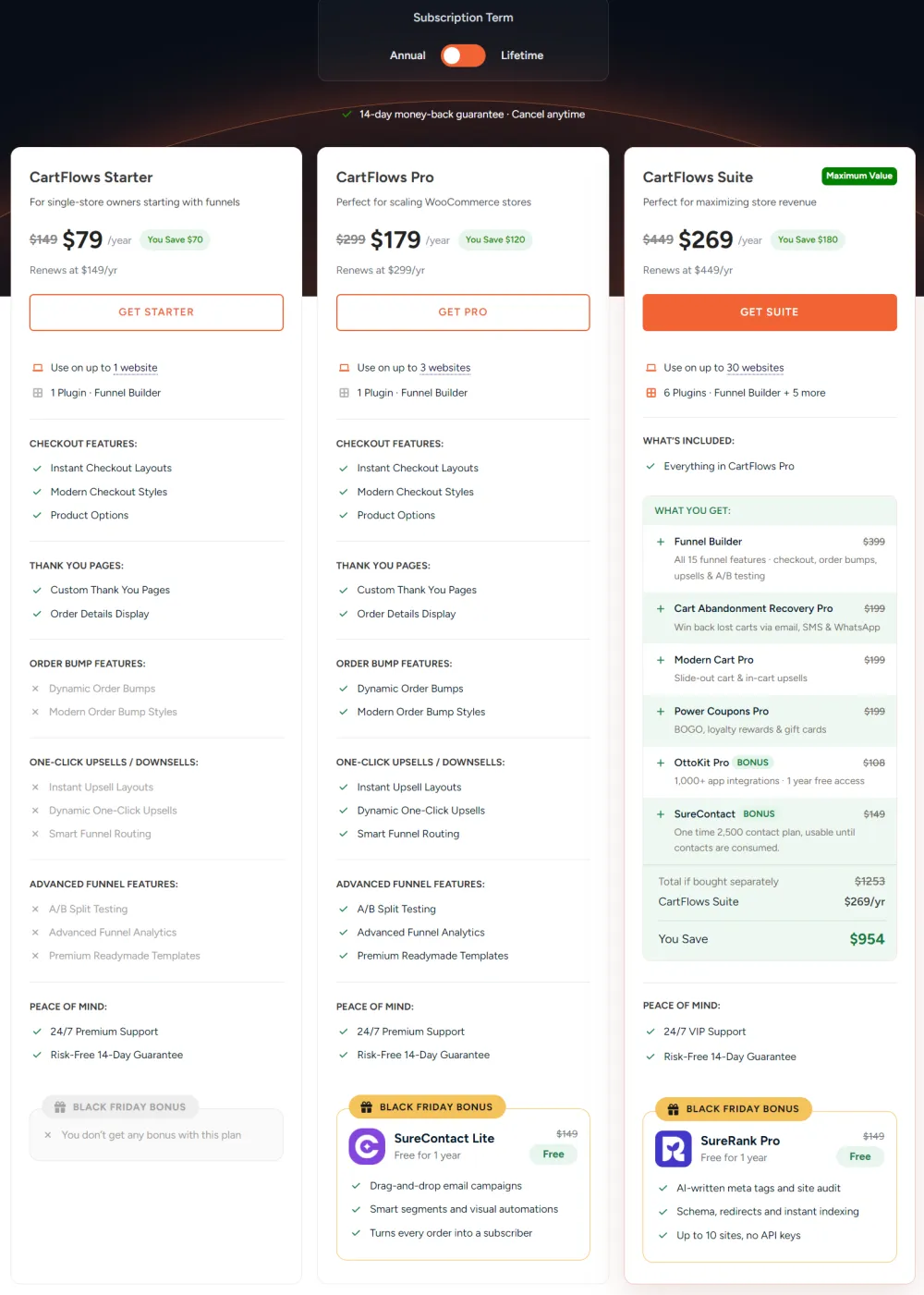
- Annual plans (USD, first year): Starter $79/yr (list $149, renews at $149/yr, 1 website) | Pro $179/yr (list $299, renews at $299/yr, 3 websites) | Suite $269/yr (list $449, renews at $449/yr, 30 websites)
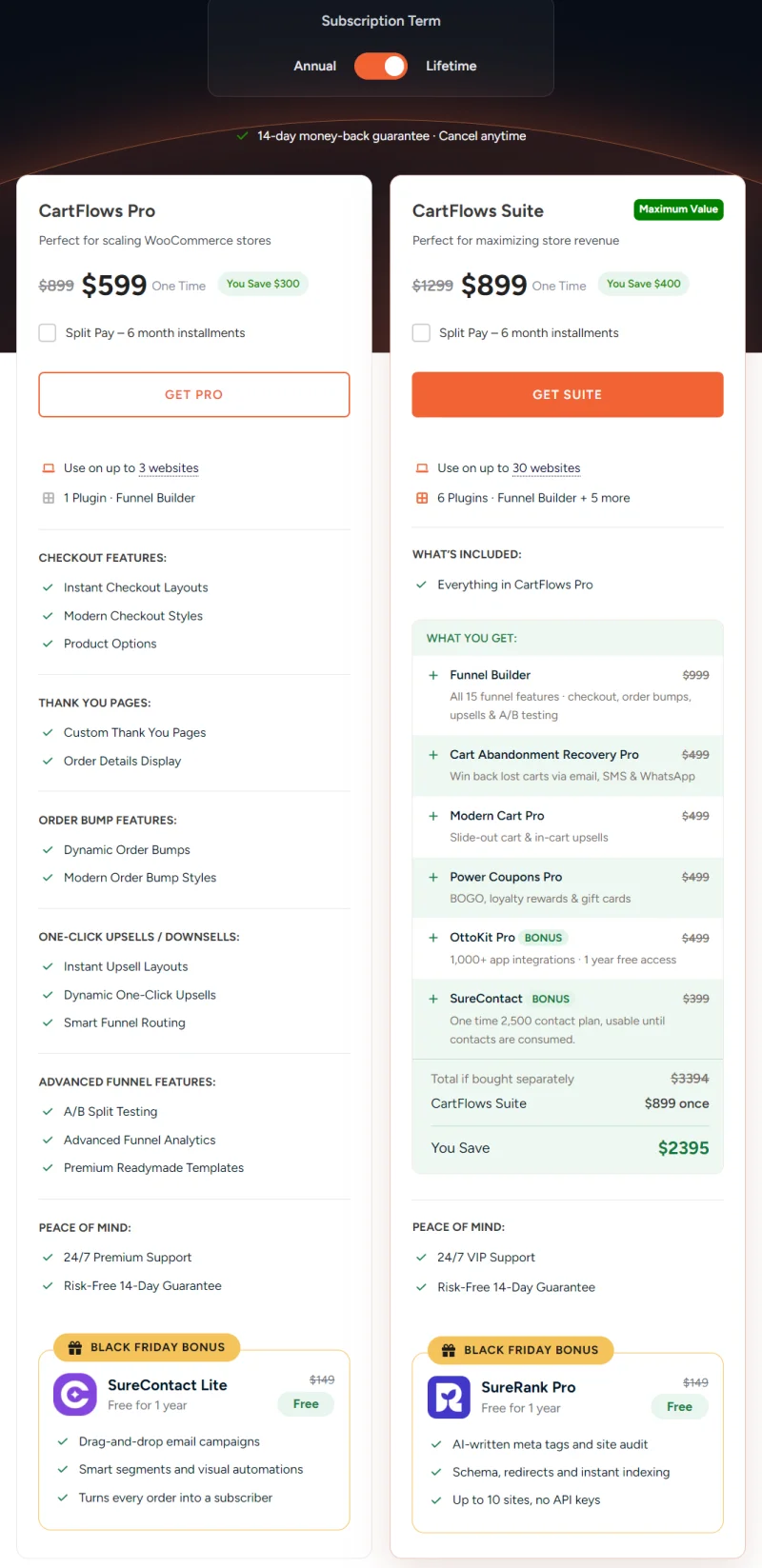
- Lifetime plans (USD, one-time): Pro $599 (list $899, 3 websites) | Suite $899 (list $1,299, 30 websites). Split Pay in 6 monthly instalments is available.
- Free bonuses: Pro gets SureContact Lite free for 1 year. Suite gets OttoKit Pro and SureRank Pro free for 1 year, plus a one-time 2,500-contact SureContact plan. Starter gets no bonus.
- Guarantee: 14-day money-back guarantee, no questions asked.
Coupon: Not needed. The discount is auto-applied at checkout. 👇

Disclaimer: This post contains affiliate links, and I earn a commission from them at no extra cost to you. Thank you for your support!Quick Answer: The Suite is the best value in this sale if you need more than a funnel builder, because it bundles cart recovery, a slide cart, coupons and three bonus plugins across up to 30 sites. Pro is the smarter pick for one to three stores, and Starter only makes sense for a basic single-site checkout.
How to Claim the CartFlows Black Friday Deal
It takes a few minutes, and nothing needs a code.
- Open the CartFlows pricing page and check that the sale banner and countdown are showing at the top.
- Pick your billing term with the Annual / Lifetime toggle. When I checked, the lifetime view listed only Pro and Suite, so Starter is annual-only.
- Choose a plan and click Get Starter, Get Pro or Get Suite.
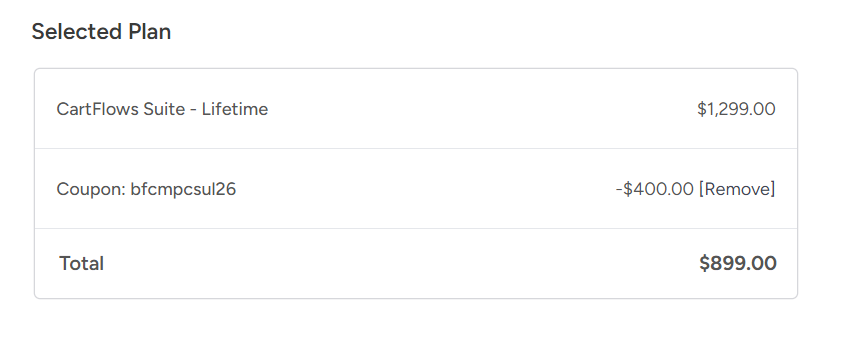
- On checkout, look at the Selected Plan box. On the Suite Lifetime checkout I looked at, the regular $1,299.00 dropped by $400.00 through a coupon that applied by itself (it showed as bfcmpcsul26), leaving a total of $899.00. You don’t need to type anything.
- Pay with PayPal, Stripe or VISA. On lifetime plans there’s also a Split Pay option that spreads the payment over six months.
- Keep your receipt. You have 14 days to ask for a refund if it isn’t right for your store.
To see what the Suite replaces, CartFlows’ own bundle maths puts the plugins at $1,253 if bought separately on annual terms, against $269/yr for the Suite (a $954 difference). On lifetime it’s $3,394 against $899 once (a $2,395 difference). Those are the company’s figures, but the plugin list matches what the Suite actually includes.
What the Discount Really Means for Each Plan
The banner says up to 56%, and that figure matches the Power Coupons Pro lifetime plan. For the plans on this page, I worked out the saving on each card from its crossed-out list price instead. These are my own calculations, rounded:
- Starter (annual): about 47% off list
- Pro (annual): about 40% off list
- Suite (annual): about 40% off list
- Pro (lifetime): about 33% off list
- Suite (lifetime): about 31% off list
The bigger saving is the bundle. By the site’s own maths, the Suite works out roughly 76% cheaper than buying its plugins separately on annual terms, and roughly 71% cheaper on lifetime.
Now the part people miss. Annual plans renew at the regular list price, so the sale price is a first-year price. Using the renewal prices on the cards, annual becomes more expensive than lifetime by the third year, for both Pro and Suite. If you know you’ll keep the plugins running past year two, lifetime is the cleaner deal.
What You Actually Get in the Suite
The Suite bundles four main plugins, and the Funnel Builder is the core one.
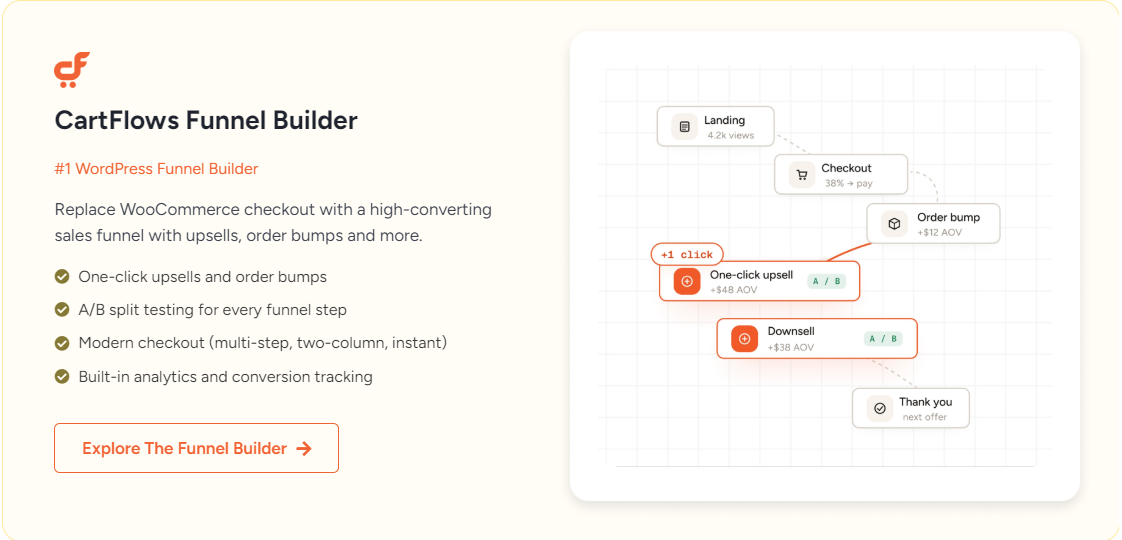
Funnel Builder. It replaces the WooCommerce checkout with a funnel: one-click upsells, order bumps, A/B split testing on every funnel step, multi-step or two-column checkout layouts, and built-in analytics.
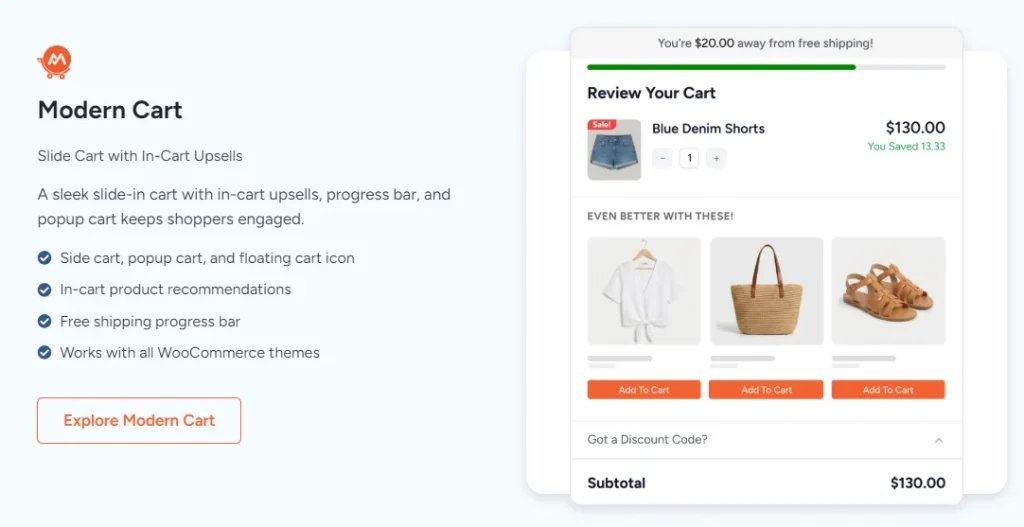
Modern Cart. A side cart, popup cart or floating cart icon, with in-cart product recommendations and a free shipping progress bar.
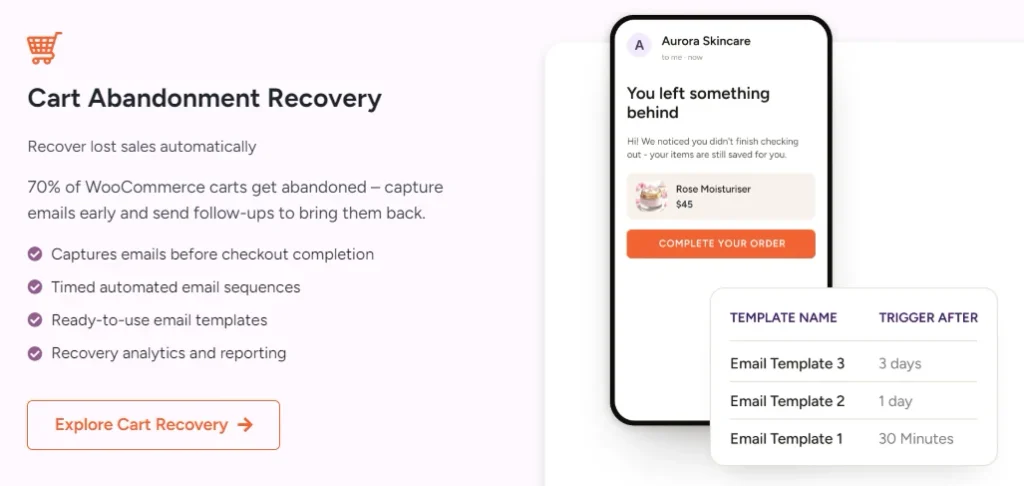
Cart Abandonment Recovery Pro. It captures emails before checkout is completed and sends timed follow-ups. The Suite listing mentions email, SMS and WhatsApp, and the sample sequence on the site uses 30 minutes, 1 day and 3 days. I’ve covered the Cart Abandonment Recovery deal on its own page too.
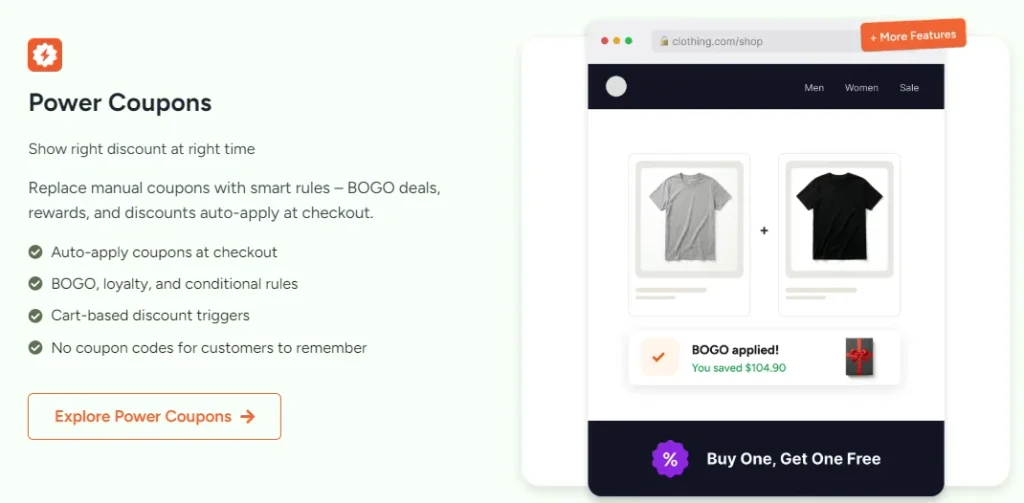
Power Coupons Pro. Auto-applied coupons, BOGO deals, loyalty rewards, gift cards and cart-based triggers, so customers never have to remember a code. If coupons are your main need, check the Power Coupons Black Friday deal before paying for the full bundle.
CartFlows claims stores using the full Suite see +12% average order value, 15% of abandoned carts recovered and +21% repeat purchase rate. Those are the company’s numbers, not mine, so treat them as best-case marketing rather than a promise.
The Free Bonus Plugins: Worth Having or Just Padding?
The bonuses depend on the plan, and that matters when you compare tiers.
- OttoKit Pro (Suite): 1,000+ app integrations, free for 1 year. If you automate WordPress tasks, the OttoKit Black Friday deal page explains where it fits.
- SureRank Pro (Suite): AI-written meta tags, site audit, schema, redirects and instant indexing for up to 10 sites, free for 1 year. SureRank only helps if you don’t already have an SEO plugin you’re happy with.
- SureContact (Pro and Suite): Pro gets SureContact Lite free for 1 year, with email campaigns, smart segments and visual automations. Suite gets a one-time 2,500-contact plan that you can use until the contacts are consumed.
Starter gets none of these. My view: nice extras, but I wouldn’t choose a plan for the bonuses alone. Most are free for the first year only, and the site doesn’t say here what happens after that, so confirm before you build a workflow around them.
A Developer’s Take: Speed, Compatibility and Fit
I look at checkout plugins differently from most reviewers because I’ve fixed slow WooCommerce stores for clients. Cart and checkout pages are the last place you want extra JavaScript.
CartFlows is built only for WooCommerce, and the company says that’s on purpose, with no multi-platform code to carry around. That’s a good sign for bloat. Still, any slide-in cart adds front-end scripts, so after turning on the Modern Cart I’d run PageSpeed Insights on a product page and watch LCP and CLS, especially whether the cart icon shifts the layout while loading.
Two practical notes. Keep cart and checkout pages out of page caching, which is standard for WooCommerce anyway. And confirm your page builder: Modern Cart is said to work with all WooCommerce themes, and one user review on the pricing page mentions Bricks Builder support, but I’d check the documentation for Elementor or Gutenberg before buying instead of assuming.
On adoption, the site lists 800,000+ active stores and a 4.8/5 rating on WordPress.org. That means plenty of stores already run it, which usually helps when you hit an odd conflict.
Where It Falls Short and Who Should Skip It
Honest drawbacks:
- Starter is thin. It has no order bumps, no one-click upsells, no A/B testing and no advanced analytics. Those are the features most people buy CartFlows for.
- Annual renewals go back to list price. The sale price covers the first year only.
- Bonuses are time-limited. Most are free for 1 year.
- WooCommerce only. No WooCommerce, no CartFlows.
- Lifetime is Pro and Suite only. The site doesn’t spell out what “lifetime” covers here, so read the licence terms for updates and support.
Who should skip it: anyone not on WooCommerce (if you’re choosing a store plugin from scratch, SureCart is a separate option), tiny stores with very few orders where the free version may be enough, and anyone who only needs one feature and doesn’t want a bundle.
Which Plan Should You Pick?
| Starter | Pro | Suite | |
|---|---|---|---|
| Websites | 1 | 3 | 30 |
| Plugins included | Funnel Builder only | Funnel Builder only | 6 (Funnel Builder + 5 more) |
| Funnel depth | Checkout and thank-you pages only | Adds order bumps, one-click upsells, smart funnel routing, A/B testing, advanced analytics | Everything in Pro |
| Support | 24/7 Premium | 24/7 Premium | 24/7 VIP |
| Black Friday bonus | None | SureContact Lite, free for 1 year | OttoKit Pro, SureRank Pro, SureContact |
| Annual saving vs list (my calculation) | About 47% | About 40% | About 40% |
| Lifetime option | Not shown | About 33% saving | About 31% saving |
| Best for | One basic single-store checkout | 1–3 stores that want order bumps and upsells | Agencies and stores that also need cart recovery, coupons and a slide cart |
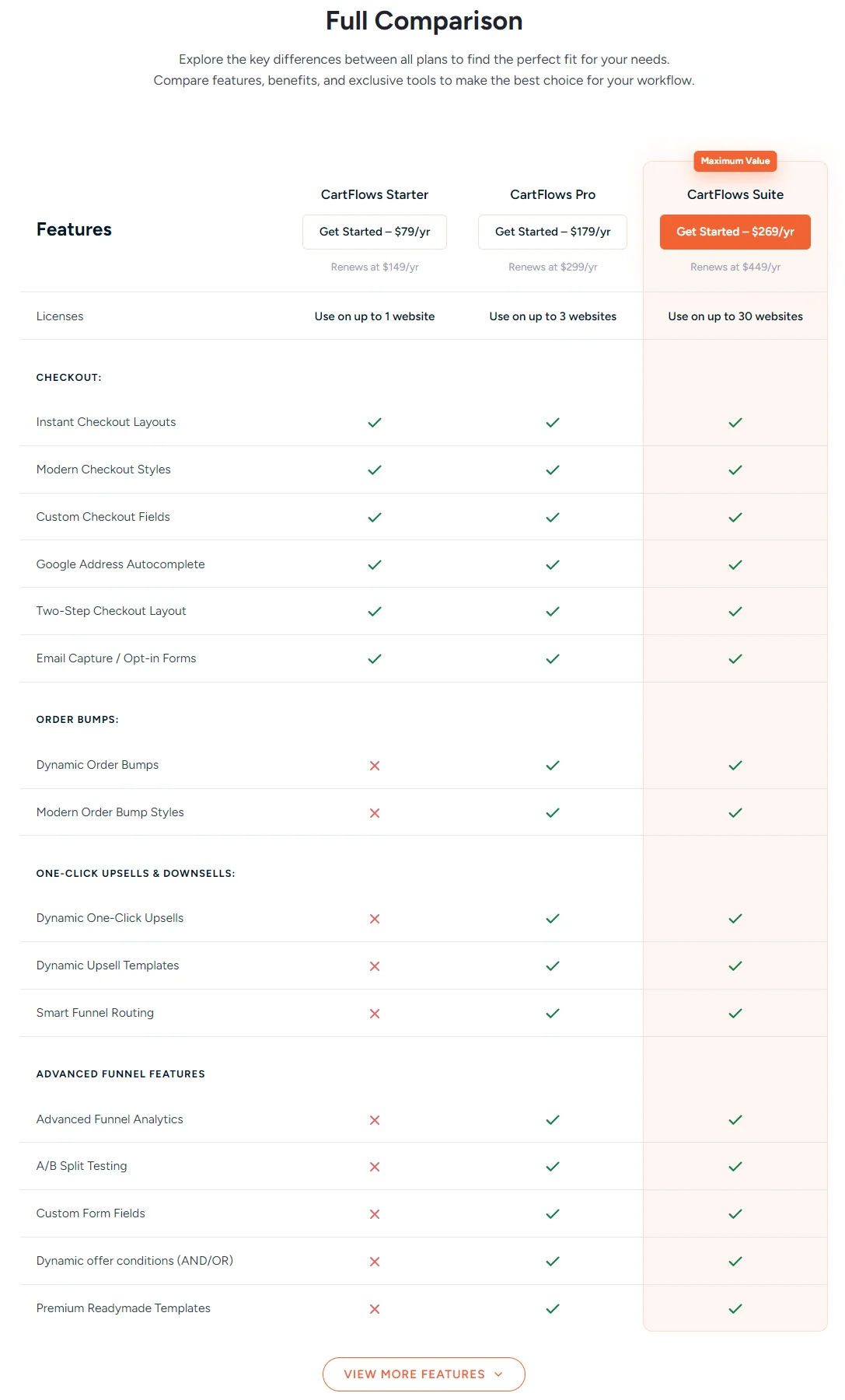
The real split is Starter versus Pro. Starter cleans up one checkout, while Pro is where funnel features start to affect revenue. The Suite then adds the surrounding plugins, and the jump from 3 sites to 30 matters if you do client work.
For one or two WooCommerce stores that want order bumps and upsells, Pro is the sensible pick. If you also need cart recovery and a coupon system, or you manage client stores, go with the Suite, because those plugins would otherwise be bought one by one. Pro tip: for client work, one Suite licence covering up to 30 sites can beat several separate Pro licences, but check the licence terms for client use first.
If you’re leaning towards Pro, the free SureContact deal bonus is worth a look for order-based email lists.
What to Do After Buying
- Log in to your CartFlows account, download the plugins you bought and activate the licence on your site.
- Build one simple funnel first: checkout, then a thank-you page. Place a real test order on mobile.
- Add one order bump or upsell at a time, so you can tell what’s actually helping.
- If you have cart recovery, set the email timing. Start with the 30 minute, 1 day and 3 day sequence the site shows.
- Exclude cart and checkout from caching, then recheck LCP and CLS.
Mistakes to avoid: switching on every module the same day, skipping a test of your coupon rules with a real cart, and forgetting the renewal date on annual plans.
Discount– Limited Time Offer!
Deal: Up to 56% OFF
Coupon Code: Not needed. The discount is auto-applied at checkout.👇
Frequently Asked Questions
Do I need a coupon code for the CartFlows Black Friday deal?
No. The discount is applied automatically when you start from the pricing page and choose a plan. On checkout, a coupon line appears inside the Selected Plan box and reduces the total by itself. If you don’t see that line, go back to the pricing page through my link and select the plan again before paying.
When does the CartFlows Black Friday sale end?
Going by the countdown timer on the site, the sale ends on 6 December 2026. Black Friday and Cyber Monday deals sometimes get extended or end early, so treat the timer as the final word and check it just before you buy. Once it hits zero, expect the pricing cards to go back to the crossed-out list prices.
Is there a free version or a refund option?
Yes to both. The pricing page points to a free version of CartFlows for simple funnels, so you can try the basics first. Paid plans also come with a 14-day money-back guarantee, which the site says is no questions asked. That keeps the risk of buying during a sale fairly small, as long as you test early.
Which CartFlows plan is best for beginners?
For most beginners I’d start with Pro. Starter only covers checkout and thank-you pages, while Pro adds order bumps, one-click upsells and A/B testing, which are the features that actually change revenue. Pick Starter only if you want a cleaner checkout on one store and nothing else. The Suite makes sense once you also need cart recovery and coupons.
Can I upgrade my CartFlows plan later?
The pricing page says you can upgrade at any time by paying the difference. What I can’t confirm is whether the sale price carries over after the sale ends. If you already know you’ll need Suite features, buying the right plan during the sale is the safer move. Check the upgrade price on the site before deciding.
Are there other WordPress deals worth checking this week?
Yes. Hosting, themes and plugins are all discounted right now, and I keep a running list in my WordPress Black Friday deals roundup with the sale dates for each offer. If you’re building a WooCommerce store from scratch, hosting and a fast theme matter as much as the checkout plugin.
Final Verdict
CartFlows is a strong buy this week if you run WooCommerce and want more from your checkout. For a single store that needs order bumps and upsells, Pro does the job. For several stores, or if you also want cart recovery, coupons and a slide cart, the Suite is the better value, and lifetime beats annual by the third year. Starter is only for the simplest setups.
The discount applies on its own, the refund window is 14 days, and the countdown is the only deadline that matters. You can claim the CartFlows Black Friday deal here before the timer ends.
77+ Best WordPress Black Friday/Cyber Monday Deals 2026 [Up to 99% OFF] – Verified Deals Live
Looking for more Black Friday & Cyber Monday software discounts? We have hand-picked and verified 77+ live deals across WordPress hosting, plugins, themes, VPNs, and AI tools—all in one place so you don’t miss out on the biggest savings of the year. Explore the complete WordPress Black Friday Deals 2026 guide.
Quick Deal Snapshot [STATUS: LIVE NOW]
Status: Live now (Ends December 11, 2026)
- Savings: Save up to 99% across 60+ verified WordPress & SaaS brands
- Web Hosting & Domains: Up to 95% OFF + Free Domains & Migrations
- WordPress Plugins & Builders: Up to 90% OFF + Lifetime Deals
- Themes, AI & VPN Tools: Up to 88% OFF + Extra Free Months
- Verified Discounts: Direct promo codes & auto-applied checkout links
- Updated Daily: New live deals added throughout Black Friday week
Coupon: Auto-applied & verified codes inside.
Related Posts