Black Friday is the one week when AI video tools get cheap enough to try without overthinking. That matters if you make content for YouTube, Instagram, or client projects. Invideo AI and Wondershare Filmora both have live sales right now, but they are very different tools sharing one label.
Invideo AI is built around generating videos with AI models, with a timeline editor on top. Filmora is a desktop editor that has added AI features, a credit system, and cloud storage over the years. One starts from a prompt. The other starts from your footage.
I’m Karan Rajput. After 7+ years of blogging, client WordPress work, and building micro-niche sites, I’ve learned that the bigger discount is rarely the better buy. What matters is whether the tool matches how you actually make videos.
This post puts both sales side by side. You’ll see who each tool is for, what the discount really covers, where each one falls short, and which plan suits creators, marketers, and small teams. Both discounts apply automatically, so there’s no coupon hunting. Note that the Invideo offer ends on 26 Nov 2026, which is the closest deadline.
Two live sales, no coupon needed on either. Prices below are in USD as shown on the official pages and may change.
Invideo AI [STATUS: LIVE NOW]
Starts on: Already live | Ends on: 26 Nov 2026
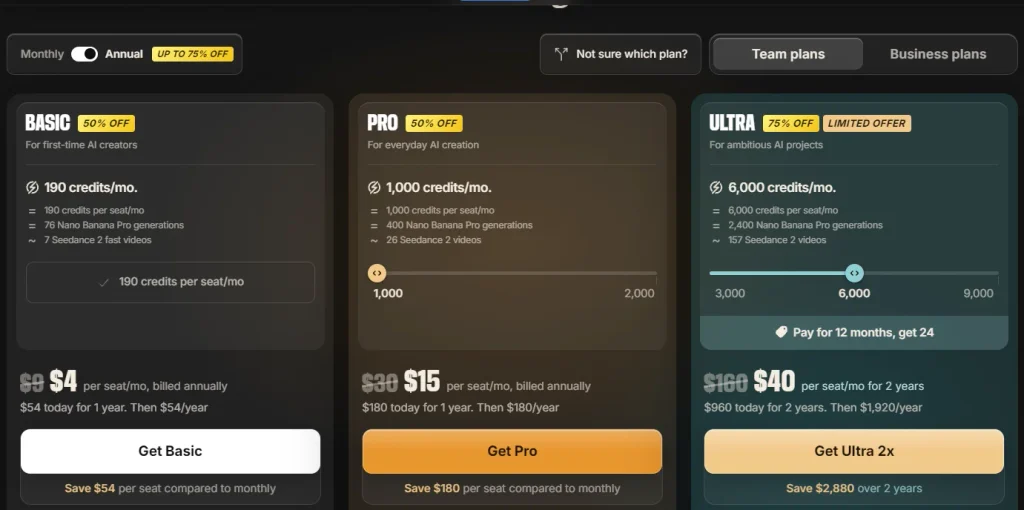
- Up to 75% off, with Pay for 12 months, get 24 months on the Ultra plan
- Basic: 50% off, $4 per seat/mo, billed annually ($54 today for 1 year)
- Pro: 50% off, $15 per seat/mo, billed annually ($180 today for 1 year)
- Ultra: 75% off, $40 per seat/mo for 2 years ($960 today for 2 years)
- Discount is auto-applied. No coupon code.
- See Live Deal Price: Click Here
Wondershare Filmora [STATUS: LIVE NOW]
Starts on: Nov 16, 2026 | Ends on: Dec 3, 2026
- The sale headline is up to 83% off across Wondershare products. Filmora itself is up to 20% off.
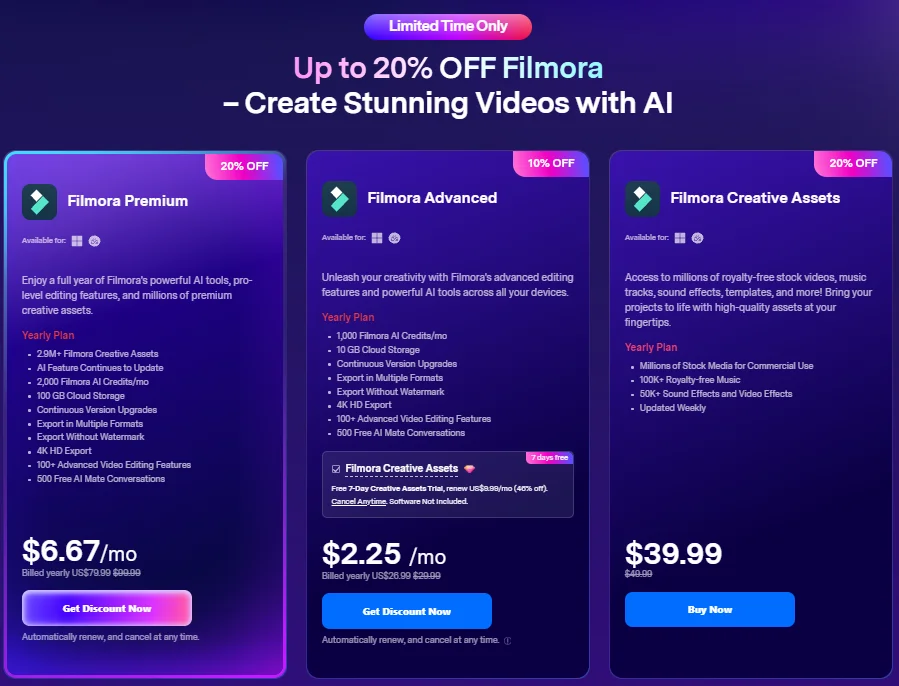
- Filmora Premium: 20% off, $6.67/mo, billed yearly US$79.99 (was $99.99)
- Filmora Advanced: 10% off, $2.25/mo, billed yearly US$26.99 (was $29.99)
- Filmora Creative Assets: 20% off, $39.99 (was $49.99)
- Discount is auto-applied at checkout. No coupon code.
- See Live Deal Price: Click Here


Disclaimer: This post contains affiliate links, and I earn a commission from them at no extra cost to you. Thank you for your support!Quick Answer: If you want AI to generate clips, ads, and social videos for you, Invideo AI Pro is the stronger buy at 50% off. If you edit your own footage and want a familiar desktop editor with 4K export, Filmora Premium at 20% off is the safer pick. Both discounts apply automatically.
How to Claim Each Deal
Neither sale needs a code, so the steps are short. Do them in this order, because Invideo expires first.
Invideo AI
- Open the Invideo AI Black Friday page and switch the pricing toggle to Annual.
- Pick a plan. Basic is $4 per seat/mo billed annually, Pro is $15 per seat/mo billed annually, and Ultra is $40 per seat/mo for 2 years.
- On Pro, use the credit slider to choose 1,000 credits or more.
- Set your seat count, then click Get Basic, Get Pro, or Get Ultra. The discount is already in the cart.
Full details are on my Invideo AI Black Friday deal page.
Wondershare Filmora
- Open the Wondershare Black Friday page and scroll to the Filmora section.
- Choose Filmora Premium ($6.67/mo, billed yearly US$79.99) or Filmora Advanced ($2.25/mo, billed yearly US$26.99).
- Click Get Discount Now. The sale price carries into checkout automatically.
- Read the Creative Assets box. On Advanced, it comes with a free 7-day trial, and it renews at US$9.99/mo (46% off) unless you cancel. The software itself is not included in that trial.
My Wondershare Black Friday deal post covers the rest of their sale.
What You Actually Get With Invideo AI
Invideo’s three plans are mostly separated by credits, model access, and team size.
Basic gives you 190 credits a month, which the page converts to 76 Nano Banana Pro generations or 7 Seedance 2 fast videos. It stops at Agent Two Lite, and it has no access to Seedance 2.5 or 2.0. It does include 45 premium stock footage clips and 100 GB of storage.
Pro is the one Invideo marks as Most Popular, and it’s where the product opens up. You get 1,000 credits a month (the slider goes up to 3,000) and access to all models, including Seedance 2.5 at 1080p and Seedance 2.0 at 4K. The agent options are Lite, Pro, and Ultra. Storage is 300 GB, with 150 premium stock footage clips and early access to advanced AI features. Multiplayer editing supports up to 10 seats, plus 10 free guest seats with 190 credits each.
Ultra is for heavy usage: 6,000 credits a month (up to 9,000), up to 20 seats, 20 free guest seats, 1,600 GB storage, and 360 premium stock footage clips. It’s also the only tier Invideo labels as the lowest cost per credit.
Pro observation: The full timeline editor, multiplayer editing, colour, audio and 3D tools are on every plan, including Basic. The real gate is model access and credits, not editing features. A lot of people buy Basic expecting the full AI toolkit, then hit the Seedance wall.
From a workflow point of view, Invideo is a browser tool, so your machine matters less. The trade-off is that you depend on your internet connection and on credits being available.
What You Actually Get With Filmora
Filmora’s sale is split into three offers, and they do different jobs.
Filmora Premium is the full package for a year. It includes 2,000 Filmora AI Credits a month, 100 GB cloud storage, 2.9M+ Filmora Creative Assets, 4K HD export, export without watermark, 100+ advanced video editing features, and 500 free AI Mate conversations.
Filmora Advanced is the lighter version. You get 1,000 AI credits a month, 10 GB of cloud storage, and the same 4K export, no watermark, and 100+ editing features. It doesn’t bundle the stock library, but you can add Creative Assets as a trial.
Filmora Creative Assets is stock only: millions of stock media files for commercial use, 100K+ royalty-free music tracks and 50K+ sound effects and video effects, updated weekly. It’s not an editor, so don’t buy it alone.
Both editor plans list Windows and macOS on the page.
When I set up video workflows for client sites, the editor was rarely the bottleneck. The bottleneck was getting small, optimised files onto a WordPress page without hurting speed. A heavy self-hosted video above the fold can drag LCP, so I usually embed from YouTube or use a lightweight embed. Whichever tool you pick, plan your export settings around that. If you’re building the site side too, my WordPress Black Friday deals roundup has the hosting and plugin offers.
Where Each One Falls Short
Here are the honest trade-offs, one tool at a time.
Invideo AI
Pros
- 50% off on Basic and Pro, and 75% off on Ultra, which is a deep discount.
- Full timeline editor and multiplayer editing on every plan.
- Pro includes all Seedance models and 10 free guest seats.
- 300 GB storage on Pro is generous for a creator.
Cons
- Basic has no Seedance 2.5 or 2.0 access and only Agent Two Lite, so it’s closer to a trial.
- Credits drain fast on video generation. Basic’s 190 credits equal about 7 Seedance 2 fast videos.
- Ultra means paying for 2 years upfront, which is a big commitment.
- Early access and the lowest cost per credit are not on Basic or Pro.
Filmora
Pros
- 4K HD export without watermark on both editor plans.
- 100+ advanced editing features suit footage-heavy work.
- Premium gives 2,000 AI credits a month and 100 GB storage.
- 2.9M+ stock assets are bundled with Premium.
Cons
- The Filmora discount is 10% to 20%. The up to 83% off headline applies to other Wondershare products.
- Advanced has only 10 GB of cloud storage, which fills up fast with video projects.
- The Creative Assets trial renews automatically after 7 days.
- Team collaboration is not listed on the sale page the way Invideo’s seats are.
Invideo AI vs Filmora: Side-by-Side
| Detail | Invideo AI Pro | Invideo AI Ultra | Filmora Premium | Filmora Advanced |
|---|---|---|---|---|
| Discount in this sale | 50% off | 75% off | 20% off | 10% off |
| Billing term | Annual | Pay 12 months, get 24 | Yearly plan | Yearly plan |
| Monthly credits | 1,000 (slider up to 3,000) | 6,000 (slider up to 9,000) | 2,000 AI credits | 1,000 AI credits |
| Storage | 300 GB | 1,600 GB | 100 GB | 10 GB |
| Seats | Up to 10 + 10 guest seats | Up to 20 + 20 guest seats | Not listed | Not listed |
| Output | Seedance 2.5 at 1080p, 2.0 at 4K | Seedance 2.5 at 1080p, 2.0 at 4K | 4K HD export, no watermark | 4K HD export, no watermark |
| Stock library | 150 premium stock footage | 360 premium stock footage | 2.9M+ Creative Assets | Add-on trial only |
| Best for | AI-generated social videos and small teams | Agencies with heavy generation | Creators editing their own footage | Budget editors on one device |
Credits are not the same currency here. Invideo credits pay for AI generation, while Filmora credits cover its AI features, so compare use cases rather than the raw numbers.
Invideo Pro is for people who want finished videos from prompts and need teammates in the project. Ultra only makes sense if you’re already burning through Pro’s credits. Filmora Premium suits someone cutting talking-head or tutorial footage who wants stock assets included. Advanced is the cheapest entry, but the 10 GB storage is its weak spot.
Which One Should You Pick?
No “it depends” here. Pick by what you make:
- For AI-generated ads, shorts, and social clips, Invideo AI Pro is better because it unlocks all Seedance models and 1,000 credits a month at 50% off.
- For YouTube or tutorial editing from your own footage, Filmora Premium makes more sense because it bundles 4K export, 100+ editing features, and 2.9M+ stock assets.
- For a small team or agency, go with Invideo Pro for the 10 seats and 10 free guest seats. Choose Ultra only if you’ll use the extra credits.
- For a tight budget, Filmora Advanced has the lowest entry, but plan around its 10 GB cloud storage.
One weakness of Invideo to flag clearly: Basic is limited enough that I wouldn’t treat it as the real product.
Who Should Skip This
Skip Invideo Ultra if you haven’t tested Pro first. Paying for 2 years upfront on an untested workflow is the most common mistake I’d expect here. Skip Filmora if you want text-to-video generation as your main workflow, since its strength is editing. And skip both if you only make one or two videos a year, because a free editor will do the job.
What to Do After Buying
- Invideo: Check which models your plan unlocks before you start a long project, and keep an eye on the credit counter.
- Invideo: Add guest seats if you’re on Pro or Ultra. They come free with credits.
- Filmora: Decide on Creative Assets before the trial ends, or cancel it.
- Both: Export in the format your site or channel actually needs, and test playback on mobile before publishing.
- Mistake to avoid: Don’t generate dozens of test videos on day one. Credits are monthly, so spend them on real work.
Invideo AI vs Wondershare Filmora Black Friday Deal 2026: Up to 83% Off + Free Perks
Coupon Code: Auto-apply👇
Frequently Asked Questions
Do I need a coupon code for either deal?
No. Both discounts apply automatically. The Invideo offer is already live, and the Wondershare offer is auto-applied at checkout. If a price looks wrong in your cart, refresh the page and check that you came from the sale page.
Which deal has the bigger discount?
Invideo AI has the bigger discount for this comparison: 50% off Basic and Pro, and 75% off Ultra. The up to 83% off headline is Wondershare’s sale across its range, while Filmora itself is 10% to 20% off.
Is Invideo AI Basic enough for beginners?
For learning the interface, yes. For real production, probably not. Basic has 190 credits, no Seedance 2.5 or 2.0 access, and Agent Two Lite only. Most beginners who plan to publish regularly will find Pro a better starting point.
When do these sales end?
Invideo ends on 26 Nov 2026. Wondershare runs from Nov 16 to Dec 3, 2026. You can also track more offers in my WordPress Black Friday deals list, which I update as deals change.
Is Pay 12 months, get 24 worth it?
It’s a good deal on paper because the Ultra discount is 75% off. But it’s a 2-year upfront commitment, so I’d only choose it if you know you’ll use the credits and seats, not just because the percentage is large.
Will the Filmora Creative Assets trial charge me?
It’s free for 7 days, then it renews unless you cancel. The software isn’t included in that trial. Cancel before day 7 if you don’t need the stock library.
Final Verdict
If you want AI to make the videos, take Invideo AI Pro while the 50% off is live, and don’t wait: it ends 26 Nov 2026. If you edit your own footage, Filmora Premium is the more practical buy through Dec 3, 2026. Don’t spend on Ultra or Creative Assets until you’ve proven you’ll use them. You can claim Invideo AI here or see the Filmora deal here.
72+ Best WordPress Black Friday/Cyber Monday Deals 2026 [Up to 99% OFF] – Verified Deals Live
Looking for more Black Friday & Cyber Monday software discounts? We have hand-picked and verified 72+ live deals across WordPress hosting, plugins, themes, VPNs, and AI tools—all in one place so you don’t miss out on the biggest savings of the year. Explore the complete WordPress Black Friday Deals 2026 guide.
Quick Deal Snapshot [STATUS: LIVE NOW]
Status: Live now (Ends December 11, 2026)
- Savings: Save up to 99% across 60+ verified WordPress & SaaS brands
- Web Hosting & Domains: Up to 95% OFF + Free Domains & Migrations
- WordPress Plugins & Builders: Up to 90% OFF + Lifetime Deals
- Themes, AI & VPN Tools: Up to 88% OFF + Extra Free Months
- Verified Discounts: Direct promo codes & auto-applied checkout links
- Updated Daily: New live deals added throughout Black Friday week
Coupon: Auto-applied & verified codes inside.

Related Posts