Black Friday sales usually push you to buy first and think later. Invideo AI’s sale is different. The AI video tools are the same, but the pricing is tied to how many videos you can generate each month, so you need to know what you’re actually buying.
The sale is live right now, with up to 75% off. No coupon code is needed, because the prices on the pricing page already include the discount. The Ultra plan also has the “pay for 12 months, get 24” structure.
I’m looking at this from a content creator’s angle: Black Friday deal reels, promo clips, blog-to-video repurposing and client video work. Below you’ll find how to claim the deal, what Invideo gives you apart from the plans, what each plan unlocks, and who should skip it.
Quick Deal Snapshot [🟢STATUS: LIVE NOW]
Starts on: Already live | Ends on: 26 Nov 2026
Up to 75% off annual billing, and Ultra adds a free second year. Prices below were taken from the pricing page and may change.
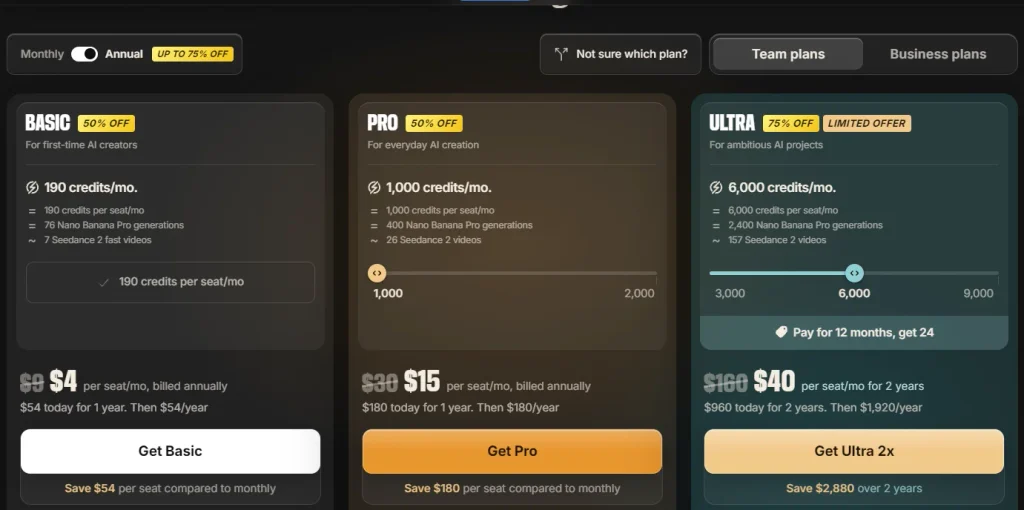
- Basic: 50% off, now $4/seat/mo (was $9), billed annually
- Pro: 50% off, now $15/seat/mo (was $30), billed annually
- Ultra: 75% off, now $40/seat/mo for 2 years (was $160), pay for 12 months, get 24
- Validity: Limited-time Black Friday offer, so check the timer
Coupon: Not needed. 👇

This post contains affiliate links, and I earn a commission from them at no extra cost to you. Thank you for your support!Quick Answer
For most solo affiliate publishers, Pro is the safe pick. Heavy video producers who want the best cost per credit should look at Ultra, because the pay-12-get-24 structure is where the savings are. Basic is only for testing the tool. Agencies should look at the Business tab instead.
How to Claim the Invideo AI Black Friday Deal
There is no code to copy, so claiming is simple. But the order of clicks matters.
- Open the official Invideo AI pricing page and confirm the Black Friday banner and countdown are visible.
- Make sure the toggle is on Annual. The sale pricing shows only on annual billing.
- Choose Team plans (solo creators and small teams) or Business plans (agencies).
- Pick your plan and set the seats. For Pro and Ultra, you can also move the credit slider.
- Check the checkout summary before paying.
Here is what the pricing page showed at the time of writing (one seat):
- Basic: $54 today for 1 year, then $54/year
- Pro: $180 today for 1 year, then $180/year
- Ultra 2x: $960 today for 2 years, then $1,920/year. The page shows $2,880 saved over 2 years.
- Business Team (5 seats): $3,887 today for 1 year, then $3,887/year
- Business Scale (5 seats): $9,030 today for 1 year, then $9,030/year
Pricing may change. Check the official site before you pay.
What’s Inside Invideo AI Besides the Plans
Invideo is no longer just a text-to-video box. The product menu and the footer show something closer to a small production suite: video, image, audio, an editor and a set of AI agents. Here is what each section lists, as seen on the site at the time of writing.
Not every model is available on every plan. The pricing page says Basic gets selected models and features, while Pro and Ultra get all models and features. Generative models are also priced differently in credits, so check the credit cost inside the app before you commit to a workflow.
The Product Line-up: Agent Two, Editor and Studio
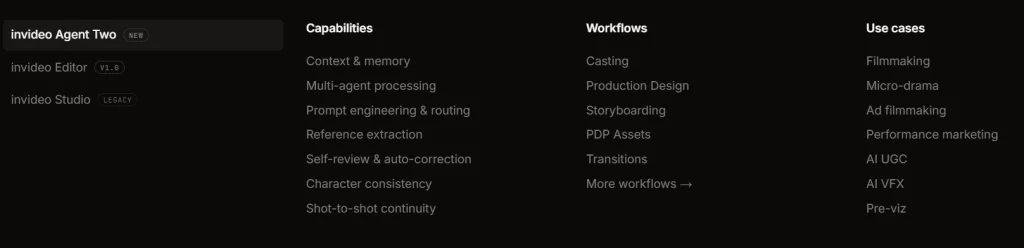
Invideo lists three products. Agent Two is tagged “New”, Editor is shown as v1.0, and Studio carries a “Legacy” label. If you used the older Invideo workflow before, Studio is that older tool. The newer work is clearly going into Agent Two and the Editor.
Agent Two Capabilities
Agent Two’s menu lists these capabilities:
- Context & memory
- Multi-agent processing
- Prompt engineering & routing
- Reference extraction
- Self-review & auto-correction
- Character consistency
- Shot-to-shot continuity
For an affiliate publisher, character consistency and shot-to-shot continuity are the two that matter most. If you run a series of deal videos with the same presenter or mascot, you need that look to stay the same across clips. I’d test this on a small project before relying on it, since the site doesn’t spell out how well it works.
Workflows and Use Cases
The workflows listed are Casting, Production Design, Storyboarding, PDP Assets, Transitions and more.
The use cases listed are Filmmaking, Micro-drama, Ad filmmaking, Performance marketing, AI UGC, AI VFX and Pre-viz.
For the people reading this blog, Ad filmmaking, Performance marketing and AI UGC are the relevant ones: promo reels, Black Friday ad creatives and UGC-style product videos. The filmmaking and VFX options exist, but they’re not what I’d base a buying decision on.
Video Tools
The footer’s video tools section lists:
- AI Video Generator
- AI Avatar Generator
- Text to Video
- Image to Video
- UGC Ads
- AI Animation Generator
- AI Ad Generator
Text to Video and Image to Video cover the usual blog-to-video flow. UGC Ads and AI Ad Generator are the ones to look at if you make promo clips for affiliate offers.
Video Models
Here is where Invideo gets interesting. The listed video models are:
- Seedance 2.5
- MiniMax H3
- Gemini Omni Flash
- Kling 4.0
- Google Veo 3.1
- Wan 3.0
- Pixverse AI
- plus a “View all” link
You get several model families under one login instead of paying for separate subscriptions. The Seedance family is the one with published credit costs on the pricing page. For the others, check the in-app credit cost.
Image Tools and Image Models
Image tools: AI Image Generator, AI Art Generator, Image to Image, AI Thumbnail Maker and AI Image Enhancer.
Image models: GPT Image 2.5, Nano Banana Pro, Nano Banana 3, Seedream, Ideogram, Flux 2, Qwen, plus a “View all” link.
The AI Thumbnail Maker is the useful one for YouTube and blog featured images. Nano Banana Pro and GPT Image 2.5 are also the two image models with credit costs published on the pricing page.
Audio and Music Tools
Audio & music tools: AI Voice Generator, AI Music Generator, Text to Speech and Voice Cloning.
Audio models: ElevenLabs, ElevenLabs Music, Minimax Music, Google Lyria, plus a “View all” link.
Voiceover and background music in the same place saves a lot of switching between tabs. One caution about Voice Cloning: only use voices you have permission to use.
Quick AI Tools
The footer lists Face Swap and Face Swap Video. I’d treat these as extras, not a reason to buy. If you use them, do it with consent, and don’t use them in a way that could mislead viewers about an affiliate offer.
Invideo Studio Tools
The Studio section lists Online Video Editor, Picture Video Maker, Instagram Video Editor, Online Video Maker, Video Collage Maker and Video Trimmer. These are the simple editing tools. Useful for quick cuts and trims, but they sit under the Legacy label, so the main work is in Agent Two and the Editor.
What You Actually Get on Each Plan
Invideo works on credits. Every generation spends some, and unused credits don’t roll over to the next month. That one detail shapes how you should choose a plan.
| Basic | Pro | Ultra | |
|---|---|---|---|
| Monthly credits (per seat) | 190 | 1,000 (slider up to 2,000) | 6,000 (slider 3,000 to 9,000) |
| Seedance 2.5 1080p (~96 credits/5s) | Not available | 10 videos | 62 videos |
| Seedance 2.5 720p (~56 credits/5s) | Not available | 17 videos | 107 videos |
| Seedance 2.5 Draft (~24.5 credits/5s) | Not available | 40 videos | 244 videos |
| Nano Banana Pro images | 76 | 400 | 2,400 |
| Multiplayer editing | Up to 5 seats | Up to 10 seats + 10 guest seats | Up to 20 seats + 20 guest seats |
| Storage | 100 GB | 300 GB | 1,600 GB |
| Premium stock footage | 45 clips | 150 clips | 360 clips |
| Best for | Trying the tool | Solo affiliate publishers | High-volume channels and small teams |
Basic gets Agent Two Lite only and Seedance 2.0 Fast and 2.0 Mini, with about 7 Seedance 2 fast videos a month. Pro and Ultra unlock all Seedance models, all Agent Two tiers (Lite, Pro, Ultra) and early access to advanced AI features. Only Ultra carries the “lowest cost per credit” tag, which the page labels 60% cheaper.
What this means in practice: Basic is a trial, not a workflow. Pro covers a steady schedule of promo clips. Ultra suits anyone running several channels or clients. If a plan looks tight, don’t just upgrade. Look at how many drafts you’ll waste first (more on that below).
Credit Math for Affiliate Video Work
Think in videos per month, not credits. That’s how publishers should budget.
Say you run a deal blog and want a short promo reel for every big Black Friday post. On Pro, the numbers above give you 10 finished 1080p clips a month, or 17 at 720p. That is enough for a focused deal calendar, but not for daily output.
Pro observation: the Draft tier is the trick most people skip. A draft costs roughly a quarter of a 1080p render, so you can check pacing, voiceover and scene order in draft and only render the winners in full quality. On Pro, that is 40 drafts against 10 final renders from the same pool. Teams that render everything in 1080p will burn through credits fast.
Because unused credits expire monthly, the cheapest plan is the one you actually use up. Buying Ultra “just in case” wastes money if you only produce a few videos a month.
Is “Pay 12 Months, Get 24” Worth It?
Only if you will still be producing video in year two. That is the honest test.
The offer is a prepayment. You pay for 12 months and get 24, and it’s the biggest discount in the sale at 75% off. The catch is commitment. You are locked into a long runway for a tool in a category where models change every few months. After the two years end, the renewal rate is higher than the sale rate, so check the renewal figure in the claim section before you pay.
It makes sense if:
- Video is part of your regular publishing, such as YouTube, Shorts or embedded post videos.
- You manage client work and will use the credits monthly.
- You want the cheapest cost per credit available.
Skip the 2-year option if:
- You are still unsure AI video will fit your content mix.
- You publish a handful of videos a quarter.
If you’re unsure, Pro on annual billing is the lower-risk way in.
Team Plans vs Business Plans for Agencies
If you run a content agency or manage videos for several affiliate clients, look at the Business plans tab.
- Team (18% off): 8,000 credits a month pooled across 5 seats (1,600 per seat), scalable from 5 to 30 members. It includes multiple workspaces and 800 GB storage.
- Scale (30% off, labelled Best Value): 20,000 credits a month across 5 seats (4,000 per seat), with 1,600 GB storage, basic SSO, basic indemnification and analytics with priority support.
- Enterprise: Custom credits, unlimited seats, SOC 2 and custom SSO. You have to talk to sales.
Notice the difference from Team plans: Business tiers add multiple workspaces, which helps when each client needs a separate project space. Scale adds priority queue access for faster generations, which matters during a tight Black Friday turnaround.
Where It Falls Short
No tool is perfect, and the pricing page makes the limits fairly clear.
- Credits expire monthly. Light months mean wasted credits.
- Credit costs can change. The FAQ says Invideo reserves the right to update credit costs at any time without notice, so the videos-per-month numbers above are today’s figures.
- Basic is very limited. No Seedance 2.5 access and Lite agent only. It’s a taste, not a tool.
- The best discount needs a 2-year commitment. The largest saving is on Ultra only.
- The renewal rate is much higher than the sale rate.
Who should skip it: hobbyists making occasional videos, people who need a fixed monthly cost with no commitment, and anyone who prefers hands-on manual editing. For that last group, a traditional editor such as Filmora may suit better. I’ve covered Wondershare’s Black Friday deals separately if you want to compare.
The Developer Angle: Embedding Videos Without Hurting Page Speed
From a performance standpoint, this is where many bloggers lose the SEO benefit of video.
An AI video is only useful for dwell time if the page still loads fast. In client WordPress projects I’ve worked on, the usual problem is a heavy embed above the fold hurting LCP, and a late-loading player shifting the layout (CLS). A few habits help:
- Use a poster image with a click-to-load player instead of an auto-loading embed.
- Reserve the video’s height in CSS so the layout doesn’t jump.
- Lazy-load videos below the fold.
- Use video where it supports the post, such as a short promo near the “How to Claim” step.
If you build the post in Elementor or Gutenberg, both handle this approach fine, as long as you avoid stacking multiple video widgets on one page. For turning written posts into scripts first, my Koala AI Black Friday guide covers the writing side.
What to Do After Buying
A few settings and habits save credits from day one.
Setup steps
- Set up your brand basics (colours, fonts, logo) so every clip matches your site.
- Invite teammates. On Pro and Ultra, guest seats come with 190 credits each.
- Start from a blog post. Convert your top-performing deal article into a short script first.
Key settings
- Render in Draft first, then finalise only the best version.
- Match resolution to the platform. Don’t render 1080p for a quick social test.
Mistakes to avoid
- Leaving credits unused until month-end.
- Rendering full quality before checking the script.
- Forgetting that the monthly credit pool resets.

Invideo AI Black Friday Sale
Deal: Up to 75% Off + Pay 12 Months, Get 24
Coupon Code: Not needed.👇
Frequently Asked Questions
Is there an Invideo AI Black Friday coupon code?
No. The sale is live directly on the pricing page and no code is needed. Pick the Annual toggle, choose your plan and check the checkout summary. Be careful with random coupon sites claiming a code, because the discount shown on the page is the real offer.
What does “Pay for 12 months, get 24” mean?
On the Ultra plan, you pay for the first 12 months and receive 24 months of access. The pricing page shows it as a 2-year term with a “Limited Offer” tag. Check the checkout summary and the renewal terms before you pay.
Which Invideo AI plan is best for beginners?
Pro is the sensible starting point for most affiliate bloggers. Basic lacks Seedance 2.5 and limits you to the Lite agent, so you may outgrow it quickly. Pro gives all models, a larger credit pool and room for guest seats.
Do unused credits roll over?
No. According to the pricing FAQ, unused credits don’t roll over to the next month. That’s why I suggest buying only the credits you’ll realistically use each month, and using Draft renders to avoid waste.
The page shows one-time annual (or 2-year) payment, and the FAQ mentions add-ons if you run out of credits. Credit costs can also be updated without notice. Check the checkout summary and official FAQ for current terms.
Are there lifetime-deal alternatives?
Invideo’s sale is subscription-based, not lifetime. If you prefer one-time-payment tools, look at software marketplaces like AppSumo’s Black Friday deals, though availability changes quickly.
Final Verdict
Invideo AI’s Black Friday sale is a good fit if video is already part of how you earn from content. For solo affiliate publishers, Pro is the lower-risk choice. For high-volume channels and small teams, Ultra with pay 12, get 24 gives the best cost per credit, as long as you will use the credits for two years. Agencies should compare Team and Scale.
Don’t buy just because of the percentage. Buy because you have a monthly video plan. If you do, claim the Invideo AI offer here before the timer ends.
Related Posts