Wondershare’s Black Friday sale is live right now and runs from November 16 to December 3, 2026. The headline says up to 83% off, but that number sits on the PDFelement bundle, not on the video editor most creators come for.
Below is every plan on the sale page, from Filmora and UniConverter to Virbo AI, PDFelement and EdrawSoft tools, plus which one suits a blogger, YouTuber or agency workflow.
No coupon code is needed. The discount is already reflected in the prices on Wondershare’s page.
Quick Deal Snapshot [🟢STATUS: LIVE NOW]
Starts on: Nov 16, 2026 | Ends on: Dec 3, 2026
Deal Active Now
- Headline discount: up to 83% off (PDFelement Bundle Perpetual Plan)
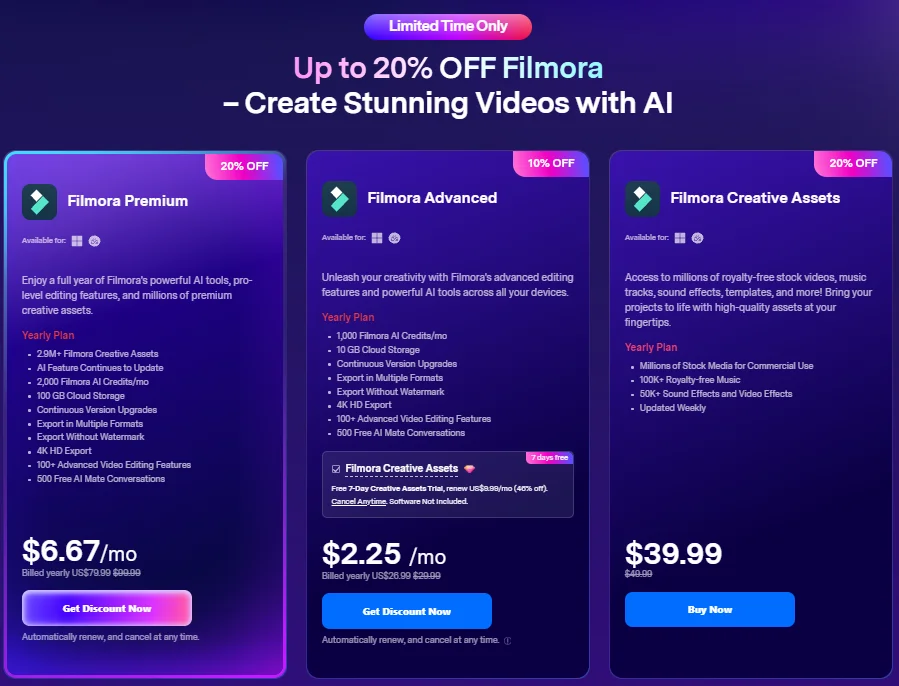
- Filmora: up to 20% off on yearly plans. Filmora Premium shows $6.67/mo, billed yearly at $79.99 (was $99.99)
- Video & AI tools block: up to 68% off
- Promo code: not required, discounted price is shown on the page
- Refund: 30-day money-back guarantee, subject to Wondershare’s Refund Policy
- Catch: the discount can’t be combined with any other discount or promotion
Coupon: Not needed. The discount is auto-applied at checkout. 👇

This post contains affiliate links, and I earn a commission from them at no extra cost to you. Thank you for your support!In Short
The sale is live until December 3, 2026, with no coupon needed. For most bloggers and YouTubers, the Filmora Premium yearly plan is the main pick. The biggest percentage, up to 83% off, applies to PDFelement bundles, which suit agency owners handling contracts and documents more than video creators.
It takes two minutes. The only thing that needs attention is picking the right plan before you click.
- Open the Wondershare Black Friday sale page from this link.
- Scroll to the block you need: Filmora (video editing), Video & AI Tools, PDF & Diagramming, or Data tools.
- Where a card has a Windows/macOS toggle (UniConverter, PDFelement, EdrawSoft, MobileTrans, Repairit, Dr.Fone), set your operating system first.
- Click Get Discount Now or Buy Now on the plan.
- At checkout, confirm the billing cycle, the auto-renew note, and (on Filmora Advanced) the Creative Assets trial checkbox.
- Pay. You don’t enter any coupon code.
Every Plan on the Sale Page (Exact Details)
All figures below are exactly as shown on the sale page PDF. Wondershare’s own note says prices are as shown on the website, with the discount already calculated.
Filmora (yearly plans, “Up to 20% OFF Filmora”)
| Plan | Off | Price shown | What the card lists |
|---|---|---|---|
| Filmora Premium (Yearly) | 20% | $6.67/mo, billed yearly $79.99 (was $99.99) | 2.9M+ Filmora Creative Assets, 2,000 Filmora AI Credits/mo, 100 GB Cloud Storage, 4K HD Export, Export Without Watermark, Export in Multiple Formats, 100+ Advanced Video Editing Features, 500 Free AI Mate Conversations, Continuous Version Upgrades, AI features continue to update |
| Filmora Advanced (Yearly) | 10% | $2.25/mo, billed yearly $26.99 (was $29.99) | 1,000 Filmora AI Credits/mo, 10 GB Cloud Storage, 4K HD Export, Export Without Watermark, Export in Multiple Formats, 100+ Advanced Video Editing Features, 500 Free AI Mate Conversations, Continuous Version Upgrades |
| Filmora Creative Assets (Yearly) | 20% | $39.99 (was $49.99) | Millions of stock media for commercial use, 100K+ royalty-free music, 50K+ sound effects and video effects, updated weekly |
Filmora Premium and Advanced show Windows and Mac availability. The Advanced card also carries a checkbox: a Free 7-Day Creative Assets Trial that renews at $9.99/mo (46% off), cancel anytime, software not included. The page also has a banner saying “up to 30% off on Filmora”, while the three yearly cards above show 10–20%.
Video & AI Tools (“Up to 68% OFF”)
| Plan | Off | Price shown | What the card lists |
|---|---|---|---|
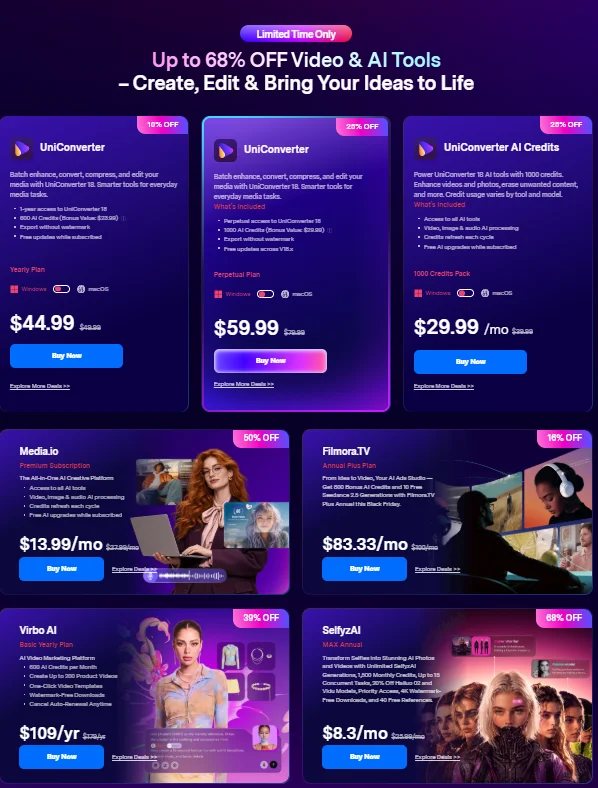
| UniConverter (Yearly) | 10% | $44.99 (was $49.99) | 1-year access to UniConverter 18, 600 AI Credits (bonus value $23.99), export without watermark, free updates while subscribed |
| UniConverter (Perpetual) | 25% | $59.99 (was $79.99) | Perpetual access to UniConverter 18, 1000 AI Credits (bonus value $29.99), export without watermark, free updates across V18.x |
| UniConverter AI Credits (1000 Credits Pack) | 25% | $29.99/mo (was $39.99) | Access to all AI tools, video, image and audio AI processing, credits refresh each cycle, free AI upgrades while subscribed. Credit usage varies by tool and model |
| Media.io (Premium Subscription) | 50% | $13.99/mo (was $27.99/mo) | All-in-one AI creative platform, access to all AI tools, video, image and audio AI processing, credits refresh each cycle, free AI upgrades while subscribed |
| Filmora.TV (Annual Plus) | 16% | $83.33/mo (was $100/mo) | AI ads studio, 800 bonus AI credits and 10 free Seedance 2.5 generations with Filmora.TV Plus Annual |
| Virbo AI (Basic Yearly) | 39% | $109/yr (was $179/yr) | AI video marketing platform, 600 AI credits per month, up to 200 product videos, one-click video templates, watermark-free downloads, cancel auto-renewal anytime |
| SelfyzAI (MAX Annual) | 68% | $8.3/mo (original price is partly unreadable in the PDF, check the page) | Unlimited SelfyzAI generations, 1,500 monthly credits, up to 15 concurrent tasks, 20% off Hailuo 02 and Vidu models, priority access, 4K watermark-free downloads, 40 free references |
| Enkio (Annual) | 29% | $359.99/yr (was $514.27/yr) | AI music videos from your songs and photos, 7,000 monthly credits, all templates unlocked, 4 concurrent tasks, 30-day task storage, up to 50 music assets and 20 portrait assets |
| ReelMate (Annual) | 17% | $108/mo, billed annually (the yearly total is partly cut off in the PDF, check the page) | AI films, short dramas and series, storyboards and cinematic videos with AI creative agents, 7,800 monthly credits, all Seedance models, all AI agents and skills, all image models |
PDF & Diagramming Tools (“Up to 83% OFF”)
| Plan | Off | Price shown | What the card lists |
|---|---|---|---|
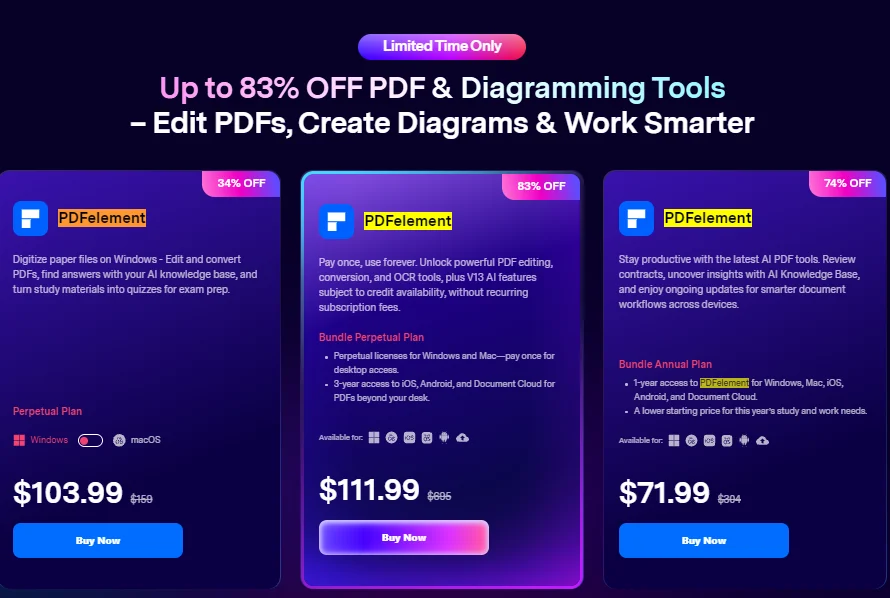
| PDFelement (Perpetual) | 34% | $103.99 (was $159) | Digitize paper files on Windows, edit and convert PDFs, AI knowledge base answers, turn study material into quizzes. Windows/macOS toggle |
| PDFelement (Bundle Perpetual) | 83% | $111.99 (was $695) | Pay once: PDF editing, conversion and OCR, plus V13 AI features subject to credit availability. Perpetual licenses for Windows and Mac, plus 3-year access to iOS, Android and Document Cloud |
| PDFelement (Bundle Annual) | 74% | $71.99 (was $304) | 1-year access on Windows, Mac, iOS, Android and Document Cloud. AI tools, contract review, AI Knowledge Base, ongoing updates |
| EdrawMind + EdrawMax + EdrawProj (Perpetual) | 20% | $196 (was $245) | EdrawMax (210+ drawing types), EdrawMind (AI mind maps and knowledge management), EdrawProj (Gantt chart maker) |
| EdrawMax (Perpetual) | 19% | $168.3 (was $210) | All features, free upgrades, priority support, 3 PCs and 3 mobiles plus EdrawMax Online, 10 GB free cloud storage |
| EdrawMind (Perpetual) | 19% | $100.3 (was $125) | All features, free upgrades, priority support, 3 PCs and 3 mobiles plus EdrawMind Online, 1 GB free cloud storage |
Data & Recovery Tools
| Plan | Off | Price shown | What the card lists |
|---|---|---|---|
| MobileTrans (Perpetual) | 43% | $44.99 (was $79.99) | Move contacts, photos, videos, messages and apps between phones. Windows/macOS toggle |
| Repairit Toolkit (Perpetual) | 30% | $89.99 (was $129.99) | Fix severely damaged videos and files, full AI enhancement with free AI credits |
| Dr.Fone Full Toolkit (Perpetual) | 28% | $115.95 (was $162.95) | Manage your phone, repair your system, recover data, transfer files |
| Dr.Fone Full Toolkit (Yearly) | 28% | $99.95 (was $139.95) | Same toolkit, yearly plan |
Why I Stayed With Filmora for 8 Years
I started blogging in 2018, and YouTube started alongside it. Whenever a domain or hosting deal came up, I edited the video in Filmora. I’ve used it from 2018 to 2026, so this isn’t a first-impressions opinion.
What kept me here is simple: it’s easy to start. Someone who has never edited a video can still add running text or a color effect without watching hours of tutorials.
I did try Adobe Premiere Pro once. It felt so heavy that I thought, if I learn this, I’ll become a video editor. My work was basic editing at that time, so I went back to Filmora and have stayed for about 8 years.
Filmora works for both beginners and advanced users. The more you learn it, the more it gives back. For a beginner, it’s still my first choice: I never needed anyone to teach me, and basic work becomes easy after you spend a little time learning the tool. When your needs grow, the editing features grow with you.
This is where most people go wrong. The 83% badge pulls attention to a PDF tool, while the plan a video creator needs sits at 10–20%. Match the plan to the job.
For bloggers and YouTubers publishing every week: Filmora Premium. It lists 2,000 AI credits a month, 100 GB cloud storage and a 2.9M+ asset library, so editing, stock media and storage sit under one plan.
For occasional editors with their own music and stock sources: Filmora Advanced. Same 4K export and 100+ editing features, with half the AI credits and 10 GB storage.
For agencies already editing in another tool: Filmora Creative Assets alone, as a stock media subscription.
For repurposing blog posts into product or review videos: Virbo AI Basic Yearly. 200 product videos and one-click templates fit affiliate roundups and agency client work.
For batch compressing and converting footage: UniConverter. Pick yearly if you want a small commitment, or perpetual if you’d rather not renew. The 1000 Credits Pack is only worth it if you already use its AI tools heavily.
For one subscription across video, image and audio AI: Media.io Premium.
For ad creatives and promo videos: Filmora.TV Annual Plus, which is built around AI ads and bundles bonus credits.
For agency owners handling contracts, proposals and lead magnet PDFs: PDFelement. The bundle perpetual plan is the 83% one, and the bundle annual plan is the lighter option.
For content planning, funnel maps and project timelines: EdrawMind for outlines, EdrawMax for diagrams, EdrawProj for Gantt scheduling. The three-in-one bundle covers all of them.
For corrupted footage: Repairit Toolkit.
Skip for most creators: SelfyzAI (selfie-based generation), Enkio (music videos), ReelMate (AI short dramas and series), MobileTrans and Dr.Fone (phone data tools). They’re fine products for their own jobs, just not core to a blogger or agency workflow.
What I Look At Beyond the Discount
In client projects, I’ve noticed the real bottleneck is rarely the edit itself. A post ranks, the client wants a video version, and then days vanish into hunting for music, exporting versions, and compressing files. Filmora Premium’s mix of AI credits, stock assets and cloud storage is aimed at exactly that gap, at least on paper.
A few things worth checking from a performance and workflow angle:
- Export formats: the page lists “Export in Multiple Formats” but doesn’t spell out aspect-ratio presets for vertical and widescreen. Confirm that inside the app before building a multi-platform plan around it.
- Page speed: on WordPress, a self-hosted MP4 can hurt LCP. A compressed file or a lazy-loaded embed is safer, and UniConverter’s convert and compress features are relevant here.
- Captions and scripts: if you draft scripts from existing posts with an AI writer, the Koala AI Black Friday deal is running at the same time.
Pro observation: the Filmora Advanced card shows a pre-built add-on box for a 7-day Creative Assets trial that renews monthly. If you only want the editor, read that box at checkout so the renewal doesn’t surprise you later.
Where It Falls Short, Honestly
Not everything on this page is a bargain, and some of it isn’t meant for you.
Pros
- Filmora Premium lists 2,000 monthly AI credits plus 100 GB cloud storage, a strong all-in-one for regular uploaders.
- No coupon hunting, since the price is already applied on the page.
- A 30-day money-back guarantee backs every product, subject to the Refund Policy.
- Perpetual options (UniConverter, PDFelement bundle, EdrawSoft) exist if you hate subscriptions.
Cons
- The biggest discounts (83%, 74%) are on PDFelement bundles, while Filmora yearly plans sit at 10–20%.
- Filmora and several AI tools are yearly or monthly subscriptions with auto-renew, so you must cancel yourself if you stop using them.
- AI credits are monthly allowances, and UniConverter states credit usage varies by tool and model, so heavy users can run out.
- The sale discount can’t be combined with other offers, and it can’t be applied retroactively once the sale ends.
Who should skip this: if you edit once a month and already have a workable free setup, a yearly plan is hard to justify. Same if you only need to trim clips and don’t use AI features.
Filmora Plans Compared Side by Side
If you’ve narrowed it down to Filmora, these three plans are easy to mix up. This table uses only what the sale page lists.
| Filmora Premium | Filmora Advanced | Filmora Creative Assets | |
|---|---|---|---|
| Discount shown | 20% | 10% | 20% |
| Monthly AI credits | 2,000 | 1,000 | Not listed |
| Cloud storage | 100 GB | 10 GB | Not listed |
| Stock library | 2.9M+ Filmora Creative Assets | Optional 7-day trial add-on | Millions of stock media, 100K+ music, 50K+ sound effects |
| Editing features | 100+ advanced, 4K HD export | 100+ advanced, 4K HD export | Media library only |
| Best for | Weekly publishers, small agencies | Occasional editors | Teams with another editor |
Premium costs more, but it doubles the AI credits and storage of Advanced and bundles the asset library, so heavy users stay in one plan. Advanced is the safer low-commitment entry. Creative Assets alone makes sense only if your editing software is already sorted.
Winner: for YouTubers and bloggers who publish weekly, Filmora Premium is the better choice because it lists twice the monthly AI credits of Advanced. If you edit occasionally and already have your own music sources, Advanced makes more sense. For agencies that edit in another tool, take Creative Assets by itself. One honest weakness: Advanced carries the smallest Filmora discount on the page.
What to Do After Buying
- Install for the right OS. Download the Windows or Mac version that matches the toggle you chose.
- Sign in and check what’s attached. Confirm AI credits, cloud storage and, on Advanced, whether the trial add-on is active.
- Set up a reusable project template with your intro, lower-thirds and caption style, so each new video starts from the same base.
- Do one small test project first, such as turning a single blog post into a short video, before committing a whole channel.
- Set a renewal reminder for the yearly and monthly plans.
Mistakes to avoid: ticking the trial add-on without needing it, burning AI credits on experiments early in the month, and forgetting the 30-day refund window if the tool doesn’t fit.

Discount– Limited Time Offer!
Deal: Up to 83% OFF
Coupon Code: Not needed. The discount is auto-applied at checkout.👇
Frequently Asked Questions
No. The discounted prices are already shown on the sale page. Wondershare’s terms add that the discount can’t be used together with any other discount or promotion, so there’s nothing to stack.
When does the sale end?
The sale runs from November 16, 2026 to December 3, 2026, and the page shows a countdown timer. The terms say the discount can’t be applied retroactively, so complete your purchase within this window.
Is there a refund if the software doesn’t suit me?
Wondershare states that its products come with a 30-day money-back guarantee, subject to its Refund Policy. Read the policy once before paying, especially for subscription and credit-based plans.
Which Filmora plan is better for YouTube and blog videos?
Filmora Premium suits regular publishing, since it lists 2,000 AI credits a month and 100 GB cloud storage. Filmora Advanced works for lighter use with 1,000 credits and 10 GB.
Is there a free trial?
The only trial on the page is the 7-day Creative Assets trial on the Filmora Advanced card, which renews monthly after it ends. For any other product, check its own page, since the sale page doesn’t mention one.
Can an agency buy for more than 5 users?
Yes, but not through these cards. The page asks you to contact the sales team through its business and education inquiry form for more than 5 users.
What else is worth grabbing for a creator stack this Black Friday?
If your blog hosting is up for renewal, the Hostinger Black Friday deal is live too, and the AppSumo Black Friday deal is worth a look for other creator tools.
Final Verdict
Wondershare’s sale is a solid window if you plan to edit video regularly. For most bloggers, YouTubers and small agencies, Filmora Premium is the cleanest pick, and PDFelement’s bundle is the one to consider if contracts and documents eat your time.
Skip the plans that don’t match your workflow, and don’t chase the 83% badge unless you actually need that tool. The sale ends December 3, 2026, so decide on one plan and grab the deal here before the timer runs out.
Related Posts