Liquid Web’s managed dedicated server lineup runs on Intel Xeon processors, and the four available configurations cover a fairly wide range of workloads, from a straightforward single-site setup to dual-processor production environments.
The E-2134 starts at $77.50/mo. The dual-Xeon 6226R goes up to $293.50/mo. If you pick the wrong one, you’re either overpaying for hardware you won’t use — or you’re undersized and dealing with performance bottlenecks at the worst possible time.
This breakdown covers what each plan actually includes, where the differences matter, and which configuration makes sense for which use case.
This post contains affiliate links. If you purchase through our links, we may earn a small commission at no extra cost to you. Thank you for your support!What You’re Getting With Liquid Web’s Managed Dedicated Servers
Before getting into the specific Intel Xeon plans, one thing worth understanding: all four configurations listed here are fully managed. That means Liquid Web handles OS-level monitoring, security patching, server health, and the ops layer entirely on their side.
You get raw dedicated hardware — no hypervisor, no resource-sharing with neighbors, single-tenant isolation — while Liquid Web owns the management overhead. For WordPress agencies, WooCommerce stores, and SaaS products that can’t afford downtime, this is the reason managed dedicated hosting exists as a category.
They also back this with a 99.99% uptime SLA, which in practice, from what I’ve seen across client projects on Liquid Web, is one of the more reliable uptime commitments in the managed hosting space. The near-zero downtime isn’t just marketing language — it holds up.
Every plan includes:
- Fully managed environment
- Unlimited sites with InterWorx
- Plesk and cPanel are available
- DDoS protection
- Remote management tools
- Advanced security
- Root access
- Dedicated IP address
- 10 TB bandwidth
The differences between plans come down to processor generation, core count, RAM, and storage — which is what actually determines whether a plan fits your workload.
The Four Intel Xeon Plans, Broken Down
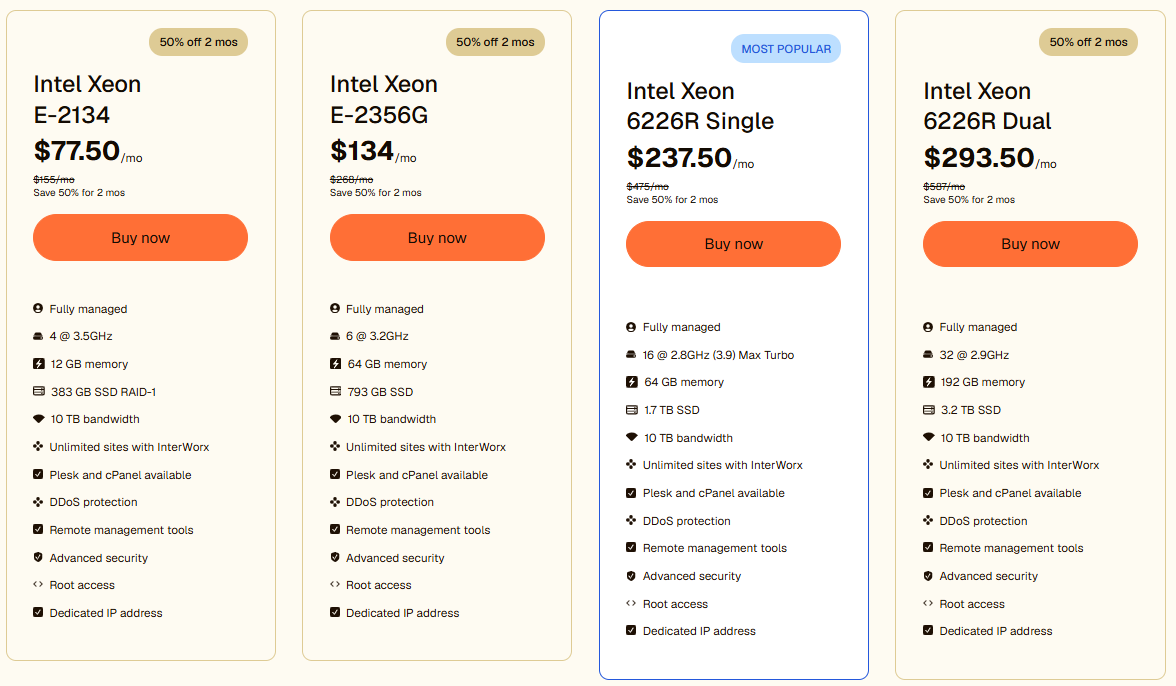
Intel Xeon E-2134 — $77.50/mo
The entry point. Four cores at 3.5GHz, 12 GB of RAM, 383 GB SSD in RAID-1, and 10 TB bandwidth.
The E-2134 is a solid single-threaded performer — the 3.5GHz base clock is actually decent for workloads that depend more on single-core speed than parallelism. RAID-1 storage means your data is mirrored automatically, which is a meaningful advantage over basic SSD setups at this price range.
Where it starts to feel limited: 12 GB of RAM is tight if you’re running a busy WooCommerce store with multiple plugins, Redis, and a caching layer. It works cleanly for a single primary site or a small client project with moderate traffic. Don’t try to stack 10–15 WordPress installs on this and expect headroom.
Best for: Single high-traffic site, small WooCommerce store, staging + production environment for a solo client.
Intel Xeon E-2356G — $134/mo
Six cores at 3.3GHz, 64 GB of RAM, 750 GB SSD, 10 TB bandwidth.
This is where the RAM jump changes things significantly. Going from 12 GB to 64 GB is not incremental — it’s a completely different class of workload. You can run multiple WordPress sites with object caching, a database server, and still have a buffer. The E-2356G is a 10th-gen Rocket Lake architecture processor, which means better IPC performance compared to the older E-2134.
The storage bump to 750 GB also matters if you’re managing large media libraries or running multiple WooCommerce stores with substantial catalog sizes.
At $134/mo, this plan sits in a comfortable middle ground — more capable than entry-level shared or VPS hosting by a wide margin, but not yet at multi-processor territory.
Best for: Growing agencies hosting 5–10 client sites, mid-sized WooCommerce stores, and sites with significant database load.
Intel Xeon 6226R Single — $237.50/mo (Most Popular)
This is Liquid Web’s most popular configuration, and for good reason. Sixteen cores at 2.9GHz base with a 3.9GHz Max Turbo, 64 GB of RAM, 1.7 TB SSD, and 10 TB bandwidth.
The 6226R is a different processor family entirely — the Cascade Lake Xeon Scalable series, designed for server-grade multi-threaded workloads. Where the E-series chips are workstation-class, the 6226R is purpose-built for sustained server load. Sixteen cores with high-boost turbo means it handles concurrency far better under real traffic spikes.
The 1.7 TB storage is substantial enough for media-heavy multisite installs, large WooCommerce stores, or applications that generate significant log and backup data on the server itself.
From a performance standpoint, the jump from E-2356G to 6226R Single isn’t just about core count. The architectural difference between Rocket Lake and Cascade Lake Scalable matters under sustained parallel load. If your site regularly handles simultaneous database queries across hundreds of concurrent users, the 6226R will behave noticeably differently from the E-2356G under pressure.
Best for: High-traffic WordPress multisite, busy WooCommerce platforms, agencies hosting 15+ client sites, applications requiring consistent multi-threaded performance.
Intel Xeon 6226R Dual — $293.50/mo
Thirty-two cores at 2.9GHz, 192 GB of RAM, 3.2 TB SSD, 10 TB bandwidth.
Two 6226R processors. 192 GB of RAM. This is production-infrastructure territory.
The dual-processor configuration is relevant when you’re running workloads that genuinely need symmetric multiprocessing — large database servers, containerized applications, or a combination of high-traffic web serving and backend processing on a single machine. For most WordPress use cases, this is overkill. But for SaaS platforms, large-scale ecommerce operations, or infrastructure that combines application serving with data processing, the 6226R Dual is where you stop hitting ceilings.
The 3.2 TB SSD is also a meaningful number if you’re running database-heavy applications where storage performance is a bottleneck.
Be honest with yourself here: If you can’t identify a specific workload that justifies 32 cores and 192 GB of RAM, the Single 6226R will serve you better at a lower cost.
Best for: SaaS platforms, large ecommerce operations, containerized workloads, high-traffic applications with combined web + database serving on one machine.
Plan Comparison at a Glance
| Feature | E-2134 | E-2356G | 6226R Single | 6226R Dual |
|---|---|---|---|---|
| Price/mo | $77.50 | $134 | $237.50 | $293.50 |
| Cores | 4 @ 3.5GHz | 6 @ 3.3GHz | 16 @ 2.9GHz (3.9R Turbo) | 32 @ 2.9GHz |
| RAM | 12 GB | 64 GB | 64 GB | 192 GB |
| Storage | 383 GB SSD RAID-1 | 750 GB SSD | 1.7 TB SSD | 3.2 TB SSD |
| Bandwidth | 10 TB | 10 TB | 10 TB | 10 TB |
| Processor Gen | Workstation-class | Rocket Lake | Cascade Lake Scalable | Cascade Lake Scalable |
| Best For | Single site / small client | 5–10 sites / mid WooCommerce | High-traffic / multisite | SaaS / large ecommerce |
The 50% discount for the first two months applies across all four plans currently, so the entry cost is lower than the listed monthly rates suggest. Check the Liquid Web dedicated server page for current pricing, as rates can change.
The most notable jump in value is between the E-2134 and E-2356G — you’re paying $56.50/mo more but getting more than 5x the RAM. That’s the most impactful upgrade in the lineup for most users.
The move from 6226R Single to Dual is only a $56/mo difference in base price, but the primary driver there is the RAM jump from 64 GB to 192 GB and the core doubling. If your workload doesn’t need either, stay on the Single.
Managed vs. Unmanaged: What Liquid Web’s “Fully Managed” Actually Means
Liquid Web also offers a self-managed (unmanaged/bare metal) dedicated option, which is worth understanding in context.
With the fully managed plans above, Liquid Web handles OS monitoring, proactive server health checks, security patching, and the full operations layer. You focus on your application; they own the infrastructure management.
Unmanaged dedicated servers give you complete control and freedom — but also complete responsibility. If something breaks at 2 AM, you’re fixing it—no tech support is included at the server level.
For WordPress professionals and agencies, the managed option almost always makes more sense. The time cost of server-level management is rarely worth the money saved, especially when Liquid Web’s managed support quality is factored in. I’ve recommended Liquid Web to clients specifically because of this — the near-zero downtime and responsive support aren’t hypothetical, they show up in practice.
Pros and Cons of Liquid Web Managed Dedicated Servers
Pros
- A fully managed environment means no server administration burden on your end
- 99.99% uptime SLA with an actual track record backing it up
- All plans include DDoS protection, root access, and a dedicated IP out of the box
- InterWorx, Plesk, and cPanel available — control panel flexibility is rare at this tier
- Processor options span entry workstation-class to enterprise-grade dual Xeon
Cons
- Pricing is meaningfully higher than unmanaged dedicated or cloud VPS alternatives — you’re paying for the management layer, and it shows in the monthly cost
- 10 TB bandwidth across all four plans — there’s no bandwidth differentiation between a $77.50 plan and a $293.50 plan, which feels like a missed opportunity at the upper tier
- The E-2134’s 12 GB RAM ceiling will be hit quickly by anyone running more than one or two production WordPress sites
- No month-to-month pricing transparency on the self-managed vs. managed difference — requires contacting sales for custom configurations
Who Should Skip This Entirely
Liquid Web’s managed dedicated servers are not the right fit for everyone.
If you’re hosting a single brochure website or a low-traffic personal blog, this is significant overkill. A managed WordPress hosting plan or a decent cloud VPS would serve you better at a fraction of the cost.
If budget is the primary constraint and you’re comfortable managing a server yourself, the unmanaged dedicated option or a DigitalOcean / Vultr VPS might make more sense.
These plans are priced for serious workloads. If your site doesn’t have the traffic, database complexity, or uptime requirements to justify dedicated hardware, start smaller.
Frequently Asked Questions
Which Liquid Web Intel Xeon plan is best for a WooCommerce store?
It depends on traffic and catalog size, but the E-2356G at $134/mo is a solid starting point for most mid-sized WooCommerce stores. The 64 GB RAM handles database load, caching, and session management without running tight. If you’re processing hundreds of orders daily with a large product catalog, the 6226R Single makes more sense.
Is the 50% off for 2 months available on all plans?
Based on the current listings, yes — all four Intel Xeon configurations show a 50% off promotion for the first two months. Verify current availability directly on the Liquid Web site, as promotional pricing can change.
What’s the difference between Intel Xeon E-series and 6226R for hosting?
The E-series (E-2134, E-2356G) is a workstation-class processor optimized for single-threaded performance with moderate core counts. The Xeon 6226R is from the Scalable server processor family, designed for sustained multi-threaded server workloads. Under concurrent user load, the 6226R handles parallelism more efficiently.
Does Liquid Web include cPanel with dedicated servers?
Plesk and cPanel are both available across all four plans, but they’re listed as available rather than included by default. Confirm licensing details with Liquid Web directly before ordering if cPanel is a requirement.
Can I upgrade from one plan to another later?
Liquid Web does support hardware upgrades for dedicated server customers, but a migration may be involved depending on the scope of change. It’s worth clarifying the upgrade path with their team before committing to a lower-tier plan with the intention to scale.
Is root access included on all managed plans?
Yes. Root access is listed as included across all four Intel Xeon managed dedicated configurations.
Bottom Line
The Liquid Web Intel Xeon lineup is one of the cleaner dedicated server offerings in the managed hosting space — not because of any single feature, but because the plan tiers are meaningfully differentiated rather than incrementally cosmetic.
The E-2134 at $77.50/mo makes sense for single-site production deployments with manageable traffic. The E-2356G at $134/mo is the first plan that handles genuine multi-site agency work comfortably. The 6226R Single at $237.50/mo is the sweet spot for high-traffic WordPress and WooCommerce operations — and the reason it’s the most popular is straightforward. The 6226R Dual at $293.50/mo is for workloads that genuinely need dual-processor infrastructure.
For most WordPress professionals and agencies, I’d recommend starting at the E-2356G minimum. If your current hosting is the bottleneck, Liquid Web’s managed dedicated plans are worth the evaluation.
Intel Xeon E-2134
- Fully managed
- 4 @ 3.5GHz
- 12 GB memory
- 383 GB SSD RAID-1
- 10 TB bandwidth
- Unlimited sites with InterWorx
- Plesk and cPanel are available
- DDoS protection
- Remote management tools
- Advanced security
- Root access
- Dedicated IP address
Intel Xeon E-2356G
- Fully managed
- 6 @ 3.2GHz
- 64 GB memory
- 793 GB SSD
- 10 TB bandwidth
- Unlimited sites with InterWorx
- Plesk and cPanel are available
- DDoS protection
- Remote management tools
- Advanced security
- Root access
- Dedicated IP address
Intel Xeon 6226R Single
- Fully managed
- 16 @ 2.8GHz (3.9) Max Turbo
- 64 GB memory
- 1.7 TB SSD
- 10 TB bandwidth
- Unlimited sites with InterWorx
- Plesk and cPanel are available
- DDoS protection
- Remote management tools
- Advanced security
- Root access
- Dedicated IP address
Intel Xeon 6226R Dual
- Fully managed
- 32 @ 2.9GHz
- 192 GB memory
- 3.2 TB SSD
- 10 TB bandwidth
- Unlimited sites with InterWorx
- Plesk and cPanel are available
- DDoS protection
- Remote management tools
- Advanced security
- Root access
- Dedicated IP address