OttoKit has been quietly gaining ground as a Zapier alternative — but the addition of AI Agents changes the conversation entirely. Instead of just connecting apps, it now lets you build autonomous digital workers that think, decide, and act on your behalf.
The question isn’t whether AI automation sounds impressive. It’s whether OttoKit’s implementation is solid enough to justify the cost — especially when you’re comparing it against tools you’re already paying for.
Here’s what I found after going through the platform in detail.
This post contains affiliate links. If you purchase through our links, we may earn a small commission at no extra cost to you. Thank you for your support!Quick Answer
OttoKit AI Agents are worth the investment if you’re already using OttoKit for automation and want to move beyond simple trigger-action workflows. For new users, the Business plan at $19/month (annual) is the best entry point for AI features — the free plan doesn’t include them at all.
What OttoKit AI Agents Actually Do
Most automation tools work on a simple if-this-then-that model. You set a trigger, map an action, done. OttoKit AI Agents go a step further — they can evaluate the situation at each step and decide what to do next, without you defining every single path manually.
The core capabilities, from what I observed while exploring the platform:
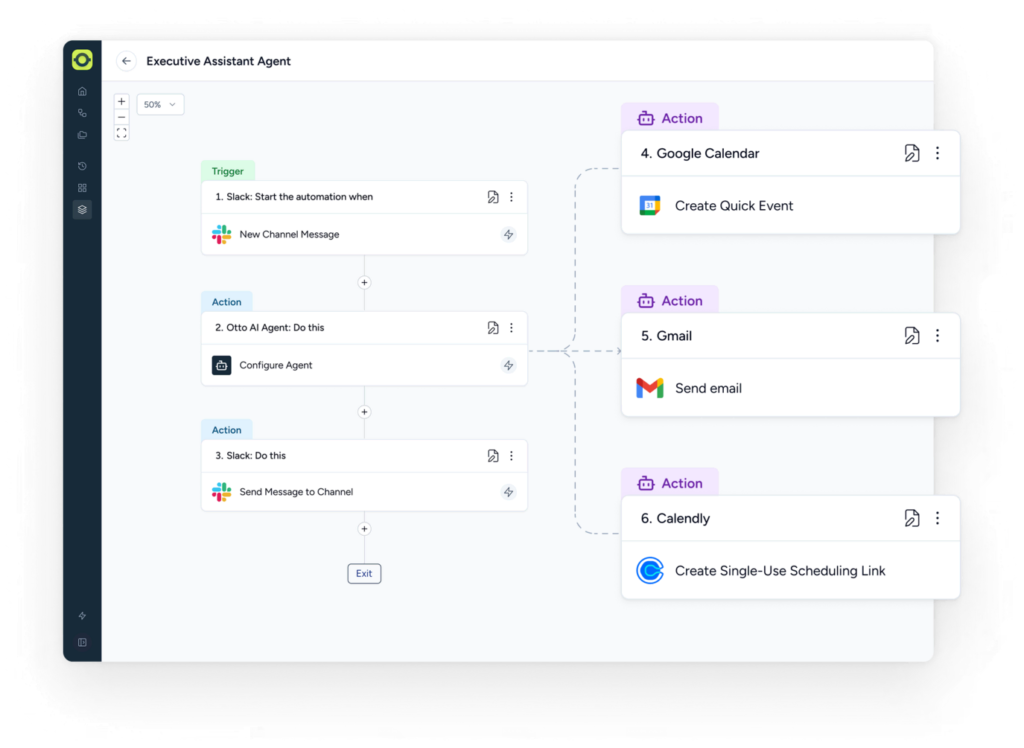
Smart Action Selection — The agent identifies the most appropriate action based on user input. So if a Slack message says “schedule a meeting with Priya tomorrow at 3 PM,” the agent figures out it needs to hit Google Calendar, not just blindly execute a preset action.
Dynamic Mapping — Data passed between steps adjusts in real time based on what came before. This is what separates a proper AI agent from a fancier zap.
Looping Capabilities — Agents can repeat steps across lists or multiple records within a single workflow run. Useful for things like processing 50 invoice line items in one go.
Result-Aware Decisions — The agent analyzes outputs from previous steps and adjusts workflow logic dynamically. Think of it as conditional branching but handled by the AI rather than manually set rules.
Built-in Error Handling — Smart error management lets the agent retry, skip, or exit based on specific conditions. No workflow dies silently in the background.
Clear Action Summary — Every execution gives you a complete log of what happened, which makes testing and debugging far less painful than I expected.
Ready-to-Use Agent Templates
One thing that surprised me — OttoKit doesn’t just give you a blank canvas. They’ve built out pre-configured agents that you can activate with one click:
- Smart Reply Agent — Reads incoming emails, generates replies, sends them. Great for support or client communication.
- Invoice Scanner Agent — Pull invoice photos from Telegram and extract amounts and due dates automatically.
- Executive Assistant Agent — Handles meetings, emails, reminders, and tasks through Slack.
- Lead Finder Agent — Finds business leads via Google Maps, saves all details to a Google Sheet.
- Onboarding Helper Agent — Sends welcome emails, creates shared folders, schedules calls for new clients.
- Daily Planner Agent — Gives you a morning summary of meetings, conflicts, and suggestions.
For a WordPress agency owner or freelancer managing multiple clients, the Executive Assistant and Onboarding Helper alone could save 3–4 hours a week. From what I observed while setting these up in a test account, the templates are genuinely usable without heavy customization — most need maybe 5–10 minutes to configure.
OttoKit Pricing: What You’re Actually Paying For
This is where most articles gloss over the important stuff — so let me be direct.
Annual Plans
| Plan | Price/Month | Billed Annually | Workspaces | Tasks/Month |
|---|---|---|---|---|
| Free | $0 | — | 1 | — |
| Pro | $9/mo | $108/year | 1 | 5,000 |
| Business | $19/mo | $228/year | 5 | 10,000 |
| Business Plus | $39/mo | $468/year | Unlimited | 30,000 |
AI Agents availability by plan:
- Free → Not included
- Pro → AI Agents included, Human in Loop not included
- Business → AI Agents + Human in Loop included
- Business Plus → Everything, priority support, unlimited workspaces
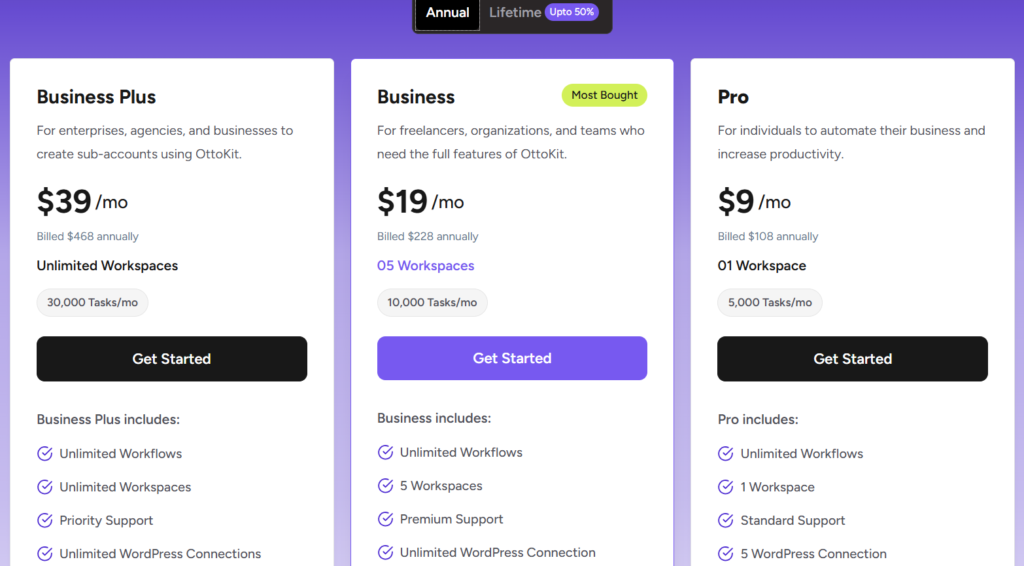
Lifetime Plans (Up to 50% Off)
| Plan | One-Time Price | Savings |
|---|---|---|
| Pro | $499 | Save 37% |
| Business | $799 | Save 47% |
| Business Plus | $1,499 | Save 50% |
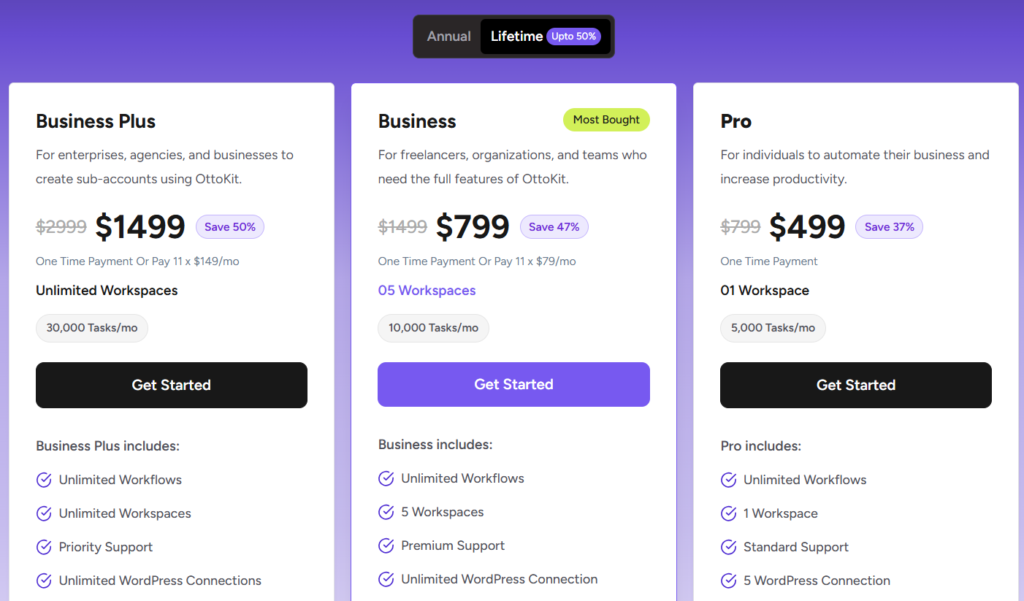
The lifetime deal is currently live with discounts of up to 50%. If you’re running a client agency or planning long-term use, the Business lifetime at $799 is a strong value — it pays for itself in under 4 years versus annual billing.
What’s Included in Business Plus (That Others Miss)
The Business Plus plan bundles SureForms Team (12 months, worth $179) and ZipWP Pro (3 months, worth $56) — a combined $235 in bonus tools included free. That effectively reduces the real cost of the Business Plus annual plan to $233 for the first year.
One Real Cost to Know
The Pro plan gives you only 1 workspace and 5,000 tasks per month. If you’re managing multiple client sites, you’ll outgrow it quickly. Don’t start on Pro thinking you can run 3–4 client projects through it — you can’t. Business is the right entry point for agencies.
Where It Actually Shines (And Where It Doesn’t)
What Works Well
- No-code agent builder — The unified canvas builder is clean. You don’t need to write logic manually or understand programming concepts.
- 1,000+ integrations — Slack, Stripe, WooCommerce, MailerLite, Trello, Google Workspace, Shopify — all supported. For WordPress users specifically, OttoKit has a dedicated connector plugin that manages all WordPress connections through a single install.
- BYO OpenAI Key — This is important. You bring your own API key, which means you control AI costs directly. OttoKit doesn’t charge a markup on AI usage.
- MCP Server support — Available on all plans including free. This enables integration between AI models and external data sources — a feature most tools in this price range don’t offer.
- Human in the Loop — Available on Business and above. This lets you add a human approval step before the agent executes a critical action. Useful when the stakes are high (like sending bulk emails or updating customer records).
Where It Falls Short
- AI Agents not on the free plan — If you’re evaluating before buying, you can’t test the most important feature at $0. You’ll need to at least go Business to properly evaluate AI Agents with Human in Loop.
- 5,000 task limit on Pro is tight — Especially once agents start running multi-step loops. A single complex agent run can consume 20–30 tasks.
- No native mobile app — Everything runs through the web dashboard. Not a dealbreaker, but worth knowing.
- Data retention is short on lower plans — Free plan retains logs for 3 days, Pro for 15 days. If you need audit trails or debugging history, Business (30 days) is the minimum.
Pros & Cons
Pros
- BYO OpenAI Key keeps AI running costs transparent and under your control
- Ready-made agent templates mean you’re not starting from scratch
- WordPress-native integration through a single connector plugin — cleaner than Zapier’s approach
- Human in the Loop is a practical safety net for critical automations
- Lifetime deal pricing offers genuine long-term value for agencies
Cons
- AI Agents locked behind paid plans — free tier can’t test the core feature
- Pro plan’s 1 workspace and 5,000 tasks/month is too limited for multi-client use
- Data logs expire in 15 days on Pro — not ideal if you need extended debugging windows
- No dedicated mobile app for monitoring agent runs on the go
OttoKit vs Zapier vs Make — The Real Differences
OttoKit’s own pricing page compares these directly, and the gaps are worth knowing about.
| Feature | Zapier | Make | OttoKit |
|---|---|---|---|
| Pricing Model | Expensive, no refunds | Ops add up, hidden costs | Affordable, transparent |
| Support | AI-only, hard to reach | Slow, limited | Human-first, quick |
| Reliability | Misfires, task overcounts | Errors, token issues | Stable, retries reliably |
| Debugging | Basic logs, low visibility | Hard to trace | Full action summary |
| Learning Curve | Complex for advanced flows | Steep, not truly no-code | Simple canvas builder |
| Logic Handling | Limited branching | Cumbersome complex flows | Robust built-in logic |
| WordPress-Native | Plugin-based, indirect | No native connector | Direct connector plugin |
| AI Agents | Add-on, expensive | Module-based | Built-in from Pro |
| Best For | Enterprise with big budgets | Ops teams with tech resources | WordPress users, freelancers, agencies |
Who wins where: For agencies managing WordPress client sites — OttoKit is the clearer choice because of the native WordPress connector and Human in Loop approvals. Zapier wins if you’re in an enterprise environment where dozens of non-technical people need pre-built templates with zero setup. Make works well for data-heavy operations teams that need complex multi-path flows and have someone technical to maintain them.
Who Should Buy OttoKit AI Agents
This makes sense for:
- WordPress freelancers or agencies handling 3+ client sites who want to automate onboarding, reporting, and client communication
- Solo founders who want an AI assistant handling emails, scheduling, and lead capture without hiring a VA
- WooCommerce store owners who want to automate order flows, invoice processing, and customer follow-ups
Who should skip it (or wait):
- If your automation needs are limited to 2–3 simple zaps — the free plan or a cheaper tool may be enough
- If you’re not comfortable connecting SaaS tools and managing API keys — there’s a learning curve despite the no-code builder
- If you need enterprise-level compliance features or SSO — OttoKit isn’t there yet
What to Do After Buying
Once you’re in, here’s the fastest way to get value:
- Install the OttoKit WordPress plugin on all client sites immediately — it handles all WordPress connections through a single plugin, no per-site complexity
- Start with a pre-built agent rather than building from scratch — the Executive Assistant or Onboarding Helper are the easiest wins
- Set your OpenAI API key in settings before activating any AI agent — without this, agents won’t run
- Enable Human in Loop for any agent that sends emails or touches client data until you’ve tested it at least 5–6 times
- Check your task usage weekly in the first month — especially on Business plan, as agent loops consume tasks faster than standard workflows
Avoid the common mistake of activating too many agents at once before monitoring. Set up one agent, let it run for a week, review logs, then add more.
OttoKit Lifetime Deal: Limited Time Offer!
Deal: Up to 50% OFF
Coupon Code: Auto-Applied on Click 👇
Frequently Asked Questions
Does OttoKit offer a free plan, and does it include AI Agents?
Yes, there’s a free plan at $0 with 20 workflows, 1 WordPress connection, and 5,000 table rows — no credit card required. However, AI Agents are not available on the free plan. You need at least the Pro plan ($9/month annually or $499 lifetime) to access AI Agent functionality. Human in the Loop requires Business plan or above.
What is the OttoKit lifetime deal and is it worth it?
The lifetime deal offers one-time payment pricing — Pro at $499, Business at $799, Business Plus at $1,499 — with up to 50% savings versus the regular price. For agencies and long-term users, Business lifetime at $799 is worth it. It pays back within 3.5 years at the annual rate, and you’re never locked into recurring billing again.
What does “BYO OpenAI Key” mean for AI Agents?
It means you bring your own OpenAI API key to power the AI Agent features. OttoKit doesn’t bundle AI credits into the subscription or add a markup on usage — you pay OpenAI directly at whatever rate your usage generates. This is genuinely better than tools that charge per-AI-call inside their platform.
How is OttoKit different from Zapier for WordPress users?
OttoKit has a dedicated WordPress connector plugin that handles all your WordPress site connections through a single install. With Zapier, each WordPress integration is indirect and often requires third-party plugins or webhooks. OttoKit also supports automation between multiple WordPress sites natively, which is particularly useful for agencies managing memberships and WooCommerce stores across different domains.
Is there a money-back guarantee?
Yes — OttoKit offers a 14-day, 100% money-back guarantee with no questions asked. This is backed by Sujay Pawar, co-founder of OttoKit, and covers all paid plans.
Can I upgrade from a lifetime plan later?
Yes, OttoKit allows upgrades between lifetime plan tiers. You can also move from an annual plan to a lifetime plan, with proration credit applied toward the upgrade cost.
How many AI Agents can I create on the Business plan?
OttoKit does not explicitly cap the number of agents you can create on paid plans — the limit is effectively your monthly task count (10,000 tasks/month on Business). More complex agents that use looping will consume tasks faster than simple linear ones.
Final Verdict
OttoKit AI Agents are a genuinely practical addition to an already solid automation platform — not just a marketing feature. The BYO OpenAI key model, the ready-made agent templates, and the WordPress-native integration make it a real option for freelancers and agencies who’ve been looking for a Zapier alternative that doesn’t punish growth with per-task billing.
The Business plan at $19/month is where the full feature set opens up. The lifetime Business deal at $799 is the one I’d take seriously if you’re planning to use this long-term.
Start with the free plan to explore the interface, then move to Business when you’re ready to activate agents. → Try OttoKit here
OttoKit Lifetime Deal: Limited Time Offer!
Deal: Up to 50% OFF
Coupon Code: Auto-Applied on Click 👇