Bluehost sells two WooCommerce-specific plans under one roof, and the names alone don’t tell you much. Essentials sound basic. Premium sounds better by default. That’s not really how it works here.
Quick Answer: Essentials ($14.99/mo) covers subscriptions, memberships, courses, and digital products — good for a store validating its first 10-100 products. Premium ($21.99/mo) adds gift cards, loyalty points, 1-click checkout, and order CRM — built for stores past that stage, managing repeat buyers and higher order volume.
I’ve set up WooCommerce on Bluehost for a couple of client stores over the years, and the plan confusion is real. Here’s what actually separates them.
This post contains affiliate links. If you purchase through our links, we may earn a small commission at no extra cost to you. Thank you for your support!What’s Actually Different Between the Two Plans
Both plans share the same backbone: 99.99% uptime, free SSL, free domain for year one, 16 pre-installed WooCommerce plugins, 30-day money-back guarantee, unlimited products and storage, and support for up to 100 storefronts on one license.
The split happens in what gets added on top for Premium.
Essentials include:
- Subscriptions and recurring revenue tools
- Memberships and gated content
- Paid courses and digital downloads
- Email marketing templates
- Social login
- Affiliate program setup
- Built-in SEO tools
Premium adds everything in Essentials, plus:
- Gift cards
- Bookings and appointments
- Product add-ons and customization options
- Points and rewards (loyalty program)
- Wishlists
- Advanced reviews
- Custom customer account pages
- 1-click checkout
- Automated shipping and fulfillment
- Customer CRM and order history
- Promotions, deals, and flash sale tools
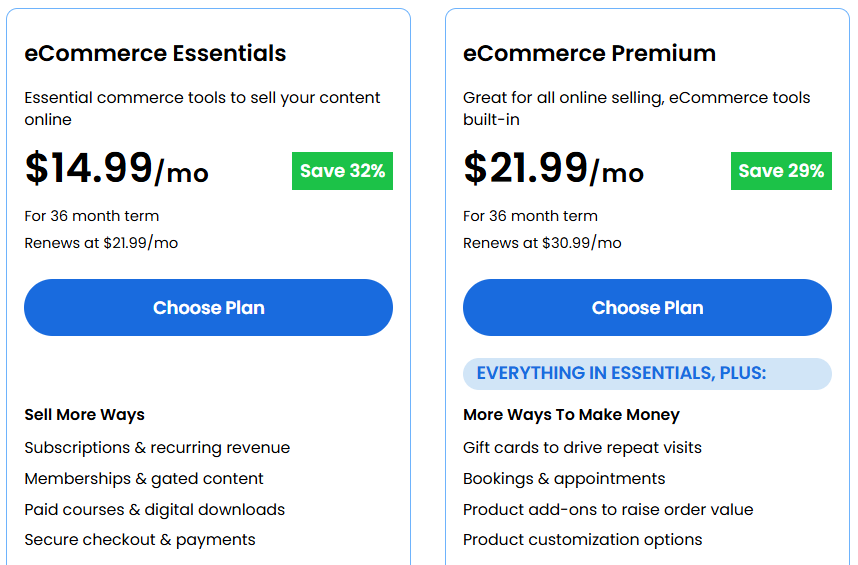
The real dividing line is conversion tooling for repeat customers. Essentials get you selling. Premium is built for stores that already have customers coming back and need to reduce friction on that second, third, and fifth purchase.
Pricing Breakdown (What You’ll Actually Pay)
| Plan | 36-Month Term | Renewal Rate | Savings |
|---|---|---|---|
| eCommerce Essentials | $14.99/mo | $21.99/mo | 32% off |
| eCommerce Premium | $21.99/mo | $30.99/mo | 29% off |
| Custom Commerce | Contact sales | — | Enterprise tier |
Note the renewal jump. Essentials nearly doubles after your first term, and Premium follows the same pattern. This isn’t unique to Bluehost — most hosts front-load the discount — but budget for the renewal price, not the intro price, when deciding if a plan fits long-term.
Custom Commerce exists above Premium for stores with complex catalogs or custom workflows, but it’s a “contact us” tier, not a listed price. Skip it unless Premium is already too limiting.
Who Should Pick Essentials
Essentials fits if you’re launching your first store, selling 10-100 products, or monetizing content (courses, memberships, digital downloads) rather than running a high-volume physical goods shop. It’s also the right call if your business model leans on recurring subscriptions rather than one-time purchases with lots of upsells.
From what I’ve seen on smaller client stores, Essentials handles the first 6-12 months of a store just fine — the bottleneck usually isn’t the plan tier, it’s traffic and product-market fit.
Who Should Pick Premium
Premium makes sense once you have repeat customers and checkout friction is costing you money. Cart abandonment averages around 70% across eCommerce — every extra field at checkout adds drop-off risk. 1-click checkout addresses exactly that, letting returning customers buy with a single click using saved payment and shipping details.
If you’re planning gift cards, a loyalty program, or want customers to see order history and manage their account without emailing you — that’s Premium’s job, not Essentials’.
Where it falls short: neither plan includes a staging environment, which is odd for eCommerce hosting. Testing a plugin update or theme change on a live WooCommerce store with real orders is risky without one. If staging matters to you, you’d need Bluehost’s Business plan or a VPS tier instead — worth checking our breakdown on Bluehost Starter vs Business vs eCommerce: Which Plan? if you’re unsure which base tier to start from.
Pros & Cons
Pros
- 16 WooCommerce plugins pre-installed, which normally cost $1,200+/year if bought separately
- No transaction fees from Bluehost itself — you only pay your payment processor’s standard rate
- 30-day money-back guarantee on both plans, so testing the setup is low-risk
- Free migration tool (InstaWP) moves an existing WooCommerce store with claimed zero downtime
Cons
- Renewal pricing nearly doubles after the 36-month term ends
- No staging environment on either plan — a real limitation for stores that update plugins often
- You can’t upgrade Essentials to Premium directly; you’d need to purchase Premium separately
- Each plan license covers only 1 website — additional sites need separate licenses
How It Compares to Other WooCommerce Hosts
| Feature | Bluehost eCommerce Premium | Hostinger Business + AI | Liquid Web Spark – Thrive |
|---|---|---|---|
| Starting price | $21.99/mo (36-mo term) | ₹199/mo (48-mo term) | $12/mo |
| Renewal price | $30.99/mo | ₹649/mo | $12/mo (no term lock-in) |
| Storage | Unlimited | 50GB NVMe | 15GB |
| Staging environment | Not included | Included | Not on this tier |
| 1-click checkout | Included | Not a built-in feature | Not applicable (infra-focused) |
| Uptime guarantee | 99.99% | Not specified as SLA | 99.99% guaranteed |
| Best for | Stores wanting native eCommerce tools bundled in | Budget stores wanting AI tools + staging | Stores wanting pure performance, no bundled plugins |
Winner: For a store that wants gift cards, loyalty points, and checkout tools without installing separate plugins, Bluehost eCommerce Premium wins on bundled value. For a budget-conscious store that also wants a staging environment, Hostinger’s Business + AI plan is worth a look — it includes staging, which neither Bluehost plan offers. For a store that’s outgrown shared hosting and cares more about raw performance and autoscaling PHP workers than bundled marketing plugins, Liquid Web’s Spark – Thrive is the stronger pick, though you’ll be sourcing your own plugins.
Hostinger’s Business plan is the better fit if you’re price-sensitive and want the AI website builder plus staging without paying extra. Liquid Web performs better under high concurrent traffic because its infrastructure is purpose-built for commerce queries, but it doesn’t provide the marketing tools that Bluehost pre-configures. If your priority is fewer moving parts and everything working out of the box, Bluehost still edges out ahead for most beginner- to mid-stage stores.
What to Do After Buying
Once you’re set up on either plan:
- Run the WooCommerce setup wizard first — don’t skip store address and currency settings
- Connect your payment gateway (Stripe, PayPal, or Razorpay comes pre-integrated) before adding products
- If you’re on Premium, configure 1-click checkout early, so it applies to your first repeat customers
- Set up daily backup confirmation — it’s included, but verify it’s actually running in your dashboard
- Avoid installing extra caching plugins on top of what Bluehost includes — it can conflict and slow things down rather than help
If you’re still unsure whether Bluehost handles WooCommerce well for your traffic level, our piece on Is Bluehost Good for WooCommerce? covers that in more depth, and Is Bluehost Good for High Traffic Sites? is worth a read if you expect fast growth.
Frequently Asked Questions
Can I upgrade from Essentials to Premium later?
No, not directly. Bluehost requires you to purchase Premium separately rather than upgrading in place. Plan based on where your store is headed in the next 12 months, not just where it is today.
Does either plan charge transaction fees?
No. Bluehost doesn’t add its own transaction fees to either plan. You’ll only pay the standard processing rate charged by your payment gateway (Stripe, PayPal, or Razorpay).
Is there a staging environment on eCommerce Essentials or Premium?
No. Neither plan includes staging. If you update plugins or themes often and want to test changes safely first, you’d need to look at Bluehost’s Business or VPS tiers instead.
How many websites does one license cover?
Just one. Each additional website needs its own separate eCommerce Essentials or Premium license — your base hosting plan can support multiple sites, but the eCommerce features are licensed per site.
Is Bluehost eCommerce hosting good for beginners?
Yes, especially Essentials. WooCommerce comes pre-installed, setup takes under 5 minutes, and no coding knowledge is required. If you’re completely new to this, Is Bluehost Good for Beginners? breaks down what to expect in your first few weeks.
Final Verdict
If you’re launching your first store or monetizing content through courses and memberships, Essentials covers what you need without overpaying for tools you won’t use yet. If you already have repeat customers and checkout friction is costing you sales, Premium’s 1-click checkout and loyalty tools justify the jump. Either way, plan for the renewal price — not just the intro rate — before committing. You can check current Bluehost WooCommerce hosting deals here to see what’s live right now.
Latest Post