Hosting.com is running its Black Friday sale from November 2 to November 30, 2026, with shared hosting discounts of up to 89% off.
I’m Karan Rajput. I’ve spent 7+ years building WordPress sites and handling hosting setups for clients, so I checked this sale the way I’d check it for a client: what you pay today, what happens at renewal, and which plan is worth it.
Below you’ll find the live prices, the BLACKFRIDAY code details, claim steps, and the catches to know before checkout.
Quick Deal Snapshot
Starts on: November 2, 2026 | Ends on: November 30, 2026
[STATUS: LIVE NOW]
- Discount: Up to 89% off shared hosting (Starter 89%, Pro 83%, Max 79%)
- Sale prices: Starter $1.49/mo, Pro $3.49/mo, Max $5.99/mo on a 1-year term
- Extra code: BLACKFRIDAY gives an additional 5% off hosting plans (new customers only, valid on 1, 2, 3 and 4-year plans)
- Perks: Free domain name registration, free managed migration, free SSL, daily backups
- Safety net: 30-day money-back guarantee
Coupon Code: BLACKFRIDAY (Extra 5% off, Valid for new customers) 👇

This post contains affiliate links. If you purchase through our links, we may earn a small commission at no extra cost to you. Thank you for your support!Quick Answer
Yes, it’s worth it if you’re starting a new site or moving an existing one. Starter fits a first project, Pro suits growing sites that need staging, and Max is built for people running many sites. The price rises at renewal, so treat the sale rate as a 12-month entry price, not a permanent one.
How to Claim the Hosting.com Black Friday Deal
Do this in order, and you won’t miss anything.
- Open the deal page through my Hosting.com link. The page opens on the US (Global) version. There’s a small prompt at the top to switch to the IN version, so check which one suits you.
- Pick your plan. Here is the exact pricing shown on the page:
- Starter: $1.49/mo. You pay $17.88 today for the 1-year term, then $13.99/mo on renewal (89% off).
- Pro: $3.49/mo. You pay $41.88 today, then $19.99/mo on renewal (83% off).
- Max: $5.99/mo. You pay $71.88 today, then $27.99/mo on renewal (79% off).
- Choose your term. The headline prices above are for the 12-month plan. BLACKFRIDAY is valid on 1, 2, 3 and 4-year plans.
- Enter the code BLACKFRIDAY at checkout. The affiliate notes don’t say whether it applies automatically, so check your cart summary first. If the extra 5% isn’t visible, enter it manually. It’s valid for new customers only. How it stacks with the sale price shows only in the final cart total, so trust that number, not my math.
- Read the cart line by line. The Marketing Suite section on the page says “automatically added in checkout.” That could mean the discount or the product itself, so confirm before paying.
- Pay. You get a 30-day money-back guarantee as a safety net.
Other hosting types are not part of the Black Friday discount and are listed at regular advertised prices on a 12-month plan: WordPress hosting from $4.99/mo, unmanaged VPS from $36/mo, and AI application hosting from $8/mo.
The sale window is four weeks, so there’s no need to panic-buy on day one. But November 30 is the end date, and I wouldn’t leave it to the last evening.
What You Actually Get on Each Plan
All three plans sit on NVMe storage and include migration help, SSL, backups and malware detection and removal. The differences are in capacity, resources and developer tools.
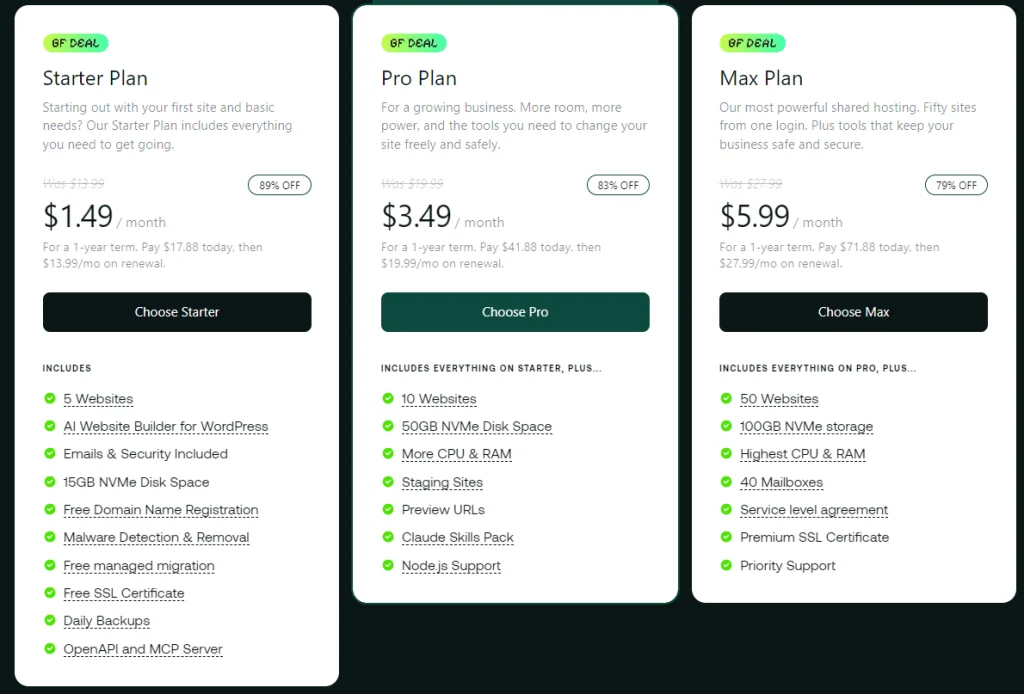
| Feature | Starter | Pro | Max |
|---|---|---|---|
| Sale discount | 89% off | 83% off | 79% off |
| Websites | 5 | 10 | 50 |
| NVMe disk space | 15GB | 50GB | 100GB |
| CPU & RAM | Entry tier (no figure listed) | More than Starter | Highest on shared |
| Staging & preview URLs | Not listed | Staging Sites + Preview URLs | Staging Sites + Preview URLs |
| Mailboxes | Email included (count not listed) | Email included (count not listed) | 40 Mailboxes |
| Support | 24/7 support | 24/7 support | Priority Support + service level agreement |
| Extras | AI Website Builder for WordPress, OpenAPI and MCP Server | Adds Claude Skills Pack, Node.js Support | Adds Premium SSL Certificate |
| Best for | First blog or niche site | Growing or client sites | Agencies and multi-site owners |
What this means in practice: Starter already gives you 5 sites, which is plenty for someone testing micro-niches. Pro is where the plan becomes safer to run, because staging lets you test updates before they hit a live site. Max makes sense only if you genuinely manage a pile of sites.
Which Plan Should You Pick?
- Starter is for a first site, a personal blog, or a small affiliate project. If you’re a beginner, start here. The page says you can upgrade whenever you like.
- Pro is the sensible default for anyone earning from their site. It has staging, preview URLs and more CPU and RAM. It’s also the one marked Most Popular on the page.
- Max is for freelancers or small agencies hosting client sites under one login, where the 50-site limit and priority support matter.
Worst use case: buying Max “just in case” while running one small blog. Start smaller and upgrade when traffic demands it.
My Developer Take: Beyond the Discount Badge
From what I’ve seen on client projects, shared hosting rarely fails because of disk space. It fails when CPU and RAM get tight, and that shows up as a slow WordPress admin and a sluggish first response from the server.
That’s why I’d look at Pro before Starter for any site that earns money. NVMe storage helps with database-heavy pages, but hosting can’t fix a bloated theme or oversized images. LCP depends on both, so don’t expect miracles from the plan alone.
A few other notes from a build point of view:
- Staging matters. Testing plugin and theme updates on a copy before touching a live site has saved me from breaking client pages more than once. Starter doesn’t list it.
- Node.js support is listed on Pro and above, which is useful if you run small apps beside WordPress. I haven’t tested what the Claude Skills Pack contains, so I won’t describe it.
- Elementor and Gutenberg are a WordPress-side choice, not a host-side one. Heavy Elementor layouts still need decent CPU and RAM, so lean toward Pro there.
- WooCommerce: the site footer lists a separate WooCommerce Hosting product. For a serious store, I’d compare that before settling for shared hosting.
Pro observation: The sale price covers the first term only. Before buying, decide whether you’ll renew or move. Also check the cart for add-ons you didn’t choose.
Where It Falls Short
Pros
- 5 websites on Starter, so you can run several small projects under one plan.
- Free domain name registration and free managed migration, which cut real setup costs when moving a site.
- Daily backups and malware detection and removal are included from the cheapest plan.
- Staging and preview URLs on Pro make updates safer.
- 30-day money-back guarantee lowers the risk of testing the host.
Cons
- Renewal is a big step up from the sale price on all three plans. Budget for year two before you buy.
- Starter has no listed staging or preview URLs, so any update goes straight to your live site.
- 15GB of NVMe space on Starter fills up faster than you’d think on image-heavy blogs.
- I couldn’t confirm server locations from the page. If your audience is mostly in India, check this with support before buying.
Who should skip this: anyone who wants a locked-in low price beyond the first term, anyone running a heavy WooCommerce store on shared hosting, and agencies that need managed cloud with easy scaling. For that last group, my Cloudways Black Friday deal post is a better starting point.
Hosting.com vs Other Black Friday Hosting Deals
I’m not building a table here. I only have verified numbers for Hosting.com, so I’d rather compare by use case than invent data. Headline percentages also ignore renewal, so always compare the cart total.
- For the biggest headline discount, HostPapa is the alternative to check. My post covers up to 90% off plus a free domain, against Hosting.com’s 89%.
- For a cheap shared host with a promo code, Hostinger is worth comparing. My post covers up to 86% off plus a code.
- For staging on a budget, Hosting.com Pro is the one I’d pick, because it gives you 10 websites with staging and preview URLs inside the sale window.
Honest weakness: the jump at renewal is the main thing to watch with Hosting.com. If you hate that pattern, compare cart totals across all three before paying.
What to Do After Buying
- Decide: new site or migration. If you already have a site, use the free managed migration instead of moving files by hand.
- Point your domain and confirm SSL is active before sharing the URL.
- Check backups. Confirm daily backups are running, then take one manual backup before big changes.
- Install only the plugins you need. More plugins mean more CPU load, especially on Starter.
- Use staging first if you’re on Pro or Max.
- Set a renewal reminder a month before your term ends.
Mistakes to avoid: leaving unwanted cart add-ons selected, uploading uncompressed images, and forgetting the renewal rate until the invoice arrives.

Discount– Limited Time Offer!
Deal: Up to 89% OFF+ 5% Extra for New Customers
Coupon Code: BLACKFRIDAY 👇
Frequently Asked Questions
Is the Hosting.com Black Friday sale live right now?
Yes. The affiliate notes say the sale runs from November 2 to November 30, 2026. The pricing page also shows Black Friday badges on all three shared plans. Prices can change, so confirm the final total in your cart before paying.
What does the BLACKFRIDAY code do?
It gives an extra 5% off hosting plans for new customers. It works on 1, 2, 3 and 4-year plans and is valid November 2 to November 30, 2026. Check your cart summary to see whether it applies automatically. If not, enter it manually at checkout.
Will the price stay the same at renewal?
No. The sale price applies to your first term only. The pricing page shows a higher renewal rate for every plan, and you’ll find those exact figures in the claim steps above. Plan for that increase before you buy.
Which plan is best for beginners?
Starter is the simplest and cheapest way to begin. It gives you 5 websites, free domain registration, free managed migration, SSL and daily backups. If you plan to test updates safely, Pro adds staging and preview URLs.
Is there a money-back guarantee?
Yes. The Hosting.com page lists a 30-day money-back guarantee. I’d still read the refund terms at checkout, especially for domain and add-on charges, since I haven’t verified those details.
Are there other Black Friday hosting deals worth comparing?
Yes. If you want to compare cart totals before deciding, I’ve covered the Bluehost Black Friday deal and the InMotion Hosting Black Friday deal as well.
Final Verdict
Hosting.com’s Black Friday sale is a solid entry point if you’re launching a new site or moving an old one. Starter is the low-risk pick for beginners, and Pro is the one I’d choose for anything that earns money, mainly because of staging. Just remember that the sale price is a first-term price, so plan for renewal. The deal ends on November 30, 2026, and the 30-day guarantee gives you room to test it. If it fits your plan, grab the Hosting.com Black Friday deal here.
Related Posts