Koala AI’s Black Friday sale is live, and it’s a simple one: 40% off annual plans through December 2. No bundle puzzle, and no coupon to hunt for.
I’m Karan Rajput. I’ve been blogging since 2018 and doing client WordPress work, so I look at tools like this as a publisher. The real question is whether you need the plan enough to pay for a full year upfront.
This page covers the discounted plans, how to claim the offer, and who should skip it. Short version: Professional is where most bloggers should start.
Koala AI Black Friday Deal Quick Snapshot [STATUS: LIVE NOW]
Starts on: Live now | Ends on: Wednesday, December 2 at 11:59 PM Eastern
Annual billing on every paid Koala AI plan is 40% cheaper than month-to-month pricing.
- Discount: 40% off annual plans, from Starter up to Scale III
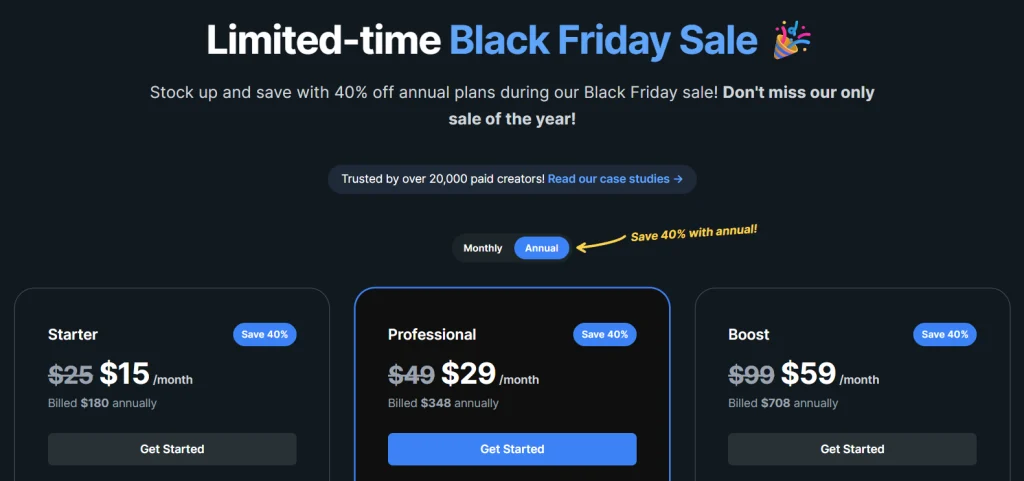
- Entry plans: Starter $15/month (regular $25), billed $180 annually. Professional $29/month (regular $49), billed $348 annually. Boost $59/month (regular $99), billed $708 annually.
- Higher-volume plans: Growth, Elite, Advanced and Scale I to III get the same 40% off.
- Try first: Free account with 5,000 words and 25 credits, no card. There’s also a 15-day refund window.
Coupon Code: None needed. The discounted price shows when the Annual toggle is on. 👇

This post contains affiliate links, and I earn a commission from them at no extra cost to you. Thank you for your support!In Short: Switch to annual billing and Koala AI’s sale pricing applies, with no code to enter. Most single-site publishers should look at Professional first. Pick the plan carefully, because changing plans later restarts the term at the new plan’s full price.
How to Claim the Koala AI Black Friday Deal
- Open the Koala AI pricing page through this link. The sale banner should be visible at the top.
- Set billing to Annual. The “Save 40%” badge appears on every plan card.
- Pick your plan. Starter is $15/month ($180 billed yearly), Professional is $29/month ($348), and Boost is $59/month ($708). Heavier volume plans sit below these cards.
- Check out through Stripe. Cards, Apple Pay, Google Pay, Cash App Pay, WeChat Pay and Alipay are listed. Indian readers should make sure their card allows international payments. PayPal or Wise is possible for annual plans if you contact Koala.
- Connect your site or AI assistant. Then set up Brand DNA first.
Not sure yet? Start with the free account. Your brand and articles carry over when you upgrade.
Sale timing for India: 11:59 PM Eastern on December 2 works out to roughly 10:29 AM IST on December 3. Don’t leave it to the last hour.
Is 40% Really the Lowest Price?
Koala’s own notes call this the lowest pricing it offers all year, and the pricing page says it’s their only sale of the year. I can’t verify past years, so I’m not claiming trends. What I can say is that the 40% is measured against month-to-month pricing, so annual billing is the only way to get it.
Waiting is a gamble. If you’re planning to use Koala for a full year anyway, buying before December 2 is the sensible move.
What You Actually Get With Koala AI Now
Koala has moved well past a “type keyword, get article” writer. Here’s what matters for a publisher:
- Brand DNA: Koala reads your site once, then uses your services, voice and existing pages in every article and chat. Starter, Professional and Boost include one brand. Growth goes to 3 brands, and higher tiers go up to 75.
- KoalaWriter with research: Koala describes it as running dozens of searches per article. Professional and above list Deep Research with citations.
- Models: The email mentions GPT-6.1 Sol, Claude Sonnet 5.5 and Claude Opus 5.5.
- Search Console and Analytics in one dashboard (Professional and above): An SEO agent sits beside the charts and explains what changed.
- Article Editor with SEO score (Professional and above): Chat edits plus a score against ranking pages.
- KoalaLinks (Professional): Internal linking for up to 50 sites.
- Content Calendar Autopilot (Boost and above): Approve a plan once, and articles get written and published automatically.
- Amazon affiliate articles: Roundups and single-product reviews from live Amazon data. This is handy for affiliate sites.
- Koala AI MCP: 60+ SEO and content tools inside Claude, ChatGPT or Codex. It’s included with every paid plan.
Pro observation: Platform credits are shared across KoalaChat, KoalaImages, KoalaLinks, KoalaMagnets, the Brand DNA agent and MCP research. Reading your Brand DNA and Search Console data through MCP costs nothing. Outside research calls cost credits. If you run heavy keyword research from your AI assistant, you’re draining the same pool you’d use for images and linking.
The Developer’s Take: Publishing, Speed and Site Impact
From a performance standpoint, the article text isn’t the risk. Images and embeds are. Koala can add AI images and YouTube videos automatically, so check every published draft for LCP and CLS problems.
My checklist for any AI-assisted draft:
- Convert images to WebP and set dimensions.
- Lazy-load video embeds below the fold.
- Preview the post inside your actual theme.
One-click publishing covers WordPress, Shopify, Webflow, Ghost and webhooks. If your single-post template is built in Elementor, preview a draft before you schedule anything. For WordPress, I’d review the draft in the Gutenberg editor before it goes live.
In my own affiliate workflow, the first draft was never the slow part. Fact-checking, internal links and publishing were. That’s where Koala’s tooling is aimed, and it’s why the Professional tier interests me more than the entry tier.
Where Koala AI Falls Short
Pros
- 40% across the whole range: You don’t need the biggest plan to get the best rate.
- Brand DNA: Output reflects your site’s services and voice, which cuts rewrite time.
- MCP at no extra fee: Your own AI assistant can use the same research tools, though credits are still spent.
- Writing, linking, SEO scoring and publishing in one place: Fewer tabs, fewer copy-paste errors.
- Low entry risk: A free account and a 15-day refund window (under 15,000 words and 100 credits used).
Cons
- Annual billing only for the discount: You pay for the full year upfront, and monthly billing isn’t discounted.
- Word counts depend on the model: Allowances assume GPT-6 Luna. GPT-6.1 Sol and Claude Sonnet 5.5 count at 2x, and Claude Opus 5.5 at 3x. Premium models burn through your words fast.
- Starter is stripped down: It lacks the Article Editor with SEO score, Deep Research, KoalaLinks and the Search Console dashboard. Its Brand DNA agent is capped at 25 messages a month.
- Plan changes aren’t prorated in your favour: A new plan starts fresh at its full price.
Who should skip it: Anyone publishing a handful of posts a month, or who wants hand-written expert content. It’s also a poor fit for sites in sensitive niches where nobody will edit the output.
Starter vs Professional vs Boost: Which Plan Fits?
| Starter | Professional | Boost | |
|---|---|---|---|
| KoalaWriter words per year | 540,000 | 1,200,000 | 3,000,000 |
| Credits per year | 6,000 | 12,000 | 30,000 |
| Brand DNA agent | 25 messages/month | 50 messages/month | No message cap |
| Brand DNA | 1 brand | 1 brand | 1 brand, full experience |
| Added tools | Bulk writing mode, live Amazon data | Deep Research, Article Editor with SEO score, KoalaLinks (50 sites) | Content Calendar Autopilot, 2x faster bulk creation |
| Best for | Testing the workflow | One serious site | Hands-off publishing at volume |
Starter is for getting a feel for the workflow. Professional is where the SEO score, linking and research tools start. Boost is mainly about automation and scale. The word limits also assume a standard model, so budget for the 2x and 3x multipliers.
Who wins? For one affiliate site publishing weekly, Professional is the better pick, because it adds the Article Editor, KoalaLinks and Deep Research at 1,200,000 words a year. If you want approved calendars to publish themselves, Boost makes more sense. If you’re still unsure, take the free account first.
How Does Koala AI Compare With Other Options?
I’m keeping this short, because pricing for other tools changes often. Check their official sites before deciding.
- ChatGPT or Claude directly: Flexible and great for ideas, but you handle site-wide research, internal linking and publishing yourself.
- Jasper: Leans toward marketing copy and brand voice rather than long SEO articles with live research.
- Surfer-style SEO editors: Strong for optimizing an existing draft, while Koala tries to cover research through publishing.
If your bottleneck is turning keywords into published, internally linked articles, Koala is built for that. If you mostly need a thinking partner, a general assistant is enough.
What to Do After Buying
- Build Brand DNA first. Everything else depends on it.
- Connect Search Console and Analytics if you’re on Professional or above.
- Publish as drafts, not live posts, until you trust the output.
- Check your model setting. Premium models cost more of your word allowance.
Mistakes to avoid: Don’t publish without fact-checking, and don’t approve Autopilot plans blindly. Add your own screenshots, experience, and opinions to every article.
Once articles are live, markup matters too. If you need a plugin for it, see our Schema Pro Black Friday deal.
Discount– Limited Time Offer!
Deal: Up to 40% OFF
Coupon Code: None Needed. The deal price shows at checkout 👇
Frequently Asked Questions
Is there a Koala AI Black Friday coupon code?
None is mentioned in the offer details. The sale price shows on the pricing page when Annual billing is selected. If a field appears at checkout, check that the discounted price is already applied before paying.
When does the Koala AI Black Friday sale end?
It ends Wednesday, December 2 at 11:59 PM Eastern. That’s around 10:29 AM IST on December 3. Since this is billed as the only sale of the year, I’d buy a day or two early.
Does Koala AI have a free trial?
Yes. A new account gets 5,000 free words and 25 credits, no credit card needed. You can upgrade anytime, and your brand and articles carry over. It’s the safest way to test the writing quality before paying for annual billing.
Can I get a refund?
Koala offers a 15-day refund window. You qualify if you’ve used under 15,000 words and 100 credits. Contact them for a refund, and Koala says most requests are processed within 24 hours.
Does the MCP cost extra?
No. MCP is included in every paid plan. Free accounts can see the tool list but can’t connect an app. Research calls spend your platform credits, and your Claude, ChatGPT or Codex subscription is billed separately.
Do I need hosting before buying?
You need somewhere to publish, or you can copy articles manually. If you’re still choosing a host for a new site, our Hostinger Black Friday deal guide is a good place to compare.
Bottom Line
Koala AI’s sale is straightforward: 40% off annual plans until December 2, with no code needed. Professional is the best fit for most solo publishers, since it adds the editor, linking and research tools. Boost suits people who want automated calendars. Starter works if you just want to test.
Check the free account first, then pick one plan and commit to a year. If it fits your workflow, claim the Koala AI Black Friday deal here before the sale ends.
Related Posts