If you use video on your WordPress site — whether for courses, marketing, or podcasts — you already know how painful the default embed experience is. Presto Player has been quietly fixing that for 90,000+ users since 2021. And right now, their lifetime deal is the most cost-effective way to get in.
Here’s everything you need to know before buying.
Quick Deal Snapshot: Presto Player Lifetime Plan
- 💰 Price: $399 (normally $499 — you save $100)
- 🌐 Sites: 25 websites
- ♾️ Updates: Lifetime updates included
- 💳 Split Pay Option: $139 × 3 monthly installments
- 🔁 Refund: 14-day money-back guarantee, no questions asked
- ✅ All pro features included — analytics, private videos, email integrations, chapters, and more
Coupon Code: Auto-Applied on Click 👇

This post contains affiliate links. If you purchase through our links, we may earn a small commission at no extra cost to you. Thank you for your support!What Makes This Deal Actually Worth It
Most WordPress video plugins do the bare minimum — play a video. Presto Player is built for people who actually want to do something with video: capture leads, track watch time, protect content, or run a full course business.
The lifetime plan at $399 covers all of that across 25 sites. No annual renewals. No feature gating behind higher tiers.
For context: the Pro annual plan costs $119/year. If you run the plugin for even 4 years, you’re already ahead with the lifetime deal — and you keep everything forever.
What You Actually Get — Feature Breakdown
Here’s what’s included across all paid plans (Starter, Pro, and Lifetime):
Core Features (Every Paid Plan):
- Multiple video sources — YouTube, Vimeo, Bunny.net, self-hosted
- Unlimited video chapters with chapter markers
- Analytics dashboard with view time and retention data
- Secure private videos (members-only or logged-in users only)
- Sticky video player that follows users as they scroll
- Muted autoplay — works on all modern browsers without user click
- Remember viewer settings (speed, volume, subtitles)
- Video presets — customizable across the paid plans
- Email opt-in / lead capture overlays
- Add CTA buttons directly inside videos
- Google Analytics integration
- Branding logo and custom color options
- Custom CSS support
- Integrations: MailChimp, MailerLite, FluentCRM, ActiveCampaign, and more
- Bunny.net integration for fast, affordable video delivery
- Pro Helpdesk Support
- Lifetime updates (even on annual plans)
What the Free Version Lacks: The free tier gives you basic playback and multiple source support, but it cuts out analytics, private video protection, chapters, email integrations, sticky player, muted autoplay, custom branding, and Bunny.net — which are honestly the most useful parts. If you’re serious about video, the free version isn’t really a working solution.
Plan Breakdown — Which One to Pick
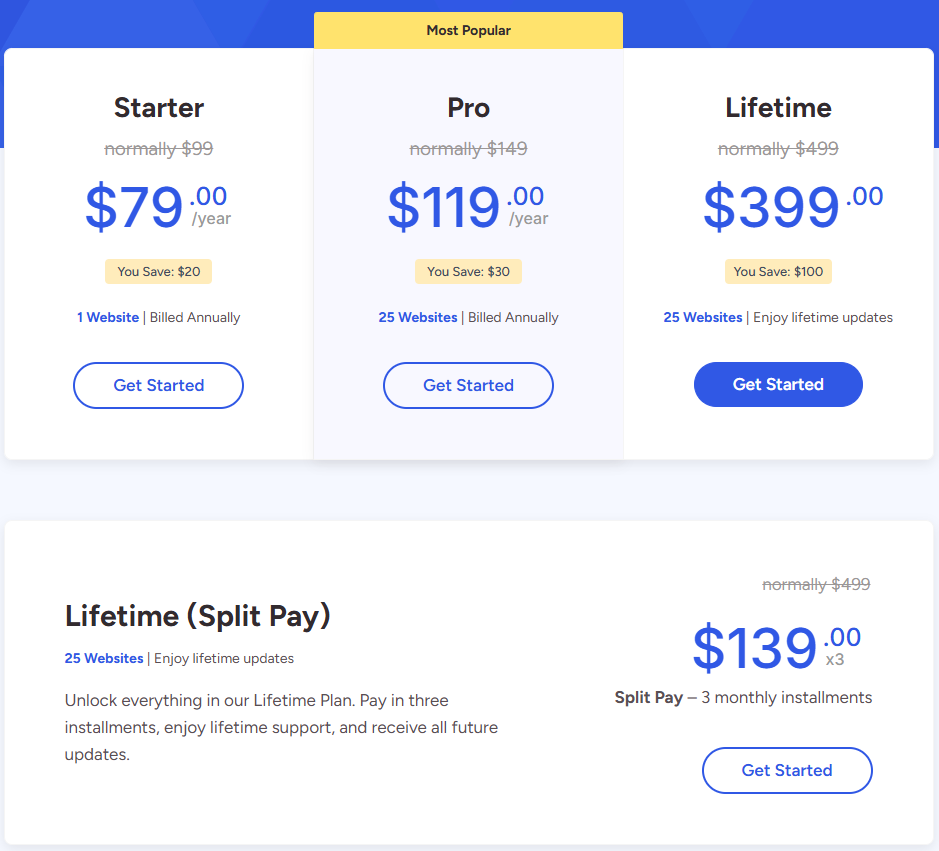
| Plan | Price | Sites | Type |
|---|---|---|---|
| Starter | $79/year (normally $99) | 1 website | Annual |
| Pro | $119/year (normally $149) | 25 websites | Annual |
| Lifetime | $399 (normally $499) | 25 websites | One-time |
| Lifetime Split Pay | $139 × 3 | 25 websites | 3 installments |
The math is simple:
- Starter is fine if you run one site and want to test the waters annually.
- Pro makes sense if you manage multiple sites and prefer paying yearly.
- Lifetime is the obvious pick if you’re already convinced — 25 sites, one payment, done forever.
- Split Pay is the same lifetime deal broken into 3 months for those who don’t want to pay $399 at once.
All renewals after the introductory pricing are at full price — so locking in now at the discounted rate makes sense if you’re planning to use it long-term.
Who This Deal Is Actually For
Perfect fit:
- Course creators running LearnDash or LMS-based sites
- Marketers who use lead capture and CTA overlays in videos
- Podcasters who want a proper audio player on WordPress
- Agencies managing multiple client WordPress sites (25 sites on lifetime = massive value)
- Bloggers using Bunny.net for video hosting who want tight integration
Probably not for you if:
- You only embed one YouTube video casually on a brochure site
- You don’t plan to use analytics, email capture, or content protection
- You’re on a tight budget and just need basic playback — the free version exists for that
Performance and Setup — From My Experience
I’ve worked with a few different WordPress video plugins across client and personal projects. What I noticed with Presto Player during setup is that the Media Hub approach — where you manage all videos centrally and then embed via shortcode or block — actually saves a lot of time on multi-page video sites. You update the video source once, and it reflects everywhere.
From a performance standpoint, Presto Player is notably lighter than most video plugin alternatives. It uses lazy loading by default, which means the player doesn’t block your page render. On a course site I was building with LearnDash, the video sections loaded clean — no visible LCP degradation from the player itself. The real bottleneck in those cases is usually your video hosting, not the plugin.
One thing worth calling out: if you’re using Bunny.net for video delivery (which I’d recommend for self-hosted video at scale), the native Bunny.net integration in Presto Player is genuinely useful — no third-party workarounds needed.
Pros and Cons
Pros
- Lifetime deal at $399 covers 25 sites — strong value for agencies and multi-site users
- Built-in lead capture, CTAs, and email marketing integrations inside the player
- Native Bunny.net integration for fast and affordable self-hosted video delivery
- The analytics dashboard tracks view time and audience retention without third-party setups
- Performance-friendly — lazy loading built in, no render-blocking JS issues observed
- Works with Elementor, Gutenberg, and major LMS plugins, including LearnDash
Cons
- Does not host video files itself — you still need YouTube, Vimeo, Bunny.net, or your own storage
- The Starter plan is limited to 1 site, which pushes most serious users toward Pro or Lifetime
- Introductory pricing applies only to the first purchase — renewals (for annual plans) go back to full price
- No free trial period — you get a 14-day refund window instead, which is fair but not the same as a trial
How to Claim the Presto Player Lifetime Deal
No coupon code needed. The discount is applied automatically.
- Go to Presto Player via this link
- Click “Get Started” under the Lifetime plan ($399)
- Choose Lifetime or Lifetime Split Pay ($139 × 3) based on your preference
- Complete checkout via PayPal, Stripe, or Visa
- You’re covered by a 14-day no-questions-asked refund policy
That’s it. No hidden steps. The license activates immediately after purchase.
What to Do After Buying
Once you’re in:
- Install and activate the plugin on your WordPress site
- Head to the Media Hub — this is where you’ll manage all your videos centrally
- Set up a video preset — define your default player style, branding, and behavior once and reuse it everywhere
- Connect your email tool — MailChimp, MailerLite, ActiveCampaign, or FluentCRM integration is under Settings → Integrations
- Enable Google Analytics if you want to view time and retention data flowing into GA
- For course sites — configure the members-only / private video settings before publishing
One mistake to avoid: don’t embed videos directly from YouTube in the block editor without going through the Media Hub. Add sources through Media Hub instead — that way, you get all the analytics, chapter markers, and preset settings applied properly.
Frequently Asked Questions
Does Presto Player host my videos?
No. Presto Player is a player plugin — it doesn’t store or host video files. You still need a video source: YouTube, Vimeo, Bunny.net, or your own server. The plugin manages how those videos are displayed, protected, and tracked on your WordPress site.
Is there a free version available?
Yes, there’s a free version on WordPress.org. It supports basic playback and multiple video sources, but core features like analytics, private videos, chapters, email integrations, sticky player, and Bunny.net support are only available in paid plans.
What does the Lifetime Split Pay option mean?
It’s the same Lifetime plan ($399 value, 25 sites, lifetime updates) broken into 3 monthly payments of $139 each. Total cost is $417 — slightly more than the one-time $399, but useful if you’d rather spread the payment.
Can I use Presto Player on client sites?
Yes. The Pro and Lifetime plans support 25 websites, which include client sites. The Lifetime plan is a solid choice for freelancers and agencies managing multiple WordPress projects.
Is the 14-day refund policy genuine?
According to their pricing page, it’s a no-questions-asked, no-hold-barred refund within 14 days. You contact their Customer Happiness Team, and they process it. There’s no free trial as such — this refund window is effectively your trial period.
Will Presto Player work with LearnDash?
Yes. The plugin is compatible with LearnDash’s video progression feature. You can set up members-only video access, chapter navigation, and watch-time tracking — all relevant for course creators using LearnDash.
Does the lifetime plan include future updates?
Yes. All plans — including Lifetime — include lifetime updates. This means you get every feature update and improvement they ship, permanently, for the one-time price paid.
Final Verdict
The Presto Player lifetime deal is one of the more straightforward purchases in the WordPress plugin space right now. $399 for 25 sites, all features, and no future renewal costs is genuinely good value — especially if you’re building course sites, running video marketing, or managing multiple client projects.
The 14-day refund policy removes the risk. The Split Pay option removes the upfront barrier. If video is a real part of your WordPress workflow, this deal makes sense to lock in.