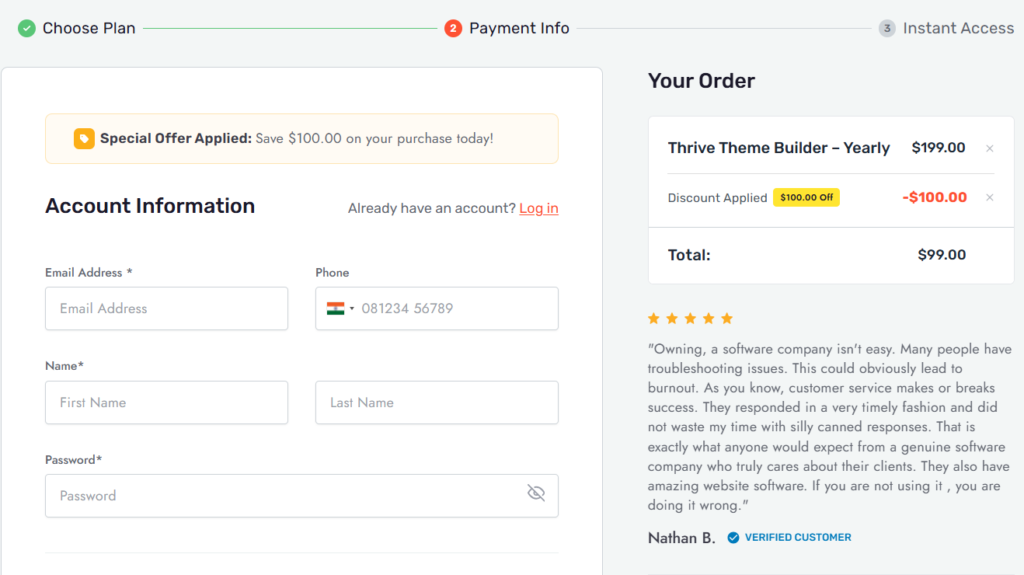
Thrive Theme Builder doesn’t run aggressive coupon campaigns like most WordPress products. The discount is built directly into the pricing page — and right now, you can grab it at $99/yr instead of the regular $199/yr. That’s $100 off on the standalone plan.
If you’ve been sitting on the fence, this is probably the lowest price you’ll see. Here’s everything you need to know before buying.
Quick Deal Snapshot: Active Thrive Theme Builder Deal
- ✅ Standalone plan:
$199/yr→ $99/yr (Save $100) - ✅ Theme Builder + Thrive Architect bundle:
$399/yr→ $199/yr (Save $200) - ✅ Thrive Suite (all tools, 5 sites):
$599/yr→ $299/yr (Save $300) - ✅ 30-Day Money Back Guarantee on all plans
- ⚠️ Renewals are billed at full price — discount applies to first year only
- ⚠️ No coupon code needed — discount is applied automatically at checkout
Coupon Code: Auto-Applied on Click 👇

This post contains affiliate links. If you purchase through our links, we may earn a small commission at no extra cost to you. Thank you for your support!How to Claim the Thrive Theme Builder Discount
No special code, no hoop-jumping. The deal is live directly on their pricing page.
- Click here to visit the Thrive Theme Builder pricing page and see the active deal
- Choose your plan — standalone ($99/yr), bundle with Architect ($199/yr), or full Suite ($299/yr)
- Hit Buy Now on your chosen plan
- The discounted price is already applied at checkout
- Complete payment — you’ll get instant access to your dashboard
That’s it. The discount is automatic. No coupon needed, no promo box to fill in.
One thing to note: Renewal pricing goes back to full rate. So if budget matters, factor that in before choosing a plan.
What You’re Actually Getting for $99/yr
Before we talk about whether this deal is worth it, let me be clear about what the standalone plan includes — because a lot of people miss this.
For $99/yr (1 site license), you get:
- Thrive Theme Builder — the visual front-end WordPress theme builder
- All companion themes — Shapeshift, Ommi, Kwik, Bookwise, Jaya, Xpert, Peak, Chords, Spa, Allure, Gallery, Traveline (12 themes total)
- 810+ smart page block templates
- Dozens of theme page templates and companion theme-specific templates
- Site setup wizard that gets you live in under 15 minutes
- Global color palettes, centralized font management, logo control
- Custom header, footer, blog post templates, sidebar, category pages, 404s, and search pages
- Mobile-responsive design out of the box
- WooCommerce compatible
- 24-hour weekday support, unlimited requests
- Unlimited updates
- Access to Thrive University
- Access to community Facebook Group
- 30-day money back guarantee
That’s a lot for $99. The companion themes alone save you from buying a separate premium theme. And the site setup wizard is something I genuinely appreciate — on a client build I worked on recently, getting from a blank install to a functional branded layout in under 15 minutes wasn’t marketing fluff. It actually works that way.
What the standalone plan does NOT include:
- Thrive Architect (landing page builder)
- Thrive Leads (opt-in forms)
- Thrive Apprentice (online courses)
- Quiz Builder, Ultimatum, Ovation, Optimize, Comments
If you need those, the Suite plan makes more sense.
The Three Plans — Which One Makes Sense for You?
| Plan | Regular Price | Deal Price | You Save | Sites | Plugins |
|---|---|---|---|---|---|
| Thrive Theme Builder | $199/yr | $99/yr | $100 | 1 | 1 |
| Theme Builder + Architect | $399/yr | $199/yr | $200 | 1 | 2 |
| Thrive Suite | $599/yr | $299/yr | $300 | 5 | 9 |
Thrive Theme Builder ($99/yr) — Best for bloggers and content sites that want full theme control without the extra tools. You get the builder, all companion themes, and nothing else. Clean and focused.
Theme Builder + Architect ($199/yr) — This is where the real value shows up. Thrive Architect is the page builder that works alongside the theme builder — so you’re designing your theme structure AND your individual pages visually. For affiliate marketers and bloggers building custom landing pages, this combo is practically all you need.
Thrive Suite ($299/yr) — Full access to all 9 Thrive plugins including Thrive Leads, Thrive Apprentice, Thrive Quiz Builder, Thrive Ultimatum, Thrive Comments, Thrive Ovation, and Thrive Optimize. Covers up to 5 sites. If you manage multiple client sites or run a full conversion-focused business, the per-site math works heavily in your favor.
Is This Actually a Good Deal — or Just Marketing?
Most WordPress tools wave around “50% off” like it’s a limited event. Thrive Themes is a bit different — this pricing appears to be their standard rate, not a flash sale. The strikethrough from $199 to $99 is how they always present it.
Does that make it less of a deal? Not really. The $99/yr price point is legitimate for what you’re getting. 85,000+ active installs, 4.9/5 on Trustpilot, and a development team that’s been active since before most of their competitors existed.
That said, keep two things in mind:
The renewal catches people off guard. Year one is $99. Year two, you’re back to full price unless another offer applies. If you’re budgeting long-term, plan for the full renewal rate.
The standalone license is for 1 site only. If you need it on two or three sites, you either buy multiple licenses or jump to the Suite.
From a pure value standpoint — if you’re building a serious WordPress site and need real visual control over your theme (not just a page builder, but actual header/footer/post template control), $99 is fair. I’ve seen premium themes on ThemeForest charge $69 one-time with far less flexibility.
Thrive Theme Builder vs Alternatives — Quick Comparison
| Feature | Thrive Theme Builder | GeneratePress One | Kadence Essentials |
|---|---|---|---|
| Price | $99/yr | $99/yr | $99/yr |
| Sites | 1 site | Unlimited | Unlimited |
| Visual Front-End Theme Builder | Full front-end visual builder | Theme Builder included | Header/footer builder, moderate control |
| Companion/Starter Themes | 12 companion themes | 80+ starter sites | 200+ starter templates |
| Page Block Templates | 810+ smart page blocks | 200+ patterns | 300+ pre-built design patterns (Blocks Pro) |
| Page Builder Included | No (Architect sold separately) | GenerateBlocks Pro (in bundle) | Kadence Blocks Pro (in bundle) |
| WooCommerce Support | Native | Via plugin | Native (Shop Kit in Pro plan) |
| Conversion Tools Built-in | With Architect bundle | Plugin-dependent | Pro plan only |
| Renewal Pricing | Full price ($199/yr) | Full price | Full price |
| Money Back Guarantee | 30 Days | 30 Days | Not specified |
Post-Comparison Context:
At the same $99/yr entry price, these three tools take completely different approaches.
GeneratePress One is the developer-friendly pick. Unlimited sites, GenerateBlocks Pro included, and a performance profile that’s hard to beat — I’ve used it on client projects where LCP scores mattered more than design flexibility, and it consistently delivers. If you’re managing multiple sites or care deeply about Core Web Vitals, GeneratePress is difficult to argue against at this price.
Kadence Essentials sits in the middle — unlimited sites, solid Gutenberg-native workflow, WooCommerce tools baked in at the Pro level. Better for teams already working block-first. The $299/yr Pro plan is where Kadence really opens up, but that’s a different budget conversation.
Thrive Theme Builder wins on one specific thing: conversion-focused theme-level control. No other tool at this price gives you visual control over every part of the theme skeleton — headers, footers, blog post templates, category pages, 404s — all from a front-end visual editor. If your site is your primary income source and conversion architecture matters, that’s worth paying for on a single site.
For multi-site developers or performance-first projects — GeneratePress. For WooCommerce-heavy builds — Kadence Pro. For a single serious affiliate or content site where design control and conversion matter, Thrive Theme Builder.
Who Should Actually Buy This
Buy the $99/yr standalone plan if:
- You’re building one blog or affiliate site
- You want full visual control over headers, footers, and post templates
- You’re comfortable without a page builder (or already have one)
Buy the $199/yr bundle (Theme Builder + Architect) if:
- You want both theme-level and page-level visual control
- You run a lead gen or affiliate site with custom landing pages
- This is your main income site, and you need the best toolset
Buy the $299/yr Thrive Suite if:
- You manage multiple sites (up to 5)
- You want the full Thrive ecosystem — email opt-ins, A/B testing, quizzes, urgency timers, course platform
- You’re building out a full online business infrastructure
Skip it if:
- You just need a lightweight blog theme — free options or a $59 GeneratePress license will do the job
- You’re on WordPress.com — Thrive Theme Builder only works on self-hosted WordPress.org
After You Buy — Getting Started Right
A few things to do immediately after purchase:
- Install Thrive Theme Builder from your dashboard — download the plugin, install it on WordPress like any other plugin
- Run the Site Setup Wizard — don’t skip this. It handles logo upload, header/footer selection, homepage layout, and blog layout in one guided flow
- Choose your companion theme — Shapeshift works for most professional/blog niches; Ommi is better for personal brands; Kwik if you want a minimal performance-focused design
- Set your Global Color Palette — change it once, and it updates everywhere on the site automatically
- Don’t try to customize everything on day one — get the structure right first, then refine individual templates
One thing that trips people up: Thrive Theme Builder and Thrive Architect are separate products. The theme builder controls your global site structure. An architect is for page-level design. If you only bought the standalone Theme Builder, you’ll edit individual pages with the standard WordPress editor or Gutenberg, which is fine for most blogs.
Frequently Asked Questions
Is there a Thrive Theme Builder coupon code available?
No coupon code is required. The discount from $199/yr to $99/yr is applied automatically at checkout. Just visit the pricing page through the link, and the deal is already active.
Does the $99/yr price renew at the same rate?
No. All renewals are at full price. The discounted rate applies to the first billing year only. You can cancel or change plans at any time.
Can I use Thrive Theme Builder on multiple sites with the standalone plan?
The standalone plan ($99/yr) covers 1 site only. For up to 5 sites, you’ll need the Thrive Suite plan at $299/yr.
Do I need Thrive Architect for the theme builder to work?
No. Thrive Theme Builder works as a standalone product without Thrive Architect. You can design and manage your full site theme — header, footer, post templates, category pages — without it. The architect adds landing page building capability on top.
Is there a free trial for Thrive Theme Builder?
There’s no free trial, but all plans come with a 30-day money-back guarantee. If it doesn’t work for your use case, you can request a full refund within 30 days.
Will Thrive Theme Builder slow down my site?
From what I observed while working with it on a content site, the initial page weight is heavier than that of lightweight themes like GeneratePress. The setup loads additional CSS and JS. It’s not unusable, but if Core Web Vitals scores are your top priority, you’ll need to do some optimization work — particularly on LCP and render-blocking resources. Enabling lazy loading and using a good caching plugin helps significantly.
Does it work with WooCommerce?
Yes. Thrive Theme Builder is fully WooCommerce compatible, letting you build and customize your store pages visually under the same theme structure.
Bottom Line
The Thrive Theme Builder deal at $99/yr is straightforward — no coupon tricks, no countdown timers, no artificial urgency. You get a legitimate 50% discount off the listed $199/yr price, applied automatically.
For a single site where you want real visual control over your WordPress theme structure — not just a page builder, but the actual theme skeleton — this is a fair price. The companion themes and the site setup wizard alone justify it over buying a standalone premium theme.
If you’re going deeper into the Thrive ecosystem, the $199/yr bundle with Architect is the smarter buy. Two tools, one cohesive system.