SureForms is running its Black Friday sale right now, and the headline number is up to 50% off. The sale is live, the discount is applied automatically, and the countdown on the official page showed roughly two days left when I checked. If you’ve been thinking about it, this isn’t the weekend to take your time.
If you haven’t heard of it, SureForms is a WordPress form builder from Brainstorm Force, the team behind Astra, Spectra, SureCart and OttoKit. It lets you build forms with AI or from scratch, collect payments, run quizzes, surveys and polls, and connect to your tools without extra plugins. The free version is already generous, so the paid plans are really about advanced fields, calculators, signatures, and licences for more sites.
I’m Karan Rajput, a full-time blogger with 7+ years of experience. I build micro-niche sites, custom tools, and client WordPress projects, so forms come up in almost every job. This page covers how to claim the deal, which plan fits how many sites you run, and who should honestly skip the paid upgrade.
Everything here comes from the official pricing and product pages. Nothing is guessed, and prices appear only in the snapshot and claim steps so they’re easy to verify.
SureForms Black Friday sale Snapshot [🟢STATUS: LIVE NOW]
Starts on: Already live | Ends on: About 2 days left on 28 November 2026 per the official countdown (the timer can change, so check the page)
Deal Active Now
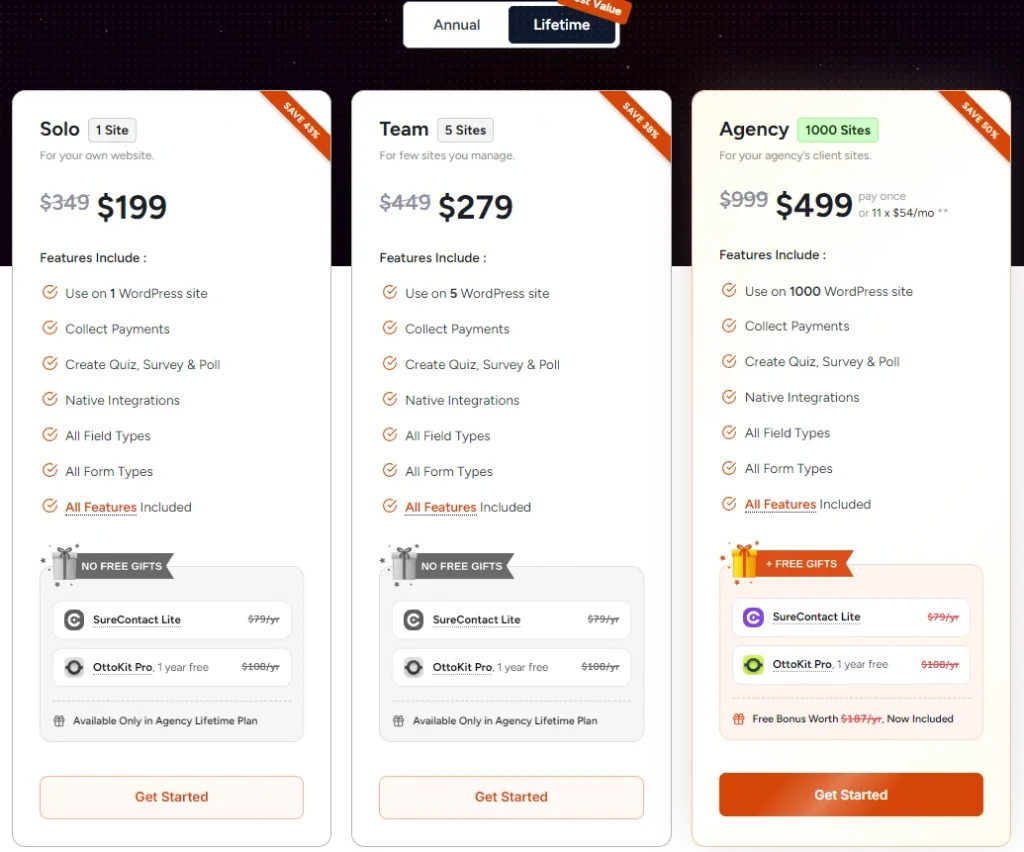
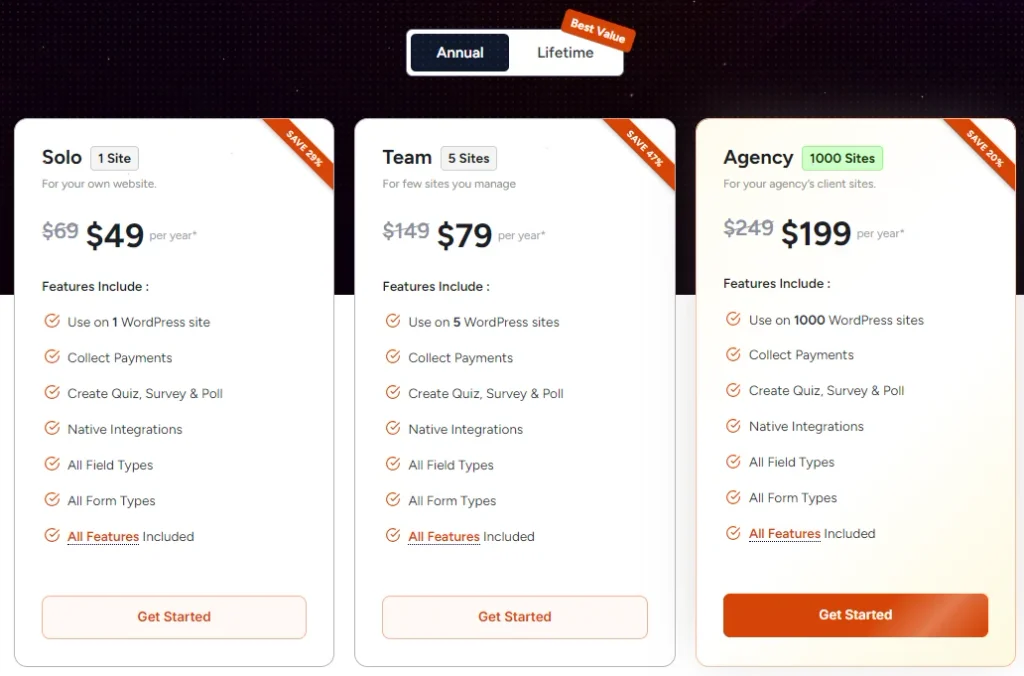
- Discount: Up to 50% off. Annual plans save 29% (Solo), 47% (Team), and 20% (Agency). Lifetime plans save 43% (Solo), 38% (Team), and 50% (Agency).
- Annual plans (per year, introductory): Solo (1 site) $49, Team (5 sites) $79, Agency (1000 sites) $199. Renewals are at full price.
- Lifetime plans (pay once): Solo $199, Team $279, Agency $499.
- Free gifts: SureContact Lite and OttoKit Pro (1 year free) come with the Agency Lifetime plan only.
- Refund window: 14 days.
Coupon: Not needed. The discount is auto-applied at checkout. 👇

Disclaimer: This post contains affiliate links, and I earn a commission from them at no extra cost to you. Thank you for your support!Quick Answer: For up to 5 sites, Team Annual has the biggest cut among the yearly plans. Agency Lifetime is the real headline deal, with 50% off plus bonus plugins. The discount applies automatically; there’s no code to hunt for, and the 14-day refund window keeps the risk low.
How to Claim the SureForms Black Friday Deal
It takes about two minutes. Here’s the exact route:
- Open the SureForms Black Friday offer page.
- Use the toggle at the top to switch between Annual and Lifetime. Lifetime carries the “Best Value” tag.
- Pick your plan and click Get Started.
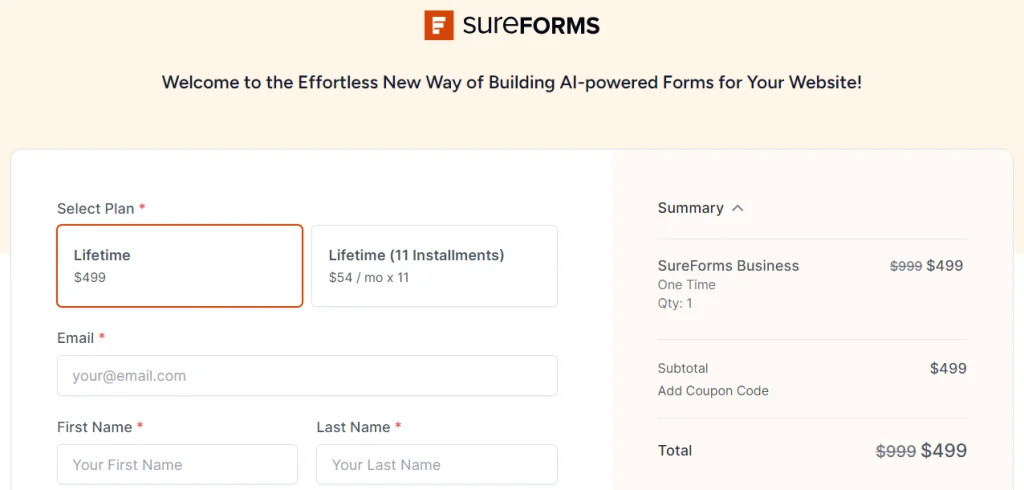
- On checkout, choose how you want to pay. For Agency Lifetime, you’ll see two options: one-time Lifetime, or Lifetime (11 Installments).
- Leave the coupon field empty. The order summary already shows the sale price against the regular price, so no code is needed.
- Fill in your details and pay. Your 14-day refund window starts from here.
Plans as shown on the sale page (USD):
- Annual, per year (introductory pricing): Solo, 1 site, $49 (regular $69). Team, 5 sites, $79 (regular $149). Agency, 1000 sites, $199 (regular $249).
- Lifetime, pay once: Solo, 1 site, $199 (regular $349). Team, 5 sites, $279 (regular $449). Agency, 1000 sites, $499 (regular $999), with free gifts.
Pro observation: The installment option on Agency Lifetime is 11 payments of $54, which adds up to $594. That’s more than the one-time $499. If cash flow isn’t a problem, paying once is cheaper. Confirm the final figures at checkout.
What You Actually Get Beyond the Discount
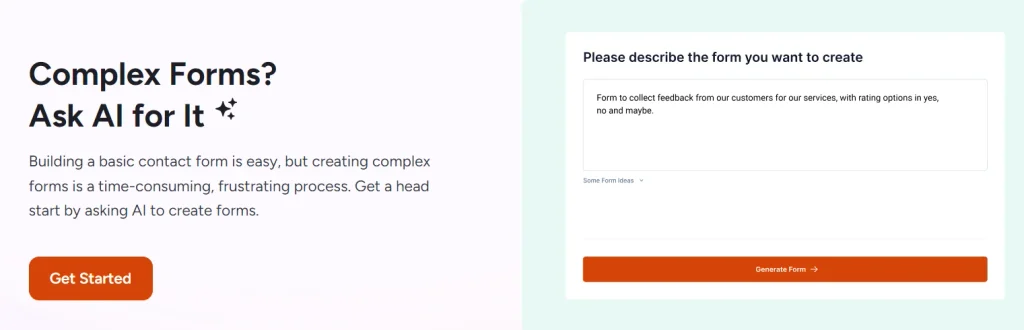
A form plugin lives or dies on how fast you can go from idea to a working form. SureForms leans hard on that. You can generate a form with AI, start from scratch, or import existing forms from WPForms, Gravity Forms, Ninja Forms, and CF7.
The paid plans add features that matter once a site grows:
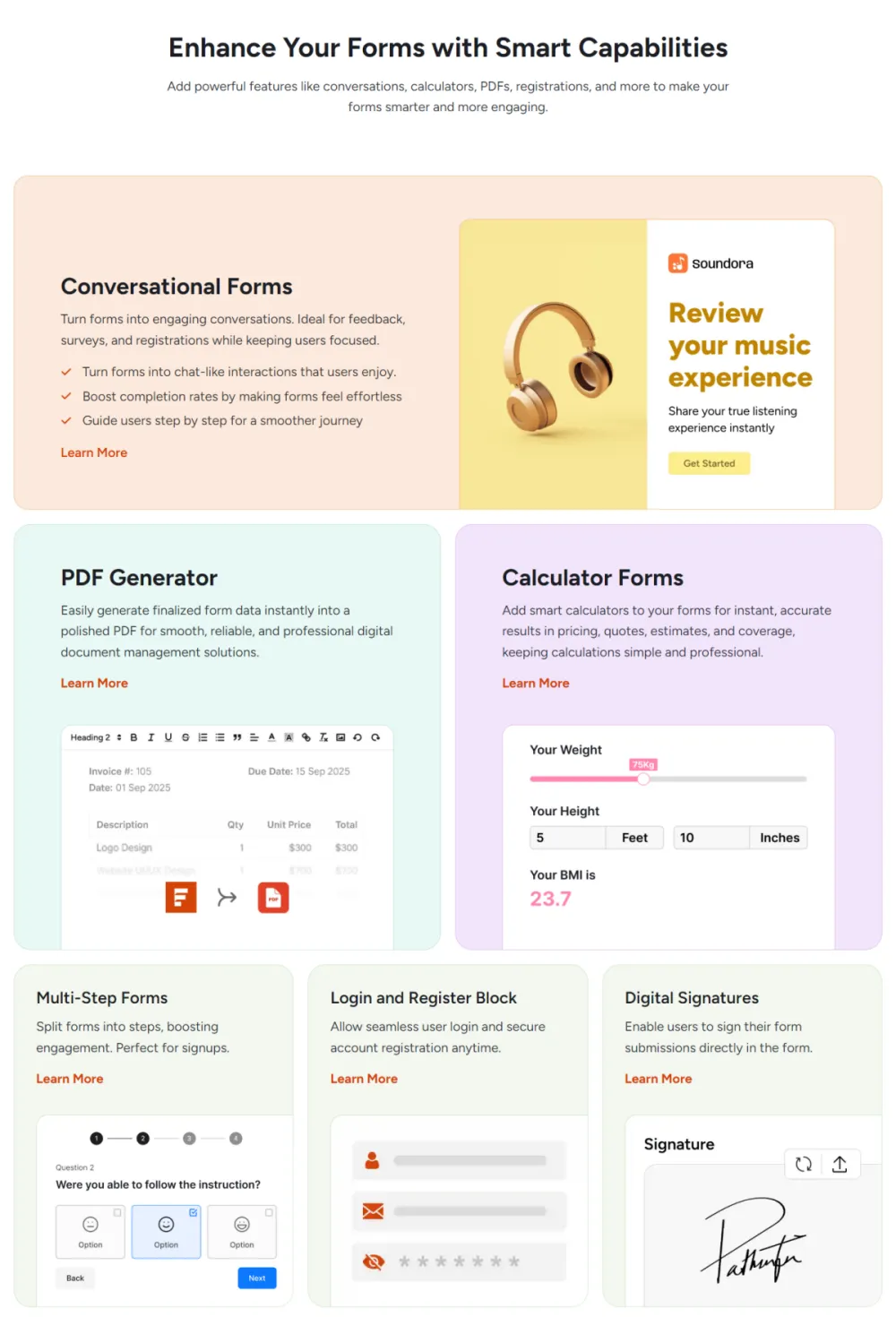
- Conversational and multi-step forms that split long forms into chat-like steps.
- Calculators for quotes, pricing, and estimates.
- PDF generator that turns form data into a finished PDF.
- Digital signatures inside the form.
- Login and register block for account forms.
- Native integrations, plus Webhooks, Zapier, and OttoKit for sending entries to a CRM or email platform.
- Instant Forms, which publish a form as its own shareable landing page.
All plans include all features. The tiers differ by site count (and gifts), not by feature locks.
Is the Free Version Enough, or Should You Upgrade?
This is the question the sales page won’t answer for you.
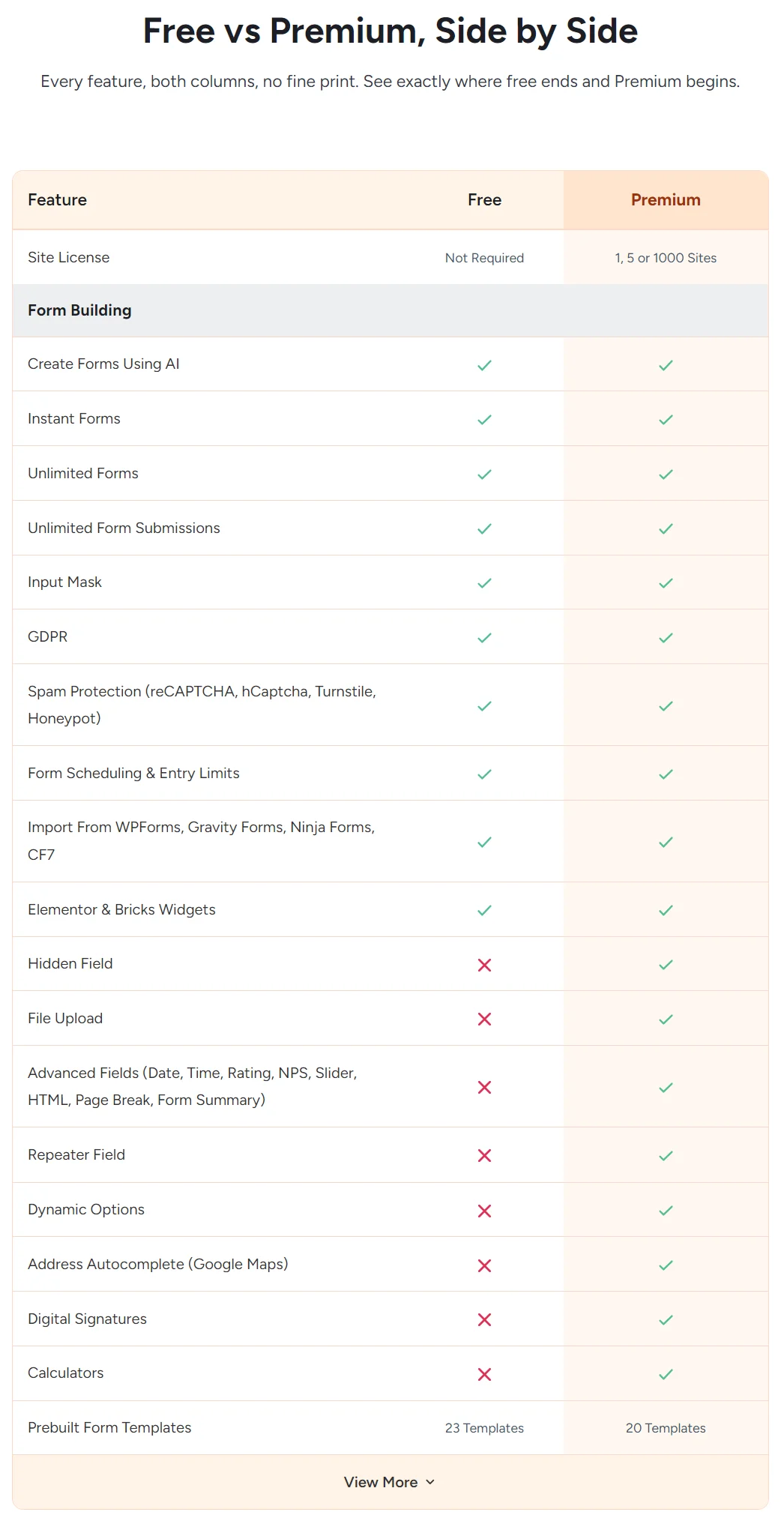
The free plan already gives you AI form creation, unlimited forms, unlimited submissions, GDPR options, spam protection (reCAPTCHA, hCaptcha, Turnstile, Honeypot), scheduling and entry limits, importers, and Elementor and Bricks widgets. For a plain contact form, that’s plenty.
Premium unlocks the parts that make forms do real work: Hidden Field, File Upload, advanced fields (Date, Time, Rating, NPS, Slider, HTML, Page Break, Form Summary), Repeater Field, Dynamic Options, Address Autocomplete with Google Maps, Digital Signatures and Calculators.
Practical trick: Hidden fields are easy to overlook, but they’re what I’d use to carry a page name or campaign tag along with each submission. On affiliate and lead-gen sites, that tells you which page actually produced the lead.
A Developer’s Take: What I Check Before a Form Plugin Goes on a Client Site
I haven’t run lab benchmarks for this post, so I won’t quote performance numbers. What I can share is my checklist, because it’s the same one I use on client projects.
First, scripts. Form plugins are often where a clean site starts picking up extra JavaScript, and heavy CAPTCHA scripts add to that. SureForms supports Turnstile and Honeypot alongside reCAPTCHA and hCaptcha, which gives you lighter options.
Second, layout shift. Embedded forms that load late can hurt CLS, so I always test a form placed above the fold on mobile before launch.
Third, editor compatibility. Elementor and Bricks widgets are listed even on the free plan, which matters if you don’t build everything in Gutenberg.
My advice: install the free version on a staging site first. SureForms also offers a live demo site, so you can try the builder before paying anything.
Where It Falls Short, and Who Should Skip
No plan is perfect, and these are the real catches:
- Annual renewals are at full price. The sale price is introductory, so check what renewal costs before choosing yearly.
- Agency Annual has the smallest cut of all six plans, at 20%.
- Free gifts are Agency Lifetime only. Solo and Team Lifetime get none.
- Split payment costs more than paying once, as shown above.
- Lifetime is tied to your site count. If you outgrow 5 sites, you’ll need to upgrade.
Who should skip: If you run one site with one contact form, the free version is probably all you need. And if forms aren’t your priority this weekend, the Best WordPress Black Friday Deals roundup may have a bigger saving for what you actually need.
Annual or Lifetime? Plan-by-Plan Breakdown
| Solo | Team | Agency | |
|---|---|---|---|
| Sites covered | 1 | 5 | 1000 |
| Annual saving | 29% | 47% | 20% |
| Lifetime saving | 43% | 38% | 50% |
| Free gifts | None | None | SureContact Lite + OttoKit Pro (1 year), Lifetime only |
| Built for | Your own website | A few sites you manage | Your agency’s client sites |
| Best for | One long-term site | Freelancers with 2–5 sites | Agencies and heavy client work |
Look at the pattern in the percentages. Team is the best yearly deal, but Agency flips the logic: its Lifetime plan has the deepest cut while its Annual plan has the weakest. If you’re an agency, annual is the trap here.
For one site you plan to keep for years, Solo Lifetime makes sense because 43% off beats paying introductory rates and then renewals. For 2–5 sites on a budget, Team Annual has the biggest cut at 47%. For client work at scale, Agency Lifetime wins because it’s the only plan with 50% off and the bonus plugins.
More Brainstorm Force Deals Live Right Now
SureForms isn’t the only Brainstorm Force product on sale. If you’re building a full stack around forms, themes, payments, and automation, these deals are running at the same time. I’ve covered each one separately, so you can compare before you commit.
| Product | Current Offer | Deal Page |
|---|---|---|
| SureCart | Up to 40% off (auto-applied) | SureCart deal |
| Astra Theme | Up to 47% off | Astra deal |
| OttoKit | Up to 50% off plus extra savings | OttoKit deal |
| Ultimate Addons | Up to 44% off | Ultimate Addons deal |
| WPSpectra Pro | Up to 44% off | WPSpectra Pro deal |
| Schema Pro | Up to 25% off | Schema Pro deal |
| Ultimate Addons for Beaver Builder | Up to 22% off plus bundle savings | UABB deal |
| Convert Pro | Up to 38% off (auto-applied) | Convert Pro deal |
| WP Portfolio | Up to 40% off | WP Portfolio deal |
| ZipWP | Up to 47% off plus bundled plugins | ZipWP deal |
| Sigmize | Up to 50% off plus lifetime | Sigmize deal |
| SureCookie | Up to 34% off plus lifetime | SureCookie deal |
Each row is a separate deal with its own timer, so open the page for the product you care about before buying.
What to Do After Buying
Setup steps:
- Install the plugin and activate your licence.
- Import any existing forms using the built-in importer.
- Turn on spam protection (Turnstile or Honeypot first, reCAPTCHA if you prefer).
- Connect your email platform or CRM through native integrations, Webhooks, Zapier, or OttoKit.
- Send a test submission and check that the notification email lands in the inbox, not spam.
Key settings: Set entry limits and scheduling on forms that shouldn’t stay open forever, and review the GDPR options if you collect data from EU visitors.
Mistakes to avoid: Don’t buy Agency Annual for two or three sites (Team is cheaper per site and has a bigger cut). Don’t skip the test submission. And don’t forget to note the annual renewal date if you went yearly.
Discount– Limited Time Offer!
Deal: Up to 50% OFF
Coupon Code: Not needed. The discount is auto-applied at checkout.👇
Frequently Asked Questions
Is there a SureForms Black Friday coupon code?
No. The discount is auto-applied, so the order summary already shows the sale price. The checkout page has a coupon field, but you don’t need to fill it. Skip any random code lists online and use the offer page directly.
When does the SureForms Black Friday sale end?
The official countdown showed about two days left on 28 November 2026. Timers like this can change, so check the offer page for the current time before you decide. If you’re comparing other launches, the Best WordPress Black Friday Deals page lists what’s live.
Is the free version of SureForms enough?
For basic contact and lead forms, often yes. Free includes unlimited forms and submissions, AI creation, and spam protection. You need Premium for file uploads, calculators, digital signatures, repeater fields, dynamic options, and several advanced field types.
Should I choose Annual or Lifetime?
Annual plans use introductory pricing, and renewals are at full price. Lifetime is a one-time payment. If you’ll use SureForms for years on the same sites, Lifetime usually makes more sense. If you just want to try it for a year, Annual keeps the upfront cost low.
Do all Lifetime plans include the free gifts?
No. SureContact Lite and OttoKit Pro (1 year free) are included only with the Agency Lifetime plan. Solo and Team Lifetime show “No Free Gifts”. You can read about the automation side in the OttoKit Black Friday deal.
Can I get a refund?
Yes. SureForms offers a 14-day money-back guarantee with no questions asked. The pricing page also says you can change plans or cancel your account at any time. Check the refund policy on the official site for exact terms.
Final Verdict
SureForms is a solid pick if you want a modern WordPress form builder with AI creation and real integrations. The sale is live, the discount applies on its own, and the refund window is generous.
My recommendation: Solo Lifetime for one long-term site, Team Annual for a few client or niche sites, and Agency Lifetime if you handle client work at scale. If you only need a basic contact form, stay on the free version.
The timer is short, so decide today. You can grab the SureForms Black Friday deal here while the sale is still running.
77+ Best WordPress Black Friday/Cyber Monday Deals 2026 [Up to 99% OFF] – Verified Deals Live
Looking for more Black Friday & Cyber Monday software discounts? We have hand-picked and verified 77+ live deals across WordPress hosting, plugins, themes, VPNs, and AI tools—all in one place so you don’t miss out on the biggest savings of the year. Explore the complete WordPress Black Friday Deals 2026 guide.
Quick Deal Snapshot [STATUS: LIVE NOW]
Status: Live now (Ends December 11, 2026)
- Savings: Save up to 99% across 60+ verified WordPress & SaaS brands
- Web Hosting & Domains: Up to 95% OFF + Free Domains & Migrations
- WordPress Plugins & Builders: Up to 90% OFF + Lifetime Deals
- Themes, AI & VPN Tools: Up to 88% OFF + Extra Free Months
- Verified Discounts: Direct promo codes & auto-applied checkout links
- Updated Daily: New live deals added throughout Black Friday week
Coupon: Auto-applied & verified codes inside.

Related Posts