ZipWP’s biggest sale of the year is live right now. Yearly plans carry up to 47% off plus $695 worth of bonus plugins, and there is also a one-time plan option where you pay once and nothing renews.
I’m Karan Rajput, and I have been building WordPress sites for clients and my own projects for 7+ years. Below I explain what the discount really gives you, which plan fits which person, and where the fine print sits.
ZipWP Black Friday Quick Deal Snapshot
Starts on: Live now | Ends on: December 6, 2026 (based on the countdown timer on the ZipWP site)
Deal Active Now
- Discount: Up to 47% off, applied automatically. No coupon code needed.
- Yearly plans: Starter $79/yr, Pro $169/yr, Business $249/yr (renewals at $149, $299 and $429 per year)
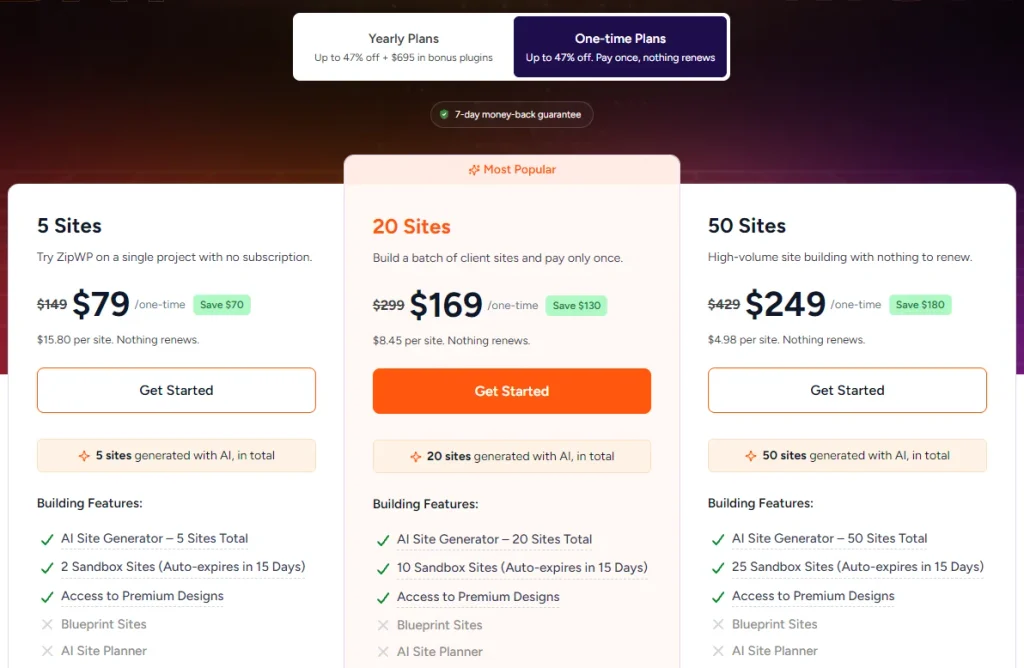
- One-time plans: 5 Sites $79, 20 Sites $169, 50 Sites $249, pay once, nothing renews
- Bonus: $695+ in premium plugins and a free first-year domain on yearly plans
- Safety net: 7-day money-back guarantee and a free plan to try first
Coupon Code: None Needed. Tap below to see the live deal price 👇

This post contains affiliate links. If you purchase through our links, we may earn a small commission at no extra cost to you. Thank you for your support!Quick Answer
If you want an AI builder plus hosting, domain, email, and premium WordPress tools in one yearly bill, the Pro plan is the sweet spot for most freelancers. If you just want a batch of AI-built sites with no renewals, the one-time 20 Sites plan is the better fit. Both are discounted automatically.
How to Claim the ZipWP Black Friday Discount
Nothing complicated here. The discount is already applied on the pricing page, so you don’t need a code.
- Open ZipWP through this link so the offer loads correctly.
- On the pricing page, choose Yearly Plans or One-time Plans using the toggle at the top.
- Pick your plan: Starter ($79/yr), Pro ($169/yr), or Business ($249/yr) for yearly. For one-time, choose 5 Sites ($79), 20 Sites ($169), or 50 Sites ($249).
- Click Get Started and finish checkout. The sale price shows up automatically.
- Not sure yet? ZipWP also offers a free plan, and paid plans include a 7-day money-back guarantee on your first purchase.
Yearly plans renew at the regular price (Starter $149, Pro $299, Business $429), because the sale price is introductory pricing. Keep that in mind before you commit.
What Does ZipWP Actually Do?
ZipWP is an AI website builder for WordPress. You describe your business in a few lines, and it generates a complete website, written and designed for you. It comes from the same team behind Astra, Spectra, SureCart and OttoKit, which is why the plans ship with so many of their premium tools.
From what I have seen on client builds, the slowest part of a new WordPress site is rarely the install. It is the first draft: layout, copy, placeholder images. That first draft is exactly what the AI generator targets. You still edit and polish, but you start from something real instead of a blank page.
Yearly Plans: What the Discount Gets You
Yearly plans are the “one bill covers everything” option. Every yearly plan includes an AI site builder, premium hosting, a domain, a business email, premium plugins worth $695+, and expert support.
Starter is for solo builders and bloggers working on a few small projects. AI generation is capped at a fixed total number of sites, and the WordPress toolkit covers up to 3 sites. You get Astra Pro here, but not Spectra Pro.
Pro is the plan ZipWP marks as most popular, and I understand why. It adds Spectra Pro, Premium Starter Templates, Ultimate Addons for Elementor Premium, blueprint sites, and sandbox sites, with the toolkit covering up to 10 sites. Savings are around 43% off the regular price.
Business is built for agencies. It covers up to 1000 sites in the toolkit, adds the AI Site Planner, team member invites, VIP support and SureForms Agency. Savings are around 42%.
The headline “up to 47%” comes from the Starter plan. Pro and Business save a little less in percentage terms, but they carry far more tools.
If you already use any of these tools separately, check my deals for Astra Theme and WPSpectra Pro too, since ZipWP bundles both in higher tiers.
One-Time Plans: Pay Once, Nothing Renews
This is the part many people miss. The one-time plans are separate from the yearly bundle, and they are simpler.
- 5 Sites: 5 AI-generated sites in total, 2 sandbox sites
- 20 Sites (Most Popular): 20 AI-generated sites in total, 10 sandbox sites
- 50 Sites: 50 AI-generated sites in total, 25 sandbox sites
All three include premium designs. Blueprint sites, the AI Site Planner and team invites are not included. Sandbox sites auto-expire in 15 days, so think of them as test copies, not permanent sites.
The pricing page lists only AI generation features for these plans. It does not list the hosting, domain or plugin extras you get on yearly plans, so treat one-time plans as “AI site generation credits” and confirm anything else on the official page before buying.
The “Five Numbers” Trick Most Buyers Miss
ZipWP’s own page has a short section titled “Every plan shows five different numbers”, and it is worth reading before you pay.
These are live sites, websites built by AI, premium theme and plugin activations, sandbox sites and blueprints. The easy mistake is to read “live sites” as a limit on how many sites you can build. It is not. It is how many can be online at once. Builds, activations and test sites are counted separately.
Pro tip: before choosing, write down which of the five numbers you will actually hit first. For a freelancer doing one new client site a week, it is usually the daily AI build limit or the number of live sites. For a blogger, it almost never matters.
Developer Take: Performance, Compatibility and What to Check
From a performance standpoint, an AI-generated site is a starting point, not a finished product. When I set up a site like this, I still check LCP and CLS on the generated pages, look at hero image sizes, and remove sections I do not need before launch. Do that and you avoid most surprises.
On compatibility, the toolkit is built around Astra and Spectra, which sit in the Gutenberg block world. Pro and Business also add Ultimate Addons for Elementor Premium, so Elementor users are covered too. If you plan to add a store later, take a look at my SureCart deal, since it comes from the same ecosystem.
Where It Falls Short
No tool fits everyone, and ZipWP has a few honest weak spots.
- Renewal jump. Yearly plans renew at the regular price, which is noticeably higher than the sale price. Budget for year two.
- Starter is tight. Fixed total AI builds, no Spectra Pro and no Premium Starter Templates. Most of the premium toolkit begins at Pro.
- Team access is Business-only. Pro users cannot invite team members.
- Generation limits. Yearly Starter has a total cap and Pro has a daily one. If you build heavily, plan around these.
- Free domain is first-year. Check the renewal cost before you rely on it.
Who should skip this: if you already have a hosting setup you love and only want a theme, you do not need the full bundle. Also skip it if you hate any AI-generated starting point and prefer building every layout by hand.
Best use case: a freelancer or small agency launching client sites regularly. Worst use case: a large, complex site with heavy custom development, where AI saves very little time.
ZipWP Plans Compared: Which One Fits You?
| Feature | Yearly Starter | Yearly Pro | Yearly Business | One-time 20 Sites |
|---|---|---|---|---|
| AI sites generated | 5 in total | 5 a day | 10 a day | 20 in total |
| Toolkit sites | Up to 3 | Up to 10 | Up to 1000 | Not listed on pricing page |
| Blueprint sites | None | 5 | 20 | None |
| Premium plugins | Astra Pro | Astra Pro, Spectra Pro, Ultimate Addons for Elementor Premium | Everything in Pro plus SureForms Agency | Not listed on pricing page |
| Complimentary live sites | 1 | 2 | 5 | Not listed on pricing page |
| Support | Premium | Premium | VIP | Not listed on pricing page |
| Best for | Solo blogger, one small project | Freelancer with regular client work | Agency with a team | Anyone who wants no renewals |
Starter is fine for a first site, but you will likely outgrow it. Pro gives you the premium toolkit and blueprints at a price that is still sensible for a freelancer. Business makes sense once you need team seats, VIP support and the AI Site Planner. The one-time plan is the odd one out: great if you just need AI-built sites and nothing else.
My recommendation: for freelancers building multiple client sites, go with Yearly Pro, because it adds Spectra Pro, blueprints and 2 complimentary live sites. For agencies with a team, Business is worth it because it is the only plan with team invites. If you hate renewals, the one-time 20 Sites plan is the pick.
If you are still choosing hosting for client sites, my Hostinger and Bluehost deal pages are worth a look before you decide.
What to Do After Buying
A few quick steps keep the setup clean:
- Claim your free domain and business email from the dashboard before you start building.
- Write a clear business description. The AI output is only as specific as your input.
- Use a sandbox site (Pro and Business) to try layout changes before touching the live site.
- Save a blueprint if you like a design, so the next client site starts half-finished.
- Run a speed test on the generated site and compress oversized images.
Mistakes to avoid: don’t burn your limited AI generations on random experiments, and don’t skip reading the refund window. It is 7 days from your first purchase.
More Brainstorm Force Black Friday Deals Worth Checking
Sigmize, Astra, Spectra, and the other tools all belong to the same company, Brainstorm Force, and their Black Friday sale is running concurrently. If you are building a WordPress stack, you can find the discount and deal page for each tool gathered in one place below. The discounts are applied automatically, so there is no need to search for a code.
| Product | Kya karta hai | Discount | Deal page |
|---|---|---|---|
| Astra Theme | Fast WordPress theme | Up to 47% off | Astra Theme deal |
| OttoKit | Workflow automation | Up to 50% off + Extra $100 off | OttoKit deal |
| Ultimate Addons for Elementor | Elementor widgets | Up to 44% off | Ultimate Addons deal |
| Spectra Pro | Gutenberg blocks | Up to 44% off | WPSpectra Pro deal |
| Schema Pro | Schema markup | Up to 25% off | Schema Pro deal |
| Ultimate Addons for Beaver Builder | Beaver Builder modules | Up to 22% off + bundle savings | UABB deal |
| Convert Pro | Popups and lead capture | Up to 38% off | Convert Pro deal |
| WP Portfolio | Portfolio display plugin | Up to 40% off | WP Portfolio deal |
| Sigmize | A/B testing, heatmaps, recordings | Up to 50% off (Lifetime) | Sigmize deal |
Discount– Limited Time Offer!
Deal: Up to 47% Off + $695 in Bonus Plugins
Coupon Code: None Needed. The deal price shows at checkout 👇
Frequently Asked Questions
Do I need a coupon code for the ZipWP Black Friday deal?
No. The discount is applied automatically on the pricing page, so you do not need to enter anything at checkout. Just open the pricing page through the link in this article, choose your plan, and the sale price shows up on its own.
Is there a free trial for ZipWP?
ZipWP has a free plan you can use before upgrading, and the site mentions that no credit card is required to start. Paid plans also come with a 7-day money-back guarantee on your first purchase, so you can test it with limited risk.
Which ZipWP plan is best for beginners?
For a single blog or small business site, Starter is enough to get going. If you want Spectra Pro, templates and blueprints, Pro is a better long-term choice. Beginners who just want a few AI sites with no renewals can look at the one-time plans instead.
Yearly plans renew at the regular price, not the sale price, and that is the main cost to plan for. The free domain is complimentary for the first year. One-time plans say nothing renews. Always confirm final totals at checkout.
Can I use ZipWP for client websites?
Yes, ZipWP has an FAQ section for freelancers and agencies. Pro and Business are the plans built for client work, with blueprints to reuse designs. If you also need a form plugin or automation later, my OttoKit deal may help.
Can I upgrade or cancel later?
ZipWP states that you can change plans or cancel your account at any time, with no contracts or lock-ins. Keep in mind the 7-day refund window applies to your first purchase, so decide early if you think the plan is wrong for you.
Final Verdict
ZipWP’s Black Friday sale is a solid offer if you build WordPress sites regularly. The yearly Pro plan gives most freelancers the best balance of AI generation, premium plugins, and extras, while the one-time plans suit anyone who dislikes renewals. Just remember that yearly prices go up after the first term.
Check the plan limits against your own workflow, then pick the tier you will actually use. When you are ready, you can claim the ZipWP Black Friday deal here before the sale timer runs out.
Related Posts