Push notification tools have a billing problem. You build the audience. You create the content. Then you pay per subscriber to reach people who signed up for you on your site and read your work.
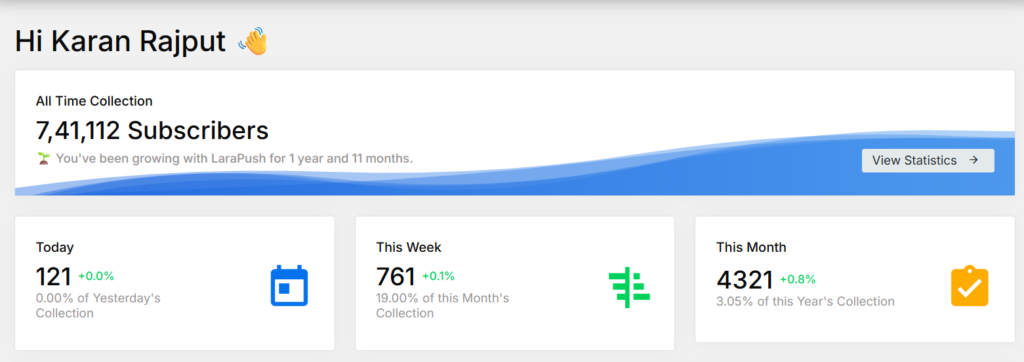
I’ve been running LaraPush on a DigitalOcean Droplet for almost two years. Pro plan. Real panel. Not a test install — this is the same setup powering push notifications on karankk.com right now, with over 741,000 all-time subscribers collected across my sites. I bought the $799 Pro plan because I needed the full automation suite upfront. Skipped the Premium Add-on for now since I don’t need YouTube token collection or Google Drive auto-backup at this stage.
This article is about what you actually gain from using LaraPush — specifically the benefits that matter in practice, not in a feature list.
Quick Answer: LaraPush’s core benefits come from three things: you pay once and never again based on subscriber count, your subscriber data stays entirely on your own infrastructure, and you can run unlimited websites from one panel without any per-site cost. The tradeoff is a real setup requirement: VPS, Firebase, and some technical patience.
This post contains affiliate links. If you purchase through our links, we may earn a small commission at no extra cost to you. Thank you for your support!1. You Stop Paying to Reach Your Own Audience
This is the foundational benefit and worth being direct about.
Every major SaaS push notification provider charges based on subscribers, campaigns, or both. OneSignal bills per million subscribers. Gravitec runs $1,000/month. Notix charges per million, too. As your list grows, your monthly bill grows — even though you did all the work of building that audience.
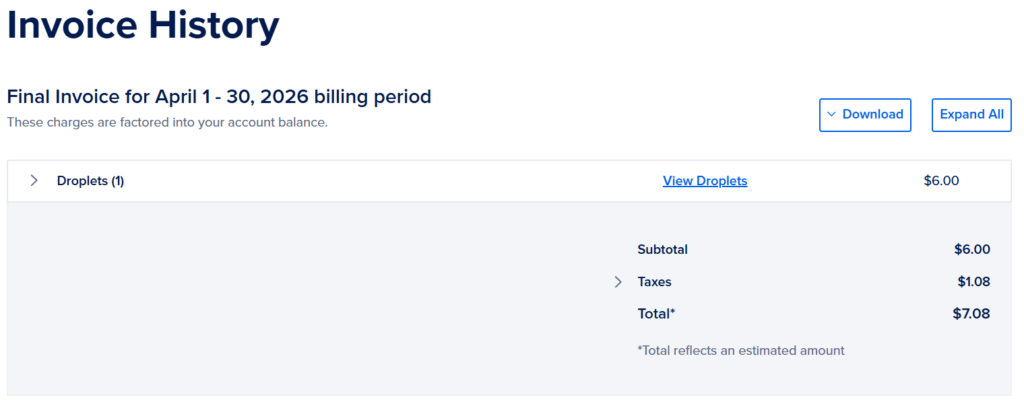
LaraPush charges once. Startup at $499, Pro at $799. After that, the ongoing cost is your VPS server — around $6–10/month, depending on your provider. I pay roughly $7.08/month, including taxes on DigitalOcean, billed annually. That’s my entire recurring cost.
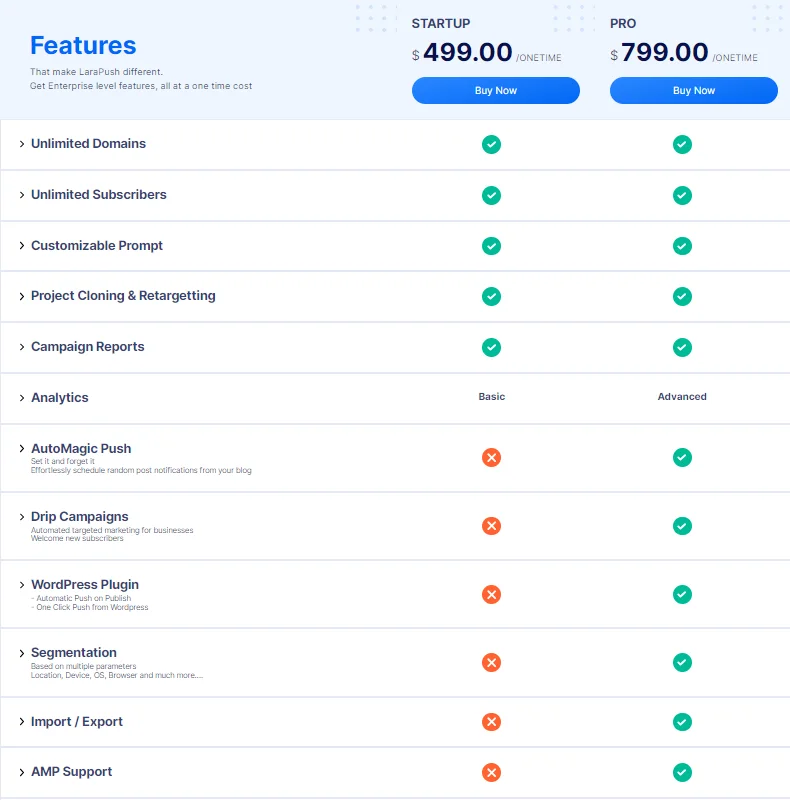
I’m on the Pro plan at $799. With nearly two years of usage, the license has cost me under $0.04 per day when spread across the period. No SaaS platform comes close to that math once your subscriber count gets into the hundreds of thousands.
The compounding effect is what surprises most people: as you add more websites to the same panel, subscriber collection accelerates — but your cost doesn’t move. Every additional domain feeds into the same panel at zero additional licensing cost.
2. Your Subscriber Data Lives Where You Control It
With SaaS tools, subscriber tokens — the device identifiers that make push delivery possible — live on their servers. Switch providers, get locked out, or have your account suspended, and your audience’s access is at risk.
LaraPush works differently. The panel runs on your VPS. Subscriber tokens are stored in your own Firebase project under your own Google account. The delivery goes through Google’s FCM network, which is the same underlying infrastructure most push tools use anyway.
Nobody else has access to your subscriber list. No third-party data sharing, no risk of your tokens being used in someone else’s campaigns, no dependency on a provider’s business decisions.
From a purely practical standpoint, if LaraPush as a company shut down tomorrow, my subscriber data would still be intact in Firebase. My panel would still run on my VPS. That’s a level of continuity no SaaS tool can offer.
This benefit matters more as your list grows. At 741,000+ subscribers, having that data sit on a third party’s infrastructure indefinitely would be a genuine risk. The self-hosted model removes it.
3. One Panel, Every Website, No Per-Site Fee
I manage multiple content sites. On any SaaS platform, that means either multiple accounts, a custom enterprise quote, or a high-tier plan that “supports” multi-domain use — each with its own billing implications.
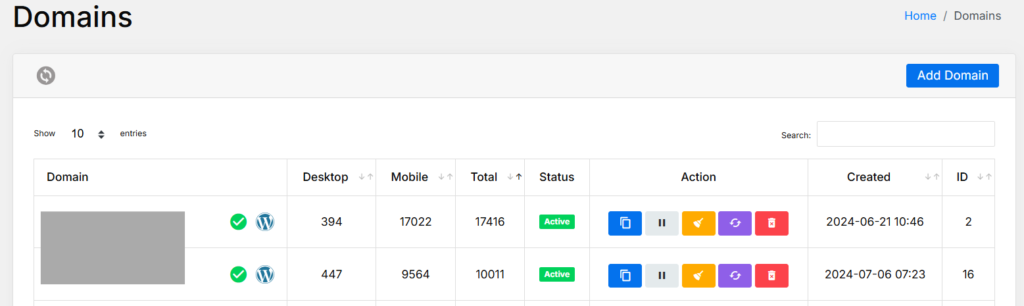
On LaraPush, you add domains from a single dashboard. Each site gets its own subscriber list, campaign management, and analytics view. The panel shows all domains in one Domains section — desktop vs. mobile subscriber counts, quick actions, and status for every connected website.
Adding a new site takes a few minutes: Add Domain → enter Firebase credentials → integrate the code or WordPress plugin. That’s it. No new license, no tier upgrade, no support ticket.
For bloggers who run even two or three niche sites, this alone changes the cost math significantly. And for anyone managing five or more sites — which is not unusual in affiliate publishing — a single LaraPush Pro license covers the entire portfolio permanently.
4. The WordPress Plugin Handles the Daily Workflow
I bought Pro specifically because of the WordPress Plugin and Push on Publish. This is where the benefit is most tangible day-to-day.
When Push on Publish is active, and a post goes live, a notification fires automatically. Title, message, and image get pulled from the post. I don’t open the LaraPush dashboard. I don’t draft a campaign. I just published.
One Click Push is the manual version — when you want to send a notification about an existing post without waiting for a new publish event, you hit one button from the WordPress post editor, and it goes out.
For anyone publishing regularly across multiple WordPress sites, this removes a repetitive manual step from every content cycle. The time saving isn’t dramatic per post, but across weeks and months, it becomes meaningful — and notifications go out consistently instead of being skipped on busy days.
Worth being transparent: this is the Pro plan only. Startup users don’t get the WordPress Plugin. If WordPress automation is a primary reason you’re considering LaraPush, the $799 Pro plan is the one that delivers it.

5. AutoMagic Push Keeps Your Older Content Working
Most published content stops getting traffic within a few days of going live. Push notifications typically go out once — at publish —, and that’s the end of it.
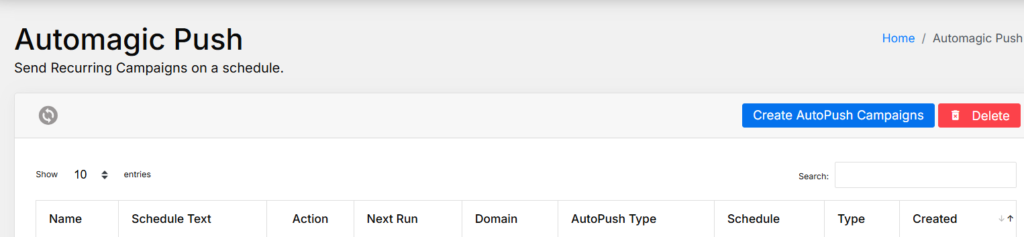
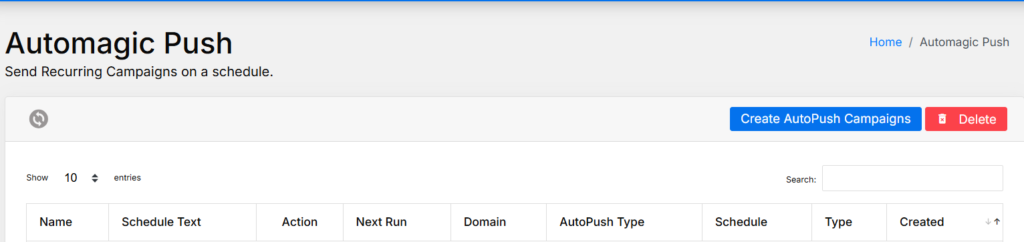
AutoMagic Push changes this. You configure it to automatically select from your recent posts and schedule notifications regularly — daily, weekly, or a custom cron schedule. It runs without manual input once set up.
The practical benefit: posts from two weeks ago, a month ago, or further back continue to get notification-driven visits from your existing subscriber base. For content that’s evergreen or ranking for search traffic, this adds a consistent re-engagement layer without creating additional work.
I set up AutoMagic Push on my panel after the first few months and left it running. The day-to-day difference shows up in the analytics as a steady baseline of traffic from older content — not a spike, but a consistent floor that wasn’t there before.
6. Segmentation Means Relevant Notifications, Which Means Fewer Opt-Outs
Sending every notification to every subscriber sounds efficient until you watch opt-out rates climb on an irrelevant campaign.
LaraPush Pro’s Segmentation lets you filter subscribers by: the URL they subscribed from, Country/State, Device type, OS, Browser, and subscription date. Conditions stack with AND logic. You see the estimated segment size before sending.
The real benefit here is list health. A subscriber who signed up for a WordPress hosting article doesn’t necessarily want notifications about a gaming income guide. Targeting by subscription URL means you can match the campaign to the audience that already showed interest in that topic.
In practice, I use segmentation primarily for geography-specific campaigns and topic-specific content pushes. The engagement difference between a broad blast and a targeted segment isn’t subtle — it’s noticeable in click rates and in how the opt-out trend moves over time.

7. LP Links: Subscriber Collection From Outside Your Website
This is the LaraPush feature most reviewers don’t cover properly.
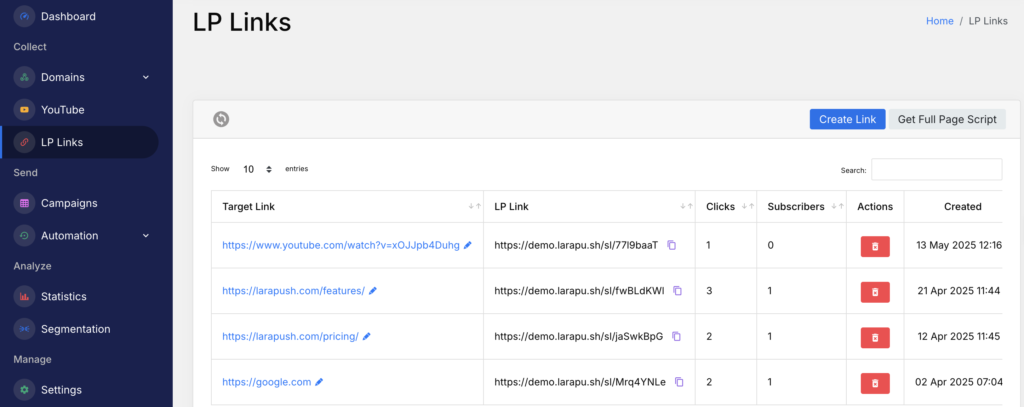
LP Links are shareable subscription URLs — short, trackable links that open a push notification permission prompt when clicked. You can drop them anywhere: YouTube video descriptions, email footers, Telegram groups, WhatsApp broadcasts, social media bios.
Someone doesn’t need to visit your website to become a push subscriber. They click the link, approve the notification prompt, and they’re in your list.
For creators who build audiences across platforms before their website traffic catches up — which is a realistic scenario for newer blogs and YouTube-linked content sites — this provides a subscriber collection channel that most tools simply don’t have.
I haven’t fully utilized LP Links yet, given my existing subscriber volume, but on client projects where social traffic outpaces site traffic, the ability to collect push subscribers from off-site has been genuinely useful.
8. Drip Campaigns Let You Onboard New Subscribers Properly
A new subscriber is most engaged in the first few days. Most push notification setups waste that window by doing nothing until the next post gets published.
Drip Campaigns (Pro plan) let you set up a sequence of automated notifications that go to new subscribers on a schedule — a welcome message immediately, a curated content recommendation after 48 hours, a product or affiliate promotion on day five, and so on.
This is the kind of sequence that email marketers have run for years. LaraPush brings it to push notifications. For bloggers with monetized content or product recommendations, the ability to guide new subscribers through a structured first-week experience adds a conversion layer that passive push campaigns don’t provide.
The configuration is straightforward: set your sequence, define delays between steps, and it runs automatically for every new subscriber. No ongoing management required.
Pros & Cons
Pros
- Genuine one-time pricing — no monthly billing, no subscriber-based charges, no campaign limits
- Full data ownership: subscriber tokens in your Firebase, panel on your VPS, nothing shared with third parties
- Unlimited domains and subscribers across both plans — structural, not a plan-cap “unlimited.”
- Pro plan’s WordPress Plugin (Push on Publish + One Click Push) removes manual steps from the daily publishing workflow
- AutoMagic Push and Drip Campaigns provide automated engagement without ongoing management
- LP Links enable subscriber collection from YouTube, email, and social media — a genuinely unique capability
- Multi-site management from one dashboard with no per-domain fee
Cons
- VPS requirement adds ~$6–10/month in ongoing server costs that some buyers don’t account for upfront
- Firebase setup is the biggest friction point for non-technical users — FCM configuration trips up beginners
- The most useful WordPress features (Push on Publish, Segmentation, Drip Campaigns) are all Pro-only — Startup at $499 is noticeably limited
- No Premium Add-on means no automated Google Drive backup, YouTube push, or real-time link analytics (separate $399 add-on)
- Firebase project deletion = permanent subscriber token loss — requires careful project management
How It Compares
| Feature | LaraPush Startup ($499) | LaraPush Pro ($799) | OneSignal Growth (~$99/mo) | iZooto (~$85/mo) |
|---|---|---|---|---|
| Pricing model | One-time | One-time | Monthly | Monthly |
| Subscriber limit | Unlimited | Unlimited | Plan tiers | Plan tiers |
| Data ownership | 100% yours | 100% yours | Hosted by them | Hosted by them |
| WordPress Plugin | Not included | Included | Included | Included |
| AutoMagic Push | Not included | Included | Not available | Not available |
| Drip Campaigns | Not included | Included | Available | Available |
| LP Links (off-site collection) | Included | Included | Not available | Not available |
| Segmentation | Not included | Included | Included | Included |
| Multi-site (unlimited domains) | Included | Included | Extra cost | Extra cost |
| Best for | Budget multi-site, non-WP | WP publishers, multi-site | Beginners, managed | News publishers |
SaaS pricing approximate — verify current rates with each provider.
OneSignal is the right choice if you want zero technical setup and a polished managed experience. Their free tier works well for small lists, and the product is genuinely good. The cost curve starts hurting once subscriber volume grows or you need multi-site coverage.
iZooto makes sense for news and media publishers who want monetization features built in. The data ownership trade-off and permanent subscription model are the downsides.
LaraPush Pro at $799 is the clear long-term choice for anyone running multiple WordPress sites with growing audiences who are willing to handle the initial setup. I bought Pro over Startup specifically because the automation features — Push on Publish, AutoMagic Push, Segmentation, Drip Campaigns — are where the actual daily benefit lives. Startup covers the unlimited infrastructure but leaves out the workflow tools.
For a complete setup walkthrough, Firebase configuration details, and integration options, the full LaraPush review covers everything in depth.

Larapush Pay Once, Use Forever
Who Gets the Most Value From LaraPush
Best fit:
- Multi-site publishers are currently paying $50–200/month on SaaS push notification tools
- WordPress bloggers who want automated Push on Publish without daily manual campaign management
- Content creators with audiences across YouTube, email, and social who want to convert those audiences into push subscribers via LP Links
- News and regional content portals with large or fast-growing subscriber bases, where SaaS per-subscriber pricing becomes expensive
Not the right fit:
- Single-site bloggers still under 10,000 subscribers with no technical background — the VPS and Firebase setup overhead isn’t worth it at that scale yet
- Anyone who needs a fully managed dashboard with zero server responsibility
- Teams with nobody comfortable handling basic Linux server maintenance
Frequently Asked Questions
The unlimited is structural. LaraPush is self-hosted — it runs on your own VPS and Firebase. There’s no backend system counting your subscribers or campaigns and charging more. Both Startup and Pro include unlimited domains, subscribers, and notification sends. The only ongoing cost is your VPS server, which runs around $6–10/month independent of subscriber count or notification volume.
What’s the actual difference between Startup ($499) and Pro ($799)?
Startup covers the infrastructure: unlimited domains, unlimited subscribers, customizable prompt, project cloning, campaign reports, and basic analytics. Pro adds the workflow and automation layer: advanced analytics, AutoMagic Push, Drip Campaigns, the WordPress Plugin (Push on Publish + One Click Push), Segmentation, Import/Export, AMP Support, and API access. For most WordPress publishers, Startup is noticeably limited — the features that make LaraPush genuinely useful day-to-day are almost all Pro.
Does buying LaraPush Pro mean I also get the Premium Add-on?
No. The Premium Add-on ($399, purchased alongside Pro) is separate. It unlocks YouTube token collection, URL shortener with subscription, automated Google Drive backup, collection through external links, URL and directory segmentation, and real-time link analytics. I haven’t purchased the add-on — for my current usage, the Pro plan covers what I need. The add-on makes sense once YouTube subscriber collection or Google Drive automated backup becomes a priority.
How much does it actually cost to run LaraPush over a full year?
License ($799 for Pro, one-time) plus server costs. On a $6/month DigitalOcean Droplet — which is what I run across 741,000+ subscribers — that’s roughly $7.08/month including taxes when billed annually, or about $85/year. Total first-year cost: $799 + $85 = $884. From year two onwards: $85/year. Compare that to $99/month on OneSignal Growth and the math becomes clear within the first 12 months.
Can LaraPush handle a large subscriber base on a basic VPS?
Based on nearly two years of personal usage — yes. My $6/month DigitalOcean Droplet handles over 741,000 all-time subscribers across multiple sites without needing a spec upgrade. CPU and RAM usage stay well under capacity during normal operation. High-volume simultaneous campaigns may require a slightly higher-spec server, but typical content publishing workloads run comfortably on entry-level VPS configurations.
What happens if I only buy Startup now — can I upgrade to Pro later?
Contact LaraPush’s team directly for upgrade pricing details. Buying Pro upfront is generally the better decision if WordPress automation is part of your plan — the gap between the two plans is significant enough that most publishers end up wanting Pro-level features within the first few months of use.
Final Verdict
The benefits of LaraPush come down to a simple trade: you absorb a one-time technical setup cost in exchange for permanent ownership of your push notification infrastructure. No recurring billing, no subscriber-based pricing, no third-party holding your audience data.
I bought the $799 Pro plan because the automation features — Push on Publish, AutoMagic Push, Drip Campaigns, Segmentation — are where the actual daily value lives. Nearly two years in, the panel runs stable, the subscriber count is past 741,000, and my total monthly cost is $7.08 for the VPS.
For any publisher who has outgrown free-tier SaaS tools and is currently paying recurring fees to reach their own audience: the math works in LaraPush’s favor, usually within the first year.
Larapush Pay Once, Use Forever