Both themes are free. Both work with Elementor. Both have been around long enough to build real user bases. So when someone asks “Astra theme or OceanWP” — the answer is not as straightforward as picking the one with more stars on WordPress.org.
I’ve worked with both themes across personal projects and client builds. Each has a distinct philosophy, a different upgrade path, and real differences in how they behave under the hood. This comparison breaks all of that down so you can pick the right one for your specific situation.
Quick Answer: Astra is the better all-around choice for most users — bloggers, freelancers, and agencies — thanks to its leaner codebase, stronger ecosystem, and cleaner upgrade path. OceanWP is a solid free theme, but its premium extensions model can get complicated and expensive fast. If you’re building something quick and lightweight, Astra wins. If you’re deep into Elementor and want granular design control without buying into an ecosystem, OceanWP has merit.
This post contains affiliate links. If you purchase through our links, we may earn a small commission at no extra cost to you. Thank you for your support!How These Two Themes Are Actually Different
On the surface, they look similar. Both are multipurpose WordPress themes, both offer free versions with premium add-ons, and both support major page builders. But underneath, they take different approaches.
Astra is built and maintained by Brainstorm Force — the same team behind CartFlows, Spectra, and ZipWP. The theme itself is just one part of a larger ecosystem. Astra Pro gives you deeper design controls, but the real value comes from the toolkit plans that bundle multiple tools together. Over 4.8 million businesses use Astra, and the active install count has crossed 1.8 million+ websites.
OceanWP positions itself as a highly customizable free theme with optional premium extensions. It’s been around since 2016 and has crossed 9.4 million downloads with 1M+ active installs. The free version is genuinely feature-rich — more so than Astra’s free tier in some respects. But the premium model works differently: you buy a Pro Bundle that unlocks extensions, templates, and additional features.
That difference in monetization strategy matters when you’re calculating what you’ll actually spend.
Performance: Where the Gap Shows Up
This is the area most comparison articles skip over or treat superficially.
Astra is built with performance as a core design principle — not an afterthought. It uses Vanilla JavaScript (no jQuery dependency), loads in under 50 KB of resources, and is designed to hit sub-second load times. Astra’s own benchmarks show a 94% speed grade on Google Developers and 450ms GTmetrix load time on a clean install. HTTP/2 support and built-in lazy loading are included out of the box.
From a developer standpoint, Astra’s HTML output is lean. There’s no bloat from unused shortcodes or plugin-style CSS stacking. When I set this up on a client project using GenerateBlocks-style layouts, the LCP on a page-builder-built homepage stayed well under 2.5 seconds without any additional optimization plugins — which is rare.
OceanWP is reasonably fast but it loads more by default. The free version comes with additional scripts for its extension framework, and depending on which free extensions you activate, you can see some render-blocking behavior. It’s not heavy by any means, but Astra has a measurable edge on initial page weight.
OceanWP supports Elementor, Gutenberg, Beaver Builder, and Brizy — similar to Astra’s page builder compatibility. But Astra also integrates natively with Spectra (its own block builder) for tighter performance coupling.
Performance Edge: Astra
Pricing Breakdown: What You’ll Actually Pay
Astra Pricing
Astra has a permanently free version. The paid plans are:
Annual Plans:
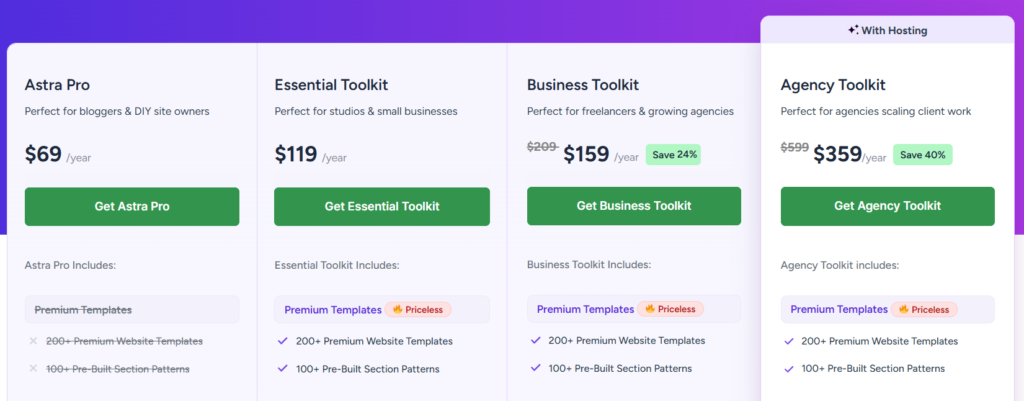
- Astra Pro: $69/year — for bloggers & DIY site owners
- Essential Toolkit: $119/year — for studios & small businesses (includes 200+ premium templates, 100+ section patterns)
- Business Toolkit:
$209$159/year (Save 24%) — for freelancers & growing agencies - Agency Toolkit:
$599$359/year (Save 40%) — for agencies scaling client work
For 1,000 sites (annual):
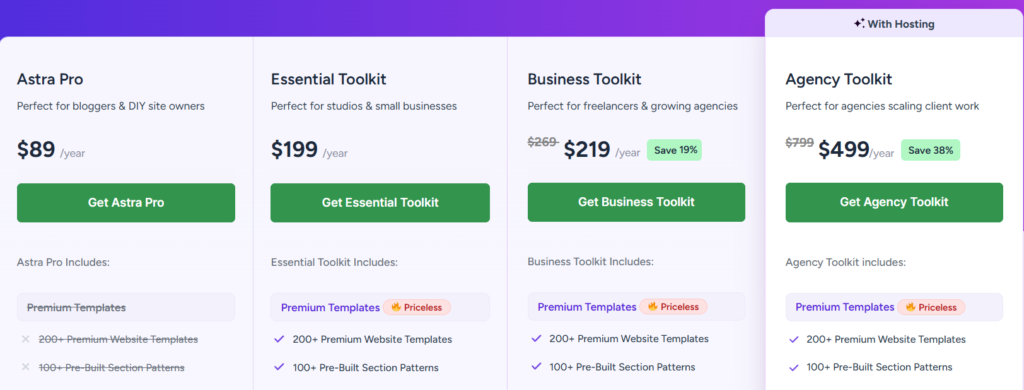
- Astra Pro: $89/year
- Essential Toolkit: $199/year
- Business Toolkit:
$269$219/year (Save 19%) - Agency Toolkit:
$799$499/year (Save 38%)
Lifetime Plans (3 sites):
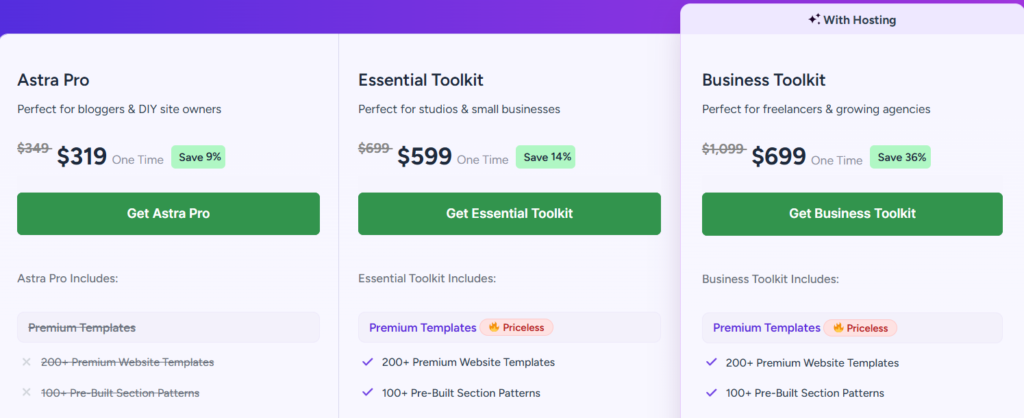
- Astra Pro:
$349$319 one-time (Save 9%) - Essential Toolkit:
$699$599 one-time (Save 14%) - Business Toolkit:
$1,099$699 one-time (Save 36%)
Lifetime Plans (1,000 sites):
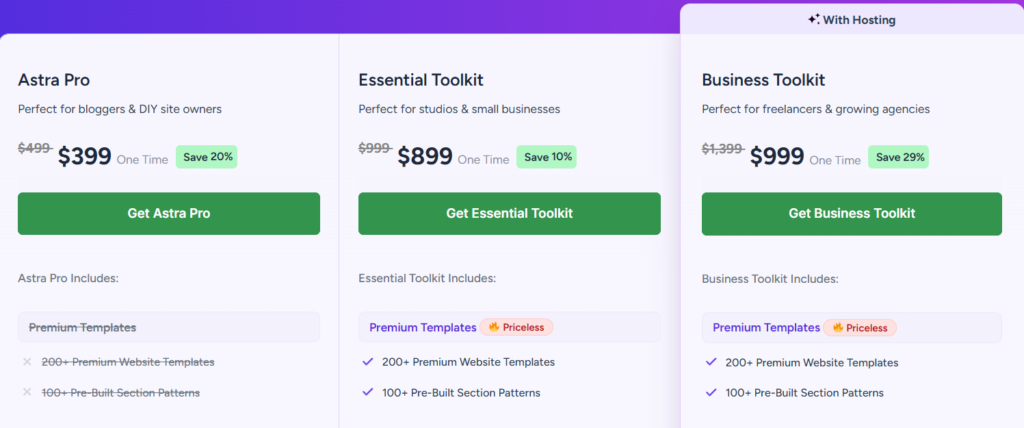
- Astra Pro:
$499$399 one-time (Save 20%) - Essential Toolkit:
$999$899 one-time (Save 10%) - Business Toolkit:
$1,399$999 one-time (Save 29%)
The lifetime plans are genuinely good value if you’re building multiple sites over time. The Agency Toolkit annual plan includes hosting bundled as an option.
OceanWP Pricing
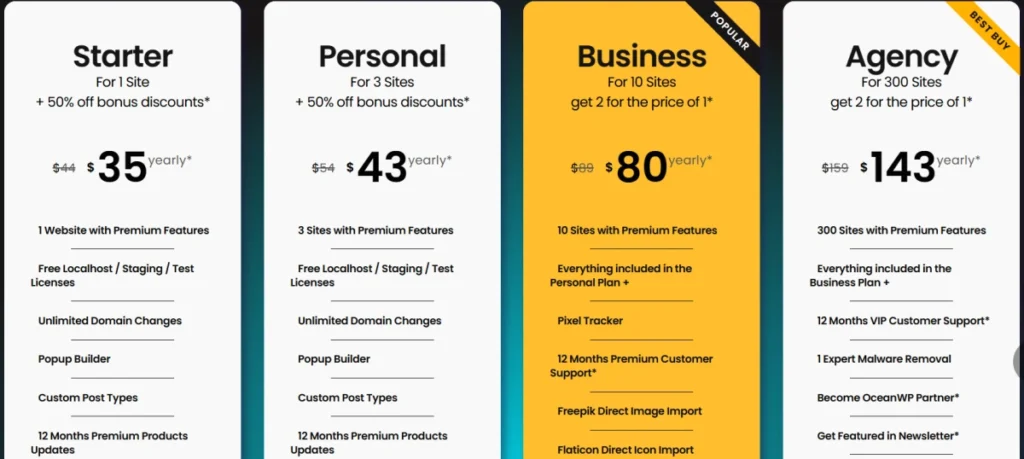
OceanWP’s premium model is through the OceanWP Pro Bundle. There are annual and lifetime options across four tiers:
Annual Plans:
- Starter (1 site):
$44$35/year - Personal (3 sites):
$54$43/year - Business (10 sites):
$80$80/year - Agency (300 sites):
$150$143/year
Lifetime Plans:
- Starter (1 site):
$176$141 one-time - Personal (3 sites):
$222$178 one-time - Business (10 sites):
$356$320 one-time - Agency (300 sites):
$630$572 one-time
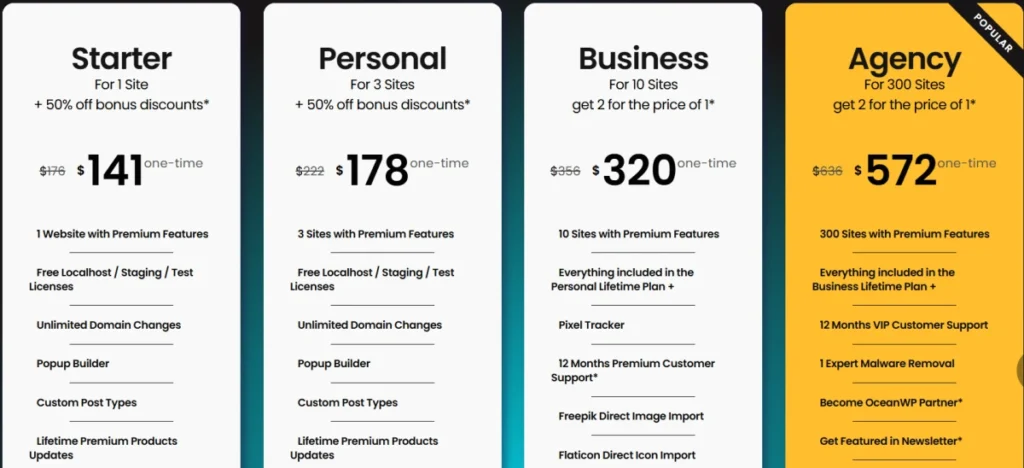
OceanWP Pro Bundle includes 14 premium extensions, 201 Pro full site templates, 7 free extensions, royalty-free images and icons (Freepik/Flaticon), Elementor Sections Library (limited on starter/personal), and a Popup Builder.
One thing worth noting: OceanWP’s annual licenses are subscription-based. Renewal pricing kicks in after year one — renewals are at 20% off the full price at the time of renewal, which is not necessarily the promotional price you paid initially.
Pricing Observation: OceanWP’s annual plans are significantly cheaper upfront. But Astra’s toolkit plans include more tools (page builder addons, AI site builder, workflow automation via OttoKit) that would otherwise require separate purchases. For a single-site blogger, OceanWP at $35/year looks attractive. For an agency or freelancer building 5+ sites a year, Astra’s toolkit approach delivers more per dollar.
Features: What You Get in the Free Version
This matters a lot, because many users stay on the free tier for a while.
Astra Free gives you the theme framework, basic customization controls, header/footer settings, blog layouts, and WooCommerce compatibility. What it does NOT include: starter templates (that’s in the paid tier), advanced header builder, custom layouts, or the design control depth of Astra Pro.
OceanWP Free is more generous here. The free version includes 7 free extensions covering things like social sharing, custom sidebars, modal window popups, and blog post sliders. You also get basic customization options that go deeper than Astra’s free version. The Metabox Settings for site-wide control is available free as well.
So if you’re genuinely trying to build something without spending, OceanWP’s free version gives you more out of the box.
Free Tier Edge: OceanWP
Template Libraries: Quantity vs Quality
Astra’s premium templates library is one of its strongest selling points — 200+ premium website templates covering blogs, eCommerce, agencies, restaurants, fitness, and more. One-click import via the Starter Templates plugin. On paid plans, you also get access to ZipWP for AI-generated websites built in under a minute.
OceanWP offers 201 Pro full site templates (on premium plans) and 17 free full site templates. These cover both Elementor and Gutenberg. The Elementor Sections Library is included but limited to 20+ items on Starter/Personal plans; full 100+ items are unlocked on Business and above.
Both libraries are comparable in quantity on premium plans. Astra’s templates tend to have more modern design sensibility — they’re clearly refreshed more regularly. OceanWP’s templates are solid but some feel a few design cycles behind.
WooCommerce: Which Theme Handles eCommerce Better?
Both themes are WooCommerce-ready. But Astra has invested more heavily in eCommerce-specific features.
Astra’s WooCommerce features include conversion-optimized checkout layouts, an off-canvas sidebar with filter options, sticky Add to Cart, dropdown cart, infinite scroll, color variation swatches, gallery lightbox, and pre-built shop demo templates. Zero Checkout Plugins — you can accept Stripe and PayPal payments natively without additional plugins.
OceanWP has a dedicated “Ocean eCommerce Pro” addon (separate from the main Pro Bundle) that unlocks advanced WooCommerce features. The base Pro Bundle does include 100+ WooCommerce templates, sticky Add to Cart, off-canvas filter, mini cart, and product quick view. But the deeper customization — the Treasure Box features — requires the separate eCommerce Pro plan.
If WooCommerce is your primary use case, Astra gives you more without needing to purchase additional addons. OceanWP can get there, but it costs extra.
WooCommerce Edge: Astra
Pros & Cons
Astra — Pros
- Genuinely lightweight codebase — Vanilla JS, under 50KB, sub-second load times possible
- Better ecosystem cohesion (Spectra, CartFlows, ZipWP all integrate natively)
- Stronger WooCommerce feature set without extra addons
- A lifetime deal makes the long-term cost very manageable for agencies
- Consistent template library updates with modern designs
- White label support — useful for client delivery
Astra — Cons
- Free version is significantly limited — premium templates locked behind paid plans
- Business Toolkit at $159/year might feel steep for a solo blogger who just needs the theme
- Astra Pro alone ($69/year) lacks the template library — you need Essential Toolkit at minimum for full value
- Agency Toolkit pricing is premium territory: $359/year is significant
OceanWP — Pros
- More generous free tier — 7 free extensions included out of the box
- Annual pricing is very accessible — $35/year for a single site
- 240+ full site templates compatible with both Elementor and Gutenberg
- Strong Elementor integration — custom sections, widget stacks, custom page layouts
- RTL and multilingual support built in
- 14-day money-back guarantee on all purchases
OceanWP — Cons
- Annual renewal pricing is not at the promotional rate — expect a price jump at renewal
- Advanced eCommerce features require a separate Ocean eCommerce Pro purchase
- The extension system can feel fragmented — some users end up with multiple add-on subscriptions
- Template designs feel less refreshed compared to Astra’s library
- Elementor Sections Library is limited (20+ items) on lower-tier plans
Head-to-Head Comparison
| Feature | Astra | OceanWP |
|---|---|---|
| Free Version Quality | Basic but clean | Generous — 7 free extensions |
| Page Weight (clean install) | Under 50 KB | Slightly heavier |
| JavaScript Approach | Vanilla JS | Mix with some jQuery dependencies |
| Premium Entry Price | $69/year (Astra Pro) | $35/year (Starter annual) |
| Templates on Premium | 200+ premium templates | 201 Pro templates |
| WooCommerce Depth | Full — no extra addon needed | Deeper WC requires add-on purchase |
| Elementor Integration | Strong | Very strong — known for Elementor |
| Lifetime Deal | Available ($319–$999 one-time) | Available ($141–$572 one-time) |
| Ecosystem Tools | Spectra, ZipWP, OttoKit, CartFlows | Site Booster, Ocean eCommerce Pro |
| Site Limit (entry premium) | 1 site ($69/year) | 1 site ($35/year) |
| White Label | Yes (Agency plans) | Not available |
| Refund Policy | Not stated on pricing page | 14-day money-back guarantee |
| Active Installs | 1.8M+ websites | 1M+ installs |
| Founded | 2017 (Brainstorm Force) | 2016 |
Post-comparison take: OceanWP is cheaper to start and gives more on the free tier — that’s a genuine advantage for budget-conscious users. But Astra’s cohesive ecosystem means you’re not stitching together multiple addons to get a professional result. If you’re building client sites regularly, Astra’s approach saves time and headaches. If you’re a solo site owner who primarily uses Elementor and wants to keep costs low, OceanWP’s $35/year plan is hard to argue with.
Who Should Use Astra
- Bloggers and site owners who want speed without configuration
- Freelancers and agencies building multiple client sites — the toolkit approach is efficient
- WooCommerce store owners who want conversion features without additional plugins
- Anyone already using or planning to use Spectra, CartFlows, or ZipWP
- Developers who want white-label capability for client delivery
Who Should Use OceanWP
- Solo site owners on a tight budget who want a capable free theme
- Elementor-heavy workflows — OceanWP’s Elementor integration is among the best
- Users who want multilingual/RTL support without any extra setup
- Someone who doesn’t need to scale beyond 1–3 sites and wants to keep costs minimal
Who Should Skip Both
Neither theme is ideal if you want a fully code-free, visual-first experience — something like Kadence or Blocksy might suit you better if you’re working exclusively with the block editor and want more native FSE capabilities in 2026.
What to Do After Buying
If you go with Astra:
- Install the Starter Templates plugin alongside the theme — this is where the real value is
- Connect to Spectra if you’re using Gutenberg for tighter integration
- Enable the header builder immediately — the default header is minimal
- Check the WooCommerce customizer if you’re running a store — there are standalone settings for checkout, cart, and shop pages
If you go with OceanWP:
- Install the free Ocean Extensions plugin to activate the bundled free extensions
- Go through the Metabox Settings — this is OceanWP’s most underrated feature for global site control
- If using Elementor, set up your custom page template first before importing demos
- Keep track of your renewal date — annual licenses auto-renew at a different rate
My Experience Using Both Themes
I’ve worked with both Astra and OceanWP across personal projects and client builds over the years — so this comparison isn’t based on reading documentation.
On my own sites, I’ve used Astra as my primary theme for a long time. The setup speed is genuinely fast — install the theme, connect Starter Templates, import a demo, and you have something presentable within an hour. For client work where timelines are tight, that matters.
OceanWP I picked up on a client project where the brief specifically called for heavy Elementor customization and a design-heavy layout. What I noticed was that OceanWP gave me more granular control at the individual page level — the Metabox Settings per page are something Astra doesn’t quite replicate in the same way. The client’s site performed well on speed tests, and the Elementor integration felt very stable throughout.
Honestly, I’d recommend both. Not as a diplomatic non-answer — but because they genuinely serve different workflows. If you’re building fast, need a clean ecosystem, and want everything in one place, Astra is the easier choice. If you’re an Elementor-first builder who wants more per-page control and doesn’t mind a slightly more hands-on setup, OceanWP holds its own.
Speed was solid on both when set up correctly. The difference shows up not in raw performance numbers but in how much work you need to do to get there.
Frequently Asked Questions
Is Astra better than OceanWP for beginners?
Generally yes. Astra’s Starter Templates plugin makes it much easier to get a complete site up quickly — one-click imports with pre-built layouts that are ready to customize. OceanWP requires a bit more setup to get the same result, especially if you’re activating extensions for the first time.
Can I use both themes on the same WordPress install?
No, you can only have one active theme at a time. You can install both for testing, but only one runs your live site.
Does OceanWP have a lifetime plan?
Yes. OceanWP offers lifetime pricing starting at $141 one-time for a single site (Starter Lifetime), going up to $572 one-time for the Agency plan covering 300 sites.
Is Astra Pro worth it at $69/year?
Astra Pro alone gives you header/footer builder, custom layouts, and design controls — but it does NOT include the premium template library. For most users, the Essential Toolkit at $119/year is the better value because it adds 200+ premium templates and 100+ section patterns. Astra Pro, on its own, feels incomplete compared to what competitors offer at similar price points.
Which theme loads faster — Astra or OceanWP?
Astra is measurably lighter on a clean install — under 50KB total page weight, Vanilla JS, and designed around Core Web Vitals from the ground up. OceanWP is not slow, but it loads slightly more on the initial install, especially with extensions active.
Does OceanWP work with Gutenberg?
Yes. OceanWP fully supports Gutenberg and offers full site templates for the block editor. However, its deeper template library and custom sections are primarily Elementor-focused.
Final Verdict
Both Astra and OceanWP are genuinely good themes — the WordPress community wouldn’t use them by the millions otherwise.
But they’re not equal for every situation. Astra wins for performance, ecosystem depth, and agency-level workflows. OceanWP wins on the budget entry point and Elementor flexibility.
For most people reading this: go with Astra. The Essential Toolkit at $119/year gives you everything you need to build fast, professional sites without stitching together multiple tools. If budget is the primary concern and you’re an Elementor user building just one or two sites, OceanWP at $35/year is a reasonable place to start — just watch the renewal pricing.
Get started with Astra here or explore OceanWP here.