If you’re evaluating Liquid Web’s server options, you’ve likely hit this wall — two product lines that sound similar but aren’t. Managed Dedicated and Cloud Dedicated both run on dedicated hardware, both promise high performance, and both target serious workloads. But they solve different problems. Choosing the wrong one doesn’t just cost you money — it affects how you scale, recover from failures, and handle traffic spikes. This breakdown clarifies exactly what sets them apart, with real pricing and practical guidance.
Quick Answer: Liquid Web’s Managed Dedicated servers are fully managed bare-metal machines ideal for stable, high-traffic workloads where you want Liquid Web’s team handling everything. Cloud Dedicated (also called Cloud Metal) layers virtualization on top of dedicated hardware, giving you cloud-like flexibility — instant resource scaling, snapshots, and API control — without sharing a server with anyone.
This post contains affiliate links. If you purchase through our links, we may earn a small commission at no extra cost to you. Thank you for your support!The Core Difference Nobody Explains Clearly
Most comparisons stop at “cloud = flexible, dedicated = powerful.” That’s not wrong, but it’s incomplete.
What Liquid Web actually does with Cloud Dedicated is unusual: they put a hypervisor on top of dedicated hardware. You still get a full physical server to yourself — no shared CPU, no noisy neighbors — but now you also get cloud features like instant provisioning, live upgrades, and snapshot-based backups through Acronis Cyber Backup.
Managed Dedicated, on the other hand, is bare-metal. No virtualization layer. The hardware is yours completely, and Liquid Web’s team handles OS patching, security monitoring, updates, and proactive response. Think of it as outsourcing your sysadmin function entirely.
The practical difference comes down to this: do you need cloud agility, or do you need bare-metal consistency with expert management?
Liquid Web Managed Dedicated Server Plans
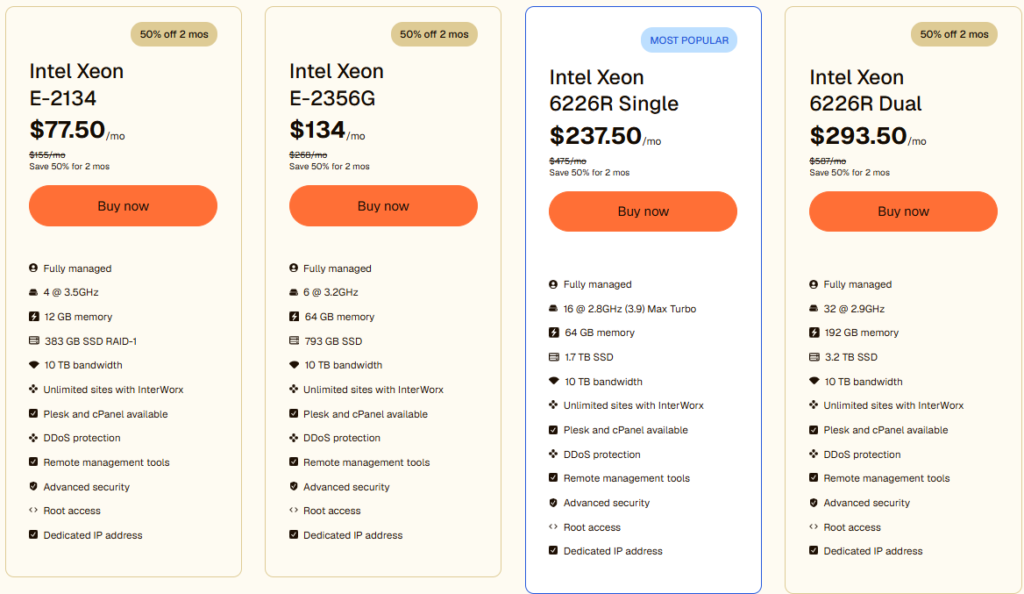
These are fully managed, bare-metal servers. Liquid Web’s team owns the ops layer — security, patching, monitoring, updates. You focus on your application.
| Plan | CPU | Cores | RAM | Storage | Bandwidth | Price/mo |
|---|---|---|---|---|---|---|
| Intel Xeon E-2134 | E-2134 @ 3.5GHz | 4 cores | 12 GB | 383 GB SSD RAID-1 | 10 TB | $77.50/mo |
| Intel Xeon E-2356G | E-2356G @ 3.2GHz | 6 cores | 64 GB | 793 GB SSD | 10 TB | $134/mo |
| Intel Xeon 6226R Single | 6226R @ 2.8GHz (3.9 Max Turbo) | 16 cores | 64 GB | 1.7 TB SSD | 10 TB | $237.50/mo |
| Intel Xeon 6226R Dual | 6226R @ 2.9GHz | 32 cores | 192 GB | 3.2 TB SSD | 10 TB | $293.50/mo |
All plans include: Fully managed support, DDoS protection, Plesk and cPanel available, remote management tools, advanced security, root access, dedicated IP address, unlimited sites with InterWorx. Promotions are 50% off for 2 months for new accounts.
The entry plan at $77.50/mo is genuinely capable — 4 cores and 12 GB RAM handles mid-traffic WordPress sites or small WooCommerce stores comfortably. Where this tier matters most is the management level. You’re not just getting hardware; you get Liquid Web’s team proactively watching your server.
The 6226R Dual at $293.50/mo is a serious machine — 32 cores, 192 GB RAM, 3.2 TB SSD. That’s enterprise territory, appropriate for high-volume eCommerce platforms, SaaS products, or agencies hosting 50+ client sites from a single managed environment.
Liquid Web Cloud Dedicated Server Plans
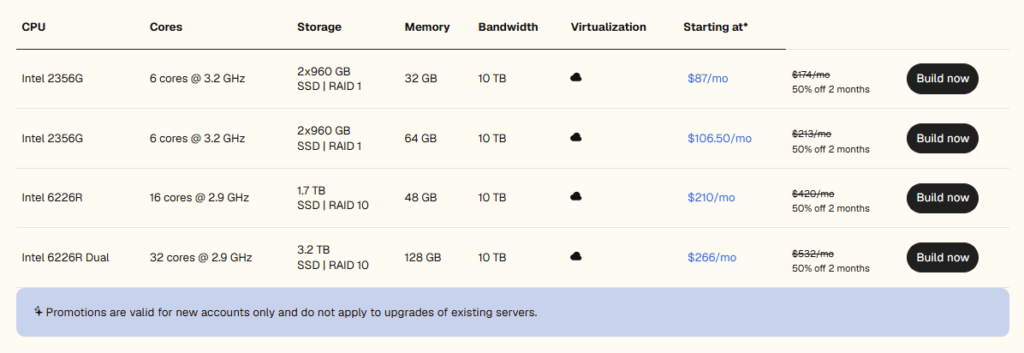
Cloud Dedicated (Cloud Metal) puts a virtualization layer on top of dedicated hardware. You get dedicated resources with cloud-like controls: instant scaling, API automation, snapshots, and environment cloning.
| Plan | CPU | Cores | Storage | RAM | Bandwidth | Price/mo |
|---|---|---|---|---|---|---|
| Intel 2356G | 6 cores @ 3.2GHz | 6 | 2×960 GB SSD RAID-1 | 32 GB | 10 TB | $87/mo |
| Intel 2356G (64 GB) | 6 cores @ 3.2GHz | 6 | 2×960 GB SSD RAID-1 | 64 GB | 10 TB | $106.50/mo |
| Intel 6226R | 16 cores @ 2.9GHz | 16 | 1.7 TB SSD RAID-10 | 48 GB | 10 TB | $210/mo |
| Intel 6226R Dual | 32 cores @ 2.9GHz | 32 | 3.2 TB SSD RAID-10 | 128 GB | 10 TB | $266/mo |
All plans include: Self-managed and fully managed options, instant provisioning, dedicated resources, easy upgrades, DDoS protection, advanced security, dedicated gigabit uplinks, cPanel/Plesk/InterWorx choice, unlimited sites with InterWorx, root access, and dedicated IP. Promotions are 50% off for 2 months for new accounts.
The entry Cloud Dedicated plan at $87/mo gives you 6 cores, 32 GB RAM, and nearly 2 TB of RAID-1 SSD — noticeably more storage than the comparable Managed Dedicated entry plan. The key advantage: you can upgrade CPU and RAM without data migration or downtime. That’s the cloud feature set working for you.
The 6226R Dual at $266/mo (32 cores, 128 GB RAM) is the most powerful Cloud Dedicated option. Worth noting — the Managed Dedicated equivalent at $293.50/mo actually ships with 192 GB RAM vs 128 GB here. More RAM at a slightly higher price, but with full management included.
What Changes When You Add the Virtualization Layer
Cloud Dedicated isn’t just “Managed Dedicated with extra steps.” The infrastructure architecture is genuinely different, and that matters depending on your use case.
What the hypervisor adds:
- Instant snapshots — capture your environment before major updates; roll back in minutes if something breaks
- Live resource scaling — upgrade CPU or RAM without moving data or changing IP addresses
- Cloud Studio API — automate re-imaging, resource resizing, and monitoring tasks through an API your team can script against
- Acronis Cyber Backups — stored separately from the server itself, not on the same hardware
From a developer standpoint, the API control alone is worth considering for teams that want infrastructure automation. If you’re running staging + production environments and want to clone, snapshot, and rebuild quickly, Cloud Dedicated handles that cleanly. With bare-metal Managed Dedicated, you don’t get that flexibility — you get stability and expert human management instead.
One thing I noticed when exploring the Cloud Dedicated setup: because it runs on a hypervisor, there’s a thin overhead layer compared to bare-metal. For most workloads — web serving, databases, application hosting — this overhead is negligible. For extremely latency-sensitive applications or raw compute benchmarks, bare-metal Managed Dedicated will edge it out.
Managed vs Cloud Dedicated: Direct Comparison
| Feature | Managed Dedicated | Cloud Dedicated |
|---|---|---|
| Hardware type | Bare-metal (no virtualization) | Dedicated hardware + hypervisor layer |
| Management level | Fully managed (Liquid Web handles ops) | Self-managed or fully managed (your choice) |
| Live resource scaling | Not available | Available — no downtime, no data migration |
| Snapshots & cloning | Not available | Available via Cloud Studio API |
| Backup system | Included (backup details per plan) | Acronis Cyber Backup (stored separately) |
| Entry price | $77.50/mo | $87/mo |
| Max RAM (flagship plan) | 192 GB (6226R Dual) | 128 GB (6226R Dual) |
| Network | 10 TB bandwidth, 10 Gbps | 10 TB bandwidth, 10 Gbps (dedicated gigabit uplinks) |
| Control panel options | cPanel, Plesk, InterWorx | cPanel, Plesk, InterWorx |
| Root access | Yes | Yes |
| DDoS protection | Yes | Yes |
| Best for | Stable, high-traffic apps needing full management | Agencies and SaaS teams needing scalable infrastructure |
Post-comparison note: Managed Dedicated wins on raw management depth and RAM at the top tier. Cloud Dedicated wins on operational flexibility and infrastructure automation. The price gap at the entry level ($77.50 vs $87) is small enough that the decision should be driven by workflow needs, not cost.
Pros and Cons: Managed Dedicated
Pros
- Fully managed — Liquid Web handles patching, security, monitoring, and updates end-to-end
- Bare-metal performance — no hypervisor overhead for raw compute tasks
- Higher RAM ceiling at the flagship level (192 GB vs 128 GB)
- Predictable environment — no virtualization complexity to debug
- 99.999% uptime SLA backed by Liquid Web’s Heroic Support team
Cons
- No snapshot or rollback capability — a bad update can require manual recovery
- Cannot scale resources live; hardware changes require provisioning work
- Less suitable for teams that want API-driven infrastructure automation
- Entry plan (12 GB RAM, 4 cores) has relatively modest specs compared to Cloud Dedicated’s entry tier
Pros and Cons: Cloud Dedicated
Pros
- Live resource scaling without downtime or data migration
- Snapshot + clone environments — ideal for dev/staging/production workflows
- Cloud Studio API for infrastructure automation
- Acronis Cyber Backup stored separately from the server (safer recovery)
- More storage on entry plan (2×960 GB RAID-1 vs 383 GB SSD)
Cons
- The virtualization layer introduces a small overhead — not ideal for extreme latency-sensitive workloads
- Max RAM at the flagship tier is 128 GB vs 192 GB on Managed Dedicated at a similar price point
- Self-managed option means you take on more ops responsibility if you choose that route
- Higher entry price than Managed Dedicated ($87 vs $77.50)
Who Should Use Each One
Choose Managed Dedicated if:
- You run a high-traffic website, a large WooCommerce store, or a SaaS product with a consistent, predictable load
- You don’t have in-house server management expertise and want Liquid Web’s team handling everything
- You need maximum RAM for memory-intensive applications (192 GB at the top tier)
- Stability and management depth matter more than cloud flexibility
Choose Cloud Dedicated if:
- You’re an agency or development team managing multiple client environments
- You need to spin up, clone, or rebuild environments quickly
- Infrastructure automation via API is part of your workflow
- You want the safety net of snapshots before deploying major changes
- You’re comfortable with some self-management, or want managed at a more cloud-native setup
There’s an edge case worth mentioning: if you’re currently on a managed VPS and outgrowing it, Cloud Dedicated is a more natural migration path. The interface and operational patterns feel similar. Moving to bare-metal Managed Dedicated is a bigger jump operationally.
What to Do After Buying
Regardless of which product you choose, here’s how to avoid the most common setup mistakes:
For Managed Dedicated:
- Work with Liquid Web’s onboarding team to define your monitoring thresholds upfront — don’t leave it at defaults
- Enable proactive notifications for disk usage and memory — their team will respond, but you want to know too
- Set up your control panel (cPanel or Plesk) before migrating any sites — don’t migrate into an unconfigured environment
For Cloud Dedicated:
- Take a snapshot immediately after initial configuration — before you install anything
- Set up automated Acronis backup schedules within the first 48 hours
- If you’re using the API, test re-imaging in a non-production environment before relying on it for critical workloads
- Use the instant provisioning feature to benchmark your setup before going live
For both: verify your dedicated IP is correctly assigned and test DDoS protection behavior under a staging load before moving production traffic.
Liquid Web vs Bluehost: Two Very Different Leagues
| Feature | Liquid Web Managed Dedicated | Liquid Web Cloud Dedicated | Bluehost Cloud | Bluehost Managed VPS |
|---|---|---|---|---|
| Server type | Bare-metal dedicated | Dedicated hardware + hypervisor | Distributed cloud (multi-region) | Virtual private server |
| Entry price | $77.50/mo | $87/mo | $65/mo (36-month term) | $49.99/mo (36-month term) |
| Management level | Fully managed (LW team owns ops) | Self-managed or fully managed | Fully managed WordPress cloud | Managed (cPanel, team handles setup) |
| Max websites | Unlimited (InterWorx) | Unlimited (InterWorx) | Up to 50 (Cloud 50 plan) | Unlimited |
| Storage | 383 GB SSD RAID-1 (entry) | 2×960 GB SSD RAID-1 (entry) | 125–225 GB NVMe SSD | 100–450 GB NVMe SSD |
| Bandwidth | 10 TB dedicated | 10 TB dedicated | Unrestricted | Unmetered |
| Uptime SLA | 99.999% | 99.999% | 100% SLA | Standard uptime |
| Live resource scaling | No | Yes (no downtime) | Auto-scales | Upgradeable |
| Snapshots & backups | Included | Acronis Cyber Backup | Automated daily backups | Automated backups |
| Root access | Yes | Yes | No | Yes |
| DDoS protection | Yes | Yes | DDoS >2Tbps | Not specified |
| Best for | Stable high-traffic apps, WooCommerce | Agencies, SaaS, dev teams needing flexibility | WordPress agencies, content sites | Developers, small businesses |
The practical read: Bluehost Cloud ($65/mo) and Managed VPS ($49.99/mo) via (check plans) are solid WordPress-first options — managed simplicity, global CDN, good for content sites and agency client work. The ceiling hits faster under heavy load.
Liquid Web’s two products (see plans) operate on a different level. Cloud Dedicated at $87/mo gives you more entry-level storage than any Bluehost plan, plus live scaling and snapshots — better for teams managing multiple environments. Managed Dedicated at $77.50/mo is the lowest-overhead option if you want zero server management responsibility on dedicated hardware.
Who should pick what:
- Bluehost Cloud or VPS — WordPress blogs, agency sites, content-heavy projects where managed simplicity matters more than raw power
- Liquid Web Cloud Dedicated — dev teams, SaaS products, multi-environment setups needing API control and snapshot flexibility
- Liquid Web Managed Dedicated — mission-critical WooCommerce stores, high-traffic applications where downtime has a direct revenue impact
Frequently Asked Questions
Can I upgrade from Cloud Dedicated to Managed Dedicated later?
Yes, but it’s not a seamless in-place upgrade — you’d be provisioning a new server and migrating your data. Both are separate product lines with different infrastructure. Plan your choice upfront rather than assuming easy switching. Liquid Web’s support team can assist with migration planning.
Does Liquid Web’s Cloud Dedicated have a fully managed option?
Yes. Cloud Dedicated is available in both self-managed and fully managed configurations. The PDF from Liquid Web’s product page confirms “Self-managed and Fully managed” as a feature across all Cloud Dedicated plans. So you’re not forced to manage the ops layer yourself.
What’s the uptime guarantee on these plans?
Liquid Web offers a 99.999% uptime SLA on its dedicated server products. That translates to roughly 5 minutes of downtime per year. It’s one of the strongest guarantees in the managed hosting space.
Is Acronis Cyber Backup included in Cloud Dedicated pricing, or is it an add-on?
Based on Liquid Web’s product page data, Acronis Cyber Backup is listed as an infrastructure feature of Cloud Dedicated. For exact billing details — whether it’s bundled or an optional add-on at your chosen tier — verify directly with Liquid Web at the time of purchase, as pricing structures can change.
Which plan is better for a high-traffic WooCommerce store?
For a single large WooCommerce store with stable traffic, Managed Dedicated (the 6226R Single at $237.50/mo or 6226R Dual at $293.50/mo) is the stronger choice — bare-metal performance and full management means your team isn’t debugging server issues during peak sales periods. If you run multiple client stores and need environment flexibility, Cloud Dedicated makes more sense.
Can I get root access on both product lines?
Yes. Root access is available on both Managed Dedicated and Cloud Dedicated plans across all tiers.
What control panel options are available?
Both product lines support cPanel, Plesk, and InterWorx. Unlimited sites with InterWorx is included across all plans.
Final Verdict
Liquid Web’s Managed Dedicated and Cloud Dedicated servers both sit at the serious end of the hosting market — these are not budget hosting products, and they’re not meant to be.
For stable, high-traffic applications where you want maximum performance and zero ops overhead, Managed Dedicated is the cleaner choice. The fully managed layer is genuine — Liquid Web handles the day-to-day so you don’t have to. For teams that need infrastructure agility — snapshots, live scaling, API automation — Cloud Dedicated delivers real cloud flexibility without sacrificing the dedicated hardware foundation.
Neither choice is wrong. The right one depends on whether your priority is management depth or operational flexibility. If you’re still unsure, Liquid Web’s support team can walk you through the options before you commit — check current plans here.