Easy Accordion Pro is 50% off on every plan right now, yearly and lifetime. The sale page calls it the plugin’s lowest price ever.
The sale runs from November 13 to December 11, 2026. If you build FAQs, tabbed content or WooCommerce product pages, you get 15+ accordion blocks and 120+ ready patterns, and the lifetime plans are discounted too.
Below, I’ve covered how to claim the deal, what Pro includes, and which license fits your setup, whether you run one blog or many client sites.
Quick Deal Snapshot [🟢STATUS: LIVE NOW]
Starts on: November 13, 2026 | Ends on: December 11, 2026, 11:59 PM ET (December 12, 10:29 AM IST)
Flat 50% off every Easy Accordion Pro plan, yearly or lifetime. The discount applies automatically at checkout.
- Discount: 50% off all plans
- Yearly prices: Single Site $14.50/year (regular $29) | 5 Sites $49.50/year (regular $99) | Unlimited Sites $99.50/year (regular $199)
- Lifetime prices: Single Site $129 (regular $258) | 5 Sites $229 (regular $458) | Unlimited Sites $399 (regular $798)
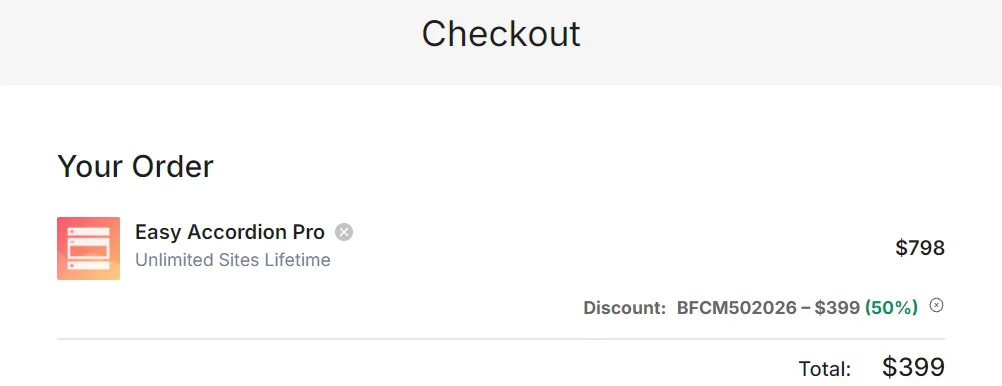
- Coupon: Auto-applied at checkout (the cart shows it as BFCM502026)
- Safety net: 14-day money-back guarantee on every plan
- Validity: When the sale ends, prices go back to normal. Pricing may change, so check the official site before paying.
Coupon: Not needed. The discount is auto-applied at checkout. 👇
This post contains affiliate links, and I earn a commission from them at no extra cost to you. Thank you for your support!Quick Answer: Easy Accordion Pro is 50% off on every plan until December 11, 2026, and the discount applies automatically at checkout. You get 15+ blocks and 120+ ready patterns, plus a 14-day refund window. Start with yearly for a single site, or pick a lifetime plan if you want one payment and no renewals.
How to Claim the Easy Accordion Pro Black Friday Deal
It takes about two minutes. No hoops.
- Open the sale page through this Easy Accordion Pro link. You’ll see the Black Friday banner and a live countdown at the top.
- Use the Yearly / Lifetime toggle above the plan cards. The page opens on Yearly.
- Pick Single Site, 5 Sites or Unlimited Sites, then click Buy now.
- At checkout, look at the Discount line. On the Unlimited Sites Lifetime plan, for example, the order shows $798, a 50% discount of $399, and a total of $399.
- The code is auto-applied and appears as BFCM502026. If the discount line is empty, enter that code manually before you pay.
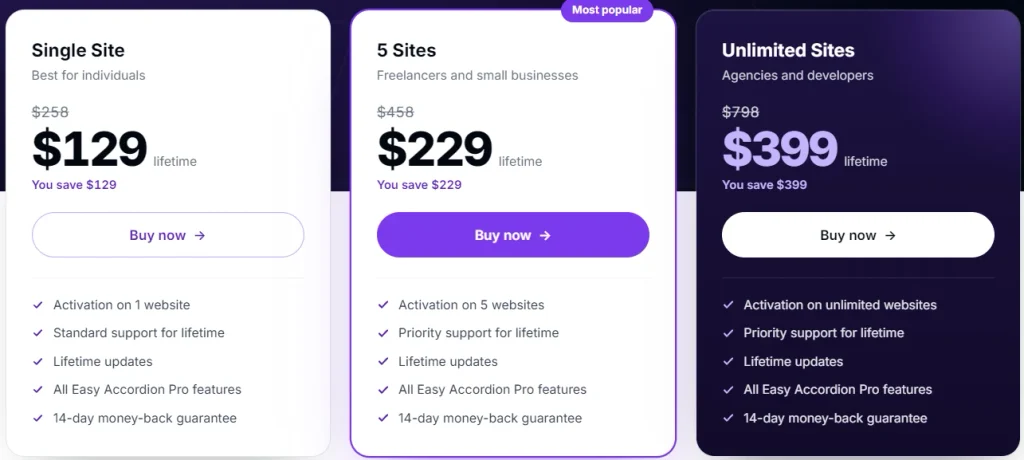
Quick math on lifetime vs yearly. At sale prices, lifetime pays for itself against the yearly plan in about 4 years on Unlimited ($399 ÷ $99.50) and about 4.6 years on 5 Sites ($229 ÷ $49.50). Single Site takes longer (about 8.9 years, $129 ÷ $14.50), so yearly is the cheaper start there. Lifetime is for people who never want to think about renewals. This ignores renewal pricing, which the sale page doesn’t spell out.
Bundle on the same page. The sale page also lists a WordPress Bundle with 9 Pro plugins at $799 lifetime. According to the page, it’s usually cheaper than buying two plugins separately.
What You Actually Get With Pro
Every plan includes all Pro features. Only the site count, support level and update length change.
- 15+ accordion blocks. Vertical FAQ, horizontal, sidebar tab, image accordion, accordion slider, media accordion, plus post and product accordions. The page also lists 120+ ready patterns, which saves you from designing from scratch.
- Post and product accordions. Post accordions come with a query builder and an AJAX taxonomy filter. WooCommerce product accordions add a product filter, and there’s a product FAQ setup for answering pre-purchase questions.
- AI FAQ Generator (Beta). You choose the language, tone and content source, add keywords or a prompt, and it drafts the FAQs.
- Controls that save you custom CSS. Click, mouseover or autoplay triggers, multiple items open together, scroll-to-top on toggle, anchor links, Expand All / Collapse All, 40+ animation effects and device visibility settings.
- Search, analytics and forms. AJAX FAQ search, multi-level accordions, impression and click analytics, and built-in FAQ forms that collect real visitor questions.
What I’d Check Before Putting It on a Live Site
I’m Karan Rajput, and after 7+ years of blogging, SEO and client WordPress work, my rule for any accordion plugin is simple: it shouldn’t cost the page its speed. The product page doesn’t publish asset sizes, so here’s what I’d check on a staging copy first:
- JS/CSS load. A plugin with 15+ blocks, sliders, AJAX search and 40+ animations deserves a look in the Network tab. Does it load scripts on pages without an accordion? Does it pull in jQuery or extra libraries?
- CLS and LCP. An accordion that opens an item on load, or images inside an image accordion, can push content around. Use the plugin’s initial-item and height controls, then test an above-the-fold accordion in PageSpeed Insights.
- Lazy loading. If you use image or media accordions, confirm the images below the fold are lazy loaded.
- Compatibility. The page lists Gutenberg and Classic editor support. It also lists saved templates you can display inside page builders (Elementor and Divi appear on it), plus dedicated WooCommerce blocks. If you build in Elementor, test a template there first. Still choosing a builder? My Elementor Black Friday deal breakdown covers its plans.
Pro observation: turn the schema toggle on for your best FAQs. Easy Accordion adds FAQ schema with a single toggle, so there’s no extra plugin or manual JSON-LD to maintain. One thing worth knowing: Google stopped showing FAQ dropdown results in Search on May 7, 2026, though the markup itself remains valid. So treat the schema as clean, structured Q&A working quietly in the background. The real win is up front: visitors find answers faster, and your long pages stay tidy and easy to scan.
Where It Shines and Where It Falls Short
Pros
- Wide block range. One plugin covers FAQs, horizontal and image accordions, sliders, post lists and WooCommerce products, so you don’t stack three plugins.
- 120+ ready patterns. You can launch a styled FAQ in minutes instead of designing from scratch.
- Works across editors. Gutenberg, Classic editor and page builders are all covered through blocks and saved templates.
- Built for WooCommerce. Product accordions and product FAQs help answer buyer questions right on the product page.
- Built-in analytics and FAQ forms. You see which questions get clicks and collect real visitor questions without another plugin.
- Lifetime licenses with lifetime updates, backed by a 14-day money-back guarantee on every plan.
Cons
- The AI FAQ Generator is still labelled Beta. Review its output before publishing.
- Yearly plans include one year of updates and support. Check renewal terms on the official site.
- Single Site gets standard support. Priority support starts at the 5 Sites plan.
Who should skip it: If you need one simple FAQ on one page, the free version or the editor’s built-in Details block may be enough. Also skip it if the only reason to buy is Google FAQ dropdowns, because those no longer exist.
Which License Is Worth Your Money?
| Single Site | 5 Sites | Unlimited Sites | |
|---|---|---|---|
| Sites covered | 1 website | 5 websites | Unlimited websites |
| Yearly plan includes | Standard support, 1 year of updates | Priority support, 1 year of updates | Priority support, 1 year of updates |
| Lifetime plan includes | Standard support, lifetime updates | Priority support, lifetime updates | Priority support, lifetime updates |
| Sale page positioning | Best for individuals | Freelancers and small businesses | Agencies and developers |
| Break-even, lifetime vs yearly (sale prices) | About 8.9 years | About 4.6 years | About 4 years |
| Best for | One blog or store | Your own 2–5 sites or a few clients | Agencies with many client sites |
Single Site is the only plan with standard rather than priority support, which matters less if you’re comfortable with documentation. 5 Sites is the sweet spot for affiliate site owners, and the sale page marks it “Most popular”. Unlimited only pays off if you really have many installs.
- For one site, yearly is the lowest-cost way in at 50% off. If you hate renewals, Single Site lifetime gives you one payment with lifetime updates and support.
- If you own or manage 2–5 sites, 5 Sites lifetime is the sweet spot. It’s marked “Most popular” on the sale page, adds priority support, and pays back in about 4.6 years.
- For agencies, Unlimited lifetime is the pick. One purchase covers every client install, and it breaks even in about four years.
The 14-day money-back guarantee makes lifetime low-risk. Install it on your real theme in week one, test your blocks, and keep it only if it fits.
Already eyeing a second ShapedPlugin product? The lifetime WordPress Bundle covers 9 Pro plugins. I’ve also listed the rest of the range in my ShapedPlugin Black Friday deal guide.
What to Do After Buying
Do these in the first week, since that’s your refund window:
- Install Pro, activate your license, and open the Getting Started tab in the Easy Accordion menu.
- Start from a ready pattern instead of a blank block. It’s faster and keeps designs consistent across pages.
- Set the initial item display and section height on purpose, so the page doesn’t jump on load.
- Turn on Analytics early. A few weeks of impression and click data shows which FAQs deserve a higher spot.
Mistakes to avoid: publishing AI-generated FAQs without editing them, hiding your most important answer inside a closed panel, stacking heavy animations on mobile pages, and waiting past day 14 to find out the plugin doesn’t suit your theme.
Easy Accordion Pro Black Friday Sale
Deal: Up to 50% Off + Lifetime Plans
Coupon Code: Not needed. The discount is auto-applied at checkout.👇
Frequently Asked Questions
Do I need a coupon code for the Easy Accordion Pro Black Friday deal?
Not normally. The 50% discount is applied automatically at checkout, and the order summary shows it as BFCM502026 on the discount line. If your cart still shows the regular price, enter that code manually. Either way, check the final total before you pay, since pricing may change.
Will yearly renewals stay at the sale price?
The sale page doesn’t state renewal pricing, so check the official terms before choosing yearly. The 50% discount applies to the purchase you make during the sale, and yearly plans include one year of updates and support. If you’d rather skip renewals altogether, the lifetime plans include lifetime updates, which is why many client-site owners prefer them.
Can I try it without risking money?
Easy Accordion has a free version you can use first. Pro also carries a 14-day money-back guarantee on every plan. Install it on your real site within the first week and test the blocks you actually need. If it doesn’t fit, ask for a refund inside those 14 days.
Which plan is best for client work?
Unlimited Sites is the cleaner fit for agencies and freelancers. It covers unlimited websites and includes priority support. The 5 Sites plan works if you only manage a handful of client or personal sites. Lifetime is easier to hand off because there are no renewals to track across projects.
Should I buy the single plugin or the ShapedPlugin bundle?
Buy the single plugin if accordions are all you need. If you also want a carousel or other Pro plugins from the same developer, the lifetime bundle may work out cheaper than buying two separately, as the sale page says. Shortlist your second plugin first, for example via the WP Carousel Pro Black Friday deal.
Bottom Line
Easy Accordion Pro at 50% off is a strong pick if your site leans on FAQs, long product pages or accordion-style content. The sale runs until December 11, 2026 (11:59 PM ET), the discount applies automatically, and the 14-day refund keeps the risk low. For a single site, start with yearly. For multiple sites or client work, Unlimited lifetime gives the best long-term value. If the features fit your setup, grab the Easy Accordion Pro deal here before the countdown ends.
Related Posts