Location Weather Pro is running what the company calls its biggest discount of the year, and it’s live right now. Every plan, yearly and lifetime, gets 50% off. The sale runs from November 13 to December 11, 2026, and the code applies automatically at checkout.
Below you’ll find the exact prices, claim steps and plan advice. If you run a travel, event, local news or outdoor-niche site on WordPress, this one is worth a look.
Not sure it fits? I’ve also listed who should skip it.
Location Weather Pro Black Friday Deal Snapshot [🟢STATUS: LIVE NOW]
Starts on: November 13, 2026 | Ends on: December 11, 2026 (11:59 PM ET)
Deal Active Now
- Discount: 50% off every yearly and lifetime plan. Promo code BFCM502026 is auto-applied at checkout.
- Yearly sale prices: Single Site $24.50/yr (regular $49), 5 Sites $49.50/yr (regular $99), Unlimited Sites $99.50/yr (regular $199)
- Lifetime sale prices: Single Site $149 (regular $298), 5 Sites $249 (regular $498), Unlimited Sites $399 (regular $798)
- Included on every plan: All Pro features and a 14-day money-back guarantee
- Validity note: When the sale ends, prices go back to normal.
Coupon: Not needed. The discount is auto-applied at checkout. 👇

This post contains affiliate links, and I earn a commission from them at no extra cost to you. Thank you for your support!Quick Answer: Location Weather Pro is 50% off on every yearly and lifetime plan until December 11, 2026 (11:59 PM ET), and the discount applies automatically at checkout. If you plan to keep a weather-heavy site for years, a lifetime plan is the better value. If you’re just testing, a yearly Single Site plan keeps risk low.
How to Claim the Location Weather Pro Deal
It takes about two minutes. Here’s the exact flow:
- Open the sale page through this Location Weather Pro link.
- Pick Yearly or Lifetime using the toggle at the top.
- Choose your plan (Single Site, 5 Sites or Unlimited Sites) and click Buy now.
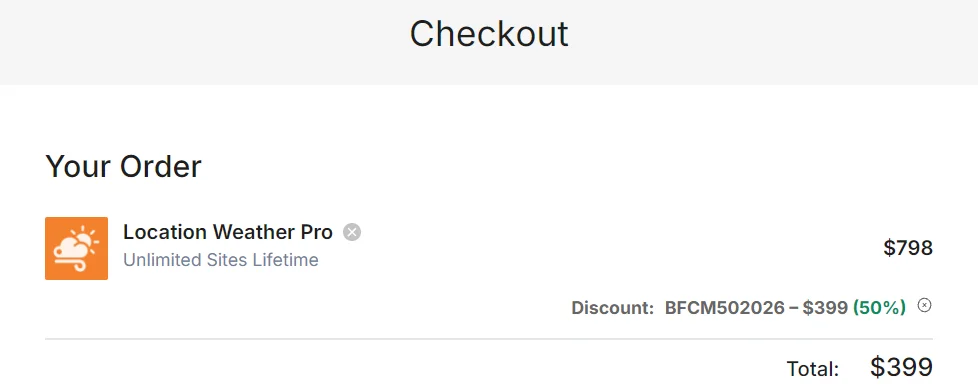
- On the checkout screen, confirm the discount line shows BFCM502026 with 50% off. It’s auto-applied, so you shouldn’t type anything. If your order shows the regular price, enter the code manually in the discount field.
- Pay by card or PayPal (payments run through Stripe). You’re covered by the 14-day refund window.
Here’s the full price list for reference:
| Plan | Yearly (Sale) | Yearly (Regular) | Lifetime (Sale) | Lifetime (Regular) |
|---|---|---|---|---|
| Single Site | $24.50/yr | $49 | $149 | $298 |
| 5 Sites | $49.50/yr | $99 | $249 | $498 |
| Unlimited Sites | $99.50/yr | $199 | $399 | $798 |
Quick math on lifetime vs yearly: at these sale prices, the lifetime plan equals roughly six yearly payments on Single Site, five on 5 Sites and four on Unlimited Sites. That assumes renewals stay at the sale price, which isn’t guaranteed, so check renewal terms on the official site.
There’s also a bigger option. The sale page lists a WordPress Bundle with 9 Pro plugins at $799 lifetime, and says it’s usually cheaper than buying two plugins separately. You can see it through the Lifetime Bundle link.
On timing: 11:59 PM ET on December 11 is roughly 10:29 AM IST on December 12. The company calls this its lowest price ever, so I wouldn’t count on a better one later.
What You Actually Get With the Pro Version
Location Weather Pro is a weather and air quality plugin built around Gutenberg blocks. From the product page, here’s what stands out:
- Live weather: temperature, humidity, wind, precipitation and visibility, with automatic or manual °C/°F switching and 40+ templates.
- Forecasts: up to 30 days daily and 96 hours hourly, with a daily/hourly toggle.
- Air quality (AQI): real-time AQI, forecasts, pollutant levels and health advice, by visitor location or search.
- Historical data: 46 years of weather and 10 years of air quality history.
- Weather maps: OpenWeather and Windy maps with 50+ data layers.
- Sun and moon data: sun times, moon phases and 10+ events.
- Global search: 200,000+ cities across 238+ countries, searchable by city, ZIP or coordinates.
- Extras: interactive graph charts, weather-based backgrounds, auto-detect visitor location, 12+ icon packs, weather alerts and an AI Weather Assistant.
The page also lists 15+ blocks and 200+ ready-made patterns. It shows 4.5/5 on WordPress.org from 100+ reviews and 4.9/5 on Trustpilot from 140+ reviews. Those are the company’s displayed numbers, so verify them yourself before relying on them.
One more thing. Every plan gets all Pro features. You’re only choosing site count, support level and update duration, not unlocking features.
A Developer’s Take: Speed, Setup and Compatibility
I’m Karan Rajput. I’ve spent 7+ years blogging and handling client WordPress and SEO work, so my first question with any widget plugin is what it does to page speed.
I haven’t audited this plugin’s JS and CSS line by line, so I won’t claim it’s light or heavy. Anything that pulls live data from an external API adds work. From a performance standpoint, I’d place weather blocks below the fold unless they’re core to the page, then run PageSpeed Insights on staging and watch LCP and CLS.
Pro observation: the “Dynamic Weather from CPT Coordinates (Custom Fields)” feature is easy to miss. If you run a directory, hotel or travel listing site with lat/long custom fields, each listing can show its own local weather. That’s a smart use of the plugin, and it’s where I’d test first.
On compatibility, it’s clearly Gutenberg-first. The product page has an FAQ about Elementor and other page builders, so read that if you’re not on the block editor. It also pitches retail and e-commerce use, but I wouldn’t assume deep WooCommerce integration. Test on staging.
Where It Falls Short (and Who Should Skip It)
The plugin doesn’t ship its own weather data. During setup you connect a free API key from OpenWeather Map or Weather API. Feature availability and call limits also depend on your provider’s plan, so check that before promising visitors things like long history.
Skip it if:
- Weather is only a “nice to have” widget on your site. A free option may be enough.
- You aren’t on WordPress.
- You want priority support on a single site. That starts at the 5 Sites plan.
- You’re on a page builder and haven’t confirmed compatibility.
Pros and Cons at a Glance
Pros
- Lifetime option: lifetime updates and support instead of yearly renewals.
- No feature gating: every plan includes all Pro features.
- Wide data coverage: weather, AQI, maps, history and sun/moon data in one plugin.
- Fast setup: a Weather View in 3 steps, then a block in any post or page.
- Low risk: a 14-day money-back guarantee on every plan.
Cons
- Separate API key required. You have to create and manage an OpenWeather or Weather API account yourself.
- Single Site gets only standard support. Priority support starts at 5 Sites.
- Yearly plans cover just one year of updates and support. API providers change things, and after that window you’re on your own.
- Block-first design. Check builder compatibility before buying if you don’t use Gutenberg.
Yearly, Lifetime or Bundle: Which One Makes Sense?
| Factor | Yearly | Lifetime | WordPress Bundle |
|---|---|---|---|
| Payment model | Per year | One-time | One-time (lifetime) |
| Updates | 1 year | Lifetime | Check official site |
| Support | Standard (Single Site) or Priority (5 Sites, Unlimited) for 1 year | Standard (Single Site) or Priority (5 Sites, Unlimited) for lifetime | Check official site |
| Sites covered | 1, 5 or Unlimited by plan | 1, 5 or Unlimited by plan | Check official site |
| Products included | Location Weather Pro only | Location Weather Pro only | 9 Pro plugins |
| Best for | Testing on one site | Long-term and client sites | People using several ShapedPlugin tools |
Yearly keeps your upfront cost low and lets you test the plugin properly before committing. Lifetime removes renewals and is the natural pick for sites you’ll run for years. The bundle only makes sense if you’d really use other plugins from the same family, such as WP Carousel Pro or Easy Accordion Pro.
- For one site you plan to keep long term, go with Lifetime Single Site. It includes lifetime updates and support, while yearly covers only 12 months.
- For freelancers with a few client sites, 5 Sites Lifetime makes more sense, and it’s also the “Most popular” tier.
- For agencies and developers, Unlimited Sites is the one to pick, and the lifetime version pays back fastest.
- For first-time buyers who are unsure, start with a yearly Single Site plan and use the refund window.
What to Do After Buying
Setup is straightforward, but a few details save headaches.
Setup steps
- Install and activate the plugin, then activate your license on each site (site limits apply).
- Create a free API key from OpenWeather Map or Weather API and connect it.
- Create a Weather View, pick a template and configure the data you need.
- Publish it in a post or page using the block or a pattern.
Key settings: set your default units (°C/°F), turn on auto-detect location only where it helps, and pick one icon pack for consistency.
Mistakes to avoid:
- Stacking several heavy blocks, like maps and charts, above the fold.
- Skipping a mobile check. Wide tables and maps can look cramped.
- Ignoring your API provider’s request limits on busy pages.
- Waiting until day 13 to test, when the refund window is almost closed.
Location Weather Pro Black Friday Deal
Deal: Up to 50% Off + Lifetime Plans
Coupon Code: Not needed. The discount is auto-applied at checkout.👇
Frequently Asked Questions
Is the 50% discount applied automatically?
Yes. On the checkout screen, code BFCM502026 was already applied to the order, showing 50% off. You shouldn’t need to type anything. If your cart ever shows the regular price, enter BFCM502026 manually in the discount field before paying.
When does the Black Friday sale end?
The Black Friday and Cyber Monday sale runs from November 13 until December 11, 2026 at 11:59 PM ET. That’s around 10:29 AM IST on December 12. After that, prices go back to normal, so decide before the countdown on the pricing page hits zero.
Is the lifetime plan a subscription?
No. Lifetime is listed as a one-time payment with lifetime updates and lifetime support, so there’s no yearly renewal. Yearly plans are different, since they include one year of updates and support. Always read the final checkout summary before paying, because terms can change.
Which plan is best for a beginner?
Start with Single Site if you run one blog or business site. Choose 5 Sites if you manage a few projects, since it adds priority support. Unlimited Sites is built for agencies and developers. If you’re unsure, take a yearly plan first, because the 14-day money-back guarantee already lowers the risk.
Do I need an API key to use Location Weather Pro?
Yes. Location Weather pulls data from external providers, so you connect a free API key from OpenWeather Map or Weather API during setup. Keep an eye on your provider’s own request limits, because a busy site can use them up faster than you’d expect.
Nothing extra showed up on the checkout beyond the plan itself. The only cost to watch is your weather data provider, since heavy traffic can push you past free API limits. If you’re also buying other ShapedPlugin tools, check the ShapedPlugin Black Friday deal before checking out.
Can I get a refund if it doesn’t work for me?
Yes. You get a 14-day money-back guarantee. Contact the support team within 14 days of purchase and you can request a full refund, no questions asked. Test it on your real site during that window, especially API setup and page speed, rather than waiting until day thirteen.
Final Verdict
Location Weather Pro at 50% off is a solid pick if weather genuinely adds value to your site, especially in travel, events, local news, outdoor or retail niches. For long-term sites, go with a lifetime plan. For a single-site test, a yearly Single Site plan plus the 14-day guarantee keeps your risk low. If weather is just a nice-to-have widget, skip it. The sale ends December 11, 2026 at 11:59 PM ET, so if it fits your plan, grab Location Weather Pro here before the timer runs out.
Related Posts