A blog that grows past a few dozen posts needs better archive pages than most themes give you. That’s where a post-widget pack earns its place, and Ultimate Post Kit is BdThemes’ version of it for Elementor.
It’s on sale for Black Friday, with 40% off yearly plans and 30% off lifetime ones. I went through the pricing page, the deals page and the product pages to see what Pro adds over free, which plan fits a blog or a client site, and where the numbers don’t line up.
Ultimate Post Kit Black Friday Deal Snapshot
BdThemes hasn’t published separate official dates. As I read them on Nov 15, the top banner counted down to Nov 17 at 18:00 UTC, and the Black Friday card on the deals page counts down to Nov 21 at 18:00 UTC. Cyber Monday and Year End show “Coming soon” with no dates. Check the live timer before you buy.
- Discount: 40% off the yearly plans and 30% off the lifetime plans
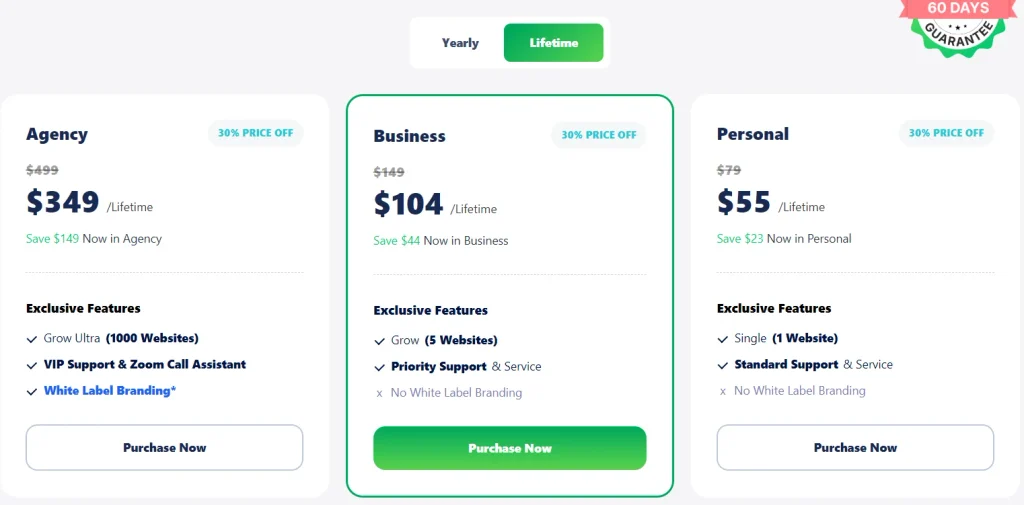
- Lifetime prices (card prices): Personal $55 (regular $79), Business $104 (regular $149), Agency $349 (regular $499). Checkout shows exact cents
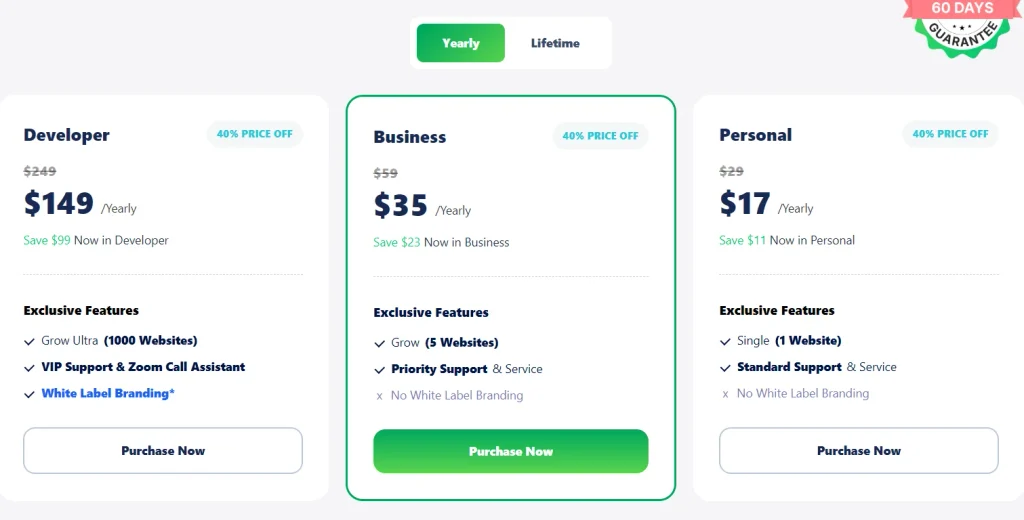
- Yearly prices (card prices, per year): Personal $17 (regular $29), Business $35 (regular $59), Developer $149 (regular $249)
- Bundle option: Post Kit’s own bundle card shows “Starts From” $349 on Lifetime and $199 on Yearly, and the combo builder starts at 65% off for two plugins on the Agency Lifetime package
Coupon Code: BdThemes says discounts apply automatically, and its links carry the code BFCM26. I haven’t run a checkout test for Ultimate Post Kit, so if your cart shows no applied coupon, enter BFCM26 manually 👇

This post contains affiliate links, and I earn a commission from them at no extra cost to you. Thank you for your support!Quick Answer: Ultimate Post Kit is worth a look if you run a blog, magazine or news site in Elementor and want better archive and post layouts. For one site, Personal is enough. Yearly is cheaper upfront, lifetime is cheaper over time. For client sites, compare Agency with the combo builder first.
How to Claim the Ultimate Post Kit Black Friday Deal
- Open Ultimate Post Kit through my Post Kit link, then go to its Pricing page.
- Pick Yearly or Lifetime. The two toggles show different discounts and different plan names, so check which one is selected.
- Choose your plan from the tables below.
- Press Purchase Now and read the cart. Look at the coupon line, exact price and tax. If the discount isn’t there, enter BFCM26 manually, and ask support if it still doesn’t show.
- Read the fine print under Continue to Payment. Yearly plans renew, so know the renewal terms. For lifetime plans, my carts said one-time payment.
- Pay, then download the plugin from your BdThemes account and activate the license.
Lifetime plans:
| Plan | Deal price | Regular price | Site limit | Support | Extras |
|---|---|---|---|---|---|
| Personal | $55 | $79 | 1 website | Standard | None listed |
| Business | $104 | $149 | 5 websites | Priority | None listed |
| Agency | $349 | $499 | 1,000 websites | VIP support and Zoom call assistant | White Label Branding* |
Yearly plans (40% off):
| Plan | Deal price per year | Regular price | Site limit | Support | Extras |
|---|---|---|---|---|---|
| Personal | $17 | $29 | 1 website | Standard | None listed |
| Business | $35 | $59 | 5 websites | Priority | None listed |
| Developer | $149 | $249 | 1,000 websites | VIP support and Zoom call assistant | White Label Branding* |
- Card prices vs cart: the cards show whole dollars, and checkout shows exact amounts that can be slightly higher or lower. BdThemes’ own checkout listed Pixel Gallery Personal, which has the same regular price as Post Kit Personal, at $55.30. Tax comes on top. 18% VAT was added in my carts from India.
- The bundle card on this page: it shows “Starts From” $349 on Lifetime and $199 on Yearly, marked as a short time offer, with 11,000 website licenses listed. I haven’t opened it from this page. On Prime Slider’s page, the same label opened a two-plugin Agency combo. Two Agency plugins at $499 each, with 65% off, come to roughly $349, so this looks like the same pattern. Check which plugins are selected before you pay.
- Full 11-plugin bundle: $790 Lifetime (regular $5,689) or $490 Yearly (regular $2,479) on BdThemes’ deals page.
What It Actually Does for a Blog
BdThemes’ pricing page says 75+ widgets. On its deals page the same plugin goes by a generic name, “Dynamic CPT Post & Blog Builder”, so don’t be confused if you land there.
What matters for a content site:
- Layouts: grids, carousels, lists and timelines for posts
- Archive Page and Post Calendar widgets, which are Pro-only
- Post Info, Title, Featured Image and Content widgets, also Pro-only, for building your own post templates
- Reading Progress Bar, Pro-only, plus Social Share, Newsletter and Tag Cloud in free
- Ajax live filtering, infinite scroll and custom post types, per the deals page
- 10+ ready-made pages, Dynamic Content and Custom Fields, and Rooten Theme included
What the Free Version Leaves Out
Free gives you 11 general widgets (grids, carousels, lists and a banner), a few carousels, Social Share, Newsletter, Tag Cloud and Post Accordion, plus Asset Manager.
Pro adds a lot. BdThemes’ comparison table lists roughly twenty Pro-only widgets, though a few names repeat across sections, plus Duplicator and Live Copy Paste. The ones I’d care about as a blogger:
- Archive Page and Post Calendar
- Soft, Oras and Grove timelines
- Post element widgets for custom single-post layouts
- Reading Progress Bar
- Hover effects like Stone Hover and Wixer Grid
If your theme’s archive already looks fine and you only need a post grid, free may be enough. Upgrade when you need custom archive or single-post templates.
Yearly or Lifetime: Which One Pays Off?
The pricing page runs two toggles: Yearly at 40% off and Lifetime at 30% off. The yearly price for Personal is about a third of the lifetime one.
If you’ll keep the site for three years or more, and the renewal price stays close to the card price, lifetime catches up around the third year. BdThemes doesn’t show the renewal price on the card, so I’d check it at checkout. If you’re running a short project or testing a niche, yearly is easier on the budget. Yearly also stops giving you updates and support when it lapses, so don’t treat it as ownership.
Which License Fits Your Sites?
- Personal: one website. A single blog or niche site.
- Business: up to 5 websites on the card, with priority support. That’s one source for the limit, so confirm it before you plan around it.
- Agency (lifetime) or Developer (yearly): 1,000 websites, VIP support, Zoom call assistant and White Label Branding*. The asterisk is on BdThemes’ page, so read what it refers to before promising white labeling.
If you need the Agency or Developer tier, price BdThemes’ combo builder first. It takes 65% off two plugins on the Agency Lifetime package. For the full picture, my BdThemes Black Friday deal guide has the breakdown.
Blog Speed and SEO Checks Before You Build Archives
I’m Karan Rajput, and with 7+ years across my own blogs and client WordPress sites, the archive page is where I see the most avoidable mistakes.
- Posts per page: every post grid runs a database query. Keep it to what the page needs.
- Infinite scroll: it can hide older posts from crawlers. Keep normal paginated archive URLs and category links too.
- Ajax filtering: test it with your cache plugin on, and keep plain category links as a fallback.
- Images: set a fixed aspect ratio for post thumbnails to avoid layout shift, and keep the first visible image out of lazy loading.
- Asset Manager: turn off widgets you don’t use, then compare PageSpeed Insights before and after.
Pro observation: if you also want structured data on posts, my Schema Pro deal page covers that separately. Hosting matters too, so see my Cloudways deal page if your blog is slow.
Where It Falls Short (and Who Should Skip It)
- Elementor only. Gutenberg bloggers need a different tool.
- The widget count changes by page. It’s 75+ on the pricing page, 100+ on the deals page and 50+ on the product page. I used the pricing page figure.
- The comparison table repeats names. Grove Timeline, Post Info and Category Carousel appear in more than one section, so treat the Pro-only count as approximate.
- Plan names differ: Agency on lifetime and Developer on yearly.
- Yearly renewal price isn’t shown on the cards.
- The “Starts From” label is easy to misread as the full bundle price.
Skip it if your theme archive already does the job, you build with Gutenberg, or you only need a couple of widgets that free covers.
Black Friday, Cyber Monday or Year End: Should You Wait?
BdThemes’ deals page shows bundle discounts of up to 86% for Black Friday, up to 80% for Cyber Monday and up to 78% for Year End. Those are bundle numbers only.
Nothing says whether Post Kit’s own discounts change between phases, and the only timing BdThemes shows is the countdown noted in the Deal Snapshot. If you’re redoing your blog layout this month, buy when the cart price looks right.
Ultimate Post Kit vs Element Pack Pro for a Blog
| Post Kit (free) | Post Kit Pro | Element Pack Pro | |
|---|---|---|---|
| Main job | Basic post grids and carousels | Blog, magazine and news layouts | General widgets, templates, theme builder |
| Widgets (pricing page) | 11 general widgets plus extras | 75+ | 230+ widgets, 2,700+ templates |
| Blog pieces named | Social Share, Newsletter, Tag Cloud | Archive Page, Post Calendar, timelines, Reading Progress Bar | Dynamic Content and Custom Fields, ACF integration |
| Site limits | Not stated | 1 / 5 / 1,000 | 1 / 5 (card) / 1,000 |
| Discount shown | Free | 40% yearly, 30% lifetime | 30% lifetime (yearly not checked) |
| Best for | Trying a post grid | Blogs, magazines and news sites | Whole-site builds |
For a blog or news site, Ultimate Post Kit is better because its widgets are built around posts and archives. If the blog is one part of a bigger site and you want mega menus and a theme builder, Element Pack Pro makes more sense. See my Element Pack Pro deal page. Both are Elementor add-ons and can run on the same site. If you sell paid content, my ArraySubs deal page covers memberships.
What to Do After Buying
- Download Ultimate Post Kit from your BdThemes account and activate the license key.
- Open Asset Manager and switch off widgets you won’t use.
- Build your archive and single-post templates on staging first.
- Check pagination, mobile layout and page speed.
- Keep your invoice and note the 60-day refund date.
Ultimate Post Kit Black Friday Deal
Deal: Up to 40% Off + Bundle Option
Coupon Code: None Needed. The deal price shows at checkout 👇
Frequently Asked Questions
Do I need a coupon code for Ultimate Post Kit?
BdThemes says discounts apply automatically, and its links carry the code BFCM26. I haven’t run a checkout test for Ultimate Post Kit, so check your cart. If it doesn’t show an applied coupon, enter BFCM26 manually and compare the total before paying.
Is yearly or lifetime the better deal?
Yearly costs far less upfront, with 40% off. Lifetime has 30% off but you pay once. For a blog you’ll keep for years, lifetime usually wins by the third year if the renewal stays close to the card price. Check the renewal price at checkout.
Is there a free version of Ultimate Post Kit?
Yes. Free covers 11 general widgets, a few carousels and Asset Manager. Pro adds Archive Page, Post Calendar, timelines, post element widgets, Duplicator and Live Copy Paste. If you only need a basic post grid, free may be enough.
Do I need Elementor Pro?
BdThemes’ deals page says Elementor Pro isn’t required for its Elementor add-ons, though some products can integrate with it. You do need Elementor itself. My Elementor Black Friday deal page covers its plans.
Is the “Starts From” bundle price for all 11 plugins?
No. On Prime Slider’s page, the same label opened a two-plugin Agency combo. The full 11-plugin bundle shows a higher price on BdThemes’ deals page. Add or remove plugins in the builder and watch the total change before paying.
Can I get a refund?
BdThemes offers a 60-day money-back guarantee. The deals page adds that special promotions can have their own refund rules, so read the refund policy before checkout.
Final Verdict
Ultimate Post Kit at up to 40% off is a good fit for bloggers and publishers building archives and post layouts in Elementor. For one site, Personal covers every Pro widget, and yearly is the cheaper way in. For long-term sites, lifetime pays off. For client work, compare Agency or Developer with BdThemes’ combo builder. Try the free version first if you’re unsure, and check the cart before you pay. Ready? Open Ultimate Post Kit.
Related Posts