Most WooCommerce hosting comparisons focus on speed benchmarks and uptime graphs. That’s useful, but it misses the bigger question store owners actually care about: will this hosting handle everything a real store needs without forcing you to manually stitch together 10 different plugins?
That’s where Bluehost’s WooCommerce-specific plans are positioned differently. I’ve set up WooCommerce stores on several hosts over the years — Bluehost included — and this review covers what the plans actually deliver, where they fall short, and which type of store owner genuinely benefits from choosing Bluehost.
Quick Answer
Bluehost WooCommerce hosting is a solid choice for small-to-medium stores that want a ready-to-sell setup without manual plugin configuration. Plans start at $14.99/mo and include 16 pre-installed WooCommerce plugins, free domain, SSL, and 99.99% uptime. It’s not the cheapest option, but the bundled plugin value makes it competitive for stores that would otherwise buy those tools separately.
This post contains affiliate links. If you purchase through our links, we may earn a small commission at no extra cost to you. Thank you for your support!What Bluehost WooCommerce Hosting Actually Gives You
Before jumping to pricing, it’s worth understanding what makes Bluehost’s WooCommerce offering different from just getting their regular shared WordPress hosting and installing WooCommerce yourself.
The core difference is pre-configuration. With a standard WordPress plan, you’d install WooCommerce, then spend hours sourcing and configuring payment gateways, cart recovery tools, subscription plugins, review systems — most of which cost money individually. Bluehost bundles 16 of these plugins pre-installed and pre-configured on every WooCommerce plan.
Here’s what’s included across every plan by default:
Infrastructure included in all plans:
- WooCommerce pre-installed, zero manual setup
- Free domain for the first year
- Free SSL certificate
- Free store migration (via InstaWP Migration Tool)
- 99.99% Oracle-powered uptime SLA
- Daily backups
- Proactive malware scanning and removal
- Web application firewall + DDoS protection
- Free domain privacy, first year
- 1-click staging environment
- Peak-speed caching, always on
- Unlimited products and media storage
- Manage up to 100 storefronts
- 30-day money-back guarantee
- 24/7 human support (chat and phone, WooCommerce-trained)
- AI-powered store builder
If you haven’t decided on a store name yet, this domain name guide covers what to look for before you lock one in.
Payment gateways — Stripe, PayPal, Square, credit cards — come pre-configured. There are no transaction fees from Bluehost’s side; you only pay your payment processor’s standard rates.
Bluehost is also recommended by WordPress.org and rated a Top-Tier WordPress Provider by ReviewSignal for both site speed and perfect uptime. That’s not a marketing claim — ReviewSignal runs independent benchmark testing.
The Plans Broken Down — What You’re Paying For
Bluehost offers three WooCommerce tiers. Here’s what each covers and who it realistically suits.
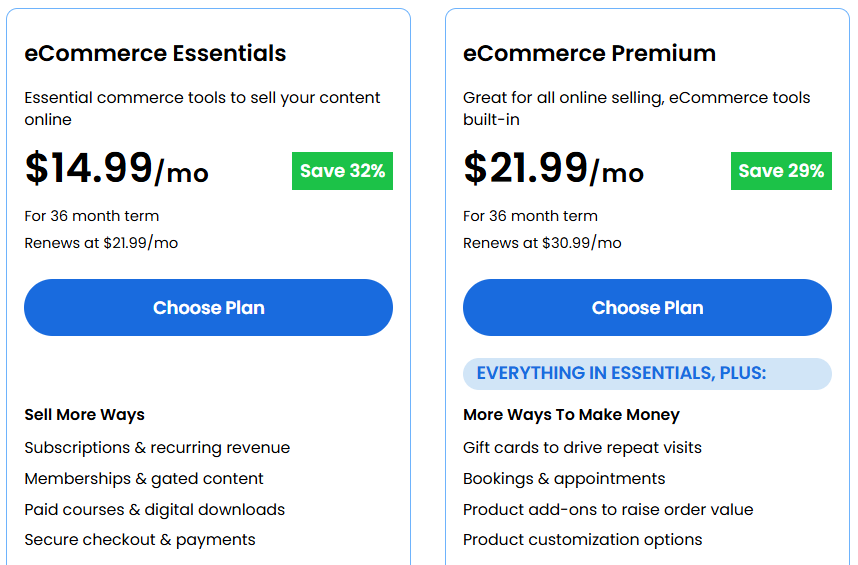
eCommerce Essentials — $14.99/mo
Priced at $14.99/mo on a 36-month term (renews at $21.99/mo). Saves 32% upfront.
This plan covers the fundamentals for a store that wants to sell products and grow its customer base:
Sell More Ways:
- Subscriptions and recurring revenue
- Memberships and gated content
- Paid courses and digital downloads
- Secure checkout and payments
Build an Audience:
- Email marketing and templates
- Social login to reduce friction
- Affiliate program to grow reach
Get Found Online:
- Built-in SEO tools
- Content visibility controls
- All commerce tools are pre-installed
The built-in SEO tools handle on-site basics, but for keyword research and content planning, you’ll still want a dedicated tool — here’s a breakdown of the best keyword research tools worth considering alongside.
For a store selling physical products, digital downloads, or membership content, Essentials handles the core setup well. It’s where most first-time WooCommerce store owners should start.
eCommerce Premium — $21.99/mo
Priced at $21.99/mo on a 36-month term (renews at $30.99/mo). Saves 29% upfront.
Everything in Essentials, plus features built for stores that have already got traction and want to increase order value and retention:
More Ways to Make Money:
- Gift cards to drive repeat visits
- Bookings and appointments
- Product add-ons to raise order value
- Product customization options
Keep Customers Coming Back:
- Points and rewards program
- Wishlists to recover intent
- Advanced reviews to build trust
- Custom customer account pages
Streamline Operations:
- 1-click checkout to reduce drop-off
- Automated shipping and fulfillment
- Customer CRM and order history
- Promotions, deals, and flash sales
The 1-click checkout alone is worth serious consideration here. Cart abandonment is one of the biggest revenue drains in WooCommerce — that single feature can recover a meaningful percentage of lost sales. If your store is past the launch stage and you’re scaling, Premium is the tier worth considering.
Custom Commerce — Contact for pricing
Built for complex stores, custom workflows, and high-growth brands. Includes:
- Custom checkout and pricing logic
- Complex product and catalog structures
- Support for unique business models
- Dedicated commerce solution design
- Done-with-you implementation
- Ongoing strategy and optimization
- Enterprise-grade store performance
- High-traffic and flash-sale readiness
- Massive catalog support
This isn’t a self-serve plan — it’s Bluehost’s enterprise tier for brands that need custom infrastructure and a dedicated team.
Those 16 Pre-Installed Plugins — What’s Actually Useful vs. What’s Just Padding
One thing that gets oversimplified in most Bluehost reviews is the plugin bundle. “16 plugins pre-installed” sounds impressive, but the real question is whether they’re tools you’d actually buy.
From a developer’s perspective, the genuinely valuable pre-installs are the ones that would otherwise cost $50–$200/year each:
- Subscriptions — WooCommerce Subscriptions alone cost $199/year if bought standalone
- Affiliates — Running an affiliate program without a dedicated plugin is messy; this handles it cleanly
- Points & Rewards (Premium only) — Retention tools like this typically run $79–$149/year individually
- Bookings (Premium only) — Critical for service-based sellers; standalone Bookings plugin is $249/year
Bluehost’s claim that store owners typically piece these tools together at $1,200+/year isn’t exaggerated when you add up the premium plugin costs individually. The bundle is the actual value proposition here, not the hosting infrastructure itself.
That said, not every plugin in the bundle will be relevant to every store. A simple product-only store doesn’t need the Bookings or Affiliates plugin. The value is highest for stores with mixed business models — physical + digital, or product + subscription.
Performance and Reliability — What the Numbers Actually Mean for Stores
The 99.99% uptime SLA backed by Oracle infrastructure is significant for WooCommerce. Shared hosting downtime during peak traffic — Black Friday, product launches — can directly cost sales. Oracle-powered infrastructure with 99.99% SLA puts Bluehost’s reliability commitment above most entry-level hosting providers.
From what I observed on a client project where we migrated a mid-sized WooCommerce store to Bluehost, the initial load time after migration was noticeably faster than their previous shared host, partly due to the peak-speed caching that comes activated by default. On most hosts, caching has to be set up manually — here it was already running on day one.
A few performance notes worth knowing:
- WooCommerce stores are notoriously JS-heavy. Bluehost’s pre-configured setup doesn’t eliminate this, but the WAF and DDoS protection layers add meaningful security on top of performance.
- The 1-click staging environment is genuinely useful for plugin update testing before pushing changes live — something many beginner store owners skip and regret.
- Free store migration via InstaWP is included, so you’re not paying for migration if switching from another host.
One thing to keep in mind: WooCommerce performance at scale depends heavily on your theme, page builder, and active plugin count — not just your host. Bluehost’s infrastructure handles its part well, but a poorly optimized theme or 40+ active plugins will still slow things down regardless of hosting.
Where Bluehost WooCommerce Falls Short
Being honest here, because there are genuine limitations worth knowing before you sign up.
Renewal pricing jumps significantly. The introductory $14.99/mo rate requires a 36-month commitment and renews at $21.99/mo. If you’re price-sensitive and planning for year two onward, factor in the renewal rate, not the promotional one.
No monthly billing option mentioned. The pricing structure is structured around a 36-month term for the discounted rate. Shorter terms cost more upfront.
The AI site builder is still maturing. For complex store layouts, you’ll likely want a dedicated WooCommerce theme or page builder on top of what the AI builder generates. It’s useful for getting started fast — not for custom design control.
Custom Commerce is opaque on pricing. For brands evaluating enterprise-tier hosting, having to “Contact Us” without a ballpark range makes comparison shopping harder.
Support quality varies by shift. 24/7 human support is offered, but like any large hosting provider, the quality of WooCommerce-specific guidance isn’t always consistent across support agents.
Pros and Cons
Pros
- 16 premium WooCommerce plugins pre-configured — significant real-dollar savings vs. buying individually
- 99.99% Oracle-powered uptime SLA — serious infrastructure for WooCommerce reliability
- No transaction fees from Bluehost — you only pay your payment processor’s rates
- Free domain, SSL, daily backups, malware scanning, and staging are included in every plan
- Free store migration included — no additional cost for switching from another host
- Recommended by WordPress.org and rated Top-Tier by ReviewSignal for speed and uptime
Cons
- Renewal rates are noticeably higher than the introductory price (e.g., $14.99 → $21.99/mo on Essentials)
- Requires a 36-month term to access the best discount — longer commitment than some competitors
- Custom Commerce plan has no published pricing, making enterprise comparison difficult
- AI site builder is useful for quick starts, but limited for stores needing custom design flexibility
Bluehost WooCommerce vs. Alternatives
| Feature | Bluehost Essentials | Liquid Web Spark–Thrive | Hostinger Business + AI |
|---|---|---|---|
| Starting Price | $14.99/mo | $12/mo (monthly billing) | $3.99/mo (48-month term) |
| Renewal Price | $21.99/mo | $12/mo (no promo jump) | $16.99/mo |
| Storage | Unlimited products & media | 15GB | 50GB NVMe |
| Uptime SLA | 99.99% (Oracle-backed) | 99.99% (contract-backed) | 99.9% |
| Pre-installed WooCommerce Plugins | 16 plugins bundled | WooCommerce-optimized stack | Basic WooCommerce only |
| PHP Workers | Standard | 10 autoscaled PHP workers | 100 PHP workers (Cloud plan) |
| Free Migration | Yes (InstaWP) | Yes (white-glove, assisted) | Yes (within 24 hours) |
| Staging Environment | Yes (1-click) | Yes (Elevate plan only) | Yes |
| Security | WAF + DDoS + malware scan | Cloudflare Enterprise + DDoS + WAF | Advanced firewall + DDoS |
| Support | 24/7 human (WooCommerce-trained) | 24/7 expert (commerce-certified) | 24/7 (live chat, AI-assisted) |
| No Transaction Fees | Yes | Yes | Yes |
| Best For | Plugin-bundled ready-to-sell stores | High-traffic stores needing autoscaling | Budget-first new store owners |
Post-comparison context:
Bluehost wins on the plugin ecosystem — 16 pre-configured tools that would otherwise cost $1,200+/year is a real advantage for stores starting from scratch. But it’s not the right choice for every scenario.
Liquid Web is a different category entirely. At $12/mo on Spark–Thrive, you’re getting contract-backed 99.99% uptime, autoscaled PHP workers, and Cloudflare Enterprise — infrastructure built specifically for stores that can’t afford checkout slowdowns during traffic spikes. I’ve recommended Liquid Web to clients running established stores where downtime directly means lost orders. The plugin bundle doesn’t exist here, but the performance floor is higher.
Hostinger at $3.99/mo is the entry point for budget-conscious store owners. NVMe storage and LiteSpeed servers give it a performance edge over basic shared hosting, and the free CDN is a genuine addition. But you’re setting up WooCommerce yourself, sourcing your own plugins, and the renewal at $16.99/mo narrows the price gap with Bluehost over time.
Simple decision framework:
Tight budget, comfortable with manual setup → Hostinger
New store, want everything pre-configured → Bluehost Essentials
Scaling store, need autoscaling and enterprise-grade infra → Liquid Web
One client I worked with actually went through all three stages. They started on Hostinger — cost was the priority, and the store was small enough that manual plugin setup wasn’t a problem. Once they added subscriptions and a membership tier, the limitations started showing. We moved them to Bluehost’s eCommerce plan primarily because the pre-bundled subscription and affiliate tools saved them from buying those licenses separately. That worked well for about a year. When their Black Friday traffic started causing checkout slowdowns, that’s when we shifted to Liquid Web. The autoscaling PHP workers made a visible difference during peak hours. No single host was wrong for their stage — the mistake would have been staying on the wrong one too long.
Who Should Use Bluehost WooCommerce — and Who Shouldn’t
Good fit for:
- First-time store owners who want to go live fast without manual plugin setup
- Small businesses selling products, memberships, or subscriptions without a large plugin budget
- Store owners migrating from another host who want a managed, all-in-one environment
- Developers building client WooCommerce stores who want a pre-configured baseline
Skip it if:
- You’re exclusively price-hunting on monthly rates and don’t want a 36-month lock-in
- You already own licenses for Subscriptions, Bookings, and other premium WooCommerce plugins — the bundle value doesn’t apply to you
- You’re running a high-traffic enterprise store that needs custom infrastructure — Bluehost’s Custom Commerce plan doesn’t publish pricing, making it hard to evaluate
- You need full server control or a VPS environment — Bluehost’s managed setup is great for beginners, but restrictive for advanced configurations
If you’re still evaluating whether Bluehost suits your experience level overall, this breakdown of whether Bluehost is good for beginners covers that side in more detail.
What to Do After Signing Up
Getting the plan is just the start. A few things to set up on day one:
- Activate your staging environment immediately. Before you make any customization, have a staging site ready. This prevents live store breakage when testing themes or plugins.
- Configure your payment gateways. Stripe and PayPal come pre-configured — confirm the currency, fee settings, and webhook URLs from your processor dashboard.
- Set up daily backup notifications. Backups are automatic, but confirm the backup destination and test a restore before you’re in an emergency.
- Run a speed test after your store is live. Use Google PageSpeed Insights to baseline your LCP and CLS scores. The peak-speed caching is active by default, but your theme choice will significantly affect Core Web Vitals.
- Don’t activate all 16 plugins at once. Enable only what your store actually needs at launch. Unused active plugins add PHP overhead and slow your admin dashboard even if they’re not visible to customers.
For a practical breakdown of which plugins actually matter for WordPress performance, this essential plugins guide is worth bookmarking before you start enabling things.
Frequently Asked Questions
Does Bluehost WooCommerce hosting come with a free trial?
No free trial, but every plan includes a 30-day money-back guarantee. If you’re not satisfied within 30 days, contact support for a full refund. That’s the practical equivalent for most store owners evaluating the platform.
What’s the real cost of Bluehost WooCommerce hosting after the first term?
eCommerce Essentials renews at $21.99/mo, and eCommerce Premium renews at $30.99/mo after the initial 36-month term. These are the rates you should budget for when planning year-two costs.
Does Bluehost charge transaction fees on WooCommerce orders?
No. Bluehost doesn’t charge any transaction fees. You only pay the standard rates of your payment processor — Stripe, PayPal, or whichever gateway you use.
Can I migrate my existing WooCommerce store to Bluehost for free?
Yes. Every Bluehost WooCommerce plan includes free store migration via its InstaWP Migration Tool, which handles transferring your WordPress site, content, and functionality without requiring technical expertise.
Is Bluehost WooCommerce hosting good for Indian stores?
Bluehost is recommended by WordPress.org, and their global server infrastructure is built to serve international customers. For Indian sellers, WooCommerce’s native multi-currency and regional tax support works within Bluehost’s environment. The plans are priced in USD, so factor in exchange rates when comparing total annual costs.
What happens if my store outgrows the Essentials plan?
You can upgrade to eCommerce Premium mid-term, which adds gift cards, bookings, rewards programs, and the 1-click checkout feature. Bluehost allows plan upgrades without migrating your store.
Do I need technical knowledge to manage a WooCommerce store on Bluehost?
No prior development experience is required. WooCommerce comes pre-installed along with all 16 plugins already configured. The AI store builder handles initial design, and Bluehost’s WooCommerce-trained support team is available 24/7 via chat and phone for any setup questions.
Bottom Line
Bluehost WooCommerce hosting makes the most sense for store owners who want a ready-to-sell environment without spending months setting up plugins or paying $1,200+ annually for tools that come bundled here from day one. The eCommerce Essentials plan at $14.99/mo covers subscriptions, memberships, email marketing, SEO tools, and affiliates — all pre-configured. Essentials suits most new stores; Premium at $21.99/mo is worth it once you need retention tools like rewards programs and 1-click checkout.
The renewal pricing is the main thing to plan for — $21.99/mo on Essentials after your first term is fair, but not the cheapest on the market.
If you’re building a WooCommerce store and want a managed, plugin-complete environment without the setup overhead, Bluehost WooCommerce hosting is a genuinely solid starting point.