Both themes are free. Both work with WooCommerce. Both are used by millions of WordPress sites. So why does picking between them feel confusing?
The short answer: they serve different types of e-commerce users. Astra is built as a general-purpose theme with solid WooCommerce support baked in. OceanWP has gone all-in on ecommerce with a dedicated add-on suite called eComm Treasure Box. That one difference changes everything depending on what kind of store you’re building.
Quick Answer: For most WooCommerce store owners — especially bloggers and small business owners — Astra is the stronger pick. OceanWP makes sense if you’re specifically chasing advanced e-commerce modules and are already in the OceanWP ecosystem.
This post contains affiliate links. If you purchase through our links, we may earn a small commission at no extra cost to you. Thank you for your support!The Real Ecommerce Question Nobody Is Asking
Most comparison articles pit Astra and OceanWP against each other on generic criteria — page builders, customizer options, speed scores. That’s useful, but it’s not what someone building a WooCommerce store actually needs to know.
What matters for e-commerce:
- Does the theme slow down product pages?
- How much does the paid version actually cost?
- Do you get real WooCommerce tools, or just “compatibility”?
- Can a solo store owner manage everything without a developer?
I’ve set up client WooCommerce projects on both themes over the years. Here’s what I actually observed — not benchmark charts, but real usage patterns.
Astra’s WooCommerce Approach: Everything in the Theme
Astra handles WooCommerce at the theme level. Even the free version gives you layout controls for shop pages, product grids, and cart styling. Once you go Pro, it opens up more — optimized shop and catalog layouts, high-conversion checkout tools, interactive quick view and cart, smart upsells, and pro product gallery tools.
This is a deliberate design choice. Astra doesn’t need a separate “ecommerce addon” — the WooCommerce features ship as part of the core Pro experience.
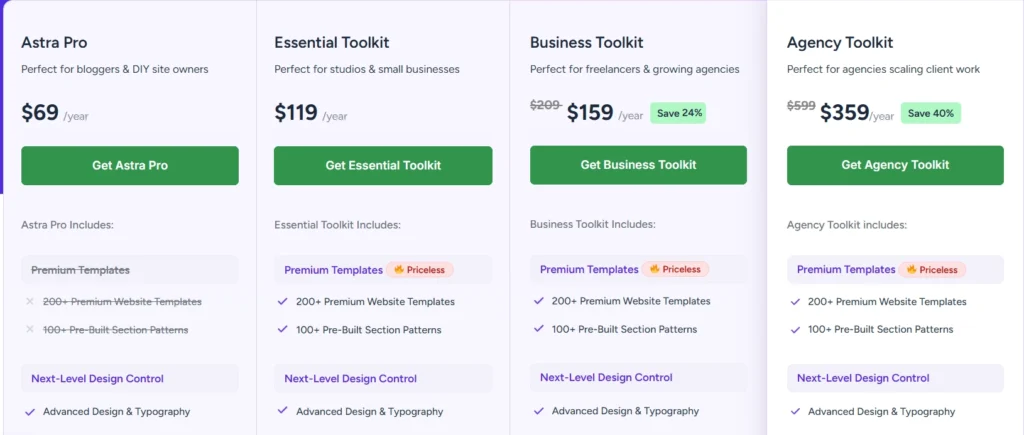
What You Get With Astra Pro (Annual)
| Plan | Price | Sites | Highlights |
|---|---|---|---|
| Astra Pro | $69/yr | Unlimited | Core theme + WooCommerce layouts |
| Essential Toolkit | $119/yr | Unlimited | + Ultimate Addons for Elementor, Advanced Page Blocks |
| Business Toolkit | $159/yr | 1 (with hosting) | + ZipWP AI Builder, OttoKit automation, SureFeedback |
| Agency Toolkit | $359/yr | 1 (with hosting) | + 20 Sandbox Sites, ZipWP Business, VIP support |
Special introductory pricing — renewals are at full price. All prices in USD.
Lifetime Plans (One-Time Payment)
| Plan | One-Time Price | Notes |
|---|---|---|
| Astra Pro | $319 | Save 9% vs regular |
| Essential Toolkit | $599 | Save 14% |
| Business Toolkit | $699 | Save 36% — includes hosting features |
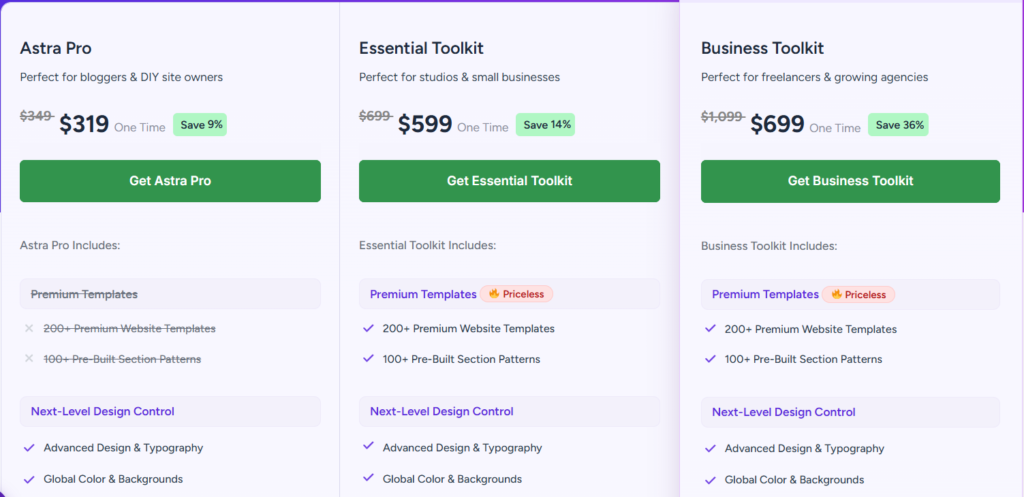
The lifetime plans are for up to 3 websites (toggle to 1000 sites, not shown in current pricing). For agency use, lifetime makes more sense financially after year 2.
One thing worth noting: the Business Toolkit and Agency Toolkit include hosting infrastructure (ZipWP Pro — 1 website, 10 GB SSD, 5 sandbox sites). That’s not a standard theme feature — it’s essentially a managed hosting add-on bundled in. Useful for freelancers building client sites, but bloggers doing personal stores don’t need to pay for it.
OceanWP’s Ecommerce Approach: A Dedicated Suite
OceanWP takes a different path. The base OceanWP theme is free and WooCommerce-compatible, but the serious ecommerce functionality lives in a paid product called eComm Treasure Box — a separate purchase from the main OceanWP Pro Bundle.
This matters. You’re not just buying “OceanWP Pro” for e-commerce — you need the eComm Treasure Box specifically.
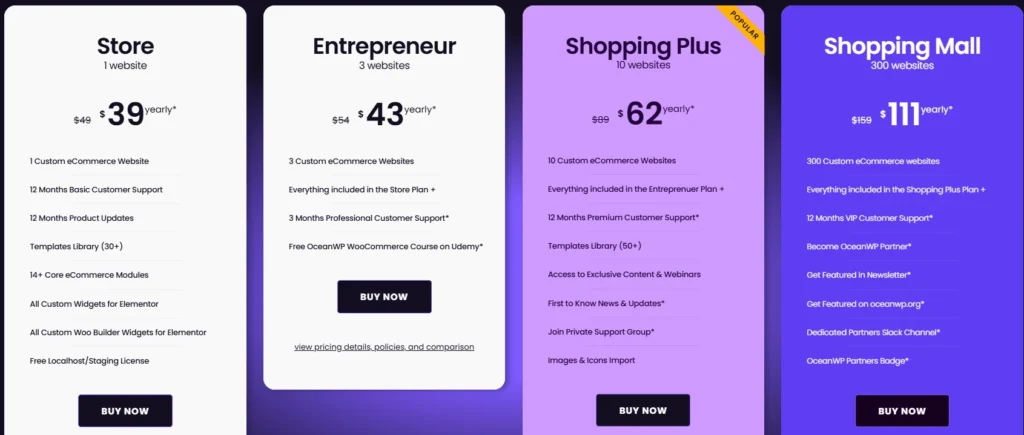
OceanWP eComm Treasure Box — Annual Pricing
| Plan | Price | Sites |
|---|---|---|
| Store | $39/yr | 1 |
| Entrepreneur | $43/yr | 3 |
| Shopping Plus | $62/yr | 10 |
| Shopping Mall | $111/yr | 300 |
Annual licenses renew automatically. 20% renewal discount is applied for active customers.
eComm Treasure Box — Lifetime Pricing
| Plan | One-Time Price | Sites |
|---|---|---|
| Store | $151 | 1 |
| Entrepreneur | $178 | 3 |
| Shopping Plus | $249 | 10 |
| Shopping Mall | $445 | 300 |
No renewals — one-time payment. OceanWP says it pays for itself within 4 years at current pricing.
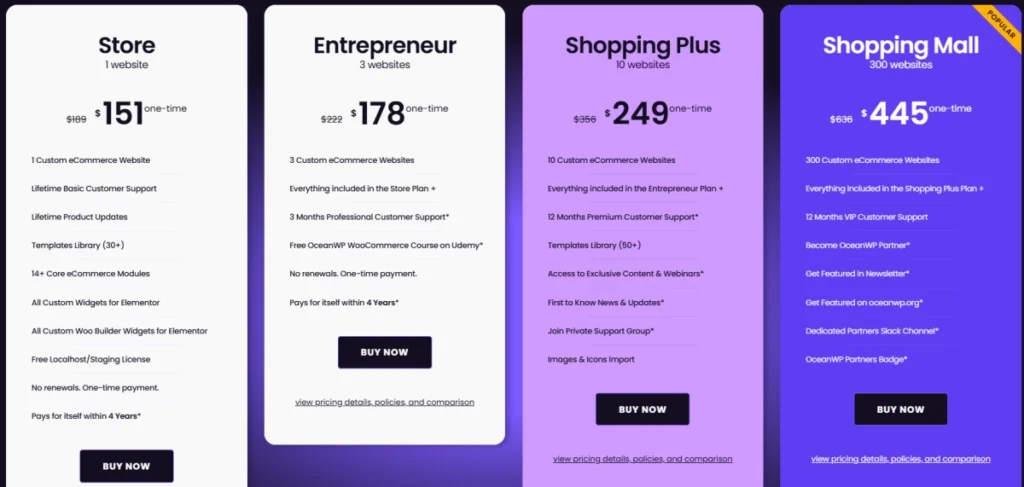
The eComm Treasure Box includes 14+ core ecommerce modules, all custom WooCommerce widgets for Elementor, all Woo Builder widgets for Elementor, and a templates library with 30+ designs on the base Store plan (50+ on Shopping Plus). That’s actually a strong feature set for a WooCommerce-specific addon.
There’s also a loyalty angle: if you already own the OceanWP Pro Bundle, you get 50% off all eComm Treasure Box plans. Annual users keep that discount locked on every renewal, which is a decent incentive to stay in the ecosystem.
Side-by-Side: Which Theme Wins on E-commerce Features
| Feature | Astra Pro | OceanWP + eComm Treasure Box |
|---|---|---|
| WooCommerce layout control | Built into theme | Requires separate eComm addon |
| Checkout optimization tools | Yes (all paid plans) | Yes (all eComm plans) |
| Quick view & cart | Yes | Yes |
| Product gallery tools | Yes (Pro+) | Yes |
| Elementor WooCommerce widgets | Essential Toolkit+ | All eComm plans |
| Templates library | 200+ website templates | 30–50+ WooCommerce templates |
| Starting annual price | $69/yr | $39/yr (eComm only) |
| Lifetime option | From $319 | From $151 |
| Hosting bundled | Business Toolkit+ | No |
| Support quality | 24/7 (VIP on Agency) | Basic/Professional/Premium/VIP |
| Best for | Bloggers, small businesses, agencies | WooCommerce-focused store builders |
Context: Astra’s $69/yr Astra Pro gives you WooCommerce layouts but doesn’t include Elementor WooCommerce widgets — you need the Essential Toolkit at $119/yr for that. OceanWP’s $39/yr eComm Treasure Box includes all custom Woo Builder widgets from the entry plan. So, for a pure WooCommerce Elementor workflow, OceanWP’s entry price is lower.
Performance: Does It Actually Matter for Stores?
Speed matters for e-commerce — directly tied to conversions. Both themes are lightweight by design.
From what I’ve observed while working on WooCommerce client setups, Astra loads fewer HTTP requests out of the box and has a lighter default CSS footprint compared to OceanWP. OceanWP’s free version loads more scripts by default, which can affect mobile Lighthouse scores on product pages if not properly optimized.
That said, a caching plugin (WP Rocket, LiteSpeed Cache) and a properly configured host will close most of that gap. Neither theme is a performance liability once your stack is set up correctly.
The more relevant performance consideration for e-commerce: how many page builder widgets and WooCommerce addons are you loading? Both Astra and OceanWP can become heavy if you stack multiple plugins without checking for script bloat. Astra’s built-in performance module (Smart Asset & Caching System, available on paid plans) helps manage this. OceanWP relies more on external optimization.
Pros and Cons
Astra Pro
Pros
- WooCommerce features built into the theme — no separate addon needed
- Massive template library (200+ sites) covering various niches
- Business Toolkit bundles AI builder, automation tools — good for agencies
- Strong Elementor + Gutenberg compatibility; loads vanilla JS, not jQuery-dependent
- 1.8M+ users — large community, extensive documentation
Cons
- Essential Toolkit ($119/yr) required to unlock Elementor-specific WooCommerce widgets — not available on base $69/yr Astra Pro
- Business and Agency plans include hosting features you may not need if you already have hosting
- Introductory pricing applies only to the first year — renewals are at full price
- 200+ templates are for general sites, not all WooCommerce-specific
OceanWP + eComm Treasure Box
Pros
- Dedicated e-commerce addon with 14+ WooCommerce-specific modules
- Lower starting price ($39/yr) for WooCommerce-focused workflow
- A lifetime deal is more affordable ($151 for 1 site vs Astra’s $319)
- OceanWP Pro Bundle members get 50% loyalty discount on eComm plans
- Partner program (Shopping Mall plan) offers exposure benefits for freelancers
Cons
- You’re managing two separate purchases — OceanWP theme + eComm Treasure Box
- The base OceanWP theme alone is not enough for a complete e-commerce build
- OceanWP Pro Bundle is a separate product, not covered in eComm pricing
- The template library is smaller and ecommerce-focused only
- Mobile performance can lag without extra optimization on the free version
Who Should Pick Astra
Astra makes more sense if:
- You’re building a blog-style site that also sells products
- You want one theme that covers multiple site types (portfolio, business, store)
- You need agency-grade tools like white labeling, AI builder, and automation in a bundle
- You already work with Elementor and want tighter integration without multiple purchases
A content creator who’s been using Astra for a while and decides to add a WooCommerce store doesn’t need to switch themes or buy a separate addon — the transition is smooth within the same ecosystem. That’s a real practical advantage.
If you’re just getting started with WordPress and need a theme that scales with your site over time, Astra is a safe choice. You can start with a blogging setup using the free version and upgrade to Pro when your WooCommerce needs grow.
Who Should Pick OceanWP
OceanWP’s eComm Treasure Box makes more sense if:
- You’re building a pure WooCommerce store with no blogging component
- You want dedicated ecommerce modules — checkout customization, coupon fields, swatches — without relying on third-party plugins
- You already own the OceanWP Pro Bundle and want to activate the 50% loyalty discount on eComm plans
- You’re managing 10+ WooCommerce stores, and the $249 lifetime (10 sites) makes financial sense
- You prefer a lower-cost lifetime option for a single store ($151 vs $319)
One freelancer managing multiple client stores would find the Shopping Plus ($249 lifetime for 10 sites) or Shopping Mall ($445 lifetime for 300 sites) plans genuinely cost-effective over a 3-4 year horizon.
What to Do After Buying
If you go with Astra:
- Install the Astra theme from WordPress.org (free)
- Activate your license from Astra > License
- Go to Astra > Starter Templates and import a WooCommerce-ready template
- Set the WooCommerce shop layout from Customizer > WooCommerce
- Enable Smart Asset & Caching System under Astra settings for performance
If you go with OceanWP + eComm Treasure Box:
- Install the OceanWP theme and activate
- Purchase eComm Treasure Box from oceanwp.org (note: separate from Pro Bundle)
- Activate license via OceanWP > Extensions panel
- Import a WooCommerce template from the built-in library
- Enable only the eCommerce modules you need — disabling unused modules reduces page weight
Frequently Asked Questions
Can I use Astra or OceanWP with any WooCommerce plugin?
Yes, both themes are compatible with standard WooCommerce and most third-party WooCommerce plugins. Neither locks you into a specific plugin ecosystem for core store functionality.
Does OceanWP’s eComm Treasure Box work without the OceanWP Pro Bundle?
Yes, eComm Treasure Box is a standalone purchase and works with the free OceanWP theme. However, if you own the Pro Bundle, you get 50% off eComm plans — so it’s worth checking what you already have.
Is Astra’s introductory pricing available every year?
No. Astra clearly states that introductory pricing applies to the first purchase only. All renewals are billed at the full standard rate. Factor that into your total cost of ownership.
Which theme is faster for WooCommerce product pages?
Astra tends to load fewer default scripts, which helps on mobile. But the difference becomes minimal with a good caching setup. The bigger factor is how many plugins and page builder widgets you’re adding on top of either theme.
Can I use Astra’s Business Toolkit just for the theme — without the hosting features?
Yes, the theme and plugin features work independently. But if you’re already paying for separate hosting, the bundled ZipWP hosting features in Business and Agency plans are redundant. Astra Pro at $69/yr may be the better value in that case.
Do Astra’s lifetime plans cover all future updates?
Astra’s lifetime plans include future updates for the purchased plan tier. However, if new features are released under a higher plan, you’d need to upgrade. Always check the official pricing page for the current plan inclusions.
Bottom Line
For most WordPress users building a WooCommerce store, Astra is the more versatile choice — especially if your site is more than just a store. The pricing is predictable, the ecosystem is mature, and you don’t need to manage multiple product purchases.
OceanWP with eComm Treasure Box is genuinely competitive for dedicated ecommerce builds — particularly if you’re already in the OceanWP ecosystem or want the lifetime deal at a lower entry price ($151 for 1 site).
Pick Astra if you want simplicity, a large template library, and an all-in-one upgrade path. Pick OceanWP’s eComm Treasure Box if you want WooCommerce-specific modules at a lower cost per store.