Paid partnership with Bluehost. Bluehost paid me to test and review Bluehost AI Builder. Everything below comes from my own build, including the parts that needed fixing.
I’m Karan Rajput, a blogger with 7+ years in SEO and WordPress. I also build small web tools in plain HTML, CSS and JavaScript, so I’m naturally sceptical of anything that promises a website from one sentence.
Bluehost AI Builder is “$0 to start, no credit card”, so I tested it properly: one long prompt, my own portfolio site, one chat edit and a live publish.
This is what worked, what I had to fix and who should skip it.
This post contains affiliate links, and I earn a commission from them at no extra cost to you. Thank you for your support!The Bottom Line: Bluehost AI Builder turned one long prompt into a mobile-friendly portfolio in a single build, and the free plan was enough to publish it. Desktop PageSpeed was 99. But the first version had placeholder content, and PageSpeed flagged my page as blocked from indexing. Good for portfolios and landing pages. Not for stores or native apps.
What I Asked Bluehost AI Builder to Build
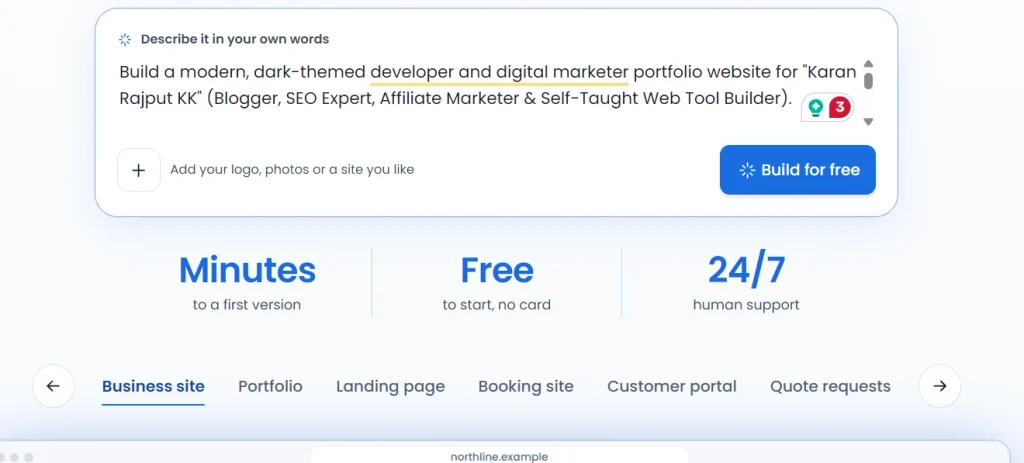
I skipped the usual “coffee shop” demo. I asked for something I’d actually use: a portfolio for my name, Karan Rajput KK, with a dark green theme, a hero section, a stats bar, an About section, six of my live web tools as project cards and a contact area.
The prompt was long on purpose. I listed the sections, the colours and the six tools with their web addresses. My main blog, karankk.com, runs on WordPress, so I’m used to full control. This was a brand-new test site. I didn’t move any existing site to Bluehost.
One rule I follow with every AI builder: vague prompt, vague site. Mine was specific, so the test is fair.
Creating the Account: Exactly What I Clicked
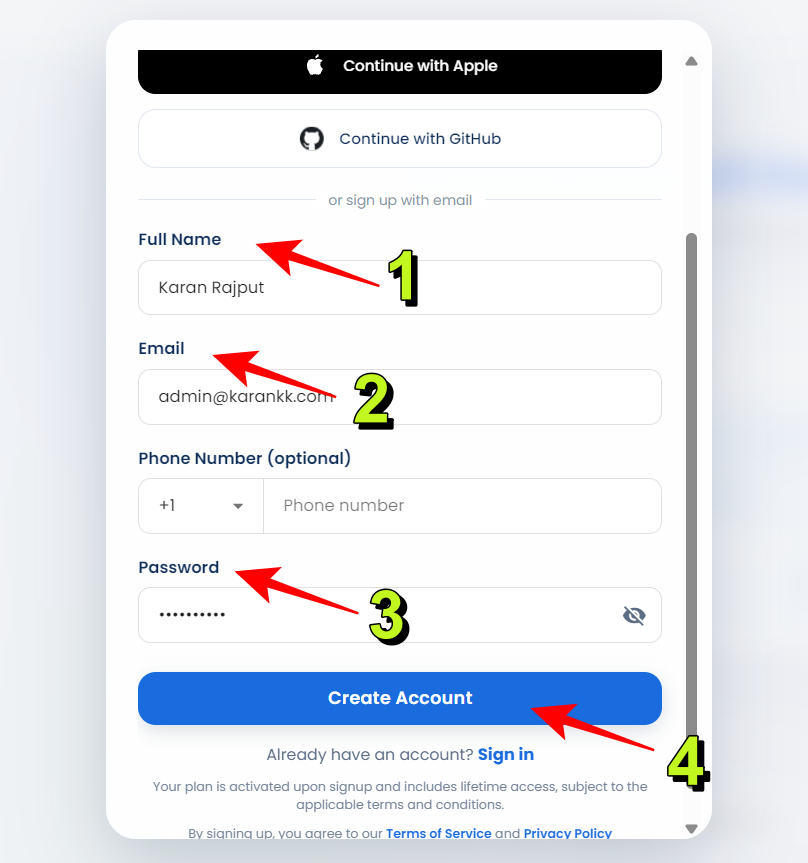
After pasting the prompt and clicking Build for free, a signup box opened. Here’s the flow:
- The box lets you continue with Google, Apple or GitHub, or sign up with email.
- I used email: full name, email address and password. Phone number is optional.
- I clicked Create Account. A short “Creating your account” screen followed.
I wasn’t asked for a credit card at any point. If you want to try the same flow, start on the Bluehost AI Builder page (I earn a commission).
What Happened After I Hit Build
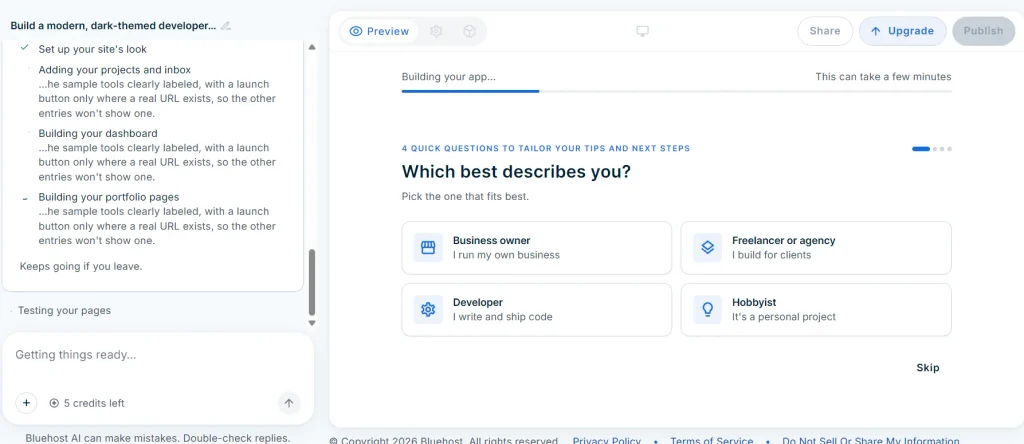
The first screen said “Understanding your business…” with a note that it can take up to a minute. The chat on the left confirmed my request was saved, then the screen switched to “Building your app…” with a progress bar.
A checklist ran alongside it: setting up the site’s look, adding projects, building the dashboard and portfolio pages, then testing the pages. The screen also said the build keeps going if you leave.
During the wait I got four quick questions. The first was “Which best describes you?” with Business owner, Freelancer or agency, Developer and Hobbyist, plus a Skip option. These looked like profile questions for tips, not questions about my design.
Bluehost says the AI’s clarifying questions don’t cost credits. I never got a design question, so I can’t confirm that part myself. My guess is that my prompt already answered everything. It’s only a guess.
The First Version: Good Layout, Placeholder Content
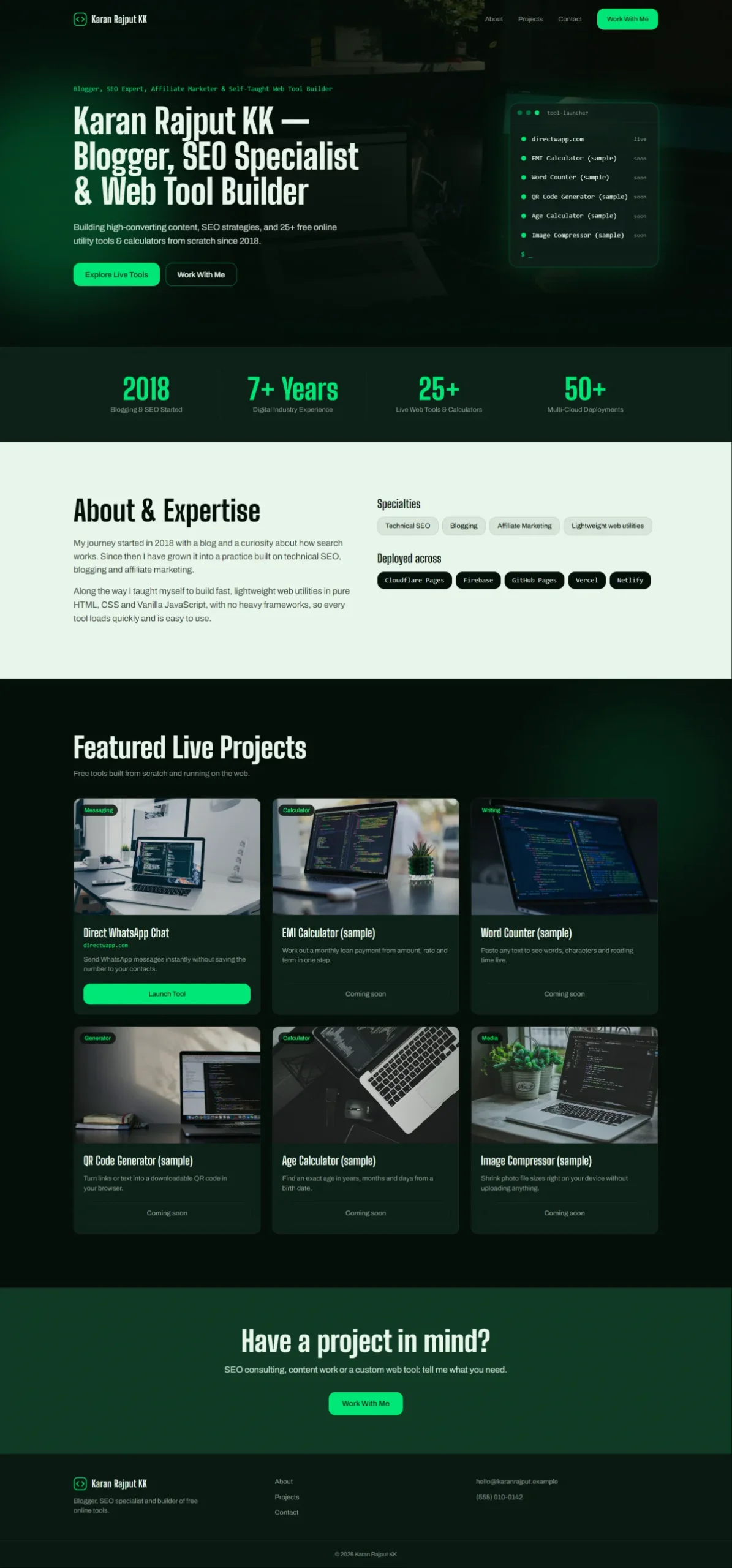
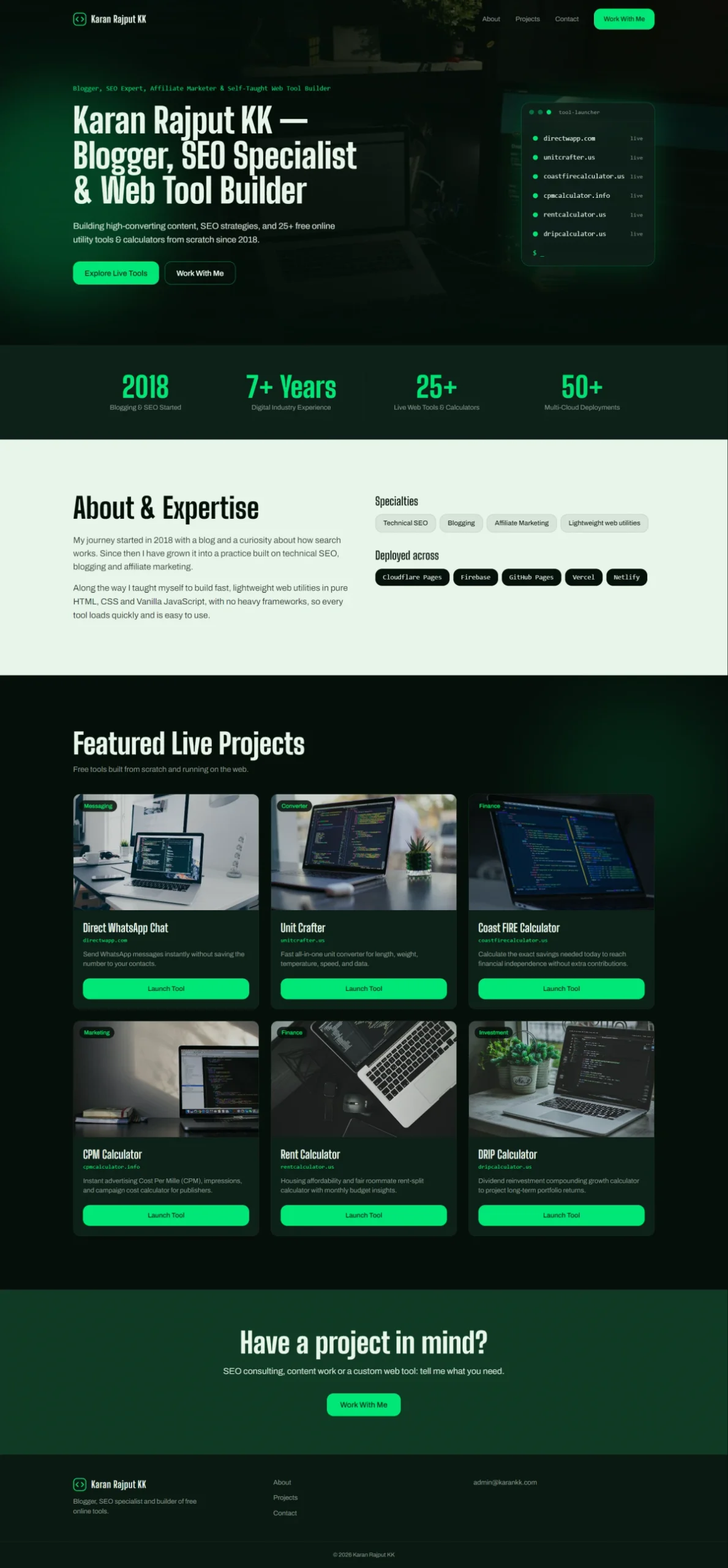
The layout came out well. Dark green background, bright green buttons, a hero with my name, a stats bar, an About section and a grid of project cards.
The content was the problem. Only Direct WhatsApp Chat had a Launch Tool button. The other five cards were labelled “(sample)”: EMI Calculator, Word Counter, QR Code Generator, Age Calculator and Image Compressor, each marked “Coming soon”. The footer had an example email address and a dummy phone number.
The builder’s own message explained that sample tools are clearly labelled and a launch button appears only where a real URL exists. I prefer that to dead links. But it means you can’t publish a first version blindly. Read every card.
One Chat Edit Fixed the Placeholders
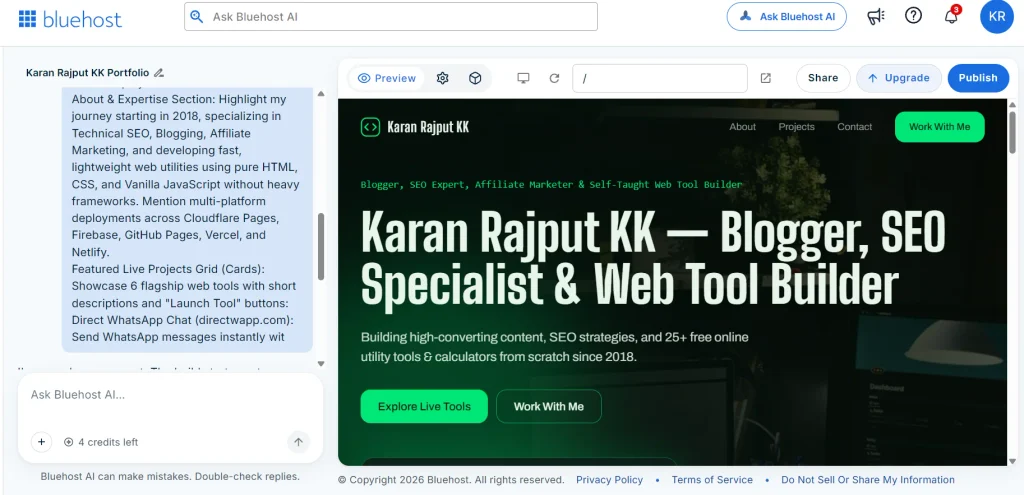
Credits first. I started with 5 credits left. After the first build, the counter showed 4.
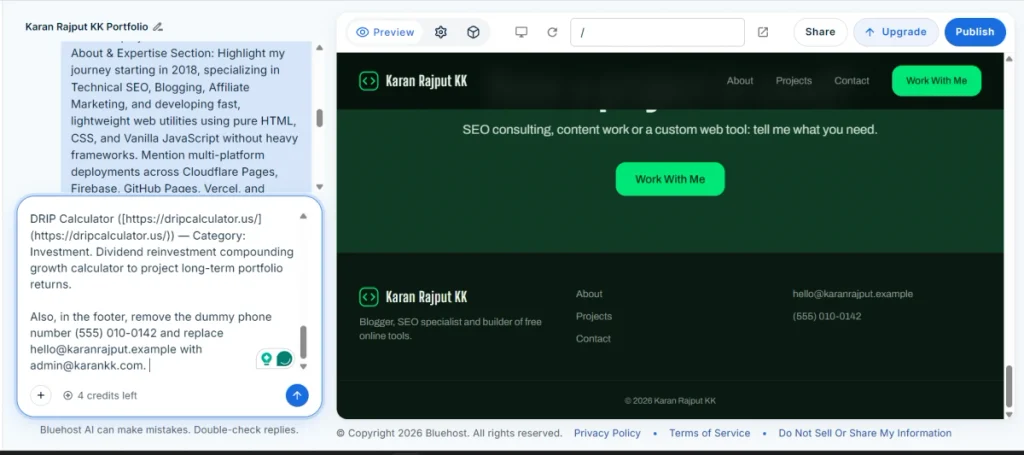
For the fix I sent one message. It listed the five real tools, each with a category, a one-line description and the full https address. In the same message I asked it to replace the dummy phone number and example email with my real email.
The builder replied that the five sample cards were now Unit Crafter, Coast FIRE Calculator, CPM Calculator, Rent Calculator and DRIP Calculator, each with its own category and Launch Tool button. It said it hadn’t changed the design or layout. The page after the edit matched that. The counter dropped to 3.
Pro observation: batch your changes. Two fixes in one message cost me one credit. On a plan with 5 credits a day, that matters.
I can’t tell you why only one project got a link the first time. When I resent the list with full addresses, categories and descriptions, all five were fixed in one go.
The box under the chat says “Bluehost AI can make mistakes. Double-check replies.” Take that seriously. Click every Launch Tool button before you share your link.
Publishing on the Free Plan: What You Get
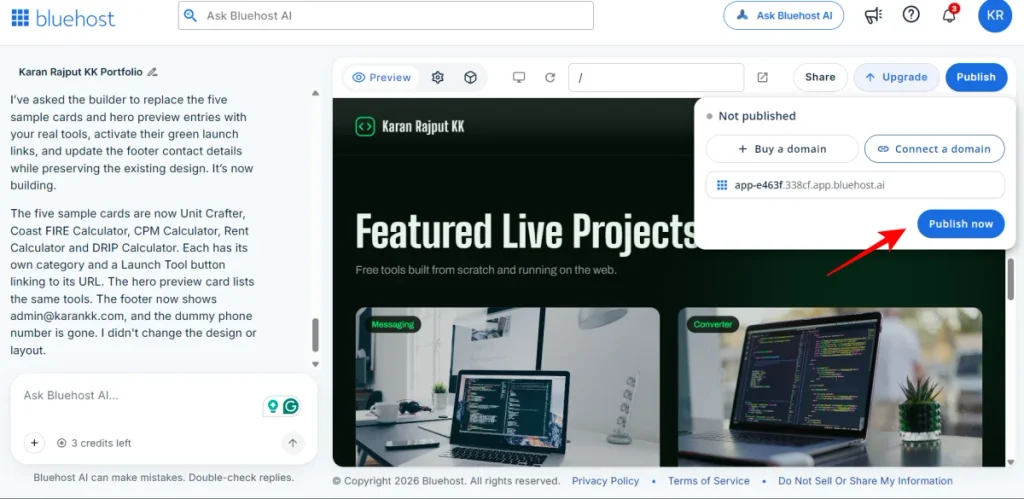
Publishing took three clicks. I hit Publish at the top right. A small panel showed “Not published”, two buttons (Buy a domain and Connect a domain) and a ready-made address. I clicked Publish now.
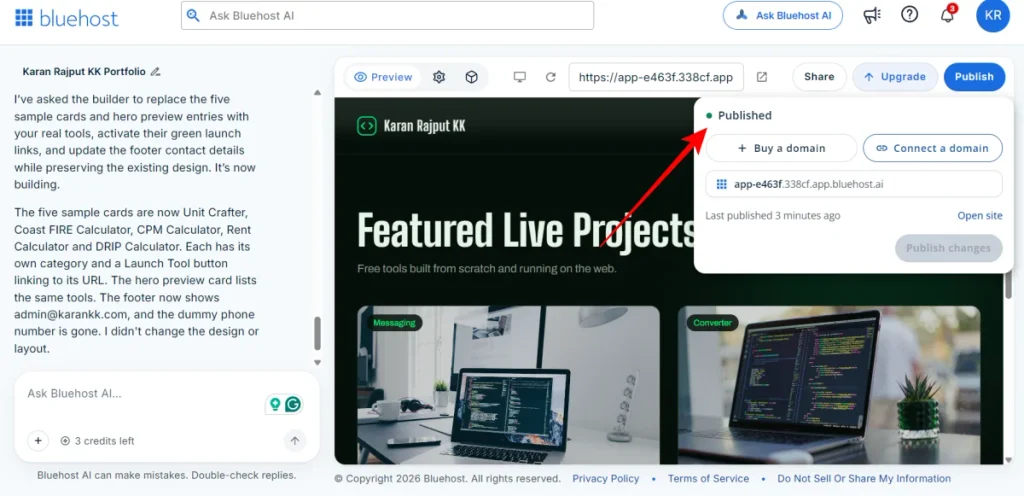
A “Publishing…” message said it may take a moment and that I could close it and keep working. After that the panel changed to “Published”, with Open site and Publish changes buttons.
The address was app-e463f.338cf.app.bluehost.ai. It’s assigned automatically, and I didn’t find any option to change the name. That’s fine for a test site or a portfolio you share on request. It’s not something you’d print on a business card.
Your own domain needs a paid plan. Bluehost’s FAQ also says registering or renewing a domain is billed separately from the plan. I didn’t test the domain connection, so I can’t say how smooth it is.
Bluehost’s FAQ says edits show in a live preview, save automatically and stay private until you publish again. I reviewed my edit in the preview before I pressed Publish, so that matched.
How the Site Looked on My Phone
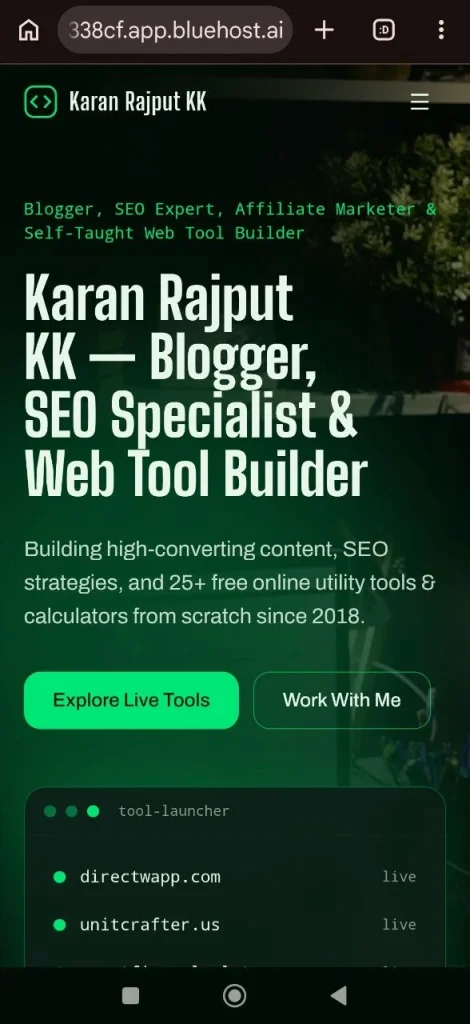
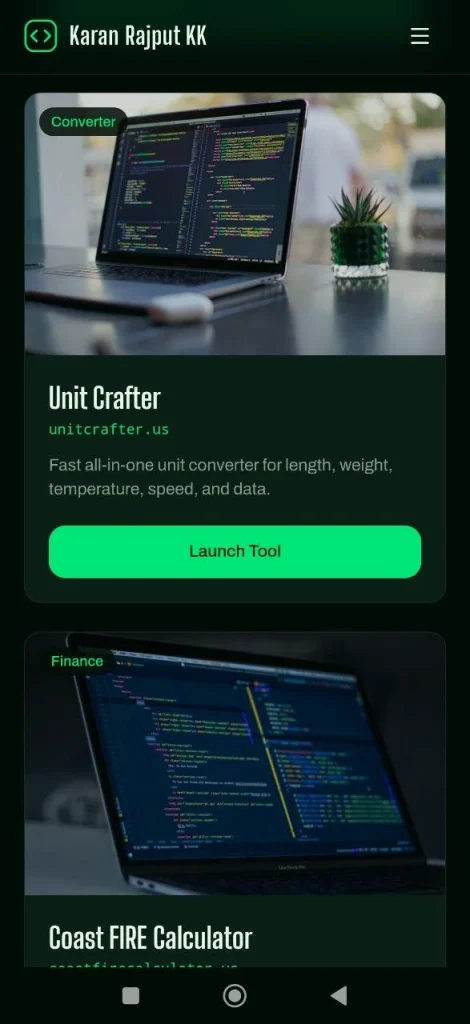
I opened the live address on my phone. The layout stacks into one column. The menu collapses into a hamburger icon with About, Projects, Contact and a Work With Me button. Each project card keeps its Launch Tool button.
I checked the builder’s desktop preview and my phone. I didn’t check a tablet.
What PageSpeed Insights Said About My Published Page
I ran the live address through PageSpeed Insights on 13 November 2026. Desktop was an emulated desktop run. Mobile was an emulated Moto G Power on slow 4G.
| Metric | Desktop | Mobile |
|---|---|---|
| Performance score | 99 | 87 |
| First Contentful Paint | 0.4 s | 2.2 s |
| Largest Contentful Paint | 0.8 s | 3.2 s |
| Total Blocking Time | 20 ms | 10 ms |
| Cumulative Layout Shift | 0.014 | 0.007 |
| Speed Index | 1.0 s | 5.3 s |
| Accessibility | 100 | 100 |
| Best Practices | 100 | 100 |
| SEO | 66 | 66 |
Desktop is excellent. Mobile is decent but slower: PageSpeed marked first paint, largest paint and Speed Index in orange. Layout shift is tiny on both, and blocking time is low, so the page doesn’t feel janky once it loads.
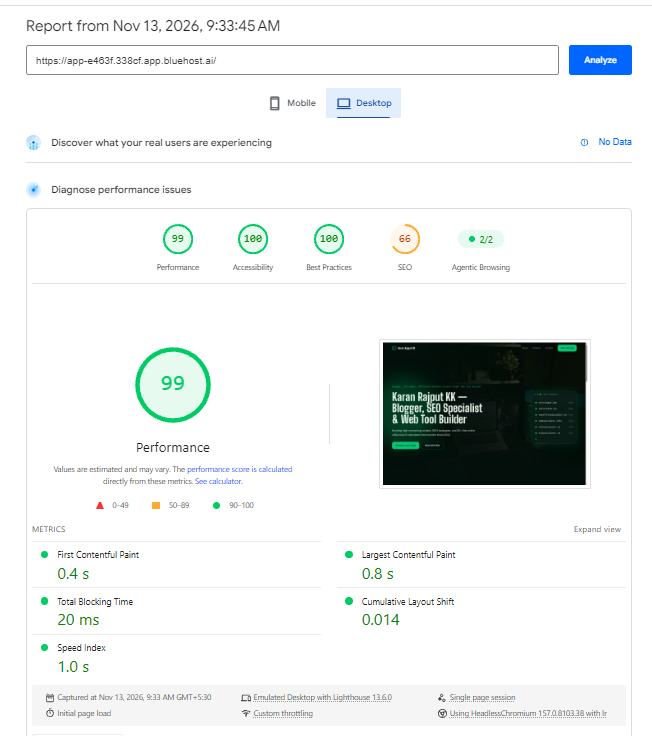
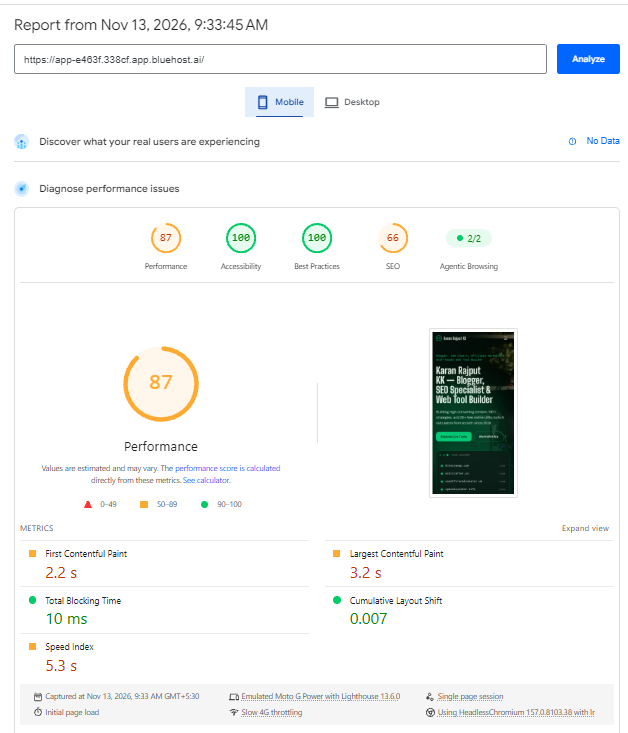
The things PageSpeed wanted fixed were render-blocking requests (about 170 ms on desktop, 790 ms on mobile), image delivery (about 509 KiB on desktop, 345 KiB on mobile), cache lifetimes (180 KiB) and about 92 KiB of unused JavaScript. It also listed two long main-thread tasks and missing source maps for large first-party JavaScript. I didn’t try to fix any of it. These are lab numbers, and PageSpeed showed no real-user data for a site this new.
The SEO score is the number to read carefully. Both reports scored SEO 66. The failed check was “Page is blocked from indexing”, with the note that crawlers need access to appear in search results. The other SEO checks passed.
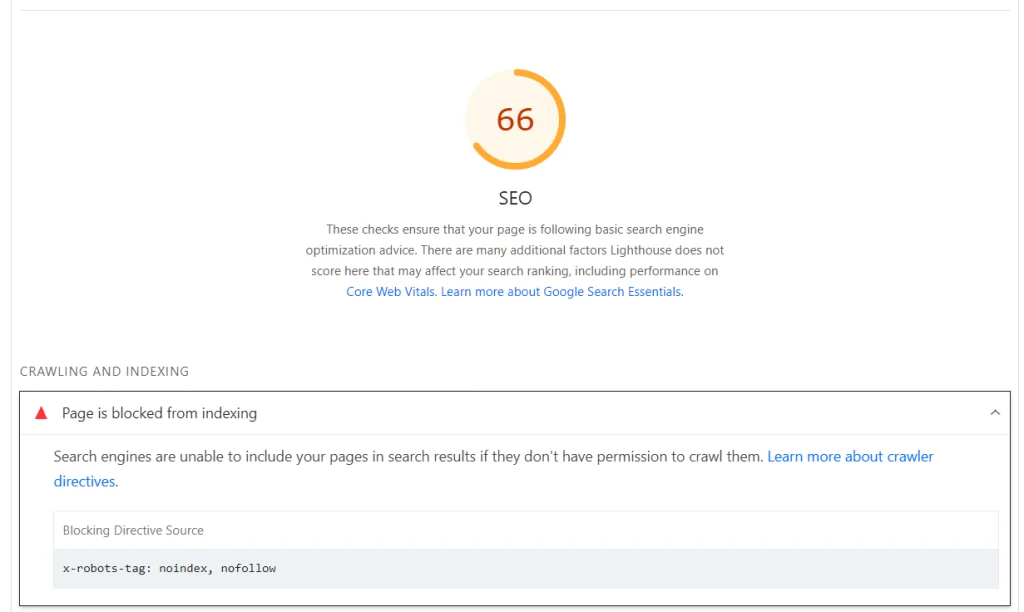
The report names the source: an x-robots-tag header set to “noindex, nofollow”. That tells search engines not to index the page or follow its links. I don’t know whether Bluehost sets it on every bluehost.ai address, only on the Free plan, or only until a custom domain is connected. I didn’t contact support to ask, so I won’t guess. Until I know, I wouldn’t plan organic traffic around a site on this kind of address.
Bluehost says the builder generates page titles, descriptions, headings and image alt text automatically. That’s useful. But a page that search engines can’t index can’t rank.
How Credits Worked in My Test
On the Free plan you get 5 credits a day, up to 30 a month. One message uses one credit. My counter went 5, then 4 after the first build, then 3 after one chat edit.
So a full first build plus one fix used 2 of my day’s 5 credits. Five messages a day is enough to build and polish a small site. It’s tight if you tweak things one by one.
Monthly plan credits and top-ups expire after 30 days. On-demand top-ups are listed under Lite. Bluehost says top-ups come in 50, 100 or 200 credits, from $15.
What happens at zero? Bluehost says hosting never uses credits. Only new changes pause, and the published site stays online. I never ran my account down to zero, so that’s Bluehost’s statement, not something I tested.
Bluehost AI Builder Pricing at a Glance
Prices are in USD and billed monthly on paid plans. Hosting is included on every plan. Pricing may change, so check Bluehost’s official page before you buy.
| AI Builder Free | AI Builder Lite | AI Builder Standard | AI Builder Pro | |
|---|---|---|---|---|
| Price | $0, no credit card | $20/mo | $40/mo | $80/mo |
| Credits | 5 a day, up to 30 a month | Up to 100 per month | 200 a month | 400 a month |
| Daily usage | Limited by the 5 daily credits | No limit on daily usage | Everything in Lite | Everything in Lite |
| Where it publishes | Bluehost subdomain | Custom domains | Everything in Lite | Everything in Lite |
| Extras listed | Forms and data storage, bookings and scheduling, user accounts and roles, admin panel | On-demand credit top-ups, remove the Bluehost badge, custom domains | Everything in Lite | Everything in Lite |
| Best for | Testing an idea or a first portfolio | A first site or app on your own domain | Businesses updating often | Managing several websites |
For testing, the Free plan is enough. Lite is the first plan that makes sense if you want your own domain or you edit often. Standard and Pro matter only if you update a lot or handle several websites. I haven’t tested any paid plan.
If you’re comparing “paid plans from $20/mo” against the Free plan, the real question is simple: do you need your own domain and more than 30 credits a month?
Pros and Cons After a Real Build
Pros
- One prompt gave a full layout. Hero, stats bar, About section, project grid and footer arrived in a single build.
- Chat edits are precise and cheap. One message replaced five placeholder cards and fixed my footer contact details.
- Desktop speed was strong. PageSpeed gave 99 for performance and 0.8 s for Largest Contentful Paint.
- The credit counter is transparent. I could watch it go from 5 to 4 to 3.
- Hosting is included and doesn’t use credits, according to Bluehost.
Cons
- The first version had placeholders. Five “(sample)” cards and dummy contact details needed a credit to fix.
- The address is automatic. I couldn’t rename app-e463f.338cf.app.bluehost.ai.
- PageSpeed flagged my page as blocked from indexing. The report points to a noindex, nofollow header, and I don’t know why it’s there.”
- Mobile is slower than desktop. Performance was 87 and Largest Contentful Paint 3.2 s, with about 790 ms of render-blocking requests.
- My prompt asked for a contact form. The page I got has a Work With Me button and an email in the footer, not a form.
- The Free plan caps you at 30 credits a month. Heavy editing pushes you towards Lite.
Who Should Skip Bluehost AI Builder
- Anyone selling products. AI Builder doesn’t support ecommerce yet.
- Anyone who needs a native Android or iOS app. Apple App Store and Google Play apps aren’t supported at this time.
- People who live inside the WordPress plugin ecosystem. Bluehost’s own FAQ says AI Builder suits owners who want no WordPress knowledge, while Bluehost WordPress AI Builder comes with WordPress hosting plans.
- Developers who want hand-coded control. I build my tools in plain HTML, CSS and JavaScript. For those, I’d still write the code myself.
- Anyone counting on search traffic from day one. See the indexing flag above.
Selling Products? Look at Bluehost AI Store Instead
If your plan is an online store, Bluehost points you to a different product: Bluehost AI Store (I earn a commission). I haven’t tested it, so here are only the facts from its page.
It offers a 14-day free trial with no credit card required, and “Only $13.59/mo after trial”. The paid plans listed are Sell Online at $13.59/mo, Sell Online Grow at $24.99/mo and Sell Online Scale at $34.99/mo. Bluehost says it’s built on WordPress and WooCommerce.
After You Publish: What I’d Do Next
- Click every Launch Tool button. AI can make mistakes, and Bluehost says so itself.
- Check how people can contact you. Don’t assume the form you asked for exists.
- Review the preview before you publish again. Edits stay private until you press the publish button.
- Decide about a domain. Connecting a domain needs a paid plan. Registering or renewing one is billed separately.
- Run PageSpeed Insights. Check the SEO section especially. If you see the same indexing flag, ask Bluehost’s 24/7 support what it means.
One mistake to avoid: spending credits on tiny tweaks one by one. Collect your changes and send them together.

Bluehost AI Builder — Free Plan
Price: $0 to start, no credit card” (paid plans from $20/mo)
Describe your website in your own words, refine it by chatting and publish live on a Bluehost subdomain. Hosting included on every plan.
Disclosure: I earn a commission.
Frequently Asked Questions
Is Bluehost AI Builder free to use?
The AI Builder Free plan costs $0 and needs no credit card. You get 5 credits a day, up to 30 a month, and you publish on a Bluehost subdomain. Paid plans from $20/mo add more credits and let you connect your own domain.
Do I need a credit card to try it?
No. Bluehost says you can start free with no credit card, and I wasn’t asked for one while signing up with my email. You can also sign up with Google, Apple or GitHub. Paid plans are added later by upgrading inside the builder.
What happens when my credits run out?
Only new changes pause. Bluehost says hosting never uses credits, so a published site stays online until credits refresh or you top up. I didn’t run my account down to zero, so this is Bluehost’s statement, not my test. Monthly credits and top-ups expire after 30 days.
Can I use my own domain on the free plan?
No. The Free plan publishes on a Bluehost subdomain. Connecting your own domain needs Lite ($20/mo), Standard or Pro. Registering or renewing a domain is billed separately. My test site got an automatic address and I couldn’t rename it.
Can I build an online store or a mobile app with it?
Not a store. Bluehost AI Builder doesn’t support ecommerce, and Bluehost points store owners to Bluehost AI Store. Native apps for the Apple App Store or Google Play aren’t supported at this time. It does build business sites, portfolios, landing pages, blogs and web apps.
Will a site built with Bluehost AI Builder rank on Google?
In my test, PageSpeed Insights flagged my page as blocked from indexing because of a noindex header. I don’t know why it’s set.
Is there real human support?
Bluehost says real people help 24/7 during the build and after launch, with changes, domains, email and hosting. Bluehost Professional Services is a separate paid service for bigger jobs. I didn’t contact support during my test.
Final Verdict
Bluehost AI Builder did what it promised in my test: one prompt, one solid first version, one chat edit, then a live site. The weak spots were placeholder content in the first draft, a subdomain I couldn’t rename and an indexing flag I can’t explain yet.
For a portfolio, a landing page or a quick web app idea, the free plan is a fair place to start. Selling products or shipping a native app? Look elsewhere.
If you want to try it, start from Bluehost AI Builder (I earn a commission) and write your prompt like a brief, not a wish.
Related Posts