OttoKit — formerly known as SureTriggers — is one of the better WordPress-focused automation tools I’ve come across. It’s built by the same team behind Astra, SureForms, and ZipWP, so the product has real backing behind it.
Right now, OttoKit is running a lifetime deal with up to 50% off across all plans. If you’ve been looking for a Zapier alternative that actually understands WordPress — this is worth your attention.
Here’s the full breakdown before you decide.
Quick Deal Snapshot
OttoKit Lifetime Deal — Active Now
- 🔥 Up to 50% off on lifetime plans
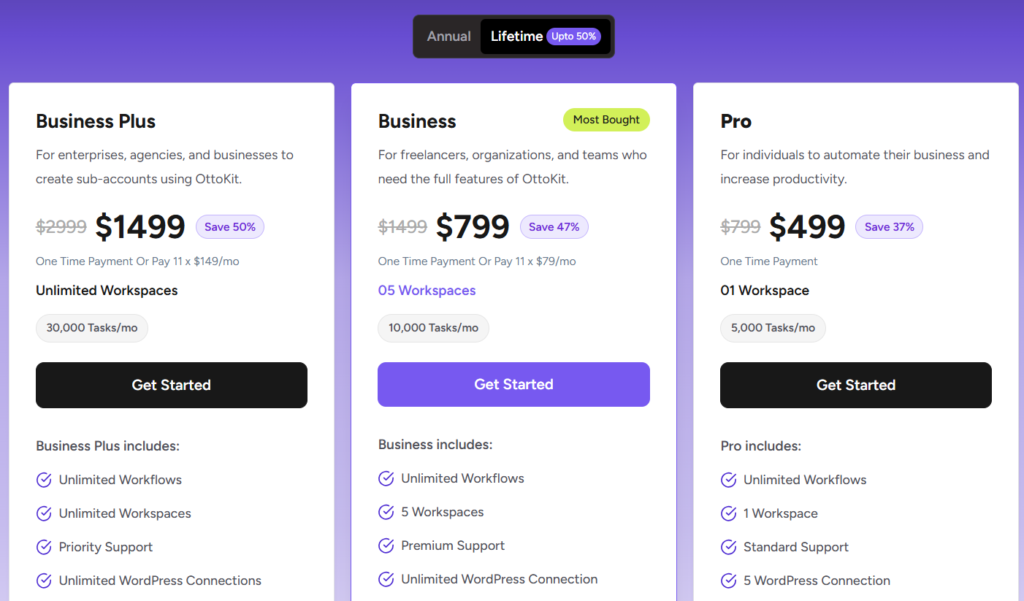
- Pro plan:
$799→ $499 (save 37%) - Business plan:
$1,499→ $799 (save 47%) ⭐ Most Popular - Business Plus:
$2,999→ $1,499 (save 50%) - Free plan available — no credit card required
- One-time payment (or split into 11 installments)
- 14-day money-back guarantee, no questions asked
- Validity: Limited-time pricing — not a permanent offer
Coupon Code: Auto-Applied on Click 👇
This post contains affiliate links. If you purchase through our links, we may earn a small commission at no extra cost to you. Thank you for your support!OttoKit Lifetime Plans — What Each One Gets You
Let’s go plan by plan, because the differences matter depending on your use case.
Pro — $499 (One-Time)
Built for individuals and solo operators who want to automate their own business workflows.
- 1 Workspace
- 5,000 tasks/month
- Unlimited Workflows
- 5 WordPress Connections
- 5,000 Table Rows
- 5 Forms
- AI Agents + MCP Server
- Standard Support
- Data retention: 15 days
- No Human in the Loop
- No Branch or Path logic
The Pro plan is decent for a single site setup, but the missing Branch/Path logic is a real limitation if you want conditional workflow routing. That’s something worth noting before you commit.
Business — $799 (One-Time) — Most Bought
This is the one most freelancers and small agencies will land on.
- 5 Workspaces
- 10,000 tasks/month
- Unlimited Workflows + WordPress Connections
- 20,000 Table Rows
- 10 Forms
- AI Agents, MCP, and Human in the Loop
- Branch + Path logic included
- Premium Support
- Data retention: 30 days
- API Integration included
The jump from Pro to Business unlocks Branch, Path, Human in the Loop, and API integration — these are not minor upgrades. If you manage even two or three client sites, Business is where you actually want to be.
Business Plus — $1,499 (One-Time)
For agencies or teams managing multiple client accounts under one roof.
- Unlimited Workspaces
- 30,000 tasks/month
- Unlimited WordPress Connections
- 50,000 Table Rows
- 20 Forms
- Everything in Business, plus Priority Support
- Bonus: SureForms Team (12 months, worth $179) + ZipWP Pro (3 months, worth $56) — total bonus value: $235 FREE
The Business Plus bonus bundle is exclusive — you won’t get SureForms or ZipWP on the lower plans.
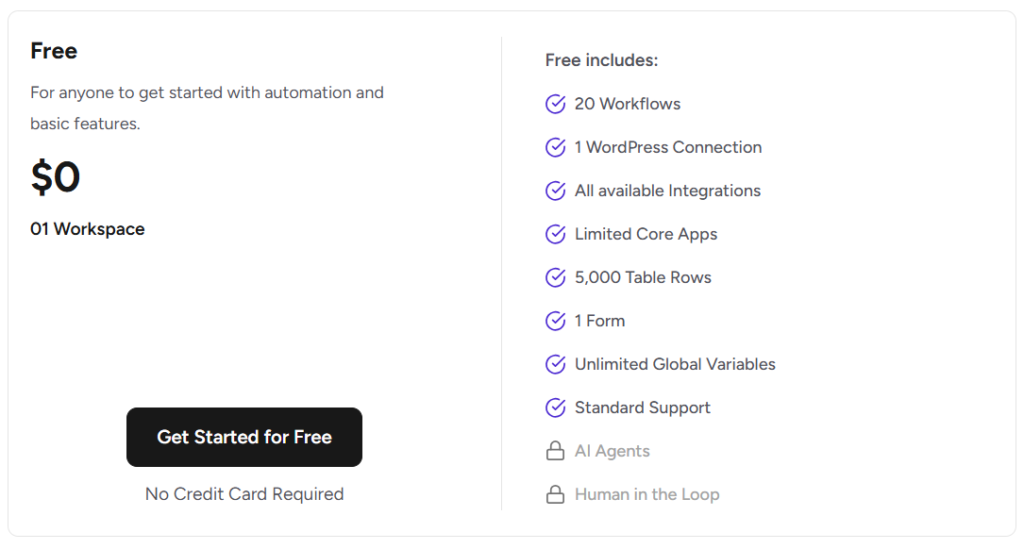
Free Plan — $0
Yes, there’s a genuinely usable free tier.
- 20 Workflows
- 1 WordPress Connection
- All available integrations (1,000+ apps)
- 5,000 Table Rows
- 1 Form
- Standard Support
- No AI Agents, no Human in the Loop
For someone just getting started with automation or testing OttoKit before buying, this is a solid starting point. I’ve written a detailed breakdown of everything included in the OttoKit Free Plan if you want to check what’s available before committing to a paid tier.
How to Claim the OttoKit Lifetime Deal
No special coupon code needed. The discounted pricing is applied automatically on the checkout page.
- Click → Get OttoKit Lifetime Deal
- Choose your plan (Pro / Business / Business Plus)
- Complete checkout — one-time payment or 11-installment option
- Set up your OttoKit account
- Install the OttoKit connector plugin on your WordPress site
- Start building workflows
The installment option is a nice touch — Business plan, for example, breaks down to $79/month × 11 instead of $799 upfront.
What You Actually Get With OttoKit
Beyond the plan tiers, here’s what the platform itself offers across all accounts.
1,200+ App Integrations Connect with HubSpot, Mailerlite, Trello, WooCommerce, and hundreds more. The WordPress-native integration is handled through their dedicated connector plugin — you don’t need to jump between dashboards.
Pre-Built Workflow Templates (Recipes) OttoKit has thousands of automation templates ready to import with a single click. This saves a significant amount of setup time, especially on common workflows like lead capture → CRM sync → follow-up email sequences.
AI Agents + MCP Server This is where OttoKit is moving forward. AI Agents let you build automated processes that can make decisions within a workflow. MCP (Model Context Protocol) enables seamless connection between AI models and external data — available even on the free plan.
Human in the Loop Available on Business and above. This lets you pause a workflow mid-execution and require a human approval before proceeding. Useful for anything that involves sending something irreversible — payments, mass emails, account changes.
No-Code Workflow Builder Visual, drag-and-drop builder. From what I observed while setting this up on a staging environment, the interface is genuinely clean — no unnecessary clutter, and the trigger → action flow is easy to follow even for non-technical users.
Where It Falls Short
OttoKit is a strong tool, but let me be direct about what it doesn’t do well.
Task limits are per month, not unlimited. Even on Business Plus, you’re capped at 30,000 tasks/month. Heavy automation users running large e-commerce or SaaS workflows could hit this ceiling. Check your current monthly automation volume before committing.
Human in the Loop is locked behind Business. If you’re on the Pro plan and need conditional human approval in a workflow, you’re out of luck. This is one feature that should arguably be available lower down.
Branch and Path logic are also absent from Pro. These are core to building anything beyond simple linear automations. Losing them on the entry paid plan feels like an odd decision.
Annual plan users can’t get lifetime pricing directly. You need to go through a prorated credit process to migrate — worth knowing before you renew an annual plan.
OttoKit vs Zapier vs Make — Quick Comparison
| Feature | OttoKit (Business) | Zapier (Professional) | Make (Core) |
|---|---|---|---|
| Pricing | $799 lifetime | ~$49/month ($588/yr) | ~$9/month ($108/yr) |
| WordPress-Native | Yes — dedicated plugin | No native integration | No native integration |
| Free Plan | Yes — 20 workflows | Yes — limited | Yes — 1,000 ops/month |
| AI Agents | Yes | Limited | No |
| Human in the Loop | Yes | No | No |
| Support Type | Human, quick response | AI-first, hard to reach | Slow, limited help |
| Reliability Notes | Stable, retries built-in | Task misfires reported | Token/error issues noted |
| Refund Policy | 14-day money-back | No refunds | No refunds |
| Best For | WordPress-heavy workflows | Large enterprise teams | Budget-first users |
Post-comparison take: Zapier is genuinely expensive over 3–5 years — at $588/year, you’re paying more than OttoKit’s lifetime Business plan in a single year. Make is cheaper upfront but the ops-based pricing gets unpredictable fast as workflows scale. OttoKit makes most sense if your workflow automation is WordPress-centric and you want a one-time cost without surprise invoices.
For large enterprise teams already embedded in the Zapier ecosystem — OttoKit may not yet match that breadth. But for freelancers, WordPress agencies, and micro-SaaS operators, the value equation is clearly in OttoKit’s favor.
Who Should Buy This — And Who Should Skip It
Buy it if:
- You run one or more WordPress sites and want to automate repetitive tasks
- You’re tired of Zapier’s monthly billing or Make’s op-counting model
- You need AI Agents or Human in the Loop in your workflows
- You manage client sites and need separate workspaces
Skip it if:
- You run less than 5 automations per month — the free plan covers you
- Your workflows are entirely outside WordPress (no WordPress connections needed)
- You need 50,000+ tasks/month routinely — check with their team first
- You’re not ready to set up and manage workflows actively
After You Buy — Getting Started Right
A few practical things to do immediately after purchase:
- Install the OttoKit connector plugin on every WordPress site you plan to connect
- Set up your Workspaces — keep client sites in separate workspaces to avoid cross-contamination
- Import a Recipe for your most common workflow first — don’t start from scratch
- Enable Automation History & Data Logs — this saves you time when debugging later
- Set your data retention preference — Business/Business Plus users get 30 days; don’t ignore this setting
One thing I’d caution against: don’t try to build 10 workflows in week one. Start with one that saves you the most time, get it working reliably, then expand.
OttoKit Lifetime Deal: Limited Time Offer!
Deal: Up to 50% OFF
Coupon Code: Auto-Applied on Click 👇
Frequently Asked Questions
Is OttoKit really a lifetime deal or does it expire?
The lifetime deal means you pay once and keep access permanently — no recurring billing. However, the discounted pricing (up to 50% off) is a limited-time offer. The lifetime pricing itself doesn’t expire, but the discount window can close anytime.
Does OttoKit have a free trial?
There’s no traditional free trial, but the free plan is genuinely usable — 20 workflows, 1 WordPress connection, and access to 1,000+ integrations. That’s enough to test the platform meaningfully before upgrading.
Can I upgrade from Pro to Business later?
Yes. OttoKit allows plan upgrades. For lifetime plans, you can upgrade and pay the difference. For annual plans, proration credit is applied toward the upgrade cost.
Is OttoKit the same as SureTriggers?
Yes. OttoKit was rebranded from SureTriggers. The product, team, and infrastructure are the same — the rebrand was primarily a positioning move as they expanded beyond just triggers.
What happens if I exceed my monthly task limit?
Your workflows will pause until the next billing cycle or until you upgrade to a higher plan. You won’t lose data, but active automations will stop running until tasks reset.
Is there a money-back guarantee?
Yes — 14 days, no questions asked. Sujay Pawar (co-founder) has personally guaranteed this on the pricing page.
Does OttoKit work with WooCommerce?
Yes. WooCommerce automation is one of the more common use cases — triggering workflows based on orders, refunds, new customers, and more. It works through the OttoKit WordPress connector plugin.
Bottom Line
OttoKit’s lifetime deal is one of the more straightforward value propositions in the WordPress tools space right now. $799 for the Business plan — lifetime — versus $588+ per year for comparable Zapier functionality is not a difficult calculation.
The Business plan is the sweet spot for most people. Pro is fine for solo users who don’t need conditional logic. Business Plus makes sense for agencies managing multiple clients.
If WordPress automation is part of how you run your business, this deal is worth locking in before the discount closes.