Astra is one of the most used WordPress themes out there, and for good reason. But the pricing page can get confusing fast — annual vs lifetime, 3 sites vs 1000, toolkit plans vs basic Pro. If you’ve been trying to figure out which plan gives you the best value, this breakdown is for you.
I’ll go through every plan, compare costs, and tell you exactly which one to pick based on your situation.
Quick Answer: The Business Toolkit at $159/yr (or $699 lifetime for 3 sites) is where the real deal is. It bundles hosting, premium Elementor addons, page building blocks, and bonus tools — at a price that beats buying them separately. Astra Pro at $69/yr works if you just need the theme.
Quick Deal Snapshot
WP Astra Lifetime Deal — Limited Time Pricing
- 💰 Best Value: Business Toolkit at $699 one-time (3 sites) — Save 36%
- 📅 Annual Option: Business Toolkit at $159/yr for 3 sites
- 🌐 1000 Sites Lifetime: Business Toolkit at $999 one-time
- ✅ Includes: Hosting + OttoKit Pro + SureForms + SureFeedback + Template Exporter
- 🔒 Guarantee: 14-day money-back, no questions asked
- ⚠️ Note: Introductory pricing — renewals at full price
Coupon Code: Auto-Applied on Click 👇
This post contains affiliate links. If you purchase through our links, we may earn a small commission at no extra cost to you. Thank you for your support!Astra Pricing Plans at a Glance (2026)
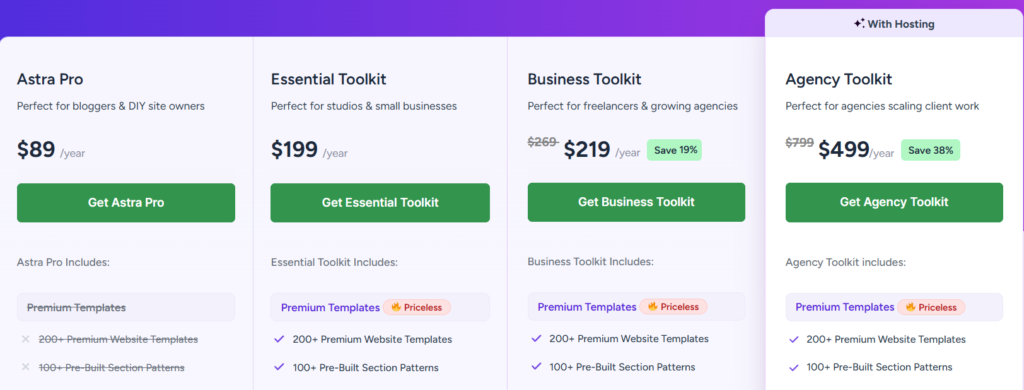
Astra offers two subscription modes — Annual and Lifetime — and two site-count tiers: 3 websites or 1000 websites. Here’s what the pricing looks like right now:
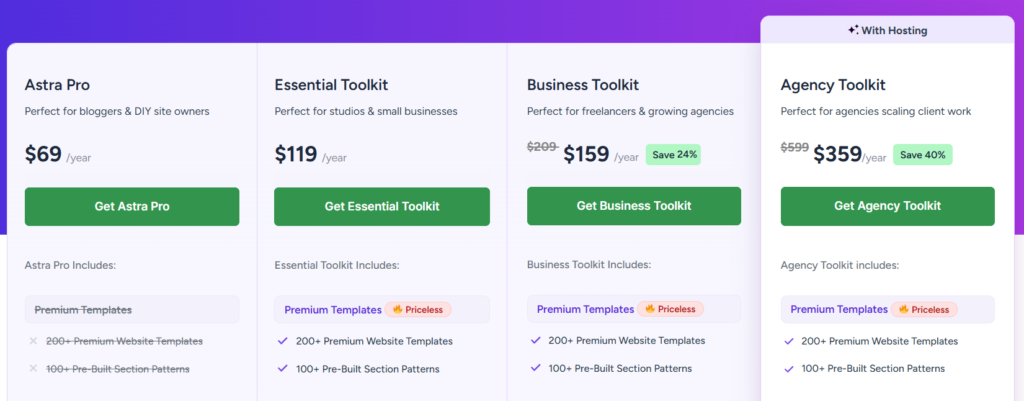
Annual Plans — 3 Websites
| Plan | Price | Best For |
|---|---|---|
| Astra Pro | $69/yr | Solo bloggers, DIY site owners |
| Essential Toolkit | $119/yr | Studios, small businesses |
| Business Toolkit | $159/yr (Save 24%) | Freelancers, growing agencies |
| Agency Toolkit | $359/yr (Save 40%) | Agencies managing client work |
Annual Plans — 1000 Websites
| Plan | Price | Best For |
|---|---|---|
| Astra Pro | $89/yr | High-volume personal builds |
| Essential Toolkit | $199/yr | Multi-project studios |
| Business Toolkit | $219/yr (Save 19%) | Freelancers with large client base |
| Agency Toolkit | $499/yr (Save 38%) | Scaling agencies |
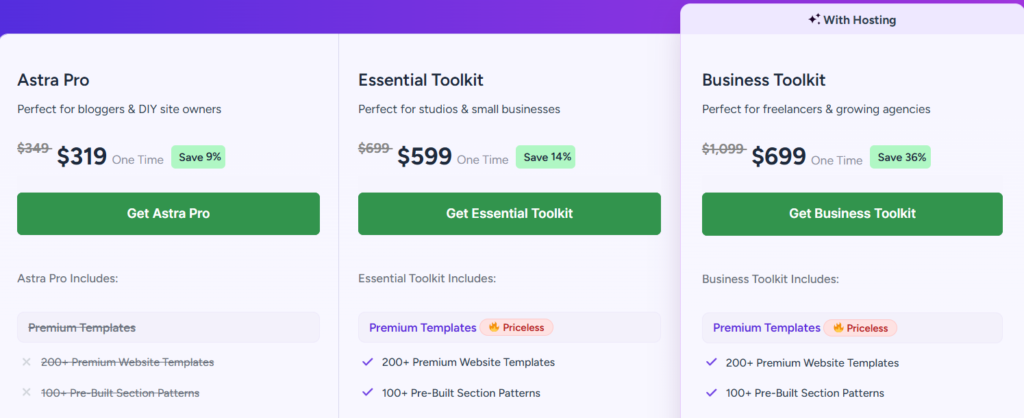
Lifetime Plans — 3 Websites
| Plan | Price | Savings |
|---|---|---|
| Astra Pro | $319 one-time | Save 9% (was $349) |
| Essential Toolkit | $599 one-time | Save 14% (was $699) |
| Business Toolkit | $699 one-time | Save 36% (was $1,099) |
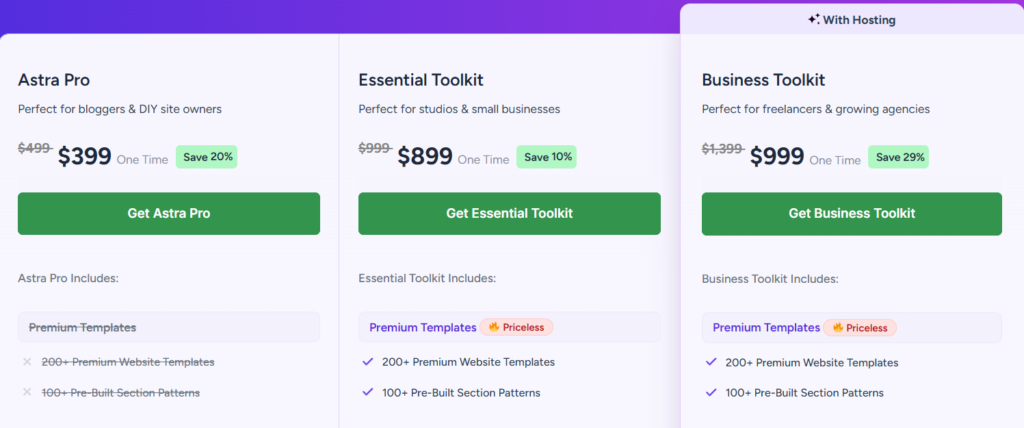
Lifetime Plans — 1000 Websites
| Plan | Price | Savings |
|---|---|---|
| Astra Pro | $399 one-time | Save 20% (was $499) |
| Essential Toolkit | $899 one-time | Save 10% (was $999) |
| Business Toolkit | $999 one-time | Save 29% (was $1,399) |
Important: All pricing is in USD. Introductory pricing applies — renewals are at full price. You can change plans or cancel anytime.
What You Actually Get in Each Plan
Let me go beyond the feature checklist and explain what matters in practice.
Astra Pro — The Baseline
At $69/yr for 3 sites, Astra Pro gives you the core theme features: advanced design and typography controls, custom page headers, sticky and transparent headers, rich mega menus, mobile flyout menus, drag-and-drop footer builder, built-in schema and breadcrumbs, WooCommerce layout controls, and custom archives and 404 pages.
What it doesn’t give you: 200+ premium templates, 100+ pre-built section patterns, or any of the bundled plugins.
From a performance standpoint, Astra Pro is impressively light. On a client project I set up last year, the theme itself added virtually no render-blocking scripts — everything loaded cleanly, and Core Web Vitals stayed healthy even without aggressive caching. That’s rare for a feature-rich theme.
One limitation worth knowing: Astra Pro doesn’t include the agency white-labeling system or VIP priority support. If you’re delivering client sites, that matters.
Essential Toolkit — The Template Unlock
At $119/yr (annual, 3 sites) or $599 lifetime, the Essential Toolkit adds:
- 200+ Premium Website Templates (marked as “Priceless” — genuinely good starter kits)
- 100+ Pre-Built Section Patterns
- Ultimate Addons for Elementor (full suite — social proof widgets, conversion widgets, form displays, WooCommerce widget suite)
- Advanced Page Building Blocks (layout blocks, media/motion blocks, lead gen blocks, dynamic content blocks)
The Elementor addons alone are worth mentioning separately. The WooCommerce widget suite and conversion-focused widgets are things you’d otherwise pay separately for through another plugin. If you use Elementor heavily, this tier starts to make financial sense quickly.
The Essential Toolkit still doesn’t include hosting infrastructure, the Astra Template Exporter, or the bonus automation tools.
Business Toolkit — Where the Deal Gets Real
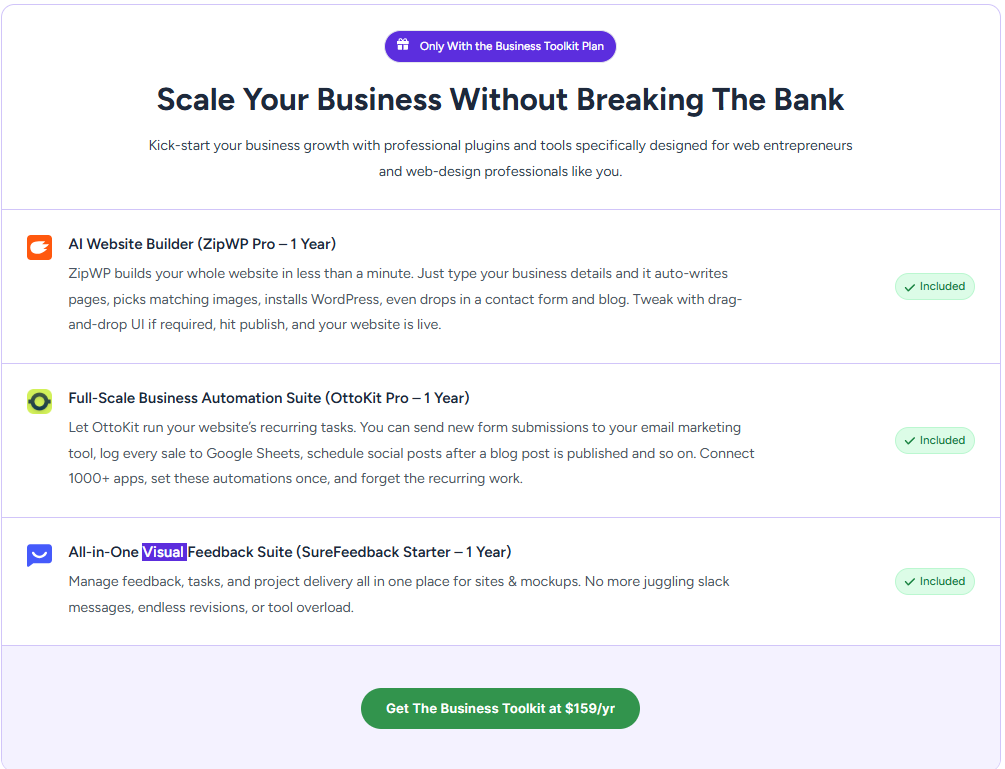
🎁 4 Premium Tools Included Free — ZipWP Pro + OttoKit Pro + SureForms + SureFeedback (Total value $500+)
This is the plan most serious WordPress builders should be looking at. At $159/yr for 3 sites (or $699 lifetime), it includes everything in Essential plus:
Hosting & Infrastructure (Included):
- Host up to 1 website
- 10 GB SSD Storage
- 5 Sandbox Sites
- 5 AI Generated Sites Per Day
- Free Domain (up to $14)
- 14-Day Backup Retention
Template Distribution Suite (Astra Template Exporter):
- Instant Full-Site Packaging
- Scalable Distribution & Reselling
Bonus Tools:
- AI Website Builder — ZipWP Pro (1 Year): Type your business details and ZipWP auto-writes pages, picks images, installs WordPress, and drops in a contact form and blog — site live in under a minute.
- Full-Scale Business Automation Suite — OttoKit Pro (1 year): AI Agents, Unlimited Workflows, Multi-Site Connectivity Suite
- Form Builder Suite — SureForms Team (10 Sites): AI Form Builder, Quiz/Survey/Poll, Advanced Integrations
- All-in-One Visual Feedback Suite — SureFeedback Starter (1 year): 5 Active Sites & Mockups, Team Collaboration & Workspaces, Visual Feedback & Annotations
The VIP support upgrade is also here — 24/7 VIP Support with queue-skipping.
To be direct: OttoKit Pro alone (1-year) justifies a chunk of this pricing for anyone running client sites or automating workflows. I used a similar automation setup on an affiliate site to automate post-publishing social shares — the time savings were real.
These bonus tools come free with the Business Toolkit — you don’t pay separately for any of them. OttoKit Pro alone is worth the upgrade for anyone managing client sites.
Agency Toolkit — For Serious Client Shops
At $359/yr (or $499/yr for 1000 sites), the Agency Toolkit adds on top of Business Toolkit:
- 20 Sandbox Sites (vs 5 in Business)
- 10 AI Generated Sites Per Day (vs 5 in Business)
- Everything else carries over
For agencies doing high-volume client delivery, the AI site generation bump is meaningful. For a solo freelancer or small studio, Business Toolkit is likely sufficient.
Annual vs Lifetime — The Break-Even Math
This is where most articles gloss over the real numbers. Let me be specific.
Business Toolkit (3 sites):
- Annual: $159/yr
- Lifetime: $699 one-time
- Break-even: ~4.4 years
If you plan to use Astra for 4+ years (which most established sites do), the lifetime deal saves you money from year 5 onwards. Given that Astra has been around since 2017 and has over 1.8 million users, longevity risk is low.
Astra Pro (3 sites):
- Annual: $69/yr
- Lifetime: $319 one-time
- Break-even: ~4.6 years
The savings percentage on Astra Pro lifetime (9%) is honestly underwhelming compared to Business Toolkit’s 36% discount. The lifetime deal math strongly favors the Business Toolkit tier if you’re going lifetime.
One thing to watch: Astra notes that introductory pricing applies and renewals are at full price. This means your $159/yr first-year rate may increase on renewal. Factor that into your decision — it makes the lifetime deal even more attractive if you want cost predictability.
Pros & Cons of Astra Pro Plans
Pros
- Genuinely lightweight codebase — Core Web Vitals performance is among the best in its class
- Works cleanly with Elementor, Gutenberg, and most major page builders
- Built-in schema markup and breadcrumbs — saves you an extra SEO plugin layer
- The Business Toolkit’s bonus stack (OttoKit, SureForms, SureFeedback) is legitimately useful for client work
- 14-day money-back guarantee with no questions asked
Cons
- Astra Pro lifetime savings (9%) is too small to get excited about — the value ladder only makes real sense at Business Toolkit
- Introductory pricing means renewal rates are unclear — budget accordingly
- The hosting included in Business Toolkit (1 site, 10 GB) is starter-grade; don’t replace your main hosting with it
- SureFeedback and OttoKit bonuses are 1-year subscriptions, not lifetime — you’ll need to renew or lose them after year one
Who Should Pick Which Plan
Go with Astra Pro ($69/yr) if you’re building one personal blog or a basic brochure site. You get full theme functionality without the extras. No reason to overpay.
Go with Essential Toolkit ($119/yr) if you use Elementor and need premium templates plus the widget suite. The Elementor addons alone make this worth it over Astra Pro.
Go with Business Toolkit ($159/yr or $699 lifetime) if you build client sites, run a growing agency, or want the complete ecosystem — automation, forms, feedback, hosting, and the template distribution system. This is the plan most WordPress professionals should buy.
Go with Agency Toolkit ($359/yr) only if you’re consistently delivering 10+ client sites a year and need the expanded sandbox and AI site generation capacity.
Skip Astra entirely if you need a highly opinionated block theme with zero customization overhead. In that case, something like Kadence Free or GeneratePress Free might serve you better for ultra-minimal builds.
Astra vs Alternatives — A Practical Comparison
| Astra Pro | GeneratePress | Kadence | |
|---|---|---|---|
| Starting Price | $69/yr | $59/yr | $99/yr |
| Lifetime Option | $319 (3 sites) | Not available | Not available |
| Premium Templates | 200+ (Essential+) | 40+ | 500+ |
| Elementor Integration | Full support | Partial | Full support |
| WooCommerce Tools | Advanced (Pro+) | Basic | Pro plan only |
| Built-in Schema | Included | Plugin needed | Plugin needed |
| White Labeling | Business+ only | Not available | Elite plan only |
| Active User Base | 1.8M+ | 400K+ | 400K+ |
For solo bloggers on a budget: GeneratePress at $59/yr is cheaper for basic builds — no lifetime option available, but the annual price is hard to argue with if you don’t need Elementor addons or WooCommerce tools.
For WooCommerce-focused builds: Astra’s pro WooCommerce tools (optimized shop layouts, quick view & cart, high-conversion checkout tools) are more developed than what Kadence or GeneratePress offer out of the box.
For design-heavy client work with lots of templates: Kadence has a larger template library. But Astra’s Business Toolkit ecosystem — with OttoKit automation and SureForms included — makes it a more complete operational platform for agencies.
Overall: Astra isn’t the cheapest option, but it’s one of the most complete if you’re building and managing WordPress sites professionally.
What to Do After Buying Astra
A few things worth setting up right away:
- Activate your license from Appearance → Astra Options → License. First step, easy to forget.
- Import a starter template that matches your site type — don’t start from scratch. Astra’s importer handles this in one click.
- Enable the Custom Header Builder and set it up before you start customizing individual pages. This saves hours of rework later.
- Turn on built-in schema under Astra Options → Schema — it handles Article, BreadcrumbList, and WebSite schema without an extra plugin.
- Check your Core Web Vitals after activating any bundled plugins (OttoKit, SureForms). Some automation tools add background JS. One project I worked on saw a small CLS impact from a form plugin loading before above-the-fold content — solved by adjusting load priority in the plugin settings.
WP Astra Lifetime Deal: – Limited Time Offer!
Deal: Up to 36% OFF
Coupon Code: Auto-Applied on Click 👇
Frequently Asked Questions
Is there a free version of Astra?
Yes. Astra Free is available from the WordPress.org repository. It includes basic design controls and is fully functional for simple sites. You won’t get premium templates, the advanced header/footer builder, or WooCommerce tools — but it’s a legitimate starting point. You can upgrade to any paid plan later without losing your settings.
Does the Astra lifetime deal include future updates?
Based on how Astra has historically handled lifetime plans — yes, updates are included for the life of the license. However, the bonus tools like OttoKit Pro and SureFeedback are 1-year subscriptions bundled in, not lifetime. After year one, those will need separate renewal.
Is Astra compatible with the new WordPress block editor (Gutenberg)?
Fully compatible. Astra supports both classic Elementor builds and full-site editing (FSE) with Gutenberg. The Advanced Page Building Blocks included in Essential Toolkit and above are Gutenberg-native blocks, not Elementor-only.
What happens if I need more than 3 sites on the Business Toolkit?
Switch the site-count toggle to 1000 websites. The Business Toolkit for 1000 sites is $219/yr or $999 lifetime — still reasonable for agencies or heavy freelancers managing many client properties.
Is the 14-day money-back guarantee genuine?
Based on Astra’s stated policy: 100% refund, no questions asked, within 14 days. PayPal, Stripe, Visa, Mastercard, and Amex are accepted. No reported issues in the WordPress community with this policy being honoured.
Can I upgrade from annual to lifetime later?
Astra allows plan changes. If you start on annual and want to switch to lifetime, check the upgrade pricing in your account — you typically pay the difference rather than the full lifetime price.
Which plan is best for a WooCommerce store?
Business Toolkit minimum. The WooCommerce-specific tools (optimized shop/catalog layouts, interactive quick view & cart, pro product page and gallery tools, smart upsells) are all available from Astra Pro upward — but the full conversion-focused stack works best when combined with the Elementor addons in Business Toolkit.
Bottom Line
Astra Pro at $69/yr is a solid entry point — lightweight, SEO-friendly, page builder compatible. But the real deal here is the Business Toolkit at $159/yr. For $40 more than Essential Toolkit, you get managed hosting, OttoKit automation, SureForms, SureFeedback, the template exporter system, and VIP support. For freelancers and small agencies, that’s a lot of operational value packed into one subscription.
If you’re going lifetime, the Business Toolkit at $699 for 3 sites makes more financial sense than the Astra Pro lifetime — the savings percentage is 36% vs 9%, and the break-even is under 5 years.
Start with the free version if you’re unsure. But if WordPress is part of your work — professionally or as a serious blogger — Astra’s ecosystem is worth being inside.