Black Friday is the one window where SaaS tools actually drop their guard, and DocHub is part of it. Right now there’s 25% off on both annual and monthly plans, running from November 16 to December 2, 2026.
There’s one catch most pages skip: it’s for new customers only. If you already pay for DocHub, this isn’t for you. It’s also a partner-only offer, so you won’t see it on DocHub’s own pricing page.
Below: how to claim it, what the deal covers, which plan makes sense, and who should skip DocHub entirely.
Quick Deal Snapshot [🟢STATUS: LIVE NOW]
Starts on: November 16, 2026 | Ends on: December 2, 2026
25% off DocHub plans for first-time buyers, claimed through a partner link.
- Discount: 25% off annual and monthly plans (new sales only)
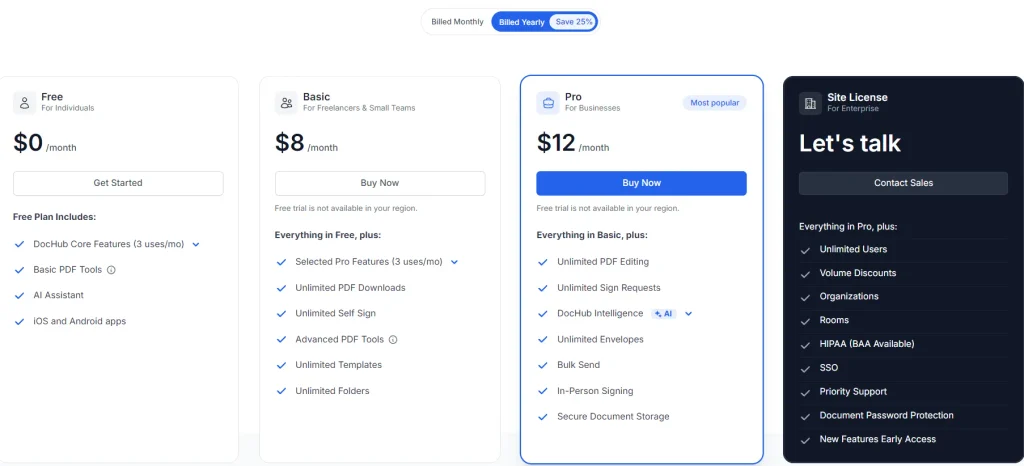
- Regular rates (pricing page, yearly billing view): Basic $8/month, Pro $12/month. The Free plan stays $0. The final amount after the 25% shows at checkout.
- Monthly billing: The 25% applies to the first 12 monthly payments, then the plan continues at the regular price.
- Not valid for: Existing subscribers, renewals, upgrades and plan changes.
Coupon: Not needed. The discount is auto-applied at checkout. 👇

This post contains affiliate links, and I earn a commission from them at no extra cost to you. Thank you for your support!Quick Answer
The 25% DocHub Black Friday discount applies to new annual and monthly plans bought through the promo link before December 2, 2026. No coupon code is needed. On monthly billing, the discount covers only the first 12 payments. Existing subscribers, renewals, upgrades and plan changes don’t qualify.
How to Claim the 25% Off (Step by Step)
Takes about two minutes. No code to copy.
- Open the DocHub promo link in the same browser you’ll use to check out.
- Pick your billing style. The yearly view on the pricing page shows Basic at $8/month and Pro at $12/month. Yearly billing carries DocHub’s own “Save 25%” tag against monthly billing. The Black Friday 25% is a separate partner offer, so check your order summary to see what your final figure looks like.
- Choose Basic or Pro. Not sure which? Skip to the plan section below before paying.
- Check the order summary. There’s no coupon box to fill. If you don’t see a discount, go back and reopen the promo link.
- Finish before December 2, 2026. After that, the offer is gone.
Read This Before You Pay: Who Actually Qualifies
This is where people get burned, so let’s be clear.
Qualifies:
- New customers buying their first DocHub plan, annual or monthly
Does not qualify:
- Existing subscribers
- Renewals
- Upgrades and plan changes
Two practical consequences follow.
On monthly billing, the discount covers the first 12 payments only. After that, you pay the regular rate. Set a calendar reminder around month 11.
On annual billing, renewals are listed as non-qualifying. Budget for the regular rate in year two.
Lowest price validation: I can’t verify a historical price log for DocHub, so I won’t claim this is the lowest it has ever been. What I can say is that this is a partner-only offer sitting on top of the rates on the official pricing page. Compare your order summary with that page, and you’ll see exactly what you’re saving.
Black Friday is a natural discount window for software in general. Whether DocHub runs anything similar later isn’t something I can promise, so don’t count on it.
What You Actually Get With DocHub
I’m Karan Rajput. After 7+ years of blogging, client WordPress work and SEO, most of the PDF pain I see isn’t fancy. It’s contracts, NDAs, onboarding forms and invoices that need editing, signing and sending.
That’s exactly the territory DocHub covers. Here’s what each tier gives you, based on the pricing page:
- Free: DocHub core features (shared limit of 3 uses/month), basic PDF tools, an AI assistant, and iOS and Android apps.
- Basic: Everything in Free, plus selected Pro features (3 uses/month), unlimited PDF downloads, unlimited self sign, advanced PDF tools, unlimited templates and unlimited folders.
- Pro: Everything in Basic, plus unlimited PDF editing, unlimited sign requests, DocHub Intelligence (AI), unlimited envelopes, bulk send, in-person signing and secure document storage.
- Site License: Custom pricing (“Let’s talk”) with unlimited users, SSO, Rooms, organizations and HIPAA (BAA available).
Integrations with Google Drive, Gmail, Dropbox, OneDrive and Google Classroom are listed on every plan, Free included.
Developer angle: DocHub is a web app, not a WordPress plugin. Unlike a PDF or form plugin, it adds no extra JS or CSS to your pages. If you’re guarding LCP and CLS on a client site, that’s a quiet advantage. Your paperwork lives off-site.
Pro observation: Many people buy Basic expecting to send documents to clients for signature. On the feature table, Send for Signature is a Pro feature. Basic gives you unlimited self sign. That’s the single most common mismatch I’d watch for.
What Works and What Doesn’t
Pros
- A usable Free plan. Basic PDF tools, an AI assistant and mobile apps cost nothing, so you can test before paying.
- Signing and sending in one plan. Pro bundles unlimited sign requests, envelopes, bulk send and in-person signing, so you don’t need a separate e-sign tool.
- Integrations on every tier. Google Drive, Gmail, Dropbox, OneDrive and Google Classroom aren’t locked behind Pro.
- Security basics on all plans. SOC2 Type II, GDPR and audit trail are listed across tiers.
Cons
- Basic can’t send signature requests. If clients need to sign, you’re forced into Pro.
- The discount is temporary. Monthly plans get 25% off only for the first 12 payments, and renewals aren’t covered.
- Free and Basic share a 3 uses/month cap. That limit applies to core and selected Pro features, and a busy week eats through it fast.
- HIPAA needs the Site License. Pro doesn’t include BAA availability, and Site License pricing isn’t public.
Which Plan Is Worth the Discount?
Here’s how the three self-serve tiers differ on real limits:
| What you care about | Free | Basic | Pro |
|---|---|---|---|
| Core and Pro-level features | DocHub core features, 3 uses/month | Selected Pro features, 3 uses/month | Full access |
| PDF editing | Basic PDF tools | Advanced PDF tools, unlimited downloads | Unlimited PDF editing |
| Signing | Not listed | Unlimited self sign | Unlimited sign requests, in-person signing |
| Team and collaboration | 2 on document collaboration | 2 organizations, 5 team members | Organizations and team members included |
| Folders | 3 folders | Unlimited folders, private folders | Unlimited folders, public documents, shared folders |
| Extras | Not offered | Not offered | Bulk send, document password protection, SSO for 5 domains |
| Best for | Occasional edits | Freelancers editing and signing their own files | Anyone sending documents out for signature |
Reading the table: Free is a trial run, not a daily driver. Basic fixes the usage cap and covers a solo freelancer’s own paperwork. Pro matters the moment other people need to sign, or when you’re sending documents in volume.
The call: For a freelancer who edits and signs their own PDFs, go Basic, because unlimited self sign and downloads remove the 3-use ceiling. If you send contracts for clients to sign, go Pro, because Send for Signature isn’t in Basic. For anything needing HIPAA, neither fits. You’d need the Site License.
Adobe Acrobat and Smallpdf are the usual names people weigh DocHub against. I’m not comparing their pricing here since I haven’t verified current numbers, so check their official sites.
Where DocHub Falls Short (and Who Should Skip It)
DocHub is good at everyday document work. It isn’t for everyone.
Skip it if:
- You’re an existing subscriber. The deal won’t apply to you.
- You work under HIPAA. Only the Site License lists BAA availability.
- You edit a PDF once or twice a month. The Free plan’s 3 uses might be enough.
- You want a decision made purely on the cheapest sticker price. The partner discount helps, but it fades after the first term.
One more thing: the pricing page notes that the free trial isn’t available in some regions. I’d test on the Free plan first if you’re unsure.
What to Do After Buying
- Connect your storage. Link Google Drive, Gmail, Dropbox or OneDrive first. That’s where your documents already live.
- Set up folders. Basic and above include private folders. Separate client files from personal ones from day one.
- Build templates. Unlimited templates are included from Basic. Turn your repeat documents (NDAs, quotes) into templates.
- Check your order summary and save the receipt. You’ll need it if the discount looks off.
- Set a reminder before the discounted period ends. Around month 11 on monthly billing, or before your annual renewal.
Mistakes to avoid:
- Buying Basic and then discovering you can’t send for signature.
- Forgetting that renewals and plan changes sit outside the deal.
- Upgrading mid-term and assuming the discount follows you. Upgrades are listed as non-qualifying.
Discount– Limited Time Offer!
Deal: Up to 25% Off
Coupon Code: Not needed. The discount is auto-applied at checkout.👇
Frequently Asked Questions
Is there a DocHub Black Friday coupon code?
No code is needed. The 25% discount is tied to the promo link, so there’s nothing to type at checkout. Open the link, choose your plan, and confirm the discount appears in your order summary. If it doesn’t, return to the link and start again.
Does the 25% discount apply to renewals?
No. Renewals, upgrades and plan changes aren’t eligible. The offer is for first-time buyers only. On monthly billing, the discount covers the first 12 payments, then the regular price applies. Plan for that when you’re deciding between monthly and annual.
Is there a DocHub free trial?
The pricing page mentions a 30-day trial, but the Basic and Pro cards also carry a note that the trial isn’t available in some regions. Availability depends on your location. The always-free plan is the safest way to test DocHub before paying.
Which plan should a beginner choose?
Start with Free to see if the workflow suits you. If you hit the 3 uses/month limit and mainly handle your own files, Basic is the sensible step up. Choose Pro only when you need to send documents to others for signature or send in bulk.
Is DocHub secure enough for sensitive documents?
The pricing page lists SOC2 Type II, GDPR and audit trail across plans. HIPAA (BAA available) is shown only for the Site License. If your documents fall under healthcare rules, confirm requirements with DocHub and your compliance advisor before buying.
Are there other software deals running this week?
Yes. If you’re building a toolkit, my AppSumo Black Friday deal page covers another source of software discounts. For DocHub, remember this offer ends December 2, 2026.
Bottom Line
If you’re new to DocHub and handle PDFs regularly, the 25% Black Friday offer is a solid reason to start now. Pick Basic for editing and signing your own files, and Pro if clients need to sign. Remember the limits: new customers only, and the monthly discount covers the first 12 payments. Test the Free plan if you’re unsure, then claim the DocHub deal here before December 2, 2026.
Related Posts