PureVPN’s Black Friday sale is live, and the headline number is 87% off the 5-year Standard plan. That’s a big cut, but a 60-month commitment shouldn’t be a blind click.
I’m Karan Rajput. After 7+ years of blogging and client WordPress work, I treat a VPN as a site-operations tool: safer wp-admin logins on public Wi-Fi, location checks, and IP allow-listing. Below is what the deal includes, which tier suits a webmaster, and what to read before you pay.
Quick Deal Snapshot [STATUS: LIVE NOW]
Starts on: Already live | Ends on: No official announcement
PureVPN is discounting its 5-year plans across three tiers, with the Standard plan getting the deepest cut.
- Discount: 87% off Standard, 85% off Plus, 83% off Max (5-year plans)
- Monthly equivalent: $1.69/mo Standard, $2.69/mo Plus, $3.39/mo Max (regular rates: $12.95, $17.95, $19.95)
- Billed upfront for 60 months: $101.55 Standard, $161.40 Plus, $203.40 Max
- Safety net: 31-day money-back guarantee
- Promo code: I don’t have a separate code for this deal. The discount is shown directly in the checkout order summary.
Coupon Code: Auto-Applied on Click 👇
This post contains affiliate links. If you purchase through our links, we may earn a small commission at no extra cost to you. Thank you for your support!Quick Answer
PureVPN’s Black Friday sale takes 87% off the 5-year Standard plan, with Plus at 85% and Max at 83%. For most webmasters, Standard covers the VPN basics, and Plus adds a password manager that is genuinely useful for client logins. The catch: you pay for all 60 months upfront.
How to Claim the PureVPN Black Friday Deal
The process is short, but a couple of screens deserve a slower look.
- Open the offer. Go through this PureVPN deal link and land on the plan page.
- Select the 5-year tab. It’s the one marked “Save 87%”. Shorter terms exist, but the Black Friday badge sits on this one.
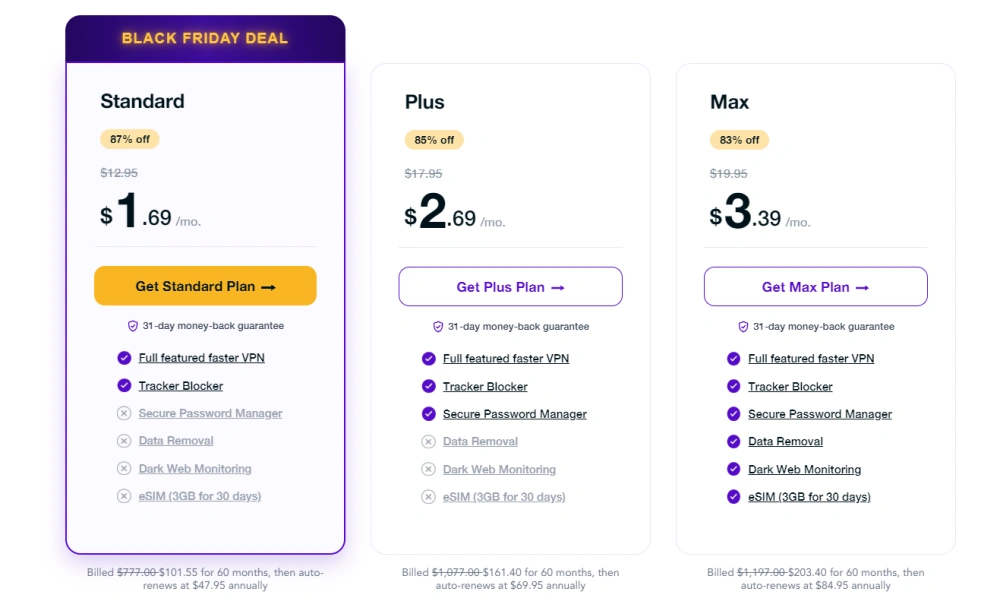
- Pick your tier. Here is what the plan cards showed:
| Plan | Discount | Regular monthly | Sale monthly equivalent | 60-month bill (regular → sale) | Renewal on plan card |
|---|---|---|---|---|---|
| Standard | 87% off | $12.95 | $1.69/mo | $777.00 → $101.55 | $47.95 annually |
| Plus | 85% off | $17.95 | $2.69/mo | $1,077.00 → $161.40 | $69.95 annually |
| Max | 83% off | $19.95 | $3.39/mo | $1,197.00 → $203.40 | $84.95 annually |
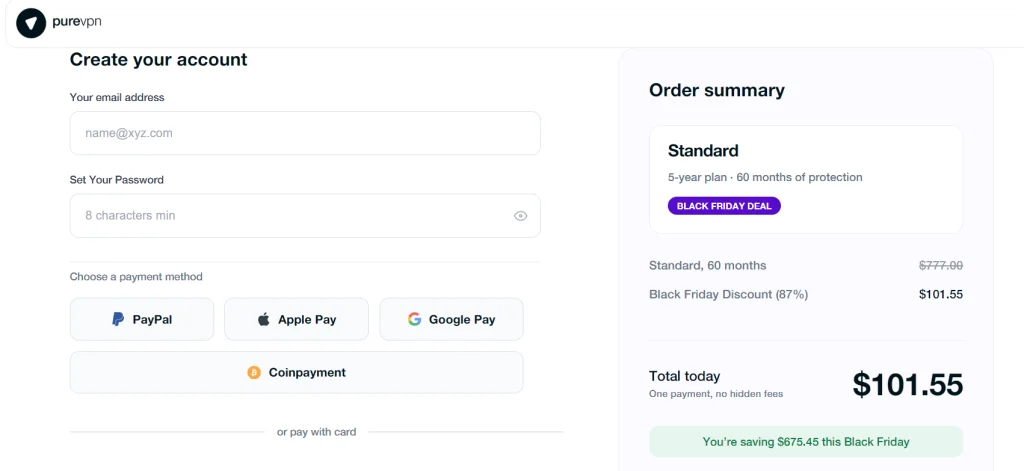
- Create your account. Email plus a password (8 characters minimum).
- Choose a payment method. The checkout I saw offered PayPal, Apple Pay, Google Pay, Coinpayment, and card (Visa, Mastercard, Amex).
- Check the order summary. For Standard it showed the 60-month term, the 87% Black Friday discount, a total of $101.55, and “You’re saving $675.45”.
- Look at the add-ons, then decide. Dedicated IP + Port Forwarding was listed at $6.49/mo (was $7.49), and Dedicated IP at $4.99/mo (was $5.99). Both are optional.
- Read the renewal lines before paying. On my check, the plan card and the checkout footer showed renewal lines that didn’t match. Trust whatever your own screen says at payment.
Why a Webmaster Would Actually Want a VPN
Forget the usual consumer pitch. Here’s where a VPN earns its place in a site owner’s week.
Logging in away from your desk. Working from a co-working space, airport or hotel, you’re still opening wp-admin, cPanel, SFTP, and your hosting dashboard. An encrypted tunnel is a cheap layer on top of strong passwords and 2FA.
Checking what visitors in other regions see. Geo-based redirects, cached pages served by a CDN, cookie banners, localized pricing on a WooCommerce store: you only catch problems here by browsing from another location. PureVPN lists 6000+ servers across 80+ locations, which is enough for this kind of spot-check.
Locking access to your own IP. Some hosts and security plugins let you allow-list an IP for admin or SSH. A VPN with a dedicated IP add-on gives you a stable address for that, even when you travel.
One line of caution. From what I’ve seen on client sites, the common VPN headache isn’t speed. It’s login-protection rules reacting to a shared IP used by many strangers.
Standard, Plus or Max: Which Tier Fits a Web Workflow
All three tiers carry the same core: a full-featured VPN and a Tracker Blocker. The difference is what’s stacked on top.
| Standard | Plus | Max | |
|---|---|---|---|
| Discount on 5-year plan | 87% | 85% | 83% |
| Core tools | VPN + Tracker Blocker | VPN + Tracker Blocker | VPN + Tracker Blocker |
| Extras bundled | None beyond core | Secure Password Manager | Secure Password Manager, Data Removal, Dark Web Monitoring |
| eSIM | Not included | Not included | eSIM (3GB for 30 days) |
| Best for | Solo blogger on public Wi-Fi | Freelancer holding many client logins | Agency owner who travels |
| Winner for | Lowest cost | Best balance | Most bundled protection |
Standard is a VPN, nothing else. Plus is where the tool starts to overlap with a real workflow, because client credentials are usually the weakest spot in a freelancer’s setup. Max makes sense only if you’ll actually use the data removal, monitoring and eSIM extras. Paying for features you ignore is the classic bundle trap.
For a solo blogger who mainly wants encrypted connections, Standard is better, because it has the deepest discount (87%) and the same core VPN as the other tiers. If you juggle many client logins, Plus makes more sense since it adds the Secure Password Manager. For an agency owner who travels often, Max is worth considering for the eSIM and monitoring extras. One honest weakness: Standard has no password manager at all.
If you’d rather skip long subscriptions entirely, IceVPN’s Black Friday deal is a lifetime-style alternative I’ve covered separately.
The Developer Take: What I’d Check Before Relying on It
A VPN runs on your device, not on your website. So it has no effect on your site’s LCP or CLS, and it doesn’t touch Elementor, Gutenberg, or WooCommerce. No plugin, no extra JS on the front end.
What it does affect is your own testing and uploads:
- Speed tests. If you run Lighthouse or PageSpeed checks from your own browser with the VPN on, the extra hop lands in your results. Switch it off for baseline performance work.
- Long transfers. An SFTP upload or database import dropping midway is the reason the kill switch matters. The homepage lists an internet kill switch that cuts access if the VPN disconnects.
- Local dev tools. The homepage lists split tunneling, so you can send only selected apps through the VPN and leave localhost and staging tools alone.
- Protocols. WireGuard and obfuscated servers are listed too, handy when a network blocks VPN traffic.
Pro observation: before you depend on any VPN, test your host’s SSH, SFTP and wp-admin from it once, on a calm day. If your firewall flags the shared IP, you want to find out before a client emergency. That’s exactly where the dedicated IP add-on becomes worth its cost.
Pros and Cons
Pros
- Deepest discount on the cheapest tier. 87% off the Standard 5-year plan is the best percentage on the page.
- Plus and Max bundle real extras. A password manager and monitoring tools reduce the number of separate subscriptions.
- Broad network. 6000+ servers, 80+ locations, and up to 10 simultaneous logins mentioned on the homepage.
- Refund window. 31-day money-back guarantee, shown on both pricing and checkout pages.
- Flexible payment. PayPal, Apple Pay, Google Pay, crypto via Coinpayment, and cards.
Cons
- Everything is billed upfront for 60 months. That’s a long lock-in, and the refund window is only 31 days.
- Renewal terms need a careful read. The renewal lines I saw on the plan card and the checkout footer didn’t match each other.
- Standard is bare. No password manager, data removal, dark web monitoring or eSIM.
- No WordPress-specific tooling. It protects your connection, not your site, so don’t treat it as a security plugin.
Who Should Skip This Deal
Skip it if you need a VPN only a few times a year, or if a 5-year commitment makes you uncomfortable. Agencies that need shared admin controls should look at PureVPN’s separate Teams plan instead of personal tiers. And if your real problem is slow or insecure hosting, a VPN won’t fix it. If you’re still shopping for servers, my Cloudways Black Friday deal page covers that side.
What to Do After Buying
- Install it on your main work laptop and phone first. These are where wp-admin and hosting logins happen.
- Turn on the kill switch before doing any long upload or import.
- Set up split tunneling so local dev and staging tools stay outside the tunnel.
- Run your login test. Open wp-admin, SSH and SFTP through the VPN once.
- Decide on the dedicated IP add-on only if a host or plugin requires a fixed address.
- Set a reminder before day 31. Use the refund window to judge it on real work, not first impressions.
Mistakes to avoid: benchmarking site speed with the VPN on, and paying for Max when you only need Standard.
Discount– Limited Time Offer!
Deal: Up to 87% OFF
Coupon Code: Auto-Applied on Click 👇
Frequently Asked Questions
Is the PureVPN Black Friday deal live right now?
When I checked, the Black Friday banner and discounted plans were showing on the pricing page. The pages I saw didn’t state an end date, so confirm the current status on the official site before you decide.
Do I need a coupon code?
I don’t have a separate promo code for this offer. The discount appeared directly in the checkout order summary. Check your own order screen before paying, since terms can change.
Which plan is best for a blogger or freelancer?
A blogger who only wants encrypted connections can start with Standard. A freelancer handling many client logins gets more from Plus because of the Secure Password Manager. Max suits people who will use all its extras.
Will a VPN slow down my WordPress site?
No. It affects your connection, not your visitors’. It can slow your uploads and distort speed tests. If site speed is the bigger worry, hosting matters more, and my Hostinger Black Friday deal page is a good place to compare.
Can I get a refund?
PureVPN displays a 31-day money-back guarantee on its pricing and checkout pages. Read the full refund terms on the official site, and test the VPN on real work early in that window.
Does the price stay the same after renewal?
Not necessarily. The renewal lines I saw were inconsistent between screens, so read the renewal terms on your own checkout page before you pay.
Final Verdict
PureVPN’s Black Friday deal is strong value if you want a long-term VPN for admin logins, public Wi-Fi and location checks. Standard is the budget pick, and Plus is the one I’d consider for anyone managing client credentials. Just go in knowing it’s a 60-month upfront payment, and read the renewal terms first. If that fits how you work, you can claim the PureVPN Black Friday deal here.
Related Posts