Zapier, Make, and n8n all send you a bill every month. OttoKit wants you to pay once and stop thinking about it.
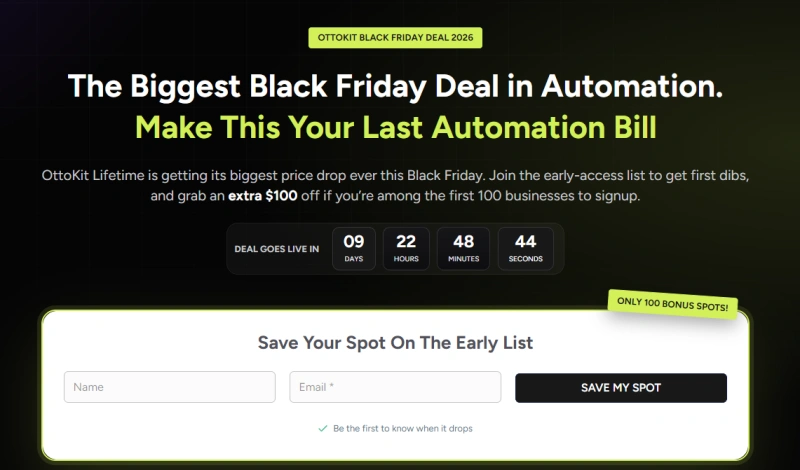
The sale isn’t live yet. As of November 8, 2026, OttoKit’s page shows a countdown of about ten days and an early-access list with a bonus for the first 100 buyers.
I’m Karan Rajput. I’ve spent 7+ years building WordPress sites and automations for clients. Below is what’s confirmed, what isn’t, and who should actually buy.
Quick Deal Snapshot
Starts on: Around November 18, 2026 (worked out from the live countdown, exact time not confirmed) | Ends on: Not announced yet
Deal Active Now
- Discount: Up to 50% off on lifetime (one-time) pricing, as shown on OttoKit’s pricing page. OttoKit calls this its “biggest price drop ever,” but the final Black Friday prices aren’t live yet.
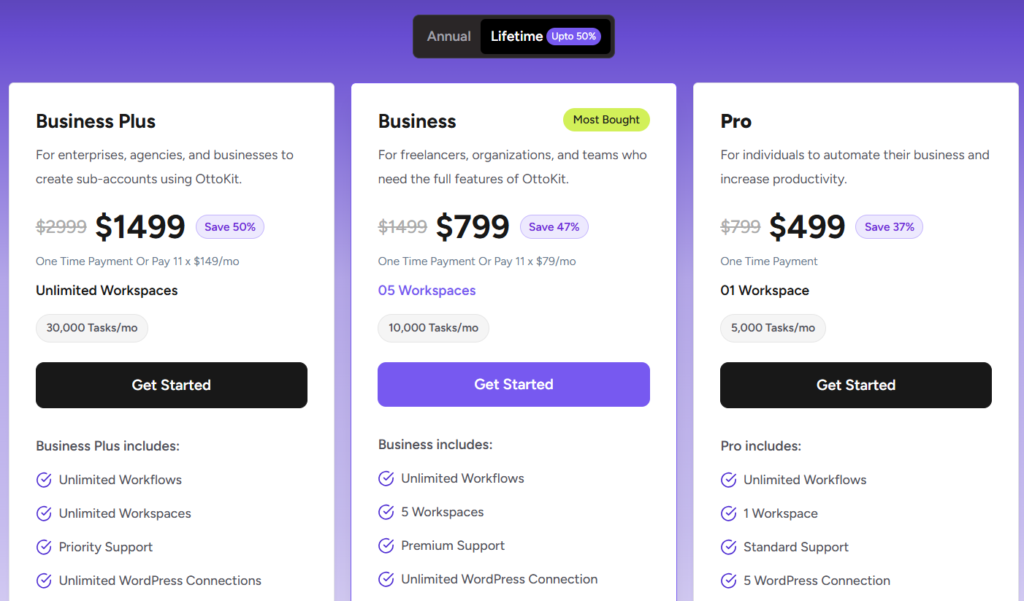
- Regular lifetime baseline: Pro $499, Business $799 (or 11 x $79/mo), Business Plus $1499 (or 11 x $149/mo). Marketing Suite bundle: $999 one-time.
- Extra bonus: $100 off for the first 100 Business Plus Lifetime buyers, per OttoKit’s top banner.
- Promo code: None announced. I’ll update this box if one appears.
- Safety net: 14-day money-back guarantee.
Coupon Code: Auto-Applied on Click 👇

This post contains affiliate links. If you purchase through our links, we may earn a small /commission at no extra cost to you. Thank you for your support!The Bottom Line
OttoKit’s Black Friday sale hasn’t started, but lifetime plans are already listed with a one-time payment badge showing up to 50% savings. The first 100 Business Plus Lifetime buyers get an extra discount. No promo code has been announced. The early list only asks for your name and email.
How to Claim the OttoKit Black Friday Deal
I’d do this in order, because the early list is the only part with a real deadline.
- Join the early list. Open OttoKit through my OttoKit link and go to the Black Friday page. Add your name and email and hit “Save My Spot.”
- Wait for the launch. The countdown on the page is the only official timing so far. I haven’t received any affiliate email with extra dates or terms.
- Open the pricing page and pick “Pay One-time.” That’s the lifetime option. Current baseline: Pro $499, Business $799, Business Plus $1499, Marketing Suite $999.
- Choose your plan. Business and Business Plus also show an 11-month installment option, but I’ll explain below why I’d skip it.
- Check the extra $100. The top banner says it’s for the first 100 Business Plus Lifetime buyers. The hero text says “first 100 businesses to sign up.” Those two lines aren’t identical, and the FAQ that explains the mechanism is collapsed on the page I checked. Since no code is announced, I can’t tell you whether it’s auto-applied or manual. Look at your cart before paying.
- Use the 14-day window. Build a real workflow in the first week, not a demo.
Which Lifetime Plan Actually Makes Sense?
Workflows are unlimited on every paid plan. What changes is the monthly task cap, workspaces, and support level. That’s where I’d decide.
- Pro is the entry tier: 5,000 tasks/month, 1 workspace, 5,000 table rows, 5 forms, 5 WordPress connections, standard support, 15-day data retention. AI agents are included, but human-in-the-loop approvals are not.
- Business (marked “Most Popular”) raises this to 10,000 tasks/month, 5 workspaces, 20,000 table rows, 10 forms, unlimited WordPress connections, premium support, and human-in-the-loop approvals.
- Business Plus goes to 30,000 tasks/month, unlimited workspaces, 50,000 table rows, 20 forms, and priority support. It also adds SureForms Team (12 months) and ZipWP Pro (3 months), valued at $235 if bought separately.
- Marketing Suite combines Business Lifetime, SureContact 10K Lifetime and 100K SMTP credits. OttoKit shows a 20% saving on the bundle, and 61.7% off against its “full sticker total.”
My pick by use case:
- One blog or one store: Pro. You don’t need five workspaces.
- Freelancer with several client sites: Business. Five workspaces keep client data separate.
- Agency: Business Plus, mainly for the unlimited workspaces and the higher task ceiling.
- Already planning an email tool: look at Marketing Suite before buying separately.
Want the regular lifetime pricing without the sale layer? I covered it in my OttoKit lifetime deal breakdown.
What “Lifetime” Really Includes
OttoKit says this isn’t a stripped-down deal plan. You pay once, keep the plan, and get future updates at no extra cost. Here’s what the Black Friday page lists:
- Unlimited workflows and unlimited AI agents
- 1,500+ integrations, with built-in SMTP (one-click DKIM and SPF) or your own SMTP
- 15,000+ ready-made recipes
- Human-in-the-loop approvals and an MCP server (MCP is on every plan, so Claude or ChatGPT can run your workflows)
- OttoKit Learn, their automation course
One catch: the Black Friday page says “priority support,” but the pricing page splits it into standard, premium, and priority by plan. Trust the pricing page. If you want to know whether the AI side justifies paying, I broke it down in Are OttoKit AI Agents Worth the Investment?
Where It Falls Short (And Who Should Skip)
Lifetime doesn’t mean unlimited. These are the real limits.
- Task caps still apply every month. A busy WooCommerce store or agency can outgrow Pro quickly.
- Data retention is short on lower tiers. Pro keeps 15 days of logs. Business and Business Plus keep 30. If a client reports an error from last month, you may not have the run history.
- Installments cost more. 11 monthly payments add up to more than the one-time price on both Business and Business Plus.
- The bonuses expire. SureForms Team (12 months) and ZipWP Pro (3 months) on Business Plus are time-limited, not lifetime.
- The extra discount is limited to 100 buyers, and the exact mechanics weren’t visible to me.
- End date and promo code are unknown. Don’t plan around a deadline OttoKit hasn’t published.
Skip this if you run two or three simple automations. The free plan gives 250 tasks/month and 20 workflows, and I explained the limits in my OttoKit free plan guide. Also skip if you’re not sure you’ll keep using it past the 14-day refund window.
A Developer’s Take Before You Pay
From a performance standpoint, automation tools matter most when they run on your own server. OttoKit connects WordPress through a connector plugin, and the workflows themselves live in OttoKit’s cloud. In client projects I’ve worked on, that split is usually what keeps wp-admin from feeling heavy. Still, install the connector on staging first and check what it adds to admin load, and make sure it doesn’t load extra scripts on the front end.
Pro observation: pick your plan by estimated monthly tasks, not by workflow count, because workflows are unlimited anyway. Before buying, check how OttoKit counts a task in a multi-step workflow. A 10-step flow could burn through a cap faster than you’d expect.
Also test with your real stack: Elementor forms, Gutenberg-based forms, WooCommerce order events. I’d never trust a feature list alone for those.
What to Do After Buying
- Install the OttoKit connector plugin on a staging site and link it.
- Start from a recipe (there are 15,000+) instead of a blank canvas.
- Create one workspace per client if you’re on Business or above.
- Add a human approval step to anything that emails customers or edits orders.
- Connect your MCP server to your AI tool if you want to trigger workflows from there.
Mistakes to avoid:
- Moving every automation over in week one.
- Mixing client data in one workspace.
- Ignoring log retention when debugging.
- Missing the 14-day refund window because you never tested properly.
Your hosting also matters, since webhooks and form triggers still hit your server. If you’re shopping for that too, my Cloudways and Hostinger Black Friday guides are worth a look.
OttoKit vs Zapier, Make and n8n Cloud
The figures below come from OttoKit’s own Black Friday comparison, so treat them as OttoKit’s framing. The 3-year row is simple multiplication of those numbers.
| OttoKit Lifetime | Zapier | Make | n8n Cloud | |
|---|---|---|---|---|
| How you pay | Once, lifetime | Monthly, per task | Monthly, per credit | Monthly, per run |
| Bill after year one | $0 | $1,068/yr at 5,000 tasks/mo | From $108/yr | From $281/yr |
| What grows your bill | Only a higher plan tier | More tasks | More credits | More runs |
| 3-year view at that rate | Same one-time price | $3,204 | From $324 | From $843 |
| AI tools | MCP server on every plan | Not listed | Not listed | Not listed |
| Best for | Steady, long-term WordPress and agency automation | Teams already deep in Zaps | Light, low-volume use | Teams already built on n8n |
OttoKit wins on long-term cost, but only if you’ll keep automating for years. Against Make’s entry rate, a light user could take years to break even on any lifetime tier. Zapier’s figure is the one that hurts, and it’s the strongest reason to switch if you already pay it. Migrating existing automations takes real work, so don’t switch just for the badge.
Discount– Limited Time Offer!
Deal: Up to 50% Off + Extra $100 Off
Coupon Code: Auto-Applied on Click 👇
Frequently Asked Questions
When does the OttoKit Black Friday deal go live?
OttoKit’s countdown shows about 9 days and 23 hours from November 8, 2026, so roughly November 18. The page doesn’t name an end date, and I haven’t seen an affiliate email confirming either. Check the countdown before you plan around it.
Is there an OttoKit Black Friday coupon code?
None has been announced. The early-access page only mentions a bonus for the first 100 buyers. If a code appears, I’ll add it to the Deal Snapshot, and I won’t guess whether it’s auto-applied.
Is OttoKit lifetime really lifetime?
OttoKit says yes: you pay once, keep your plan, and get future updates at no extra cost. Limits still apply, though, like monthly task caps and workspace counts. Check the refund policy and terms before buying.
Can I get a refund?
Yes. OttoKit advertises a 14-day money-back guarantee on its paid plans. That’s why I’d build one real workflow in the first week.
Is the free plan enough?
Maybe, for light use. It gives 250 tasks/month and 20 workflows. If you’re deciding whether to upgrade at all, my OttoKit free plan breakdown covers the limits in detail.
Which plan is best for freelancers?
Business, in most cases. It gives 5 workspaces, 10,000 tasks/month, and human-in-the-loop approvals. Pro works only if you run a single site.
Final Verdict
If you already pay for Zapier, Make, or n8n every month, the lifetime route deserves a serious look. A freelancer with several client sites should lean toward Business. An agency should consider Business Plus, especially if you’re among the first 100 buyers.
If your automations are small or occasional, the free plan or a cheap monthly tool is the safer start.
Join the early list now, then decide when the final numbers go live. You can start through my OttoKit link.
Related Posts