Most WooCommerce hosting comparisons list 10+ providers and leave you more confused than when you started. This one doesn’t. After working on WooCommerce client projects for 7+ years — setting up stores, migrating them, and debugging slow checkouts — I’ve narrowed it down to three hosts that actually make sense depending on where you are in your eCommerce journey.
Whether you’re launching your first store or running a store that’s outgrown shared hosting, the right pick is below.
If you’ve been searching for the best host for WooCommerce or trying to figure out which hosting provider for WooCommerce actually delivers on its promises, this covers exactly that. Including options for WooCommerce hosting for high-traffic stores that need more than what shared plans offer.
This post contains affiliate links. If you purchase through our links, we may earn a small commission at no extra cost to you. Thank you for your support!Quick Answer: Hostinger is best for budget-conscious beginners. Bluehost is built for store owners who want everything preconfigured. Cloudways is the go-to when speed and scale actually matter. Read on for the full breakdown.
Why Your WooCommerce Host Matters More Than Most People Realize
A slow checkout page doesn’t just hurt UX — it kills conversions. WooCommerce is PHP-heavy and database-intensive by nature. Add product images, cart logic, payment gateways, and a few plugins, and a generic shared host buckles under normal traffic.
What you need specifically from WooCommerce hosting:
- Server-level caching (not just plugin caching)
- PHP 8.x support for better performance
- Enough RAM to handle concurrent cart sessions
- Clean uptime — because downtime during a flash sale is real money lost
Standard WordPress hosting can technically run WooCommerce. But “technically” and “reliably” are two different things. That’s what separates managed WooCommerce WordPress hosting from generic shared plans — the entire stack is tuned for store workloads, not just WordPress sites in general.
The 3 Best Managed WooCommerce Hosts in 2026



1. Bluehost — Best for New Store Owners Who Want Zero Setup Hassle
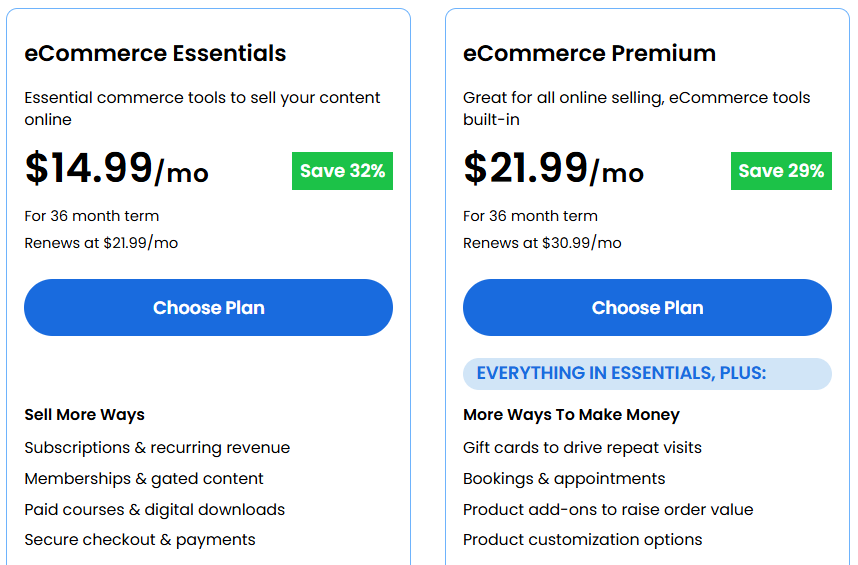
Starting price: $14.99/mo (eCommerce Essentials, 36-month term) | Renews at $21.99/mo
Bluehost positions itself squarely as a WooCommerce host — not just a WordPress host that happens to support WooCommerce. That distinction shows up in what’s actually included from day one.
The eCommerce Essentials plan at $14.99/mo ships with WooCommerce pre-configured, 16 premium WooCommerce plugins pre-installed (subscriptions, memberships, wishlists, product filters, one-click checkout, gift cards, and more), an AI-powered store builder, and 99.99% uptime SLA. You’re not stitching together a store — you’re launching one.
The eCommerce Premium plan at $21.99/mo (36-month, renews at $30.99/mo) adds bookings & appointments, points & rewards, advanced reviews, custom account pages, and product customization options — essentially the conversion layer for stores past the beginner phase.
There’s also a Custom Commerce tier for complex stores with high-growth needs — contact-based pricing.
What’s included across all plans: Free domain for year one, free SSL, DDoS protection, daily malware scanning, web application firewall, one-click staging, unlimited products and media storage, free store migration, and 24/7 support by chat and phone.
The plugin’s angle is real. On a typical WooCommerce setup, buying WooCommerce Subscriptions, Memberships, Bookings, and Advanced Reviews separately would run you $1,200+/year easily. Bluehost bundles them. That’s not marketing copy — I’ve priced this out for client projects, and the math checks out.
One thing to know: Bluehost’s introductory pricing requires committing to 36 months. The renewal rate jumps noticeably. If you’re not ready for a long-term commitment, factor in the renewal cost, not just the signup price.
Who it’s for: First-time store owners, bloggers monetizing via digital products or subscriptions, and small businesses that want a complete setup without touching code.
Who should skip it: Developers or store owners who want full server control, or those expecting cloud-level scalability.
2. Hostinger — Best Budget Pick With Surprisingly Solid Performance
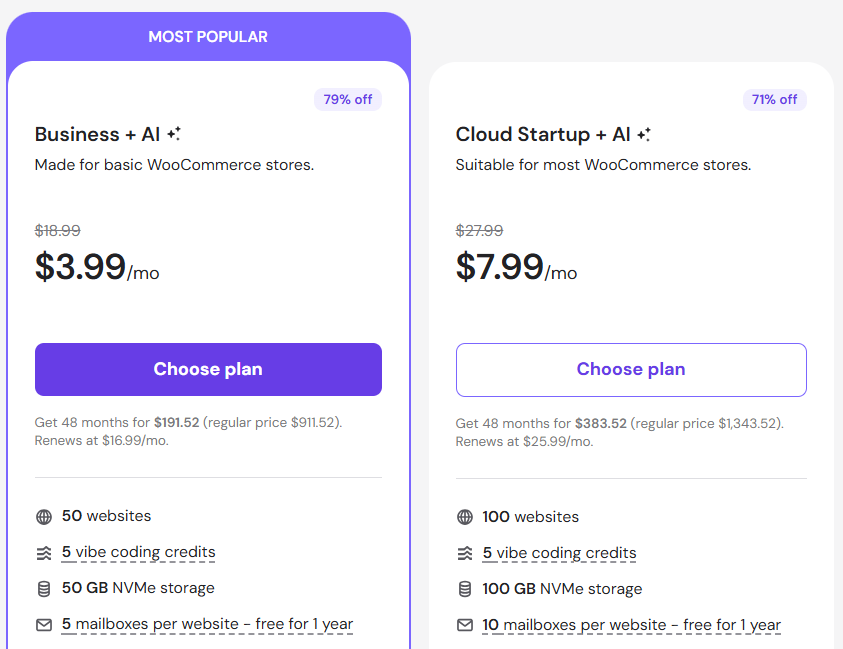
Starting price: $3.99/mo (Business + AI, 48-month term) | Renews at $16.99/mo Cloud Startup + AI: $7.99/mo (48-month) | Renews at $25.09/mo
Hostinger’s managed WooCommerce plans run on LiteSpeed servers with the LSCWP plugin baked in — which matters more than most beginners realize. LiteSpeed handles WooCommerce’s dynamic pages better than standard Apache setups because it caches even non-static content like cart pages more intelligently.
The Business + AI plan at $3.99/mo covers up to 50 websites, 50GB NVMe storage, 5 vibe coding credits, 5 mailboxes per website free for a year, 1-click WooCommerce setup, automatic store migration, daily backups, and a free CDN. The AI tools include an AI website builder for Elementor and Gutenberg, an AI Agent for WordPress (Kodee), and an AI website troubleshooter.
The Cloud Startup + AI plan at $7.99/mo bumps storage to 100GB NVMe, supports 100 websites, adds a dedicated IP address, priority 24/7 support, a power boost for peak traffic for one week/month, 100 PHP workers for busy sites, 4GB RAM, and 2M inodes for larger catalogs.
Hostinger’s 99.9% uptime is backed by their LiteSpeed infrastructure, and they claim store response times are reduced by up to 3x through Object Cache. Their global CDN handles geographic distribution automatically.
The Kodee AI agent is a genuinely interesting new addition — it lets you manage WooCommerce tasks (adding products, changing prices, checking reports) through a simple chat interface. Useful for non-technical store owners.
From what I observed while setting up a client store on Hostinger’s Business plan, the LiteSpeed + LSCWP combination handled product page load times well out of the box, even without additional optimization. The staging tool also worked cleanly for testing plugin updates before pushing live.
One honest limitation: Hostinger’s renewal pricing is a significant jump from the introductory rate — especially on the 48-month plan. At $16.99/mo renewal (Business plan), it’s no longer the budget option it appears at signup. Plan for that number, not $3.99.
Who it’s for: Budget-conscious beginners, bloggers adding eCommerce, and small store owners who want AI assistance without a steep learning curve.
Who should skip it: High-traffic stores, stores with large product catalogs (100K+ SKUs), or anyone needing granular server control.
3. Cloudways — Best for Performance-First Stores and Agencies
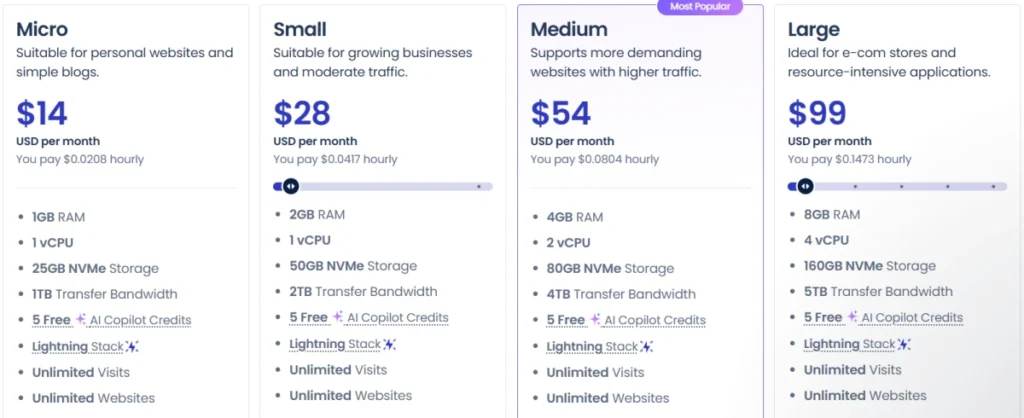
Starting price: $14/mo (Micro — DigitalOcean, 1GB RAM, 1 vCPU, 25GB NVMe) Small: $28/mo (2GB RAM, 1 vCPU, 50GB NVMe) Medium: $54/mo (4GB RAM, 2 vCPU, 80GB NVMe) — Most Popular Large: $99/mo (8GB RAM, 4 vCPU, 160GB NVMe)
Cloudways is structurally different from the other two. It’s a managed cloud hosting platform — you’re not buying a plan with X features listed on a marketing page. You’re choosing a cloud server size from providers like DigitalOcean, Vultr, Linode, AWS, or Google Cloud, and Cloudways manages the infrastructure layer for you.
That model has a real implication for WooCommerce: you can scale vertically on demand. A store hitting a traffic spike doesn’t have to migrate hosts — you scale the server. That’s not something shared or “optimized” plans offer.
What Cloudways includes on every plan: Free migration, Lightning Stack (optimized NGINX stack), built-in Varnish + Memcached + Redis caching, Cloudflare integration, free Object Cache Pro (worth $95/month), free Redis Cache (worth $100/month), advanced staging and cloning, built-in firewall with IP blocking, WordPress Vulnerability Scanner, and 24/7 expert support.
The tech stack is serious. NGINX + Apache + MySQL/MariaDB + PHP-FPM handles high concurrency better than a typical shared stack. For a WooCommerce store with 500+ concurrent users, this matters. The Breeze cache plugin (their own) adds another layer of site-side optimization.
Two plan types to know:
- Cloudways Flexible — pay-as-you-go, full control over server resources and cloud provider choice. Best for developers and agencies.
- Cloudways Autonomous — fully managed for dynamic high-traffic eCom and LMS sites, built to autoscale for thousands of concurrent users.
One real limitation: Cloudways is not beginner-friendly. There’s no one-click WooCommerce with pre-installed plugins. You install WooCommerce yourself, configure caching, set up email separately, and manage backups (though their backup interface is straightforward). For a developer, this is freedom. For a first-time store owner, it’s friction.
Also, there are no free domains. Backup storage costs extra ($0.033/GB per server).
When I moved a client’s mid-size store from shared hosting to Cloudways Medium (DigitalOcean, 4GB RAM), the Time to First Byte dropped noticeably, and the checkout page load time improved significantly. No plugin changes — just the server environment.
Who it’s for: Agencies managing multiple WooCommerce stores, developers, established stores outgrowing shared hosting, and stores with unpredictable traffic spikes.
Who should skip it: Beginners with no server experience, small stores that don’t need cloud-level resources.
Pros & Cons: Honest Take
Bluehost
Pros
- 16 premium WooCommerce plugins pre-installed (saves $1,200+/year in plugin costs)
- WooCommerce pre-configured — zero manual setup
- 99.99% uptime with 24/7 WooCommerce-trained support
- AI-powered store builder included
- 30-day money-back guarantee
Cons
- 36-month commitment required for advertised pricing; renewal rates jump to $21.99–$30.99/mo
- Not suitable for high-traffic stores or complex custom architectures
- No cloud-level scalability — you’re on shared infrastructure
Hostinger
Pros
- Genuinely affordable entry point ($3.99/mo for Business plan)
- LiteSpeed servers deliver real performance gains vs Apache-based shared hosts
- Kodee AI agent is a practical tool for non-technical store owners
- Free CDN, free SSL, daily backups, and automatic store migration included
- 99.9% uptime with solid infrastructure
Cons
- Renewal pricing at $16.99/mo (Business) is a steep jump from the $3.99/mo introductory rate
- 100 PHP workers on Cloud plan sounds good — but the base Business plan may struggle under heavy concurrent traffic
- Email hosting is limited (5 mailboxes free, then paid)
Cloudways
Pros
- True cloud infrastructure — choose DigitalOcean, Vultr, AWS, Linode, or Google Cloud
- Object Cache Pro ($95/mo value) and Redis Cache ($100/mo value) included free
- Vertical scaling on demand without server migration
- NGINX + PHP-FPM stack built for high-concurrency WooCommerce stores
- 3-day free trial, no credit card required
Cons
- No free domain — you bring your own
- Not beginner-friendly; setup requires technical comfort
- Email hosting not included — need a separate service (Rackspace add-on available at $1/mo per mailbox)
- Backup storage billed separately at $0.033/GB
Head-to-Head Comparison
| Feature | Bluehost eCommerce Essentials | Hostinger Business + AI | Cloudways Medium (DO) |
|---|---|---|---|
| Starting Price | $14.99/mo (36-month) | $3.99/mo (48-month) | $54/mo (pay-as-you-go) |
| Renewal Price | $21.99/mo | $16.99/mo | Same (no lock-in) |
| Server Type | Shared/Optimized | LiteSpeed Shared Cloud | Managed Cloud (DigitalOcean) |
| WooCommerce Setup | Pre-configured, 1-click | 1-click install | Manual install |
| Pre-installed Plugins | 16 WooCommerce plugins | None | None |
| Uptime Guarantee | 99.99% | 99.9% | 99% (provider-dependent) |
| Free Domain | Yes (year 1) | Yes | No |
| Free CDN | Yes | Yes | Cloudflare integration |
| Caching | Server-level | LiteSpeed + LSCWP | Varnish + Redis + Memcached |
| Scalability | Limited (shared) | Moderate (cloud infra) | High (vertical scaling) |
| Free Migration | Yes | Yes | Yes (1 site) |
| Free Trial | 30-day money-back | 30-day money-back | 3-day free trial |
| Best For | Best woocommerce host for beginners & small stores | Best budget hosting provider for WooCommerce | Best host for WooCommerce high traffic stores |
| Official Website | Try Bluehost | Try Hostinger | Try Cloudways |
Post-comparison context: Bluehost wins on plugin value and zero-effort setup — if you’re launching a store this week and don’t want to touch configuration, it’s the easiest path. Hostinger is the better budget option if you’re starting small and comfortable with a bit of setup, though plan for the renewal cost. Cloudways is for store owners who’ve outgrown the shared hosting comfort zone and need real server resources — the performance difference is tangible once you’re past basic traffic levels.
What to Do After Buying Your WooCommerce Hosting
Regardless of which host you pick, these steps apply:
Bluehost users:
- Use the AI-powered store builder to set up your first product categories and payment gateway
- Review which of the 16 pre-installed plugins are active — disable the ones your store doesn’t need to keep the environment clean
- Enable the staging environment before making major theme or plugin changes
Hostinger users:
- Activate LSCWP (LiteSpeed Cache for WooCommerce) immediately — it’s your biggest performance lever
- Set up Kodee to handle routine WooCommerce tasks
- Enable Object Cache through the Hostinger hPanel to reduce database load
Cloudways users:
- Configure the Breeze cache plugin and enable Varnish from the server settings panel
- Activate Object Cache Pro (it’s free and already available in your plan)
- Set up automatic backups — they’re not enabled by default; you configure frequency from the platform dashboard
- Use the staging clone feature before deploying any major changes
Who Should Skip All Three?
If you’re running a very large catalog (50,000+ products), processing thousands of orders per day, or need enterprise-grade SLAs with dedicated account management, look at WP Engine’s eCommerce plans or Nexcess. Those are purpose-built for high-volume WooCommerce at scale. None of the three hosts above is optimized for that volume.
Also, if you’re not committed to WooCommerce specifically and are evaluating Shopify vs WooCommerce, that’s a different decision worth making before you invest in hosting.
Frequently Asked Questions
What is managed WooCommerce hosting?
Managed WooCommerce hosting means the hosting provider handles server configuration, security patches, performance optimization, and often WooCommerce-specific settings — so you focus on running your store, not managing infrastructure. The level of “management” varies: Bluehost pre-installs plugins and configures WooCommerce, while Cloudways manages the cloud server layer but leaves the WooCommerce configuration to you.
Is Hostinger good enough for a serious WooCommerce store?
For stores with moderate traffic and a few hundred products, Hostinger’s Business + AI plan handles it fine. The LiteSpeed stack and free CDN genuinely help. Where it starts to show limits is under heavy concurrent traffic or large product catalogs — for those, the Cloud Startup + AI plan (with 100 PHP workers and 4GB RAM) is a better fit, or you move to Cloudways.
Does Cloudways offer WooCommerce-specific optimization?
Not in the “pre-installed plugins” sense. But the technical stack — NGINX, PHP-FPM, Redis, Varnish, Object Cache Pro — is optimized for dynamic PHP applications, including WooCommerce. The performance per dollar on a $54/mo Medium plan competes well against much more expensive managed WooCommerce hosts.
Which host is best for a WooCommerce store with high traffic?
For WooCommerce hosting for high-traffic stores, Cloudways is the clear answer. The ability to scale server resources vertically on demand, combined with their NGINX + Redis + Varnish stack and Cloudflare integration, makes it the only option of these three that can handle unpredictable traffic spikes without moving hosts. For extreme scale, Cloudways Autonomous (auto-scaling) is the right tier.
Bluehost: renewal prices jump significantly after the initial term — budget $21.99–$30.99/mo after year 3, not $14.99–$21.99. Hostinger: similar issue — $16.99/mo renewal vs $3.99/mo introductory. Cloudways: backup storage is billed at $0.033/GB per server, and email hosting requires the Rackspace add-on at $1/mo per mailbox. No transaction fees on any of these three.
Is there a free trial available?
Bluehost and Hostinger both offer 30-day money-back guarantees — not a traditional free trial, but a functional equivalent. Cloudways offers a genuine 3-day free trial with no credit card required, which is useful for testing their dashboard and server performance before committing.
Final Verdict
Three good hosts. Three different use cases.
Hostinger makes sense if budget is the priority and you’re launching something small — the LiteSpeed performance is genuine, and the AI tools reduce setup friction for non-technical users. Just read the renewal pricing before signing up.
Bluehost is the right call when you want a complete WooCommerce environment with zero configuration — the pre-installed plugin bundle alone justifies the price for most store types, and the 24/7 WooCommerce-trained support is worth something when things go wrong.
Cloudways is where you go when the store has outgrown shared infrastructure, performance is non-negotiable, or you’re an agency managing multiple client stores. The setup curve is real, but so is the performance ceiling.
Pick based on where you are now — and which host gives you room to grow.