Most automation tools will drain your wallet every month. Zapier charges $1,548/year for 10,000 tasks. Make (formerly Integromat) counts every trigger as a task. And you’re stuck in that subscription loop forever.
Pabbly Connect breaks that cycle with a one-time payment plan — pay once, use it for life. No monthly fees, no renewal reminders.
But is the lifetime deal actually worth it? Let me walk you through the real numbers, what you get in each plan, where it genuinely falls short, and who should buy it right now.
Quick Deal Snapshot
| Detail | Info |
|---|---|
| Deal Type | One-Time Payment + Lifetime Access |
| Available Plans | Standard, Ultimate, Ultimate Plus |
| Starting Price | $349 (₹31,399) |
| Most Popular Plan | Ultimate — $799 (₹71,899) |
| Top Plan | Ultimate Plus — $1,298 (₹1,15,729) |
| Extra Discount Code | 100OFF (Ultimate & Ultimate Plus only) |
| Refund Policy | 30-day money-back guarantee |
| Validity | Limited-time — no one-time plan in future |
Short on time? Skip the details and grab the deal directly — Click here to get the Pabbly Connect Lifetime Deal and don’t forget to use code 100OFF at checkout for an extra discount.
Bottom Line: If you’re running automations regularly and paying Zapier monthly, the Pabbly Connect lifetime deal pays for itself within 6–12 months. The Ultimate plan at $799 is the sweet spot for most users.
What’s the One-Time Payment Deal, Exactly?
Pabbly Connect normally runs on a subscription model. The lifetime deal — also called the one-time payment plan — lets you pay a single amount and get access forever, with no recurring charges.
Here’s what makes it different from a regular SaaS deal:
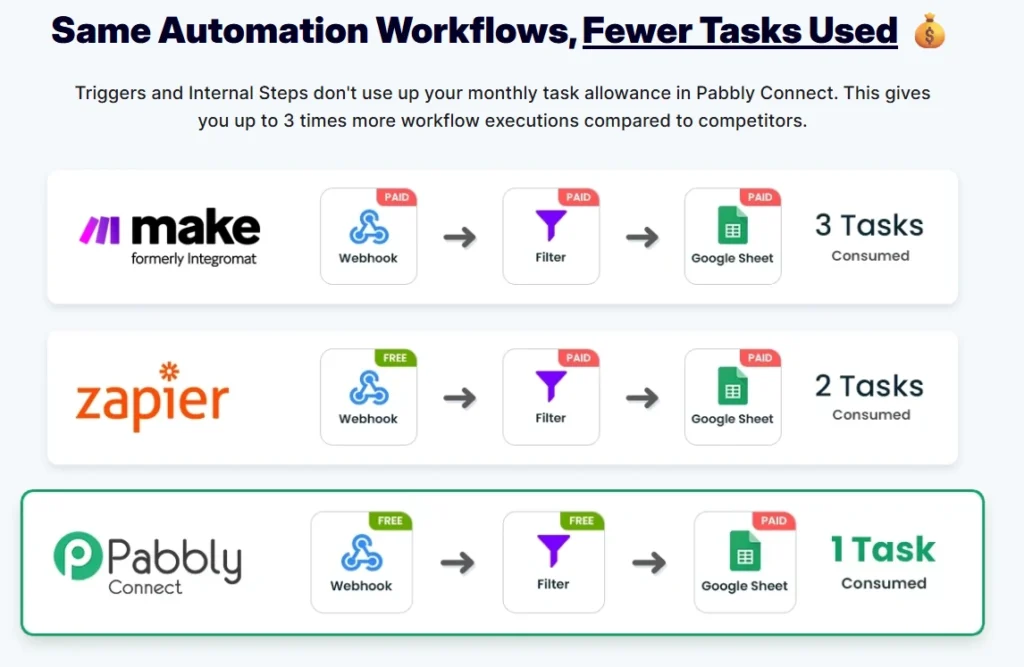
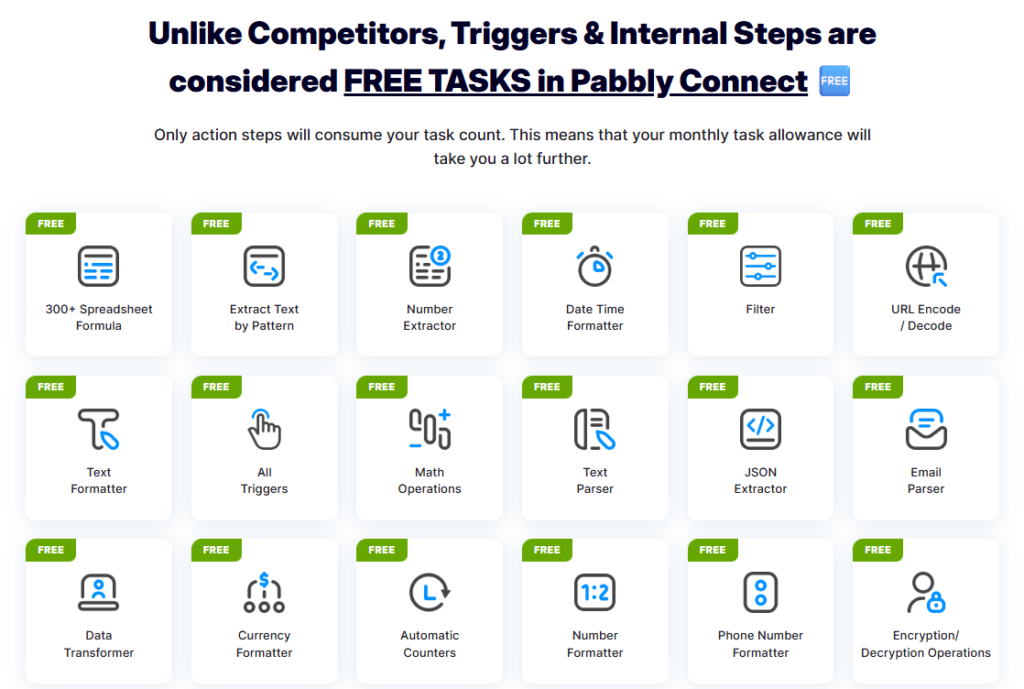
- Triggers and internal steps (Filter, Router, Formatter) are not counted as tasks
- Only the actual action step in a workflow consumes your monthly task count
- This means your real task efficiency is 2–3x better than what Zapier or Make offers for the same number on paper
So when Pabbly says 10,000 tasks/month on the Ultimate plan, it genuinely goes much further than 10,000 tasks on Zapier. From what I’ve observed setting up automations for clients, a typical multi-step workflow on Zapier consumes 3 tasks for something Pabbly handles in 1.
Plan Breakdown — All Three One-Time Plans Compared
| Feature | Standard | Ultimate | Ultimate Plus |
|---|---|---|---|
| Monthly Tasks | 3,000 | 10,000 | 20,000 |
| Workflows | 10 | Unlimited | Unlimited |
| Multi-Step Workflows | No | Yes | Yes |
| AI Assistant (Pabbly) | No | Yes | Yes |
| MCP Servers | No | Yes | Yes |
| Iterator & Filter | No | Yes | Yes |
| Email Parser | No | Yes | Yes |
| JS & Python Module | No | Yes | Yes |
| Unlimited Path Routers | No | Yes | Yes |
| Custom Variables | No | Yes | Yes |
| Human in Loop | No | Yes | Yes |
| 1 Year Customer Support | No | No | Yes |
| 23,500+ Community Members | No | No | Yes |
| Price (USD) | $349 | $799 | $1,298 |
| Price (INR) | ₹31,399 | ₹71,899 | ₹1,15,729 |
| Zapier Equivalent (yearly) | $588/yr | $1,548/yr | $3,036/yr |
Best For row: Light use / Testing | Growing businesses & agencies | Power users, teams, enterprises
Which Plan Should You Pick?
Standard at $349 makes sense only if you’re just getting started with automation, have very simple workflows, and don’t need multi-step logic. The 10-workflow cap is a real limitation though — most people outgrow it fast.
Ultimate at $799 is where the deal makes the most financial sense. You get unlimited workflows, multi-step support, AI assistant, MCP servers, JS/Python modules, and everything in between. For freelancers, bloggers, small agencies, and growing businesses — this is the one.
Ultimate Plus at $1,298 is worth considering if you need the full team support (1-year dedicated support + community access included), 20,000 tasks, and Human-in-Loop for approval-based automations. The extra discount code 100OFF brings it down further, which makes it genuinely competitive for larger operations.
One important note from the official page: You cannot upgrade between one-time plans once purchased. So if you think you’ll need more tasks later, buying at the right tier from day one matters.
The Biggest Reason Pabbly’s Task System Beats Competitors
This part is what most deal pages gloss over — and it’s actually the most important thing to understand before buying.
On Zapier, if your workflow has a Webhook → Filter → Google Sheet, that’s 2 billable tasks (Filter + Sheet action).
On Make, all three steps count — 3 tasks consumed.
On Pabbly Connect, the Webhook is free (triggers are free), the Filter is free (internal steps are free), and only the Google Sheet action counts — 1 task consumed.
So your 10,000-task monthly limit on Pabbly’s Ultimate plan effectively behaves like 20,000–30,000 tasks on competing platforms. For users running WooCommerce order automation, lead capture flows, or CRM syncing, this difference adds up very quickly.
I’ve set up similar workflows for a client project — a WooCommerce store syncing orders to Google Sheets and sending a WhatsApp notification via webhook. On Make, that would eat 3 tasks per order. On Pabbly Connect, it consumed 1. Over a month with 2,000 orders, that’s 4,000 tasks saved.
What You Actually Get With Pabbly Connect
Beyond the task math, here’s what the platform itself offers:
2,000+ App Integrations — WooCommerce, Shopify, Salesforce, HubSpot, Gmail, Google Sheets, WhatsApp Cloud API, Razorpay, Stripe, Calendly, Facebook, Instagram, Canva, OpenAI, Telegram Bot, Zoho CRM, and hundreds more.
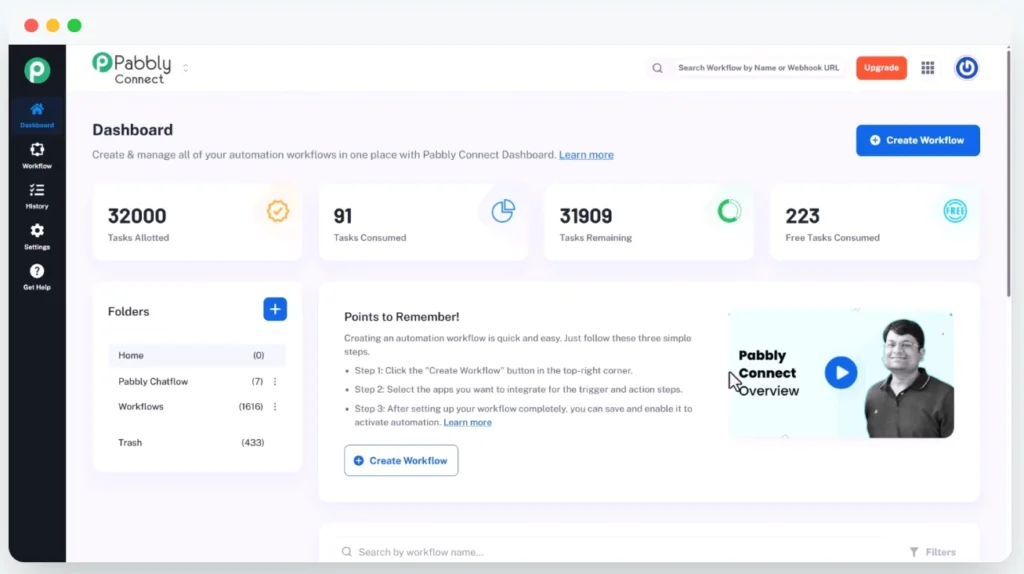
No-Code Workflow Builder — Set a trigger, connect your apps, enable the workflow. Three steps, no developer needed. The dashboard is clean and genuinely beginner-friendly.
AI Assistant — Build and interact with intelligent assistants inside your workflows. Useful for automating content creation, dynamic conversation flows, or processing AI-generated outputs into other apps.
Code by Pabbly — Run custom JavaScript or Python logic directly inside a workflow step. This is a significant advantage for developers who need conditional logic or data transformation beyond what built-in formatters offer.
Email Parser — Automatically extract data (sender name, subject, attachments) from incoming emails and pass it to other workflow steps. Very handy for invoice processing or lead capture from email.
Schedule Workflows — Run automations at a specific time, daily, weekly, or at set intervals. Works well for report generation, social media posting, or end-of-day summaries.
11,000+ Video Tutorials — One of Pabbly’s genuine strengths. The YouTube library is massive and updated regularly. New to automation? You’ll rarely get stuck without a tutorial to guide you.
SOC2 Type 2 Compliant + ISO 27001:2022 Certified — For businesses that handle customer data, this is a serious trust signal. Not many automation tools at this price point carry both certifications.
Pros & Cons — Honest Assessment
Pros
- One-time payment with genuinely no recurring fees — rare in this category
- Task calculation system is more efficient than Zapier, Make, or n8n cloud — your task allowance goes further
- 2,000+ integrations including Indian apps like Razorpay, IndiaMART, JustDial, PhonePe, Sulekha, and Wati
- AI Assistant + MCP Servers included in Ultimate and above — no extra charges for AI-powered workflows
- Code by Pabbly lets you run JS or Python inside workflows — real developer flexibility
- 11,000+ tutorials on YouTube, released daily — excellent onboarding support
- SOC2 and ISO certified — enterprise-grade security at a non-enterprise price
Cons
- Standard plan caps you at 10 workflows — this is genuinely limiting for real-world use
- No upgrading between one-time plans after purchase — choose your tier carefully upfront
- 1-year customer support is only on Ultimate Plus — Ultimate buyers rely on community and docs for support after year one
- Cloud-hosted only — your data sits on Pabbly’s servers; not suitable for strict data residency requirements
- 3,000 tasks/month on Standard plan is low for active ecommerce or lead generation operations
Pabbly Connect vs. Zapier — The Real Savings Picture
| Zapier (Monthly) | Pabbly Connect (Lifetime) | |
|---|---|---|
| Tasks/Month | 10,000 | 10,000 |
| Annual Cost | $1,548/year | $799 (once) |
| 3-Year Total Cost | $4,644 | $799 |
| Internal Steps Counted | Yes | No |
| Multi-Step Workflows | Yes | Yes |
| Indian App Support | Limited | Strong (Razorpay, Wati, IndiaMART) |
| AI Assistant | Add-on | Included (Ultimate+) |
| Effective Task Value | Lower | 2–3x higher |
Zapier charges $1,548 every year for the same 10,000 task tier. Over three years, that’s $4,644. Pabbly Connect costs $799 once. The math is hard to argue with — especially when you factor in that Pabbly’s task efficiency makes that 10,000 go much further anyway.
For Indian freelancers and agencies specifically, the INR pricing option and local app integrations (Razorpay, IndiaMART, Sulekha, Wati, JustDial) make this a practical choice, not just a cheap alternative.
Who wins where: For pure ease of use and app ecosystem breadth, Zapier is still ahead. But for value, long-term cost, and Indian market support — Pabbly Connect wins decisively.
Who Should Buy the Pabbly Connect Lifetime Deal
Buy it if you:
- Run regular automations for your business, blog, or clients and are tired of monthly billing
- Are a freelancer or agency handling WooCommerce, lead gen, or CRM automations
- Need Indian app integrations — Razorpay, Wati, IndiaMART, PhonePe, Sulekha
- Want to experiment with AI-powered workflows without paying extra
- Are a developer who needs custom JS/Python steps inside automation flows
Skip it if you:
- Only need automation once in a while — the one-time cost won’t justify itself
- Require strict data residency or on-premise hosting (Pabbly is cloud-only)
- Need more than 10 simple workflows on a tight budget — the Standard plan will frustrate you
- Are deeply embedded in the Zapier or Make ecosystem with complex existing setups — migration has a learning curve
What to Do After Buying Pabbly Connect
Once you complete the purchase, here’s how to get started without wasting time:
- Set up your first workflow within 24 hours — don’t let the dashboard sit idle. Start with a simple two-step automation: a form submission that sends data to Google Sheets.
- Explore the folder system — organise workflows by client or project from day one. It gets messy fast if you don’t.
- Check the free internal tools — Formatters, Filters, Date-Time converters, JSON Extractor, Email Parser, Math Operations — these are all free and save you from needing extra steps in many workflows.
- Watch 2–3 tutorials from the official Pabbly YouTube channel before building anything complex — the library is genuinely useful and saves hours of trial and error.
- Don’t buy Standard if you think you’ll scale — you can’t upgrade between lifetime plans later. Start at Ultimate if there’s any chance your automation needs will grow.
Frequently Asked Questions
Is the Pabbly Connect lifetime deal still available in 2026?
As of now, the one-time payment plan is listed as a limited-time offer on the official site. Pabbly has explicitly stated that one-time plans will not be available in the future, so there’s genuine urgency here — not manufactured pressure.
Can I upgrade from Standard to Ultimate later if I need more tasks?
No. According to the official pricing page, upgrading between one-time plans is not allowed after purchase. This is a real limitation to plan for before buying.
Is there a free trial for Pabbly Connect?
Pabbly Connect does not offer a free trial as such, but they back every purchase with a 30-day, 100% money-back guarantee. So you can test it risk-free within the first month.
Does the task limit reset every month even on the lifetime plan?
Yes. The task allowance (3,000, 10,000, or 20,000 depending on your plan) resets every month. You’re not getting a one-time task bank — you get that monthly quota for life.
What happens if I hit my monthly task limit?
Your automations pause until the next month’s reset. You can’t run additional tasks without upgrading — but since upgrades aren’t available within lifetime plans, this is something to factor into your plan choice.
Is Pabbly Connect safe for business data?
Pabbly is SOC2 Type 2 compliant and ISO 27001:2022 certified, which are legitimate enterprise-grade security standards. That said, it’s cloud-hosted, meaning your data lives on Pabbly’s servers. For most small businesses and agencies, this is fine. For regulated industries requiring on-premise data storage, it isn’t.
What’s the extra discount code mentioned on the pricing page?
Use code 100OFF at checkout to get an additional discount on the Ultimate and Ultimate Plus plans.
Final Verdict
The Pabbly Connect lifetime deal is one of the few automation tool deals that actually holds up when you crunch the numbers. The task efficiency system alone makes 10,000 tasks here worth more than 10,000 tasks on Zapier or Make. Add in the AI Assistant, MCP Servers, JS/Python modules, and 2,000+ integrations — all for a one-time fee — and the value is hard to find elsewhere.
The Standard plan is genuinely limited and I’d skip it for anyone with real automation needs. The Ultimate plan at $799 (₹71,899) is where this deal makes the most sense. Use code 100OFF for extra savings on Ultimate Plus if you need team support and 20,000 tasks.
This offer won’t last forever — Pabbly has confirmed one-time plans won’t be available in the future.
👉 Grab the Pabbly Connect Lifetime Deal here before the pricing goes subscription-only.