Most people spend hours picking a blog name and zero time choosing the right platform. Then, six months later, they’re stuck — limited features, no monetization options, or a painful migration ahead. The platform decision shapes everything: how your blog looks, performs, ranks on Google, and makes money.
This guide cuts through the noise. Whether you’re starting fresh or reconsidering your current setup, here’s how to make the right call — with real pricing data and practical recommendations.
This post contains affiliate links. If you purchase through our links, we may earn a small commission at no extra cost to you. Thank you for your support!Free Blog vs. Self-Hosted — Get This Right First
Before comparing platforms, understand the single most important distinction in blogging.
Free platforms (Blogger, WordPress.com free, Wix free) let you publish content without paying. But you don’t own your blog. You can’t add custom plugins, monetize freely with ads, or control your SEO fully. They’re fine for hobby journaling — not for building a serious blog.
Self-hosted WordPress means you own the website. You pay for hosting, install WordPress, and have complete control. This is what 43%+ of the entire web runs on — including most blogs that actually make money.
The moment you decide blogging is more than a hobby, self-hosted is the only path that makes sense.
What Actually Matters When Choosing a Platform
People overthink this. Here’s what genuinely matters — and what doesn’t.
What matters:
- Can you monetize it without restrictions?
- Do you control your content and data?
- Can it scale as your traffic grows?
- Does it support SEO properly (custom meta, schema, sitemap)?
- What does it actually cost — introductory vs renewal?
What doesn’t matter as much as people think:
- The drag-and-drop builder (you’ll use a theme anyway)
- Pre-built templates (most bloggers replace them within a month)
- The “free” tier (it always has a ceiling you’ll hit)
If you’re planning to start a blog with any intention of earning from it, treat platform choice as a business decision, not a design one.
The Platforms Worth Considering in 2026
WordPress.org (Self-Hosted) — The Standard
WordPress.org is the software. You install it on a hosting account you pay for. This gives you access to 59,000+ plugins, complete SEO control, unlimited monetization options, and full data ownership.
The learning curve is real — but it’s manageable. And the ecosystem around WordPress (themes, plugins, tutorials) is the largest in the world for good reason.
From client projects I’ve worked on, WordPress consistently outperforms proprietary builders when it comes to long-term SEO flexibility. Things like schema markup, custom post types, and advanced caching — these just work better on WordPress when set up correctly.
The only thing WordPress.org doesn’t come with is hosting. That’s where your platform choice — and your budget — comes in.
WordPress.com — Not the Same Thing
A lot of beginners confuse WordPress.org and WordPress.com. WordPress.com is a hosted service. On the free plan, you can’t install plugins, you have a WordPress subdomain, and there are ads on your site (that you don’t earn from). The paid plans unlock more features but at a higher cost than just buying hosting separately.
For serious bloggers: WordPress.org + good hosting is almost always a better value.
Blogger — Old, Free, Limited

Google’s Blogger is genuinely free with a custom domain, and it’s been around since 1999. It works for very casual bloggers. But plugin support is nonexistent, the editor is basic, and SEO capabilities are limited. If you outgrow it, migration is messy. Not recommended if growth is the goal.
Wix / Squarespace — Pretty, But Limiting
Both are polished website builders with blog functionality. They’re not built for content-first publishing the way WordPress is. SEO has improved over the years, but it is still not on par with a well-optimized WordPress site. Pricing is also higher than hosting + WordPress when you factor in the plans needed for a real blog.
The Real Choice: Which Hosting for Your WordPress Blog
Once you’ve committed to WordPress (which you should), the hosting decision is where most beginners either save money wisely or make a mistake that costs them performance and renewals.
Two platforms consistently recommended for bloggers: Hostinger and Bluehost.
Here’s what the actual pricing looks like.
Hostinger Pricing (Web Hosting — 48-Month Plan)
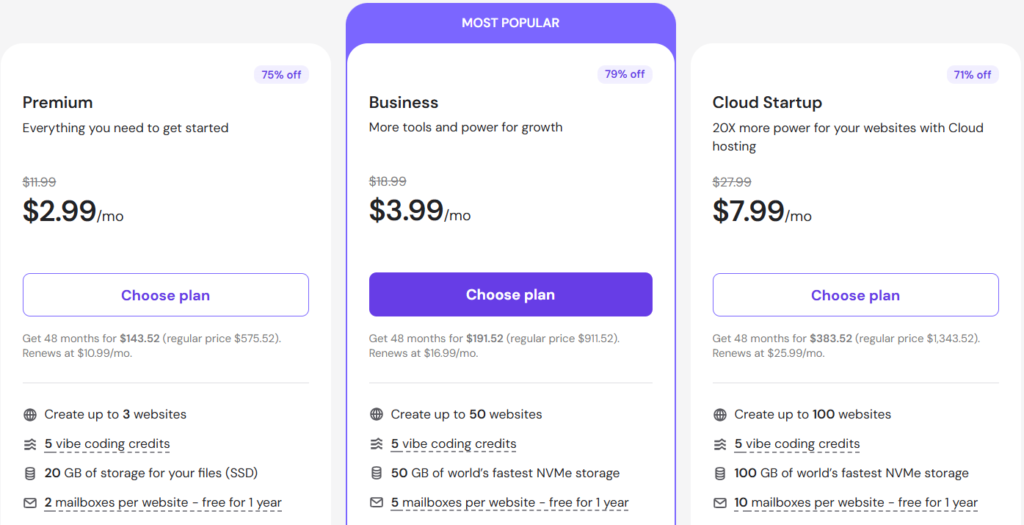
| Plan | Price/mo | Websites | Storage | RAM | Key Extras |
|---|---|---|---|---|---|
| Premium | $2.99/mo | 3 | 20 GB SSD | 2 GB | Free domain, 2 mailboxes/site |
| Business | $3.99/mo | 50 | 50 GB NVMe | 3 GB | Free CDN, daily backups, AI Agent for WordPress |
| Cloud Startup | $7.99/mo | 100 | 100 GB NVMe | 4 GB | Dedicated IP, 100 PHP workers, priority support |
Prices shown are for 48-month billing. Renews at $10.90/mo (Premium), $16.99/mo (Business), $25.99/mo (Cloud Startup).
The Business plan at $3.99/mo is the sweet spot for bloggers. You get NVMe storage (noticeably faster than standard SSD), free CDN, daily backups, and an AI Agent for WordPress that helps you set up and manage the site faster. For most new bloggers running 1–3 sites, this covers everything you need.
The Premium plan is workable if the budget is tight, but the lack of daily backups and CDN is something you’ll feel as your site grows.
Bluehost Pricing (WordPress Hosting — 36-Month Plan)
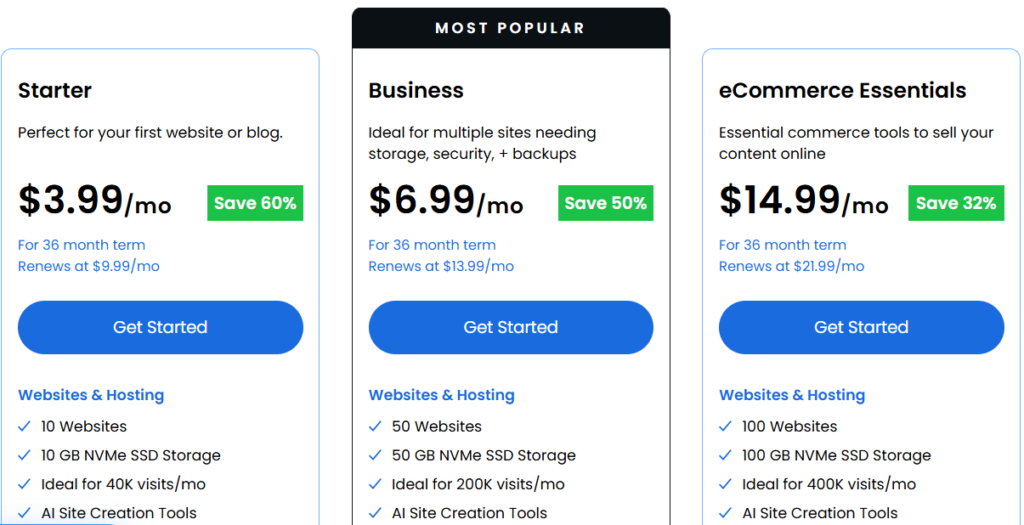
| Plan | Price/mo | Websites | Storage | Key Extras |
|---|---|---|---|---|
| Starter | $3.99/mo | 10 | 10 GB NVMe SSD | Free domain, SSL, AI Builder, Site Migration |
| Business | $6.99/mo | 50 | 50 GB NVMe SSD | Staging, Domain Privacy (free yr 1), Phone Support |
| eCommerce Essentials | $14.99/mo | 100 | 100 GB NVMe SSD | WooCommerce, Secure Payment Processing |
Prices for a 36-month term. Starter renews at $9.99/mo, Business at $13.99/mo.
Bluehost is an official WordPress.org recommended host — one of the very few that carry that endorsement. The Starter plan at $3.99/mo is solid for a first blog with free domain, free SSL, and AI site creation tools included. The Business plan adds a staging environment, which is genuinely useful once you’re regularly updating themes or plugins.
One thing to note: Bluehost’s Starter plan doesn’t include phone support — that’s available from Business tier upward.
Hostinger vs Bluehost — Side-by-Side for Bloggers
| Feature | Hostinger Business | Bluehost Starter |
|---|---|---|
| Starting Price | $3.99/mo | $3.99/mo |
| Renewal Price | $16.99/mo | $9.99/mo |
| Websites | 50 | 10 |
| Storage | 50 GB NVMe | 10 GB NVMe SSD |
| Free Domain | Included | Included |
| Daily Backups | Included | Not on Starter |
| Free CDN | Included | Included |
| WordPress Recommended | — | Official Partner |
| Phone Support | Cloud plan only | Business plan+ |
| AI Tools | AI Agent for WordPress | AI Builder |
| Best For | Budget bloggers, multi-site | Beginners, single blog |
Winner by use case:
- Starting your first blog on a tight budget → Hostinger Business at $3.99/mo wins on storage (50 GB vs 10 GB) and daily backups included.
- Want an officially WordPress-recommended host with lower renewal rates → Bluehost Starter renews cheaper at $9.99/mo vs $16.99/mo for Hostinger Business.
- Running multiple blogs or a niche site portfolio → Hostinger Business clearly wins — 50 websites vs 10.
The renewal pricing difference is worth paying attention to. Hostinger’s introductory rates are attractive, but the jump at renewal is significant. If you’re on a 4-year cycle, that’s fine — but plan for it.
Pros and Cons of Each Platform
Hostinger
Pros
- Highly competitive entry pricing, especially on 48-month plans
- NVMe storage even on the Business plan (genuinely faster I/O)
- Daily backups and free CDN included at $3.99/mo — competitors charge extra for this
- 50-website limit on Business makes it great for portfolio builders or affiliate site operators
- AI Agent for WordPress speeds up initial setup considerably
Cons
- Renewal prices jump sharply — Business goes from $3.99/mo to $16.99/mo
- Phone support is only available on higher-tier plans
- Premium plan uses standard SSD, not NVMe — the storage speed difference is real
- Support quality can vary depending on query complexity
Bluehost
Pros
- Official WordPress.org recommended host — significant trust signal
- Lower renewal rates compared to Hostinger (Starter: $9.99/mo renewal)
- Free site migration included on all plans
- AI Site Creation Tools + AI Builder are genuinely useful for non-technical bloggers
- US-based phone support on Business plan and above, 24/7
- 99.99% uptime SLA — one of the better guarantees in shared hosting
Cons
- Starter plan storage is only 10 GB NVMe — can feel tight for image-heavy blogs
- Phone support is not available on the Starter plan
- Domain privacy is paid after year 1
- No daily backups on the Starter plan — you’d need a plugin like UpdraftPlus separately
Other Blogging Platforms — Brief Notes
Medium
Good for writers who don’t want to manage a website. No hosting, no setup. But you own nothing — Medium can change monetization terms anytime, and your SEO equity stays with their domain, not yours.
Substack
Excellent for newsletter-based blogs. Free to start; they take a cut of paid subscriptions. Works well if email is your primary channel, but SEO capability is limited.
Ghost
A solid WordPress alternative for content-focused bloggers. Clean, fast, built-in newsletter. Hosting starts at $9/mo. Good for minimalists, but the plugin ecosystem is tiny compared to WordPress.
For most bloggers in India or globally who want long-term growth, monetization control, and SEO flexibility, WordPress.org on Hostinger or Bluehost remains the practical answer.
Who Should Use What — The Honest Breakdown
You’re a complete beginner, just testing blogging: Start on WordPress.com free. No investment required. If you stick with it for 90 days, then move to self-hosted.
You want to monetize through ads, affiliate marketing, or products: Self-hosted WordPress immediately. Don’t delay this — migrating later wastes time and sometimes loses rankings.
You’re building a personal brand or portfolio: WordPress.org on Bluehost Starter. The official WordPress recommendation matters for perception, and the setup is beginner-friendly.
You’re building a niche site or running multiple blogs: Hostinger Business plan. 50 websites, 50 GB NVMe, daily backups — the math works strongly in your favor at $3.99/mo.
You’re a developer or managing client sites: Hostinger Cloud Startup or Bluehost Business for staging environments, better PHP workers, and performance headroom.
What to Do After You’ve Chosen Your Platform
Once you’ve signed up for hosting and installed WordPress, don’t get distracted by design right away. Here’s what actually matters first:
- Choose your niche before writing — Read: How to Choose a Niche for Your Blog
- Pick your domain name carefully — How to Choose the Perfect Domain Name
- Set up Hostinger properly — How to Sign Up with Hostinger | How to Install WordPress in Hostinger
- Install a fast, lightweight theme — How to Install GeneratePress Premium
- Add only essential plugins first — How to Install Essential Plugins
- Start writing with SEO in mind from day one — How to Optimize Your Content for SEO
- Plan monetization early — How to Monetize Your Blog
Most beginners make the mistake of installing 20 plugins in week one and wondering why their site is slow. Keep it clean. A lightweight theme, an SEO plugin, a caching plugin, and a security plugin — that’s genuinely enough to start.
One thing I noticed while setting up client blogs: the sites that performed best from the start weren’t the most feature-packed — they were the ones with clean installs, fast themes, and content published consistently from week one.
Bluehost Hosting Discount– Limited Time Offer!
Deal: Up to 75% OFF
Coupon Code: Auto-Applied on Click 👇
Frequently Asked Questions
Is WordPress really free?
WordPress.org software is free to download and use. What you pay for is hosting — the server that runs your site. A Hostinger Business plan costs $3.99/mo, or a Bluehost Starter at $3.99/mo (both on long-term billing). That’s your actual cost to run a WordPress blog.
Can I switch blogging platforms later?
You can, but it’s painful. Moving from a proprietary platform like Wix or Squarespace to WordPress involves manual content migration and often means rebuilding your site structure. Starting on WordPress from the beginning saves you that headache.
Hostinger vs Bluehost — which is better for a first blog?
Both are genuinely good. Hostinger Business wins on storage (50 GB vs 10 GB) and daily backups at the same $3.99/mo entry price. Bluehost wins on its official WordPress recommendation and lower renewal price ($9.99/mo vs $16.99/mo). If you want a better renewal deal, go to Bluehost. If you want more resources upfront, go to Hostinger.
Do I need a free domain from my hosting provider?
Not necessarily. Both Hostinger and Bluehost offer a free domain for a year. It’s a nice bonus, but make sure you choose the domain name you actually want to keep — you’ll renew it directly after year one regardless. Check: How to Choose the Perfect Domain Name
Is there a free trial for Hostinger or Bluehost?
Neither offers a traditional free trial. Both have a 30-day money-back guarantee, so you can get a refund within 30 days if it’s not working for you. Note: domains are typically non-refundable even within the guarantee period.
What’s the best blogging platform for SEO?
Self-hosted WordPress, consistently. You control every technical SEO element — sitemaps, schema, canonical URLs, robots.txt, page speed optimization, and Core Web Vitals tuning. No proprietary builder gives you the same level of control.
How much does it cost to start a blog in 2026?
Realistically: $2.99–$3.99/month on Hostinger or Bluehost (long-term plans), plus a domain (~$10–15/year if not bundled free). You can start with zero premium plugins and a free theme. The total first-year cost can be under $60 if you go with a 48-month Hostinger plan.
Final Verdict
The platform question isn’t complicated once you strip out the noise. For any blogger who’s serious about growth, SEO, and monetization: self-hosted WordPress is the answer. The only variable left is which host to go with.
Hostinger at $3.99/mo (Business plan) is the better deal if you want more websites, more storage, and daily backups baked in from day one — especially useful if you’re building multiple niche sites. Start with Hostinger →
Bluehost at $3.99/mo (Starter plan) is the right pick if you want the official WordPress endorsement, a more predictable renewal cost, and a well-established support infrastructure behind you. Start with Bluehost →
Both have 30-day money-back guarantees. Pick one, start publishing, and iterate from there. The best blogging platform is the one you actually use.