Most people get stuck on this question longer than they should. Both are from the same platform — Bluehost — but they serve very different use cases, and picking the wrong one has real consequences: either you’re overpaying for resources you don’t need, or your site starts struggling under traffic it can’t handle.
This comparison breaks down exactly what you get with each, where the real differences lie, and which one makes sense for your situation right now.
The Short Answer
If you’re running a new blog, small business site, or a WordPress project under 40K–200K monthly visits, Bluehost’s web hosting plans will handle it fine. Once you’re managing multiple high-traffic sites, need root server access, run Docker containers, or deal with unpredictable traffic spikes — that’s when VPS becomes the right call.
This post contains affiliate links. If you purchase through our links, we may earn a small commission at no extra cost to you. Thank you for your support!What You’re Actually Comparing Here
These are not two competing products fighting for the same customer. They’re two different layers of infrastructure, and Bluehost offers both under one roof.
Web Hosting (Shared) = Your site lives on a server alongside hundreds of other sites. Resources like RAM and CPU are pooled. You don’t manage the server — Bluehost does.
VPS Hosting (Self-Managed) = You get your own isolated virtual server with allocated CPU cores, RAM, and NVMe SSD storage. You have full root access. You manage the environment yourself.
One is managed for you. The other gives you complete control — but demands technical confidence.
Bluehost Web Hosting: Plans and What They Cover
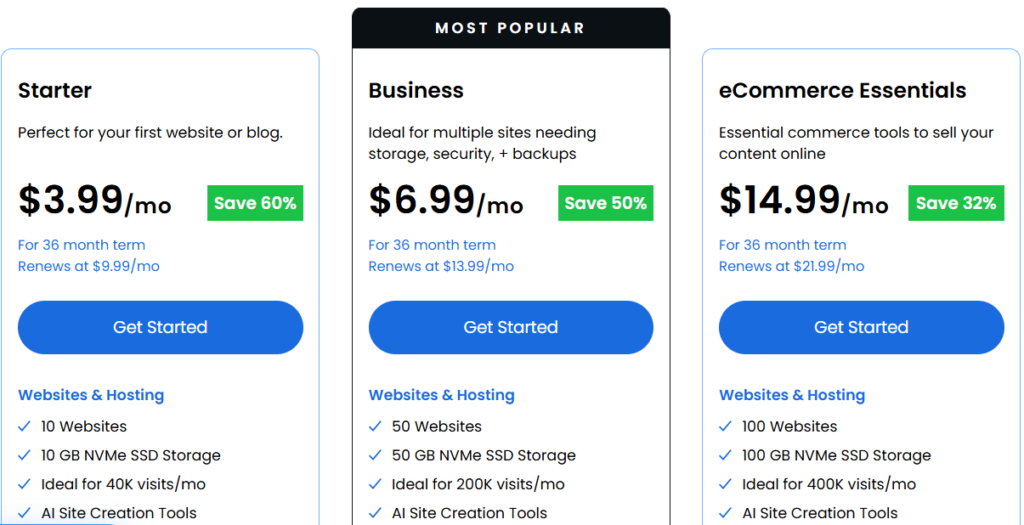
Bluehost’s shared web hosting currently runs on Standard plans. Here’s the exact pricing from their live pricing page:
| Plan | Price (Promo) | Renews At | Websites | Storage | Traffic Capacity |
|---|---|---|---|---|---|
| Starter | $3.99/mo | $9.99/mo | 10 | 10 GB NVMe SSD | ~40K visits/mo |
| Business | $6.99/mo | $11.60/mo | 50 | 50 GB NVMe SSD | ~200K visits/mo |
| eCommerce Essentials | $14.99/mo | $21.99/mo | 100 | 100 GB NVMe SSD | ~400K visits/mo |
All plans are billed for 36 months to get the promotional rate.
Every plan includes: Free domain (1st year), Free SSL, Free CDN, 99.99% Uptime SLA, AI Website Builder, Free Site Migration Tool, Managed WordPress Updates, DDoS Protection, Web Application Firewall, Yoast SEO (free plugin), and 24/7 chat support.
The Business plan also gets AI-Powered Malware Detection & Removal and Domain Privacy for free — both missing from Starter.
eCommerce Essentials adds WooCommerce Auto-Install, Secure Payment Processing, Visitor Memberships, Affiliate Program integration, and Phone Support.
One thing worth noting from a performance standpoint: WPShout’s November 2025 load time comparison showed Bluehost clocking in at 0.35s for US load time — faster than Kinsta (0.43s), SiteGround (1.17s), and Hostinger (1.92s). That’s genuinely good for shared hosting, especially when you consider the price point.
WordPress itself recommends Bluehost as an official hosting partner — that’s not a marketing claim; it’s been consistent for years. The Business plan tends to be the most popular pick among beginners, and for good reason: 50 websites, 50 GB NVMe storage, staging environment, and AI malware protection at $6.99/mo is hard to beat at that price point.
When I started out about 8 years ago, the Business plan was my first choice too. It handled everything I needed early on — multiple WordPress sites, decent speed, and zero server headaches. The real test came at renewal time. Once my sites started ranking and traffic picked up meaningfully, shared hosting began showing its limits. That’s when I moved to a cloud environment — not because Bluehost failed me, but because growing traffic eventually needs more isolated, scalable resources. That’s the natural upgrade path, and it worked out well.
Bluehost VPS Hosting: Plans and What They Cover
Bluehost’s VPS is self-managed. You get full root SSH access, AMD EPYC PCIE 5 NVMe SSD storage, and the ability to scale resources on demand without rebuilding anything.
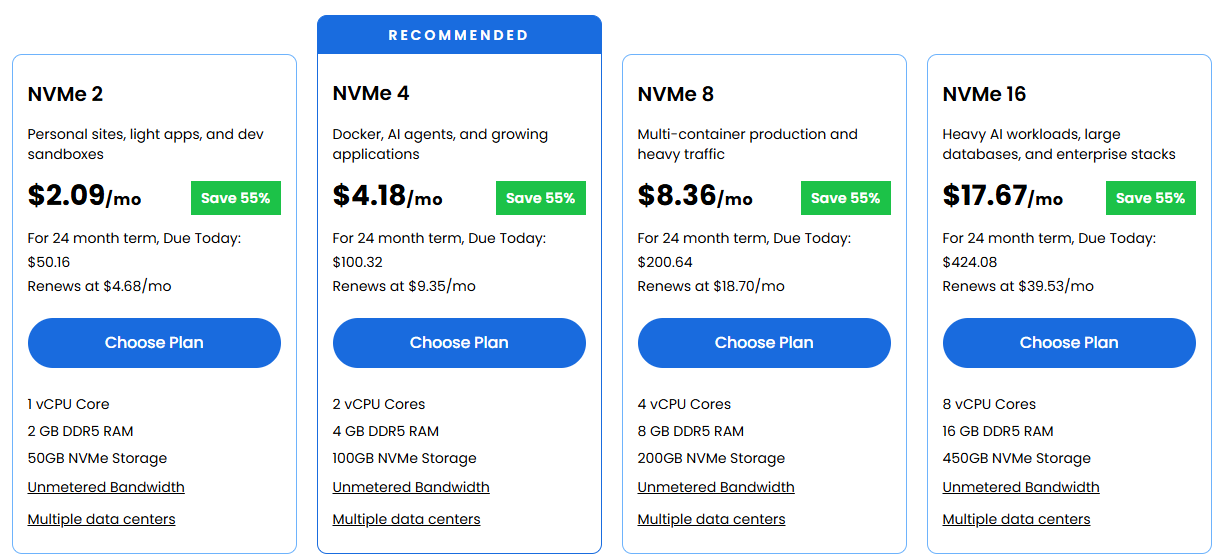
Here are the current VPS plans (24-month term pricing):
| Plan | Price (Promo) | Due Today (24 months) | Renews At | vCPU Cores | RAM | NVMe Storage |
|---|---|---|---|---|---|---|
| NVMe 2 | $2.09/mo | $50.16 | $4.68/mo | 1 vCPU | 2 GB DDR5 | 50 GB |
| NVMe 4 | $4.18/mo | $100.32 | $9.35/mo | 2 vCPU | 4 GB DDR5 | 100 GB |
| NVMe 8 | $8.36/mo | $200.64 | $18.70/mo | 4 vCPU | 8 GB DDR5 | 200 GB |
| NVMe 16 | $17.67/mo | $424.08 | $39.53/mo | 8 vCPU | 16 GB DDR5 | 450 GB |
The NVMe 4 is flagged as “Recommended” for Docker, AI agents, and growing applications.
All VPS plans include: Unmetered Bandwidth, DDoS Protection, Dedicated IP address, Full Root SSH + API access, Remote access via Secure SSH/SFTP, AMD EPYC processors, NVMe SSD storage, 99.99% uptime guarantee, multiple data center options.
What’s NOT included by default: cPanel, 24/7 priority support, and Plesk. These are self-managed plans — you’re handling OS updates, security hardening, software installs, and server configuration yourself.
There’s a notable addition in 2025: Claude Code comes pre-installed on every VPS plan. That’s a legitimately useful feature if you’re deploying AI coding workflows or agentic apps.
One-click deploy supports WordPress, WooCommerce, Magento, LAMP Stack, LEMP Stack, n8n, Coolify, Ollama, Docker (via Compose), and several AI agent tools, including OpenClaw and GatorClaw.
The Real Differences That Matter
Most comparisons stop at “shared = cheap, VPS = powerful.” That’s not wrong — but it misses the decisions that actually matter day to day.
| Feature | Web Hosting | VPS Hosting |
|---|---|---|
| Server resources | Pooled (shared) | Dedicated allocation |
| RAM | Not specified, shared pool | 2 GB – 16 GB DDR5 (guaranteed) |
| Root access | No | Yes (full SSH + API) |
| cPanel | Not mentioned | Not included (self-managed) |
| OS control | Managed by Bluehost | You choose and manage |
| Traffic spikes | Can slow under load | Scales with allocated resources |
| WordPress staging | Yes (Business plan+) | Manual setup |
| Support included | 24/7 chat + phone (eComm plan) | No priority support by default |
| Best for | Blogs, business sites, WooCommerce | Agencies, devs, high-traffic, AI apps |
| Entry price (promo) | $3.99/mo | $2.09/mo |
That entry-price difference is interesting — the NVMe 2 VPS is actually cheaper than the Starter web hosting plan on paper. But compare what you’re getting: the VPS NVMe 2 has just 1 vCPU and 2 GB RAM, no managed support, and no auto-managed WordPress environment. It’s a dev sandbox, not a production WordPress host for beginners.
Where Web Hosting Falls Short
Shared hosting is genuinely good — until it isn’t. The limitations surface in specific situations:
Resource contention is real. When other sites on the same server spike in traffic, your site feels it. It’s not common with a quality host like Bluehost, but it happens. I’ve seen it on client sites during flash-sale periods — load times go from 0.4s to over 2s during peak shared-server load.
You can’t install custom software. Need a specific PHP extension, Redis cache server, or custom cron configuration? On shared hosting, you work within what Bluehost provides. On a VPS, you install exactly what you need.
Staging is limited. WordPress Staging is available on the Business plan and above — not on the Starter. On VPS, you manage staging environments however you prefer.
No guaranteed RAM allocation. Web hosting doesn’t give you a fixed RAM number because resources are pooled. This is fine 95% of the time, but it’s a concern for WooCommerce stores running during high-traffic events.
Where VPS Hosting Isn’t the Right Call
VPS sounds powerful — and it is. But it’s genuinely not for everyone.
You handle everything. OS patches, firewall rules, PHP version updates, SSL renewals if you don’t automate them — all your responsibility. I’ve seen first-time VPS users leave their servers misconfigured for months without realizing it.
No cPanel by default. You SSH in and work from the command line or install your own control panel. If that sounds unfamiliar, the learning curve is real.
Support limitations. Standard VPS plans don’t include 24/7 priority support. You’ll need to purchase additional support options or use Bluehost’s Managed VPS offering instead.
The NVMe 2 plan is underpowered for most WordPress sites. 1 vCPU and 2 GB RAM can handle a basic WordPress install, but add WooCommerce with a dozen plugins and you’ll run into PHP memory limits quickly. The NVMe 4 (4 GB RAM, 2 vCPU) is the practical starting point.
Who Should Actually Consider Moving to VPS
If any of these describe your situation, it’s time to seriously think about upgrading:
- Your site has started ranking consistently and traffic is climbing month over month
- You’re hitting PHP memory limits or seeing slow load times during traffic spikes
- You manage client sites and need isolated environments per project
- You want to run Docker containers, n8n workflows, or AI agent tools
- You need root access to configure custom PHP extensions or Redis
The shift isn’t about prestige — it’s about your site outgrowing what shared resources can reliably deliver. Moving before you’re forced to (due to downtime or slowdowns) is always the smarter call.
Pros and Cons: Bluehost Web Hosting
Pros
- Entry price at $3.99/mo is genuinely competitive for what’s included
- Fully managed — no server knowledge required
- Strong security stack: DDoS protection, WAF, SSL, malware scanning on all plans
- WPShout clocked Bluehost at 0.35s US load time — fastest in their November 2025 test
- Free domain + SSL + CDN in every plan simplifies the setup for new sites
- WordPress staging on Business plan and above
Cons
- Starter plan at just 10 GB NVMe storage is tight for sites with heavy media
- Renewal prices jump significantly (e.g., $3.99/mo → $9.99/mo on Starter)
- No dedicated RAM or CPU — resource sharing means variable performance under server-wide load
- Phone support is only available on eCommerce Essentials, not Starter or Business
Pros and Cons: Bluehost VPS Hosting
Pros
- Guaranteed dedicated resources — RAM, vCPU, and NVMe SSD are yours alone
- Full root SSH access for complete environment control
- AMD EPYC PCIE 5 processors + DDR5 RAM — genuinely modern hardware
- Unmetered bandwidth on all plans (no surprise overage bills)
- Claude Code pre-installed — useful for AI agent and developer workflows
- One-click deploy for WordPress, WooCommerce, Docker, n8n, Magento, and more
Cons
- Fully self-managed — no cPanel, no managed support in base plans
- NVMe 2 (1 vCPU / 2 GB RAM) is too limited for production WordPress use
- No 24/7 priority support included — must purchase separately or upgrade to Managed VPS
- Steeper learning curve for non-developers; beginners will struggle with server management
- Renewal pricing increases significantly (NVMe 4 goes from $4.18/mo to $9.35/mo)
Head-to-Head: Which Bluehost Plan Wins for Common Use Cases
| Use Case | Best Choice | Why |
|---|---|---|
| New WordPress blog | Web Hosting Starter ($3.99/mo) | Managed, easy, handles 40K visits/mo |
| Small business site (5–10 pages) | Web Hosting Business ($6.99/mo) | 50 sites, staging, AI malware protection |
| WooCommerce store (small-medium) | Web Hosting eCommerce ($14.99/mo) | Built-in commerce tools, 400K visits/mo |
| Developer with multiple client sites | VPS NVMe 4 ($4.18/mo) | 2 vCPU, 4 GB RAM, root access, Docker |
| High-traffic WordPress (500K+ visits) | VPS NVMe 8 ($8.36/mo) | 4 vCPU, 8 GB RAM, isolated resources |
| AI agents / n8n workflows | VPS NVMe 4 or NVMe 8 | Claude Code pre-installed, Docker support |
| Agency managing 50+ sites | VPS NVMe 16 ($17.67/mo) | 8 vCPU, 16 GB RAM, multi-container capable |
| Best for | Web Hosting | VPS Hosting |
The Hidden Cost Reality
Both hosting types have renewal price jumps that deserve attention before you commit.
On web hosting, the Starter plan renews at $9.99/mo after your initial term — that’s 2.5x the promo rate. Business goes from $6.99/mo to $11.60/mo.
On VPS, the NVMe 4 renews at $9.35/mo vs the promo rate of $4.18/mo. NVMe 16 renews at $39.53/mo.
Neither is unusual for the hosting industry, but go in with eyes open. Budget based on renewal pricing if you’re planning long-term.
Also worth knowing: cPanel is not included with any VPS plan. If you want a graphical control panel, you’ll need to install one (like Coolify, CyberPanel, or Plesk) or use one of Bluehost’s one-click deploy options.
Who Should Skip VPS Entirely
If any of these apply to you, stick with web hosting for now:
- You’re launching your first WordPress site
- You don’t know what SSH means or have no interest in learning server management
- Your site gets under 100K visits per month and doesn’t run resource-heavy plugins
- You want 24/7 support included without extra cost
- You’re on a tight budget and don’t want renewal price surprises beyond $10/mo
VPS is the right move when you’ve genuinely outgrown shared hosting — not just because someone told you VPS sounds better.
What to Do After Buying
After purchasing Bluehost Web Hosting:
- Enable the free SSL immediately via your control panel
- Install WordPress via one-click setup if not auto-configured
- Install Yoast SEO (already included for free) and set up your site structure
- Activate CDN from your Bluehost dashboard
- Set up staging before making major theme or plugin changes (Business plan+)
- Avoid installing too many plugins early — it’s the most common cause of shared hosting slowdowns
After purchasing Bluehost VPS:
- Choose your stack at checkout (WordPress, Docker, LAMP, LEMP, or AI agent tools)
- Log in via SSH and verify your server’s allocated resources
- Configure firewall rules before going live
- Set up automated backups from day one — this is not managed for you
- If you’re running WordPress, use a lightweight stack (LEMP + PHP-FPM performs better than LAMP on VPS)
- Disable unused services to free up RAM on the NVMe 2 or NVMe 4 tiers
Frequently Asked Questions
Is Bluehost web hosting or VPS hosting better for WordPress?
For most WordPress sites — especially new or growing ones — web hosting is the better starting point. It’s fully managed, includes automatic WordPress updates, and the Business plan ($6.99/mo) handles up to 50 sites with 50 GB NVMe storage. VPS becomes relevant when you need root access, custom server configurations, or isolated resources for high-traffic WordPress installs.
Can I upgrade from Bluehost web hosting to a VPS later?
Yes. Bluehost supports VPS migration through their team — they handle zero-downtime transfer, preserve all content, themes, and plugins, and assist with the process. Upgrading later is a reasonable approach: start on web hosting, move to VPS when traffic or technical needs demand it.
Does Bluehost VPS include cPanel?
No. Bluehost’s self-managed VPS plans do not include cPanel. You get full root SSH access and a basic management panel, but cPanel must be installed separately. One-click deploy options like Coolify or CyberPanel are available if you want a graphical interface.
What’s the difference between Bluehost’s Self-Managed VPS and Managed VPS?
Self-managed VPS gives you full control but requires you to handle OS updates, security, and configuration yourself. Managed VPS offloads most server management tasks to Bluehost’s team — closer to a fully managed environment. A managed VPS typically costs more but comes with expert support included.
Is Bluehost’s VPS NVMe 2 good enough for a WordPress site?
For a basic WordPress site with minimal plugins, yes — but it’s tight. 1 vCPU and 2 GB DDR5 RAM work for light use. The moment you add WooCommerce, caching plugins, and real traffic, you’ll feel the constraints. NVMe 4 (2 vCPU, 4 GB RAM) is the practical minimum for a production WordPress or WooCommerce site on Bluehost VPS.
Can Bluehost web hosting handle eCommerce?
Yes. The eCommerce Essentials plan ($14.99/mo, renews at $21.99/mo) includes WooCommerce Auto-Install, Secure Payment Processing, Visitor Memberships, Affiliate Program, and supports up to 400K visits/month. It’s well-suited for small to medium online stores.
Final Verdict
Bluehost web hosting and VPS hosting aren’t competing options — they’re designed for different stages and use cases.
For beginners, small businesses, and WordPress users: start with web hosting. The Business plan at $6.99/mo gives you the best balance of features, performance, and management ease. You don’t need a VPS until your site genuinely outgrows it.
For developers, agencies, and high-traffic or technical projects: the VPS NVMe 4 ($4.18/mo promo) is where I’d start. The NVMe 8 is worth considering if you’re running multi-container setups or WooCommerce at scale.
Either way, get started through Bluehost here — pricing is time-sensitive, and the promo rates won’t last indefinitely.