Hostinger Premium is easily one of the most searched shared hosting plans in India right now — and for a reason. At ₹149/month (on a 48-month plan), it sits right in that sweet spot where price meets usability. But is it actually a solid pick for serious websites, or does the low price come with silent trade-offs?
I’ve set up and managed multiple client WordPress sites on Hostinger, so this isn’t just a spec comparison — this is what I’ve observed after real usage.
In Short: Hostinger Premium is a well-rounded shared hosting plan for bloggers, freelancers, and small businesses. The ₹149/month price point is genuinely competitive, and the feature set for that price is hard to beat. But it’s not for everyone — particularly if you need staging, daily backups, or Node.js support.
This post contains affiliate links. If you purchase through our links, we may earn a small commission at no extra cost to you. Thank you for your support!What the Premium Plan Actually Includes
Before anything else, let’s clear up what you’re paying for — because Hostinger’s plan page lists a lot, but some of it needs context.
At ₹149/month (48-month billing), the Premium plan gives you:
- 3 websites — not unlimited, so plan if you’re building multiple projects
- 20 GB SSD storage — enough for a standard blog or portfolio site
- 2 mailboxes per website — free for the first year
- Unlimited bandwidth
- Free domain for 1 year
- Free domain WHOIS privacy (worth ₹749 separately)
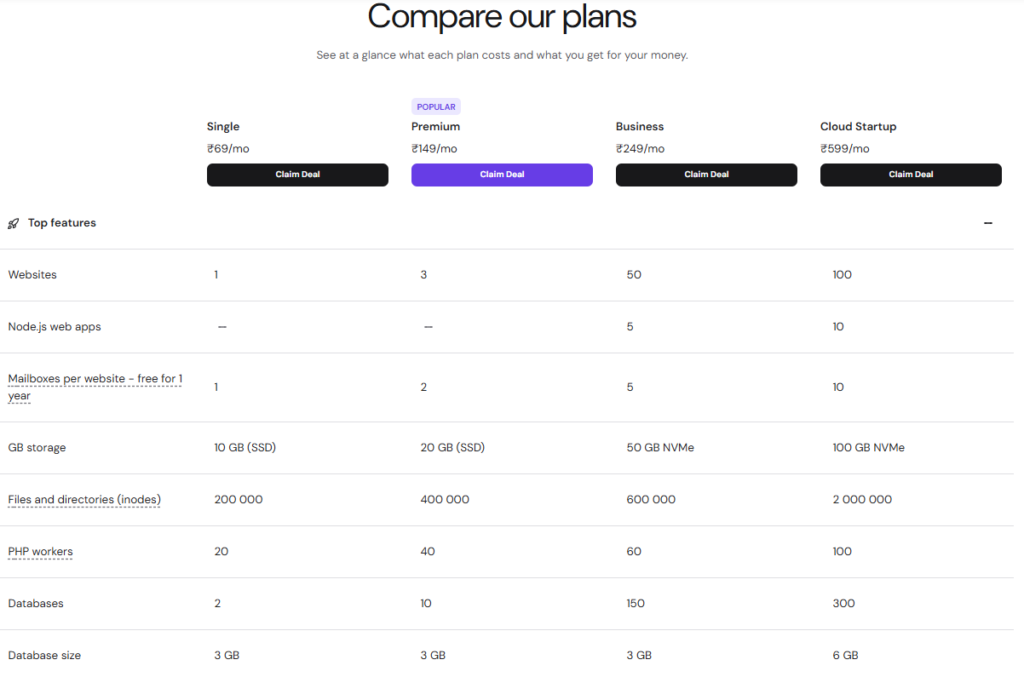
- 2 GB RAM, 1 CPU core
- 40 PHP workers
- 10 databases, 3 GB each
- 100 subdomains, 400,000 inodes
- SSH access + WP-CLI
- Free email marketing for 1 year
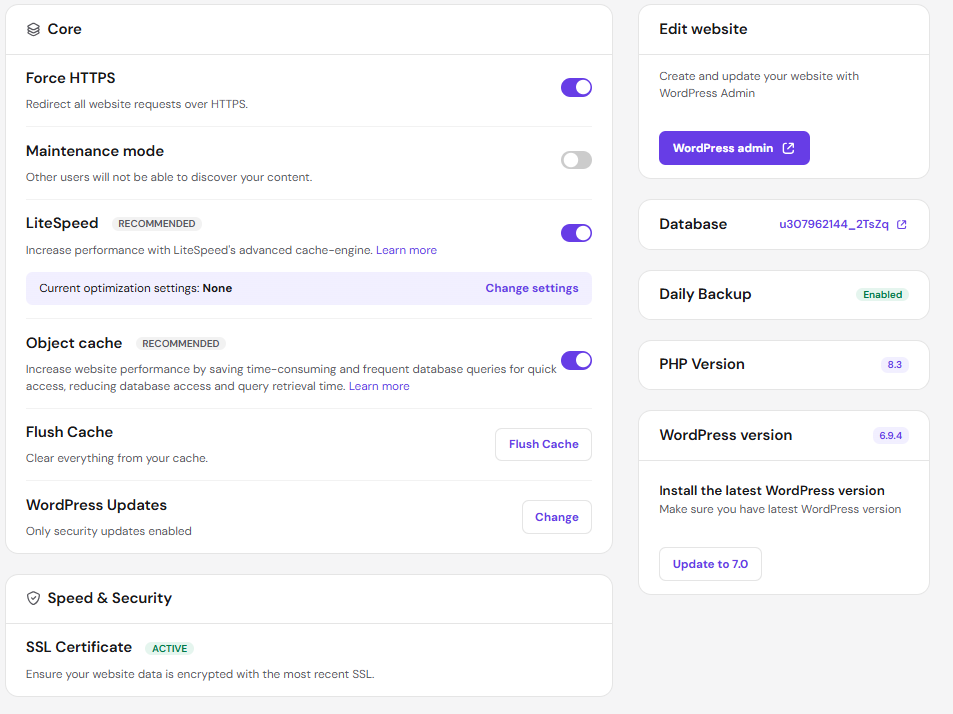
- LiteSpeed-powered WordPress acceleration
- Managed WordPress maintenance (auto updates, vulnerability scanner)
- WooCommerce support
- Hostinger Website Builder with drag-and-drop editor + 300 templates
- 30-day money-back guarantee
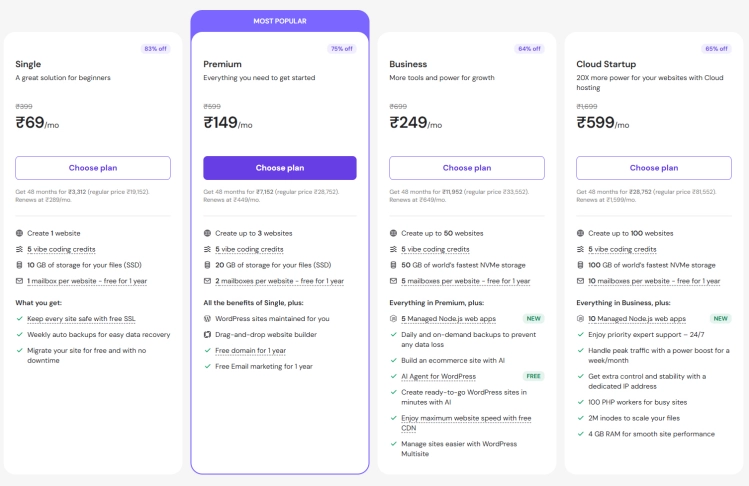
That’s a decent package. The WP-CLI + SSH access at this price is something not every shared host offers at the entry level — that alone matters if you work with WordPress regularly.
💡 Extra 7% Off: Use the coupon code WPDEALSEXPERT at checkout to stack an additional 7% discount on top of the current 75% off deal.
Where It Actually Performs Well
LiteSpeed Makes a Real Difference
Most shared hosts run Apache. Hostinger uses LiteSpeed across their stack, and from a performance standpoint, this isn’t marketing fluff — LiteSpeed handles PHP requests faster than Apache, especially on WordPress sites with caching enabled.
When I set this up on a client’s blog that was getting ~15k monthly visits, the LCP numbers stayed in the green range without any third-party caching plugin. The built-in LiteSpeed cache handles most of it if you configure it properly.
Managed WordPress Maintenance — Actually Useful
Hostinger Premium includes auto WordPress updates, a vulnerability scanner, and a compatibility checker. For non-technical clients who don’t want to think about maintenance, this is genuinely useful.
It’s not as deep as a dedicated managed host like Kinsta, but for the price, it removes the most common pain points.
Free Domain + WHOIS Privacy in the Same Bundle
Many hosts charge separately for WHOIS privacy — usually ₹500–₹800/year. Getting it free on Premium is a small but real saving. The free domain is for 1 year, then it renews at standard Hostinger pricing, so factor that in.
SSH + WP-CLI Access at ₹149/mo
This is where Hostinger Premium quietly differentiates itself from other budget hosts. SSH access and WP-CLI at this price tier means developers can actually work efficiently — run bulk operations, manage plugins from terminal, push changes faster.
Not every blogger will use this, but for developers managing client sites, it’s a meaningful inclusion.
Where It Falls Short
No Daily Backups
This is the biggest gap in the Premium plan. Daily automated backups only start from the Business plan (₹249/mo). Premium only gets weekly auto backups.
For a blog, that might be acceptable. For an e-commerce site or client project? A week between backups is risky. If something breaks on day 5 and your last backup is 6 days old, you’re in a tough spot.
Only 1 CPU Core
2 GB RAM sounds decent, but 1 CPU core is a real limit. Under traffic spikes or if you run resource-heavy plugins (page builders, WooCommerce with multiple extensions), you’ll feel it. The Business plan doubles this to 2 CPU cores.
No Staging Environment
Staging is only available from the Business plan onwards. If you’re developing on live sites — which you really shouldn’t — Premium doesn’t give you a safety net for testing changes.
No Node.js Support
React, Vue, Next.js, Express — none of these frameworks work on the Premium plan. Node.js support starts from Business. If you’re building anything beyond standard PHP/WordPress, Premium isn’t your plan.
3-Website Limit
Some competitors offer “unlimited websites” even at lower tiers. 3 websites on Premium is manageable for most, but once you cross that, you need to upgrade or get a second account.
Honest Pros & Cons
Pros
- ₹149/mo is genuinely one of the most competitive price points for this feature set in India
- LiteSpeed-based stack with real performance impact
- SSH + WP-CLI access included (rare at this price)
- Free domain + WHOIS privacy + email marketing in one bundle
- Managed WordPress maintenance reduces manual overhead
- WooCommerce supported
- 30-day money-back, no questions asked
Cons
- No daily backups — weekly only (Business plan onwards)
- Single CPU core limits performance under load
- No staging environment for safe testing
- 3-website limit feels restrictive for multi-project users
- ₹149/mo is the 48-month price — shorter billing cycles cost significantly more
- No Node.js, so not suitable for modern JS frameworks
The Pricing Reality Check
Hostinger’s discount pricing looks attractive until you notice it’s only for the longest billing cycle.
| Billing | Premium Price |
|---|---|
| 48 months | ₹149/mo |
| Regular renewal | ₹449/mo (approx) |
The 48-month price is the ₹149/mo you see advertised. The regular price listed is ₹599/mo before discount — your renewal rate will be higher than the initial price you paid. This is industry standard, but worth knowing before you commit.
For reference, the full Hostinger web hosting lineup in India:
| Plan | Price (48-month) | Websites | Storage | RAM |
|---|---|---|---|---|
| Single | ₹69/mo | 1 | 10 GB SSD | 1 GB |
| Premium | ₹149/mo | 3 | 20 GB SSD | 2 GB |
| Business | ₹249/mo | 50 | 50 GB NVMe | 3 GB |
| Cloud Startup | ₹599/mo | 100 | 100 GB NVMe | 4 GB |
The jump from Premium to Business (₹249/mo) brings NVMe storage, daily backups, staging, Node.js support, and 2 CPU cores. If any of those are important to you, the extra ₹100/mo is worth it.
Premium vs Business — Which One Should You Actually Pick?
This is the real question most people are silently asking.
| Feature | Premium (₹149/mo) | Business (₹249/mo) |
|---|---|---|
| Websites | 3 | 50 |
| Storage | 20 GB SSD | 50 GB NVMe |
| RAM | 2 GB | 3 GB |
| CPU cores | 1 | 2 |
| Daily backups | ✗ | ✓ |
| Staging tool | ✗ | ✓ |
| Node.js support | ✗ | ✓ |
| On-demand backup | ✗ | ✓ |
| Price (48-month) | ₹149/mo | ₹249/mo |
For a personal blog or portfolio site: Premium is more than enough. You don’t need 50 websites, NVMe storage, or staging for a single-purpose site.
For a WooCommerce store or client project: Go with Business. The daily backups alone justify the extra ₹100/mo, and you’ll appreciate the staging environment when you need to test a plugin update before pushing live.
For a developer managing multiple client sites: Business gives you 50 websites, 2 CPU cores, and Node.js — a much better fit.
Who Should Buy Hostinger Premium?
Good fit:
- Bloggers starting their first or second site
- Freelancers who manage 1–3 client WordPress sites
- Small business owners who need a clean, fast website without technical complexity
- Anyone migrating from a slower shared host and looking for an upgrade at low cost
Skip it if:
- You’re running an e-commerce store with real transaction volume
- You need daily backups or staging as a baseline
- You manage more than 3 active projects
- You’re building with modern JS frameworks (React, Next.js, etc.)
Getting Started — What to Do After Buying
If you do go with the Premium plan, here’s what to configure first:
- Set your data center to India (Mumbai) — during checkout or in your hPanel. This directly impacts page load speed for Indian visitors.
- Install LiteSpeed Cache plugin — enable it immediately after WordPress install for best performance
- Set up your free email marketing — Hostinger includes this for 1 year; connect it before you need it
- Enable the WordPress vulnerability scanner — it’s in hPanel under WordPress settings, and it runs automatically once active
- Set weekly backup schedule — you don’t get daily, but make sure the weekly one is actively configured and not just assumed
How It Compares to Other Hosts at This Price
| Feature | Hostinger Premium | Bluehost Starter | SiteGround StartUp |
|---|---|---|---|
| Price (intro) | ₹149/mo (48-month) | ₹199/mo (36-month) | ~₹379/mo (12-month) |
| Websites | 3 | 10 | 1 |
| Storage | 20 GB SSD | 10 GB NVMe | 10 GB |
| Free domain | ✓ (1 yr) | ✓ (1 yr) | ✗ |
| SSH access | ✓ | ✓ | ✓ |
| LiteSpeed | ✓ | ✗ | ✗ |
| Daily backups | ✗ | ✗ (weekly) | ✓ (all plans) |
| Staging | ✗ | ✓ | ✗ (GrowBig onwards) |
| Renewal pricing | Higher | ₹349/mo | $17.99/mo |
Bluehost Starter gives you 10 websites and a staging environment at ₹199/mo — ₹50 more than Hostinger Premium. But storage is only 10 GB NVMe vs Hostinger’s 20 GB SSD, and there’s no LiteSpeed. For multi-site management, Bluehost makes sense. For pure performance-per-rupee on a single blog or small project, Hostinger wins.
SiteGround StartUp is the premium option here — daily backups across all plans are a genuine differentiator. But at ~₹379/mo with USD-based pricing (subject to exchange rate fluctuations for Indian users) and only 1 website allowed, it’s hard to justify unless backups and managed reliability are your top priorities.
For Indian bloggers and freelancers comparing on value, Hostinger Premium at ₹149/mo is the strongest entry-level pick. SiteGround is worth the premium only if daily backups are non-negotiable from day one.
Frequently Asked Questions
Is Hostinger Premium hosting good for WordPress?
Yes, it’s well-suited for WordPress. It includes LiteSpeed acceleration, 1-click WordPress installation, auto updates, vulnerability scanning, WP-CLI, and SSH access. For a blog or small WordPress site, it covers everything you need without extra configuration.
What’s the renewal price for Hostinger Premium?
The ₹149/mo price applies to the 48-month billing cycle. Renewal rates are higher — Hostinger lists the regular price at ₹599/mo. Always check the renewal cost before committing to any long-term plan.
Can I host a WooCommerce store on Hostinger Premium?
You can run a basic WooCommerce store, but I’d recommend the Business plan for anything serious. You get daily backups, 2 CPU cores, and staging — all of which matter when you’re handling transactions and need a safety net.
Does Hostinger Premium include a free domain?
Yes, a free domain for 1 year is included, along with free WHOIS privacy protection. After the first year, the domain renews at Hostinger’s standard pricing.
Is there a money-back guarantee?
Yes — 30 days. If you’re not satisfied within the first 30 days, you can request a refund. The process is straightforward through hPanel.
Does Hostinger Premium have daily backups?
No. The Premium plan includes weekly automated backups only. Daily backups and on-demand backups are available starting from the Business plan at ₹249/mo.
Can I upgrade from Premium to Business later?
Yes, you can upgrade anytime from your hPanel dashboard. Hostinger will prorate the remaining value of your current plan against the new one.
Final Verdict
Hostinger Premium at ₹149/month is a genuinely strong option for beginners, bloggers, and freelancers who want reliable WordPress hosting without overpaying. The LiteSpeed stack, SSH access, managed WordPress features, and free domain bundle make it hard to match at this price.
That said, it’s not a plan for everyone. The lack of daily backups, a single CPU core, and a 3-website limit mean some users will outgrow it quickly — and for them, the Business plan at ₹249/mo is the smarter move.
If you’re just starting or running a light-to-medium traffic site, Hostinger Premium is worth picking up. Commit to the 48-month plan for the best per-month value.
💡 Extra 7% Off: Use the coupon code WPDEALSEXPERT at checkout to stack an additional 7% discount on top of the current 75% off deal.