This post contains affiliate links. If you purchase through our links, we may earn a small commission at no extra cost to you. Thank you for your support!OttoKit has a free plan — no credit card, no expiry. You get 20 workflows and access to 1,200+ integrations at $0. But free doesn’t mean unlimited.
The real question is whether the free plan’s limits work for your use case, or whether you’ll hit a wall before you’ve even set up a second automation.
Quick Answer: OttoKit’s free plan is genuine and usable for basic single-site automations. You get 20 workflows, 1 WordPress connection, and all integrations free forever. The main restrictions are 3-day data retention, no AI Agents, and only 500 table rows, which makes it impractical for client work or multi-site setups.
What the OttoKit Free Plan Actually Includes
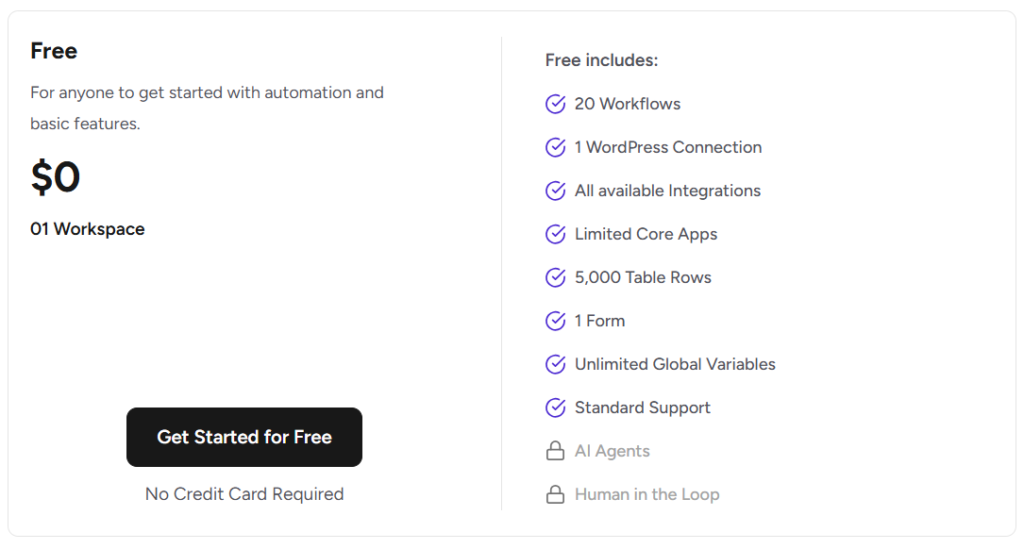
Here’s what you get on the free tier, pulled directly from their current pricing page:
- 20 active workflows
- 1 WordPress connection
- All available integrations (access to 1,200+ apps)
- 1 workspace
- 500 table rows
- 1 form
- Unlimited global variables
- Standard support
- 5,000 tasks/month — wait, actually this is on the Pro plan. The free plan has more limited task execution (check the official site for current task caps as this can update)
One thing worth noting: the free plan gives you access to all integrations — HubSpot, Mailerlite, Trello, WooCommerce, and 1,200+ others. That’s not a reduced integration list. You’re connecting to the same apps as paid users. The limitation is on how much you can do with them — tasks, workflows, and workspaces are capped.
AI Agents and Human in the Loop — both locked on free. If you’re looking to build AI-assisted automations, you’ll need at least the Pro plan.
The Free Plan Is Real — But These Limits Matter
20 workflows sounds decent. For a solo freelancer testing the tool or running a small personal site, it’s workable. But if you’re managing a client project with multiple trigger-action sequences — lead capture → CRM update → email notification → Slack alert — that’s 4 workflows for just one funnel.
Data retention is 3 days on free. That means OttoKit only keeps your automation history and logs for 72 hours. If something breaks on a Friday and you check on Monday — the log is gone. This is one of the more frustrating free-plan restrictions for anyone doing serious work.
1 WordPress connection is another real constraint. If you run multiple websites (even just 2), you’ll need to upgrade.
From what I observed while setting this up on a staging WordPress environment — the free plan works cleanly for simple automations. A contact form submission triggering an email notification ran without any setup issues. But the moment you want branching logic or multi-step conditional workflows, you start counting your workflow slots very quickly.
OttoKit Pricing Plans — Full Breakdown
Here’s the complete picture so you can decide where the free plan ends for you:
| Plan | Monthly Price | Billed Annually | Tasks/Month | Workspaces | WordPress Connections | Forms | Table Rows |
|---|---|---|---|---|---|---|---|
| Free | $0 | — | Limited | 1 | 1 | 1 | 500 |
| Pro | $9/mo | $108/year | 5,000 | 1 | 5 | 5 | 5,000 |
| Business | $19/mo | $228/year | 10,000 | 5 | Unlimited | 10 | 20,000 |
| Business Plus | $39/mo | $468/year | 30,000 | Unlimited | Unlimited | 20 | 50,000 |
All plans include unlimited workflows (except free), unlimited global variables, MCP server access, and AI Agents on Pro and above.
Data retention: 3 days (Free) → 15 days (Pro) → 30 days (Business/Business Plus)
Which Plan Is Worth It — And Which Is a Trap
Pro at $9/month is where OttoKit starts making real sense for solo users. You get 5 WordPress connections, 5,000 tasks/month, 5 forms, and — importantly — AI Agents and MCP access. For anyone running 2–3 client sites or a personal project + affiliate site, Pro is the entry point that removes most of the friction.
Business at $19/month is the one labeled “Most Bought” on their pricing page — and it earns that tag. 5 workspaces means you can organize workflows by client or project. Unlimited WordPress connections is a significant jump. If you’re doing agency-level work or managing 5+ sites, Business is the practical choice.
Business Plus at $39/month is for agencies running multiple clients under sub-accounts. You get unlimited workspaces, 30,000 tasks/month, priority support, and access to plan bonuses worth $235 — SureForms Team (12 months, value $179) and ZipWP Pro (3 months, value $56). If you’d buy those tools anyway, Business Plus effectively pays for itself partially.
The trap plan? Honestly, none of them are poorly designed. But upgrading from Free to Pro specifically for AI Agents, then finding you need 5+ workspaces — you might end up at Business anyway. If client work is in your plans at all, skip Pro and go straight to Business.
Is There a Free Trial on Paid Plans?
No dedicated free trial period for paid plans — but OttoKit offers a 14-day money-back guarantee, no questions asked. That’s backed by Sujay Pawar, co-founder of OttoKit. So effectively, you have two weeks to test a paid plan and get a full refund if it doesn’t work for you.
Combined with the free plan (no credit card needed), you have a genuinely low-risk way to evaluate OttoKit before spending anything.
OttoKit Free vs Zapier Free — Quick Comparison
A fair question: how does OttoKit’s free plan stack up against Zapier’s?
| Feature | OttoKit Free | Zapier Free |
|---|---|---|
| Active Workflows (Zaps) | 20 | 5 |
| Tasks/Month | Limited | 100 |
| Multi-step Workflows | Yes | No (paid only) |
| WordPress Integration | Native plugin | Via connector |
| AI Agents | Locked | Not available |
| Data Retention | 3 days | 7 days |
| App Integrations | 1,200+ | 7,000+ |
| Price | $0 | $0 |
OttoKit’s free plan gives you more active workflows and multi-step automation support — both locked behind Zapier’s paid tier. Zapier has a broader app library, but for WordPress-heavy workflows specifically, OttoKit’s native WordPress connector is a practical advantage.
For pure WordPress automation on a budget, OttoKit free is the stronger starting point. If your stack is heavily SaaS-based and non-WordPress, Zapier’s app ecosystem might justify the switch.
Who Should Stay on the Free Plan
The free plan is genuinely useful if:
- You’re testing OttoKit before committing
- You run a single WordPress site with simple trigger-action automations
- You’re a solo creator with 10–15 workflows maximum
- You don’t need automation history beyond 3 days
Who should upgrade immediately: Anyone doing client work, managing multiple sites, or building automations that require AI Agents or Human in the Loop approvals. The 3-day data retention alone makes free impractical for production-level work.
Pros & Cons of OttoKit Free Plan
Pros
- Genuinely free — no credit card, no expiry
- Access to all 1,200+ app integrations (not a reduced list)
- 20 workflows is more generous than most competitors at free tier
- Multi-step workflows supported (Zapier restricts this on free)
Cons
- 3-day data retention kills it for production use — logs disappear before you notice a problem
- AI Agents and Human in the Loop are completely locked
- Only 1 WordPress connection — useless for multi-site users
- 500 table rows gets consumed fast if you’re collecting form data
ottokit (suretriggers)
No Credit Card Required
Frequently Asked Questions
Is OttoKit really free with no credit card required?
Yes. The free plan requires no payment information to start. You get 20 workflows, 1 WordPress connection, and access to all integrations at $0. It’s not a time-limited trial — it stays free until you choose to upgrade.
What happens when I hit the task limit on OttoKit free?
Once you reach the task cap, your automations stop executing until the next billing cycle resets your count. OttoKit sends a notification when you’re close to the limit. If you’re hitting the cap regularly, the Pro plan at $9/month is the logical next step.
Can I use OttoKit free for client work?
Technically yes, but practically no. With only 1 workspace, 1 WordPress connection, and 3-day data retention, it’s not suited for client projects. Business at $19/month with 5 workspaces and unlimited WordPress connections is the realistic minimum for agency use.
Does OttoKit have a lifetime deal?
OttoKit does offer lifetime pricing options — the pricing page shows lifetime as an alternative to annual billing. Lifetime plans are priced at $499 (Pro), $799 (Business), and $1,499 (Business Plus) as of the current pricing page. Always verify on the official site, as these can change.
Is OttoKit better than Zapier for WordPress sites?
For WordPress-specific automations, yes. OttoKit has a native WordPress connector plugin that handles integrations more cleanly than Zapier’s general-purpose approach. It also costs significantly less at comparable feature levels. For non-WordPress SaaS workflows, Zapier’s wider app library has an edge.
Can I upgrade from free to a paid plan anytime?
Yes. You can upgrade, downgrade, or cancel at any time. OttoKit uses proration credit when upgrading mid-cycle, so you’re only charged the difference for the remaining period.
Bottom Line
OttoKit’s free plan is one of the more usable free tiers in the automation space — 20 workflows, all integrations, no time limit. For basic single-site automations, it holds up.
But if you’re doing any kind of serious work — client projects, multi-site management, AI-powered workflows — the free plan’s limits become walls quickly. The 3-day data retention is the biggest friction point in real use.
For most WordPress users, the Pro plan at $9/month is the right entry point. It unlocks AI Agents, 5 WordPress connections, and 15-day log retention — enough to run a proper setup without overpaying.