Smart Team Pro is a WordPress plugin for team pages, member profiles and searchable staff directories. Its Black Friday sale is live right now, with 50% off every yearly and lifetime plan.
The discount applies automatically at checkout, and the sale ends on December 11 at 11:59 PM ET.
Below, you’ll see what the plugin does, which plan suits which user, where it falls short, and how to claim the offer.
Quick Deal Snapshot [🟢STATUS: LIVE NOW]
Starts on: November 13, 2026 | Ends on: December 11, 2026, 11:59 PM ET
Deal Active Now
- Discount: 50% off on all plans, yearly and lifetime
- Lifetime plans: Single Site $149, 5 Sites $249, Unlimited Sites $399
- Yearly plans: starting at $24.50/year for Single Site
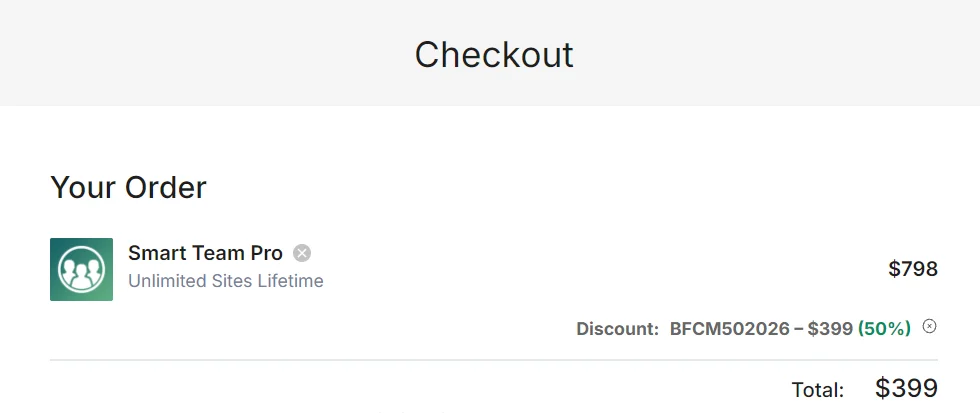
- Coupon: applied automatically at checkout. The order summary shows code BFCM502026, so you don’t need to type anything.
- Refund: 14-day money-back guarantee
Coupon: Not needed. The discount is auto-applied at checkout. 👇

This post contains affiliate links, and I earn a commission from them at no extra cost to you. Thank you for your support!Quick Answer
Smart Team Pro is worth buying in this sale if you build team pages, staff directories or org charts regularly. The 50% discount covers every plan, and lifetime pricing gives the best long-term value. If you only need a basic grid, the free version may already be enough.
How to Claim the Smart Team Pro Black Friday Deal
It takes about two minutes.
- Open the official Smart Team Pro pricing page.
- Use the toggle at the top to choose Yearly or Lifetime.
- Pick your plan from the table below and click Buy now.
- On the checkout page, look for the discount line in your order summary. In the checkout I saw for the Unlimited Sites Lifetime plan, code BFCM502026 was already applied at 50% off. If you ever see no discount line, enter that code manually.
- Complete payment. You have 14 days to ask for a refund if it doesn’t fit.
| Plan | Best for | Yearly (sale / regular) | Lifetime (sale / regular) |
|---|---|---|---|
| Single Site | Individuals | $24.50 / $49 | $149 / $298 |
| 5 Sites (Most popular) | Freelancers and small businesses | $49.50 / $99 | $249 / $498 |
| Unlimited Sites | Agencies and developers | $99.50 / $199 | $399 / $798 |
Every plan includes all Smart Team Pro features. Yearly plans come with 1 year of updates and support. Lifetime plans come with lifetime updates and support.
Bundle option: ShapedPlugin also sells a WordPress Bundle with 9 Pro plugins for $799 lifetime. If you need more than one of their plugins, the lifetime bundle is worth a look. The product page says it is usually cheaper than buying two plugins separately.
What You Actually Get With Smart Team Pro
This isn’t a simple “name and photo” plugin. Here is what the product page lists:
- Seven layout styles: Carousel, Grid, Polaroid Grid, Staggered Grid, Overlay, 3D Carousel and Organization Chart.
- Ajax search, live filters and pagination, useful once your team passes a dozen people.
- Profile display options: a member’s profile can open in a modal, a drawer or its own page, with room for role, bio, skills and social links.
- A ready patterns library: pick a design, swap in your people and publish.
- An AI builder: describe a layout in plain words and it generates an editable team grid, carousel or overlay.
- Styling controls for layout, image shape, type, colour and spacing.
The org chart and filterable directory are what justify Pro. A basic grid is easy to get elsewhere, but reporting lines and searchable member lists are not.
Yearly or Lifetime: Which Plan Should You Pick?
Single Site suits one blog or business site. It comes with Standard support. 5 Sites is the “Most popular” plan and adds Priority support. Unlimited Sites has the same Priority support with no activation limit.
My take: yearly makes sense only if you want to test Pro on one project before committing. If you plan to keep the plugin for more than a year or two, lifetime is the better deal. You skip renewals, and updates and support are not tied to a 12-month window.
On price worries: this is the lowest price Smart Team has offered, according to its own sale page. Compare the 50% discount against how many sites you’ll actually use it on. If it’s one site, don’t pay for the Unlimited Sites tier.
On beginner worries: the patterns library and AI builder lower the learning curve, and the product page mentions a support team available 24/7. I haven’t tested that response time myself, so treat it as the vendor’s claim.
A Developer’s Take: Scripts, Speed and Page Builders
I’m Karan Rajput, and I’ve been blogging since 2018 and doing client WordPress work for over 7 years. Team pages look simple, but they are a common source of slow pages.
From what I’ve seen on client sites, the plugin is rarely the real problem. Unoptimised headshots are. A page with 20 large JPEGs will hurt LCP no matter which plugin you use.
A few things worth checking after you install it:
- Script loading: Carousels use Swiper and search uses Ajax, so extra JS comes with them. Use Query Monitor or your caching plugin’s asset manager to confirm those scripts don’t load on pages without a team block.
- LCP: Don’t lazy-load the first row of headshots if they sit above the fold. Use properly sized WebP images.
- CLS: Keep image ratios consistent. The image shape settings help here.
- Compatibility: It has native blocks for the WordPress block editor (Gutenberg). For other editors it uses shortcodes and saved templates for popular page builders.
Pro observation: If a site only has 4 to 6 team members, a static grid is usually faster than a carousel with effects. Pick the layout for the content, not the demo.
Pros and Cons
Pros
- Real directory features: Ajax search, live filters and pagination work well for large teams.
- Flexible layouts: seven styles cover most team page designs, including org charts.
- Block editor native: it fits a standard Gutenberg workflow without a heavy builder.
- Lifetime option: support and updates for life, with no yearly renewal on the lifetime plans.
- Low-risk trial: a free version exists, plus a 14-day money-back guarantee.
Cons
- Narrow purpose: it only does team showcases. If you need testimonials or portfolios too, you’ll need other plugins.
- Page builders get less: outside the block editor you rely on shortcodes and saved templates, not a dedicated widget experience, as per the product page.
- Single Site gets Standard support only: Priority support starts from the 5 Sites plan.
- Smaller review base: about 92+ reviews on WordPress.org (4.7/5) and 180+ on Trustpilot (4.9/5) is solid, but far smaller than the biggest plugins.
Who Should Skip This Deal
Skip it if you only have a small static team page. The free version on WordPress.org includes Carousel, Grid and List layouts with styling options, and that covers many small sites.
Also skip it if you build everything in a page builder and dislike shortcodes. And if you expect to use it on one site for just a few months, the lifetime price won’t pay off.
Smart Team Pro vs the Free Version
| Feature | Free Version | Pro Yearly | Pro Lifetime |
|---|---|---|---|
| Layouts | Carousel, Grid, List | Carousel, Grid, Polaroid Grid, Staggered Grid, Overlay, 3D Carousel, Org Chart | Same as Yearly |
| Interactive features | Advanced modules need Pro | Ajax search, live filters, pagination | Same as Yearly |
| Updates | Via WordPress.org | 1 year | Lifetime |
| Support | Not covered by Pro support | 1 year (Standard or Priority by plan) | Lifetime (Standard or Priority by plan) |
| Money-back window | Free to try | 14 days | 14 days |
| Best for | Simple team grids | Short-term or trial use | Long-term sites and agencies |
The free version is a fair starting point if you’re unsure. Yearly suits someone who wants advanced layouts for one project. Lifetime is for people who know they’ll keep using it, especially across several sites.
Recommendation: If you run several client sites, go for Lifetime on the 5 Sites or Unlimited Sites plan, because Priority support and lifetime updates are what you’ll value most. If you have one site and a basic grid is enough, stay on the free version. If you need an org chart or a searchable directory on one site, Single Site Lifetime is the cleanest choice.
What to Do After Buying
- Install and activate Smart Team Pro. Activation uses one of your site slots.
- Add your team members and keep headshots at one consistent size.
- Pick a layout from the patterns library, then adjust image shape and spacing.
- Choose how profiles open (modal, drawer or own page).
- Test on mobile and clear your cache.
Mistakes to avoid:
- Activating the licence on a staging or dev site and using up your limit.
- Uploading full-size photos straight from a camera.
- Using a heavy 3D carousel for a three-person team.

Smart Team Pro Black Friday Deal
Deal: Up to 50% Off + Lifetime Plans
Coupon Code: Not needed. The discount is auto-applied at checkout.👇
Frequently Asked Questions
When does the Smart Team Pro Black Friday deal end?
The sale runs from November 13 until December 11 at 11:59 PM ET. After it ends, prices return to normal. If you’re planning to buy, it’s safest to finish checkout before the final weekend.
Do I need to enter a coupon code?
No. The discount applies automatically at checkout. Check that your order summary shows the 50% discount line before paying. If it’s missing, refresh the page or contact support before completing payment.
Is the discount on every plan?
Yes. The site banner says 50% off on all Smart Team Pro plans. That covers Single Site, 5 Sites and Unlimited Sites, on both yearly and lifetime billing.
Is the lifetime plan a subscription?
The lifetime plans list lifetime support and lifetime updates instead of a 1-year term, so they work as a one-time purchase. For the exact licence wording, check the official terms before you pay.
Can I try Smart Team before buying Pro?
Yes. The free version on WordPress.org has Carousel, Grid and List layouts. Pro also has a 14-day money-back guarantee, so you can test it on a real site. If you want more ShapedPlugin discounts, see my ShapedPlugin Black Friday deal page.
Which plan should a beginner choose?
Start with Single Site if you only have one website. If you plan to use it for clients later, go straight to 5 Sites, since it adds Priority support and is marked as the most popular plan.
Final Verdict
Smart Team Pro makes the most sense if you regularly build team pages, directories or org charts. The 50% sale covers every plan, and lifetime is the best-value way in for anyone who will keep the plugin long term. Its weakness is its narrow focus and shortcode-based page builder support.
Test the free version first if you’re unsure. Otherwise, you can grab Smart Team Pro here before the sale ends on December 11.
Related Posts