Smart Post Pro is a Gutenberg blocks plugin for post grids, sliders, carousels, timelines and news tickers. The Black Friday sale takes 50% off every plan, including the lifetime licenses.
This page covers the live deal, how to claim it, which plan fits you, and who should skip it. The discount applies automatically at checkout, so you don’t need to hunt for a code.
I’m Karan Rajput. I’ve worked with WordPress and SEO for 7+ years across my own blogs and client sites, so I’ll tell you where this plugin fits and where it doesn’t.
Quick Deal Snapshot [🟢STATUS: LIVE NOW]
Starts on: November 13, 2026 | Ends on: December 11, 2026, 11:59 PM ET (that’s December 12, around 10:29 AM IST)
Smart Post Pro is 50% off on all plans, yearly or lifetime. The coupon is auto-applied at checkout.
- Discount: 50% off on every plan
- Lifetime plans: Single Site $139 (was $278) | 5 Sites $239 (was $478) | Unlimited Sites $399 (was $798)
- Yearly plans: Single Site $19.50/year (was $39) | 5 Sites $49.50/year (was $99) | Unlimited Sites $99.50/year (was $199)
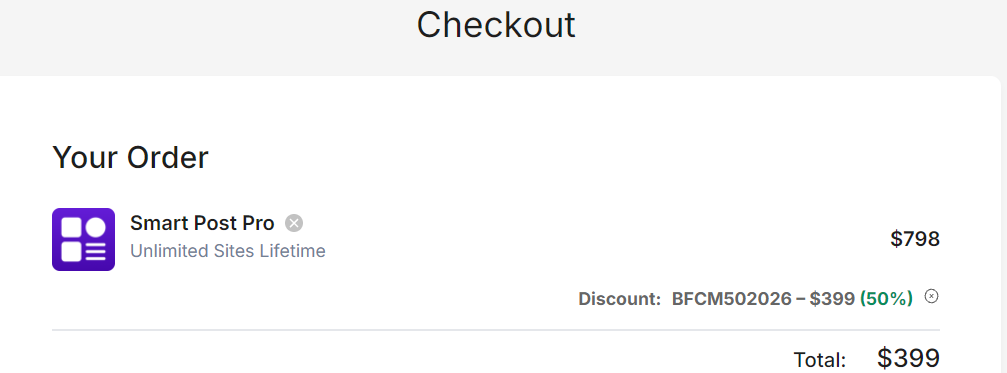
- Coupon: BFCM502026, applied automatically (no manual entry needed)
- Safety net: All plans include all Smart Post Pro features and a 14-day money-back guarantee
- Bundle option: WordPress Bundle with 9 Pro plugins, $799 lifetime
Coupon: Not needed. The discount is auto-applied at checkout. 👇

This post contains affiliate links, and I earn a commission from them at no extra cost to you. Thank you for your support!The Bottom Line
Smart Post Pro is worth grabbing at 50% off if you build content-heavy WordPress sites in Gutenberg and want good-looking post grids, sliders and front-end filters. Go lifetime if the site will stay for years. Skip it if you build only in Elementor, or if a basic blog list is all you ever show.
How to Claim the Smart Post Pro Black Friday Deal
It takes about two minutes.
- Open the pricing page through this Smart Post Pro link.
- Choose your billing type using the Yearly / Lifetime toggle at the top.
- Pick your plan:
- Lifetime: Single Site $139, 5 Sites $239, Unlimited Sites $399
- Yearly: Single Site $19.50, 5 Sites $49.50, Unlimited Sites $99.50
- Click Buy now. At checkout you should see the discount line with BFCM502026 already applied and the total cut by 50%. If that line is missing, type the code in manually.
- Pay (Stripe and PayPal are both listed) and activate the plugin on your site.
If you want the bundle instead, the WordPress Lifetime Bundle gives you 9 Pro plugins for $799 lifetime. The page says it’s usually cheaper than buying two plugins separately.
Break-even note: at these sale prices, a lifetime license equals roughly 7 years of yearly payments on Single Site, about 5 years on 5 Sites, and about 4 years on Unlimited Sites. But yearly renewal rates aren’t shown on the sale page. So if you choose yearly, check what year two costs before you commit.
Is 50% Really the Best Price?
The pricing page calls this its lowest price ever and its biggest discount of the year, on every plan. That’s the vendor’s own claim, and I don’t have a price history I can independently quote.
What I can say is that the sale has a hard end date, and prices go back to normal after it. No fake urgency here. If you were planning to buy Smart Post Pro anyway, waiting past December 11 only makes sense if you’re unsure it fits your workflow. For that, the 14-day refund window is a better safety net than waiting.
Which Plan Actually Makes Sense
The Single Site plan suits one blog or one client site. It comes with standard support.
The 5 Sites plan is marked “Most popular,” and it’s the one I’d point freelancers to. You get priority support and enough activations for a small client set. If you build a new site every few months, this is where the savings show up fast.
The Unlimited Sites plan is for agencies and developers who reuse the same blocks everywhere. Priority support is included here too.
Yearly or lifetime? Yearly gives you one year of updates and support, and then it’s renewal time. Lifetime gives you updates and support for as long as the plugin is maintained. For a site you’ll run for years, lifetime is simply the calmer choice. For a short-term project, yearly is fine.
One thing to note: every plan includes all Smart Post Pro features. The tiers differ only in site count and support level, so you aren’t missing blocks by choosing the cheaper tier.
What You Actually Get
Smart Post is a block plugin with 60+ ready-to-use blocks. Here is what matters in real use:
- Layout variety: Post Carousel, Post Slider, Thumbnails Slider, News Ticker, six Post Grid styles, three Post List styles and Post Timeline layouts.
- Front-end filters: Visitors can filter by taxonomy, author, date or keyword search. Pagination options include Load More, navigation and numbered pages, plus an infinite scroll toggle.
- Advanced Query Builder: Pulls from posts, pages and custom post types. You can filter by category, tag, date, author or keyword, and set conditions, offsets and a custom “no results” label.
- Device controls: Layouts can be adjusted per device, with custom breakpoints and visibility control.
- Global settings: Colors, typography and spacing can be set once and kept consistent site-wide.
- Ready patterns: Pre-built patterns you can import and edit instead of starting from scratch.
Pro observation: The Offset option in the query builder is easy to overlook. If you show a featured slider at the top of a page and a grid below it, set the grid’s offset to skip those same posts. Otherwise your top stories appear twice, which looks sloppy and wastes a content slot.
Developer Take: Speed, Compatibility and Code
Any plugin that outputs sliders needs a performance check. Here’s what the vendor claims: a maximum page size of 300KB with Smart Post, a 99/100 mobile score, 100/100 desktop, 97% across PageSpeed Insights, GTmetrix and Pingdom, and a fully loaded time of up to 0.8s. These are the vendor’s numbers from their own setup, not mine. Your theme, hosting and images will change the result.
From what I’ve seen on client blogs, the real risk is never the plugin alone. It’s a hero slider with an oversized first image, pushing LCP up. Whatever you build, test your top-of-page block on mobile before publishing.
Compatibility notes:
- It’s built for Gutenberg, and the vendor says it works with all standard themes.
- If your site runs on Elementor, these blocks aren’t Elementor widgets, so you’d be using two builders.
- For WooCommerce product listings, I haven’t confirmed block-level support from the page. Test on a staging site first.
- I couldn’t confirm from the page whether the sliders depend on jQuery. A quick look at the Network tab on a demo page will tell you.
Pros and Cons
Pros
- 60+ blocks in one plugin, so you don’t need separate plugins for grids, sliders and timelines.
- Front-end filters with Ajax pagination, which is hard to get from basic blog layouts.
- Lifetime options on every tier, including Unlimited Sites.
- All features on every plan, so the cheapest plan isn’t a stripped-down version.
- 14-day refund window, which makes testing on a real site low-risk.
- Vendor-shown social proof: 4.7/5 from 207+ WordPress.org reviews and 4.9/5 from 140+ Trustpilot reviews.
Cons
- Gutenberg-only. Elementor-only or Divi-only builders get nothing from it.
- Single Site gets standard support only. Priority support starts at the 5 Sites plan.
- Yearly renewal pricing isn’t shown on the sale page, so yearly buyers can’t see their year-two cost upfront.
- 60+ blocks means a learning curve. Getting query settings and global styles right takes a few hours the first time.
Who Should Skip This
Best fit: News sites, magazines, personal blogs, food and recipe blogs, travel blogs, portfolios and sports sites, all built in Gutenberg.
Skip it if:
- Your site is built entirely in Elementor.
- Your theme’s built-in Query Loop already covers your simple blog grid.
- You’re on a one-off project and don’t need filters, sliders or timelines.
- You want to avoid any recurring cost and aren’t sure you’ll use it for years. The 14-day refund helps here, but test it properly in that window.
Want More Than Smart Post? Check the Bundle
Smart Post is made by ShapedPlugin. The WordPress Bundle covers 9 Pro plugins on lifetime terms. I can’t see the exact plugin list on the pricing page, so confirm it before buying. If you also need a carousel plugin, WP Carousel Pro is a sister product with its own deal page. The bundle only makes sense if you’ll use at least two of the plugins, since the page says it’s usually cheaper than buying two.
Smart Post Pro vs Other Options
| Feature | Smart Post Pro | WordPress Query Loop Block | Ultimate Post Kit |
|---|---|---|---|
| Works inside | Gutenberg block editor | Gutenberg block editor | Elementor |
| Layout choices | 60+ blocks, including 6 grid styles, 3 list styles, sliders, timelines, news ticker | Basic list and grid layouts | Elementor post widgets (check official site for count) |
| Visitor filtering | Taxonomy, author, date, keyword search | Pagination only; extra plugin needed for filters | Check official site |
| Pagination types | Load More, navigation, numbers, infinite scroll | Standard pagination | Check official site |
| Cost model | Yearly or lifetime license | Included with WordPress | Check deal page |
| Best for | Content-heavy Gutenberg sites | Simple blogs with plain lists | Elementor-based sites |
Quick read: The Query Loop block is free and fast to set up, but it stops at basic layouts and has no visitor-side filtering. Ultimate Post Kit is the natural pick if your whole site already runs on Elementor. Smart Post Pro is the one that gives Gutenberg users sliders, timelines and filters without leaving the editor.
Winner by use case:
- For a Gutenberg blog or magazine that needs filters and sliders, Smart Post Pro is better because it offers 60+ blocks and front-end filtering in one plugin.
- If your site is built entirely in Elementor, Ultimate Post Kit makes more sense.
- For a simple blog with a plain post list, the free Query Loop block is enough.
One honest weakness of Smart Post Pro: it does nothing for Elementor-only sites.
What to Do After Buying
Setup steps
- Download the plugin from your account and install it. Activate your license.
- If you’re upgrading from the free version, test on a staging site first.
- Set your global colors, typography and spacing before building any layout.
- Build one pattern you like, then reuse it across pages.
Key settings to check
- Query Builder offset, if the same posts appear in two blocks.
- Mobile breakpoints for every grid and slider.
- Pagination type. Load More is usually friendlier than infinite scroll for SEO and footers.
Mistakes to avoid
- Stacking multiple sliders above the fold. It hurts LCP.
- Skipping the refund window. Test properly within 14 days.
- Buying Unlimited Sites when you only run a few sites.
- Forgetting your yearly license end date.

Smart Post Pro Black Friday Deal
Deal: Up to 50% Off + Lifetime Plans
Coupon Code: Not needed. The discount is auto-applied at checkout.👇
Frequently Asked Questions
When does the Smart Post Pro Black Friday sale end?
The sale runs from November 13 until December 11, 2026, at 11:59 PM ET. In Indian time, that’s roughly 10:29 AM IST on December 12. After it ends, prices go back to normal, so check the countdown on the pricing page before you buy.
Do I need to enter a coupon code?
No. The Black Friday discount is auto-applied at checkout, and you’ll see BFCM502026 listed as a discount line on your order. If for some reason the discount line doesn’t appear, you can enter the code manually. Always check the order total before paying.
Is the lifetime plan better than yearly?
It depends on how long you’ll keep the site. Lifetime includes updates and support for as long as the plugin lasts, while yearly covers one year at a time. For a site you’ll run for years, lifetime usually works out cheaper. For short projects, yearly is simpler.
What if Smart Post Pro doesn’t work for me?
There’s a 14-day money-back guarantee, and the page says there are no questions asked. Install it on your real site, test the blocks you need and contact support within 14 days if it isn’t the right fit. Don’t leave the testing for the last day.
Will Smart Post Pro slow down my WordPress site?
The vendor claims a maximum page size of 300KB and strong speed scores, but those are vendor-side numbers. In practice, your theme, images and hosting matter just as much. Test your pages on mobile after building, especially any slider near the top.
Is there a cheaper way to get other ShapedPlugin plugins?
Yes, if you need more than one. The bundle covers 9 Pro plugins on lifetime terms. You can also compare individual plugin offers on the ShapedPlugin Black Friday deal page before deciding which route suits you.
Final Verdict
Smart Post Pro at 50% off is a strong pick if you build content-heavy sites in Gutenberg and want sliders, grids and visitor filters from one plugin. For most freelancers, the 5 Sites lifetime plan is the sweet spot. Single Site suits one blog, and Unlimited Sites suits agencies. Skip it if you work only in Elementor or just need a plain blog list. With the 14-day refund and a deal ending December 11, you can test it on a real site with little risk. Grab the Smart Post Pro deal here while the discount is live.
Related Posts