If you’ve been looking for a way to build a proper community space around your courses, students, or audience — without paying monthly SaaS fees — SureDash is worth paying attention to.
It’s a WordPress plugin from the BrainstormForce ecosystem (the same team behind Astra, OttoKit, SureCart, and Presto Player), and right now they’re running an introductory deal where plans start at $69/year — down from the regular $99. The Business Lifetime plan drops to $499 from $999.
Here’s everything you need to know before you buy.
Quick Deal Snapshot: Current SureDash Introductory Pricing (Limited Time)
- 🎯 Business Lifetime Plan: $499 (was $999) — 50% off, pay once
- ✅ Covers up to 100 sites
- ✅ Lifetime product updates + lifetime priority support
- ✅ Courses, Discussions, Resource Library, Events (just launched)
- ⚠️ This is introductory pricing — renewals are at full price
- 💳 Split pay option available: 11 × $49/month
Coupon Code: Auto-Applied on Click 👇

This post contains affiliate links. If you purchase through our links, we may earn a small commission at no extra cost to you. Thank you for your support!What Is SureDash, Actually?
SureDash is a community-building plugin for WordPress. Think of it as your own self-hosted alternative to Facebook Groups or Mighty Networks — but you own the data, control the design, and there’s no monthly SaaS lock-in.
It handles members, courses, discussions, events, announcements, and notifications — all from inside your WordPress dashboard. The positioning is clear: one centralized hub for your audience, built on a platform you already control.
The plugin is built for:
- Creators & influencers building an engaged following
- Educators and coaches who want courses + community in one place
- Businesses and brands running member portals or client spaces
- Nonprofits and groups managing member activity and events
From what I observed while exploring the setup, the interface feels closer to a modern SaaS dashboard than a typical WordPress plugin admin area. That’s actually a good thing — your members interact with a clean, branded community frontend, not a clunky WordPress template.
SureDash Pricing Plans — Exact Breakdown
All prices are in USD. Current pricing is introductory — renewals will be charged at full price.
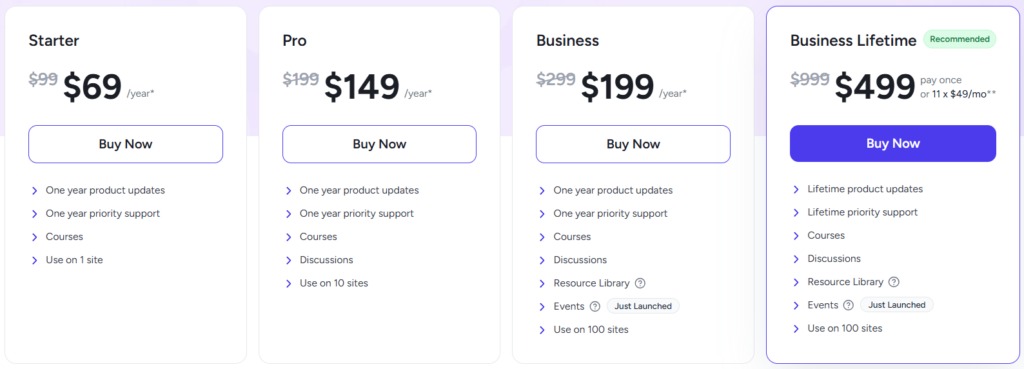
| Plan | Regular Price | Current Price | Sites | Support | Updates |
|---|---|---|---|---|---|
| Starter | $99/year | $69/year | 1 site | 1-year priority | 1 year |
| Pro | $199/year | $149/year | 10 sites | 1-year priority | 1 year |
| Business | $299/year | $199/year | 100 sites | 1-year priority | 1 year |
| Business Lifetime | $999 one-time | $499 one-time | 100 sites | Lifetime priority | Lifetime |
What each plan includes:
- Starter ($69/year): Courses, 1-year updates + support, 1 site
- Pro ($149/year): Everything in Starter + Discussions, 10 sites
- Business ($199/year): Everything in Pro + Resource Library + Events (just launched), 100 sites
- Business Lifetime ($499): Everything in Business, forever — lifetime updates and support, 100 sites. Split pay available as 11 × $49/month.
Refund policy: 14-day money-back guarantee, no questions asked.
Free version: Available — no credit card required. Good for testing the basics before committing.
Where the Lifetime Deal Actually Makes Sense
The Business Lifetime plan at $499 is the one most people will want to evaluate seriously.
At the annual rate, Business costs $199/year. So you break even in roughly 2.5 years — and after that, you’re paying nothing while still getting updates and support. For anyone building a long-term community or running courses on multiple client sites, that math works out clearly in your favor.
The split pay option (11 × $49/month) also makes it accessible if you don’t want to pay $499 upfront. Total comes to $539 that way, but it reduces the initial commitment.
One thing worth noting: SureDash explicitly says introductory pricing is limited-time and renewals will be at full price. So the annual plans aren’t quite as straightforward — if you renew Starter next year, you’re likely looking at $99, not $69.
Bottom line: If you’re planning to use SureDash for more than 2–3 years on multiple sites, the Lifetime plan is the only one worth serious consideration.
How to Claim the SureDash Lifetime Deal
Straightforward process — 5 minutes max:
- Click the deal link — Go to SureDash via this link
- Choose your plan — For long-term use, go straight to Business Lifetime ($499). If you want to test first, the Starter ($69/year) works too
- Click “Buy Now” on your chosen plan
- Complete checkout — PayPal, Stripe, or Visa accepted. If you want to split the Lifetime payment, select the 11 × $49/month option on the checkout page
- Check your email — License key and account details will arrive immediately
- Log in to your SureDash account and download the plugin
- Install on WordPress — Upload via Plugins → Add New → Upload, activate, and enter your license key
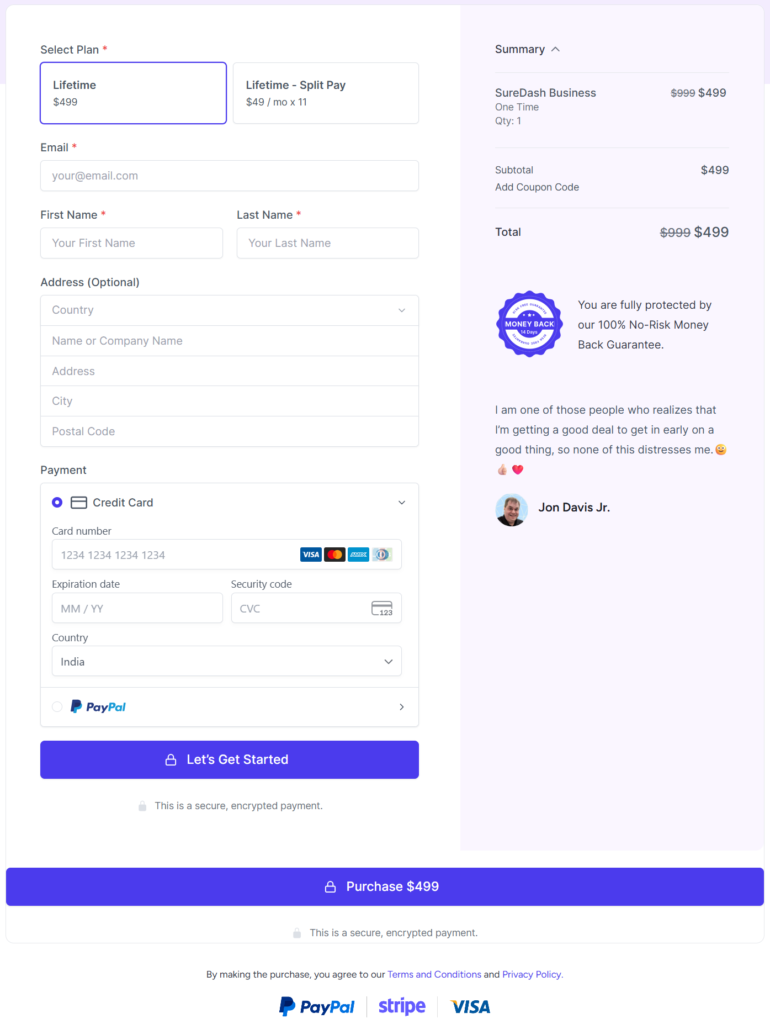
That’s it. The free version is also available if you want to test before paying — no credit card needed for that.
⚠️ Note: Current pricing is introductory. Once the launch phase ends, prices go back to full rate — Lifetime returns to $999.
What You Actually Get Inside SureDash
Here’s what’s included across the paid plans (most features from Pro upward):
Course Builder
Build and host courses directly inside your WordPress site. Members get a clean learning interface with sections and lessons. No third-party LMS needed.
Discussions
A proper community discussion space — not just a comment section. Members can post, reply, and interact within a threaded format. Think forum-lite, but designed for engagement.
Events (Just Launched)
Create and manage events — webinars, live sessions, community calls. Members can RSVP directly. This is brand new as of the time of writing, so expect it to mature over time.
Resource Library
A content repository for your members — PDFs, links, documents, or anything you want to share. Available from Business Plan upward.
Leaderboard + Badges
Gamification elements that reward active members. Useful for keeping engagement high in course communities, especially.
Real-Time Notifications
Members get notified of new posts, replies, course updates, and events — keeping them in the loop without you having to manually reach out.
Integrations
Connects with OttoKit (BrainstormForce’s own automation tool), Zapier, Zoom, WooCommerce, Mailchimp, Notion, HubSpot, Google Sheets, and more. Practically speaking, if you’re already using OttoKit to automate workflows, SureDash fits in naturally.
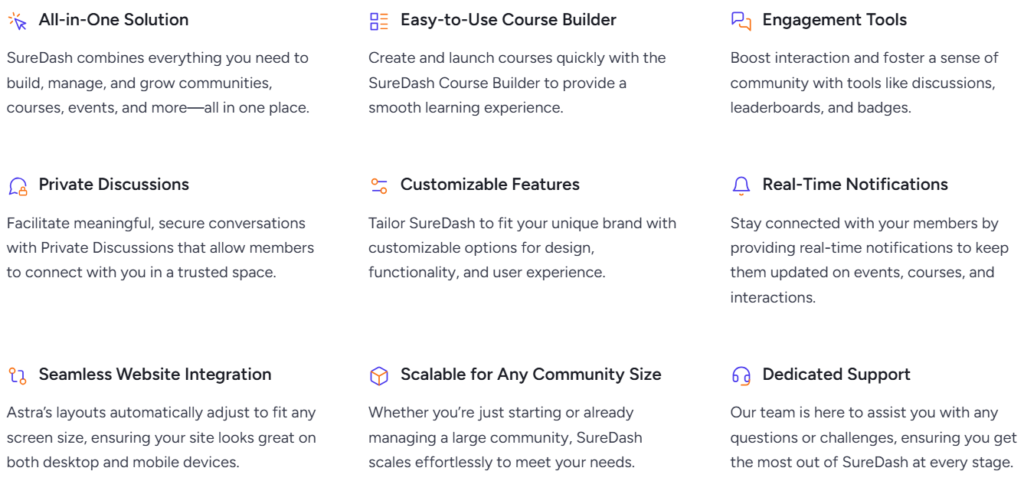
What Makes SureDash Awesome” feature grid
The BrainstormForce Ecosystem Advantage
This is actually one of SureDash’s more underrated strengths. It comes from the same team that built Astra, Spectra, SureCart, SureMembers, OttoKit, and Presto Player.
If you’re already on that stack — and a lot of WordPress users are — SureDash integrates cleanly. For example:
- Running a paid community? Pair it with SureCart to handle payments and subscriptions
- Want gated content alongside the community? SureMembers handles access control
- Hosting video lessons inside courses? Presto Player is the obvious pairing
- Need automation — new member triggers an email sequence, adds them to a list? OttoKit handles that natively
The ecosystem play here is real. You’re not stitching together five different companies’ tools — everything is under one roof, with shared support and a common design language.
Honest Pros and Cons
Pros
- You own your data — no lock-in, no SaaS dependency, no platform risk
- The lifetime plan at $499 is genuinely a good value for multi-site or agency use
- All-in-one for community + courses — reduces tool sprawl
- From a credible team — BrainstormForce has a strong track record with Astra, OttoKit, and SureCart
- Free version available — lets you test before committing
Cons
- Events module is brand new — just launched, so expect rough edges and limited documentation initially
- Annual plans will renew at full price — the introductory discount doesn’t carry over, which isn’t entirely clear at first glance
- Starter plan is 1 site only — not great value unless you’re testing before upgrading
- Community features are still maturing — compared to established tools like BuddyBoss, the feature depth is still catching up
SureDash vs. The Alternatives
| Feature | SureDash | BuddyBoss | Mighty Networks |
|---|---|---|---|
| Hosting | Self-hosted (WordPress) | Self-hosted (WordPress) | SaaS (cloud) |
| Data Ownership | Full — yours | Full — yours | No |
| Starting Price | $69/year | $299/year | $79/month ($948/year) |
| Lifetime Plan | $499 one-time (100 sites) | Not available | Not available |
| Course Builder | Built-in | LearnDash/MemberPress integration needed | Built-in |
| Discussions | Yes (Pro plan+) | Yes | Yes |
| Events | Yes (just launched) | No native events module | Yes |
| Gamification | Leaderboard + Badges | Yes (Plus plan — $349/year) | Yes (Launch plan+) |
| Refund Policy | 14-day money back | 14-day money back | 14-day free trial |
| Best For | WordPress users, agencies | Established WP communities | SaaS-first creators |
Who wins where:
- For WordPress users who want full data control at the lowest long-term cost, SureDash is the clear winner. At $499 lifetime vs. BuddyBoss’s $299/year recurring or Mighty Networks’ $79/month, the math isn’t close after year two.
- For large established communities needing deep social profiles, live messaging, and mature member networking — BuddyBoss still has more feature depth, especially on the Plus plan ($349/year). The premium is justified if those specific features are critical.
- For creators who don’t want to manage WordPress hosting at all — Mighty Networks removes that overhead entirely, but you’re paying $948+/year forever with zero data ownership and no lifetime option.
Who Should Buy the SureDash Lifetime Deal
Get it if:
- You’re building a course + community combo on WordPress
- You manage multiple client sites and want a community tool that doesn’t bill monthly per site
- You’re already using Astra, SureCart, or OttoKit and want to extend the ecosystem
- You want to move a Facebook Group or Mighty Networks community to something you own
Skip it (for now) if:
- You need a battle-tested events system immediately — the Events module just launched
- You’re looking for a massive social profile/networking setup similar to BuddyBoss’s depth
- You have no WordPress experience and want a fully managed, no-hosting solution
What to Do After Buying
Once you’ve picked up the lifetime deal, here’s how to get started cleanly:
- Install and activate SureDash from your account dashboard
- Set up your community space — name it, brand it, add your logo and colors
- Create your first course — even a simple 3-lesson course helps members understand the value immediately
- Enable Discussions and post a welcome thread to kickstart engagement
- Connect OttoKit (if you’re on that plan) to automate welcome emails and member onboarding
- Test on mobile before going live — member experience on phone matters more than desktop for communities
Avoid the mistake of launching with zero content. Set up at least one course and a few discussion prompts before inviting members — an empty community feels dead on arrival.
Frequently Asked Questions
Is there a free version of SureDash?
Yes. SureDash offers a free version you can download and try without a credit card. It’s a good way to test the plugin on your site before committing to a paid plan. The free version gives you core community features, but paid plans unlock courses, discussions, events, and multi-site use.
Is the $499 Business Lifetime price permanent?
No. The pricing page clearly states this is introductory pricing. Once the launch period ends, the full price is $999. There’s no stated deadline, but given how BrainstormForce has handled past product launches, prices typically increase once the product moves past its early phase.
Can I use SureDash on client websites?
Yes — the Pro (10 sites) and Business / Business Lifetime (100 sites) plans allow installation on client sites. Just check the license terms to confirm how client usage is defined. The Starter plan is limited to 1 site only.
What’s the difference between SureDash and SureMembers?
SureMembers is a membership access control plugin — it gates content based on membership levels. SureDash is a full community platform with courses, discussions, events, and member engagement tools. They can work together: SureMembers restricts access, SureDash delivers the community experience. See the SureMembers Lifetime Deal if you need access control alongside this.
Does SureDash work with Elementor or Gutenberg?
SureDash operates as its own frontend community interface, so it doesn’t depend on a page builder for its core functionality. The plugin has its own rendering layer for the community dashboard. However, it’s designed to work alongside your existing WordPress theme and page builder without conflicts.
What’s the refund policy?
SureDash offers a 14-day money-back guarantee with no questions asked. If you’re not satisfied within 14 days of purchase, you can request a full refund.
Final Verdict
SureDash is one of the more interesting community plugins to come out of the WordPress ecosystem recently. The combination of courses, discussions, events, and member tools — all self-hosted, all owned by you — fills a real gap.
The Business Lifetime deal at $499 is where the value is clearest. Break-even is under 3 years, and after that, you’re running a full community platform for free. For WordPress agencies or anyone building for the long term, it’s a hard deal to argue against.
The Events module is fresh off launch, so if that’s critical for your use case, give it a few months to mature. But if you’re primarily here for courses + community, SureDash is ready today.