Most content fails to rank — not because it’s poorly written, but because it’s not built with search in mind. The gap between a post that sits on page 4 and one that lands in the top 3 usually comes down to a handful of optimization decisions made before and after writing.
This guide walks through how to actually optimize content for SEO — the process I use across my own affiliate sites and client WordPress projects. No generic tips. Just a real workflow, the right tools, and where each one fits in.
Start With Keyword Research — Before You Write a Single Word
Content optimization doesn’t begin in your WordPress editor. It begins with understanding what your target reader is actually searching for and how competitive that space is.
This is where Semrush earns its place in the workflow.
The Keyword Magic Tool inside Semrush lets you go beyond just volume — you can see keyword difficulty, search intent tags (informational, commercial, transactional), and SERP features that are already appearing for a query. That last part matters more than most people realize. If the SERP is full of featured snippets or “People Also Ask” boxes, your content structure needs to account for those.
What to look for before picking a keyword:
- Monthly search volume (don’t chase volume blindly — look at trend consistency)
- Keyword difficulty score (under 40 is manageable for most new sites)
- Intent match — informational queries need educational content, not product pages
- SERP competition — check what types of pages are ranking (guides, tools, forums)
I worked on a client’s affiliate blog last year where we switched our target keyword from a high-volume but highly competitive head term to a longer, intent-specific variation. Rankings moved from page 6 to page 1 within about 6 weeks — same content, just a smarter keyword choice upfront.
If you’re still figuring out the basics of your site’s niche before diving into keyword research, the guide on how to choose a niche is a solid starting point.
Semrush SEO Classic Plan pricing (billed annually):
| Plan | Monthly (Annual) | Monthly Billing | Best For |
|---|---|---|---|
| Pro | $117.33/mo | $139.95/mo | Beginners, individual bloggers |
| Guru | $208.33/mo | $249.95/mo | Growing sites, small teams |
| Business | $416.66/mo | $499.95/mo | Agencies, high-volume needs |
The Pro plan is where most bloggers and solopreneurs should start — 500 keywords to track daily, 5 websites to monitor, and full access to the Keyword Magic Tool. Annual billing saves you around 16% versus paying month to month.
Semrush also launched Semrush One — their newer bundle that combines traditional SEO with AI search and GEO (generative engine optimization) tracking:
| Plan | Annual Price | Monthly Price |
|---|---|---|
| Starter | $165.17/mo | $199/mo |
| Pro+ | $248.17/mo | $299/mo |
| Advanced | $455.67/mo | $549/mo |
The Semrush One Starter plan includes AI visibility tracking for 1 domain, 50 AI prompts tracked daily, and 300 AI visibility reports per day — useful if you’re thinking beyond Google rankings and into AI search presence. That said, for pure traditional SEO work, the Classic Pro plan still offers better value per dollar at the entry level.
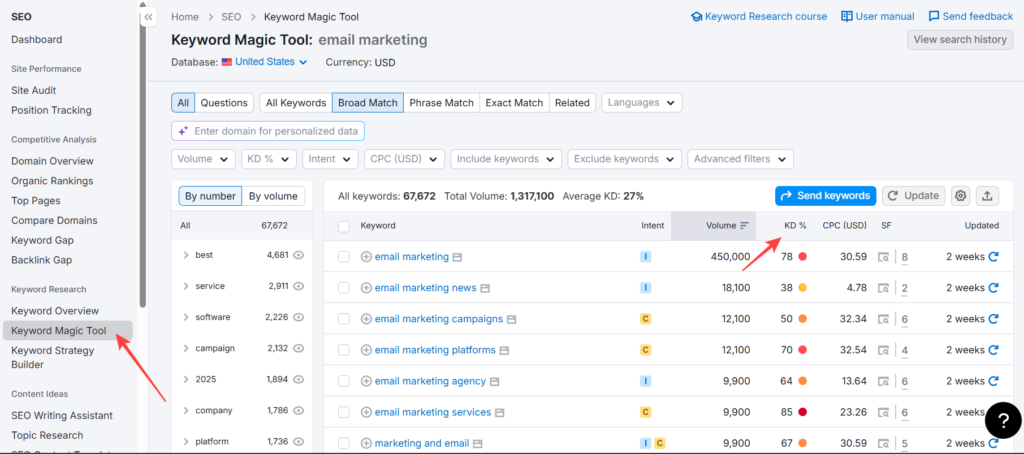
Semrush’s Keyword Magic Tool showing 67,672 keyword variations for “email marketing” — with intent tags, KD%, volume, and CPC visible at a glance. The Intent filter (highlighted) is what most beginners miss — it’s how you separate informational queries from commercial ones before writing a single word.
Free Keyword Research Options Worth Knowing
Not everyone is ready to invest in Semrush on day one — and honestly, you don’t have to be. There are solid free options that can carry you through the early stages of a site.
This is Google’s own tool, built into Google Ads. You don’t need to run ads to use it — just create a free account, and you get access to keyword ideas, search volume ranges, and competition data directly from Google’s index. The volume data is shown in ranges rather than exact numbers (100–1K, 1K–10K), which is limiting, but for directional research, it works.
The catch: Keyword Planner is designed for advertisers, not SEOs. It groups similar keywords together and doesn’t show you search intent signals, SERP features, or keyword difficulty scores. You’ll need to manually cross-check the SERP for those.
If your site is already live and indexed, GSC is arguably the most underused free SEO tool available. It shows you exactly which queries your pages are already ranking for, their average position, impressions, and CTR. That data is a goldmine for finding optimization opportunities — pages stuck on position 8–15 that need a small push, or keywords you’re ranking for accidentally that deserve their own dedicated content.
Useful for validating whether a keyword is growing, declining, or seasonal before you invest time writing about it. Not a replacement for a proper research tool, but a quick sanity check that takes 30 seconds.
Where free tools fall short: None of these show competitor keyword gaps, backlink data, historical ranking trends, or reliable keyword difficulty scores. That’s the gap Semrush fills — and why most serious bloggers eventually make the switch once their site starts generating returns.
Match Your Content to Search Intent — This Is Not Optional
Google’s job is to match a query to the most satisfying result. Your content’s job is to be that result.
Search intent falls into four buckets:
- Informational — “how to do X” → needs a tutorial or explainer
- Navigational — someone looking for a specific site or brand
- Commercial — “best X for Y” → needs a comparison or review
- Transactional — “buy X” or “X discount” → needs a product/deal page
Getting this wrong is the single biggest reason well-written content fails. A product-heavy post targeting an informational query will rarely rank — Google can tell the content doesn’t satisfy what the searcher actually wants.
Quick check: Search your target keyword in an incognito window and look at the top 5 results. Are they guides? Lists? Product pages? Your content format should match what’s already winning.
Structure Your Content for Both Humans and Crawlers
Once intent is confirmed and the keyword is selected, structure is where most content either wins or loses at the on-page level.
A few things that genuinely matter:
H1 tag — one per page, contains your primary keyword naturally, not stuffed. Rank Math will flag this if missing or duplicated.
H2/H3 hierarchy — search engines use heading structure to understand your content’s depth. H2s should cover major sub-topics; H3s break them down. Don’t use headings just to break up text — each one should signal something meaningful.
Paragraph length — shorter paragraphs improve readability and reduce bounce rate. On mobile, especially, a wall of text loses readers fast.
Semantic keyword coverage — your content should naturally cover related terms, synonyms, and sub-questions. This is what Rank Math’s Content AI helps surface — it shows you what related terms top-ranking pages are using that you might be missing.
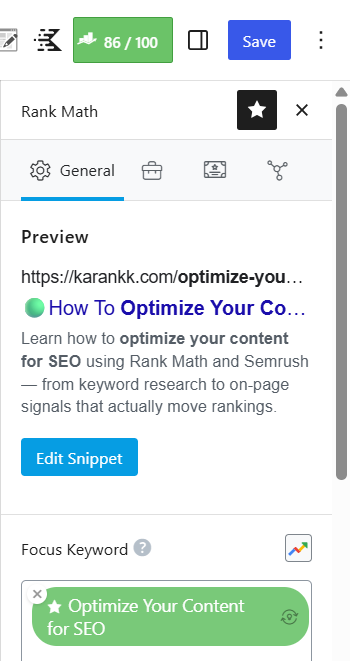
Rank Math’s sidebar panel showing an 86/100 SEO score on a live post — with focus keyword set, snippet preview active, and the meta description visible exactly as it will appear in Google search results.
On-Page SEO Signals — Where Rank Math Does the Heavy Lifting
This is where Rank Math becomes the tool I reach for on every WordPress site, whether it’s a client project or my own.
Rank Math sits inside your WordPress editor and scores your content in real time across multiple SEO factors. But more importantly, it handles the technical on-page signals that many writers overlook.
What Rank Math handles automatically (or near-automatically):
- Title tag and meta description — with dynamic variables so you’re not manually editing every post
- Schema markup — one of Rank Math’s strongest features; 840+ schema types supported in the paid plans with a full custom schema builder
- XML sitemaps — auto-generated, updated on publish
- Canonical URLs — prevents duplicate content issues on sites with filters, pagination, or tag archives
- Redirect manager — handles 301/302 redirects from inside WordPress without needing a separate plugin
- Image SEO — auto-fills alt tags based on your settings, which saves significant time on content-heavy sites
From a performance standpoint, Rank Math is genuinely lightweight. It doesn’t pile on render-blocking scripts or unnecessary jQuery calls the way some SEO plugins do. On client sites where I’ve switched from heavier alternatives, the difference in plugin-related JS load is noticeable — especially on shared hosting environments.
Rank Math Pro Pricing (billed annually, ex VAT):
| Plan | Price/Month | Websites | Keywords Tracked | Renews At |
|---|---|---|---|---|
| PRO | $7.99/mo | Unlimited personal | 500 | $8.99/mo |
| Business | $24.99/mo | 100 client sites | 10,000 | $27.99/mo |
| Agency | $54.99/mo | 500 client sites | 50,000 | $64.99/mo |
The PRO plan at $7.99/month is genuinely one of the best-value deals in the WordPress SEO space. Unlimited personal websites, 500 keyword tracking slots, full schema support, AI Search Traffic Tracker, and the Content AI trial — all for under $8/month. The renewal price of $8.99/month is also transparent and fair, which isn’t always the case in this space.
One thing worth noting: the Business and Agency plans are for client-facing work. If you’re a blogger managing only your own sites — even if you have several — the PRO plan covers you. The Business plan makes sense when you’re managing sites for paying clients and need white-label reporting or client management features.
Rank Math PRO vs Business — Key Differences:
| Feature | PRO | Business |
|---|---|---|
| Websites | Unlimited personal | 100 client sites |
| Keyword tracking | 500 | 10,000 |
| Client management | Not included | Included |
| White-label email reports | Not included | Included |
| Content AI trial | Starter Plan | Creator Plan |
| Google Data fetch | Daily | Daily |
| Data preservation | 180 days | No limit |
If you’re a solopreneur or blogger, PRO is your plan. If you’re doing client SEO work — even just for 2–3 clients — Business at $24.99/month starts to make sense because of the keyword tracking volume alone.
Pros and Cons: Rank Math for On-Page SEO
Pros
- PRO plan covers unlimited personal websites for under $8/month — exceptional value
- The schema generator is significantly more advanced than most alternatives; 840+ types with a custom builder
- Lightweight plugin; doesn’t bloat your site with unnecessary scripts
- Built-in rank tracker, redirect manager, and analytics integration in one plugin — replaces multiple paid tools
- AI Search Traffic Tracker is now included, which is forward-looking for the AI-era SEO
Cons
- Content AI is a separate product with its own pricing beyond the free trial included in plans — it can add up if you use it heavily
- The keyword tracking limit of 500 on the PRO plan is tight if you’re managing multiple sites with large content libraries
- The sheer number of features inside the plugin can feel overwhelming initially — the setup wizard helps, but there’s still a learning curve
- Client management features only start from the Business plan; PRO doesn’t include them even partially
Free Alternatives for On-Page SEO
Before spending anything on SEO plugins, it’s worth knowing what you can do at zero cost.
Rank Math Free
Rank Math’s free version is available directly from the WordPress plugin repository and covers more ground than most free plugins in this category. You get:
- Focus keyword optimization with a real-time SEO score
- Basic schema types (Article, Product, Review, FAQ, HowTo)
- XML sitemap generation
- robots.txt editor
- Redirect manager (basic)
- Google Search Console integration
- 404 monitor
For a new blog with 1–2 sites and modest content volume, the free plan handles the fundamentals well. The limitation kicks in when you need advanced schema, keyword rank tracking, Content AI, or multi-site management — those are locked behind the PRO plan ($7.99/month).
Yoast SEO Free
Yoast is the plugin that most WordPress users encounter first, and the free version is genuinely capable for basic on-page optimization. It handles title tags, meta descriptions, XML sitemaps, breadcrumbs, and a readability analysis. The SEO analysis flags basic issues — missing focus keyword in the title, thin meta description, no internal links — which is useful for beginners building good habits.
Where it lags behind Rank Math free: schema support is more limited, there’s no built-in redirect manager in the free version, and the rank tracker requires a separate paid Yoast subscription. The interface is also more beginner-focused, which can feel restrictive once you know what you’re doing.
Honest take: Both Rank Math free and Yoast free can handle on-page basics for a starting site. Once you’re managing multiple sites, need keyword tracking, or want advanced schema, Rank Math PRO at $7.99/month becomes an easy upgrade to justify. The gap between free and paid is larger with Rank Math than with Yoast, which is part of why it’s worth the switch.
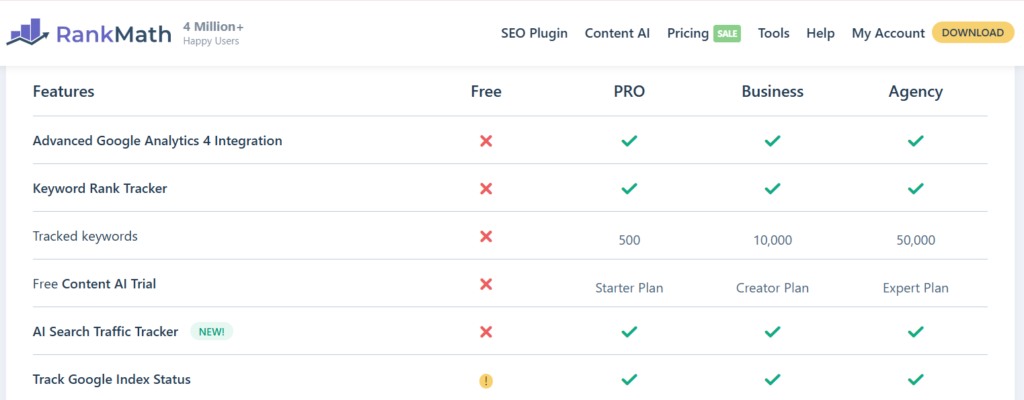
Rank Math’s official Free vs PRO vs Business vs Agency comparison — showing exactly where the free plan stops and what you gain at each paid tier. Key gaps in the free plan: no Keyword Rank Tracker, no tracked keywords, no Content AI trial, and no AI Search Traffic Tracker.
Title Tags, Meta Descriptions, and URL Slugs
These three elements are where many bloggers still make basic mistakes.
Title tag: Keep it under 60 characters. Include your primary keyword naturally — toward the front if possible. Don’t keyword-stuff. Don’t write clickbait that doesn’t match the content.
Meta description: Under 160 characters. This doesn’t directly impact rankings, but it affects click-through rate from the SERP. Write it like an ad — what will the reader get if they click?
URL slug: Short, descriptive, hyphen-separated. Drop filler words like “a”, “the”, and “for”. Once a post is indexed, avoid changing the slug without setting up a proper 301 redirect.
Rank Math handles all three from a single panel in the editor. The snippet preview shows you exactly how your title and description will appear in search results before you publish.
Internal Linking — The Underused SEO Lever
Internal links distribute PageRank across your site, help Google discover new content, and keep readers on your site longer. Most bloggers treat them as an afterthought.
A few practical rules:
- Link from high-traffic existing posts to new posts you want to push up
- Use descriptive anchor text — not “click here” but the actual topic
- Don’t over-link a single post; 3–5 contextual internal links per article is a reasonable range
- Link to topically related content, not just whatever fits
If you’re building a content cluster around SEO, your linking structure matters as much as the individual posts. For example, a post about SEO tools should link naturally to content about keyword research, high-quality content creation, and monetization — because that’s the actual reader journey.
Rank Math’s orphan page detection (available from the PRO plan) flags posts with no incoming internal links, which is a helpful audit tool when your site gets large.
Technical On-Page Factors You Can’t Ignore
Content optimization isn’t just about words and keywords. A few technical factors directly impact whether your content ranks well, even when the writing is solid.
Page speed and Core Web Vitals
Google uses Core Web Vitals — LCP, CLS, and INP — as ranking signals. A well-optimized post on a slow-loading page will underperform versus the same content on a fast site. From what I’ve observed while auditing client sites, image compression and lazy loading alone can move LCP significantly on content-heavy blogs.
Rank Math’s rank tracker includes PageSpeed tracking per post, which helps you catch slowdowns without manually running each URL through a separate tool.
Mobile optimization
Over 60% of search traffic comes from mobile. Your content must be readable on small screens — short paragraphs, properly scaled images, no horizontal scrolling. Semrush’s Position Tracking tool includes mobile data tracking from the Pro plan, so you can see if your rankings differ between mobile and desktop (they often do).
Schema markup
Schema helps Google understand your content type — article, FAQ, how-to, review, product. It doesn’t guarantee rich results, but it makes your content eligible for them. Rank Math automates basic schema on publish and gives you a full schema builder for custom implementations.
For a content-heavy blog, FAQ schema on posts that answer specific questions can meaningfully improve SERP visibility — especially for “People Also Ask” appearances.
Semrush vs Rank Math — How They Fit Together
These aren’t competing tools. They solve different problems.
| Factor | Semrush (SEO Classic Pro) | Rank Math PRO |
|---|---|---|
| Primary role | Keyword research, competitor analysis, rank tracking | WordPress on-page SEO, schema, technical SEO |
| Price (annual) | $117.33/mo | $7.99/mo |
| Best for | Pre-writing research, site audits, backlink analysis | In-editor optimization, schema, redirects |
| Websites | 5 | Unlimited personal |
| Keyword tracking | 500/daily | 500 |
| Works outside WordPress | Yes | No (WordPress only) |
| AI search tracking | Via Semrush One plans | AI Search Traffic Tracker included |
| Winner for | Research & analysis | WordPress optimization |
The realistic workflow: Use Semrush to find keywords, validate search intent, and monitor rankings from a bird’s-eye view. Use Rank Math to implement everything inside WordPress — title tags, schema, redirects, internal link audits.
For most bloggers, Rank Math PRO at $7.99/month is the non-negotiable foundation. Semrush is the research layer on top — start with the Pro plan if budget is a concern, or try their free trial before committing.
If you’re exploring the AI search tracking angle, Semrush One Starter at $165.17/month (annual) gives you traditional SEO plus AI visibility tracking in one platform — though that’s a significant jump in budget and better suited to established sites or small agencies.
What to Do After Publishing
Most SEOs treat publishing as the finish line. It’s actually closer to the starting point.
Immediately after publishing:
- Submit the URL to Google Search Console for indexing
- Add 2–3 internal links from existing related posts pointing to the new post
- Check the Rank Math SEO score — aim for 80+ before considering the post “done.”
- Verify the schema is implemented correctly using Google’s Rich Results Test
30–60 days in:
- Check rankings using Semrush Position Tracking or Rank Math’s built-in tracker
- Look at GSC for impressions vs clicks — if impressions are deep but CTR is low, your title tag needs work
- Check which keywords the post is ranking for beyond your target — these often reveal related sub-topics worth expanding
- Review bounce rate and time-on-page in GA4 — poor engagement signals can suppress rankings over time
Ongoing:
- Update posts with outdated information, especially pricing data or tool comparisons
- Add new internal links from newer posts back to older ones
- Revisit and expand thin sections if competitors start outranking you
Content optimization is a cycle, not a checklist. The posts I’ve seen perform best long-term are the ones that get revisited and strengthened every 3–6 months based on actual search data.
Who Should Skip the Paid Tools (At Least Initially)
If you’re just starting your first blog, you don’t need Semrush on day one. The free version of Rank Math covers the essential on-page signals well enough for a new site. Google Search Console (free) gives you real ranking data once you have some. Semrush’s free tier allows limited keyword lookups that can get you started.
Where paid tools start paying for themselves:
- You’re publishing more than 2–3 posts per week and need efficient keyword research
- You’re managing multiple sites and need centralized tracking
- You’re doing client SEO work where reporting and competitor analysis are non-negotiable
- You’re seeing a traffic plateau and need real data to diagnose why
Starting a site from scratch? The logical sequence is: choose a niche → pick a blogging platform → set up your domain → get hosting → install WordPress → install Rank Math → then worry about Semrush once you’re publishing consistently.
FAQ about Optimize Your Content for SEO
Is Rank Math better than Yoast for on-page SEO?
For most WordPress users in 2026, Rank Math offers more features at a lower price point — especially once you factor in the built-in schema builder, redirect manager, and rank tracker. Yoast’s equivalent features are split across multiple premium add-ons that each carry separate costs. That said, Yoast has a longer track record and may feel more familiar if you’ve used it for years. Rank Math’s free version alone covers more ground than Yoast’s free version.
Do I need both Semrush and Rank Math?
They serve different purposes — Semrush is a research and monitoring platform; Rank Math is a WordPress optimization plugin. Using both gives you a complete workflow: research outside WordPress with Semrush, then implement inside WordPress with Rank Math. If the budget is limited, start with Rank Math PRO ($7.99/mo) and use Semrush’s free tier until your site is generating revenue to justify the upgrade.
How long does it take to see results after optimizing content?
Typically 4–12 weeks for meaningful movement on established content, assuming your site isn’t brand new. New sites can take 3–6 months before Google grants enough trust to rank content consistently. The timeline shortens when you have a strong internal linking structure and consistent publishing frequency.
What’s the difference between Semrush’s Classic Pro plan and Semrush One Starter?
The Classic Pro plan ($117.33/mo annually) is traditional SEO — keyword research, rank tracking, site audit, and backlink analysis. Semrush One Starter ($165.17/mo annually) adds AI search visibility tracking, covering how your brand appears in AI-generated search results across platforms. For most bloggers, Classic Pro is sufficient. Semrush One makes more sense for brands actively optimizing for AI search presence.
Does Rank Math slow down my WordPress site?
Not in any meaningful way. Rank Math is one of the lighter SEO plugins available — it doesn’t load unnecessary scripts on the front end. The back-end dashboard does add some overhead in the admin area, but that doesn’t affect your site’s public-facing speed or Core Web Vitals. If anything, replacing multiple single-feature plugins with Rank Math often reduces overall plugin bloat.
Should I optimize for AI search differently from traditional SEO?
The foundations overlap significantly — structured content, clear answers to specific questions, proper schema, and authoritative, well-cited information all help in both Google Search and AI-generated responses. The main addition for AI search is monitoring how your brand or content appears in AI summaries (which Semrush One’s AI visibility tools track), and ensuring your content directly answers prompt-style questions rather than just targeting keywords.
Final Verdict
Content SEO isn’t complicated — but it requires a system. Keyword research before writing, intent matching, solid structure, clean on-page signals, and consistent post-publish auditing. Skip any of those steps, and you’re leaving rankings on the table.
For the actual implementation inside WordPress, Rank Math PRO at $7.99/month is hard to argue against — it handles schema, redirects, tracking, and on-page optimization in one plugin without bloating your site. For research and competitive intelligence, Semrush starts at $117.33/month (annual) and gives you the data layer that informs smarter content decisions. Use both together, and you’ve covered the full optimization workflow from idea to ranking.